Copilot Notebooks Could Rewrite Executive Memory
How Copilot Notebooks and Multimodal Capture Could Reshape Executive Knowledge Work


Copilot Notebooks may be more than a notes feature.
Microsoft appears to be turning Copilot into more than a chat surface. My read is that the bigger shift could be a governed capture-and-synthesis layer that helps assemble meetings, files, notes, and workflow context into a new operating model for executive knowledge work.
The conventional read is that Copilot Notebooks are a productivity upgrade for people who already live in notes, meetings, and summaries. I think that view is too small.
What Microsoft documents today:
- Microsoft 365 Copilot is grounded in Microsoft 365 apps, services, and Microsoft Graph data.
- Copilot Notebooks are now described within the Microsoft 365 Copilot service.
- Microsoft documents extensibility paths for agents across surfaces like Copilot Chat, Outlook, Teams, and Word.
- Microsoft also documents Copilot APIs for building custom apps and agents aligned with Microsoft 365 compliance controls.
What this likely signals:
- Notebooks are becoming a meaningful product surface inside the Copilot experience.
- Microsoft is moving beyond single-turn chat toward more durable, task-centered workspaces.
- Executive workflows may benefit if organizations can combine grounded retrieval, synthesis, and governance in one environment.
That matters because leaders are not buying “AI summaries.” They are buying an architecture: identity-aware access, grounded retrieval, policy boundaries, and usable outputs.
Why this matters now
Executive work has not suddenly changed. The tax is still the same: too much time spent reconstructing context across email, meetings, files, and chat before a decision can even begin.
Last quarter, I sat with a 14-person leadership team at a regional services firm while the COO spent 27 minutes reconstructing the status of three customer escalations from Outlook threads, a Teams recording, and a SharePoint folder named “final_v2.”
That is the problem space.
My opinion is simple: the next interface for executive knowledge work may not be another app tab. It could be a governed context layer that helps assemble relevant signals from meetings, files, messages, and personal working artifacts into briefing-grade synthesis.
Microsoft Fabric makes that direction easier to see. Copilot in Fabric already supports notebook-style, multi-step assistance within that product context. Different product, different scope, but it suggests a broader design instinct: AI is moving from one-off help toward durable workspaces that organize and synthesize across artifacts.

The practical takeaway
If you lead digital workplace, security, or enterprise architecture, the near-term question is not “Are notebooks useful?”
It is:
- What context should be in scope?
- What evidence should be cited?
- What permissions should carry through?
- What actions should require approval?
That is where the real value and the real risk sit.
What Microsoft documents today vs. what I think comes next
What Microsoft documents today:
- Copilot is grounded in Microsoft 365 content and context.
- Agents and extensibility are part of the Microsoft 365 Copilot model.
- Custom apps and agents can be built with compliance alignment in mind.
- Notebooks are part of the documented Copilot service description.
What I think comes next:
- More teams will try to use notebook-style experiences as working context for recurring decisions.
- Leaders will expect synthesis with citations, not just polished prose.
- Organizations will want executive briefing workflows that combine retrieval, summarization, and follow-up actions.
- The differentiator will not be capture alone. It will be governed synthesis over approved context.
That is also where Microsoft has an advantage over point tools.
A meeting summarizer can summarize a meeting. A note app can store notes. A transcription tool can capture audio.
But executive work rarely lives inside one artifact type, and enterprise work rarely tolerates weak identity, permissions, or lifecycle controls.
The winning platform will not be the one that captures the most. It will be the one that turns approved context into trustworthy organizational memory.
A simple model for how this could work
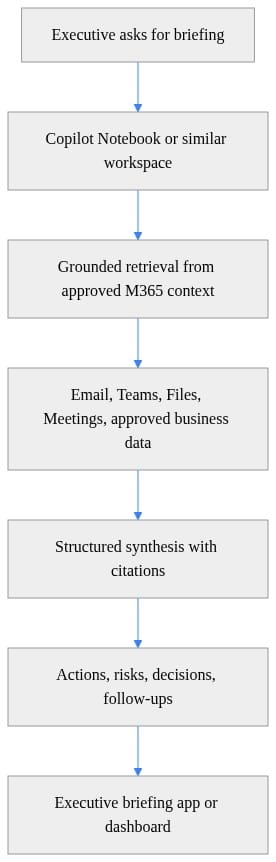
The important part is not the notebook box.
It is everything around it:
- approved context
- bounded retrieval
- structured synthesis
- traceable evidence
- delivery into a workflow leaders can actually use

Conceptual example: safe patterns for executive synthesis
The example below is illustrative pseudocode, not a current Microsoft endpoint. The point is to show durable design patterns safely: scoped context, citations, sensitivity metadata, least privilege, and approval boundaries.
# Illustrative pseudocode, not a current Microsoft endpoint.
request = {
    "task": "Create weekly executive briefing",
    "prompt": "Summarize strategic risks, customer escalations, open decisions, and required follow-ups.",
    "contextScope": {
        "users": ["ceo@contoso.com"],
        "sources": ["mail", "meetings", "sharePoint", "teamsChats"],
        "timeRange": {"start": "2026-06-12T00:00:00Z", "end": "2026-06-19T00:00:00Z"},
        "leastPrivilege": True
    },
    "output": {
        "format": "bulletSummary",
        "includeCitations": True,
        "includeSensitivityLabels": True
    },
    "actionPolicy": {
        "advisoryOnly": True,
        "approvalRequiredForExternalSharing": True
    }
}

response = {
    "summary": ["Revenue risk in EMEA due to delayed renewals."],
    "decisions": ["Approve discount exception for top 3 accounts."],
    "actions": [{"owner": "CRO", "task": "Review renewal blockers"}],
    "citations": [{"title": "Q2 Renewal Review", "location": "SharePoint"}],
    "sensitivity": "Confidential"
}
For executive use, those concepts matter more than any one API shape:
- scoped context
- explicit sources
- bounded time window
- citations
- sensitivity metadata
- approval boundaries before action
Synthesis without provenance is decoration.
Synthesis with evidence starts to become decision support.
The governance questions leaders should answer now
This opportunity is real. So is the risk.
If organizations expand AI-assisted context assembly across executive meetings, notes, files, and chat, oversharing risk can increase quickly. A notebook may feel personal. The architecture is not.
The key questions are straightforward:
- Who can discover the underlying context?
- Who can summarize it?
- What permissions carry forward into generated outputs?
- How long is source material retained?
- What happens when the source is more sensitive than the summary?
- Where do actions stop and approvals begin?
If you are evaluating this seriously, your pilot should start with a governance checklist before it starts with executive enthusiasm.
At minimum:
- clean up SharePoint and Teams permissions
- review sensitivity labels
- validate retention and meeting policies
- define which outputs are advisory vs. authoritative
- require explicit approval for sensitive downstream actions

Agents increase the upside and the attack surface
Agents make this more interesting and more consequential.
What Microsoft documents today is extensibility: agents can participate across Microsoft 365 Copilot surfaces. What that likely signals is a path from passive summarization toward workflow participation.
That could be powerful for chiefs of staff and leadership teams:
- draft follow-ups from a briefing
- prepare risk review inputs
- assemble decision logs
- route tasks into existing systems
But this is exactly where discipline matters.
Treat agent-connected executive workflows like privileged automation:
- apply least privilege
- keep auditability front and center
- separate advisory synthesis from transactional execution
- require approval for sensitive actions
- test boundary failures before broad rollout
The question is not whether agents are useful.
It is whether your permissions model, policy model, and trust model are ready for them.
Adoption will fail if the system is untrusted
Executives will only rely on notebook-style synthesis if they trust three things:
- provenance
- freshness
- access boundaries
This is why information architecture still matters. If metadata is poor, permissions are messy, or source quality is inconsistent, the failure will show up as credibility problems.
That is also why usage metrics are not enough. Dashboard adoption can look healthy while real decision reliance stays low.
For leadership teams, every output should be classified mentally as one of three things:
- authoritative
- advisory
- disposable
If that line is blurry, trust erodes fast.
A practical two-quarter playbook
If I were advising a leadership team right now, I would not start with a broad “Copilot for everyone” motion.
I would start with one narrow executive workflow where context reconstruction is expensive and repetitive.
Quarter 1: establish the policy envelope
Pick 2-3 scenarios:
- weekly executive briefing
- staff meeting follow-up synthesis
- cross-functional risk review
Map the information sources:
- Teams meetings
- Outlook email and calendar context
- SharePoint and OneDrive files
- collaborative workspaces
- selected business data where governance is already clear
Review controls before expanding scope:
- sensitivity labeling
- retention
- DLP
- identity boundaries
- site and file permissions hygiene
Quarter 2: pilot synthesis, then test trust
Use a small leadership cohort.
Measure outcomes that matter:
- time saved preparing briefings
- quality of follow-up actions
- number of context resets avoided
- confidence in citations and evidence
- trust signals from executives and chiefs of staff
Set explicit red lines until controls are proven:
- M&A
- legal strategy
- board materials
- sensitive personnel matters

The bottom line
I do not think Copilot Notebooks matter only because they modernize notes.
My read is that they may point toward something bigger: a more durable enterprise context layer inside Microsoft 365 Copilot, where grounded retrieval, synthesis, extensibility, and governance start to converge.
Microsoft is unusually well positioned here because it already spans the systems where executive context actually lives: email, meetings, files, chat, identity, compliance, and workflow tooling.
But the winners will not be the companies that normalize more capture first.
They will be the ones that solve:
- permissions hygiene
- retention and labeling
- provenance and trust
- approval boundaries
- agent governance
That is the real executive decision.
Rate your organization from 1 to 5 on this question:
If Copilot started assembling more executive context tomorrow, how ready is your policy envelope to follow that context everywhere it goes?
And more specifically: what breaks first in your org: permissions hygiene, retention policy, or executive trust?
#Microsoft365Copilot #EnterpriseAI #AIGovernance #InformationProtection #DigitalWorkplace #Microsoft365
Sources
- Microsoft 365 Copilot service description: https://learn.microsoft.com/en-us/office365/servicedescriptions/office-365-platform-service-description/microsoft-365-copilot
- Agents for Microsoft 365 Copilot overview: https://learn.microsoft.com/en-us/microsoft-365/copilot/extensibility/agents-overview
- Microsoft 365 Copilot APIs overview: https://learn.microsoft.com/en-us/microsoft-365/copilot/extensibility/copilot-apis-overview
- Copilot in Fabric overview: https://learn.microsoft.com/en-us/fabric/fundamentals/copilot-fabric-overview
- Copilot Dashboard for Microsoft 365 customers: https://learn.microsoft.com/en-us/viva/insights/org-team-insights/copilot-dashboard
- Prepare your data for AI to improve Copilot results: https://learn.microsoft.com/en-us/power-bi/create-reports/copilot-prepare-data-ai
Try it yourself
Run this tutorial as a Jupyter notebook: Download runbook.ipynb (32 cells, 27 KB).



