Azure Data API Builder Exposes More Than You Think
From Data API Builder to Governed APIs: Exposing SQL Safely in Azure

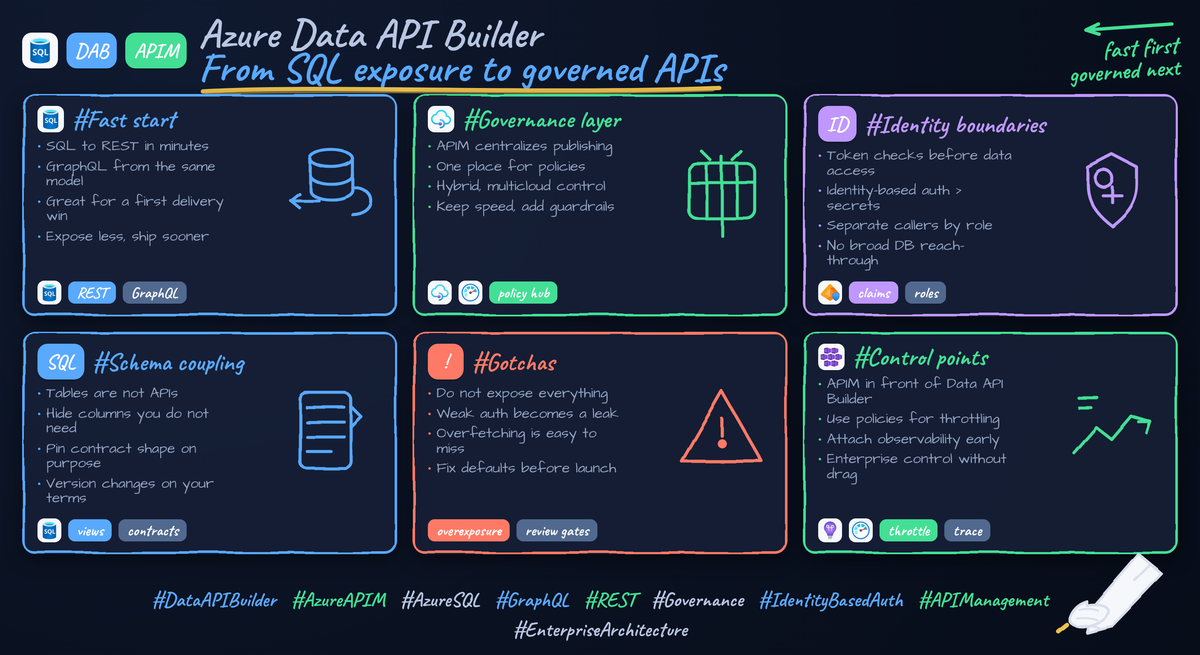
A renamed SQL column can break downstream apps faster than most teams expect.
Data API Builder makes exposure easy. The hard part is creating a contract that survives schema change, enforces least privilege, and stays governable once real consumers arrive.
That is where many Azure teams are right now.
They need faster app delivery, partner integrations, and AI-ready access to operational data without waiting for a full custom API backlog. The temptation is obvious: let apps connect straight to the database, or expose generated endpoints and move on. But direct database access fails basic governance goals around least privilege, auditability, and stable consumer contracts. Generated endpoints are incredibly useful, but they can reflect schema decisions more closely than you want external consumers to depend on.
Azure gives us a better pattern:
- Azure SQL as the system of record
- Data API Builder as the fast exposure layer
- Azure API Management as the control plane for publishing, security, throttling, and governance
- Microsoft Entra ID for identity
- Least-privilege data access, using managed identity patterns where supported and verified for your hosting model
This tutorial walks through that pattern step by step.
One sentence from the field before we start: in Q1, a 14-person internal platform team I worked with exposed six Azure SQL tables through a generated API in a lower environment and discovered within two sprints that a renamed column in CustomerStatus had already broken two downstream Power Apps and one partner integration.
That is the problem we are solving.
Step 1: Understand the target architecture before you generate anything
The fastest way to create a future governance problem is to expose a database first and design the API boundary later.
What each layer should own
Here is the target operating model:
- Azure SQL handles relational integrity, indexing, transactions, and the authoritative operational data model
- Data API Builder generates REST and GraphQL endpoints over selected database objects, which is why it is effective for rapid internal delivery
- Azure API Management becomes the consumer-facing gateway for policy, products, JWT validation, throttling, transformations, and versioning
- Microsoft Entra ID authenticates clients
- SQL permissions remain the final backstop
The important boundary is this: enterprise clients should consume the governed API surface in Azure API Management, not connect directly to SQL and not rely on raw Data API Builder endpoints as the long-term contract.
To make that concrete, start with the reference flow below.
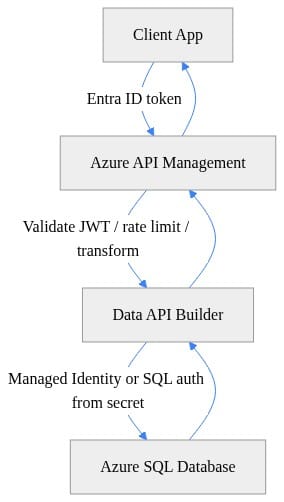
What to observe: the client authenticates at the edge, Azure API Management applies policy, Data API Builder executes only the allowed data operations, and Azure SQL remains behind the API boundary.
Why this matters now
Three things have changed:
- Schema changes happen faster because product teams ship continuously.
- API estates grow quickly, and unmanaged endpoint sprawl becomes an operational tax.
- AI and conversational access patterns increase pressure to expose operational data safely.
The same principle shows up across Microsoft’s broader data platform direction: governed interfaces beat raw reach-through. That matters here too.
Step 2: Stand up Azure SQL with a least-privilege contract surface
If you expose base tables directly, you are effectively publishing your internal schema.
That is often too much.
Start with curated SQL objects
A safer pattern is to expose:
- Views for read models
- Stored procedures for controlled writes
- Dedicated database principals with only the exact permissions required
This gives you a contract boundary before Data API Builder ever enters the picture.
The example below creates an Orders table, a vOrders view for reads, and a CreateOrder stored procedure for writes. This is illustrative for the pattern, not a production-ready schema.
-- SQL objects for a least-privilege API surface with a read model and controlled write path
CREATE TABLE dbo.Orders (
    OrderId INT IDENTITY PRIMARY KEY,
    CustomerId INT NOT NULL,
    Amount DECIMAL(10,2) NOT NULL,
    CreatedAt DATETIME2 NOT NULL DEFAULT SYSUTCDATETIME()
);
GO
CREATE VIEW dbo.vOrders AS
SELECT OrderId, CustomerId, Amount, CreatedAt FROM dbo.Orders;
GO
CREATE PROCEDURE dbo.CreateOrder
    @CustomerId INT,
    @Amount DECIMAL(10,2)
AS
BEGIN
    SET NOCOUNT ON;
    INSERT INTO dbo.Orders(CustomerId, Amount) VALUES (@CustomerId, @Amount);
    SELECT SCOPE_IDENTITY() AS OrderId;
END;
What to observe: the view limits the read surface, and the stored procedure creates a controlled write path instead of granting broad insert rights on the base table.
Why views and procedures matter
Views help you:
- Hide sensitive or internal columns
- Alias names to stabilize the consumer contract
- Prevent clients from learning unnecessary join details
Stored procedures help you:
- Encapsulate write logic
- Validate and constrain writes
- Avoid publishing unrestricted table mutations
For many teams, this is the first governance win: your API surface starts from intentional database objects instead of convenience.
Least privilege is not optional
Give the API layer access only to the objects it needs. If Data API Builder only needs SELECT on dbo.vOrders and EXECUTE on dbo.CreateOrder, do not grant broader rights.
Azure supports identity-based access patterns with Azure resources and Azure SQL, which is why secretless or reduced-secret designs are preferable where your hosting and driver combination supports them. If you begin with a connection string in a lower environment, your production target should still be identity-first.
Step 3: Configure Data API Builder for explicit entity exposure
Data API Builder is powerful because it can generate REST and GraphQL endpoints quickly. That speed is exactly why you need discipline at configuration time.
Expose only what you mean to expose
Do not publish broad table access because it is available. Publish selected entities and selected operations.
The configuration below exposes a read-only Orders entity backed by the curated view dbo.vOrders, plus a stored procedure action for order creation. Using the view instead of the base table preserves a more stable read contract if the underlying table evolves. Treat this as an illustrative pattern.
// Data API Builder config exposing only governed entities and stored procedure actions
{
  "$schema": "https://github.com/Azure/data-api-builder/releases/latest/download/dab.draft.schema.json",
  "data-source": {
    "database-type": "mssql",
    "connection-string": "@env('SQL_CONNECTION_STRING')"
  },
  "runtime": {
    "rest": { "enabled": true, "path": "/api" },
    "host": { "mode": "production", "cors": { "origins": ["https://portal.contoso.com"] } }
  },
  "entities": {
    "Orders": { "source": "dbo.vOrders", "permissions": [{ "role": "authenticated", "actions": ["read"] }] },
    "CreateOrder": { "source": { "type": "stored-procedure", "object": "dbo.CreateOrder" }, "permissions": [{ "role": "authenticated", "actions": ["execute"] }] }
  }
}
What to observe: only two entities are exposed, permissions are explicit, and the read model comes from a curated view rather than the base table.
Practical guidance for entity design
When you define Data API Builder entities:
- Prefer domain-oriented names over raw schema names
- Expose read-only entities by default
- Add write operations only when the workflow is simple and bounded
- Use custom REST paths when they improve clarity for consumers
- Be careful with GraphQL if consumers should not freely traverse relationships
Data API Builder supports both REST and GraphQL, which is excellent for delivery speed but increases the need to deliberately choose what entities and operations are exposed.
Validate before adding the gateway
At this point, test in a lower environment and answer three questions:
- Are the returned fields exactly the fields you want consumers to see?
- Are the allowed operations narrower than the underlying schema capabilities?
- If a column is renamed internally, do you have a stable abstraction layer to preserve the external contract?
If the answer to the third question is no, stop here and tighten the SQL object layer first.
Step 4: Reduce schema coupling before consumers arrive
Generated APIs can be excellent implementation accelerators. They are not magic insulation from schema change.
The core risk
If your endpoint shape mirrors table names, column names, and join structures too closely, then internal database refactors become external breaking changes.
That is a governance issue because:
- You create accidental contracts
- You increase downstream dependency on internal implementation
- You make change management harder across teams
Mitigations that work
Before onboarding consumers, apply these patterns:
- Expose views instead of base tables
- Use stable aliases in SQL objects
- Avoid publishing internal join tables
- Limit writable operations to explicit stored procedures
- Review Data API Builder config changes alongside database changes in pull requests
If your use case needs orchestration across multiple entities, non-trivial transactions, bespoke authorization logic, or business-rule-heavy writes, a hand-built API may be the better choice.
When not to use Data API Builder
If the API contract must diverge heavily from relational entities, or if authorization depends on complex domain logic rather than object-level access, Data API Builder is usually not the right primary interface. In those cases, use a custom API and treat SQL as an implementation detail.
Step 5: Put Azure API Management in front of Data API Builder
This is the step that turns fast exposure into a governed API surface.
Azure API Management is designed to centralize API publishing, security, and governance concerns across environments. That is why it belongs in front of Data API Builder for enterprise-facing scenarios.
Provision the gateway
The Bicep example below provisions an Azure API Management instance and outputs the gateway URL plus the backend URL you intend to use for Data API Builder.
// Bicep to provision API Management and pass Data API Builder backend settings securely
param location string = resourceGroup().location
param apimName string
param publisherEmail string
param publisherName string
param dabBackendUrl string

resource apim 'Microsoft.ApiManagement/service@2023-05-01-preview' = {
  name: apimName
  location: location
  sku: { name: 'Consumption', capacity: 0 }
  properties: {
    publisherEmail: publisherEmail
    publisherName: publisherName
  }
}

output gatewayUrl string = 'https://${apim.name}.azure-api.net'
output dabBackend string = dabBackendUrl
What to observe: the infrastructure definition establishes Azure API Management as a first-class platform component, not an afterthought added manually later.
Configure backend settings securely
Next, configure the Data API Builder app settings and create an Azure API Management named value for the backend URL. The example below shows the pattern conceptually. Exact CLI parameters and managed identity connection details can vary by current tooling, hosting model, and SQL driver support, so verify against current documentation before copy-paste use.
# PowerShell to configure secure app settings for a Data API Builder app and APIM named value
param(
  [string]$ResourceGroup = "rg-governed-api",
  [string]$WebAppName = "dab-contoso",
  [string]$ApimName = "apim-contoso",
  [string]$SqlConnectionString = "Server=tcp:sqlsrv.database.windows.net;Database=appdb;Authentication=Active Directory Managed Identity;"
)

az webapp config appsettings set `
  --resource-group $ResourceGroup `
  --name $WebAppName `
  --settings SQL_CONNECTION_STRING="$SqlConnectionString" DAB_ENVIRONMENT="Production"

az apim nv create `
  --resource-group $ResourceGroup `
  --service-name $ApimName `
  --named-value-id backend-url `
  --display-name "backend-url" `
  --value "https://$WebAppName.azurewebsites.net/api" `
  --secret false
What to observe: the app settings externalize configuration, and Azure API Management references the backend as configuration rather than hardcoding environment-specific values into every operation.
Why Azure API Management is the governance layer
Once Azure API Management fronts the service, you gain:
- Consumer-facing routes decoupled from backend implementation
- JWT validation at the edge
- Rate limiting and quotas
- IP filtering
- Header and URL transformation
- Product-based access control
- Versioning and revisions
- Centralized observability and publishing workflows
Step 6: Establish authentication and authorization boundaries
A valid token is not the same thing as valid access to every entity or operation.
That distinction matters.
Layer the controls
A strong pattern uses all three layers:
- Azure API Management validates client identity and applies edge policy
- Data API Builder restricts which entities and actions exist at all
- Azure SQL enforces least-privilege access to the underlying objects
The Azure API Management policy below shows the pattern conceptually: validate a Microsoft Entra ID JWT, rate-limit requests, forward traffic to Data API Builder, and optionally rewrite a friendly route to the backend path. Exact policy details depend on how your API and operations are defined.
<!-- APIM inbound policy validating Entra ID JWT and forwarding to Data API Builder -->
<policies>
  <inbound>
    <base />
    <validate-jwt header-name="Authorization" require-scheme="Bearer">
      <openid-config url="https://login.microsoftonline.com/{tenant-id}/v2.0/.well-known/openid-configuration" />
      <audiences>
        <audience>api://governed-orders-api</audience>
      </audiences>
    </validate-jwt>
    <rate-limit-by-key calls="60" renewal-period="60" counter-key="@(context.Principal?.Id ?? context.Request.IpAddress)" />
    <set-backend-service base-url="https://dab-contoso.azurewebsites.net/api" />
    <rewrite-uri template="/Orders" />
  </inbound>
  <backend><base /></backend>
  <outbound><base /></outbound>
</policies>
What to observe: authentication happens before the request reaches Data API Builder, and the public route can be cleaner than the backend route.
Authentication vs authorization
Be explicit about the difference:
- Authentication answers: who is calling?
- Authorization answers: what are they allowed to do?
Do not assume any of the following are sufficient on their own:
- Internal network location
- A shared service principal
- Broad database read access
- “It is only for internal users”
Friendly public contracts matter
Azure API Management also lets you create a public contract that is more stable and consumer-friendly than the backend implementation. The following operation definition maps a simple /orders route for consumers.
// APIM API operation example mapping a friendly public route to the DAB backend
{
  "name": "get-orders",
  "properties": {
    "displayName": "Get Orders",
    "method": "GET",
    "urlTemplate": "/orders",
    "description": "Public governed endpoint for reading orders",
    "request": {
      "queryParameters": []
    },
    "responses": [
      { "statusCode": 200, "description": "Successful response" },
      { "statusCode": 401, "description": "Unauthorized" }
    ]
  }
}
What to observe: the external route is domain-oriented and stable, even if the backend pathing or entity configuration changes later.
Step 7: Test the governed path the way consumers actually will
Do not validate this architecture by connecting directly to SQL from a test script. Validate it through the governed API surface.
The example below shows a Python client acquiring a Microsoft Entra ID token and calling Azure API Management, not the database.
# Python consumer calling APIM with an Entra ID bearer token instead of connecting to SQL directly
import requests
from azure.identity import DefaultAzureCredential

scope = "api://governed-orders-api/.default"
token = DefaultAzureCredential().get_token(scope).token

url = "https://apim-contoso.azure-api.net/orders"
headers = {"Authorization": f"Bearer {token}", "Accept": "application/json"}

response = requests.get(url, headers=headers, timeout=30)
response.raise_for_status()

for order in response.json().get("value", []):
    print(order["OrderId"], order["Amount"])
What to observe: the consumer authenticates to the API audience, calls the API gateway, and receives JSON without any direct awareness of SQL connectivity or database credentials.
What to test before rollout
At minimum, test:
- Successful reads with a valid token
- Rejection on missing or invalid tokens
- Rate limiting behavior
- Access denial for routes or operations not published
- Schema-change resilience for the external contract
- Logging and traceability from gateway to backend
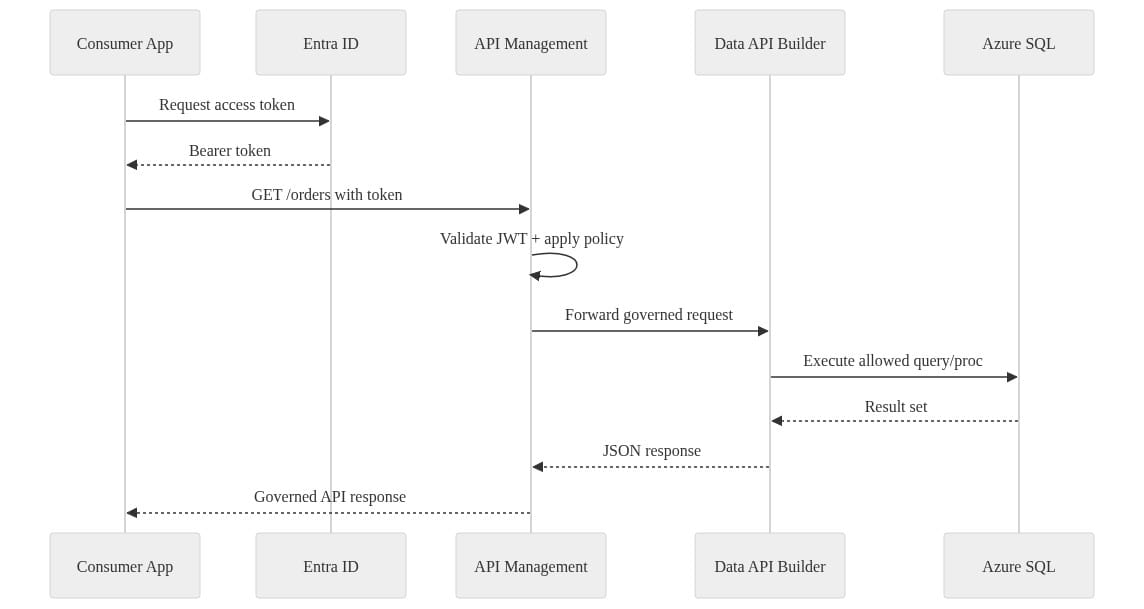
What to observe: the token is issued to the client, validated at the gateway, and only then does the request proceed to the data-facing layer.
Step 8: Add versioning, observability, and change control
This is the difference between a technical demo and a platform capability.
Version for consumers, not for your database
Use Azure API Management revisions and versions to evolve the external contract without forcing consumers to track every schema change. Your database may evolve weekly. Your public API should evolve deliberately.
Instrument what is actually used
Add logging, metrics, and tracing so you can answer:
- Which entities are called most often?
- Which operations are unused and safe to retire?
- Which clients depend on older versions?
- Which requests are failing at policy, backend, or data layer?
Put configuration in source control
Treat these as deployable artifacts:
- SQL object definitions
- Data API Builder configuration
- Azure API Management definitions and policies
- Infrastructure as code for the gateway and hosting
Step 9: Know when this pattern is right, and when it is not
This pattern is strong when you need:
- CRUD-heavy operational data exposure
- Internal platform APIs
- Partner APIs with clear boundaries
- Governed access layers for AI and conversational scenarios
- Faster delivery than a fully custom API backlog can support
It is weaker when you need:
- Complex orchestration across multiple systems
- Rich domain workflows
- Non-trivial transactional coordination
- Heavy custom authorization logic
- Aggregations and response shaping that diverge significantly from relational entities
In those cases, a hand-built API in App Service or Functions may be the better long-term interface, even if it costs more to build and maintain.
Why this also matters for AI
SQL MCP Server is built on Data API Builder for deterministic and secure SQL operations in AI agent scenarios. That is an important signal: the pattern is not “let the agent talk directly to the database.” The pattern is governed access over curated operations.
As conversational access patterns become more common, the need for scoped operations, identity boundaries, and observability only increases.
Closing guidance
If you want the shortest practical version of this tutorial, it is this:
- Start with one bounded domain
- Curate SQL objects first
- Expose only selected entities in Data API Builder
- Put Azure API Management in front
- Use Microsoft Entra ID and least privilege
- Version and observe the external contract
- Treat generated endpoints as an accelerator, not the final governance story
Data API Builder is excellent at turning Azure SQL into usable REST and GraphQL endpoints quickly. Azure API Management is excellent at centralizing publishing, security, and governance. Azure SQL remains the right managed relational system of record for many operational workloads. Combined with identity-based access patterns, they form a practical architecture that preserves developer velocity while reducing overexposure and weak authorization assumptions.
The winning pattern is not fastest exposure alone.
It is fastest exposure with durable control points.
Which part causes more pain in your environment right now: GraphQL exposure, Azure API Management versioning, or the managed identity path into Azure SQL?
#AzureSQL #AzureAPIManagement #MicrosoftEntraID #DataAPIBuider
Sources & References
- Azure API Management - Overview and Key Concepts
- Data API builder documentation - Data API builder
- Microsoft SQL Documentation - SQL Server
- SQL MCP Server Documentation - SQL MCP Server
- Fabric data agent creation - Microsoft Fabric
- OneLake, the unified data lake - Microsoft Fabric
Try it yourself
Run this tutorial as a Jupyter notebook: Download runbook.ipynb (30 cells, 20 KB).



