Copilot Studio Secrets Become Tomorrow's Governance Incident
Preventing Credential Oversharing in Copilot Studio Before It Becomes a Governance Incident

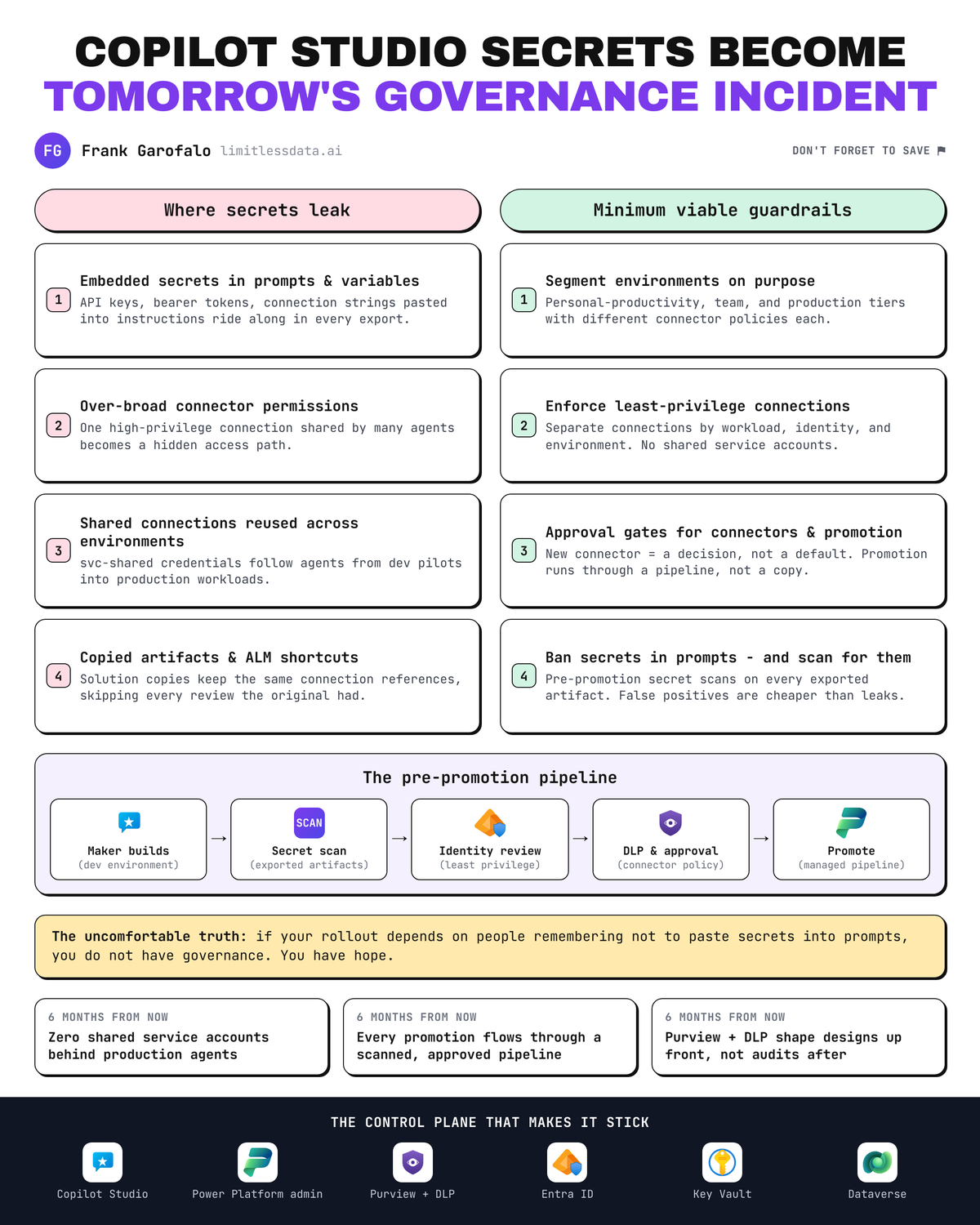
Credential oversharing is not a prompt problem. It is a governance design failure that shows up first in prompts, connectors, and copied assets because the operating model was never ready for production.
That is the uncomfortable truth behind a lot of Copilot Studio risk. The incident report usually points at a bad prompt, a leaked token, or a maker who reused a shared connection. But those are symptoms. The root cause is most often the same: the organization let builders move faster than the controls governing identities, connectors, environments, and promotion paths.
Microsoft’s own guidance does not treat this as optional cleanup. Power Platform administration, environment strategy, DLP, and ALM guidance all point to the same conclusion: secure rollout depends on deliberate environment design, connector governance, and controlled promotion paths before scale. Sources: https://learn.microsoft.com/en-us/power-platform/ https://learn.microsoft.com/en-us/power-platform/admin/wp-environment-strategy https://learn.microsoft.com/en-us/power-platform/admin/wp-data-loss-prevention https://learn.microsoft.com/en-us/power-platform/alm/
The real problem is operating-model drift, not “bad AI behavior”
The conventional wisdom says oversharing happens because someone wrote a careless prompt. That is too shallow to be useful.
Credential oversharing in Copilot Studio is usually created by a series of convenience decisions:
- a shared service account gets reused to speed up a pilot
- a prompt export contains a token-like value that nobody reviews before promotion
- a maker copies an agent or solution from one environment to another with the same connection reference
- a broad connector grant is left in place because “we’ll tighten it later”
None of those are AI-native failures. They are governance failures, misconfigurations, or user actions that good governance should have constrained.
A CDO I advised in Q4 had 14 Copilot-related assets across two business units, and the first red flag was not a jailbreak or a malicious user; it was a production-bound solution export that still referenced a shared SQL connection owned by svc-shared.
That is why I take a hard line here: lightweight maker enablement is good, but only when bounded by controls that scale. If your rollout model depends on people remembering not to paste secrets into prompts or not to reuse privileged connections, you do not have governance. You have hope.
Where credential oversharing actually shows up in Copilot Studio
Let’s get concrete. In Copilot Studio, credential oversharing tends to appear in four places.
1. Embedded secrets in prompts, instructions, or variables
Makers often treat prompts and agent instructions as harmless text. They are not. They can contain:
- API keys
- bearer tokens
- connection strings
- privileged URLs with embedded access patterns
- operational instructions that reveal internal systems or escalation paths
If those assets are exported in solution artifacts and moved without inspection, the secret moves with them.
A simple pre-promotion scan is the minimum viable control. This example is illustrative, but it maps to a real workflow: scan exported Power Platform solution contents before import to a higher-trust environment.
# Scan exported solution files for likely embedded secrets before promotion
import re
from pathlib import Path

patterns = {
    "api_key": re.compile(r"(?i)(api[_-]?key|secret)\s*[:=]\s*['\"][A-Za-z0-9_\-]{12,}['\"]"),
    "bearer": re.compile(r"(?i)bearer\s+[A-Za-z0-9\-._~+/]+=*"),
    "connection_string": re.compile(r"(?i)(password|accountkey|sharedaccesskey)\s*="),
}

root = Path("exported_solution")
for path in root.rglob("*"):
    if path.is_file() and path.suffix.lower() in {".json", ".yaml", ".yml", ".txt"}:
        text = path.read_text(encoding="utf-8", errors="ignore")
        for name, pattern in patterns.items():
            if pattern.search(text):
                print(f"[ALERT] {name} found in {path}")
What to observe: this kind of scan is intentionally blunt. That is fine. At this stage, false positives are cheaper than a leaked credential in a promoted artifact.
2. Over-broad connector permissions
The quietest blast-radius multiplier is a single powerful connection reused by many agents. One connection reference with broad rights can become the hidden access path behind multiple copilots, topics, or flows.
That matters because Copilot Studio sits inside broader Power Platform governance. Connection references, connectors, and service principal patterns are not side topics here; they are the control plane for how agents actually reach data and actions. Sources: https://learn.microsoft.com/en-us/power-apps/maker/data-platform/create-connection-reference https://learn.microsoft.com/en-us/power-platform/admin/powerplatform-api-create-service-principal https://learn.microsoft.com/en-us/connectors/connector-reference/connector-reference-powerplatform-connectors
Use reporting to find shared or high-privilege connection references before they become normal. The sample below is illustrative, but in practice I would pair this with Power Platform admin reporting, solution inspection, and connector inventory from the admin center or admin cmdlet families.
# Report high-privilege or shared connection references for least-privilege redesign
$connectionRefs = @(
    [pscustomobject]@{ Name = "Dataverse-App"; Connector = "Dataverse"; Owner = "svc-prod"; AuthType = "ServicePrincipal"; SharedWith = 12; Privilege = "High" },
    [pscustomobject]@{ Name = "Graph-User"; Connector = "Office365Users"; Owner = "alice@contoso.com"; AuthType = "Delegated"; SharedWith = 0; Privilege = "Medium" },
    [pscustomobject]@{ Name = "SQL-Shared"; Connector = "SQL"; Owner = "svc-shared"; AuthType = "UsernamePassword"; SharedWith = 25; Privilege = "High" }
)

$risky = $connectionRefs | Where-Object {
    $_.SharedWith -gt 5 -or $_.Privilege -eq "High" -or $_.AuthType -eq "UsernamePassword"
}

$risky |
    Sort-Object Privilege, SharedWith -Descending |
    Select-Object Name, Connector, Owner, AuthType, SharedWith, Privilege |
    Format-Table -AutoSize
What to observe: the risky pattern is not just “high privilege.” It is the combination of high privilege, broad sharing, and weak authentication methods like username/password where stronger patterns should exist.
3. Shared connections reused across agents and environments
Least privilege is not a slogan here. It means separate connections by workload, identity, and environment.
A dev sandbox should not rely on the same powerful connection reference as production. A finance agent should not inherit the same connector identity as a general HR helper. Shared connections feel efficient during a pilot and become governance debt the moment adoption expands.
4. Copied artifacts and ALM shortcuts
This is where many teams get burned. They think they are moving “just a prompt” or “just a solution.” In reality, they are transporting defaults, references, and access assumptions.
A proper promotion path needs a gate that checks for secrets and reviews connector posture before anything reaches a higher-trust environment.
This flow is the right mental model.
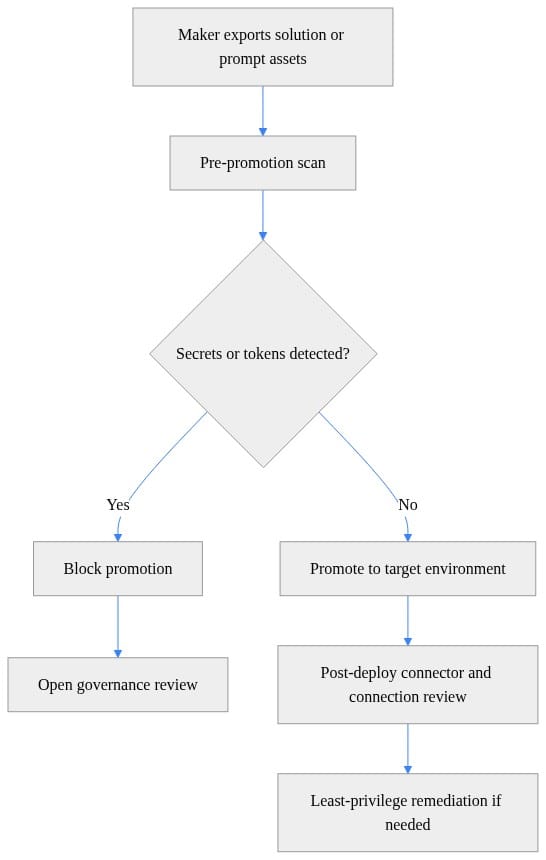
What to do next: if your current promotion process has no equivalent of this gate, your ALM process is moving faster than your security model.
Why waiting for product fixes is the wrong strategy
A common objection sounds reasonable: “The platform is evolving quickly, so we’ll wait for better native controls.”
That is exactly backwards.
Copilot Studio continues to ship new capabilities and changes over time. That is not a reason to defer governance; it is the reason to establish guardrails now. When the platform changes, the organizations with a stable operating model adapt. The ones running on exceptions and shared credentials scramble. Source: https://learn.microsoft.com/en-us/microsoft-copilot-studio/whats-new
New controls will help, but they will not remove the need for:
- human review of access paths
- approval workflows for new connectors
- environment ownership
- periodic recertification of production agents
- revocation processes when identities or business needs change
Credentials are operational objects. They need management, rotation, review, and revocation. They should never be treated as casual text to paste into an agent workflow.
The minimum viable guardrails before broad rollout
If you want a practical starting point, this is the floor.
1. Segment environments on purpose
You need distinct environments for experimentation, business-owned development, test, and production, with clear promotion paths and differentiated DLP policies.
This small inventory example is illustrative, but it mirrors a real governance review you can support with Power Platform admin inventory and environment reporting.
# Inventory environments to support segmentation and governance review
$envs = @(
    [pscustomobject]@{ Name = "Dev"; Region = "US"; Type = "Sandbox"; DlpPolicy = "Makers-Low" },
    [pscustomobject]@{ Name = "Test"; Region = "US"; Type = "Sandbox"; DlpPolicy = "Restricted" },
    [pscustomobject]@{ Name = "Prod"; Region = "US"; Type = "Production"; DlpPolicy = "Strict" }
)

$envs |
    Sort-Object Type, Name |
    Select-Object Name, Type, Region, DlpPolicy |
    Format-Table -AutoSize

$grouped = $envs | Group-Object Type
$grouped | ForEach-Object {
    "{0}: {1} environment(s)" -f $_.Name, $_.Count
}
What to observe: the point is not the script. The point is whether every environment has an explicit purpose, region, type, and DLP posture. If it does not, governance is already fuzzy.
2. Enforce least-privilege connector design
Do not share one powerful connection broadly because it is convenient. Separate by:
- environment
- workload
- data sensitivity
- identity type
- operational owner
If a production-grade connector is shared across many agents, treat that as an exception requiring explicit review.
3. Require approvals for connector introduction and promotion
Approval workflows should be mandatory for:
- new external connectors
- elevated permissions
- production publication
- copied artifacts from unmanaged or low-trust environments
- cross-environment movement of prompts or solutions
This sequence is a practical lightweight review pattern.
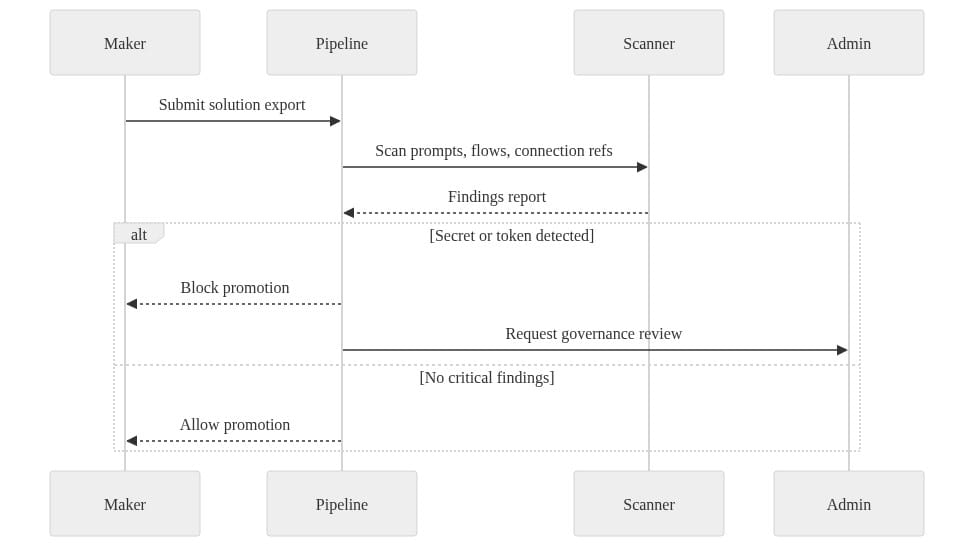
What to do next: make this flow real in your pipeline or change-management process. “We review things informally” is not a control.
4. Ban secrets in prompts and artifacts
Set an explicit policy: secrets never live in prompts, instructions, variables, or solution artifacts when a managed identity, service principal, or approved credential store is available.
If you cannot scan and block, you cannot enforce.
This pipeline-style example is illustrative, but it reflects a real gate you can place around exported solution files or other deployment artifacts.
# Fail a pipeline when prompt artifacts contain token-like values or hardcoded credentials
import re
import sys
from pathlib import Path

token_patterns = [
    re.compile(r"\beyJ[A-Za-z0-9_-]+\.[A-Za-z0-9._-]+\.[A-Za-z0-9._-]+\b"),  # JWT-like
    re.compile(r"(?i)(client_secret|access_token|refresh_token)\s*[:=]\s*['\"][^'\"]+['\"]"),
]

hits = []
for file in Path("artifacts").rglob("*.json"):
    content = file.read_text(encoding="utf-8", errors="ignore")
    if any(p.search(content) for p in token_patterns):
        hits.append(str(file))

print("\n".join(hits) if hits else "No suspicious tokens found.")
sys.exit(1 if hits else 0)
What to observe: this is not production-ready detection logic. It is a governance pattern. Promotion should stop when artifacts look like they contain credentials.
Purview and DLP should shape the design, not audit the aftermath
This is where many rollouts go wrong. Purview gets invited after the architecture is already in motion.
That is too late.
Microsoft Purview provides data security and compliance protections for Microsoft 365 Copilot and other generative AI apps to mitigate AI-related data risks with governance controls. Power Platform DLP guidance does the same at the connector and environment layer. Together, they should influence rollout decisions from day one, not just post-incident review. Sources: https://learn.microsoft.com/en-us/purview/ai-microsoft-purview https://learn.microsoft.com/en-us/power-platform/admin/wp-data-loss-prevention
DLP policy design should influence:
- which connectors are allowed in which environments
- which business groups get access to which maker paths
- how sensitive data can move between services
- what kinds of agents can be published where
And if you are still working through permission cleanup in Microsoft 365, SharePoint Restricted Content Discovery exists for a reason: it limits broad discoverability while organizations review permissions and governance before wider Copilot exposure. That is a direct acknowledgment that discoverability and access need deliberate staging, not blind expansion. Source: https://learn.microsoft.com/en-us/sharepoint/restricted-content-discovery
My opinion here is firm: governance is strongest when Purview, DLP, and platform administration operate as one design system. If those teams run as separate workstreams, oversharing will slip through the seams.
A pragmatic review workflow that does not crush makers
The fear is always the same: “If we add governance, we will slow down the business.”
Only bad governance slows down the business. Good governance creates paved roads.
Here is a review model that scales:
- Design intake
Maker declares purpose, users, target environment, and data sources.
- Connector approval
Review identity type, permissions, and whether an existing approved connector pattern already exists.
- Secret hygiene check
Scan prompts, instructions, variables, and exported artifacts for token-like values or embedded credentials.
- Environment assignment
Place the asset into the correct development or test environment based on risk and DLP policy.
- Publication approval
Confirm business owner, support owner, access path, and revocation plan before production.
- Periodic recertification
Revalidate production agents and connection references on a schedule.
You can also watch for promotion-path violations directly. This is a simple way to flag solutions that bypass expected movement, such as Dev straight to Prod.
# Flag solution movement patterns that bypass expected promotion paths
$moves = @(
    [pscustomobject]@{ Solution = "SalesCopilot"; From = "Dev"; To = "Test"; Approved = $true },
    [pscustomobject]@{ Solution = "SalesCopilot"; From = "Test"; To = "Prod"; Approved = $true },
    [pscustomobject]@{ Solution = "BotOps"; From = "Dev"; To = "Prod"; Approved = $false }
)

$violations = $moves | Where-Object {
    ($_.From -eq "Dev" -and $_.To -eq "Prod") -or -not $_.Approved
}

$violations |
    Select-Object Solution, From, To, Approved |
    Format-Table -AutoSize
What to observe: the dangerous pattern is not just lack of approval. It is bypassing the promotion path entirely, because that usually means bypassing security review too.
The ownership model should also be explicit:
- Microsoft 365 admins: tenant-level governance and Copilot readiness
- Power Platform admins: environments, DLP, ALM, connector governance
- Security/compliance teams: data risk, Purview alignment, review criteria
- Business platform owners: use case ownership, maker support, publication accountability
That is how you stay fast without being careless.
What mature governance looks like six months from now
A mature Copilot Studio rollout does not look restrictive. It looks boring in the best possible way.
- makers use preapproved connectors and templates
- production environments have stricter DLP than dev
- shared high-privilege connections are rare and visible
- promotion approvals are documented
- copied assets from unmanaged environments trigger review
- access reviews happen on a schedule
- exceptions are tracked, owned, and time-bound
If you want a quick signal for connector concentration risk by environment, even a lightweight summary helps surface where governance should focus first.
# Summarize connector usage to spot risky connector concentration by environment
$connectors = @(
    [pscustomobject]@{ Environment = "Dev"; Connector = "HTTP"; Count = 8 },
    [pscustomobject]@{ Environment = "Dev"; Connector = "Dataverse"; Count = 14 },
    [pscustomobject]@{ Environment = "Prod"; Connector = "HTTP"; Count = 1 },
    [pscustomobject]@{ Environment = "Prod"; Connector = "SQL"; Count = 9 }
)

$connectors |
    Group-Object Environment |
    ForEach-Object {
        $_.Group | Sort-Object Count -Descending | Select-Object Environment, Connector, Count
    } |
    Format-Table -AutoSize
What to observe: if risky connectors cluster heavily in low-control environments, that is your early warning that experimentation is drifting into operational dependency.
The goal is not to stop Copilot Studio adoption. The goal is to stop your first governance incident from becoming the de facto architecture review.
My strongest opinion in this entire discussion is also the simplest: if governance arrives after the first credential leak, the rollout model was never production-ready.
Which control did your team implement first for Copilot Studio governance: environment segmentation, connector approvals, promotion gates, or DLP? And where is the biggest gap still showing up today?
#Copilotstudio #PowerPlatform #Microsoftpurview
Sources & References
- Official Microsoft Power Platform documentation - Power Platform
- Environment strategy for Power Platform
- Data loss prevention policies for Power Platform
- Application lifecycle management (ALM) in Power Platform
- Create a connection reference in a solution
- Create service principal application user
- Power Platform connectors overview and reference
- What's new in Copilot Studio - Microsoft Copilot Studio
- Microsoft Purview data security and compliance protections for Microsoft 365 Copilot and other generative AI apps
- Restrict discovery of SharePoint sites and content - SharePoint in Microsoft 365
Try it yourself
Run this tutorial as a Jupyter notebook: Download runbook.ipynb (26 cells, 19 KB).



