Copilot Studio Agent Node Just Moved Beyond Chat
Using Copilot Studio’s Agent Node to Orchestrate Business Workflows

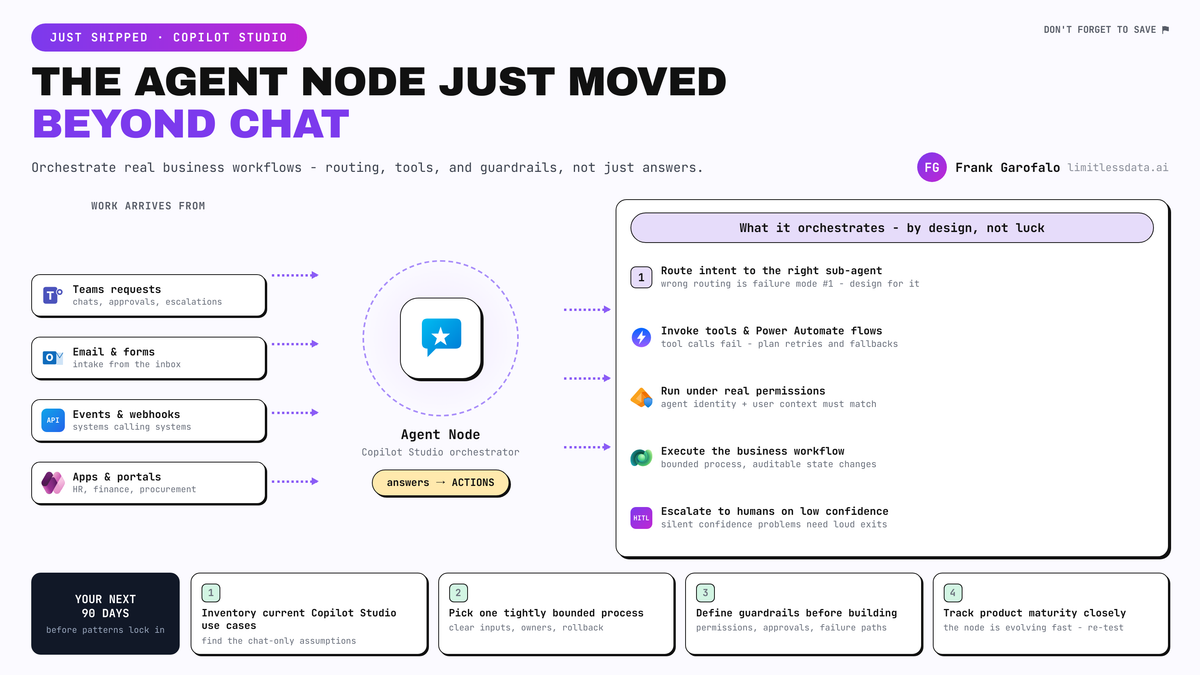
Copilot Studio’s new Agent Node is the announcement enterprise workflow teams should pay attention to.
This release pushes Copilot Studio further beyond chatbot design and into orchestration: agents that can evaluate context, choose next steps, and participate in approvals, triage, and exception handling across Microsoft 365 and Power Platform. If you design enterprise workflows, this changes the shape of the work.
What changed: the Agent Node points beyond chatbot design
Microsoft already positions Copilot Studio as a platform to build AI-driven agents and automate workflows across the Power Platform ecosystem, not just a chatbot builder (Microsoft Power Platform documentation: https://learn.microsoft.com/en-us/power-platform/). The broader product surface has also been adding orchestration-oriented primitives, including agent flow capabilities such as a prompt node for single AI calls with dynamic content and model selection (Copilot Studio What’s New: https://learn.microsoft.com/en-us/microsoft-copilot-studio/whats-new).
The Agent Node matters because it shifts the center of gravity in solution design:
- Old expectation: detect intent, answer the question, maybe trigger a simple action.
- New expectation: gather context, reason over state, choose tools, route work, escalate exceptions, and continue the flow.
That is a very different architectural problem.
Microsoft’s extensibility story for Microsoft 365 Copilot reinforces the same direction. Agents are described as extensions that enhance workflows across Copilot Chat, Outlook, Teams, and Word using enterprise data from Microsoft Graph (Microsoft 365 Copilot agents overview: https://learn.microsoft.com/en-us/microsoft-365/copilot/extensibility/agents-overview). The destination is not isolated chatbots. It is embedded work patterns inside the apps where people already approve, review, and act.
Why this matters now: teams are about to lock in the wrong patterns
If your backlog still frames Copilot Studio as “an internal FAQ bot with actions,” this is the moment to revisit it.
Microsoft 365 Copilot guidance already emphasizes architecture, security, governance, privacy, and extensibility as core planning areas for enterprise deployment, not just end-user adoption (Microsoft 365 Copilot documentation: https://learn.microsoft.com/en-us/microsoft-365/copilot/). That is exactly the planning posture you need for orchestration.
A specific field example: in Q1, a 4,800-user operations team I advised had an HR intake bot resolving policy questions nicely in Teams, but it failed the first live leave-escalation case because nobody had modeled missing-document handling or a manager approval branch in the downstream ServiceNow process.
That is the shift in one sentence: the hard part is no longer prompt quality alone. The hard part is operational control.
Architects should now redesign use cases around:
- governance boundaries and tool permissions
- human-in-the-loop controls and approval thresholds
- deterministic validation and observable checkpoints
- failure handling, retries, and escalation paths
If you wait until patterns harden, you will end up retrofitting controls into agent experiences that were designed like chat front ends.
Who should care: enterprise architects, platform owners, and workflow teams
Three groups should be paying attention immediately.
1) Enterprise architects
The AB-100 study guide now explicitly includes designing agents, agent flows, prompt actions, and generative AI orchestration in Copilot Studio. That is a useful signal that orchestration is no longer an edge skill; it is becoming a formal architecture competency (AB-100 study guide: https://learn.microsoft.com/en-us/credentials/certifications/resources/study-guides/ab-100).
2) Power Platform and Microsoft 365 platform owners
Copilot Studio tools are described by Microsoft as building blocks that let agents interact with external systems and perform actions in response to user requests or autonomous triggers (Copilot Studio tools documentation: https://learn.microsoft.com/en-us/microsoft-copilot-studio/add-tools-custom-agent). That means your connector strategy, DLP policies, environment setup, and admin controls now directly shape what an agent can safely orchestrate.
Also note the practical rollout implication: makers with a Teams plan are limited to classic orchestration, according to the Teams quickstart. Orchestration model choice is not theoretical; licensing and environment constraints affect what patterns you can actually ship (Teams quickstart: https://learn.microsoft.com/en-us/microsoft-copilot-studio/fundamentals-get-started-teams).
3) Process owners in IT, HR, finance, procurement, and customer operations
These are the teams with the highest-value first use cases:
- approval routing
- intake triage
- exception handling
- status coordination across systems
Those patterns sit much closer to measurable operational outcomes than generic knowledge bots.
The practical design shift: from answers to controlled workflow execution
The best way to understand the Agent Node is to stop thinking about “chat resolution” and start thinking about “workflow orchestration with probabilistic reasoning.”
A practical reference pattern looks like this:
- User starts in Teams, Copilot Chat, or another Microsoft 365 entry point
- Copilot Studio agent flow receives the request
- Agent Node evaluates context and decides the next step
- Tools connect the agent to validation services or external systems
- Power Automate handles deterministic execution steps
- Human approval gates catch sensitive or high-risk actions
- Status is returned to the user in the same work context
That layered model matters because not every step should be agent-led.
Use the agent for:
- ambiguous intake
- classification
- context gathering
- dynamic routing
- exception summarization
Use Power Automate or another deterministic workflow layer for:
- fixed business rules
- compliance-controlled actions
- guaranteed sequencing
- system-of-record updates
- auditable approvals
Agent Node should decide, not blindly execute.
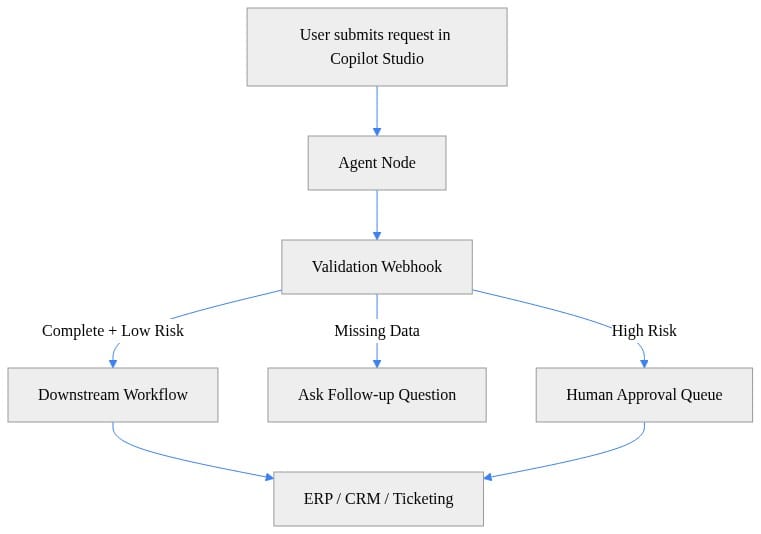
The key takeaway: the agent is not replacing the workflow. It is coordinating validation, clarification, and downstream execution based on risk and completeness.
The real challenge: governance and failure handling become first-class design work
This is where mature teams will separate themselves quickly.
An orchestrating agent should only act within the permissions, data sources, and tool surfaces intentionally exposed to it. In practice, that means designing:
- access scope for each tool
- dev, test, and production environment strategy
- auditability, rollback, and retry behavior
- release management for changing prompts, tools, and flows
The failure modes are also more concrete than many teams expect:
Wrong routing
Ambiguous intake or poor grounding can send a request down the wrong path.
Tool invocation failures
External APIs time out. Connectors fail. Partial completion creates duplicate-action risk.
Permission mismatches
The agent may infer what should happen but still lack the technical or policy authority to do it.
Silent confidence problems
The response sounds fluent while missing a required business field or policy condition.
A good pilot should include explicit fallback paths to human review and deterministic validation before execution. The FastAPI example below is an illustrative external validation service pattern that could sit behind a Copilot Studio tool or webhook: check completeness, assign risk flags, and return a route for the flow to follow.
# FastAPI webhook to validate completeness and risk before Agent Node orchestration
from fastapi import FastAPI
from pydantic import BaseModel
from typing import Optional

app = FastAPI()

class WorkflowRequest(BaseModel):
    request_id: str
    requester_email: str
    amount: float
    department: Optional[str] = None
    justification: Optional[str] = None

@app.post("/validate")
def validate(req: WorkflowRequest):
    missing = [f for f in ["department", "justification"] if not getattr(req, f)]
    risk_flags = []
    if req.amount > 10000:
        risk_flags.append("HIGH_VALUE")
    if not req.requester_email.endswith("@contoso.com"):
        risk_flags.append("EXTERNAL_IDENTITY")
    return {
        "request_id": req.request_id,
        "is_complete": len(missing) == 0,
        "missing_fields": missing,
        "risk_flags": risk_flags,
        "route": "approve" if not missing and not risk_flags else "review"
    }
What matters most is not the framework. It is the contract: the agent gets a structured decision surface—complete, missing data, or review—before it triggers business actions.
What to do in the next 90 days
If you want to turn this announcement into a useful roadmap move, keep it bounded.
1) Inventory your current Copilot Studio use cases
Separate:
- chat-only experiences
- action-taking assistants
- true workflow candidates
If a use case involves approvals, triage, SLA routing, or exception handling, it belongs in the third bucket.
2) Pick one process with tight boundaries
Good pilot candidates:
- procurement request approval
- HR intake triage
- IT access request routing
- customer operations exception review
Avoid broad “enterprise assistant” pilots. Start with a process that has clear inputs, known approvers, and measurable outcomes.
3) Define guardrails before building
At minimum, document:
- tool permissions and escalation rules
- validation checkpoints and observability requirements
- rollback plan and human approval thresholds
4) Track product maturity closely
Copilot Studio is evolving quickly. Watch release notes and capability updates so your design aligns with the current orchestration model and licensing reality, especially if your makers are working from Teams-based plans.
Bottom line
The Agent Node marks a strategic shift in Copilot Studio from conversational experiences toward orchestrated business workflows.
That means the winning enterprise pattern is not “smarter chatbot.” It is “controlled workflow participant.”
The teams that move first should not chase autonomy. They should redesign around governance, human-in-the-loop controls, tool boundaries, and failure handling—because that is where business value and enterprise safety now meet.
Where does this break for your environment: approval routing, tool permissions, or exception handling?
#CopilotStudio #PowerPlatform #Microsoft365
Sources & References
- Official Microsoft Power Platform documentation - Power Platform
- Microsoft 365 Copilot hub
- Official Microsoft Power Apps documentation - Power Apps
- Add tools to custom agents - Microsoft Copilot Studio
- Agent in a day - Online Workshop - Training
- Azure developer documentation
- What's new in Copilot Studio - Microsoft Copilot Studio
- Agents for Microsoft 365 Copilot
- Study guide for Exam AB-100: Agentic AI Business Solutions Architect
- Quickstart: Create a classic agent and publish it to Microsoft Teams - Microsoft Copilot Studio
Try it yourself
Run this tutorial as a Jupyter notebook: Download runbook.ipynb (28 cells, 22 KB).



