Fabric Data Agent API Just Turned Governance Into Architecture
Building Governed AI Data Products with the Public Fabric Data Agent API


Build a governed AI data product with the public Fabric Data Agent API
The public Fabric Data Agent API changes the job from building a clever demo to building a reusable interface that can survive security review, app integration, and production support.
Once an agent can be called outside the Fabric UI, the question is no longer just “Can it answer well?” It becomes “Can we control who calls it, what it can reach, how it is logged, and how we investigate failures?”
That is the real opportunity: treat Fabric data agents as governed data product interfaces, not standalone chat features.
Microsoft Fabric data agents are a generally available Fabric capability for conversational Q&A over organizational data, including Fabric items such as lakehouses, warehouses, and Power BI semantic models, according to Microsoft Learn. In this tutorial, the goal is not just to discuss the pattern. It is to build the implementation path in order.
What you will build
By the end of this walkthrough, you will have a practical pattern to:
- create a governed Fabric data agent over curated Fabric assets
- validate workspace, source, and caller permissions
- register and authenticate an API caller with Microsoft Entra ID
- invoke the agent from Python
- capture request metadata and correlation IDs for audit
- test denial paths before rollout
- decide when to place a broker in front of direct API access
One field lesson shaped this sequence. In Q4, a 40-person analytics team I advised had a working conversational demo over a semantic model in 9 days, but the launch stalled in week 3 because security asked a simple question: “Which users can trigger this agent from outside the Fabric UI, and where is that logged?” The steps below are designed to prevent exactly that stall.
Prerequisites
Before Step 1, confirm these basics:
- a Fabric tenant and workspace where data agents are available
- curated source assets already prepared in Fabric, such as lakehouses, warehouses, or semantic models
- permission to create or manage the data agent in the target workspace
- permission model decisions for who can invoke the agent and under which identity
- a Microsoft Entra ID app registration if you plan to call the API from code
- a secure place to store secrets, or a managed identity pattern where applicable
- a logging destination for audit metadata
- the latest Microsoft documentation for:
- data agent creation and supported source types - current Fabric API endpoint paths and authentication requirements - supported request and response schema for agent invocation - any preview, tenant, or workspace limitations that apply in your environment
One important precision point: API paths, payloads, and invocation patterns can change. Verify the current Microsoft Learn documentation before implementing against a production contract. Where examples below show request shapes, treat them as educational patterns unless they exactly match the current docs in your tenant.
Step 1: Reframe the agent as a governed interface
Before writing code, define what the agent is allowed to represent.
A governed AI data product in Fabric usually looks like this:
- trusted data lives in curated Fabric assets
- semantic meaning stays in the model or source design, not improvised in prompts
- the data agent is scoped to approved assets only
- workspace and source permissions remain the primary security boundary
- ownership, lineage, and policy stay visible through governance tooling
- downstream consumers inherit controls instead of bypassing them
That framing matters because a public API expands the blast radius from one UI to every app, workflow, portal, or Copilot-style surface that can call it.
Step 2: Define the governance envelope
Keep this compact and explicit before implementation:
- Approved source assets
List the exact lakehouses, warehouses, and semantic models the agent can use.
- Ownership
Name the data product owner, platform owner, and security approver.
- Access model
Decide whether invocation will be user-delegated, service-to-service, or brokered.
- Audit requirements
Capture caller identity, agent identity, request metadata, response status, and correlation IDs.
- Operational expectations
Set timeout, retry, support, and incident ownership expectations.
- Lifecycle policy
Define promotion, approval, versioning, and retirement.
The key mindset shift is simple: the conversation is the interface. The governed asset remains the product.
Step 3: Start with a reference architecture
A production pattern typically includes:
- Fabric source assets
- a Fabric data agent scoped to approved assets
- an API consumer such as an internal app or workflow
- Microsoft Entra ID for identity and token issuance
- a governance plane for lineage, ownership, and policy
- a monitoring plane for logs, metrics, and investigation
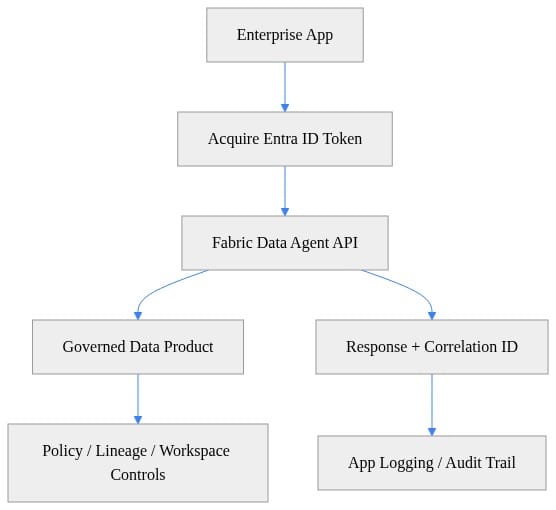
What matters here is not just the API call. It is the control around identity, approved data scope, and audit.
A useful distinction for teams: Fabric enforces native controls such as workspace boundaries, source access, and platform behavior documented by Microsoft. A broker or gateway pattern adds your own enterprise controls on top, such as request validation, throttling, centralized logging, and consumer-specific policy. Do not conflate the two.
End-to-end build checklist
Use this as the implementation order:
- create curated source assets in Fabric
- create the data agent and attach only approved sources
- confirm workspace and source permissions for creators and callers
- register the calling app in Entra ID
- acquire a Fabric API token
- invoke the agent with correlation IDs
- inspect the response and capture platform request metadata
- test denial paths for unauthorized users and mis-scoped apps
- log requests and outcomes for audit
- promote through environments with approval and rollback steps
Step 4: Validate workspace and rollout assumptions
Before wiring client code, validate the IDs and app configuration you expect to use during rollout.
This PowerShell preflight is for Fabric-specific deployment assumptions: required IDs, tenant app settings, and whether the expected Entra app values are present.
# Validate workspace and deployment prerequisites for a governed rollout
param(
    [string]$WorkspaceId = "aaaaaaaa-bbbb-cccc-dddd-eeeeeeeeeeee",
    [string]$CapacityId = "bbbbbbbb-cccc-dddd-eeee-ffffffffffff"
)

$checks = [ordered]@{
    WorkspaceIdFormat = ($WorkspaceId -match '^[0-9a-fA-F-]{36}What you are doing here: failing early if the rollout is missing the basic identifiers and tooling you expect to use for Fabric deployment and support.Next, validate that the app registration values required for API access are actually present before you debug authentication.# Check configuration assumptions and automate readiness steps for enterprise rollout
$requiredEnv = "TENANT_ID","CLIENT_ID","CLIENT_SECRET"
$missing = $requiredEnv | Where-Object { -not $env:$_ }

if ($missing) {
    throw "Missing required environment variables: $($missing -join ', ')"
}

if (-not (Get-Module -ListAvailable -Name Microsoft.Graph.Authentication)) {
    Install-Module Microsoft.Graph.Authentication -Scope CurrentUser -Force
}

Write-Host "Environment variables present and required module is available."
Write-Host "Next step: connect with service principal and validate Fabric permissions."
What you are doing here: confirming the tenant and app configuration needed for the caller identity exists before you attempt a Fabric API call.Step 5: Create the security boundary intentionallyFabric data agents answer questions over Fabric items such as lakehouses, warehouses, and Power BI semantic models. That means your true security boundary starts with the underlying Fabric assets and workspace permissions, not with application-side filtering.If the agent is scoped too broadly, the API simply makes that overexposure easier to operationalize.Microsoft also documents workspace outbound access protection as an important production control. If your design depends on external access patterns, test that behavior early rather than discovering a blocked dependency later.Choose your identity pattern deliberately:User-delegated access
   Best when the user’s own permissions should shape access.Service-to-service access
   Useful for backend workflows, but risky if the service identity can see more than the initiating user should.Broker or gateway pattern
   Best when multiple consumers need consistent policy enforcement, telemetry, throttling, and request shaping.For one consumer, direct invocation may be enough. For several consumers, a broker usually becomes the cleaner operational model.Step 6: Acquire an Entra ID tokenNow move into the request path.This Python snippet maps to one milestone only: acquiring a token for the Fabric API before any business request is sent. Verify the current Fabric resource and scope requirements in Microsoft documentation for your tenant before using this in production.# Acquire an Entra ID token for the Fabric Data Agent API using MSAL
import msal

TENANT_ID = "contoso.onmicrosoft.com"
CLIENT_ID = "11111111-2222-3333-4444-555555555555"
CLIENT_SECRET = "your-client-secret"
SCOPE = ["https://api.fabric.microsoft.com/.default"]

app = msal.ConfidentialClientApplication(
    CLIENT_ID,
    authority=f"https://login.microsoftonline.com/{TENANT_ID}",
    client_credential=CLIENT_SECRET,
)

result = app.acquire_token_for_client(scopes=SCOPE)
if "access_token" not in result:
    raise RuntimeError(f"Token acquisition failed: {result.get('error_description', result)}")

print(result["access_token"][:40] + "...")
What you are doing here: proving that the calling app can authenticate successfully and obtain a token for the Fabric API before you troubleshoot agent behavior.Step 7: Invoke the API with correlation and cautionThis next milestone is the actual invocation. Because endpoint paths and payload schema may evolve, treat the example below as pseudocode unless it exactly matches the latest Microsoft Learn contract for Fabric Data Agent API invocation.# Call the Fabric Data Agent API with correlation IDs, structured errors, and response logging
import json
import uuid
import requests

ACCESS_TOKEN = "eyJ..."
API_URL = "https://api.fabric.microsoft.com/v1/dataAgents/query"

headers = {
    "Authorization": f"Bearer {ACCESS_TOKEN}",
    "Content-Type": "application/json",
    "x-ms-client-request-id": str(uuid.uuid4()),
}

payload = {
    "workspaceId": "aaaaaaaa-bbbb-cccc-dddd-eeeeeeeeeeee",
    "dataAgentId": "ffffffff-1111-2222-3333-444444444444",
    "question": "Summarize sales variance by region for the last quarter."
}

try:
    response = requests.post(API_URL, headers=headers, json=payload, timeout=30)
    response.raise_for_status()
    print(json.dumps({"status": response.status_code, "body": response.json()}, indent=2))
except requests.HTTPError as ex:
    print(json.dumps({
        "error": "http_error",
        "status": response.status_code,
        "requestId": response.headers.get("x-ms-request-id"),
        "details": response.text
    }, indent=2))
    raise ex
What you are doing here: sending a request with a client correlation ID and preserving enough response metadata to troubleshoot failures later.If you want a REST client version for quick testing, use the same caution: verify the exact path and body shape against current documentation.# Invoke the Fabric Data Agent API from a REST client with explicit governance-friendly headers
POST https://api.fabric.microsoft.com/v1/dataAgents/query HTTP/1.1
Authorization: Bearer {{access_token}}
Content-Type: application/json
x-ms-client-request-id: 8d7d4f6d-2f0d-4f0a-a4f2-7d6d7f9f0a11

{
  "workspaceId": "aaaaaaaa-bbbb-cccc-dddd-eeeeeeeeeeee",
  "dataAgentId": "ffffffff-1111-2222-3333-444444444444",
  "question": "Which governed data product contains customer churn KPIs?"
}
What you are doing here: testing the invocation path in a lightweight client while still modeling production-friendly headers and explicit identifiers.Step 8: Inspect the response like an operator, not just a developerAt this point, do not stop at “200 OK.”Check for:response status
returned body shape
platform request ID headers if present
your own client request ID
latency
any source or context metadata returned by the API contract
error detail shape for denied or malformed requests

This is where many teams miss the future audit question. The earlier field anecdote stalled because the team could show answers, but not traceability. Response inspection is where traceability starts.Step 9: Add audit logging before broader exposureThis milestone is audit capture. Log metadata before you connect the agent to downstream apps or workflows.# Add minimal audit logging around Data Agent responses for governed AI operations
import json
from datetime import datetime, timezone

audit_record = {
    "timestampUtc": datetime.now(timezone.utc).isoformat(),
    "workspaceId": "aaaaaaaa-bbbb-cccc-dddd-eeeeeeeeeeee",
    "dataAgentId": "ffffffff-1111-2222-3333-444444444444",
    "clientRequestId": "8d7d4f6d-2f0d-4f0a-a4f2-7d6d7f9f0a11",
    "userPromptCategory": "sales-analytics",
    "responseStatus": "success"
}

with open("fabric_data_agent_audit.jsonl", "a", encoding="utf-8") as log_file:
    log_file.write(json.dumps(audit_record) + "\n")

print("Audit record written.")
What you are doing here: creating the minimum trace needed to answer who called the agent, which governed interface was used, and whether the request succeeded.At minimum, capture:timestamp
caller identity or app identity
workspace ID
data agent ID
client request ID
response status
latency
platform request ID if returned

That earlier 40-person team would likely have avoided its week-3 stall if this metadata had been designed into the first external invocation path instead of added after the demo.Step 10: Test denial paths as seriously as happy pathsRun tests with at least these personas:agent owner
authorized analyst
unauthorized employee
service identity used by an app or workflow
security reviewer or auditor persona

Validate these scenarios:Success:
approved user can query approved governed sources
response returns with expected metadata and correlation IDs

Denial:
unauthorized user cannot access the agent
authorized app cannot query outside approved scope
malformed requests fail with actionable errors
blocked outbound access behaves as expected
retries do not create duplicate operational side effects

This is where a tutorial becomes a production pattern. If you only test success paths, you have a demo. If you test denial paths, you have an operating model.Step 11: Embed safely, and know when to add a brokerA single governed agent may eventually appear in:an internal portal
a workflow
an analytics experience
a productivity extension

Each new surface introduces risk around caching, retries, impersonation, and hidden service identities.When more than one downstream consumer needs the agent, a broker or gateway pattern often becomes the right move. It can standardize:token handling
request validation
throttling
logging
source disclosure
fallback behavior
user-context preservation

What Fabric enforces natively is the platform boundary. What the broker adds is your enterprise runtime discipline across many consumers.Step 12: Production readiness checklistSave this checklist for rollout:curated Fabric sources are approved and documented
data agent scope is limited to approved assets
workspace and source permissions are validated
Entra app registration is approved and least-privilege
token acquisition is tested in the target environment
API path and payload are verified against current Microsoft docs
client request IDs are sent on every call
platform request IDs are captured when returned
audit metadata is written to centralized logging
unauthorized personas are denied as expected
retry, timeout, and fallback behavior are tested
outbound access assumptions are validated
promotion across dev, test, and prod is documented
ownership for support, governance, and incident response is assigned
Final takeawayThe smartest question is not, “How do we add chat to this app?”It is, “Which governed data products deserve a conversational interface, and what implementation path makes that safe to reuse?”If you build the Fabric Data Agent API pattern in this order, you get more than an answer engine. You get a governed interface with identity, traceability, denial-path confidence, and a rollout model your security team can actually approve.How far along is your team on this path: still proving the demo, or already treating Fabric agents as governed data product interfaces?#MicrosoftFabric #EnterpriseAI #DataArchitecture
Sources & ReferencesFabric data agent creation - Microsoft Fabric
Create a Fabric data agent - Microsoft Fabric
Azure Architecture Center - Azure Architecture Center
Microsoft Purview
Microsoft 365 Copilot hub
Cloud Adoption Framework for Microsoft - Cloud Adoption Framework
What is Fabric IQ? - Microsoft Fabric
Official Microsoft Power Platform documentation - Power Platform
Introduction to end-to-end analytics using Microsoft Fabric - Training)
    CapacityIdFormat  = ($CapacityId -match '^[0-9a-fA-F-]{36}What you are doing here: failing early if the rollout is missing the basic identifiers and tooling you expect to use for Fabric deployment and support.Next, validate that the app registration values required for API access are actually present before you debug authentication.CB2What you are doing here: confirming the tenant and app configuration needed for the caller identity exists before you attempt a Fabric API call.Step 5: Create the security boundary intentionallyFabric data agents answer questions over Fabric items such as lakehouses, warehouses, and Power BI semantic models. That means your true security boundary starts with the underlying Fabric assets and workspace permissions, not with application-side filtering.If the agent is scoped too broadly, the API simply makes that overexposure easier to operationalize.Microsoft also documents workspace outbound access protection as an important production control. If your design depends on external access patterns, test that behavior early rather than discovering a blocked dependency later.Choose your identity pattern deliberately:User-delegated access
   Best when the user’s own permissions should shape access.Service-to-service access
   Useful for backend workflows, but risky if the service identity can see more than the initiating user should.Broker or gateway pattern
   Best when multiple consumers need consistent policy enforcement, telemetry, throttling, and request shaping.For one consumer, direct invocation may be enough. For several consumers, a broker usually becomes the cleaner operational model.Step 6: Acquire an Entra ID tokenNow move into the request path.This Python snippet maps to one milestone only: acquiring a token for the Fabric API before any business request is sent. Verify the current Fabric resource and scope requirements in Microsoft documentation for your tenant before using this in production.CB3What you are doing here: proving that the calling app can authenticate successfully and obtain a token for the Fabric API before you troubleshoot agent behavior.Step 7: Invoke the API with correlation and cautionThis next milestone is the actual invocation. Because endpoint paths and payload schema may evolve, treat the example below as pseudocode unless it exactly matches the latest Microsoft Learn contract for Fabric Data Agent API invocation.CB4What you are doing here: sending a request with a client correlation ID and preserving enough response metadata to troubleshoot failures later.If you want a REST client version for quick testing, use the same caution: verify the exact path and body shape against current documentation.CB5What you are doing here: testing the invocation path in a lightweight client while still modeling production-friendly headers and explicit identifiers.Step 8: Inspect the response like an operator, not just a developerAt this point, do not stop at “200 OK.”Check for:response status
returned body shape
platform request ID headers if present
your own client request ID
latency
any source or context metadata returned by the API contract
error detail shape for denied or malformed requests

This is where many teams miss the future audit question. The earlier field anecdote stalled because the team could show answers, but not traceability. Response inspection is where traceability starts.Step 9: Add audit logging before broader exposureThis milestone is audit capture. Log metadata before you connect the agent to downstream apps or workflows.CB6What you are doing here: creating the minimum trace needed to answer who called the agent, which governed interface was used, and whether the request succeeded.At minimum, capture:timestamp
caller identity or app identity
workspace ID
data agent ID
client request ID
response status
latency
platform request ID if returned

That earlier 40-person team would likely have avoided its week-3 stall if this metadata had been designed into the first external invocation path instead of added after the demo.Step 10: Test denial paths as seriously as happy pathsRun tests with at least these personas:agent owner
authorized analyst
unauthorized employee
service identity used by an app or workflow
security reviewer or auditor persona

Validate these scenarios:Success:
approved user can query approved governed sources
response returns with expected metadata and correlation IDs

Denial:
unauthorized user cannot access the agent
authorized app cannot query outside approved scope
malformed requests fail with actionable errors
blocked outbound access behaves as expected
retries do not create duplicate operational side effects

This is where a tutorial becomes a production pattern. If you only test success paths, you have a demo. If you test denial paths, you have an operating model.Step 11: Embed safely, and know when to add a brokerA single governed agent may eventually appear in:an internal portal
a workflow
an analytics experience
a productivity extension

Each new surface introduces risk around caching, retries, impersonation, and hidden service identities.When more than one downstream consumer needs the agent, a broker or gateway pattern often becomes the right move. It can standardize:token handling
request validation
throttling
logging
source disclosure
fallback behavior
user-context preservation

CB7What Fabric enforces natively is the platform boundary. What the broker adds is your enterprise runtime discipline across many consumers.Step 12: Production readiness checklistSave this checklist for rollout:curated Fabric sources are approved and documented
data agent scope is limited to approved assets
workspace and source permissions are validated
Entra app registration is approved and least-privilege
token acquisition is tested in the target environment
API path and payload are verified against current Microsoft docs
client request IDs are sent on every call
platform request IDs are captured when returned
audit metadata is written to centralized logging
unauthorized personas are denied as expected
retry, timeout, and fallback behavior are tested
outbound access assumptions are validated
promotion across dev, test, and prod is documented
ownership for support, governance, and incident response is assigned
Final takeawayThe smartest question is not, “How do we add chat to this app?”It is, “Which governed data products deserve a conversational interface, and what implementation path makes that safe to reuse?”If you build the Fabric Data Agent API pattern in this order, you get more than an answer engine. You get a governed interface with identity, traceability, denial-path confidence, and a rollout model your security team can actually approve.How far along is your team on this path: still proving the demo, or already treating Fabric agents as governed data product interfaces?#MicrosoftFabric #EnterpriseAI #DataArchitecture
Sources & ReferencesFabric data agent creation - Microsoft Fabric
Create a Fabric data agent - Microsoft Fabric
Azure Architecture Center - Azure Architecture Center
Microsoft Purview
Microsoft 365 Copilot hub
Cloud Adoption Framework for Microsoft - Cloud Adoption Framework
What is Fabric IQ? - Microsoft Fabric
Official Microsoft Power Platform documentation - Power Platform
Introduction to end-to-end analytics using Microsoft Fabric - Training)
    PowerShellVersion = ($PSVersionTable.PSVersion.Major -ge 7)
    AzModuleInstalled = [bool](Get-Module -ListAvailable -Name Az.Accounts)
}

$checks.GetEnumerator() | ForEach-Object {
    [pscustomobject]@{ Check = $_.Key; Passed = $_.Value }
} | Format-Table -AutoSize

if ($checks.Values -contains $false) {
    throw "Environment prerequisite validation failed."
}
What you are doing here: failing early if the rollout is missing the basic identifiers and tooling you expect to use for Fabric deployment and support.
Next, validate that the app registration values required for API access are actually present before you debug authentication.
CB2
What you are doing here: confirming the tenant and app configuration needed for the caller identity exists before you attempt a Fabric API call.
Step 5: Create the security boundary intentionally
Fabric data agents answer questions over Fabric items such as lakehouses, warehouses, and Power BI semantic models. That means your true security boundary starts with the underlying Fabric assets and workspace permissions, not with application-side filtering.
If the agent is scoped too broadly, the API simply makes that overexposure easier to operationalize.
Microsoft also documents workspace outbound access protection as an important production control. If your design depends on external access patterns, test that behavior early rather than discovering a blocked dependency later.
Choose your identity pattern deliberately:
- User-delegated access
Best when the user’s own permissions should shape access.
- Service-to-service access
Useful for backend workflows, but risky if the service identity can see more than the initiating user should.
- Broker or gateway pattern
Best when multiple consumers need consistent policy enforcement, telemetry, throttling, and request shaping.
For one consumer, direct invocation may be enough. For several consumers, a broker usually becomes the cleaner operational model.
Step 6: Acquire an Entra ID token
Now move into the request path.
This Python snippet maps to one milestone only: acquiring a token for the Fabric API before any business request is sent. Verify the current Fabric resource and scope requirements in Microsoft documentation for your tenant before using this in production.
CB3
What you are doing here: proving that the calling app can authenticate successfully and obtain a token for the Fabric API before you troubleshoot agent behavior.
Step 7: Invoke the API with correlation and caution
This next milestone is the actual invocation. Because endpoint paths and payload schema may evolve, treat the example below as pseudocode unless it exactly matches the latest Microsoft Learn contract for Fabric Data Agent API invocation.
CB4
What you are doing here: sending a request with a client correlation ID and preserving enough response metadata to troubleshoot failures later.
If you want a REST client version for quick testing, use the same caution: verify the exact path and body shape against current documentation.
CB5
What you are doing here: testing the invocation path in a lightweight client while still modeling production-friendly headers and explicit identifiers.
Step 8: Inspect the response like an operator, not just a developer
At this point, do not stop at “200 OK.”
Check for:
- response status
- returned body shape
- platform request ID headers if present
- your own client request ID
- latency
- any source or context metadata returned by the API contract
- error detail shape for denied or malformed requests
This is where many teams miss the future audit question. The earlier field anecdote stalled because the team could show answers, but not traceability. Response inspection is where traceability starts.
Step 9: Add audit logging before broader exposure
This milestone is audit capture. Log metadata before you connect the agent to downstream apps or workflows.
CB6
What you are doing here: creating the minimum trace needed to answer who called the agent, which governed interface was used, and whether the request succeeded.
At minimum, capture:
- timestamp
- caller identity or app identity
- workspace ID
- data agent ID
- client request ID
- response status
- latency
- platform request ID if returned
That earlier 40-person team would likely have avoided its week-3 stall if this metadata had been designed into the first external invocation path instead of added after the demo.
Step 10: Test denial paths as seriously as happy paths
Run tests with at least these personas:
- agent owner
- authorized analyst
- unauthorized employee
- service identity used by an app or workflow
- security reviewer or auditor persona
Validate these scenarios:
Success:
- approved user can query approved governed sources
- response returns with expected metadata and correlation IDs
Denial:
- unauthorized user cannot access the agent
- authorized app cannot query outside approved scope
- malformed requests fail with actionable errors
- blocked outbound access behaves as expected
- retries do not create duplicate operational side effects
This is where a tutorial becomes a production pattern. If you only test success paths, you have a demo. If you test denial paths, you have an operating model.
Step 11: Embed safely, and know when to add a broker
A single governed agent may eventually appear in:
- an internal portal
- a workflow
- an analytics experience
- a productivity extension
Each new surface introduces risk around caching, retries, impersonation, and hidden service identities.
When more than one downstream consumer needs the agent, a broker or gateway pattern often becomes the right move. It can standardize:
- token handling
- request validation
- throttling
- logging
- source disclosure
- fallback behavior
- user-context preservation
CB7
What Fabric enforces natively is the platform boundary. What the broker adds is your enterprise runtime discipline across many consumers.
Step 12: Production readiness checklist
Save this checklist for rollout:
- curated Fabric sources are approved and documented
- data agent scope is limited to approved assets
- workspace and source permissions are validated
- Entra app registration is approved and least-privilege
- token acquisition is tested in the target environment
- API path and payload are verified against current Microsoft docs
- client request IDs are sent on every call
- platform request IDs are captured when returned
- audit metadata is written to centralized logging
- unauthorized personas are denied as expected
- retry, timeout, and fallback behavior are tested
- outbound access assumptions are validated
- promotion across dev, test, and prod is documented
- ownership for support, governance, and incident response is assigned
Final takeaway
The smartest question is not, “How do we add chat to this app?”
It is, “Which governed data products deserve a conversational interface, and what implementation path makes that safe to reuse?”
If you build the Fabric Data Agent API pattern in this order, you get more than an answer engine. You get a governed interface with identity, traceability, denial-path confidence, and a rollout model your security team can actually approve.
How far along is your team on this path: still proving the demo, or already treating Fabric agents as governed data product interfaces?
#MicrosoftFabric #EnterpriseAI #DataArchitecture
Sources & References
- Fabric data agent creation - Microsoft Fabric
- Create a Fabric data agent - Microsoft Fabric
- Azure Architecture Center - Azure Architecture Center
- Microsoft Purview
- Microsoft 365 Copilot hub
- Cloud Adoption Framework for Microsoft - Cloud Adoption Framework
- What is Fabric IQ? - Microsoft Fabric
- Official Microsoft Power Platform documentation - Power Platform
- Introduction to end-to-end analytics using Microsoft Fabric - Training
Try it yourself
Run this tutorial as a Jupyter notebook: Download runbook.ipynb (25 cells, 21 KB).



