Azure SQL as an AI-ready data platform: embeddings and external models in production
Azure SQL as an AI-ready data platform: embeddings and external models in production


Azure SQL can now participate in the AI execution path—on purpose.
More precisely: Azure SQL can now participate in embedding generation, vector storage, and governed retrieval for intelligent applications. That is a meaningful shift, but it is not the same as saying the full AI runtime belongs in the database.
The important enterprise question is not, “Can we do AI in SQL now?”
It is: “Which AI responsibilities belong there in production, and which still belong in application or platform layers?”
For teams already standardized on Microsoft data platforms, the answer is increasingly practical. Microsoft now documents intelligent application patterns across Azure SQL Database, Azure SQL Managed Instance, SQL Server 2025, and SQL database in Microsoft Fabric: https://learn.microsoft.com/en-us/azure/azure-sql/database/ai-artificial-intelligence-intelligent-applications
A quick scope note before the tutorial: this post describes a common architectural pattern across those platforms, but exact feature availability, syntax, credential setup, and operational steps can vary by product and by preview/GA status. Treat the code below as a production-minded starting point, and verify the current documentation for your specific platform before implementation.
This tutorial walks through a pragmatic pattern:
- generate embeddings close to governed data when that reduces complexity
- store vectors beside relational records when retrieval belongs with the data
- use database-native model definitions and credentials as control points
- keep orchestration-heavy, latency-sensitive, and rapidly changing AI logic in app and platform tiers
Last quarter, I reviewed an enterprise team that had built semantic product search with three separate services, two secret stores, and a nightly export job—only to realize the source records, security boundary, and retrieval filters already lived in Azure SQL.
This is not a “put all AI in SQL” argument.
It is a hands-on guide to using Azure SQL as a credible AI-ready data platform without turning the database into an application runtime.

1) Start with the architecture decision, not the feature list
GA changes the conversation. Preview invites experiments. GA invites standardization, supportability, and ownership discussions.
Microsoft documents the same intelligent application pattern across Azure SQL Database and SQL Server: https://learn.microsoft.com/en-us/sql/sql-server/ai/artificial-intelligence-intelligent-applications
The practical shift is not just that embeddings exist in SQL. It is that vectors, embedding functions, and external model definitions can become governed database objects and functions.
Use Azure SQL when:
- the source data already lives there
- semantic retrieval needs relational filters and governance controls
- you want fewer ETL hops before embedding generation
- platform teams prefer SQL-native ownership for moderate-scale retrieval workflows
Good fits include:
- document enrichment pipelines
- semantic lookup over business entities
- RAG pre-processing close to enterprise records
- incremental embedding maintenance tied to row changes
Keep AI in app or platform layers when:
- workflows involve multi-step prompting, tool use, agent state, or branching logic
- retrieval needs highly specialized indexing behavior or independent scaling
- product teams need rapid model routing or custom middleware
- SQL starts looking like an application runtime
That boundary matters: use SQL as the governed AI data plane, not as the entire AI system.
2) Understand the three building blocks
Vector support
Azure SQL’s multi-model capabilities include vector data alongside relational, JSON, XML, graph, and spatial patterns: https://learn.microsoft.com/en-us/azure/azure-sql/multi-model-features
That matters because one governed platform can hold:
- operational records
- semi-structured payloads
- embedding vectors used for semantic retrieval
AI_GENERATE_EMBEDDINGS
Microsoft documents AI_GENERATE_EMBEDDINGS as a built-in T-SQL function that creates embeddings using a precreated AI model definition stored in the database: https://learn.microsoft.com/en-us/sql/t-sql/functions/ai-generate-embeddings-transact-sql
EXTERNAL MODEL objects
CREATE EXTERNAL MODEL creates a database object that stores the location, authentication method, and purpose of an AI inference endpoint: https://learn.microsoft.com/en-us/sql/t-sql/statements/create-external-model-transact-sql
That gives DBAs and platform teams a database-native abstraction for:
- endpoint location
- API format
- authentication binding
- intended model purpose
And ALTER EXTERNAL MODEL exists so teams can update endpoint configuration over time: https://learn.microsoft.com/en-us/sql/t-sql/statements/alter-external-model-transact-sql

3) Map the reference architecture before you touch T-SQL
The pattern is simple:
- Azure SQL stores operational records
- an external model definition points to an approved embeddings endpoint
- embeddings are generated close to the data
- vectors are stored beside source rows
- applications query SQL for retrieval-ready context
- the app tier still owns prompt assembly, answer generation, and UX
For LinkedIn readability, I recommend publishing this architecture as a rendered diagram rather than relying on Mermaid in-feed.
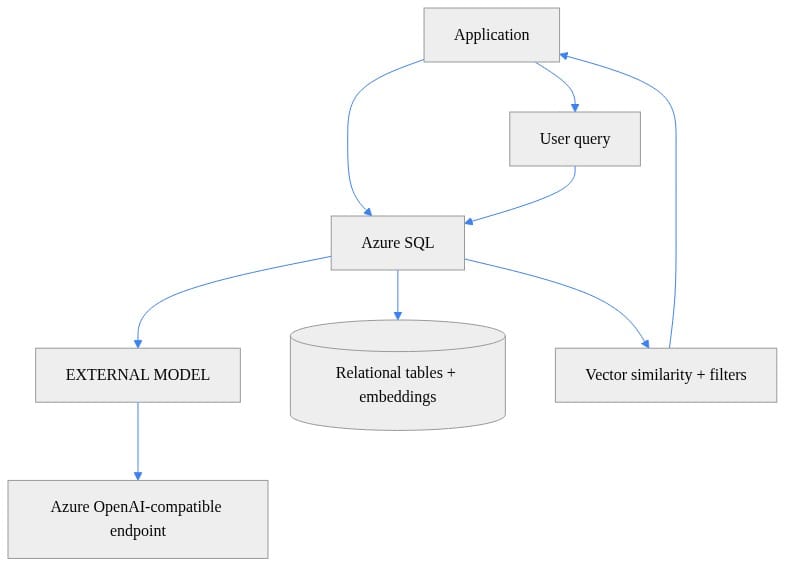
What to observe: Azure SQL is the governed AI data plane here, not the whole AI stack. The application still exists, and the model endpoint remains outside the database.
Where complementary services still fit
Azure Well-Architected guidance positions Azure SQL Database and Azure Cosmos DB as native vector-capable stores while still treating Azure AI Search and other services as complementary depending on workload shape: https://learn.microsoft.com/en-us/azure/well-architected/ai/data-platform
So if you need:
- broader content indexing
- specialized search features
- independent retrieval scaling
- cross-system search experiences
Azure AI Search may still be the better retrieval tier.
If your requirement is governed retrieval tightly coupled to business records already in SQL, Azure SQL becomes much more attractive.

4) Provision the foundation and confirm prerequisites
Microsoft documents support for this general pattern across:
- Azure SQL Database
- Azure SQL Managed Instance
- SQL Server 2025
- SQL database in Microsoft Fabric
Reference: https://learn.microsoft.com/en-us/azure/azure-sql/database/ai-artificial-intelligence-intelligent-applications
Before you implement anything, confirm:
- your specific platform supports the AI features you intend to use
- you have an approved Azure OpenAI-compatible endpoint
- credentials and permissions are configured appropriately
- you have a clear outbound data policy for what text may leave the database for inference
If you want a minimal infrastructure starting point, the following Bicep snippet provisions only the relational foundation. It intentionally omits identity, firewall/networking, credentials, and AI object configuration.
// Provision a SQL logical server and database as the foundation for AI-ready relational + vector workloads
param location string = resourceGroup().location
param sqlServerName string
param adminLogin string
@secure()
param adminPassword string
param databaseName string = 'appdb'

resource sqlServer 'Microsoft.Sql/servers@2023-08-01-preview' = {
  name: sqlServerName
  location: location
  properties: {
    administratorLogin: adminLogin
    administratorLoginPassword: adminPassword
    version: '12.0'
  }
}

resource sqlDb 'Microsoft.Sql/servers/databases@2023-08-01-preview' = {
  name: '${sqlServer.name}/${databaseName}'
  location: location
  sku: { name: 'GP_S_Gen5_2' }
}
Microsoft’s AI FAQ for SQL also highlights passwordless access patterns and identity considerations: https://learn.microsoft.com/en-us/sql/sql-server/ai/artificial-intelligence-intelligent-applications-faq
Decide early:
- which identity pattern you will use
- who can create or alter external model objects
- which datasets are allowed to be sent to external inference endpoints

5) Create the external model object
One of the easiest ways to lose control of AI integration is to scatter endpoints and secrets across apps, notebooks, and scripts.
The database-native pattern is cleaner:
- define the approved endpoint once
- bind authentication through a credential
- let T-SQL reference the model object by name
The following example is illustrative and should be validated against the exact syntax supported by your target platform and release. CREATE EXTERNAL MODEL options, API format values, credential bindings, and endpoint URL shape may differ across Azure SQL Database, Azure SQL Managed Instance, SQL Server 2025, and Fabric SQL database.
-- Create an EXTERNAL MODEL in Azure SQL for an approved Azure OpenAI-compatible embeddings endpoint
CREATE EXTERNAL MODEL [aoai_text_embedding_3_small]
WITH
(
    LOCATION = 'https://my-approved-openai.openai.azure.com/openai/deployments/text-embedding-3-small/embeddings?api-version=2024-02-01',
    API_FORMAT = 'AzureOpenAI',
    MODEL_TYPE = EMBEDDINGS,
    CREDENTIAL = [https://my-approved-openai.openai.azure.com],
    TIMEOUT = 60
);
GO
What to observe: the model definition centralizes endpoint location, API format, model purpose, credential reference, and timeout.
That is exactly the kind of control point you want in production.
6) Create a table that stores source data and vectors together
Now create a table that keeps:
- source text
- a content hash for change detection
- the embedding vector
- timestamps for lineage and maintenance
The following table definition is also illustrative. Native vector type syntax and dimensions should be verified for your specific SQL platform.
-- Create a table that stores source text plus generated embeddings for retrieval scenarios
CREATE TABLE dbo.ProductKnowledge
(
    ProductId int IDENTITY(1,1) PRIMARY KEY,
    Title nvarchar(200) NOT NULL,
    Description nvarchar(max) NOT NULL,
    SourceHash varbinary(32) NOT NULL,
    Embedding vector(1536) NULL,
    EmbeddedAt datetime2 NULL,
    LastModifiedAt datetime2 NOT NULL DEFAULT sysutcdatetime()
);
GO
Microsoft training guidance for Azure SQL AI integration explicitly covers embedding strategy design and maintenance patterns: https://learn.microsoft.com/en-us/training/modules/design-implement-models-embeddings-with-sql/
A content hash gives you a cheap way to detect whether a row’s semantic source text changed and needs re-embedding.
7) Generate embeddings in-database
Now we can generate embeddings and persist them alongside the source rows.
Important caveat: the example below is meant to be pseudo-realistic, but exact invocation details for AI_GENERATE_EMBEDDINGS can vary by platform and release. Validate the documented syntax for your environment before using it directly.
-- Generate embeddings with AI_GENERATE_EMBEDDINGS and persist them alongside relational records
INSERT INTO dbo.ProductKnowledge (Title, Description, SourceHash, Embedding, EmbeddedAt)
SELECT
    s.Title,
    s.Description,
    HASHBYTES('SHA2_256', CONCAT(s.Title, N'|', s.Description)),
    AI_GENERATE_EMBEDDINGS(
        CONCAT(s.Title, N'. ', s.Description)
        USE MODEL [aoai_text_embedding_3_small]
    ),
    sysutcdatetime()
FROM (VALUES
    (N'Premium Support', N'24x7 enterprise support with SLA-backed response times'),
    (N'Cold Storage', N'Low-cost archival storage for infrequently accessed data')
) AS s(Title, Description);
GO
This pattern is strongest when:
- source records already reside in SQL
- embedding generation is part of a governed enrichment flow
- you want to avoid exporting text to another pipeline just to create vectors
Operational warning: avoid synchronous embedding generation on hot write paths unless you have tested the latency and failure behavior carefully.
8) Query semantically relevant rows with vector distance
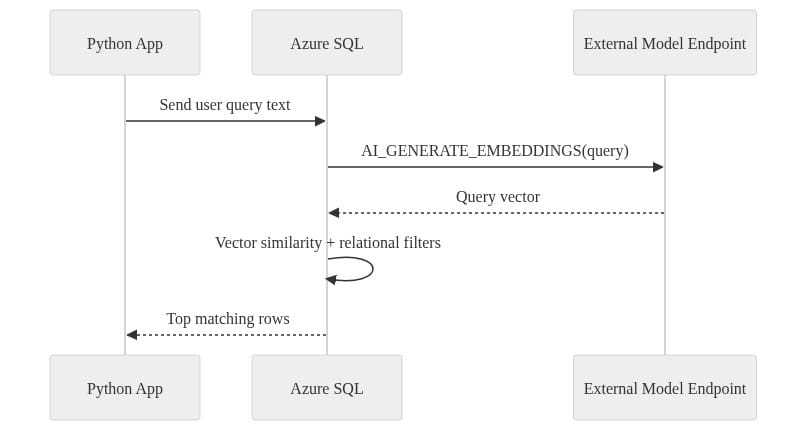
Once vectors are stored, SQL can generate a query embedding and rank rows by similarity using vector distance functions.
Again, treat the next example as illustrative. Vector variable syntax and VECTOR_DISTANCE usage may differ by platform.
-- Retrieve semantically relevant rows by embedding the query in-database and ranking by vector distance
DECLARE @query nvarchar(4000) = N'enterprise support with guaranteed response times';

DECLARE @query_vector vector(1536) =
    AI_GENERATE_EMBEDDINGS(@query USE MODEL [aoai_text_embedding_3_small]);

SELECT TOP (5)
    ProductId,
    Title,
    Description,
    VECTOR_DISTANCE('cosine', Embedding, @query_vector) AS CosineDistance
FROM dbo.ProductKnowledge
WHERE Embedding IS NOT NULL
ORDER BY VECTOR_DISTANCE('cosine', Embedding, @query_vector);
GO
In a real workload, you would usually add:
- tenant filters
- business rules
- security predicates
- freshness constraints
This is where SQL often shines: semantic ranking plus relational governance in one place.
9) Keep orchestration in the app tier
The most effective split is usually:
- SQL handles embedding persistence and governed retrieval
- the app handles prompt assembly, answer generation, and user interaction
Here is a simple Python example that asks Azure SQL for semantically relevant rows and then assembles context in the application layer.
# Query Azure SQL for semantic retrieval while keeping prompt assembly and answer generation in the app tier
import pyodbc

query_text = "Which offering includes SLA-backed support?"
conn = pyodbc.connect("Driver={ODBC Driver 18 for SQL Server};Server=tcp:myserver.database.windows.net,1433;Database=mydb;Encrypt=yes;Authentication=ActiveDirectoryInteractive")
sql = """
DECLARE @q nvarchar(4000) = ?;
DECLARE @v vector(1536) = AI_GENERATE_EMBEDDINGS(@q USE MODEL [aoai_text_embedding_3_small]);
SELECT TOP (3) ProductId, Title, Description
FROM dbo.ProductKnowledge
ORDER BY VECTOR_DISTANCE('cosine', Embedding, @v);
"""
with conn.cursor() as cur:
    cur.execute(sql, query_text)
    rows = cur.fetchall()

context = "\n".join(f"{r.Title}: {r.Description}" for r in rows)
print({"question": query_text, "retrieved_context": context})
If your application needs:
- multi-step prompt chains
- tool invocation
- memory or agent state
- dynamic model routing
keep that outside SQL.
10) Build the maintenance loop for changed data
Initial backfill is the easy part. Staying in sync is the harder production problem.
Microsoft’s training guidance explicitly frames maintenance around:
- initial backfill
- incremental updates
- re-embedding when source data changes
- embedding strategy choices over time
https://learn.microsoft.com/en-us/training/modules/design-implement-models-embeddings-with-sql/
A common pattern is:
- persist a source hash
- detect changed rows
- re-embed only the changed rows
- stamp update time and model metadata
The following example shows a targeted re-embedding pattern. As above, validate function syntax for your platform.
-- Re-embed only changed rows by comparing a persisted content hash to the current source hash
;WITH ChangedRows AS
(
    SELECT
        pk.ProductId,
        NewHash = HASHBYTES('SHA2_256', CONCAT(pk.Title, N'|', pk.Description)),
        NewText = CONCAT(pk.Title, N'. ', pk.Description)
    FROM dbo.ProductKnowledge AS pk
    WHERE pk.SourceHash <> HASHBYTES('SHA2_256', CONCAT(pk.Title, N'|', pk.Description))
       OR pk.Embedding IS NULL
)
UPDATE pk
SET
    SourceHash = c.NewHash,
    Embedding = AI_GENERATE_EMBEDDINGS(c.NewText USE MODEL [aoai_text_embedding_3_small]),
    EmbeddedAt = sysutcdatetime(),
    LastModifiedAt = sysutcdatetime()
FROM dbo.ProductKnowledge AS pk
JOIN ChangedRows AS c
    ON c.ProductId = pk.ProductId;
GO
In production, I strongly recommend storing:
- embedding model identifier
- embedding dimension
- generation timestamp
- content hash used at generation time
- optional pipeline or job run identifier
That gives you the ability to answer operational questions after a model change or relevance regression.
11) Plan for latency, throughput, cost, and policy
In this pattern, latency typically comes from:
- network hops from SQL to the model endpoint
- embedding generation time at the endpoint
- retrieval query execution
- any app-layer answer generation that follows
That is why synchronous embedding generation inside a high-throughput OLTP transaction path can be risky. If a user write depends on external inference to complete, you have extended your transaction boundary to a networked AI service.
For most enterprise systems, use:
- asynchronous embedding jobs for large backfills
- queue- or schedule-driven incremental refresh
- synchronous query-time embedding only for user search text, where acceptable
Also:
- validate outbound data policies before sending text to external endpoints
- benchmark retrieval quality before broad rollout
- avoid embedding every text column “just in case”
- re-embed selectively, not indiscriminately
Azure SQL reduces moving parts, but it does not erase all tradeoffs.
12) Secure the boundary and prepare for model changes
External model objects centralize endpoint definitions, which is already better than distributing secrets and URLs through multiple apps.
But centralization is not enough. You still need to define:
- who can invoke model-backed functions
- which tables can feed text to those models
- what sensitive data is prohibited from leaving the database
- how calls are audited
The SQL AI FAQ’s emphasis on passwordless and managed-identity-oriented patterns is a reminder that identity design is part of the architecture: https://learn.microsoft.com/en-us/sql/sql-server/ai/artificial-intelligence-intelligent-applications-faq
Over time, you will need to:
- rotate secrets
- update endpoints
- change API formats if required
- cut over to new model deployments
That is where ALTER EXTERNAL MODEL becomes operationally important: https://learn.microsoft.com/en-us/sql/t-sql/statements/alter-external-model-transact-sql
The PowerShell example below is intentionally high-level and platform-dependent. Credential formats and secret material representation can vary, so the safest production pattern is to rotate the database-scoped credential using the documented method for your platform and then redeploy or alter the external model definition as needed.
# Rotate the external endpoint secret and redeploy SQL objects in a controlled release step
param(
  [string]$SqlServer = "myserver.database.windows.net",
  [string]$Database = "appdb",
  [string]$CredentialName = "https://my-approved-openai.openai.azure.com",
  [string]$NewApiKey
)

$query = @"
ALTER DATABASE SCOPED CREDENTIAL [$CredentialName]
WITH IDENTITY = 'HTTPEndpointHeaders',
SECRET = '{"api-key":"$NewApiKey"}';
"@

Invoke-Sqlcmd -ServerInstance $SqlServer -Database $Database -AccessToken (Get-AzAccessToken -ResourceUrl https://database.windows.net).Token -Query $query
Invoke-Sqlcmd -ServerInstance $SqlServer -Database $Database -AccessToken (Get-AzAccessToken -ResourceUrl https://database.windows.net).Token -InputFile ".\sql\external-model.sql"
Recommended rollout pattern:
- canary on a subset of rows or tenants
- compare retrieval quality before broad cutover
- consider dual-writing embeddings during migration
- keep rollback simple if relevance drops
13) Use a practical rubric to decide where retrieval belongs
Azure SQL is the better fit when you want:
- governed retrieval close to operational data
- fewer systems to operate
- SQL-native ownership
- simpler security boundaries
- moderate-scale semantic search tied to business records
Separate vector stores or external pipelines are the better fit when you want:
- specialized indexing behavior
- broader search-centric capabilities
- independent scaling of retrieval infrastructure
- cross-system AI orchestration
- stronger isolation of AI workload blast radius from the database tier
This is consistent with Microsoft’s own positioning: https://learn.microsoft.com/en-us/azure/well-architected/ai/data-platform https://learn.microsoft.com/en-us/sql/sql-server/ai/vectors-faq
The right question is not “Which platform wins?”
It is “Where should the AI data plane live for this use case?”
14) Start with one bounded production use case
If your team is evaluating Azure SQL as an AI-ready data platform, start here:
- Pick one use case where source data already lives in SQL.
- Create one approved external model definition.
- Store vectors beside source rows with provenance metadata.
- Implement incremental refresh based on content changes.
- Keep orchestration in the app tier.
- Measure retrieval quality, latency, and operational simplicity before expanding.
That is the disciplined path.
Azure SQL is now credible for selective embedding generation, vector storage, and governed retrieval. The strongest architecture is not “put all AI in SQL.” It is a deliberate split between a governed SQL data plane and an application/platform orchestration layer.
If you have implemented this pattern, what did you keep in SQL versus the app tier? What governance, latency, or relevance tradeoffs showed up? And did Azure AI Search remain part of your architecture?
#AzureSQL #EnterpriseAI #DataArchitecture
Code Reference
Additional code samples that complement the tutorial above.
Sample 1 (mermaid)
For publishing, I would render this as a static sequence diagram image rather than relying on Mermaid support in-feed.
Sources & References
- AI_GENERATE_EMBEDDINGS (Transact-SQL) - SQL Server
- Intelligent Applications and AI - Azure SQL Database
- Design and implement models and embeddings with SQL - Training
- Intelligent Applications and AI - SQL Server
- CREATE EXTERNAL MODEL (Transact-SQL) - SQL Server
- Multi-model capabilities - Azure SQL
- Intelligent Applications and AI Frequently Asked Questions (FAQ) - SQL Server
- ALTER EXTERNAL MODEL (Transact-SQL) - SQL Server
- Vector & Embeddings Frequently Asked Questions (FAQ) - SQL Server
- Data Platform for AI Workloads on Azure - Microsoft Azure Well-Architected Framework
Try it yourself
Run this tutorial as a Jupyter notebook: Download runbook.ipynb (25 cells, 19 KB).



