Build an Enterprise ready 2nd Brain on Azure Foundry + Cosmos DB
Build an Enterprise ready 2nd Brain on Azure Foundry + Cosmos DB


Build an Enterprise-Ready second brain on Azure Foundry + Cosmos DB
A useful enterprise second brain is not just a chatbot over documents. It is a governed, retrieval-first knowledge system with durable memory, secure APIs, and predictable cost built on services your platform team can actually operate.
That distinction matters.
Most internal AI prototypes stop at “upload files, ask questions.” But production systems need more:
- durable organizational memory
- grounded retrieval with citations
- secure access controls
- API governance across apps and agents
- observability and auditability
- cost controls that survive real usage
In this hands-on tutorial, I’ll show you a practical baseline architecture using:
- Microsoft Foundry as the AI control plane for chat and embeddings
- Azure Cosmos DB as the durable knowledge and memory layer
- Azure API Management as the governed enterprise entry point
- Azure-native identity, networking, and monitoring for production boundaries
What you will have by the end
- a baseline Azure architecture for a production-oriented second brain
- a chunking and ingestion pattern with deployment-based embeddings
- Cosmos DB containers for knowledge, memory, and preferences
- a retrieval flow with tenant and ACL filtering
- APIM in front of the system with a realistic JWT validation baseline
- a clear path to harden security, cost, and evaluation
This is not a toy demo. It is a production-oriented starting point you can evolve into a reusable platform pattern.
Why an enterprise second brain needs more than RAG
Retrieval-augmented generation is necessary, but it is not sufficient.
An enterprise second brain should act as organizational memory across:
- documents and policies
- decisions and rationale
- conversations and task context
- user preferences and working style
- feedback signals that improve future answers
To build that well, senior teams should separate concerns instead of collapsing everything into one app:
- Model orchestration: which chat and embedding deployments you use
- Retrieval: how you index, filter, and rank knowledge
- Memory: what short-term and long-term state you persist
- Governance: how you secure, meter, and observe access
- Integration: how other apps, workflows, and agents consume the system
That separation is what makes the architecture operable.
My thesis is simple:
- Foundry provides the intelligence layer
- Cosmos DB provides durable knowledge and memory
- APIM provides governance, security, and reuse
Reference architecture on Azure Foundry plus Cosmos DB
Here is the end-to-end shape we’re building:
- Raw files land in Blob Storage or another enterprise content source.
- An ingestion job extracts and normalizes text.
- Text is chunked into retrieval-friendly units.
- An embeddings deployment in Foundry creates vectors.
- Chunk records and metadata are stored in Cosmos DB.
- Users call a stable API exposed through API Management.
- The application loads user memory and retrieves relevant chunks.
- A chat deployment in Foundry produces a grounded answer with citations.
- Feedback, traces, and audit events are persisted for improvement and governance.
A compact architecture diagram makes that flow easier to reason about:
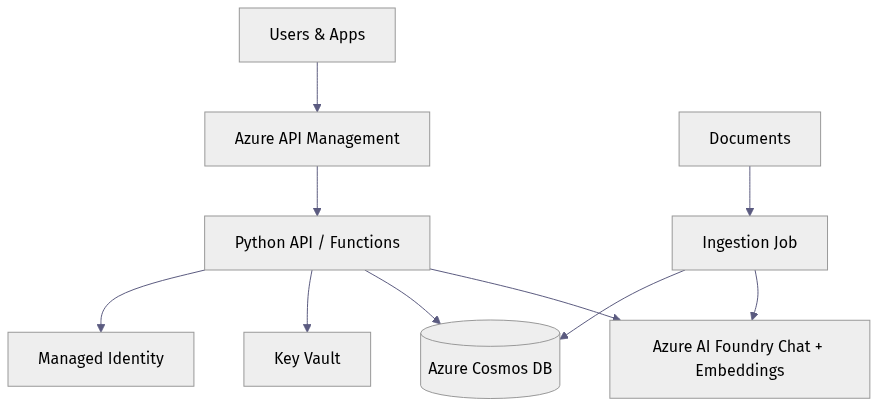
What to notice: APIM sits in front, your application logic mediates retrieval and memory, Foundry handles model inference, and Cosmos DB holds operational state. That separation is intentional.
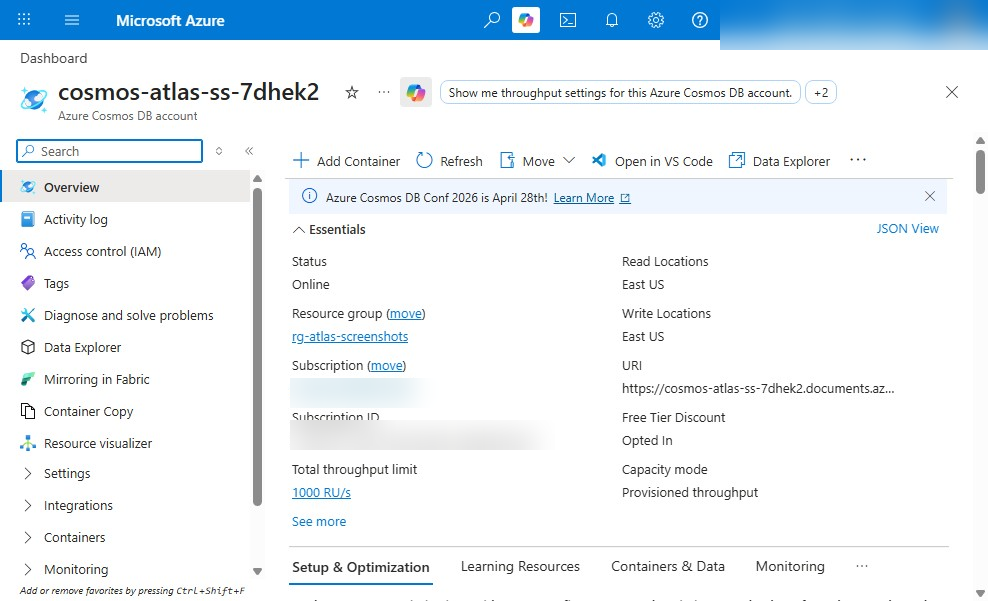
Where each kind of state lives
A common design mistake is storing every kind of data together. Instead, separate these clearly:
- Raw files: Blob Storage
- Chunked knowledge records: Cosmos DB
- Short-term conversation state: Cosmos DB with TTL
- Long-term user memory and preferences: Cosmos DB with stricter write rules
- Audit trails and feedback events: separate Cosmos DB containers or a downstream analytics path
Enterprise boundaries to define early
Before writing code, decide your baseline controls:
- Microsoft Entra ID for identity
- Managed identity for service-to-service access
- RBAC for least privilege
- Private endpoints and network isolation where required
- Policy enforcement at APIM
- Monitoring via Azure Monitor / Application Insights
If you are in a regulated or sovereignty-sensitive environment, make that decision at the start, not after the prototype works.
Prerequisites
Before Step 1, make sure you have:
- an Azure subscription with permission to create Cosmos DB, APIM, Storage, and networking resources
- a Foundry project with chat and embedding deployments already created
- deployment names for:
- your-chat-deployment - your-embedding-deployment
- Azure CLI and PowerShell installed
- Python 3.10+ for the application examples
- Entra-backed access to Azure resources
In Azure, the model= value used in the SDK examples below should be your deployment name from Foundry, not a raw model family name.
Data model the second brain before writing code
The fastest way to create a slow, expensive system is to skip the data model.
For this tutorial, design Cosmos DB around distinct workloads.
Recommended containers
Use separate containers for:
documents: source-level metadatachunks: retrieval units with embeddings and ACL metadataconversations: chat sessions and turn summariesmemory: durable or semi-durable user/task memorypreferences: stable user preferencesfeedbackorcitations: evaluation and audit artifacts
Partition key choices
Partitioning is not cosmetic in Cosmos DB. It directly affects RU efficiency, scale, and tenant isolation.
A practical baseline:
chunks: partition by/tenantIddocuments: partition by/tenantIdmemory: partition by/userIdpreferences: partition by/userIdconversations: partition by/conversationIdfeedback: partition by/tenantIdor/conversationIddepending on query patterns
Why not one giant container? Because your access patterns differ:
- retrieval is usually tenant-scoped and metadata-filtered
- memory lookups are usually user-scoped
- conversation playback is conversation-scoped
Metadata that improves retrieval quality
For chunk records, include at least:
tenantIddocIdchunkIdtextembeddingsourceUrior source file namedocumentTypebusinessDomaincreatedAt/updatedAtaclTagsembeddingModelembeddingVersion
That metadata is what lets you:
- filter by tenant and permissions
- restrict results to a business domain
- re-embed safely when models change
- explain answers with citations
Sample chunk schema
A concrete chunk document helps make the design real:
{
  "id": "contoso|handbook-001|00012",
  "tenantId": "contoso",
  "docId": "handbook-001",
  "chunkId": "00012",
  "text": "Azure Foundry helps teams build governed copilots with deployment-based model access.",
  "embedding": [0.0123, -0.0456, 0.0789],
  "sourceUri": "https://storageaccount.blob.core.windows.net/docs/handbook.pdf",
  "source": "handbook.pdf",
  "documentType": "policy",
  "businessDomain": "it",
  "aclTags": ["group:it-admins", "region:us"],
  "classification": "internal",
  "embeddingModel": "your-embedding-deployment",
  "embeddingVersion": "2025-01",
  "contentHash": "sha256:abc123",
  "createdAt": "2025-05-01T12:00:00Z",
  "updatedAt": "2025-05-01T12:00:00Z"
}
Retention strategy
Not all memory deserves to live forever.
A useful pattern:
- Conversation turns: TTL of days to weeks
- Episodic memory: TTL of hours to days
- User preferences: no TTL unless business rules require it
- Knowledge chunks: no TTL, but versioned and archived when superseded
- Audit events: retained according to compliance policy
This hot-versus-archival distinction is important for both cost and quality. Unbounded memory growth increases RU usage, storage costs, and prompt pollution.
Step 1: Create the Azure foundation
Start with a minimal but realistic Azure footprint:
- Resource group
- Virtual network baseline
- Cosmos DB account and SQL database
- API Management instance
- Storage account for raw files
- Monitoring resources
- Foundry project/workspace and model access
The following PowerShell example provisions a resource group, VNet, Cosmos DB, a SQL database, a couple of baseline containers, and APIM. It is intentionally compact for tutorial purposes.
# Provision a resource group, Cosmos DB, APIM, and baseline networking for the 2nd Brain tutorial
$location = "eastus"
$rg = "rg-2ndbrain-demo"
$cosmos = "cosmos2ndbrain$((Get-Random -Maximum 9999))"
$apim = "apim-2ndbrain-demo"
$vnet = "vnet-2ndbrain"
$subnet = "snet-app"

az group create -n $rg -l $location | Out-Null
az network vnet create -g $rg -n $vnet --address-prefix 10.10.0.0/16 --subnet-name $subnet --subnet-prefix 10.10.1.0/24 | Out-Null
az cosmosdb create -g $rg -n $cosmos --kind GlobalDocumentDB --default-consistency-level Session --enable-free-tier true | Out-Null
az cosmosdb sql database create -g $rg -a $cosmos -n brain | Out-Null
az cosmosdb sql container create -g $rg -a $cosmos -d brain -n chunks --partition-key-path "/tenantId" --ttl -1 | Out-Null
az cosmosdb sql container create -g $rg -a $cosmos -d brain -n memory --partition-key-path "/userId" --ttl 2592000 | Out-Null
az apim create -g $rg -n $apim --publisher-name "Contoso" --publisher-email "admin@contoso.com" --sku-name Consumption | Out-Null
What to observe: the example creates a brain database and starts with separate chunks and memory containers, with TTL enabled on memory. In a real implementation, you would also add Storage, Key Vault, diagnostics settings, and likely private connectivity.
Identity and least privilege
After the resources exist, wire up access deliberately. The next example assigns Cosmos DB data-plane access and creates additional containers for preferences, conversations, and citations.
# Configure managed identity access and create Cosmos DB containers used by ingestion and chat APIs
$rg = "rg-2ndbrain-demo"
$cosmos = (az cosmosdb list -g $rg --query "[0].name" -o tsv)
$principalId = az ad signed-in-user show --query id -o tsv

az cosmosdb sql role assignment create `
  -g $rg -a $cosmos `
  --role-definition-name "Cosmos DB Built-in Data Contributor" `
  --scope "/" --principal-id $principalId | Out-Null

az cosmosdb sql container create -g $rg -a $cosmos -d brain -n preferences --partition-key-path "/userId" --ttl -1 | Out-Null
az cosmosdb sql container create -g $rg -a $cosmos -d brain -n conversations --partition-key-path "/conversationId" --ttl 604800 | Out-Null
az cosmosdb sql container create -g $rg -a $cosmos -d brain -n citations --partition-key-path "/tenantId" --ttl -1 | Out-Null
What to do next: replace user-assigned access with managed identities for your app and ingestion workers. For enterprise deployments, avoid long-lived keys and prefer Entra-backed auth paths end to end.
Step 2: Deploy models in Foundry for chat and embeddings
Once the foundation exists, prepare the AI layer.
For this architecture, you need two model capabilities:
- a chat deployment for grounded answer generation
- an embeddings deployment for indexing and query vectorization
Model selection guidance
Choose based on workload:
- If you need lower latency and lower cost for high-volume enterprise Q&A, a smaller chat deployment is often the right default.
- If you need more complex reasoning, tool use, or longer synthesis tasks, route selectively to a stronger deployment instead of sending every request there.
- For embeddings, use one deployment consistently across indexing and query time until you intentionally version and re-embed.
Capture operational assumptions
Document these early:
- deployment names
- tokens per minute or throughput assumptions
- concurrency expectations
- retry policy
- fallback behavior when rate-limited
This is where many pilots fail in production: they know the prompt, but not the throughput envelope.

Step 3: Create Cosmos DB containers for knowledge and memory
Now formalize the operational data layer.
You already created some containers above, but here is the design intent:
chunksstores retrieval recordsdocumentsstores source metadata and ingestion statusconversationsstores session state and summariesmemorystores durable or semi-durable episodic factspreferencesstores user-level stable settingscitationsorfeedbackstores answer evidence and user reactions
Indexing strategy
Be deliberate with indexing in Cosmos DB:
- include the metadata fields you filter on often
- exclude fields you never query to reduce write cost
- treat large embedding arrays carefully because they increase item size and write RU cost
If Cosmos DB is your operational retrieval store, keep embeddings and retrieval metadata alongside each chunk record. Also plan for re-embedding by storing embeddingVersion and possibly supersededBy fields.
One practical indexing policy decision
For the chunks container, a common baseline is:
- index
tenantId,docId,businessDomain,aclTags,createdAt, andsource - keep the default index for
textonly if you need keyword fallback - exclude
/embedding/*from the standard indexing policy to reduce write RU if vector search is handled separately by the vector index capability rather than normal property indexing
The exact policy depends on your retrieval design, but the principle is simple: index what you filter on, not every large field by default.
TTL strategy
A good default:
memory: TTL enabledconversations: TTL enabledpreferences: no TTLchunks: no TTLdocuments: no TTL unless source lifecycle requires it
The point is to make short-lived context expire automatically while durable knowledge remains stable.
Step 4: Build the ingestion and chunking pipeline
This is where the second brain becomes useful.
Your ingestion pipeline should do more than just split text every N characters. In production, it should:
- read files from Blob Storage or enterprise connectors
- normalize encodings and whitespace
- remove boilerplate where possible
- chunk text into semantically meaningful segments
- attach source and ACL metadata
- generate embeddings
- upsert records idempotently
- surface poison documents for manual review
- support reprocessing when chunking or embedding strategy changes
A practical chunking baseline
A simple starting point that works better than fixed-width slicing:
- chunk by section or heading when available
- target roughly 300–800 tokens per chunk
- use 10–20% overlap for narrative documents
- keep tables, lists, and policy clauses intact where possible
- store a stable
contentHashso re-ingestion can detect unchanged chunks
The following Python example shows the core loop: chunk text, call an embeddings deployment, and store chunk records in Cosmos DB using Entra-backed auth.
# Ingest documents, chunk text, generate embeddings from Foundry, and store chunk records in Cosmos DB
import os, uuid
from azure.identity import DefaultAzureCredential
from azure.cosmos import CosmosClient, PartitionKey
from openai import AzureOpenAI

text = "Azure Foundry helps build enterprise copilots. Cosmos DB stores durable memory and chunks."
chunks = [text[i:i+60] for i in range(0, len(text), 60)]

client = AzureOpenAI(
    azure_endpoint=os.environ["AZURE_OPENAI_ENDPOINT"],
    api_version="2024-02-01",
    azure_ad_token_provider=lambda: DefaultAzureCredential().get_token("https://cognitiveservices.azure.com/.default").token,
)
cosmos = CosmosClient(os.environ["COSMOS_URI"], credential=os.environ["COSMOS_KEY"])
container = cosmos.get_database_client("brain").get_container_client("chunks")

for i, chunk in enumerate(chunks):
    emb = client.embeddings.create(model="text-embedding-3-large", input=chunk).data[0].embedding
    doc = {"id": str(uuid.uuid4()), "tenantId": "contoso", "docId": "handbook-001", "chunkId": i,
           "text": chunk, "embedding": emb, "source": "handbook.pdf", "category": "policy"}
    container.upsert_item(doc)
Use the same pattern, but switch the deployment name and Cosmos auth to your production baseline:
- set
model="your-embedding-deployment"because Azure expects the Foundry deployment name - use managed identity or another Entra-backed credential for Cosmos DB instead of account keys in production
A production-oriented version of the same flow looks like this:
import os, uuid, hashlib
from azure.identity import DefaultAzureCredential
from azure.cosmos import CosmosClient
from openai import AzureOpenAI

credential = DefaultAzureCredential()

aoai = AzureOpenAI(
    azure_endpoint=os.environ["AZURE_OPENAI_ENDPOINT"],
    api_version="2024-02-01",
    azure_ad_token_provider=lambda: credential.get_token(
        "https://cognitiveservices.azure.com/.default"
    ).token,
)

cosmos = CosmosClient(os.environ["COSMOS_URI"], credential=credential)
container = cosmos.get_database_client("brain").get_container_client("chunks")

text = "Azure Foundry helps build enterprise copilots. Cosmos DB stores durable memory and chunks."
chunks = [text[i:i+60] for i in range(0, len(text), 60)]

for i, chunk in enumerate(chunks):
    emb = aoai.embeddings.create(
        model="your-embedding-deployment",
        input=chunk
    ).data[0].embedding

    chunk_id = f"contoso|handbook-001|{i:05d}"
    doc = {
        "id": chunk_id,
        "tenantId": "contoso",
        "docId": "handbook-001",
        "chunkId": f"{i:05d}",
        "text": chunk,
        "embedding": emb,
        "source": "handbook.pdf",
        "sourceUri": "https://storageaccount.blob.core.windows.net/docs/handbook.pdf",
        "documentType": "policy",
        "businessDomain": "it",
        "aclTags": ["group:it-admins"],
        "embeddingModel": "your-embedding-deployment",
        "embeddingVersion": "2025-01",
        "contentHash": hashlib.sha256(chunk.encode("utf-8")).hexdigest(),
    }
    container.upsert_item(doc)
What to observe: each chunk is stored with tenant, document, source, and ACL metadata. The IDs are stable, the embedding deployment is explicit, and the auth pattern is consistent with managed identity guidance.
Production notes for ingestion
A few hard-earned lessons:
- Use deterministic document IDs so repeated ingestion updates instead of duplicating.
- Preserve source URIs and timestamps for traceability.
- Carry ACL or classification tags into chunk metadata so retrieval can enforce authorization.
- Keep a reprocessing hook because embedding deployment changes are inevitable.
Step 5: Implement retrieval and answer generation
A second brain should be retrieval-first, not model-first.
That means the answer path should:
- vectorize the user’s question
- retrieve relevant chunks with tenant and ACL filtering
- assemble a grounded prompt
- call the chat deployment
- return citations and confidence hints
- degrade gracefully when retrieval is weak
The next example shows a simple retrieval-plus-answer flow. It computes an embedding for the question, performs vector retrieval against Cosmos DB, applies tenant and ACL filtering, builds a context window, and asks the chat deployment to answer only from that context.
# Retrieve relevant chunks from Cosmos DB and generate a grounded answer with inline citations
import os
from azure.cosmos import CosmosClient
from openai import AzureOpenAI

question = "What does our handbook say about enterprise copilots?"
aoai = AzureOpenAI(api_key=os.environ["AZURE_OPENAI_KEY"], azure_endpoint=os.environ["AZURE_OPENAI_ENDPOINT"], api_version="2024-02-01")
cosmos = CosmosClient(os.environ["COSMOS_URI"], credential=os.environ["COSMOS_KEY"])
container = cosmos.get_database_client("brain").get_container_client("chunks")

qvec = aoai.embeddings.create(model="text-embedding-3-large", input=question).data[0].embedding
query = "SELECT TOP 3 c.text, c.source FROM c WHERE c.tenantId = @tenant"
items = list(container.query_items(query=query, parameters=[{"name":"@tenant","value":"contoso"}], enable_cross_partition_query=True))

context = "\n".join([f"[{i+1}] {x['text']} (source: {x['source']})" for i, x in enumerate(items)])
messages = [
    {"role": "system", "content": "Answer only from the provided context and cite sources like [1]."},
    {"role": "user", "content": f"Context:\n{context}\n\nQuestion: {question}"}
]
resp = aoai.chat.completions.create(model="gpt-4o-mini", messages=messages, temperature=0)
print(resp.choices[0].message.content)
For a production baseline, make the retrieval actually use the query vector and keep the auth pattern consistent:
import os
from azure.identity import DefaultAzureCredential
from azure.cosmos import CosmosClient
from openai import AzureOpenAI

credential = DefaultAzureCredential()

question = "What does our handbook say about enterprise copilots?"
tenant_id = "contoso"
allowed_acl_tags = ["group:it-admins", "region:us"]

aoai = AzureOpenAI(
    azure_endpoint=os.environ["AZURE_OPENAI_ENDPOINT"],
    api_version="2024-02-01",
    azure_ad_token_provider=lambda: credential.get_token(
        "https://cognitiveservices.azure.com/.default"
    ).token,
)

cosmos = CosmosClient(os.environ["COSMOS_URI"], credential=credential)
container = cosmos.get_database_client("brain").get_container_client("chunks")

qvec = aoai.embeddings.create(
    model="your-embedding-deployment",
    input=question
).data[0].embedding

query = """
SELECT TOP 5
    c.text,
    c.source,
    c.sourceUri,
    VectorDistance(c.embedding, @qvec) AS score
FROM c
WHERE c.tenantId = @tenantId
  AND ARRAY_CONTAINS(@aclTags, c.aclTags[0], true)
ORDER BY VectorDistance(c.embedding, @qvec)
"""

items = list(container.query_items(
    query=query,
    parameters=[
        {"name": "@qvec", "value": qvec},
        {"name": "@tenantId", "value": tenant_id},
        {"name": "@aclTags", "value": allowed_acl_tags},
    ],
    partition_key=tenant_id
))

context = "\n".join(
    f"[{i+1}] {x['text']} (source: {x['source']})"
    for i, x in enumerate(items)
)

messages = [
    {
        "role": "system",
        "content": "Answer only from the provided context. Cite sources like [1]. If evidence is insufficient, say so."
    },
    {
        "role": "user",
        "content": f"Context:\n{context}\n\nQuestion: {question}"
    }
]

resp = aoai.chat.completions.create(
    model="your-chat-deployment",
    messages=messages,
    temperature=0
)

print(resp.choices[0].message.content)
If your ACL model stores multiple tags per chunk, tighten the filter to match your exact schema rather than relying on a single array position. The key point is that authorization filtering happens before the model sees the text.
ACL-filtered query example
Here is the retrieval rule in plain terms:
- restrict to the caller’s tenant
- restrict to documents whose ACL tags intersect the caller’s allowed tags
- only then rank by vector similarity
That is the minimum safe pattern for enterprise retrieval.
Grounding rules that matter
Use prompt instructions like:
- answer only from provided context
- cite sources inline
- say when the answer is not present
- do not infer policy beyond the evidence
Those are not cosmetic. They reduce hallucination risk by narrowing the model’s allowed behavior.
When retrieval is weak
Do not force a confident answer. Return something like:
- “I couldn’t find enough grounded evidence”
- top matching citations for manual review
- a suggestion to broaden the search scope or rephrase the question
That is better than a fluent but unsupported answer.

Step 6: Add durable memory and agent behaviors
Knowledge retrieval answers “what do our sources say?” Memory answers “what should this system remember over time?”
Those are different jobs.
Separate ephemeral context from durable memory
A practical memory design has at least two layers:
- ephemeral session context: recent turns, short-lived, often TTL-based
- durable user memory: stable preferences, recurring tasks, approved facts worth keeping
Do not dump every chat turn into long-term memory. That pollutes the system and increases cost.
The next example persists user preferences and a memory record in Cosmos DB, with a simple rule that avoids storing low-value or obviously sensitive content.
# Persist durable conversation memory and user preferences in Cosmos DB with TTL-aware records
import os, time, uuid
from azure.cosmos import CosmosClient

cosmos = CosmosClient(os.environ["COSMOS_URI"], credential=os.environ["COSMOS_KEY"])
db = cosmos.get_database_client("brain")
memory = db.get_container_client("memory")
prefs = db.get_container_client("preferences")

user_id = "u-123"
conversation_id = "conv-456"
prefs.upsert_item({"id": user_id, "userId": user_id, "tone": "concise", "topics": ["azure", "cosmosdb"]})

message = {
    "id": str(uuid.uuid4()), "userId": user_id, "conversationId": conversation_id,
    "role": "assistant", "content": "Use grounded answers with citations.",
    "memoryType": "episodic", "ttl": 86400, "createdAt": int(time.time())
}
if len(message["content"]) > 20 and "password" not in message["content"].lower():
    memory.upsert_item(message)
To align with the rest of the architecture, use the same Entra-backed pattern here as well:
import os, time, uuid
from azure.identity import DefaultAzureCredential
from azure.cosmos import CosmosClient

credential = DefaultAzureCredential()
cosmos = CosmosClient(os.environ["COSMOS_URI"], credential=credential)
db = cosmos.get_database_client("brain")
memory = db.get_container_client("memory")
prefs = db.get_container_client("preferences")

user_id = "u-123"
conversation_id = "conv-456"

prefs.upsert_item({
    "id": user_id,
    "userId": user_id,
    "tone": "concise",
    "topics": ["azure", "cosmosdb"]
})

message = {
    "id": str(uuid.uuid4()),
    "userId": user_id,
    "conversationId": conversation_id,
    "role": "assistant",
    "content": "Use grounded answers with citations.",
    "memoryType": "episodic",
    "ttl": 86400,
    "createdAt": int(time.time())
}

if len(message["content"]) > 20 and "password" not in message["content"].lower():
    memory.upsert_item(message)
Then, when serving a new request, load the recent memory plus stable preferences to build a more personalized system prompt:
# Load recent memory and preferences to build a personalized chat prompt
import os
from azure.cosmos import CosmosClient

cosmos = CosmosClient(os.environ["COSMOS_URI"], credential=os.environ["COSMOS_KEY"])
db = cosmos.get_database_client("brain")
memory = db.get_container_client("memory")
prefs = db.get_container_client("preferences")

user_id = "u-123"
pref = prefs.read_item(item=user_id, partition_key=user_id)
recent = list(memory.query_items(
    query="SELECT TOP 5 c.role, c.content FROM c WHERE c.userId=@u ORDER BY c.createdAt DESC",
    parameters=[{"name":"@u","value":user_id}], enable_cross_partition_query=True))

system_prompt = f"User prefers a {pref['tone']} tone and cares about {', '.join(pref['topics'])}."
history = "\n".join([f"{m['role']}: {m['content']}" for m in recent])
print(system_prompt + "\n" + history)
And the managed identity version:
import os
from azure.identity import DefaultAzureCredential
from azure.cosmos import CosmosClient

credential = DefaultAzureCredential()
cosmos = CosmosClient(os.environ["COSMOS_URI"], credential=credential)
db = cosmos.get_database_client("brain")
memory = db.get_container_client("memory")
prefs = db.get_container_client("preferences")

user_id = "u-123"
pref = prefs.read_item(item=user_id, partition_key=user_id)

recent = list(memory.query_items(
    query="SELECT TOP 5 c.role, c.content FROM c WHERE c.userId=@u ORDER BY c.createdAt DESC",
    parameters=[{"name": "@u", "value": user_id}],
    partition_key=user_id
))

system_prompt = f"User prefers a {pref['tone']} tone and cares about {', '.join(pref['topics'])}."
history = "\n".join(f"{m['role']}: {m['content']}" for m in recent)
print(system_prompt + "\n" + history)
What to observe: the system prompt is assembled from durable preference data and recent memory. In a real app, you would summarize older turns rather than replaying them raw.
Memory write rules
Good enterprise defaults:
- store preferences only after repeated confirmation or explicit user action
- store task state only when it affects future work
- never store secrets, credentials, or regulated data unless explicitly designed and approved
- expire episodic memory automatically
- log why a memory write happened
Step 7: Put Azure API Management in front of the second brain
A second brain becomes enterprise-ready when it is a governed service, not just an app endpoint.
Azure API Management is a strong fit here because it gives you one Azure-native platform to govern:
- chat APIs
- ingestion APIs
- retrieval APIs
- admin APIs
- AI-related endpoints and agent-facing interfaces
That matters once multiple internal apps, copilots, or agents start using the same knowledge system.
The sequence below shows the runtime path from user request through APIM to your backend, Cosmos DB, and Foundry.
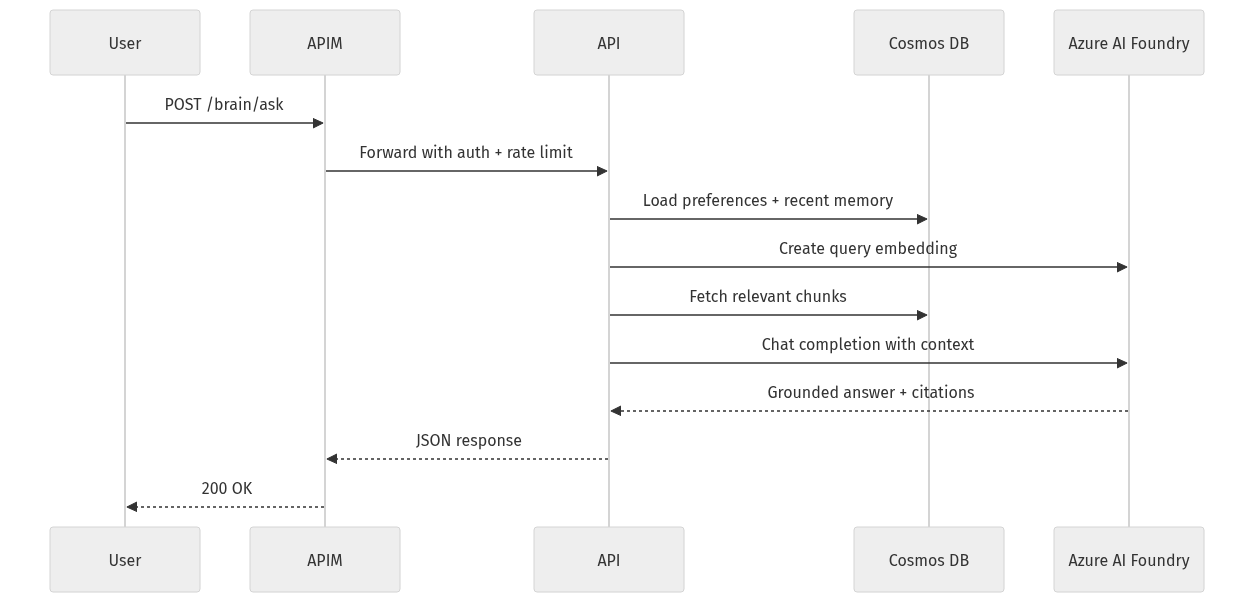
What to observe: APIM is the front door. It enforces policy before your application spends tokens or RU on a request.
Now publish the backend through APIM with JWT validation, rate limiting, and backend routing:
# Publish an API through APIM with JWT validation, rate limiting, and backend routing
$rg = "rg-2ndbrain-demo"
$apim = "apim-2ndbrain-demo"
$apiId = "brain-api"
$backendUrl = "https://2ndbrain-api.azurewebsites.net"

az apim api create -g $rg --service-name $apim `
  --api-id $apiId --path "brain" --display-name "2nd Brain API" `
  --protocols https --service-url $backendUrl | Out-Null

$policy = @"
<policies>
  <inbound>
    <validate-jwt header-name="Authorization" require-scheme="Bearer" />
    <rate-limit-by-key calls="30" renewal-period="60" counter-key="@(context.Request.IpAddress)" />
    <set-backend-service base-url="$backendUrl" />
  </inbound>
  <backend /><outbound /><on-error />
</policies>
"@
az apim api policy create -g $rg --service-name $apim --api-id $apiId --xml-content $policy | Out-Null
A more realistic baseline policy includes issuer metadata and audience validation:
<policies>
  <inbound>
    <base />
    <validate-jwt header-name="Authorization" require-scheme="Bearer" failed-validation-httpcode="401" failed-validation-error-message="Unauthorized">
      <openid-config url="https://login.microsoftonline.com/<tenant-id>/v2.0/.well-known/openid-configuration" />
      <audiences>
        <audience>api://second-brain-api</audience>
      </audiences>
      <issuers>
        <issuer>https://login.microsoftonline.com/<tenant-id>/v2.0</issuer>
      </issuers>
      <required-claims>
        <claim name="scp" match="any">
          <value>SecondBrain.Read</value>
          <value>SecondBrain.Write</value>
        </claim>
      </required-claims>
    </validate-jwt>
    <set-variable name="tenantId" value="@(context.Principal?.Claims.GetValueOrDefault("tid",""))" />
    <rate-limit-by-key calls="30" renewal-period="60" counter-key="@(context.Principal?.Claims.GetValueOrDefault("oid", context.Request.IpAddress))" />
    <set-header name="x-correlation-id" exists-action="override">
      <value>@(context.RequestId.ToString())</value>
    </set-header>
    <set-backend-service base-url="https://secondbrain-api.azurewebsites.net" />
  </inbound>
  <backend>
    <base />
  </backend>
  <outbound>
    <base />
  </outbound>
  <on-error>
    <base />
  </on-error>
</policies>
What to do next: add tenant-based quotas, header normalization, correlation IDs, and request/response logging with redaction.
Why APIM belongs in this architecture
Without APIM, every team reinvents:
- auth checks
- rate limiting
- quotas
- request shaping
- observability
- versioning
With APIM, you centralize those controls and make the second brain reusable as a platform capability.
Step 8: Secure for enterprise requirements
Security is not an add-on to retrieval. It is part of retrieval.
Core controls
At minimum, implement:
- Entra ID for user and service authentication
- Managed identity for service-to-service access
- RBAC for least privilege
- Private endpoints where required
- Network isolation for sensitive deployments
- Key Vault for secret material that cannot yet be eliminated
- Audit trails for prompts, citations, and admin actions
ACL-aware retrieval
The single most important security rule in enterprise RAG is this:
Only retrieve chunks the caller is authorized to see.
That means document permissions must be propagated into chunk metadata, usually via:
- ACL tags
- tenant and business-unit labels
- sensitivity classification
- source system permission IDs
Then every retrieval query must filter on those attributes before the model sees the text.
If you skip this, you do not have enterprise retrieval. You have a data leakage path.
One strong governance reminder
Keep governance and data-residency decisions close to the architecture and security layers, not repeated across every section. Decide early where data can live, how identities are issued, and which boundaries APIM and networking must enforce.
Step 9: Optimize cost, throughput, and reliability
A second brain that works for 20 users but collapses at 2,000 is still a prototype.
Control token spend
The biggest AI cost drivers are usually:
- oversized prompts
- retrieving too many chunks
- using a high-cost deployment for every request
- re-embedding too often
- storing too much irrelevant memory
Practical controls:
- keep chunks semantically coherent but not oversized
- cap the number of retrieved chunks
- use prompt budgets
- cache embeddings for repeated queries where appropriate
- route simple Q&A to a lower-cost chat deployment
- summarize long histories instead of replaying them
Tune Cosmos DB RU consumption
Cosmos DB cost and performance are dominated by:
- partition key choice
- item size
- indexing policy
- query pattern
- cross-partition fan-out
Practical tuning levers:
- choose partition keys aligned to your dominant access pattern
- avoid one giant “everything” container
- exclude non-queryable fields from indexing where appropriate
- keep chunk documents compact
- precompute metadata needed for retrieval filters
- use TTL to auto-delete short-lived memory
Reliability targets
Define service-level objectives early:
- ingestion latency
- retrieval latency
- answer latency
- answer groundedness
- cost per query
- ingestion failure rate
If you do not define those, you cannot make rational trade-offs.
Step 10: Evaluate quality and productionize
This is where many teams stop too early.
A second brain is only enterprise-ready when you can measure whether it is actually helping.
Evaluate the retrieval layer
Track:
- retrieval precision for known questions
- citation coverage
- ACL correctness
- freshness of indexed content
- failure rate on ingestion
Evaluate answer quality
Track:
- groundedness
- citation correctness
- refusal quality when evidence is missing
- user satisfaction
- task completion rate for target workflows
Build replayable evaluation sets
Do not rely only on synthetic benchmarks. Build a test set from real enterprise questions, then replay it when you change:
- chunking strategy
- embedding deployment
- prompt template
- retrieval ranking
- memory rules
Rollout plan
A practical rollout path:
- start with one business domain
- instrument everything
- validate quality and cost
- expand to adjacent domains
- standardize the platform for wider internal reuse
That staged approach is far safer than trying to AI-enable the whole intranet in one move.
Common pitfalls and design trade-offs
A few mistakes show up again and again.
1) One container for everything
This usually leads to poor partition efficiency, messy indexing, and rising RU costs. Different data types have different access patterns. Model them that way.
2) Treating chat history as knowledge
Conversation text is not automatically durable truth. Knowledge should be curated, sourced, and versioned. Memory should be selective.
3) Ignoring API governance until later
Once multiple teams and agents appear, lack of API governance becomes a delivery bottleneck. Put APIM in front early.
4) Underestimating re-embedding cost
Embedding migrations are real. Store version metadata and make reprocessing deliberate.
5) Allowing unbounded memory growth
If everything is remembered, nothing is useful. Use TTL, summarization, and explicit memory write rules.
6) Skipping ACL propagation
If permissions do not flow from source to chunk to retrieval query, your system is not safe for enterprise use.
What makes this architecture enterprise-ready
To summarize the pattern:
- Foundry handles model orchestration for chat and embeddings
- Cosmos DB stores durable knowledge, memory, and operational state
- APIM governs access, quotas, policies, and reuse
- Azure-native identity and networking provide enforceable security boundaries
- Monitoring and evaluation make quality and cost measurable
This is what moves you from “RAG demo” to “enterprise second brain.”
Not because it is more complicated for its own sake.
Because real enterprise systems need:
- security
- durability
- observability
- governance
- predictable cost
And they need to be operable by platform teams, not only by the team that built the first demo.
Final takeaway
If you are building internal AI systems this year, my recommendation is simple:
Start with one domain where grounded knowledge actually matters. Build retrieval first. Add durable memory carefully. Put APIM in front early. Measure quality and cost before you scale.
That gives you a second brain your organization can trust.
If you want, I can turn this into a follow-up post with:
- a full reference repo structure
- a FastAPI implementation
- APIM policy examples for multi-tenant governance
- a production evaluation checklist for Azure Foundry + Cosmos DB
If that would be useful, comment “part 2” and tell me which piece you want next.
Sources & References
- Azure API Management policy reference – validate-jwt
- Azure Cosmos DB for NoSQL query reference
- Azure Cosmos DB vector search overview
- Azure Cosmos DB RBAC and data plane role-based access
- Azure Identity client library for Python
- Azure OpenAI / Foundry chat completions and embeddings documentation
- Azure API Management policy snippets and examples
- Azure Well-Architected Framework – Cost Optimization
- Azure Monitor documentation
- Azure Cosmos DB indexing policies
Try it yourself
Run this tutorial as a Jupyter notebook: Download runbook.ipynb (31 cells, 33 KB).



