Fabric Eventstream Connectors Rewrite Real Time Architecture
How Fabric Eventstream’s New Connectors Change Real-Time Ingestion Strategy


Fabric just moved the streaming edge inward.
Microsoft didn’t just add more ingestion options to Fabric; it strengthened Eventstream as a native front door for real-time data. With Eventstreams positioned in Real-Time Intelligence as the no-code service to collect, transform, and route streaming data—and with Kafka endpoint support in the mix—the default architecture for many Fabric-bound streaming workloads should be reconsidered, not just incrementally updated (Microsoft Learn: Eventstreams overview, Real-Time Intelligence overview).
The old assumption was: solve streaming before Fabric. Stand up Event Hubs or Kafka, write custom bridges, normalize payloads elsewhere, land files, then let analytics begin. That pattern still has valid uses. But it is now overused.
If more operational events can enter Fabric directly through Eventstream, the integration boundary moves inward. That means source connectivity, lightweight shaping, and routing no longer have to start outside the platform by default.
That is the real change.
Why the connector story matters more than it looks
The easy reaction is: “Nice, more connectors.” But connectors are not just plumbing. They determine where integration responsibility starts.
For years, many teams treated Fabric as the destination after upstream integration had already happened somewhere else:
- source emits or is polled
- custom bridge translates format or protocol
- broker buffers and decouples
- processor filters and enriches
- files land
- analytics finally starts
Sometimes that was necessary. Sometimes it was just habit.
I recently saw a team moving CRM change events through a custom .NET poller, Azure Functions, Event Hubs, and parquet landing before Fabric touched the data—adding multiple ownership boundaries and avoidable latency. That is exactly the kind of pattern architects should now challenge first.
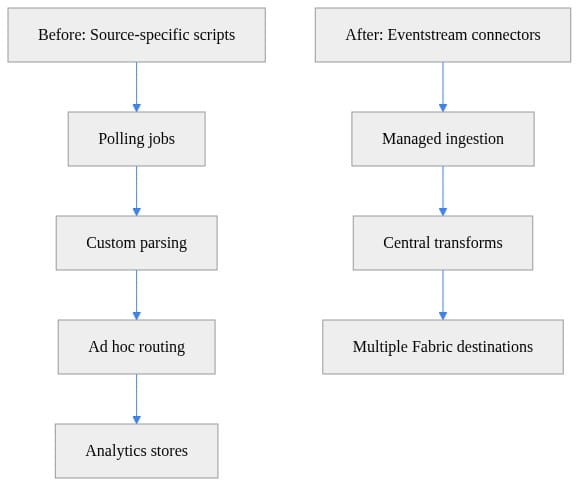
What matters here is not just fewer boxes. It is that ingestion and routing move closer to the analytical destinations that actually consume the data.
Where Eventstream fits in the Fabric decision tree
Microsoft’s own guidance is fairly clear on service boundaries:
- Eventstreams and Eventhouse for real-time ingestion and analytics
- Data Factory pipelines for batch orchestration and movement
- Mirroring for near-real-time replication from supported operational stores
- OneLake shortcuts for virtualization rather than movement
That gives architects a cleaner decision tree:
- If the workload is event streaming, start with Eventstream.
- If the workload is replication, use mirroring.
- If it is scheduled movement, use pipelines.
- If it is access without copying, use shortcuts.
That separation matters because it makes streaming a first-class ingestion path inside Fabric, not an afterthought (Microsoft Learn: get data guidance, data lifecycle).
Kafka endpoint support is especially important because it reduces protocol translation work for Kafka-compatible producers. It does not mean every enterprise architecture changes overnight, but it does mean a meaningful class of “temporary” bridge code is now easier to avoid (Microsoft Learn: Eventstreams overview).
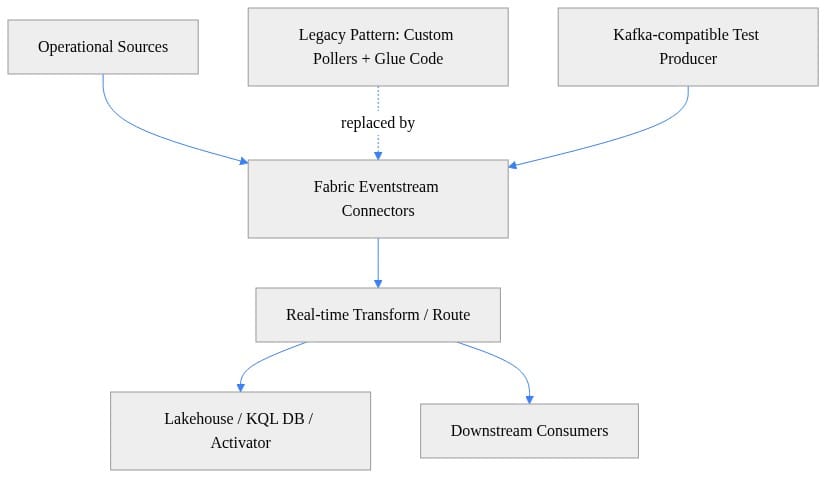
Hands-on: test the ingestion posture
If you want to understand the shift, don’t start with a whiteboard. Start by proving how quickly you can get events into Fabric through a Kafka-compatible path.
First, validate that the endpoint is reachable from your network.
# PowerShell: Validate enterprise prerequisites for Kafka-style Eventstream connectivity
$endpoint = "your-eventstream-kafka-endpoint"
$port = 9093

Write-Host "Checking DNS resolution for $endpoint..."
Resolve-DnsName $endpoint -ErrorAction Stop | Out-Null
Write-Host "DNS OK"

Write-Host "Checking TCP connectivity on port $port..."
$test = Test-NetConnection -ComputerName $endpoint -Port $port
if (-not $test.TcpTestSucceeded) {
    throw "TCP connectivity failed to $endpoint`:$port"
}

Write-Host "TLS/Kafka network path appears reachable"
If DNS or TCP 9093 fails, the architecture discussion is premature.
The Python examples below are illustrative smoke tests using kafka-python; topic creation, package/version alignment, authentication details, and endpoint/topic configuration must match your Fabric/Eventstream setup.
# Python: Send JSON events to a Kafka-compatible endpoint to test Eventstream ingestion quickly
import json
import time
from datetime import datetime, timezone
from kafka import KafkaProducer

producer = KafkaProducer(
    bootstrap_servers="your-eventstream-kafka-endpoint:9093",
    security_protocol="SASL_SSL",
    sasl_mechanism="PLAIN",
    sasl_plain_username="$ConnectionString",
    sasl_plain_password="Endpoint=sb://...;SharedAccessKeyName=...;SharedAccessKey=...",
    value_serializer=lambda v: json.dumps(v).encode("utf-8"),
)

for i in range(3):
    event = {
        "deviceId": f"sensor-{i}",
        "temperature": 20 + i,
        "eventTime": datetime.now(timezone.utc).isoformat(),
    }
    producer.send("telemetry", event)
    time.sleep(1)

producer.flush()
producer.close()
What this proves is not production readiness. It proves how quickly you can validate the ingestion path with a few events and a known payload shape.
Then add callbacks and keys to verify publish success and basic partition behavior.
# Python: Add delivery callbacks and keys so teams can validate partitioning and publish success
import json
from kafka import KafkaProducer

def on_send_success(record_metadata):
    print(f"delivered topic={record_metadata.topic} partition={record_metadata.partition} offset={record_metadata.offset}")

def on_send_error(excp):
    print(f"publish_failed error={excp}")

producer = KafkaProducer(
    bootstrap_servers="your-eventstream-kafka-endpoint:9093",
    security_protocol="SASL_SSL",
    sasl_mechanism="PLAIN",
    sasl_plain_username="$ConnectionString",
    sasl_plain_password="Endpoint=sb://...;SharedAccessKeyName=...;SharedAccessKey=...",
    key_serializer=lambda k: k.encode("utf-8"),
    value_serializer=lambda v: json.dumps(v).encode("utf-8"),
)

future = producer.send("telemetry", key="sensor-42", value={"status": "ok", "rpm": 1800})
future.add_callback(on_send_success)
future.add_errback(on_send_error)
producer.flush()
Finally, simulate a bursty workload to compare connector-first ingestion with older polling instincts.
# Python: Simulate a bursty workload to compare connector-first ingestion with legacy batch polling
import json
import random
import time
from kafka import KafkaProducer

producer = KafkaProducer(
    bootstrap_servers="your-eventstream-kafka-endpoint:9093",
    security_protocol="SASL_SSL",
    sasl_mechanism="PLAIN",
    sasl_plain_username="$ConnectionString",
    sasl_plain_password="Endpoint=sb://...;SharedAccessKeyName=...;SharedAccessKey=...",
    value_serializer=lambda v: json.dumps(v).encode("utf-8"),
)

for _ in range(10):
    producer.send("orders", {"orderId": random.randint(1000, 9999), "amount": round(random.uniform(10, 500), 2)})
    time.sleep(random.uniform(0.05, 0.3))

producer.flush()
print("Burst test complete")
That exposes the real question: can Eventstream absorb your workload well enough that a separate ingress layer is unnecessary, or do your peak rates and durability requirements still justify one?
The strategic win
The biggest benefit of the connector model is architectural compression.
When Eventstream can directly onboard more analytics-bound sources, you can often remove:
- bespoke polling jobs written only to convert source changes into events
- intermediate messaging layers used mainly as protocol adapters
- duplicate transformation logic split across teams
- batch landing workarounds inserted because streaming connectivity was weak
That can reduce latency, simplify ownership, and keep lineage closer to Fabric destinations. Microsoft’s data lifecycle guidance reinforces this by placing Eventstreams directly in the ingestion phase of OneLake-centric architectures (Microsoft Learn: data lifecycle).
The important point is not that Eventstream replaces every upstream integration service. It is that Fabric is increasingly credible as the managed ingress and routing layer for a meaningful set of real-time analytics designs.
The tradeoffs architects still own
This is where the opinion needs discipline.
Eventstream should be the default first design option for Fabric-native real-time analytics. But it should not become an excuse for sloppy ingestion design.
1. Governance does not disappear inside Fabric
Native ingestion improves lineage inside the platform, but source permissions, data contracts, classification, and policy enforcement still need real governance.
2. Replay and durability still matter
If your workload needs strict replay semantics, long retention, or broad decoupling across many consumers, a dedicated broker may still be the right answer.
3. Schema drift gets riskier when onboarding gets easier
If source teams can connect faster, they can also break downstream consumers faster. Eventstream should host lightweight shaping and routing, not become a dumping ground for unstable contracts.
4. Transformation boundaries still matter
Lightweight filtering, branching, and event shaping belong near ingestion. Deep enrichment, domain modeling, long-running workflow orchestration, and transactional integration do not. Fabric’s own service boundaries already point in that direction (Microsoft Learn: get data guidance).
When Eventstream is enough, and when it is not
Eventstream is enough when:
- throughput is moderate rather than extreme
- event contracts are reasonably stable
- the primary destination is Fabric
- the main goal is analytics, alerting, or activation
- the team wants fast time to value with managed ingestion
You still need broader integration services when:
- you need high-scale decoupling across many independent consumers
- replay guarantees are strict and central
- protocol mediation across heterogeneous estates is the main challenge
- the workload is enterprise integration first and analytics second
- the pattern is really batch movement, replication, or virtualization instead of streaming
That is why the product map matters. Microsoft is not saying Eventstream replaces everything. It is saying streaming ingestion now has a native center of gravity inside Fabric, with continued investment across Real-Time Intelligence (Microsoft Learn: What’s new in Fabric, Real-Time Intelligence learning path).
Why this matters right now
Fresh data is no longer only a dashboard problem.
If your organization wants alerts, anomaly detection, recommendations, or AI systems that reflect current business state, then the path from source event to analytical signal matters much more than it did in a nightly ETL world.
That is why I am opinionated here: the evolving Eventstream connector model changes real-time ingestion strategy because it lets many teams stop designing Fabric as the endpoint of someone else’s integration architecture. For a growing class of workloads, Fabric can own more of the streaming edge itself.
That does not eliminate the need for governance, replay planning, schema discipline, or broader Azure services where they are justified. It does eliminate a lot of unnecessary glue.
My recommendation is simple: for Fabric-bound real-time analytics, start with Eventstream as the default design, put lightweight shaping and routing there, and force exceptions to justify themselves.
Which part of that claim breaks first in your environment: replay guarantees, burst handling, or team ownership boundaries?
#MicrosoftFabric #Realtimeintelligence #DataArchitecture
Sources & References
- What's New? - Microsoft Fabric
- Microsoft Fabric Eventstreams Overview - Microsoft Fabric
- End-to-end data lifecycle in Microsoft Fabric - Microsoft Fabric
- What Is Real-Time Intelligence in Microsoft Fabric? - Microsoft Fabric
- Implement Real-Time Intelligence with Microsoft Fabric - Training
- Microsoft Fabric Terminology - Microsoft Fabric
- Data ingestion options in Microsoft Fabric - Microsoft Fabric
Try it yourself
Run this tutorial as a Jupyter notebook: Download runbook.ipynb (31 cells, 21 KB).



