Harness vs. Workflow vs. CLI: The Three Layers of Agentic Coding (and When to Use Each)
Exploring the distinctions between harnesses, workflows, and coding CLI tools in agentic code development.

The Three Layers of Agentic Coding
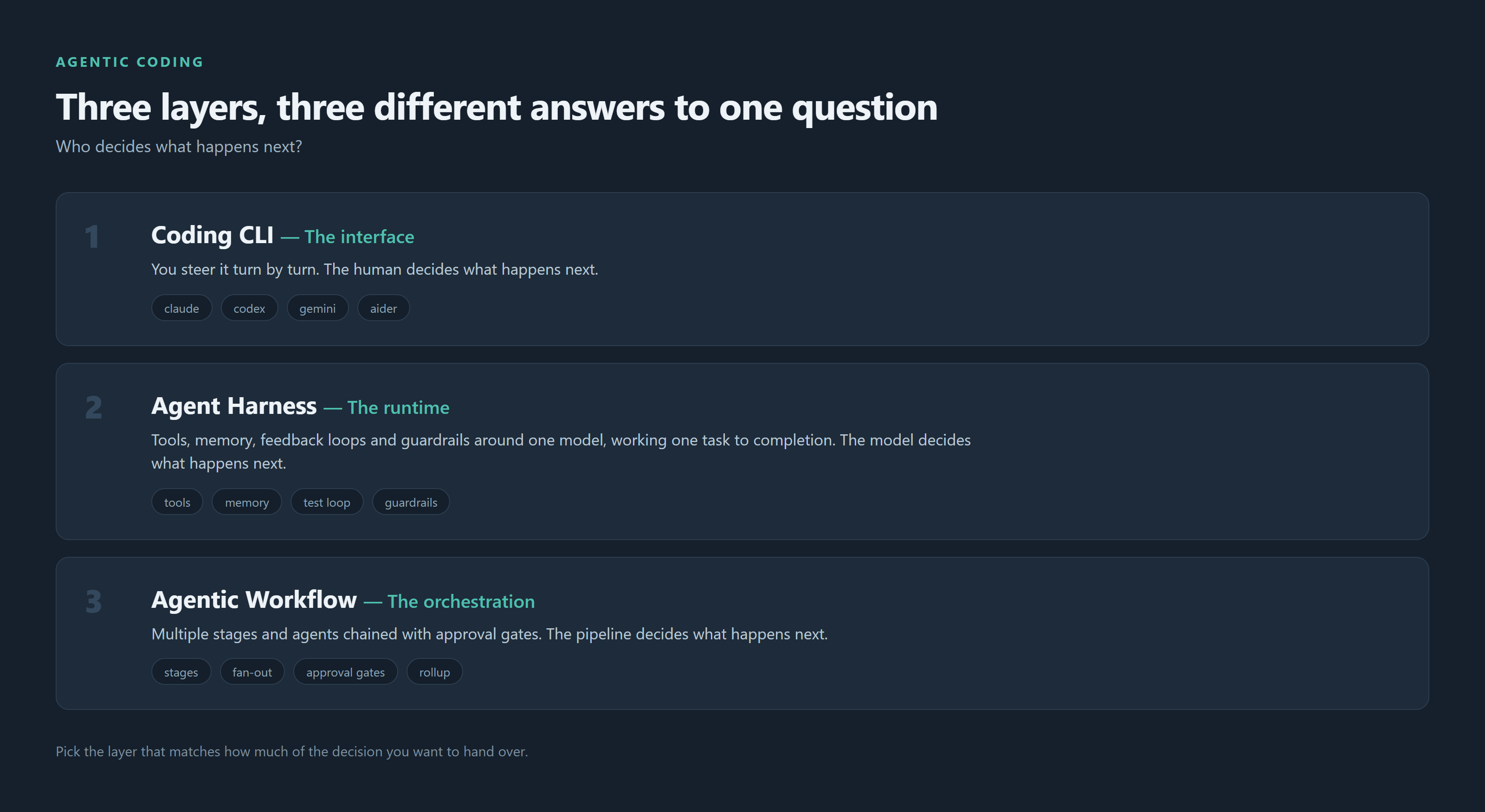
If you've used Claude Code, Codex CLI, Aider, n8n, or Devin in the same month, you've probably felt the terminology blur together. "Agent," "harness," "workflow," and "CLI" get used almost interchangeably in marketing copy — but they describe three distinct layers of the agentic coding stack, and confusing them is why teams pick the wrong tool for the job.
Here's the clean breakdown, grounded in how the term is actually being used across the industry in 2026.
1. The Coding CLI — the interface
A coding CLI (Claude Code, Codex CLI, Aider, OpenCode, Gemini CLI) is the thing you type into. It's the terminal-native front door: you run a command, it opens an interactive loop, you chat with it turn by turn while it reads files, proposes edits, and runs commands in your repo.
The CLI is the surface. It's how a human invokes agentic behavior conversationally, one exchange at a time, with you steering.
Best for: exploratory work, single-repo tasks, pairing on a tricky bug, anything where you want to stay in the loop and approve each step.
2. The Agent Harness — the runtime that makes a model an agent
This is the layer people conflate most. As Anthropic, LangChain, and Databricks have all converged on describing it recently: agent = model + harness. The harness is everything that isn't the model — the system prompt, the tool definitions (bash, file edits, MCP servers), the sandbox, the memory/state management, and crucially the feedback loops and guardrails that keep the model from running off the rails.
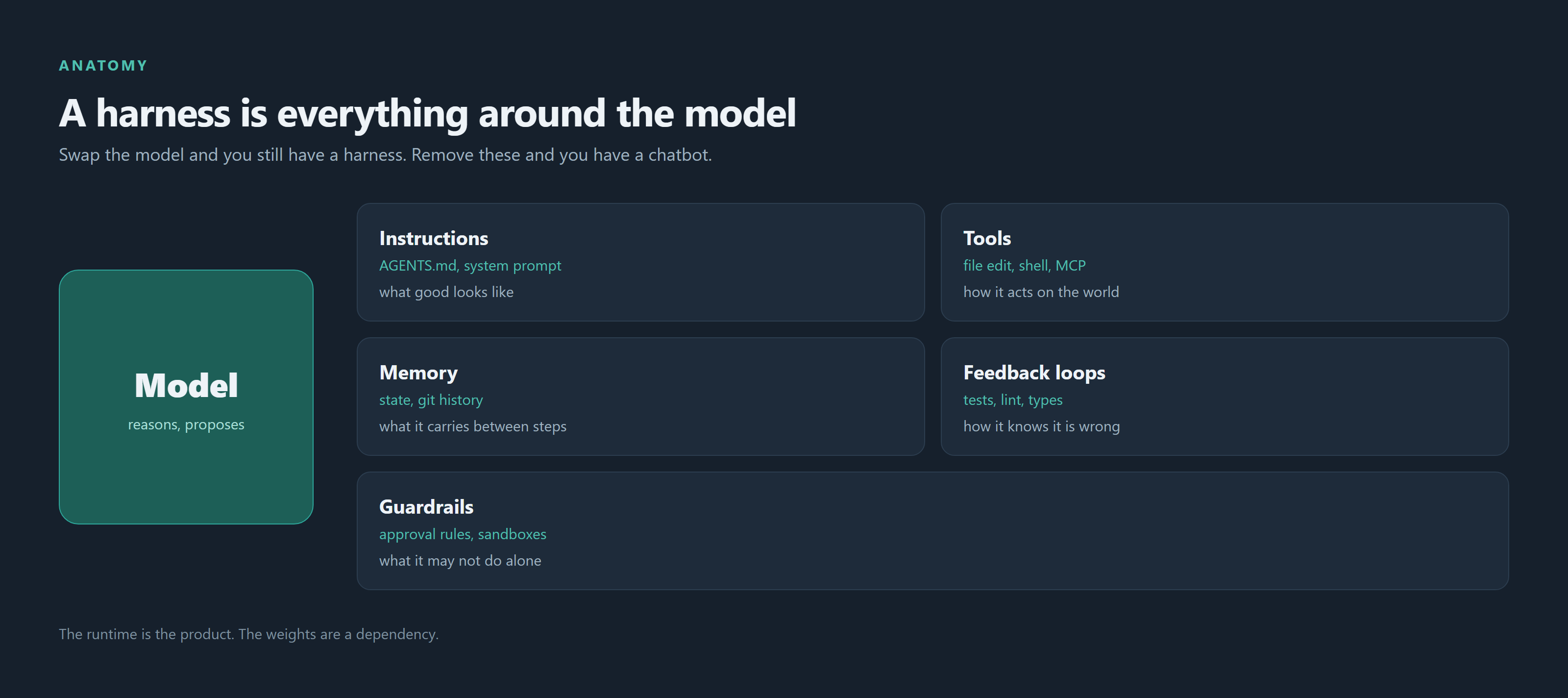
Concretely, a harness is the runtime envelope that gives a raw LLM:
- Instructions — a CLAUDE.md/AGENTS.md of standing orders and conventions
- Tools — a deliberately small, sharp set of actions (a model with 400 tools picks badly; one with 12 picks well)
- Memory — durable state across a session (or sessions) via the filesystem/git, not just context window
- Feedback loops — linters, tests, and structure checks the output must pass before it counts
- Guardrails — hard rules about what the agent may never do without a human
Claude Code and Codex CLI are, technically, both a CLI and a harness — the interactive shell you type into is the front end of a harness that can also run headless/autonomously (e.g., claude -p "fix this failing test" in CI, or a background agent resolving a GitHub issue end-to-end). That's the real distinction: the harness is what lets the same model work unattended inside a sandbox — writing code, running tests, committing, opening a PR — with no human turn-by-turn.
Best for: a well-scoped, autonomous task with a clear "done" signal (tests pass, lint is clean, PR opens) that you're comfortable letting run without babysitting each step. Bug fixes, dependency bumps, adding test coverage, small well-defined features.
3. The Agentic Workflow — orchestration across multiple steps/agents
A workflow is a level up again: an explicit, often visual, multi-step pipeline that chains together model calls, tools, human approval gates, and sometimes multiple different harnesses/agents, each handling one phase. Think n8n, LangGraph, or a plan → build → test → review → ship pipeline where each stage might be a different specialized (sub)agent with its own harness.
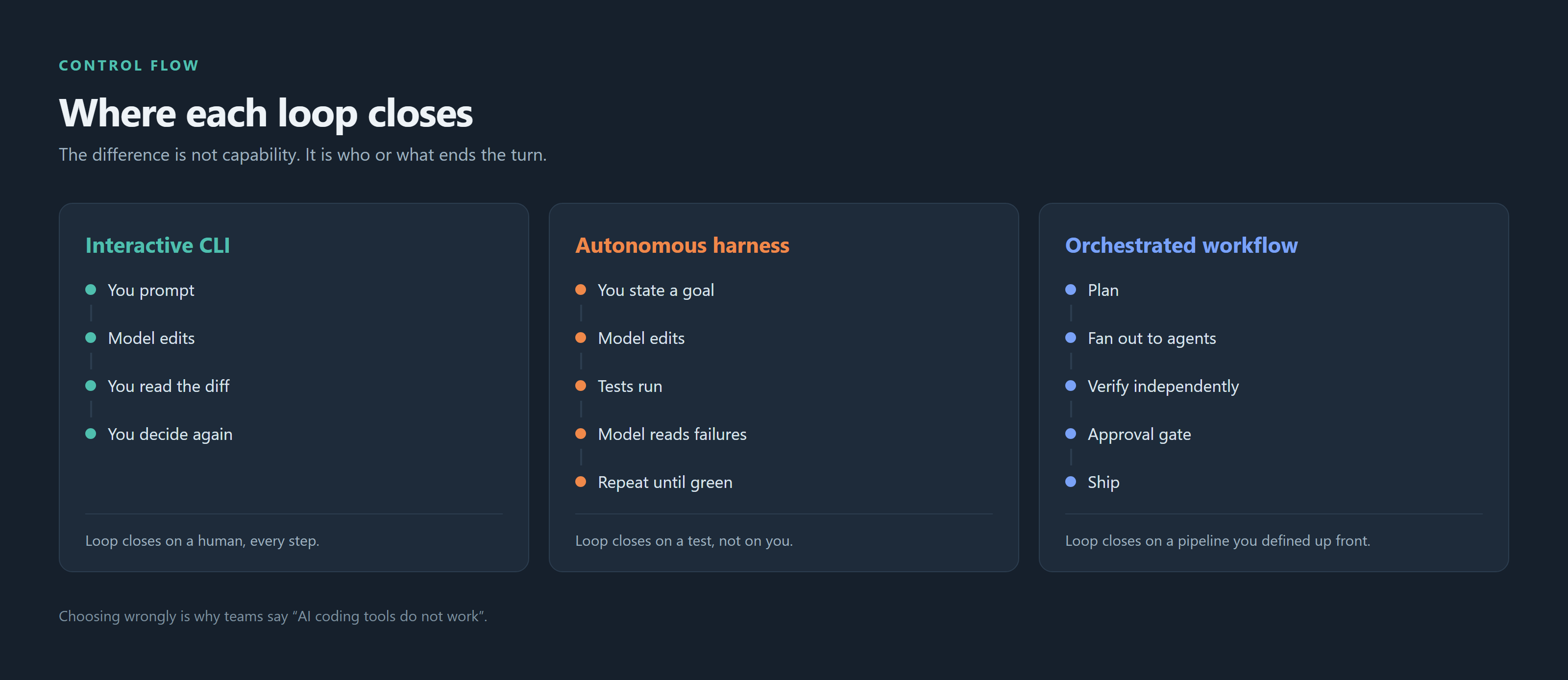
The key difference from a harness: a workflow's control flow is defined ahead of time by you (a graph or YAML), and steps hand off explicitly — whereas a harness's control loop is the agent itself deciding what to do next inside one sandboxed task.
Best for: multi-stage software delivery (plan → build → test → review → ship), fan-out tasks (spawn N subagents on independent modules), anything that needs a human approval gate mid-pipeline, or coordinating multiple specialized agents toward one larger goal.
Control-flow comparison
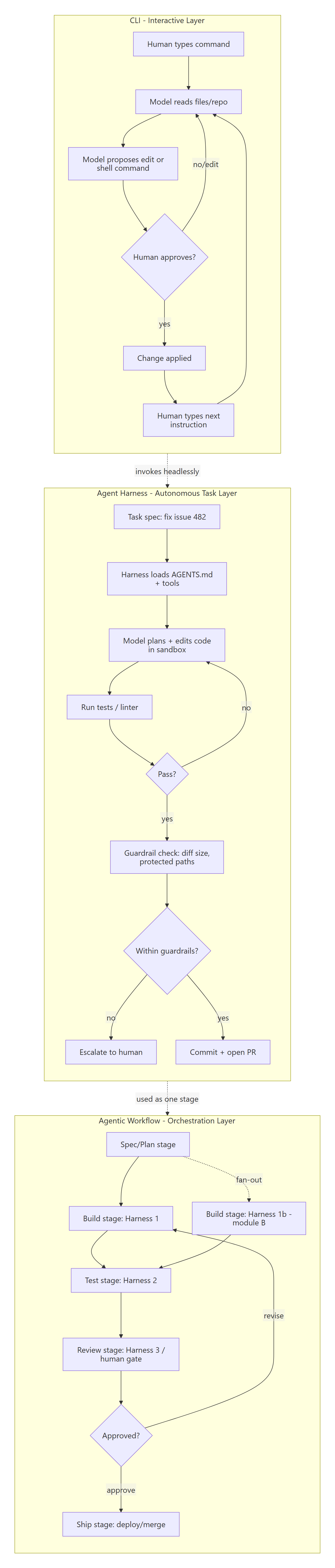
Putting it together — a decision guide
| Situation | Use |
|---|---|
| "Help me debug this weird stack trace right now" | CLI, interactive |
| "Fix this GitHub issue, run tests, open a PR — don't wait on me" | Harness, headless/autonomous mode |
| "Spec this feature, build it, test it, get me a review, then ship it" | Workflow, multi-agent pipeline with approval gates |
| "Refactor every module across the monorepo in parallel" | Workflow fanning out to N harness instances |
| "I want git-native commits and full control over prompts" | CLI (Aider-style architect/editor mode) |
| "CI should auto-resolve flaky test failures nightly" | Harness, scheduled/headless |
Practical takeaway
Don't ask "which tool is best" — ask "what layer does my task live at":
- If you need to stay in the loop, reach for the CLI.
- If you need one task done unattended, safely, reach for (or build) a harness with real feedback loops and guardrails — not just a bare model call.
- If you need multiple stages or multiple agents coordinated, reach for a workflow, and let each stage own its own harness.
The best agentic setups today aren't choosing one of these — they're layering all three: a workflow that orchestrates several harness-driven agents, each one still reachable via its CLI when a human needs to step in.



