Azure SQL Database Containers Local Development Guide
Azure SQL Database Containers: A Better Local Dev Loop for Enterprise Database Teams

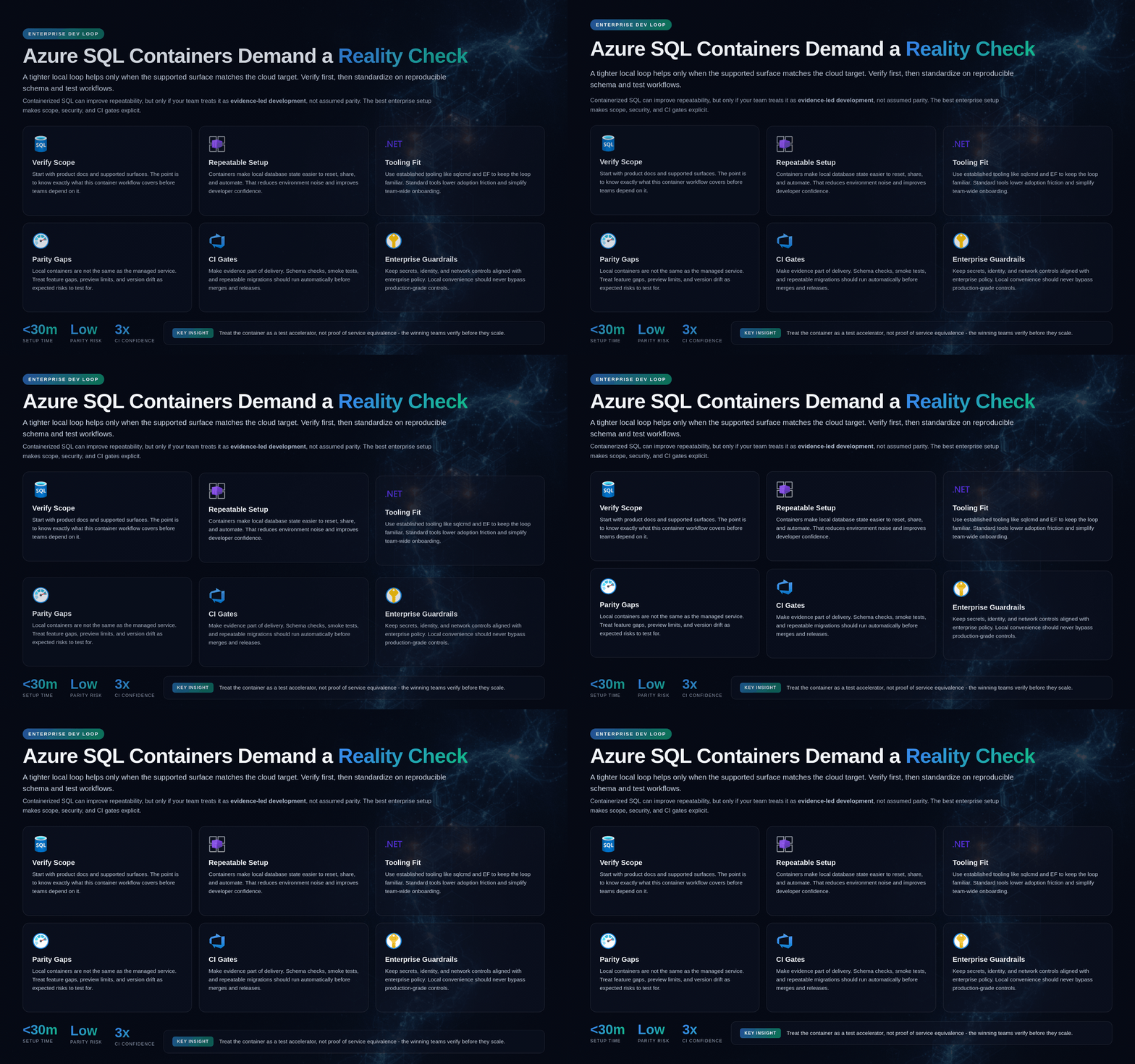
A bad dev database loop will burn a sprint before lunch.
On this page
- Step 1: Verify product scope before adopting a container workflow
- Step 2: Define the reproducible local environment contract
- Step 3: Use SQL tooling as the control plane
- Step 4: Build a schema-first test lane
- Step 5: Carry the same contract into CI
- Step 6: Keep a separate cloud-target validation lane
- Step 7: Put security and governance guardrails around developer databases
- Step 8: Decide with evidence, not enthusiasm
- Step 9: Adopt containers as a confidence layer, not a parity promise
- Sources & References
A few months ago I was on with a 14-person app team that had turned a shared development database into a polite traffic jam. One engineer was testing a migration, another was reseeding lookup data, a third had a long-running query pinned open in SSMS, and by 10:40 a.m. nobody trusted the state of the environment enough to merge anything. That’s the moment local database containers get interesting.
But only if the supported surface matches what you’re trying to prove.
That’s the part teams skip. They hear “container,” assume “close enough to cloud,” and standardize before they’ve verified scope, support boundaries, feature coverage, or identity behavior. Then six weeks later they’re debugging the wrong thing.
So here’s the practical approach I recommend: treat Azure SQL Database container claims as a capability to verify before you bless them as a team standard. Then use the SQL tools you already know to build a tight, repeatable local loop for schema work, smoke tests, and CI evidence.
This is a hands-on tutorial. It’s intentionally opinionated. It’s also disciplined about one thing: local is for confidence, not mythology.
Step 1: Verify product scope before adopting a container workflow
Before you write a Dockerfile, answer the boring questions that save careers.
What your team must document up front
I want a one-page decision record before any team says “we’re doing local Azure SQL containers.” It needs explicit answers for:
- Availability and current support status
- Official image source
- Supported host OS and architecture
- Licensing terms for local dev use
- Security ownership for image provenance and patching
- Product support boundary
- Known differences versus the Azure-hosted target
If you can’t point to a source for those, you are not standardizing a platform. You are starting a rumor.
The SQL docs already give you one simple discipline that helps here: use the “Applies to” label on every setup, migration, and troubleshooting article to confirm which SQL product the guidance actually covers, per the SQL docs navigation guide. I make this a review gate. If the article doesn’t apply to your target, it doesn’t get cited in the team runbook.
Put the workflow in the real SQL tooling landscape
Microsoft’s SQL documentation is broader than one runtime. Azure SQL Database sits within the Azure SQL family, and the docs navigation also includes things like Fabric Database Hub, per the SQL Server technical documentation. Useful context, but don’t confuse navigation structure with a product announcement or feature guarantee.
That distinction matters in enterprise architecture reviews. I’ve had platform teams wave around doc nav screenshots as if they were support statements. They’re not.
Set the boundary now, not after the pilot fails
Here’s the boundary I use:
- Local containerized SQL is for repeatable developer setup, schema evolution, deterministic fixtures, and fast smoke testing.
- Azure-hosted validation is for service behavior, identity, network controls, operational characteristics, and anything feature-specific that local cannot prove.
Write that down. Put it in the repo. Make every team lead sign off on it.
Step 2: Define the reproducible local environment contract
The biggest mistake in local database workflows is treating the environment as a pile of convenience scripts instead of a contract.
What goes in the contract
Your contract should version these things together:
- Schema definition or migration history
- Seed-data policy
- Startup/runtime configuration
- Migration runner
- Test entry point
- Reset behavior
- Expected cloud target
If a new engineer joins, they should be able to answer one question fast: “What exact state am I testing against?”
I also separate data into three buckets:
- Disposable developer data
- Approved deterministic test fixtures
- Production-derived data, which is blocked by default
That separation saves you from the classic mess where someone quietly uses a scrubbed prod extract on a laptop, then screenshots a query result in Teams.
Start with a simple local flow
This diagram is the entire point of the tutorial: shorten the loop, keep the state known, and make failure classification obvious.
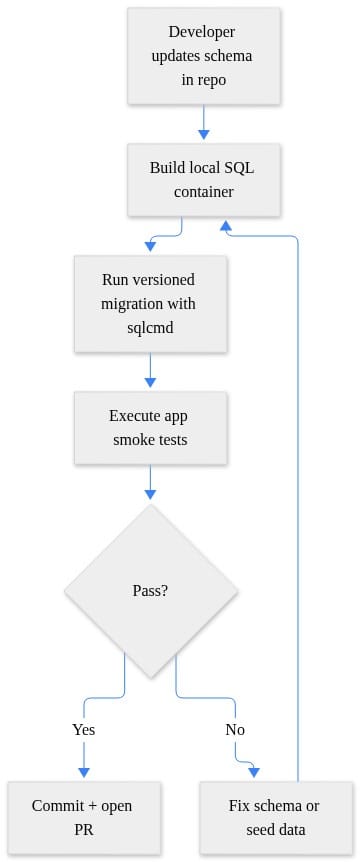
What you should observe: the loop is intentionally boring. Build, migrate, test, fix, repeat. No hidden workstation magic. No “works on my machine” folklore.
Build an illustrative local image
One important clarification before the Dockerfile: there is no official container image for Azure SQL Database itself. For local development, azure-sql-edge is a practical proxy because it offers strong feature compatibility in a relatively small footprint. That makes it useful for schema work, fixtures, and smoke tests, while reinforcing the core rule of this post: local and cloud are related environments, not identical ones.
For LinkedIn purposes, I’m keeping this example simple and readable. It shows the shape of a local SQL container build with migrations and seed scripts included. The key idea is that the environment definition lives with the application artifacts.
# Dockerfile: Build a local Azure SQL Edge container image with seed scripts
FROM mcr.microsoft.com/azure-sql-edge:latest

ENV ACCEPT_EULA=Y
ENV MSSQL_PID=Developer
ENV MSSQL_SA_PASSWORD=Your_strong_Password123

WORKDIR /workspace
COPY ./migrations /workspace/migrations
COPY ./seed /workspace/seed

EXPOSE 1433
CMD /opt/mssql/bin/sqlservr
What you should observe: this is an illustrative local image pattern, not a production recipe. The important part is versioning the schema inputs with the container definition.
Add a disposable compose definition
Now give the team a one-command way to stand up an isolated database. I prefer explicit ports and named volumes so developers can inspect and reset state without guessing.
# docker-compose.yml: Start an isolated local database for team development
version: "3.9"

services:
  sqledge:
    build:
      context: .
      dockerfile: Dockerfile
    container_name: local-sqldb
    environment:
      ACCEPT_EULA: "Y"
      MSSQL_SA_PASSWORD: "Your_strong_Password123"
      MSSQL_PID: "Developer"
    ports:
      - "14333:1433"
    volumes:
      - sqldata:/var/opt/mssql

volumes:
  sqldata:
What you should observe: each developer gets an isolated environment contract. That reduces collisions immediately compared to a shared dev database.
Step 3: Use SQL tooling as the control plane
You do not need a fancy abstraction layer to get discipline here. Start with the tools your database team already trusts.
Use sqlcmd for portable execution
When I need a command-line path that works across laptops, build agents, and containerized workflows, I reach for sqlcmd. Microsoft’s installation documentation explicitly states sqlcmd applies to Azure SQL Database and that it runs on Windows, macOS, Linux, and in containers, per the sqlcmd install docs.
That combination matters. It means your migration runner can be portable without inventing your own client wrapper.
Here’s a thin PowerShell wrapper that validates required settings and returns a CI-friendly exit code.
# migrate.ps1: Validate local config, run a versioned sqlcmd migration, and return a CI-friendly exit code
$required = "SQL_SERVER","SQL_PORT","SQL_USER","SQL_PASSWORD","SQL_DB","MIGRATION_FILE"
$missing = $required | Where-Object { -not $env:$_ }
if ($missing) { Write-Error ("Missing env vars: " + ($missing -join ", ")); exit 2 }

Write-Host "Using SQL_SERVER=$($env:SQL_SERVER) SQL_PORT=$($env:SQL_PORT) SQL_USER=$($env:SQL_USER) SQL_DB=$($env:SQL_DB)"
Write-Host "Running migration file: $($env:MIGRATION_FILE)"

& sqlcmd `
  -S "$($env:SQL_SERVER),$($env:SQL_PORT)" `
  -U $env:SQL_USER `
  -P $env:SQL_PASSWORD `
  -d $env:SQL_DB `
  -b -i $env:MIGRATION_FILE

$code = $LASTEXITCODE
Write-Host "sqlcmd exit code: $code"
exit $code
What you should observe: the script fails fast on missing configuration and surfaces sqlcmd’s exit code cleanly. That’s exactly what you want in local runs and pipelines.
Use SSMS when a GUI is the right tool
I’m not ideological about terminals. If you’re troubleshooting a migration, inspecting indexes, or scripting a quick validation query, SSMS is still a practical tool. Microsoft’s SSMS docs cover connecting, querying, and scripting tasks in the normal way, per the SSMS documentation.
My rule is simple: use the GUI to inspect, but put the actual migration and validation logic under source control. If a step only exists in somebody’s SSMS history, it doesn’t exist.
Use EF where the app already uses .NET
If your application already lives in .NET, Entity Framework gives you a provider-aware ORM and migration workflow across multiple back ends, including SQL Database, SQLite, MySQL, PostgreSQL, and Azure Cosmos DB, per the Entity Framework documentation.
That doesn’t mean “one provider equals all behavior.” It means EF can help you standardize the application-side workflow while you stay honest about provider differences. I covered that broader application/database interaction pattern in my post on Azure SQL for Enterprise Coding Agents.
Step 4: Build a schema-first test lane
A local database loop earns its keep when schema changes become cheap to validate and cheap to reject.
Apply schema to a clean environment
Start with a minimal migration that creates the database, schema, and one table with a realistic constraint shape.
-- 001_create_app_schema.sql: Create a minimal enterprise-style schema with audit columns
IF DB_ID(N'AppDb') IS NULL
BEGIN
    CREATE DATABASE AppDb;
END;
GO

USE AppDb;
GO

IF SCHEMA_ID(N'app') IS NULL EXEC('CREATE SCHEMA app');
GO

CREATE TABLE app.Customer (
    CustomerId INT IDENTITY(1,1) PRIMARY KEY,
    Email NVARCHAR(320) NOT NULL UNIQUE,
    DisplayName NVARCHAR(200) NOT NULL,
    CreatedAt DATETIME2 NOT NULL DEFAULT SYSUTCDATETIME()
);
GO
What you should observe: this script creates a deterministic starting point with a schema namespace, a primary key, a unique constraint, and an audit-style timestamp default.
Seed only deterministic, non-sensitive fixtures
Then add fixtures that support repeatable tests. Not “whatever data I had lying around.” Deterministic fixtures.
-- 002_seed_reference_data.sql: Seed deterministic test data for repeatable local runs
USE AppDb;
GO

IF NOT EXISTS (SELECT 1 FROM app.Customer WHERE Email = N'alice@example.com')
BEGIN
    INSERT INTO app.Customer (Email, DisplayName)
    VALUES (N'alice@example.com', N'Alice');
END;
GO

SELECT COUNT(*) AS CustomerCount
FROM app.Customer;
GO
What you should observe: the seed pattern is idempotent and ends with a simple validation query. That makes reruns predictable.
Add a smoke test the pipeline can understand
I like smoke tests that return machine-readable output. When a test fails, I want to know whether I’m dealing with connectivity, schema state, missing data, or application logic.
# smoke_test.py: Verify the database is reachable and emit machine-readable JSON pass/fail
import json
import os
import sys
import pyodbc

conn_str = (
    f"DRIVER={{ODBC Driver 18 for SQL Server}};"
    f"SERVER={os.environ['SQL_SERVER']},{os.environ.get('SQL_PORT', '14333')};"
    f"DATABASE={os.environ['SQL_DB']};UID={os.environ['SQL_USER']};PWD={os.environ['SQL_PASSWORD']};"
    "Encrypt=no;TrustServerCertificate=yes;"
)

try:
    with pyodbc.connect(conn_str, timeout=5) as conn:
        row = conn.cursor().execute("SELECT COUNT(*) FROM app.Customer").fetchone()
    print(json.dumps({"status": "pass", "customerCount": int(row[0])}))
    sys.exit(0)
except Exception as ex:
    print(json.dumps({"status": "fail", "error": str(ex)}))
    sys.exit(1)
What you should observe: this test answers one narrow question well—can I connect and query the expected table state? That’s enough for a first gate.
Classify failures like an adult system
When the test lane breaks, don’t dump everything into “database issue.”
Use categories:
- Schema defect
- Data-fixture defect
- Application defect
- Local-environment limitation
- Cloud-target compatibility issue
That classification is not bureaucracy. It’s how you avoid wasting two days blaming the wrong layer.
In my home lab on Proxmox, I do exactly this with every new service pattern before I let it near Azure spend. If the local loop can’t tell me which layer failed, the loop is too fuzzy.
Step 5: Carry the same contract into CI
If local and CI use different definitions, your team is just role-playing reproducibility.
Reuse the same environment definition
The pipeline should create the database environment from the same versioned assets used locally:
- same migration files
- same seed policy
- same test entry point
- same validation queries
That’s how you make “passed locally” mean something.
Make the stages explicit
A clean pipeline for this pattern usually looks like:
- Build local database runtime
- Apply migrations
- Seed approved fixtures
- Run smoke queries
- Run application integration tests
- Publish logs and results
And yes, publish the migration output. I want reviewable evidence, not green checkboxes with no trail.
This sequence diagram shows the local-to-cloud handoff clearly.
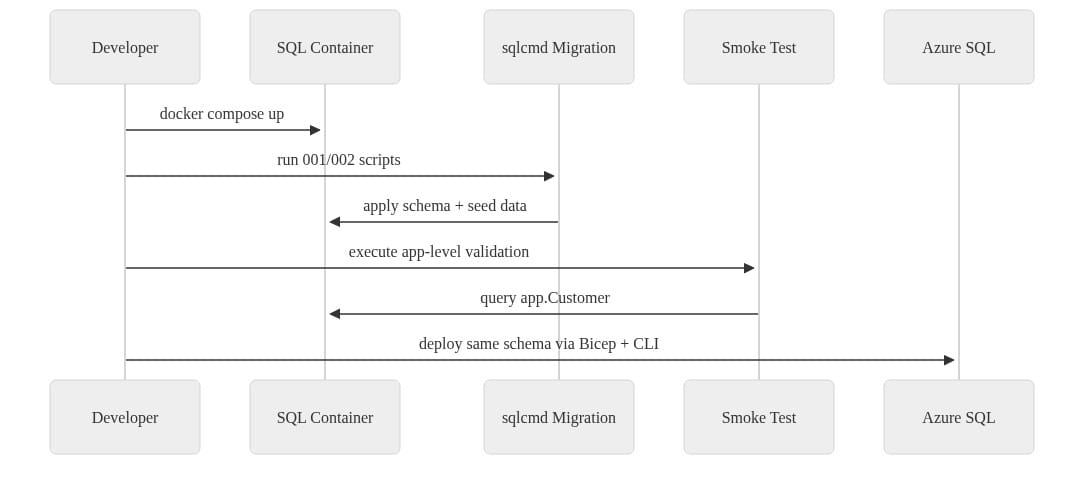
What you should observe: the same schema path starts locally, then extends to Azure validation. That separation is healthy. Don’t collapse it.
Step 6: Keep a separate cloud-target validation lane
This is where teams either get disciplined or get embarrassed.
Local validation proves your team can build and test against a known state. It does not prove Azure SQL Database behavior across every feature, identity flow, network path, or managed operation.
Provision an Azure-hosted integration target
For the cloud lane, keep the infrastructure definition just as versioned as the local one. Here’s a small Bicep example for an Azure SQL logical server and database.
// main.bicep: Provision an Azure SQL logical server and database for integration environments
param location string = resourceGroup().location
param sqlServerName string
@secure()
param sqlAdminPassword string
param sqlAdminLogin string = 'sqladminuser'
param databaseName string = 'appdb-int'

resource sqlServer 'Microsoft.Sql/servers@2022-05-01-preview' = {
  name: sqlServerName
  location: location
  properties: {
    administratorLogin: sqlAdminLogin
    administratorLoginPassword: sqlAdminPassword
    publicNetworkAccess: 'Enabled'
  }
}

resource sqlDb 'Microsoft.Sql/servers/databases@2022-05-01-preview' = {
  name: '${sqlServer.name}/${databaseName}'
  location: location
  sku: { name: 'Basic', tier: 'Basic' }
}
What you should observe: this establishes a separate Azure-hosted target for integration validation. Keep this lane distinct from the local loop.
Then wire it up with a simple Azure CLI deployment script.
# deploy.sh: Create Azure infrastructure from Bicep with Azure CLI for shared test environments
#!/usr/bin/env bash
set -euo pipefail

RESOURCE_GROUP="${RESOURCE_GROUP:-rg-sql-dev}"
LOCATION="${LOCATION:-eastus}"
SQL_SERVER_NAME="${SQL_SERVER_NAME:-sqldev$RANDOM}"
SQL_ADMIN_PASSWORD="${SQL_ADMIN_PASSWORD:?set SQL_ADMIN_PASSWORD}"

az group create --name "$RESOURCE_GROUP" --location "$LOCATION" >/dev/null
az deployment group create \
  --resource-group "$RESOURCE_GROUP" \
  --template-file main.bicep \
  --parameters sqlServerName="$SQL_SERVER_NAME" sqlAdminPassword="$SQL_ADMIN_PASSWORD"
What you should observe: now you have a repeatable path to stand up a cloud test target from source-controlled infrastructure.
I’ve written about this broader cost-and-governance tradeoff before in Azure SQL Free Tier for Enterprise Modernization. The short version: use local where speed matters, use Azure where truth matters.
Build a parity matrix instead of making assumptions
This is the artifact I ask for before scale-out:
| Capability area | Local result valid? | Azure validation required? | Notes |
|---|---|---|---|
| Schema creation and migration order | Yes | Yes | Validate both |
| Deterministic seed data | Yes | Optional | Usually local-first |
| Basic CRUD smoke tests | Yes | Yes | Good in both |
| Authentication and identity flows | No | Yes | Cloud-required |
| Network restrictions and firewall behavior | No | Yes | Cloud-required |
| Service-managed operations | No | Yes | Cloud-required |
| Performance characteristics | Limited | Yes | Cloud-required |
| Operational observability | Limited | Yes | Cloud-required |
If the matrix is blank, the standard is not ready.
Step 7: Put security and governance guardrails around developer databases
This is where a lot of “just for local dev” ideas turn into audit findings.
Keep secrets out of the wrong places
Do not store secrets in:
- repository files
- Dockerfiles committed to source
- image layers
- screenshots
- shared wiki pages
- CI logs
Use environment injection or a proper secret store for anything real. The examples here are illustrative on purpose; your enterprise pattern should replace hard-coded credentials immediately.
Ban production-derived data by default
My default policy is simple: synthetic data first, approved sample data second, production-derived data only with explicit exception handling. Local developer machines are not your sanitization platform.
Assign ownership for local artifacts
Someone must own:
- approved base images
- update cadence
- vulnerability review
- retirement path
- developer guidance
- CI log retention
- exported backup handling
If nobody owns those, the platform team owns the incident by default.
The same governance mindset shows up in my Azure AI Agent Security Playbook for Enterprise Tools. Different stack, same rule: convenience without controls becomes risk fast.
Step 8: Decide with evidence, not enthusiasm
I like local database containers. I also like measurable outcomes more than fashionable architecture.
What to measure in a pilot
Run a time-boxed pilot with two or three services and capture:
- onboarding time for a new developer
- wait time caused by shared DB contention
- environment reset time
- migration failure rate
- flaky test rate
- CI rerun frequency
- support effort from DBAs or platform engineering
- Azure consumption avoided or shifted
Those numbers tell you whether the workflow is helping.
The tradeoff is real
Isolated local environments reduce coordination friction. Shared environments centralize administration and access control. Both are valid. The right answer depends on what your team is optimizing for.
What I push back on is false certainty. If a team says “local containers solve database dev,” I ask one question: which checks moved left, and which checks still require Azure because that’s where the real behavior lives?
If they can’t answer that, they’re buying speed with borrowed confidence.
Step 9: Adopt containers as a confidence layer, not a parity promise
Here’s the checklist I’d use to approve this pattern for an enterprise team:
- Documented product scope and support boundary
- “Applies to” review for every key doc and runbook step
- Versioned local environment contract
- Deterministic reset behavior
- Safe data policy
- Approved image provenance and patch ownership
- Source-controlled migration and validation commands
- CI evidence with logs and test outputs
- Separate Azure-hosted validation lane
- A maintained parity matrix
That’s the mature version of the pattern.
The immature version is “we have a container, so we’re basically testing Azure locally.” That sentence has wasted a lot of expensive engineering time.
A tighter local database loop is worth real money when it improves repeatability, onboarding, and test discipline. Just don’t confuse convenience with proof. Verify the capability. Define the contract. Keep the cloud lane honest.
Have you built a parity matrix for your local database workflow yet—yes or no?
#Azuresql #Databasedevops #DataArchitecture
Sources & References
- Microsoft SQL Documentation - SQL Server
- SQL Server Management Studio
- Entity Framework documentation hub
- Download and Install the sqlcmd Utility - SQL Server
- SQL Server Docs Navigation Tips - SQL Server
- SQL Server Technical Documentation - SQL Server
Try it yourself
Run this tutorial as a Jupyter notebook: Download runbook.ipynb (42 cells, 25 KB).