The next wave of AI productization: from search augmentation to domain-specific copilots
The next wave of AI productization: from search augmentation to domain-specific copilots


Generic chat becomes shelfware the moment it cannot act inside a governed system.
The moat in enterprise AI is no longer a smarter prompt box. It is a copilot that can operate inside real workflows without breaking trust.
Enterprise AI is moving past the novelty phase of generic chat. The next durable advantage will come from copilots embedded in actual processes, constrained by domain rules, and trusted enough to support bounded action.
That is the shift leaders should optimize for now: not “better chat,” but a move from search augmentation toward domain-specific copilots and, selectively, orchestrated agent patterns. The winning architecture is not model-first. It is workflow-first and measurable.
Why standalone chat is no longer enough
The first wave of enterprise AI adoption was predictable. Teams started with generic chat because it was easy to demo, easy to procure, and easy to explain. Ask a question, get an answer, summarize a document, draft an email. Useful? Yes. Defensible as a long-term product strategy? No.
Search augmentation was an important first step because it improved retrieval over enterprise content without forcing companies to redesign systems of work. Microsoft 365 Copilot is positioned as an AI-powered productivity layer that integrates large language models with Microsoft Graph and enterprise data across Microsoft 365 workloads. Early value was fundamentally about finding and synthesizing information faster, not executing governed business processes.
But that phase is hitting a ceiling.
A chatbot that answers questions but cannot complete a governed task becomes another tab. It may reduce lookup time, yet still leave the hard part untouched: approvals, permissions, business rules, auditability, and action execution across systems of record.
In Q4, a 220-person operations team I advised had a support bot answering policy questions in under 8 seconds, but agents still alt-tabbed across ServiceNow, Outlook, and a claims system for every exception case because the bot could not inherit entitlements or trigger a bounded action.
That is the maturity moment buyers are in now. The question is no longer, “Which model sounds smartest in a demo?” It is, “Which AI capability can be trusted inside a workflow?”
My read of Microsoft’s product direction is that it reinforces this shift. Microsoft explicitly distinguishes among different Copilot choices by role and organizational need, and its release plans continue expanding role-based experiences across Dynamics 365, Power Platform, Cloud for Industry, and Copilot. That is consistent with a market moving from generic assistants toward specialized, in-context AI.
From search augmentation to embedded copilots
Let’s get precise.
Search augmentation is AI layered over enterprise content to retrieve, summarize, and synthesize information. It is excellent for knowledge discovery, policy lookup, meeting recap, and document Q&A. It lowers search friction. It does not, by itself, transform the process.
Embedded copilots are different. They live inside the application context where work actually happens: CRM, service operations, finance workflows, field service, legal review, document systems, and collaboration tools. They are aware of the user, the object, the state of the process, and the bounded actions allowed next.
That is why embedded copilots create more enterprise value. They reduce context switching, narrow the decision surface, and apply policy constraints before a recommendation or action is surfaced.
Microsoft’s extensibility story supports this view. Microsoft documents that agents for Microsoft 365 Copilot extend Copilot across apps such as Copilot Chat, Outlook, Teams, and Word using enterprise data from Microsoft Graph. Microsoft 365 Copilot APIs are also designed to let organizations build custom apps and agents that align with Microsoft 365 compliance controls. That is a platform story about specialization in context, not one monolithic assistant.
If you want a simple mental model, this is the progression:
- Search augmentation helps people find answers.
- Embedded copilots help people complete work.
- Orchestrated agent patterns help systems coordinate complex work across domains.
That middle step is where most enterprise ROI will be won in the next few years.

The real moat: workflow integration, trusted access, and domain guardrails
Model capability is getting commoditized faster than many product teams want to admit. Differentiation is shifting upward into architecture and operating model.
I would break the moat into three layers.
1. Workflow integration
A real copilot must understand task boundaries, trigger points, downstream systems, approvals, and reversibility. If it cannot tell whether a task is advisory, preparatory, or executable, it is not a copilot. It is a chat surface with better branding.
For example, a finance operations copilot should know the difference between:
- explaining a vendor reset policy,
- preparing a reset request with required fields,
- and initiating the reset after manager approval.
That distinction is product design, not an implementation detail.
2. Trusted access
Grounding must be identity-aware. In Microsoft environments, that typically means enterprise data access aligns with Microsoft Graph plus Microsoft 365 security and compliance controls where those systems are in play.
This is the architectural inflection point many teams miss: retrieval is not just “connect to more data.” It is “connect to the right data, scoped to the right identity, with the right permissions.”
3. Domain guardrails
Legal, healthcare, finance, manufacturing, and public sector workflows are not generic. They have domain terminology, policy boundaries, compliance requirements, and action constraints. Those guardrails are not back-office controls. They are core product features.
A claims copilot that does not understand payout thresholds, escalation rules, or regulated disclosure language is not minimally viable. A legal drafting assistant without citation discipline is not production-ready. A healthcare assistant that cannot respect context-specific access and review controls is a liability.
Architecture patterns: search, copilot, and multi-agent systems
There are three patterns worth separating clearly.
Pattern 1: Search augmentation
This is the lowest-risk pattern and still the right starting point for many organizations. It is broad, useful, and relatively fast to deploy. The tradeoff is that it rarely changes process economics on its own.
The snippets below are illustrative design patterns, not product SDK examples.
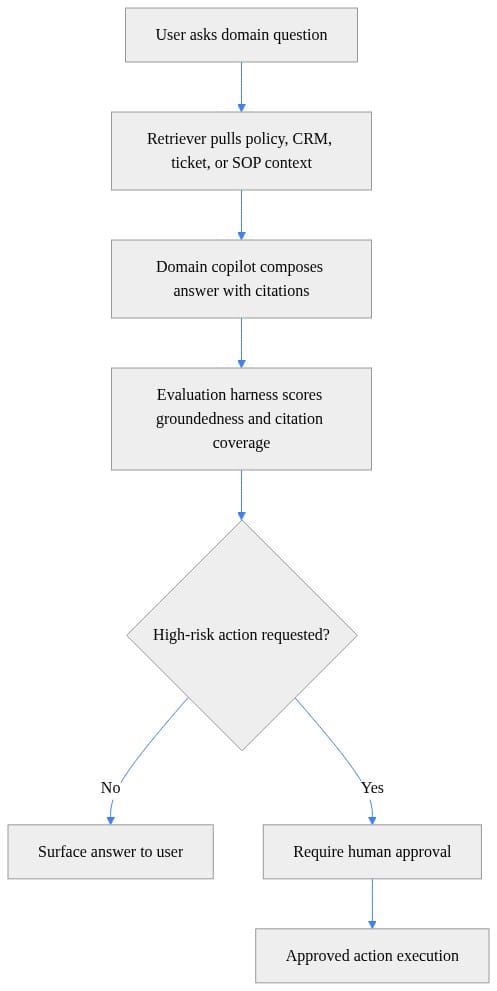
What matters here is the branch. The moment a high-risk action appears, the architecture should move into approval rather than pretending every answer is equal.
Pattern 2: Embedded copilots
This is where stronger ROI usually appears because the assistant sits in the flow of work and can recommend or initiate bounded actions. Good copilots do not “do anything.” They do a small number of high-value things safely.
A Microsoft-adjacent way to think about it is: retrieve context through Graph-connected enterprise data, generate a recommendation, score risk, and route any executable step into an approval workflow before calling downstream systems.
# Python: Simple policy gate for a Copilot-style action using Graph-grounded context and approval routing
def route_action(requested_action: str, risk_score: float, has_citation: bool) -> str:
    if not has_citation:
        return "block_and_request_more_context"
    if risk_score >= 0.7:
        return "send_to_approval_flow"
    return f"execute_{requested_action}"

decision = route_action(
    requested_action="update_case_status",
    risk_score=0.82,
    has_citation=True,
)
print(decision)
What to observe: the structure matters more than the syntax. If your copilot cannot carry evidence, classify risk, and distinguish between direct execution and approval routing, governance becomes guesswork.
Pattern 3: Multi-agent orchestration
This pattern is real, but it is also where hype gets dangerous. Multi-agent does not mean replacing systems of record. It means coordinating specialized capabilities around them.
Think supply chain exception handling, enterprise service operations, or cross-functional incident response:
- one agent gathers context,
- another evaluates policy,
- another proposes the next action,
- a human or workflow engine approves,
- and existing systems execute.
The right progression path is straightforward:
- Start with retrieval and summarization.
- Move to role-specific copilots with bounded actions.
- Adopt orchestrated agent patterns only where process complexity justifies the added control plane.

Governance is now product architecture
The rise in AI risk and trusted-platform abuse means governance can no longer be treated as a review gate at the end. It has to be designed into the product.
Identity-aware access is foundational. The assistant should inherit user entitlements and respect application-level permissions.
Provenance is next. Users and auditors need to know what sources informed a recommendation or action.
Human-in-the-loop controls come after that: approvals, escalation paths, confidence thresholds, and reversible actions. These are not signs of weak automation. They are signs of competent automation.
You also need observability. If you cannot measure groundedness, action requests, approval rates, and what was actually shown to users, you cannot improve quality or defend the system to risk teams.
Microsoft’s positioning reinforces this trust-first model. Microsoft highlights enterprise data protection and responsible AI safety checks in Copilot Chat, and its Copilot APIs and agent extensibility documentation emphasize secure integration into Microsoft 365 environments. Governance is no longer just an IT talking point. It is a buying criterion.

Why now: platform readiness and buyer expectations have converged
This shift is happening now because the stack is finally mature enough.
Microsoft documentation now spans Copilot APIs, extensibility, agents, Graph-connected experiences, Power Platform workflow tooling, and architecture guidance. To me, that breadth is evidence of a platform moving from experimentation to operationalization. The pieces are increasingly there:
- APIs to extend and embed capabilities,
- connectors to enterprise systems,
- workflow tooling to orchestrate actions,
- compliance and security controls to constrain access,
- and role-based product experiences that reflect actual business functions.
Buyer expectations have also changed. Executives are less interested in another chat surface and more interested in measurable outcomes:
- shorter cycle times,
- higher first-contact resolution,
- faster exception handling,
- better analyst throughput,
- lower compliance error rates.
This is the end of the “just add a chatbot” era. It is the beginning of AI as a governed application capability.
What enterprise leaders should do next
If you lead data, platform, architecture, or transformation, here is the practical playbook.
1. Inventory high-friction workflows
Look for places where knowledge retrieval and bounded action can be combined. Good targets include service operations, finance exceptions, claims review, document-heavy approvals, and internal support.
2. Prioritize measurable use cases
Choose workflows with clear business metrics:
- cycle time reduction,
- first-contact resolution,
- analyst throughput,
- exception handling speed,
- compliance quality.
3. Establish a reference architecture
Your baseline should include:
- identity and access inheritance,
- retrieval and grounding,
- action boundaries,
- observability,
- evaluation,
- approval controls,
- and provenance.
4. Build a copilot portfolio strategy
Separate three categories:
- broad productivity copilots,
- domain-specific copilots,
- heavier agent orchestration patterns.
5. Instrument outcomes from day one
A pilot should graduate based on evidence, not executive enthusiasm. Track user-visible quality, approval rates, exception paths, task completion, and business impact.
My opinion is simple: the winners in this wave will not be the organizations with the flashiest demos. They will be the ones that make AI dependable inside real work.
Which pattern are you implementing right now: retrieval, embedded copilot, or orchestrated agents? And what governance blocker is hardest in practice: permissions, approvals, evaluation, or auditability?
#EnterpriseAI #Microsoft365Copilot #DataArchitecture
Sources & References
- Official Microsoft Power Platform documentation - Power Platform
- Microsoft 365 Copilot hub
- Microsoft 365 Copilot APIs Overview
- Agents for Microsoft 365 Copilot
- AI Fluency - Explore AI in your language. - Training
- AI Architecture Design - Azure Architecture Center
- Microsoft 365 Copilot - Service Descriptions
- Decide which Copilot is right for you
- Release plans for Dynamics 365, Power Platform, Cloud for Industry, and Copilot - Dynamics 365
- Microsoft 365 Copilot Chat Privacy and Protections
Try it yourself
Run this tutorial as a Jupyter notebook: Download runbook.ipynb (26 cells, 22 KB).



