The Skills Gap Myth: What Fabric, Databricks, and AI Copilots Actually Close
What Fabric, Databricks and AI copilots make easier, and what teams still need to validate across platform boundaries and government clouds.

Disclosure: I'm Chief Data Officer for Federal Civilian at Microsoft. These are my personal views. Product capabilities and availability are based on the sources linked below; verify current support before making an architecture decision.
The claim I keep hearing
There's a persistent industry narrative that goes something like this: "Databricks requires deep data engineering and Python expertise. Microsoft Fabric doesn't. It's lower-code, more accessible, and closes the skills gap."
I don't think that's the right question.
If a platform lets your team deliver a workload with less code and less infrastructure work, that is a real benefit, and I am not dismissing it. What I want to know is which work went away and which work someone still has to own. Who checks the data? Who validates access when it crosses a platform boundary? Who works out why a number is wrong?
That is what this piece is about: what Fabric, Databricks and AI copilots make easier, where the complexity moves instead of disappearing, and what you still have to understand before you rely on any of it.
The short version:
- No platform removes the need for skilled engineers. Fabric and Databricks both lower the floor; neither lowers the ceiling.
- AI copilots shorten ramp-up on well-scoped work. They don't supply judgment, and the evidence on experienced engineers is mixed.
- Run two engines only if you clear three capability gates. Otherwise pick one and stay on open formats.
- Federal readers: skip to the federal and sovereign-cloud check. In Azure Government and GCC High the commercial reference architecture doesn't exist yet. One shortcut-based path does work, with a network-isolation question to settle first.
Does Fabric require less skill than Databricks?
Sometimes. It depends on the workload, and the comparison has to use current capabilities on both sides. Databricks has spent the last two years shipping its own abstraction layer: Databricks SQL Serverless, Lakeflow Designer for low-code pipeline authoring, and Genie. Between them they do much of what Fabric's low-code story does. Comparing 2026 Fabric to 2022 Databricks isn't a fair comparison. Comparing current-generation features on both sides is.
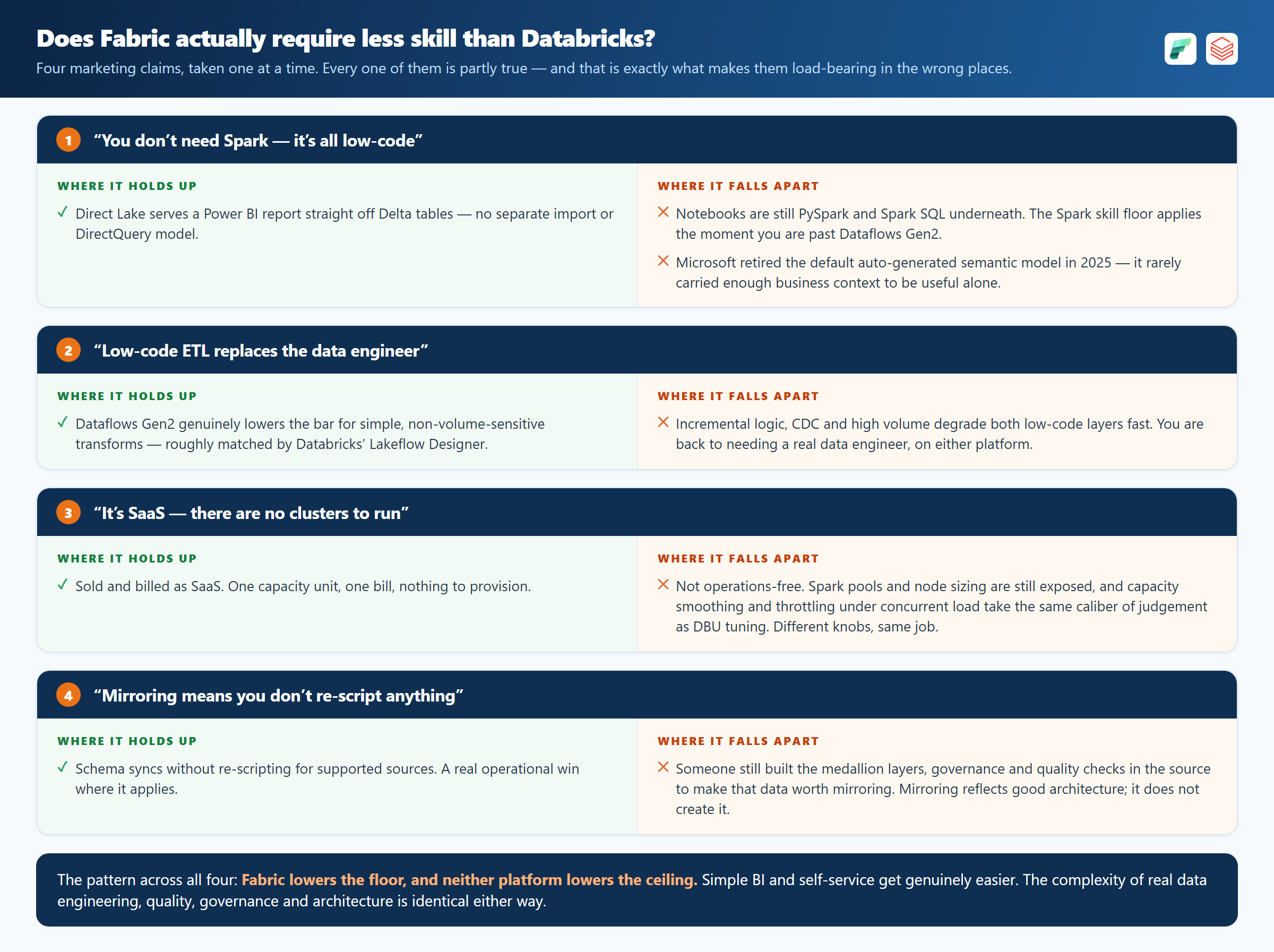
Direct Lake serves a Power BI report straight off Delta, with no import model. That is a real benefit. The notebooks underneath are still PySpark, so the Spark skill floor arrives as soon as you are past Dataflows Gen2.
Dataflows Gen2 lowers the bar for simple transforms. Databricks’ Lakeflow Designer does the same from its side. Both degrade once you add incremental logic, CDC or volume, and then you need someone who can write the pipeline.
It is billed as SaaS, one capacity and one bill. Spark pool sizing is still exposed. So are capacity smoothing and throttling under concurrent load, and tuning those takes what DBU tuning takes.
The fourth is the one that costs money. Mirroring syncs a schema without re-scripting, which is true and is not the same as the medallion layers, quality checks and governance existing in the source in the first place. Mirroring reflects an architecture; it does not create one.
For a customer conversation I'd put it this way. It isn't "Fabric needs less skill." It's:
Fabric lowers the floor for simple BI/self-service work and reduces infrastructure operations overhead, and Databricks has been closing that same gap from its side with serverless compute and Lakeflow Designer. Neither lowers the ceiling. The responsibilities remain, but the work required to meet them differs by platform. That is what the comparison needs to account for.
What AI copilots close, and what they don't
These tools do different jobs, and the names get used interchangeably in ways that muddle the question. Copilot assists with coding and authoring. Fabric data agents and Databricks’ AI/BI Genie answer natural-language questions over governed data. Teams also build custom LLM agents on top of both. The question is how much each one reduces the expertise the work actually needs.
My read: it narrows the ramp-up gap, not the judgment gap. Those are different things, and conflating them is how organizations get burned.
What's real
- Syntax and boilerplate acceleration. Generating PySpark/SQL from natural language, scaffolding notebooks, drafting DAX/Power Query. Junior and mid-level engineers move measurably faster on mechanical tasks. GitHub’s own controlled study of Copilot showed real task-completion speedups for well-scoped work.
- Translation and explanation. "What does this pipeline do," "convert this Databricks notebook to Fabric," "explain this error." These lower the time cost of onboarding onto unfamiliar code or an unfamiliar platform.
- Natural-language query access for non-engineers, via data agents/Genie. Analysts who will never learn PySpark can get answers directly from governed data. Real value, but the accuracy of the answer is determined far more by whether someone has defined a clean semantic layer (certified metrics, consistent grain, documented joins) than by which vendor's NL-to-SQL engine is asking the question. A great copilot over an undefined semantic layer still produces confidently wrong answers.
What’s overstated
- AI hides judgment gaps instead of closing them. The dangerous failure mode was never "the engineer doesn't know Python syntax." It's "the engineer doesn't know a naive
MERGE INTOdestroys performance at scale, doesn't know why SCD Type 2 matters, doesn't know their partition strategy causes skew, doesn't notice the generated SQL is joining on the wrong grain and silently double-counting revenue." Copilot can generate plausible code containing every one of those mistakes. You cannot assume it will flag them without the right context and a validation step. The requirement for judgment doesn't shrink. It moves later in the pipeline, from "can you write this" to "can you tell this is wrong." - Both Genie/data agents and Copilot are bounded by the quality of the platform underneath them. Genie needs a well-curated Unity Catalog (certified tables, column descriptions, sample queries) to be reliable. Fabric data agents need the equivalent curation in OneLake/the semantic model. Building that curation layer is a data engineering and governance task, not something the AI does for you.
- Governance, security and cost tuning are not ramp-up problems, and this is where the assurance question bites hardest. Capacity planning, RLS/OLS design, network isolation, cost attribution, DR strategy. A copilot can draft the config and talk through the tradeoffs. That does not establish that the result meets your regulatory, security and scale requirements.
What the studies measured
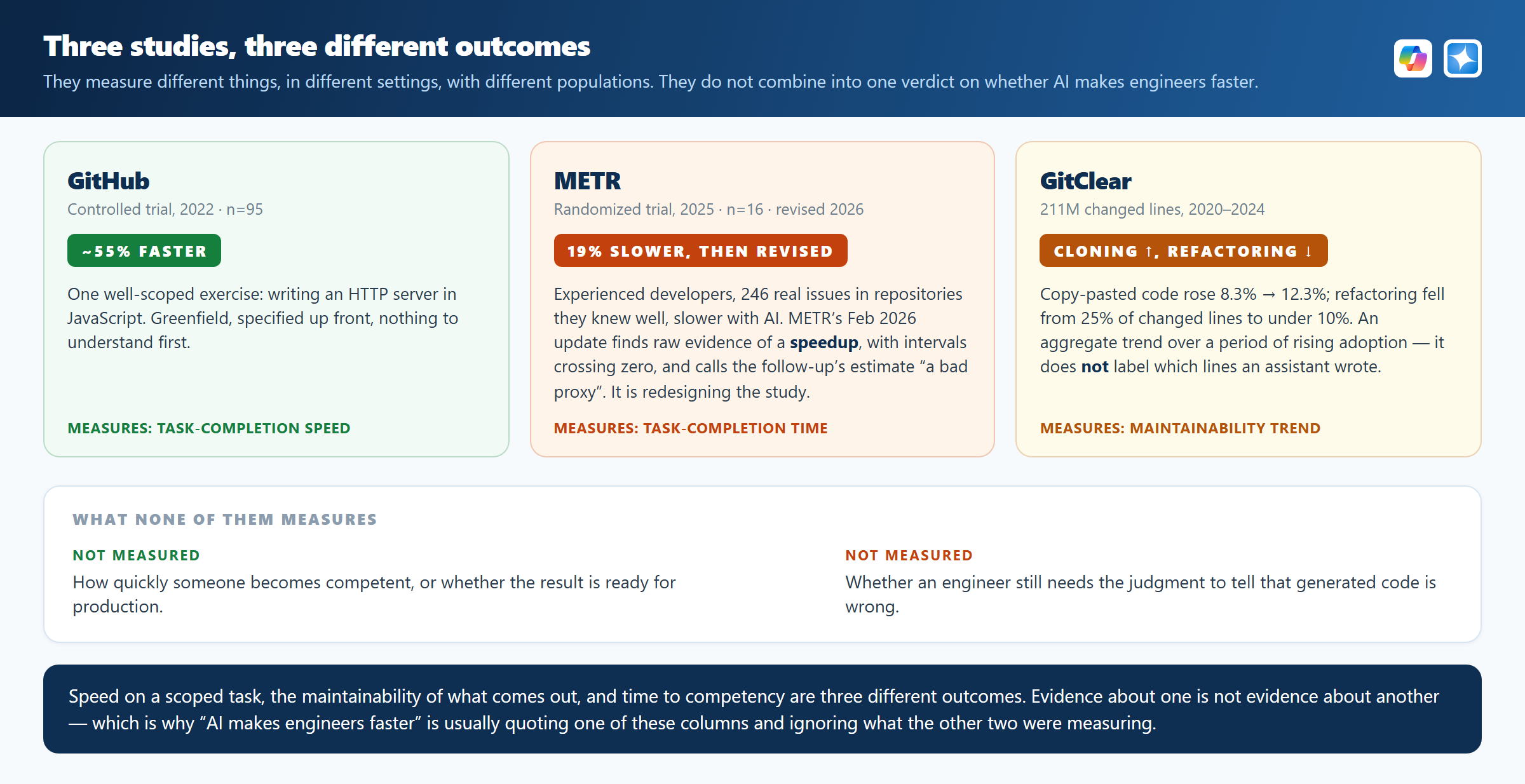
GitHub’s controlled experiment (2022) had 95 developers write an HTTP server in JavaScript. The group with Copilot finished 55% faster. That is task-completion speed, on one greenfield task specified up front.
METR’s randomized trial (July 2025) is the result usually quoted against it. Sixteen experienced open-source developers worked 246 real issues in repositories they knew well and took 19% longer with AI, while believing it had sped them up. METR’s February 2026 update revises that. For the returning developers it now estimates roughly an 18% speedup, with a confidence interval that still crosses zero. It says developers declining to work without AI biased the follow-up sample, calls the follow-up’s central estimate “likely a bad proxy for the real productivity impact”, and is redesigning the experiment. The 2025 page now carries a note that its results are out of date.
GitClear measures something else again. It covers 211 million changed lines from 2020 to 2024, with copy-pasted code rising from 8.3% to 12.3% and refactoring falling from 25% of changed lines to under 10%. That is an aggregate trend across a period of rising adoption, and it does not label which lines an assistant produced, so it cannot tell you AI caused the change.
My own reading goes further than any of those studies establish. Speed on a scoped task, the maintainability of what comes out, and how long someone takes to become competent are three different outcomes, and evidence about one is not evidence about another. None of them measures whether an engineer still needs the judgment to tell that generated code is wrong.
Where this leaves us
AI can reduce the effort some tasks take. How much depends on the work, the tools and the person using them. These studies do not establish how quickly someone becomes competent, or whether what comes out is ready for production. Measure the benefit in your own workflow, and make validation part of the job.
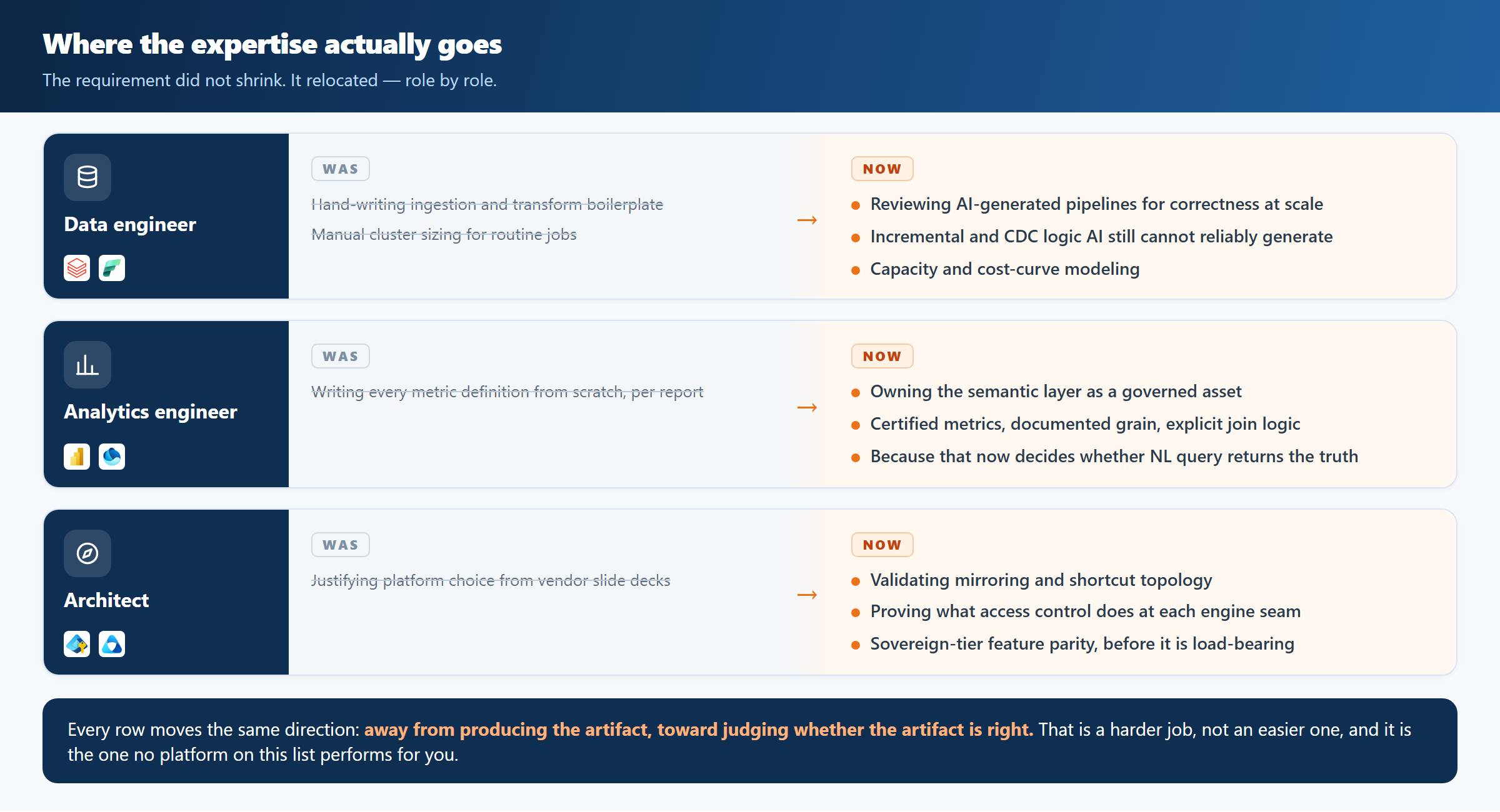
Where the expertise goes instead: a before/after map
Some tasks need less specialist knowledge than they used to. Other responsibilities stay exactly where they were, and a few matter more than before. Here is how that changes the work, role by role:
Should you standardize on one platform?
If no platform removes the skill requirement, should you at least simplify by standardizing on one? It depends on two things: whether your workloads genuinely differ, and whether you can operate two estates. Where both are true, the best engine per workload under one identity plane can be worth the extra operating cost. Shared identity and catalog visibility help, but each platform keeps its own access controls and its own failure modes, so the benefit has to justify running two of everything. The decision framework below is how to tell.
Where each engine wins today
- Azure Databricks: large-scale complex transformation, streaming, ML/feature engineering, heavy custom Python. Unity Catalog forces governance discipline early. Serverless SQL and Lakeflow Designer have meaningfully closed the low-code gap with Fabric.
- Microsoft Fabric Data Warehouse: pure T-SQL analytics. A transactional, T-SQL-native warehouse experience with no Spark required, tight Power BI/Direct Lake integration, and the lowest-friction path for SQL-first teams already in the Microsoft data estate.
- Microsoft Fabric (broader): BI-to-lake integration friction (Direct Lake, native Power BI), self-service low-code for shallow transforms, Microsoft ecosystem stickiness (Purview, Entra, Copilot across Microsoft 365).
- Snowflake: elastic cross-cloud portability and an established ecosystem for organizations already standardized on it outside the Microsoft stack.
Open table formats, not just mirroring
Mirroring gets the attention, but the deeper enabler of "better together" is open table format interoperability: Delta Lake and Apache Iceberg, and the catalog federation building up around them (Unity Catalog's Iceberg REST support, OneLake's multi-format ambitions). That's what lets multiple engines read and write the same physical data without a proprietary export/import step. Mirroring is a convenience layer on top of that; the format and catalog layer underneath it is the part worth architecting carefully, because it determines whether you're genuinely engine-agnostic or quietly locked into whichever engine wrote the data first.
The architecture
Reference pattern: OneLake/ADLS as the open Delta/Iceberg-compatible lake, Databricks and Fabric (and optionally Snowflake) as parallel processing engines connected via mirroring and shortcuts, Purview and Unity Catalog federated for cataloging and classification, Entra ID as the identity plane, and an AI layer (Copilot, Genie, data agents, custom agents) assisting engineers and analysts. Read shortcuts and mirroring closely. A shortcut copies nothing. “Mirroring” is three different mechanisms, and “no data duplication” is true of only one of them. The mirroring section below sets out which.
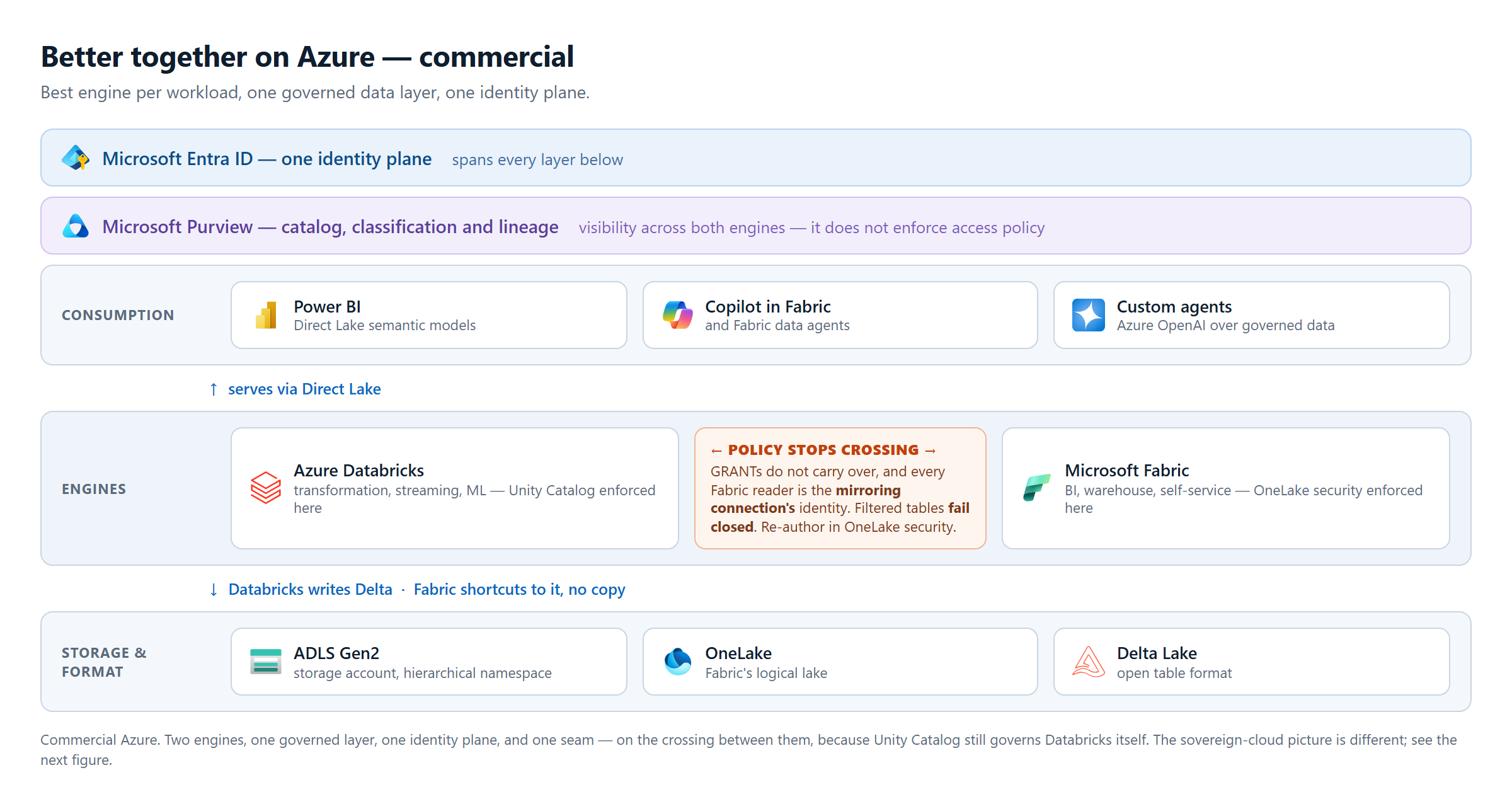
What “better together” costs
"Better together" is not free:
- It adds a second axis of complexity on top of skills. Your team now needs both platforms' security models, the mirroring/shortcut semantics between them, and clarity on which platform owns which SLA. Mirroring failure modes differ by source type, so find out which one you are running before you assume a pause-and-resume story.
- Multi-platform architectures fail at governance seams, not from lack of talent. Unity Catalog access controls do not carry over to a Fabric consumer of mirrored data (covered below), so they have to be re-authored in OneLake security, not assumed to inherit. You also run two billing models and two consumption curves, and someone has to own each.
- Making Fabric the organizing layer is a strategic bet, not a neutral engineering decision. It's choosing Microsoft ecosystem gravity (Purview, Entra, Copilot, M365/E5 bundling economics) as the organizing principle over technical merit alone. Legitimate for a Microsoft-centric enterprise, but it should be named as a platform-strategy and procurement decision.
- Purview's actual role: Purview catalogs, classifies, and provides lineage across Fabric, Databricks, and Snowflake from one pane. It does not enforce access policy in those source systems. Enforcement stays with each platform's own security model (Unity Catalog, OneLake security, Snowflake RBAC). Purview closes a visibility gap, not an enforcement gap; conflating the two overstates what it does.
- Snowflake and Entra ID: Snowflake federates with Entra ID for SSO and SCIM provisioning on any cloud it runs on. That's real and useful, but it's identity federation, not a shared authorization or governance plane the way Entra Conditional Access is for Azure-native services.
Sizing guidance: multi-platform architecture is right for organizations with sunk investment across platforms, diverse workload profiles, and enough platform engineering maturity to own the integration seams. That last one is where most of them come unstuck. A smaller or less mature data organization is often better off on one platform even when it's technically suboptimal per-workload, because they don't have the bench to run two governance models at once safely.
A decision framework that can say no
A rubric that adds everything up and hands back one number lets a shop with no platform team, no governance function and two production platforms land on “borderline, could go either way.” It cannot go either way. Capability and need are different kinds of thing, and adding them together hides the organizations most likely to get hurt. So capability is a set of gates you either clear or you do not, and need is scored separately, afterwards.
Step 1 — the capability gates. You clear these, or you do not run two platforms.
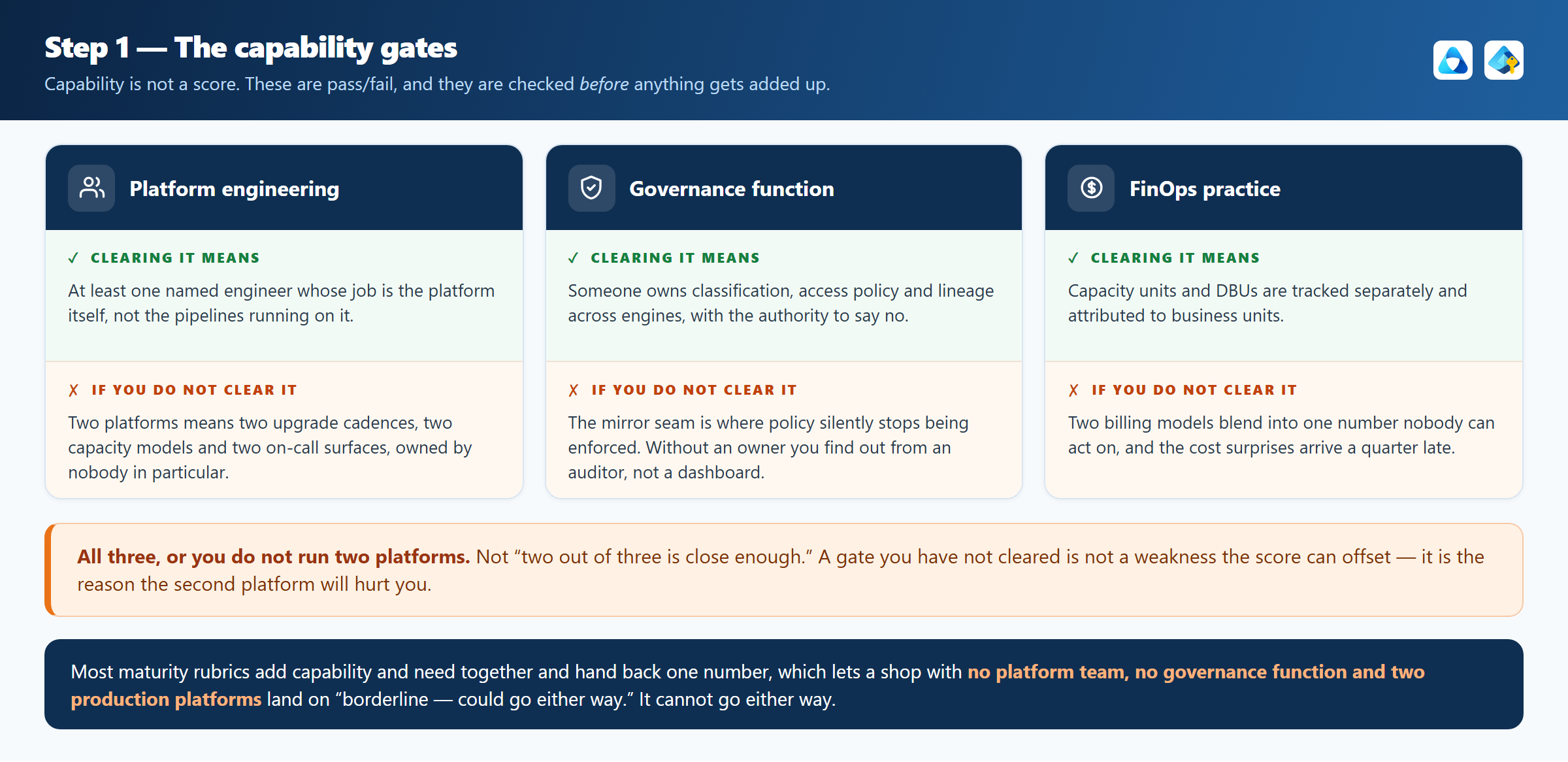
Fail any one of these and the answer is single-platform, regardless of how much you need multi-engine. That is the whole point of a gate. Fix the gap first; it is cheaper than running two estates badly.
Step 2 — only if all three gates cleared, score the need
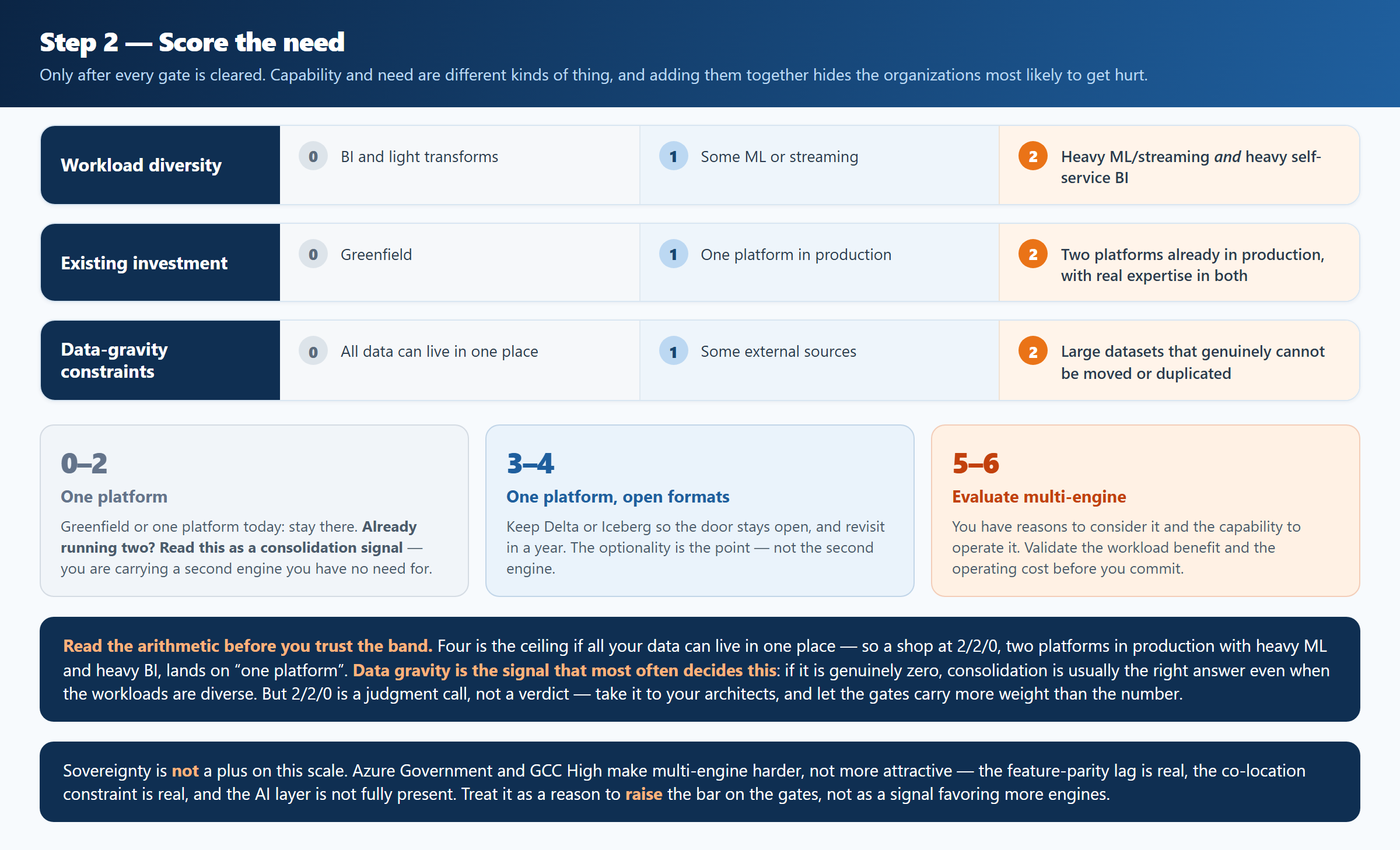
0–2: single platform. You do not have a multi-engine problem yet.
3–4: single platform with open table formats. Keep Delta or Iceberg
so the door stays open, and revisit in a year. The optionality is the point, not
the second engine.
5–6: evaluate a multi-engine design. You have reasons to consider it and the capability to operate it. Validate the workload benefit and the operating cost before you commit.
How the number is built, and why the total is the least interesting part. Three signals, zero to two each, so six is the maximum: workload diversity (do you have streaming, ML and BI, or one of the three with ambitions), existing investment (real production estate on both, not a proof of concept), and data gravity (where the volume already sits, and what it would cost in egress and elapsed time to move it).
Read the three separately before you add them up. A score carried mostly by existing investment is a sunk-cost argument: it is the case for finishing a consolidation, not for committing to two estates permanently, and the question is what the second platform would cost to retire, not what it costs to keep. Data gravity is the opposite, and the only one of the three that does not decay: petabytes in one cloud with egress charges and a re-platforming window attached are a fact about physics and contracts, and no amount of organizational preference moves them this year. A 5 built from diversity and gravity is a different recommendation from a 5 built from investment and diversity, and a single total cannot tell you which one you are holding.
Where sovereignty fits, and it is not a plus
Azure Government and GCC High make multi-engine harder, not more attractive: the feature-parity lag is real, the co-location constraint is real, and the AI layer is not fully present. Treat a sovereign-cloud requirement as a reason to raise the bar on the gates above, not as a signal favoring more engines.
The full scoring rubric is in the one-pager, and the governance runbook that goes with it is a working document rather than a summary. Both are available to download at the end of this post.
The federal and sovereign-cloud reality check
This is where I have the most direct exposure, and it is the part of this piece most likely to be out of date by the time you read it. The sovereign clouds move on their own schedule, the feature tables lag the commercial ones by quarters, and the gap between what a vendor deck implies and what is actually switched on in usgovvirginia is where I have watched more than one program lose a quarter. Dates and citations throughout, so you can check whether they still hold.
Getting the taxonomy right first
These are four different things, not nested rings. Per the service descriptions, and the Microsoft 365 Government commitments table:
- GCC: FedRAMP High, DFARS, the criminal-justice and federal-tax data requirements, and DISA SRG L2.
- GCC High: NIST SP 800-53 at a FIPS 199 High categorization, DISA SRG L4 controls, with IL4 equivalency, not IL5. The only tier where Microsoft agrees to ITAR contract language, so “ITAR” over a GCC tenant is a contradiction to resolve before design rather than during. This is the tier Fabric for GCC High runs in, which is why it lists only US Gov Virginia and US Gov Texas.
- DoD: DISA SRG L5. DoD entities only.
- Azure Government: Microsoft's physically and logically isolated Azure cloud, operated by screened US persons and separate from commercial Azure. It is where your Databricks and Fabric compute runs.
Three terms get conflated with all of this. ITAR is not an authorization: it is a set of contractual and access controls. HIPAA and CJIS do not require a sovereign cloud and can be met on commercial Azure with the right configuration. And HYOK is an information-protection control, not a data-platform capability. It is not a substitute for network isolation, though the two are often discussed as if they were.
Databricks in Azure Government is not the fuller-featured option
Making Azure Databricks the primary engine in Gov, and leaning on Unity Catalog and Genie throughout, does not hold up against Microsoft's own documentation. Microsoft's Azure Databricks regional-availability page states that the Azure Government regions usgovarizona and usgovvirginia do not support Databricks SQL or Unity Catalog. Databricks and Microsoft have since announced that the full Data Intelligence Platform comes to Azure Government in 2026, which means today's Gov estate is running the legacy platform, with neither Unity Catalog nor Genie available.
Databricks on AWS GovCloud carries FedRAMP High and DoD IL5 authorization with Databricks SQL, Unity Catalog and Delta Sharing, today. If your program's requirement is genuinely Unity-Catalog-governed analytics at IL5 right now, Azure is not currently the platform that does it. You should hear that from me rather than find it out in month four. Verify current Azure Government service state directly with your Databricks and Microsoft account teams before committing to this architecture for a Gov workload. Do not take this article's word for it either. The ground moves quarter to quarter.
What changes in GCC High, and an interim pattern to validate
The intuition is that GCC High adds controls: customer-managed keys required, private endpoints mandatory. The preview does the opposite. Microsoft's own Fabric GCC High preview limitations page states that during preview, Private Link, customer-managed keys, outbound access protection, and workspace identity are not supported. That is the opposite of mandatory. For an audience handling CUI, that unsupported list is the headline.
The same limitations page does confirm that shortcuts to Azure Blob Storage and ADLS Gen2 work in GCC High preview. That opens a more realistic interim pattern than single-source SQL mirroring: Databricks writes Delta tables to ADLS Gen2, Fabric consumes that via a OneLake shortcut, and Direct Lake serves it to Power BI. That bypasses the mirroring-source restriction entirely, because shortcuts and mirroring are different mechanisms. The catch is network isolation, not authentication, and it follows directly from the missing-features list above. The shortcut authenticates fine: ADLS Gen2 shortcuts support organizational account, service principal, SAS and account key, none of which needs a workspace identity. What you cannot do in the preview is firewall that storage account and still reach it. Trusted workspace access is the documented route to a firewall-enabled ADLS Gen2 account and it requires a workspace identity, which GCC High preview does not support. Private Link is unsupported there as well, and OneLake shortcuts do not support storage accounts using managed private endpoints in any cloud. So the question for your security team is a specific one: is a storage account reachable from the public network acceptable in an environment you chose for isolation?
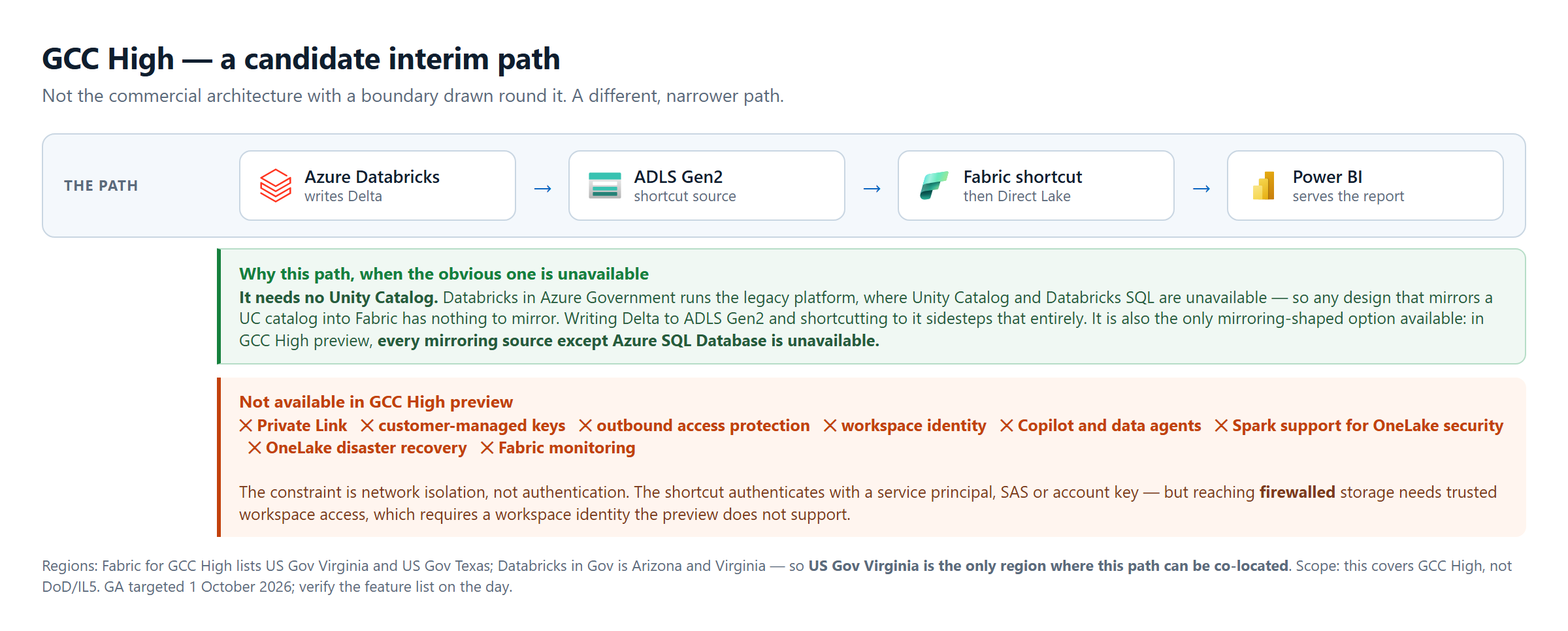
Also missing from the GCC High preview feature table as of this writing: Copilot and data agents. The "AI layer at every tier" part of the commercial architecture above does not currently extend into GCC High. That is a real gap.
Timing note: Fabric's GCC High GA is targeted for October 1, 2026, about two weeks out from writing. By the time you read this, some of the above may already be resolved. Treat everything in this section as a snapshot with a citation and a date, verify current state before you plan around it, and don't assume GA automatically means mirroring-source and Copilot parity arrived on day one. Confirm the GA feature list specifically.
Mirroring mechanics
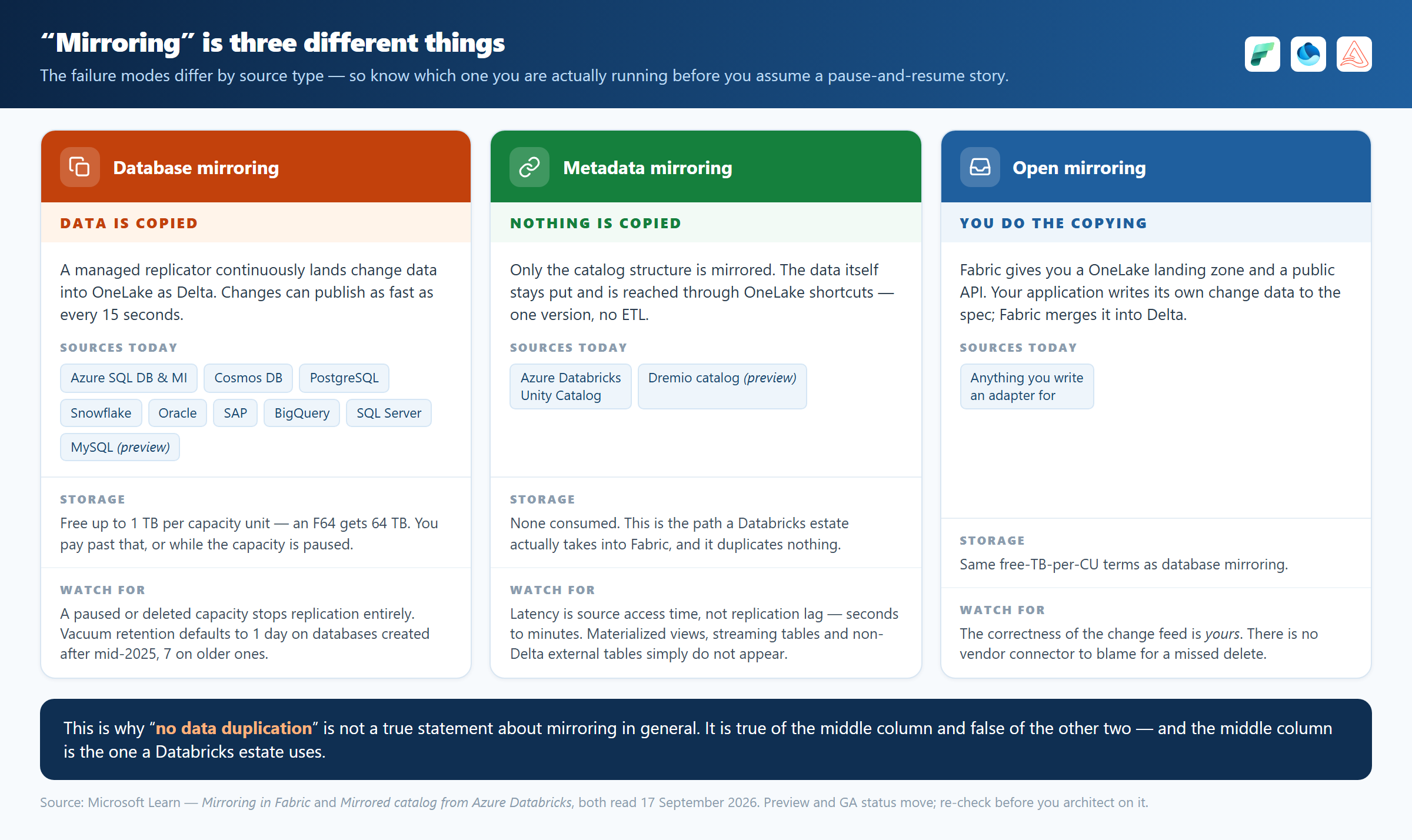
“Mirroring” is one word covering three genuinely different mechanisms, and the failure modes are not interchangeable:
- Metadata mirroring: the Azure Databricks Unity Catalog path. Only the catalog structure is mirrored; the data stays where it is and is reached through OneLake shortcuts. No copy. Latency is source access time, not replication lag. Materialized views, streaming tables and non-Delta external tables do not appear at all.
- Database mirroring: Snowflake, Azure SQL Database, Cosmos DB, PostgreSQL, Oracle, SAP, BigQuery, SQL Server. A managed replicator continuously lands change data into OneLake as Delta, publishing as fast as every 15 seconds. That is duplication: physically separate storage, kept in sync. Not a snapshot, and a paused or deleted capacity stops replication entirely.
- Open mirroring: you land change data in a OneLake zone yourself, to a published spec, and Fabric merges it into Delta. The correctness of that change feed is yours; there is no vendor connector to blame for a missed delete.
Which is why “no data duplication” is not a true statement about mirroring in general. It is true of the first mechanism and false of the other two, and the first is the one a Databricks estate uses. Know which one you are running before you reason about staleness, cost, or what happens when it stops.
What happens to access control at the seam
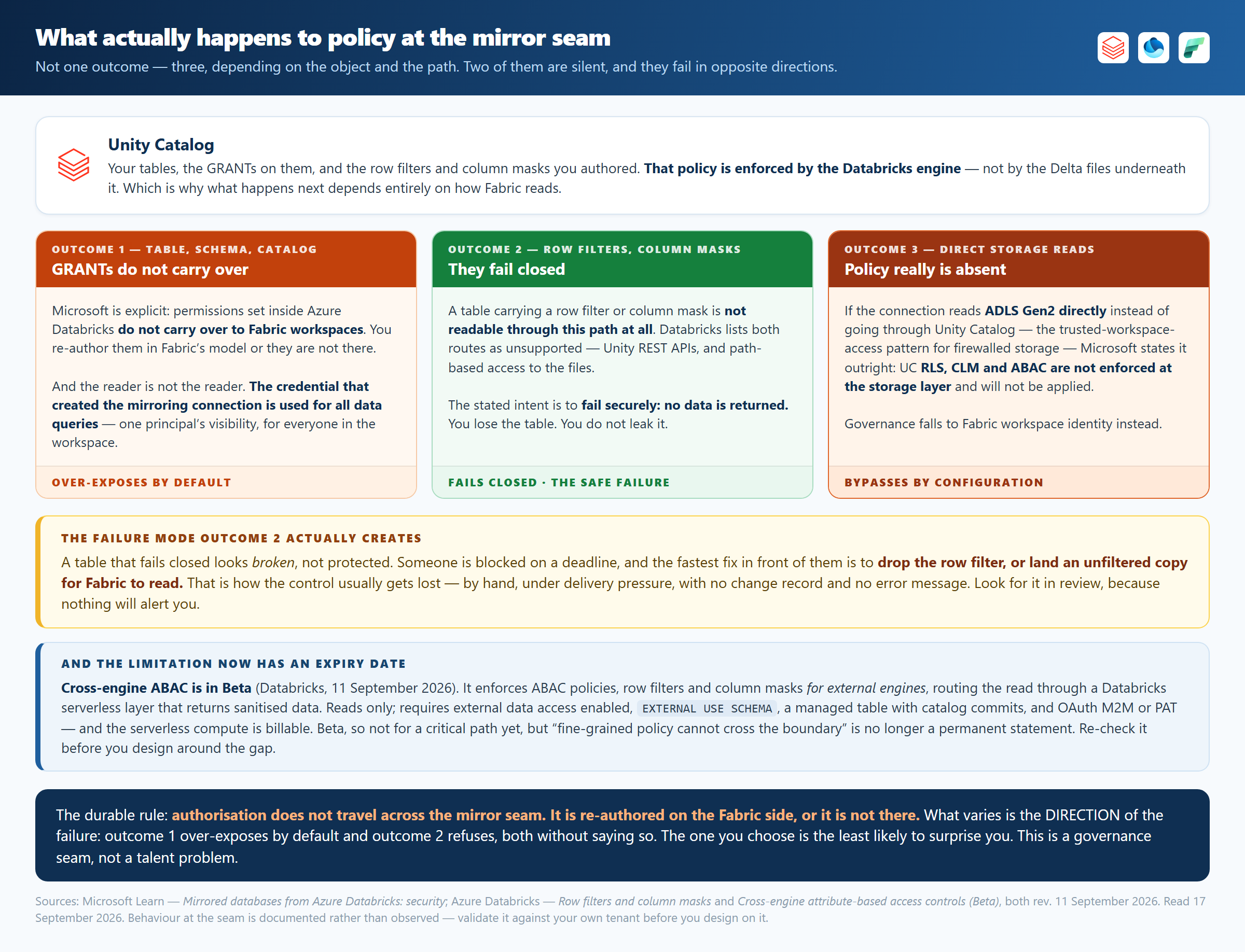
Three different things happen here, depending on the object and on how Fabric reads it. They get collapsed into one sentence in most architecture conversations, and the sentence people reach for is the wrong one.
Table, schema and catalog GRANTs do not carry over. Microsoft states it plainly: permissions set on catalogs, schemas and tables inside Azure Databricks do not carry over to Fabric workspaces. You re-author them in Fabric's permission model or they are not there. Fabric queries also run as the connection credential, not as the calling user. The credential used to create the mirroring connection is used for all data queries. So the blast radius of the mirror is whatever that one principal can see, for everyone in the workspace. Scope it deliberately; it is the actual security boundary.
Tables with row filters or column masks fail closed, not open. This is the one that gets described backwards most often. Such a table is not readable through that path at all: Databricks lists both routes as unsupported (Unity REST APIs and path-based access to the files) and states the intent for the runtime case in the same list, that unsupported clients fail securely and no data is returned. You lose the table. You do not leak it.
Which creates the failure mode worth worrying about. A table that fails closed looks broken, not protected. Someone is blocked on a deadline, and the fastest fix in front of them is to drop the row filter or land an unfiltered copy for Fabric to read. That is how the control usually gets lost: by hand, under delivery pressure, with no change record and no error message. Look for it in review, and do not assume your existing alerts will catch it.
There is one path where data really does arrive unfiltered: a direct ADLS Gen2 read that does not go through Unity Catalog. That is the trusted workspace access pattern used to reach firewall-enabled storage. Microsoft says it outright: Unity Catalog policies such as RLS, CLM or ABAC are not enforced at the storage layer and will not be applied. Governance falls to Fabric workspace identity instead. Put that one in front of your security team, because it looks like a networking decision and is not.
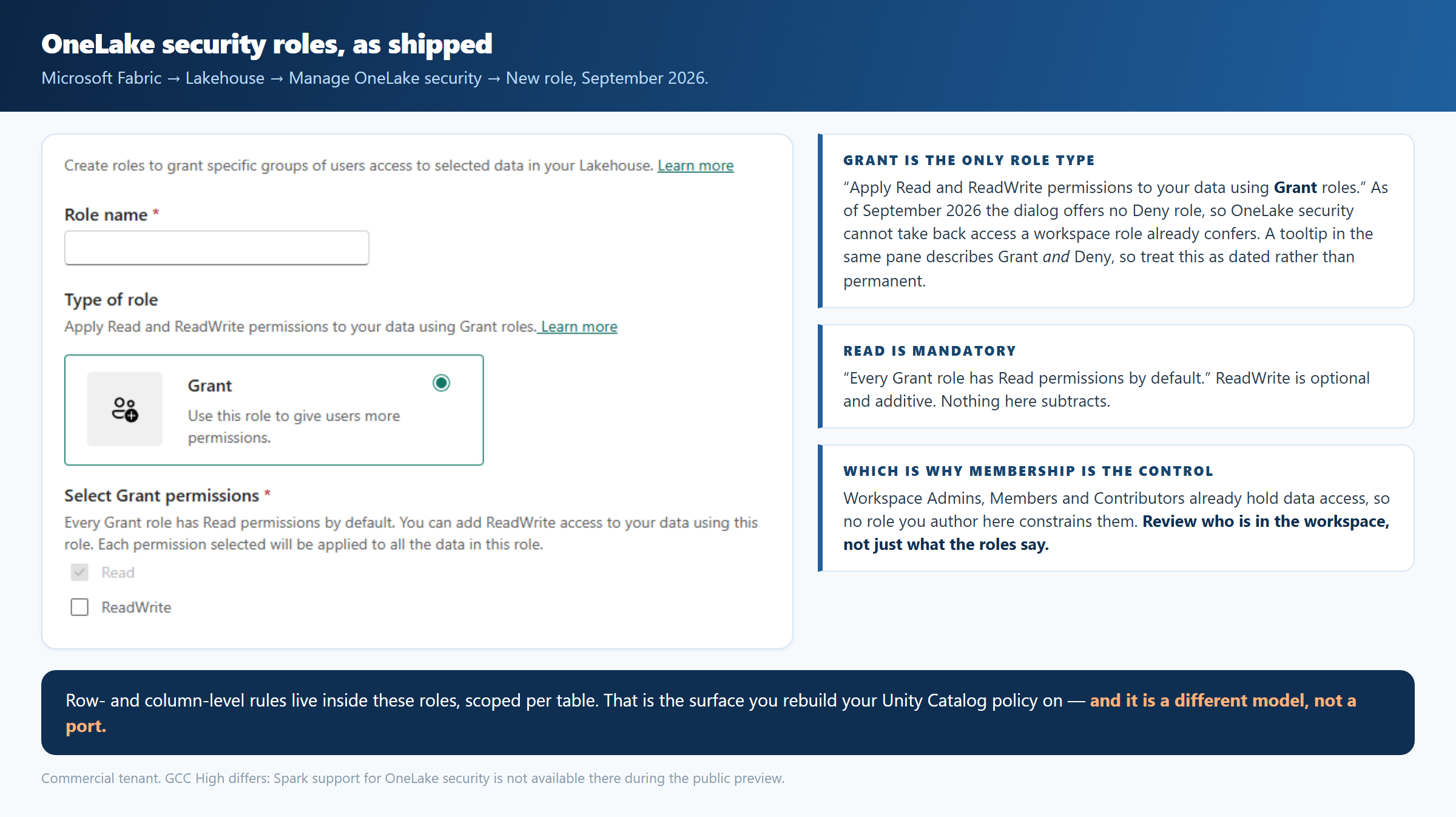
And the Fabric side has its own three properties. OneLake security is a grant model that workspace roles sit above: Admins, Members and Contributors are not restricted by RLS or CLS at all, so if your sensitive-data control depends on RLS, every Contributor on that workspace is outside it. That is a membership review, not a rules review. Enforcement also differs by engine: on a SELECT * where CLS hides a column, Spark notebooks succeed and return the allowed columns while the SQL analytics endpoint and semantic models return an error. And through Direct Lake over SQL, or T-SQL in delegated identity mode, the calling user's identity is not passed to the shortcut target. The calling item's owner is, so any per-user rule downstream evaluates against the wrong principal.
Finally, this has an expiry date. Cross-engine ABAC is in Beta as of 11 September 2026, and enforces ABAC policies, row filters and column masks for external engines by routing the read through a Databricks serverless layer. Reads only, and billable. Not for a critical path yet, but “fine-grained policy cannot cross the boundary” is no longer permanent. Re-check it before you design around the gap.
What I checked directly. Three things above I checked in a commercial Fabric tenant in September 2026: that Grant is the only role type the dialog offers, that no preview marker appears anywhere in that surface, and that DefaultReader is present by default. The rest (Contributors sitting above RLS, the per-engine difference on a hidden column, the owner-identity behavior through Direct Lake, and everything about what crosses the mirror seam) is read from Microsoft's and Databricks' documentation. I have not had a mirrored Unity Catalog carrying a row filter to run against. If you do, and it behaves differently, I would like to hear about it.
The state of play
- Azure Government: Azure Databricks has been available since 2020 with a long FedRAMP High track record, but on the legacy platform. Unity Catalog and Databricks SQL are not supported in the Gov regions today (see above). Re-check when the 2026 rollout lands.
- GCC High: Fabric is in public preview, with GA on October 1, 2026. The interim path and its network-isolation constraint are described above. Copilot and data agents are not in the preview feature table.
- What changes between commercial Azure and Azure Government/GCC High: available regions, real and currently-provable feature-parity lag (see above, not hypothetical), network isolation patterns (ExpressRoute Government), and audit/eDiscovery requirements under DoD or IC-specific frameworks.
Entra ID as a single identity plane across Databricks, Fabric, Purview, and Power BI remains a real, structural advantage over bridging AWS IAM, Databricks' own identity model, and separate BI-tool auth by hand. Azure Databricks' native integration into Azure networking, Monitor, Policy, and cost management is a genuine first-party depth advantage over Databricks-on-AWS or -on-GCP. Both still hold. Read them next to the feature-parity caveats above, not instead of them.
AWS and GCP can host Databricks and Snowflake well; Microsoft's moat is the identity and governance integration depth, not superior sovereign-cloud feature completeness. That part is still catching up, and pretending otherwise helps nobody in a procurement conversation.
Bottom line: the gap nobody is automating away
The sovereign-cloud caveats above are not a footnote. They are the argument. Roadmap state, feature-parity gaps and mirroring-mechanism differences change fast enough that they are easy to miss if nobody owns checking current service documentation. Writing this, I had to trace every constraint above back to the primary sources rather than rely on reference architectures.
Where expert architecture review has outsized leverage:
- The single-vs-multi-platform decision itself: made once, early, expensive to reverse.
- Mirroring topology, and re-authoring access control on the Fabric side. This is where governance silently breaks, and the documentation only takes you so far until you test it in your own tenant.
- Capacity and FinOps modeling before go-live, not after the first surprise bill.
- Gov/GCC High sequencing: feature parity in the sovereign clouds moves quarterly and in different directions on each platform. That is exactly the kind of fast-moving, easy-to-miss detail that stalls a program if nobody on the team is tracking the roadmap in real time.
All four are cheaper to get right at the whiteboard than to unpick later, which is the argument for putting an experienced architect on the design rather than on the recovery.
Before committing, validate three things: whether the features you need exist in your target cloud, which identity reads the data across platforms, and who owns the operating cost and the failure response.
Do that before the architecture is approved, not after the first production problem.
Downloads
Everything referenced above, as working documents rather than summaries. Use them, change them, argue with them.
- Decision framework (PDF, 2 pages): the gates and the need score as a worksheet you can take into a meeting, plus the sovereign-cloud constraints and the mirroring seam to pressure-test before go-live. Dated and sourced, because the feature tables move quarterly.
- Governance runbook, Fabric notebook (
.ipynb): import it into your own Fabric workspace, fill in the parameters cell, and run it. It prints the exact GRANT audit to run on the Databricks side, classifies the mirrors in your workspace from the Fabric API as replicated or metadata-and-shortcut (they behave nothing alike), and branches the incident procedure across all three mechanisms. Owners, alert thresholds and the Microsoft source links are in the notebook rather than left as an exercise. - Federal & Sovereign-Cloud Reality Check (PDF, v4.0): what is switched on in Azure Government and GCC High right now, versus what the commercial architecture implies. The tier taxonomy, the regions where both platforms can co-locate, the GCC High preview limitations verbatim, and the access-control seam. Every claim dated and sourced to Microsoft and Databricks documentation, because all of it moves.



