Azure AI Foundry Hosted Agent Network Governance Guide
If your hosted agents can reach anything, you don’t have governance — you have hope

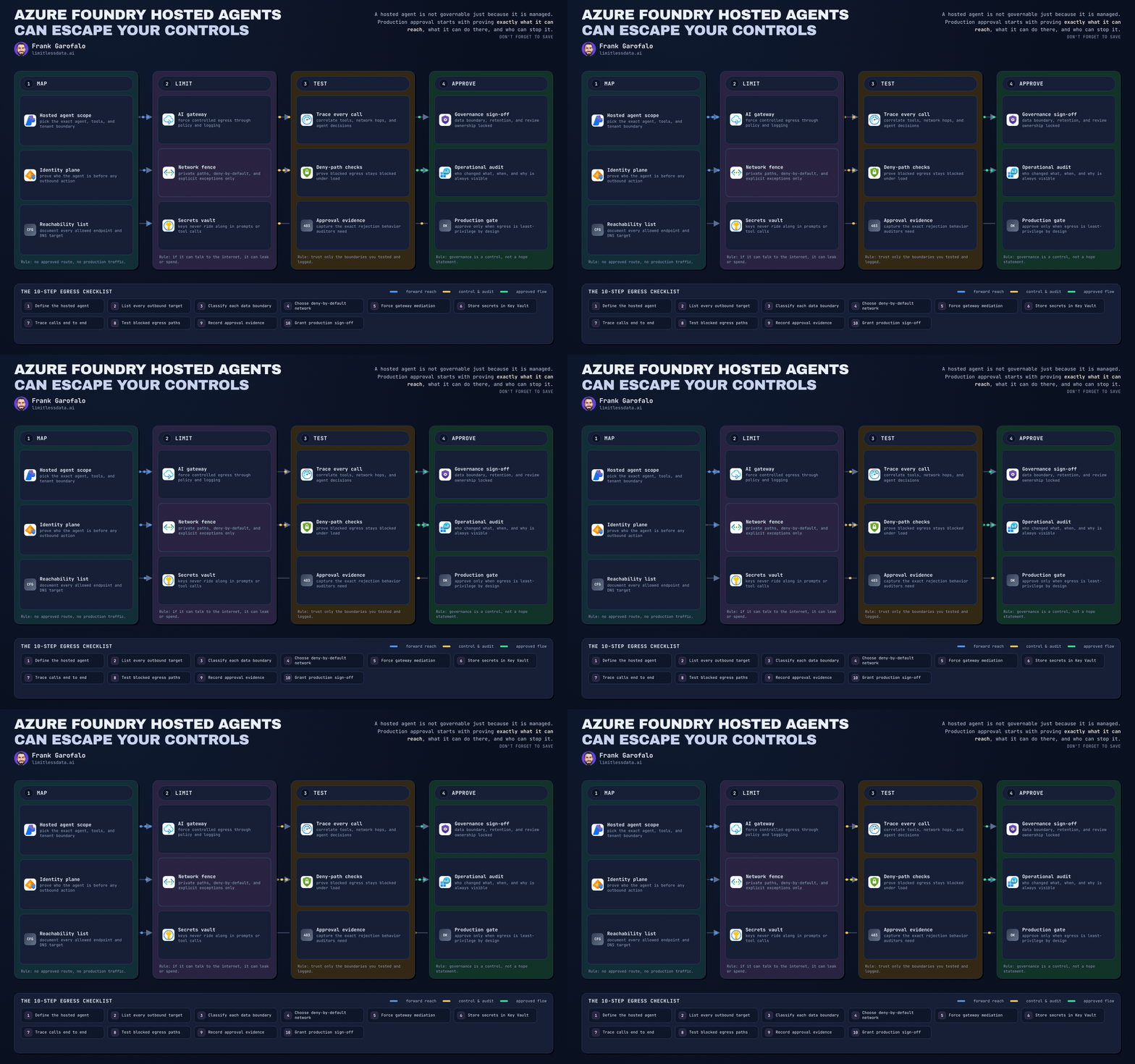
“Can we approve the hosted agent for production if it runs on Microsoft’s managed platform?”
On this page
- Step 1: Separate managed runtime benefits from governance responsibilities
- Step 2: Draw the call path you are actually approving
- Step 3: Define the approved baseline before you build tests
- Step 4: Build a pre-production validation harness
- Step 5: Put hard network boundaries around the data plane
- Step 6: Turn data and tool access into explicit contracts
- Step 7: Export a reviewable checklist artifact
- Step 8: Detect drift after deployment
- Step 9: Test failure modes, not just the demo path
- Step 10: Make connectivity governance an operating model
- Final take
- Sources & References
That question is where governance either gets serious or turns into wishful thinking.
I’ll give you the blunt answer I give architecture review boards: a hosted agent is not governable merely because it runs on a managed service. Microsoft Foundry Agent Service absolutely reduces the platform plumbing for teams building and scaling agents, including everything from prompt-based patterns to hosted custom code on a managed runtime, per the Foundry Agent Service overview. Good. That removes toil. It does not answer the production question.
The production question is simpler and harsher: exactly what can this agent reach, what can it do there, what data can it send, and who can shut it off at 2:13 AM without a six-team bridge call?
In Q1, I sat in a review with a 40-person product team that had a “secure hosted agent” demo ready for leadership, and nobody in the room could prove whether the tool chain could call an unapproved external endpoint after prompt injection. That agent was one security exception away from becoming a compliance incident.
If you work in a regulated environment, outbound connectivity is an approval decision, not a convenience feature. Below is the hands-on way I’d stand this up so your hosted agent consumes governed interfaces instead of wandering the network with your brand attached to it.
If you want the full deep dive, this post is long by design. If your audience prefers shorter LinkedIn reads, publish the summary here and point them to the full article or turn the steps into a short series.
Step 1: Separate managed runtime benefits from governance responsibilities
What the platform gives you
Hosted agents exist for a reason. Microsoft is very explicit that when teams roll their own agent hosting with open-source frameworks, they end up owning containerization, web hosting, security, persistence, and scaling overhead that a managed offering can absorb, per the hosted agents documentation. That’s real value. I want teams off the undifferentiated plumbing.
What the platform does not give you
Here’s the line I draw with every delivery team:
- Managed hosting does not equal approved egress
- Prompt instructions do not equal network policy
- Tool descriptions do not equal authorization
- “We’ll monitor it later” does not equal governance
The risks show up in four buckets every single time:
- Data exfiltration
- Tool misuse
- Compliance-boundary violations
- Runaway external-call cost
If your hosted agent can hit arbitrary internet endpoints, broadly scoped internal APIs, or write-capable tools with weak identity, you don’t have an operating model. You have hope.
Your approval standard
Before production, every permitted destination and action needs:
- a named owner
- a business purpose
- an authentication method
- a data classification decision
- an audit trail
- a revocation path
That’s the baseline. Not “the app team says it’s fine.”
Step 2: Draw the call path you are actually approving
I want this architecture visible on one page before anyone talks about model quality.
The target pattern is:
- user or workload invokes hosted agent
- hosted agent calls only approved tool/API boundaries
- those boundaries call only approved internal or external services
- every handoff has identity, policy, and logs
This first diagram is the approval flow I use with platform teams. It makes one thing obvious: approval is tied to a baseline and a validation harness, not a slide deck.
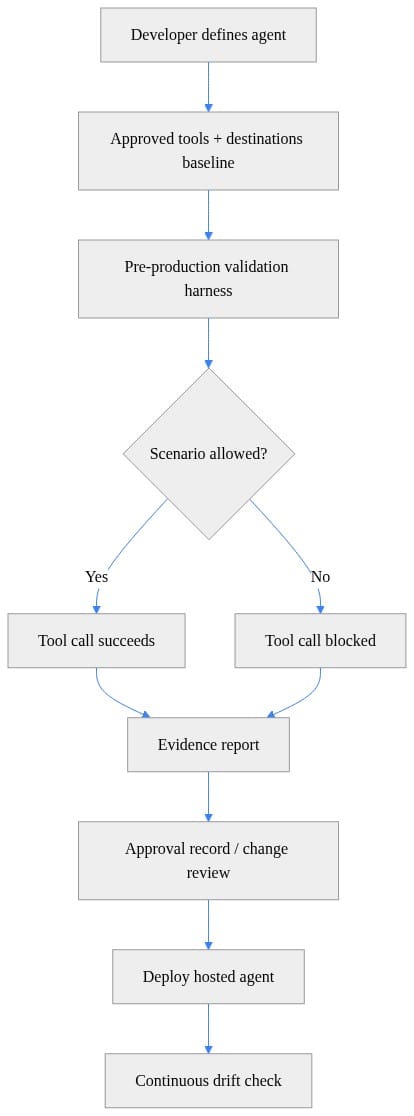
What to observe: the deployment happens after allowed and denied scenarios are tested and attached to an approval record. If your process skips that evidence report, you are approving intent, not behavior.
Why mediation matters
Agents should be consumers of governed interfaces, not holders of unconstrained network freedom.
That is exactly where Azure API Management earns its keep. Microsoft positions APIM’s AI gateway capabilities to help organizations secure, scale, monitor, and govern AI models, agents, and tools behind intelligent applications, per the Azure API Management AI gateway documentation. I’m not saying APIM is the only control plane you can use. I am saying you need one.
If the agent can call tools directly with broad credentials, you’ve already lost the review.
Step 3: Define the approved baseline before you build tests
Start with an allowlist, not a prompt
This is where teams get sloppy. They write detailed instructions in the system prompt about what the agent “should” use, then call that governance. That’s not governance. That’s a polite suggestion to a probabilistic system.
You need a baseline artifact that names:
- approved tools
- approved destinations
- denied scenarios
- expected allow/block outcome
Here’s a lightweight example in Python. It is illustrative for a LinkedIn audience, not production release code.
# Define approved tools, destinations, and validation scenarios for agent governance
from dataclasses import dataclass
from typing import List

@dataclass
class Scenario:
    name: str
    tool: str
    destination: str
    should_allow: bool

APPROVED_TOOLS = {"search_docs", "ticket_lookup"}
APPROVED_DESTINATIONS = {"https://docs.contoso.internal", "https://tickets.contoso.internal"}

SCENARIOS: List[Scenario] = [
    Scenario("approved-doc-search", "search_docs", "https://docs.contoso.internal", True),
    Scenario("approved-ticket-lookup", "ticket_lookup", "https://tickets.contoso.internal", True),
    Scenario("blocked-external-web", "search_docs", "https://example.com", False),
    Scenario("blocked-unapproved-tool", "shell_exec", "https://docs.contoso.internal", False),
]
What to observe: the baseline is explicit. Two tools. Two destinations. Two blocked scenarios. That’s how you force the conversation from “the agent can browse if needed” to “show me the approved path.”
My rule for regulated workloads
If a destination is not named, it is denied.
If a tool is not named, it is denied.
If ownership is unclear, it is denied.
That default posture removes 80% of the nonsense before you get to security review.
Step 4: Build a pre-production validation harness
Test the bad paths on purpose
I don’t trust happy-path demos. Neither should you.
Your validation harness should execute both approved and denied scenarios and emit a report you can attach to the approval record. That gives your review board evidence that the controls are doing something real.
Here’s a simple harness that checks the scenarios against the approved baseline and produces a JSON report.
# Run a pre-production validation harness and emit an evidence report for approval records
import json
from datetime import datetime

approved_tools = {"search_docs", "ticket_lookup"}
approved_destinations = {"https://docs.contoso.internal", "https://tickets.contoso.internal"}
scenarios = [
    {"name": "approved-doc-search", "tool": "search_docs", "destination": "https://docs.contoso.internal", "should_allow": True},
    {"name": "blocked-external-web", "tool": "search_docs", "destination": "https://example.com", "should_allow": False},
    {"name": "blocked-unapproved-tool", "tool": "shell_exec", "destination": "https://docs.contoso.internal", "should_allow": False},
]

results = []
for s in scenarios:
    allowed = s["tool"] in approved_tools and s["destination"] in approved_destinations
    results.append({**s, "actual_allow": allowed, "pass": allowed == s["should_allow"]})

report = {
    "agent_id": "agent-preprod-001",
    "generated_utc": datetime.utcnow().isoformat() + "Z",
    "summary": {"total": len(results), "passed": sum(r["pass"] for r in results)},
    "results": results,
}
print(json.dumps(report, indent=2))
What to observe: every scenario gets an expected result and an actual result. That gap is where governance failures show up. Save the report as evidence, not just console noise.
Fail the release if governance drifts
A control that only warns is a suggestion. For production agents, failed governance validation should stop the release.
This tiny example shows the pattern.
# Fail the release if any validation scenario violates the approved governance baseline
import sys

results = [
    {"name": "approved-doc-search", "pass": True},
    {"name": "blocked-external-web", "pass": True},
    {"name": "blocked-unapproved-tool", "pass": False},
]

failed = [r["name"] for r in results if not r["pass"]]
if failed:
    print("Validation failed for scenarios:", ", ".join(failed))
    sys.exit(1)

print("Validation passed: governance evidence is complete.")
What to observe: one failed blocked scenario is enough to fail deployment. Good. If an unapproved tool or destination slips in, the build should go red before the incident ticket goes red.
I’ve compiled a comprehensive checklist for this approval motion, which you can find in my Microsoft Foundry Agent Governance Production Checklist.
Step 5: Put hard network boundaries around the data plane
Don’t leave your retrieval layer hanging out on the public internet
A lot of agent stacks fail governance one layer down. The agent itself may be managed and “safe,” but the search service, API endpoint, or backing store is wide open.
So lock down the services the agent depends on.
This Bicep example shows the shape of what I want to see for an agent-facing Azure AI Search account: public network access disabled and access restricted to approved paths. Again, illustrative, not a complete enterprise template.
// Restrict an agent-facing Azure AI Search account to approved network paths only
param searchName string = 'contoso-agent-search'
param location string = resourceGroup().location

resource search 'Microsoft.Search/searchServices@2023-11-01' = {
  name: searchName
  location: location
  sku: {
    name: 'basic'
  }
  properties: {
    publicNetworkAccess: 'disabled'
    networkRuleSet: {
      ipRules: []
    }
  }
}
What to observe: the important move is not the SKU. It’s that public access is disabled. Reviewers should ask the next question immediately: what private path or approved ingress replaces it?
Store approval metadata with the deployment
I also like tagging the deployed AI resource with the approved baseline and approval record ID. It’s not the control itself, but it helps operations and audit teams line up intent with deployed state quickly.
// Store the approved tool and destination baseline as deployment-governed tags
param accountName string = 'contoso-agent-host'
param location string = resourceGroup().location

resource ai 'Microsoft.CognitiveServices/accounts@2023-05-01' = {
  name: accountName
  location: location
  kind: 'OpenAI'
  sku: {
    name: 'S0'
  }
  tags: {
    approvedTools: 'search_docs,ticket_lookup'
    approvedDestinations: 'docs.contoso.internal,tickets.contoso.internal'
    approvalRecordId: 'ARB-2026-0142'
  }
}
What to observe: tags like approved tools, approved destinations, and approval record ID make drift reviews much easier. When I’m on a call with platform ops, I want to know in 30 seconds what the deployment claims it was approved to do.
Step 6: Turn data and tool access into explicit contracts
Inventory every input the agent can touch
This is where teams underestimate exposure. The agent doesn’t just see the user prompt.
Inventory all of it:
- user prompts
- uploaded files
- retrieved content
- organizational context
- tool outputs
- credentials and secrets
- system instructions
- memory or conversation state, if used
For each tool, document:
- permitted operations
- permitted resource scope
- data classification
- external recipients
- retention implications
- failure behavior
- owner
- emergency disablement method
Treat organizational context differently
When agents access organizational context, permission-aware access matters. Microsoft 365 Work IQ is described as a workplace intelligence layer that lets agents access and reason over organizational data, context, and tools with built-in permission-aware governance, per the Work IQ documentation. That’s the right direction of travel: the agent should inherit enforceable permissions, not invent its own access model.
Read-only retrieval is one thing. Write-capable tools are another.
Any tool that can:
- create
- update
- delete
- approve
- purchase
- grant access
- run admin actions
…needs stronger authorization, confirmation design, logging, and a rollback story.
This focus on the tool boundary is critical, a pattern I detail for different agent architectures in my guides on Azure Copilot Agent Access Architecture and Governance and Azure MCP Tools with Functions and azd: Production Guide.
Step 7: Export a reviewable checklist artifact
Make the baseline portable
Security, platform engineering, and app owners need the same artifact during review. Don’t leave the approved list buried in code comments or someone’s notebook.
This PowerShell example exports the approved tools and destinations into a checklist file that can travel with the release record.
# Export the approved destination and tool inventory into a reviewable checklist artifact
$baseline = [pscustomobject]@{
    AgentId = "agent-prod-001"
    ApprovedTools = @("search_docs", "ticket_lookup")
    ApprovedDestinations = @("https://docs.contoso.internal", "https://tickets.contoso.internal")
    ApprovalRecord = "ARB-2026-0142"
}

$checklist = @()
$baseline.ApprovedTools | ForEach-Object { $checklist += [pscustomobject]@{ Type="Tool"; Value=$_ } }
$baseline.ApprovedDestinations | ForEach-Object { $checklist += [pscustomobject]@{ Type="Destination"; Value=$_ } }

$checklist | ConvertTo-Json -Depth 3 | Set-Content -Path ".\agent-checklist.json"
Get-Content ".\agent-checklist.json"
What to observe: the artifact is simple on purpose. Reviewers need a clean inventory of tools and destinations, not a 40-page architecture deck that hides the important bit.
What I expect in the regulated-environment checklist
At minimum, answer these:
- Is every destination named and technically enforceable?
- Is arbitrary outbound access blocked by default?
- Can the agent transmit regulated or personal data to each destination?
- What minimization or redaction happens before transmission?
- Does each call use scoped, revocable identity?
- Are write-capable operations restricted to the business task?
- Do destinations meet residency, contractual, retention, and audit obligations?
- Are external calls observable and bounded?
- Can ops disable a tool, route, credential, or agent fast?
- Can the team produce approval evidence on demand?
If you can’t answer those in one review meeting, the agent is not ready.
Step 8: Detect drift after deployment
Production drift is where “approved” architectures go to die
The clean baseline from review day won’t stay clean unless you check it.
Somebody adds a tool. Somebody broadens a credential. Somebody points a connector at a new endpoint. Somebody says it’s temporary.
Temporary is how governance gets buried.
This example compares the approved checklist with a current observed configuration and flags drift.
# Compare the current agent configuration with the approved baseline and flag drift
$baseline = Get-Content ".\agent-checklist.json" | ConvertFrom-Json
$current = @(
    [pscustomobject]@{ Type="Tool"; Value="search_docs" },
    [pscustomobject]@{ Type="Tool"; Value="shell_exec" },
    [pscustomobject]@{ Type="Destination"; Value="https://docs.contoso.internal" },
    [pscustomobject]@{ Type="Destination"; Value="https://example.com" }
)

$approved = $baseline | ForEach-Object { "$($_.Type):$($_.Value)" }
$observed = $current | ForEach-Object { "$($_.Type):$($_.Value)" }

Compare-Object -ReferenceObject $approved -DifferenceObject $observed |
    Select-Object SideIndicator, InputObject |
    Format-Table -AutoSize
What to observe: shell_exec and https://example.com should jump out immediately as unauthorized additions. That is exactly the kind of drift I want surfaced before a regulator, auditor, or IR team finds it for me.
Reapproval triggers I enforce
Reapproval is required when any of these change:
- model or runtime behavior that affects tool calling
- tool inventory
- destination inventory
- data classification
- permission scope
- business workflow
- external recipient
- retention behavior
No exceptions because “it’s a small change.” Small changes create very large incident reports.
Step 9: Test failure modes, not just the demo path
The four tests I run first
- Attempt a call to an unapproved destination
- Inject instructions that try to redirect the agent to an unapproved tool
- Request overbroad data and verify scope enforcement
- Simulate a spike in external calls and verify containment
This sequence diagram is the release discipline I want teams to internalize.
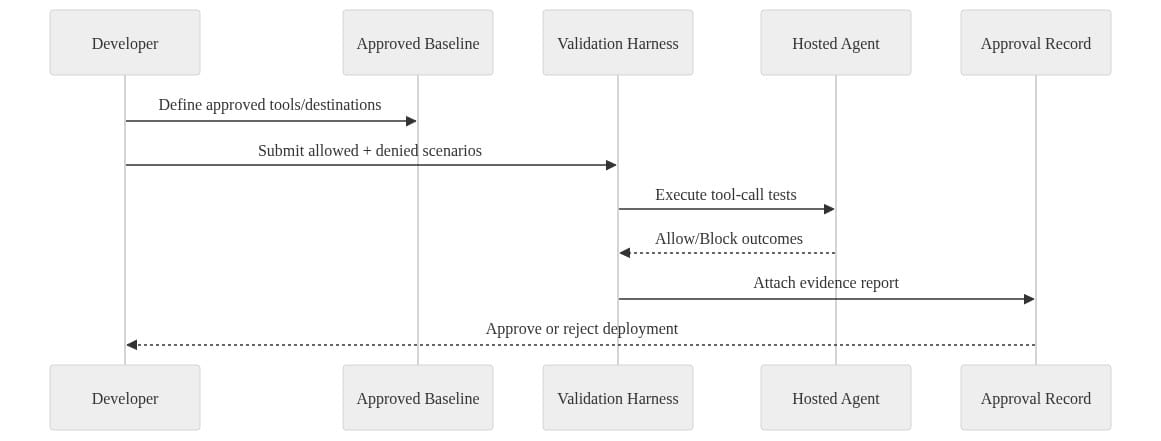
What to observe: the validation harness is not optional ceremony. It is the mechanism that turns architecture rules into deployment evidence.
Add one more test most teams skip
Revoke the credential and disable the route before production.
Then prove:
- the agent fails safely
- the event is logged
- the on-call team knows where to look
- the business owner understands the blast radius
If your kill switch has never been tested, you don’t have a kill switch. You have a diagram.
Step 10: Make connectivity governance an operating model
Assign decision rights clearly
Here’s the split that works:
- Application owner defines purpose and acceptable actions
- Security approves destination and data risk
- Platform engineering implements mediation, identity, and network controls
- Operations owns monitoring, rate controls, and emergency response
When those roles blur, approvals get hand-wavy fast.
Use the broader Microsoft stack for the right parts of the problem
Microsoft’s enterprise agent ecosystem covers different slices of this:
- Foundry Agent Service helps with managed agent runtime and hosted execution
- API Management AI gateway capabilities help with secure, observable mediation
- Microsoft 365 permission-aware governance helps with organizational context
- Power Platform provides a governed environment to build and manage agents, apps, automations, analytics, and sites across business workflows, per the Power Platform documentation
- Microsoft 365 Copilot Agent Builder and Copilot Studio are positioned for building secure, scalable agents across Microsoft 365 and line-of-business systems, per the Copilot Studio experience documentation
That stack is useful. But none of it rescues a team that refuses to make outbound reachability explicit.
The operating principle
Deny by default.
Permit named destinations and named operations.
Use narrowly scoped credentials.
Log every call worth explaining later.
Retire access when the business purpose expires.
That’s how you get from “cool demo” to “defensible production system.”
Final take
Hosted-agent convenience is great. I use managed services constantly, both in enterprise platforms and in my home lab when I’d rather spend my Saturday testing policy paths than rebuilding plumbing for the tenth time.
But convenience comes after control.
If your hosted agents can reach anything, they can send the wrong data, call the wrong tools, cross the wrong boundary, and run up the wrong bill. At that point, governance isn’t a system. It’s optimism dressed up as architecture.
Rate your team’s current state on hosted-agent connectivity governance from 1 to 5: 1 means “the agent can reach whatever it wants,” and 5 means “every destination, tool, identity, and kill switch is tested and evidenced.”
#AzureAI #EnterpriseAI #DataArchitecture
Sources & References
- Microsoft Foundry documentation
- Official Microsoft Power Platform documentation - Power Platform
- What is Microsoft Foundry Agent Service? - Microsoft Foundry
- Agent Builder in Microsoft 365 Copilot
- Work IQ overview
- Set Up Your Development Environment to Extend Microsoft 365 Copilot
- Choose between Agent Builder in Microsoft 365 Copilot and Copilot Studio to build your agent
- AI gateway capabilities in Azure API Management
- Hosted agents in Foundry Agent Service - Microsoft Foundry
- Share and manage agents built with Microsoft 365 Copilot
Try it yourself
Run this tutorial as a Jupyter notebook: Download runbook.ipynb (26 cells, 24 KB).