Enterprise Copilot Release Management for Teams
Publishing agents to Teams is the easy part — the real work starts with release management, identity, and blast-radius control

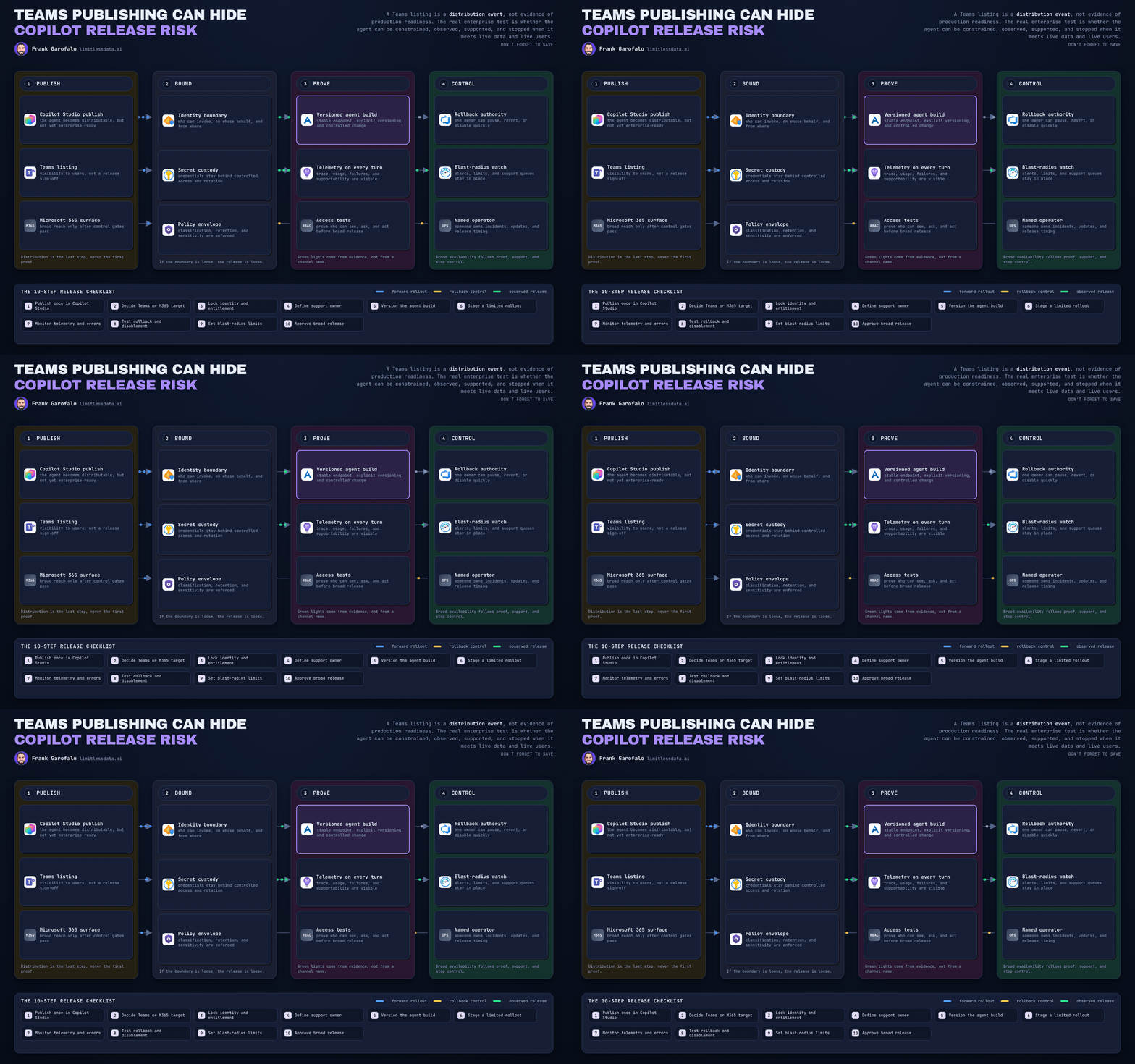
A Teams listing proves distribution, not readiness. I learned that the hard way in a release review where the demo passed on Tuesday, the agent hit live users on Thursday, and by Friday nobody could answer the only question that mattered: who can shut this thing off?
On this page
- Publishing is distribution, not production readiness
- Make release scope smaller than channel scope
- Identity is the blast-radius control plane
- Use a release gate, not a publishing button
- Telemetry must connect usage to risk
- Rollback is an ownership problem before it is a technical problem
- The leadership standard for broad release
- Sources & References
That is the mistake I keep pushing back on with Teams and Microsoft 365 Copilot agents. Publishing is the final mile of exposure, not the milestone that says you are production-ready. Yes, a Copilot Studio agent has to be published before it can be made available in Teams and Microsoft 365, per the Copilot Studio publishing docs. But that publish action only proves the channel can surface the agent. It does not prove you can constrain it, observe it, support it, or stop it.
If you are leading enterprise AI and your success metric is “we got it into Teams,” you are grading the wrong exam.
Publishing is distribution, not production readiness
A lot of teams still treat the catalog listing like a deployment finish line. It is not. It is a distribution event.
Microsoft has made the delivery surface easier on purpose. Foundry Agent Service is positioned as a managed platform for building, deploying, and scaling agents, including versioning, stable endpoints, and sharing through Teams and Microsoft 365 Copilot, per the Foundry Agent Service overview. That is useful. But easier publishing increases the odds that someone mistakes visibility for operational control.
The docs make an important distinction here: sharing an agent inside the organization is not the same thing as organization-wide deployment and integrated operational ownership, per the agent sharing guidance. That distinction matters more than the launch button.
Back in Q4, I sat in a tenant review with a 14-person platform team and a sales operations pilot where the agent was visible to far more users than intended because “published” had quietly become “available.” The app worked. The release process did not.
That is the pattern:
- the demo works
- the channel shows the app
- the sponsor celebrates
- then the first real question lands:
- who is entitled? - what data can it touch? - what actions can it execute? - who approves the next connector? - where is telemetry? - who owns rollback?
If those answers are fuzzy, you did not deploy a production service. You distributed an unmanaged risk surface.
Make release scope smaller than channel scope
Here is the operating model I use: Teams or Microsoft 365 Copilot is the outer boundary. Entitlement groups define the actual release boundary.
That sounds simple, but most failures happen because teams reverse it. They publish broadly, then try to remember who was supposed to use it.
Your rollout should move in named cohorts:
- platform owners and security testers
- a business pilot with a named sponsor
- ring expansion after evidence review
- broad release only after controls survive contact with reality
I like to make this visual because release discipline gets sloppy when it lives only in meeting notes. This flow is the right mental model for agent rollout.
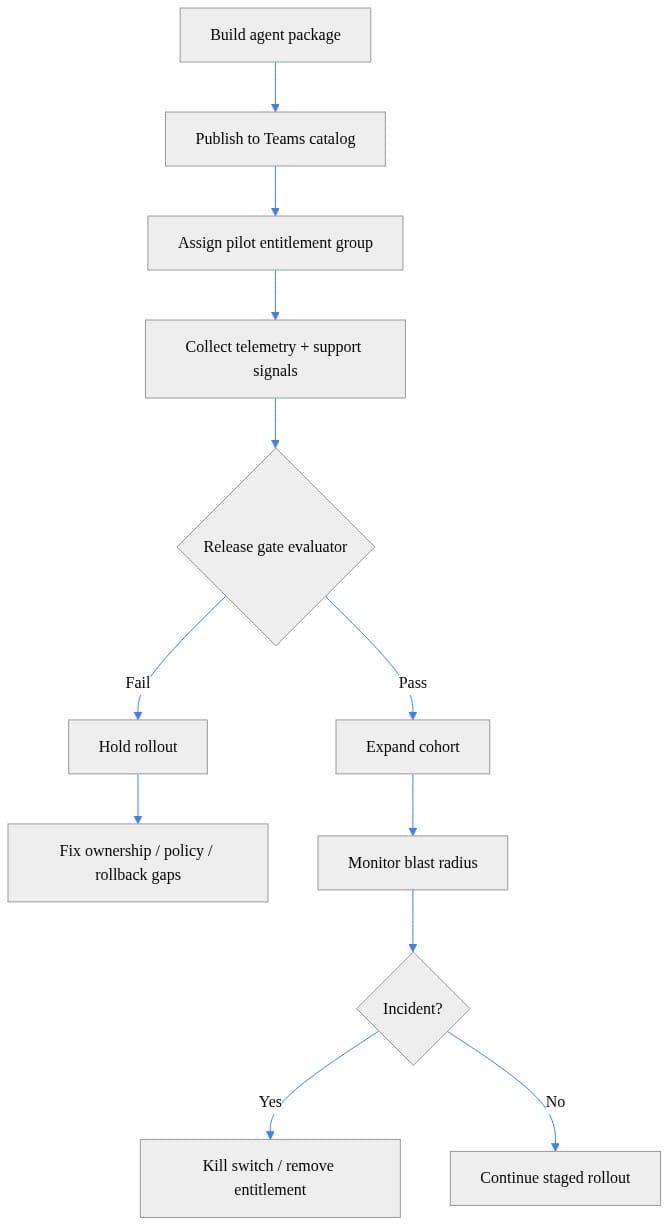
What to observe: publishing happens early in the flow, not at the end. The real release decision sits at the gate, after telemetry and support signals show up.
For each cohort, I require a release contract:
- intended tasks
- approved data sources
- allowed actions
- business owner
- support route
- measurable success criteria
- exit criteria
If a team cannot write that down in one page, they are not ready for broad availability.
This is also where I tie in the governance work I wrote about in my Enterprise Microsoft 365 Copilot Agent Governance Playbook. The point is not paperwork. The point is making blast radius smaller than distribution radius.
Identity is the blast-radius control plane
Identity is where serious teams separate themselves from demo teams.
You need to design at least five boundaries explicitly:
- user identity
- group entitlement
- agent identity
- connector identity
- downstream service identity
Do not blur them together.
Work IQ is useful here because it is built as a workplace intelligence layer that lets agents access organizational data, context, and tools with permission-aware governance, per the Work IQ documentation. Good. Use that. But inherited permissions do not remove your obligation to define who may invoke which tools and data paths. Permission-aware does not mean release-aware.
In practice, I want least privilege at every downstream hop:
- different scopes for pilot vs broad release
- separate identities where business functions differ
- narrower connector permissions than the sponsor first asks for
- explicit approval when a tool can write, not just read
This tiny example shows the pattern. Access should require more than “the app exists.” I want role, group membership, and tenant checks lined up.
# Identity-aware access check that requires both app role and pilot entitlement membership.
def can_use_agent(user: dict, app: dict) -> bool:
    has_role = "Agent.User" in user.get("roles", [])
    in_entitlement = app["pilot_group"] in user.get("groups", [])
    tenant_allowed = user.get("tenant_id") in app.get("allowed_tenants", [])
    return has_role and in_entitlement and tenant_allowed

user = {
    "id": "u-123",
    "tenant_id": "contoso",
    "roles": ["Agent.User"],
    "groups": ["grp-agent-pilot"],
}
app = {"pilot_group": "grp-agent-pilot", "allowed_tenants": ["contoso"]}
print({"authorized": can_use_agent(user, app)})
What to observe: entitlement is separate from role assignment. That is how you keep a published agent from becoming a de facto broad release.
The predictable failure mode is common: the agent looked safe in a 25-user pilot because everyone already had broad access, then it hit a 2,000-user ring and suddenly the connector path exposed data combinations nobody tested. That is not a model problem. It is an identity design problem.
Security should approve the access pattern. The business owner should approve the audience and use case. The platform team should enforce the technical controls. If one person is doing all three, you do not have governance. You have convenience.
Use a release gate, not a publishing button
If you want to run agents like enterprise software, treat the release as an artifact with evidence attached.
That means a minimum go-live gate before broad distribution:
- documented owner
- entitlement group
- approved data policy
- tested downstream permissions
- support model
- telemetry plan
- rollback authority
Copilot Studio data policies exist for exactly this reason: to help agents connect to data sources and services while protecting how data is used, per the Copilot Studio DLP and data policy guidance. If your agent can hit a connector and nobody can point to the data policy decision, the release is incomplete.
This is the kind of lightweight evaluator I like to show teams. Not production code. Just a clear expression of the standard.
# Release-gate evaluator that blocks cohort expansion when evidence is incomplete.
from dataclasses import dataclass

@dataclass
class ReleaseEvidence:
    owner: str | None
    entitlement_group: str | None
    telemetry_healthy: bool
    data_policy_approved: bool
    rollback_tested: bool

def evaluate_gate(e: ReleaseEvidence) -> tuple[bool, list[str]]:
    failures = []
    if not e.owner: failures.append("missing service owner")
    if not e.entitlement_group: failures.append("missing pilot entitlement group")
    if not e.telemetry_healthy: failures.append("telemetry unhealthy or absent")
    if not e.data_policy_approved: failures.append("data policy approval missing")
    if not e.rollback_tested: failures.append("rollback evidence missing")
    return (len(failures) == 0, failures)

evidence = ReleaseEvidence("teams-agent-oncall", "grp-agent-pilot", True, True, False)
allowed, reasons = evaluate_gate(evidence)
print({"expand_cohort": allowed, "reasons": reasons})
What to observe: the gate fails on missing evidence, not just broken functionality. That is how you stop “it works in Teams” from becoming the only acceptance criterion.
I also classify changes differently:
- prompt/instruction changes
- tool changes
- identity changes
- data-source changes
- channel changes
These should not share the same approval path. A prompt tweak is not the same thing as adding a write-capable connector into a finance system.
If you need a deeper control model, I covered the broader mechanics in my post on Microsoft 365 Copilot enterprise AI governance controls. The short version: missing approvers are an operational defect, not a process inconvenience.
Telemetry must connect usage to risk
I do not care how many conversations your agent handled if you cannot tell me:
- which cohort used it
- which version they hit
- which tools or data paths were invoked
- what failed
- what policy signals fired
- whether support demand is rising or falling
Conversation count is adoption telemetry. It is not operating telemetry.
Your review cadence should bring platform, security, and business owners to the same evidence set:
- usage patterns by cohort
- error rate
- latency
- connector failures
- policy events
- support tickets
- approved exceptions
Here is a simple guardrail pattern. Again, illustrative, not a production monitoring stack.
# Telemetry guardrail that halts rollout when error rate or latency exceeds thresholds.
from statistics import mean

def telemetry_ok(requests: int, failures: int, p95_ms: list[int]) -> bool:
    error_rate = failures / max(requests, 1)
    p95 = mean(p95_ms) if p95_ms else 99999
    return error_rate < 0.02 and p95 < 1500

snapshot = {
    "requests": 1200,
    "failures": 31,
    "p95_ms": [1100, 1250, 1400, 1600],
}
print({
    "telemetry_ok": telemetry_ok(**snapshot),
    "error_rate": round(snapshot["failures"] / snapshot["requests"], 4),
})
What to observe: rollout should halt when the operating signals degrade, even if adoption looks great. I have seen agents get praised for usage while quietly generating support debt and risky workarounds.
This is one of the reasons I keep talking about adoption and governance together. If you separate them, you reward the wrong behavior. I made that case in Microsoft 365 Copilot Adoption, Burnout and Governance, and it applies even more aggressively to agents because they can act, not just suggest.
Rollback is an ownership problem before it is a technical problem
Every agent team says they can roll back. Fewer can answer who is authorized to do it at 9:17 PM when legal, security, and the business owner all want different things.
That is why I insist on distinct rollback targets:
- remove channel availability
- remove entitlement membership
- revert to previous agent version
- disable tool connectivity
- revoke downstream credentials
Those are different response paths. Treating them as one big “rollback” bucket is how incidents drag on.
Foundry hosted agents support Teams and Microsoft 365 channel integration through the Activity protocol, per the hosted agents channel integration docs. That matters operationally because the channel path is part of the release surface. You need a tested way to disable or restrict that path, not just a theory.
I like teams to rehearse blast-radius reduction in two motions:
- stop new exposure
- shrink existing entitlement
This is the kind of kill-switch pattern I want documented in a runbook.
# Operational kill-switch runbook that disables a release path during an incident.
param(
    [string]$ConfigPath = ".\release-config.json"
)

$config = @{
    releasePathEnabled = $true
    lastChangedBy = "unknown"
} | ConvertTo-Json | Set-Content -Path $ConfigPath -PassThru | ConvertFrom-Json

$config.releasePathEnabled = $false
$config.lastChangedBy = $env:USERNAME
$config.changedAtUtc = (Get-Date).ToUniversalTime().ToString("o")
$config | ConvertTo-Json | Set-Content -Path $ConfigPath

Write-Host "Release path disabled. New state:"
Get-Content $ConfigPath
What to observe: the important part is not the script. It is the fact that someone owns the command, the state change is recorded, and the path is fast.
Then I want a second motion for entitlement reduction when the issue is cohort-specific rather than global.
# Pilot entitlement removal runbook pattern for shrinking blast radius fast.
param(
    [string]$GroupName = "grp-agent-pilot",
    [string[]]$Users = @("alex@contoso.com", "sam@contoso.com")
)

$membership = @{}
$membership[$GroupName] = [System.Collections.Generic.List[string]]::new()
$Users | ForEach-Object { [void]$membership[$GroupName].Add($_) }

$Users | ForEach-Object {
    [void]$membership[$GroupName].Remove($_)
    Write-Host "Removed from $GroupName => $_"
}

Write-Host "Remaining members:"
$membership[$GroupName]
What to observe: removing access from a pilot ring is often the fastest safe response while the team investigates. Broad publishing without a tested entitlement-removal path is amateur hour.
The failure mode here is blunt: if your team can publish in minutes but cannot name who may disable the agent, you have created unmanaged blast radius.
The leadership standard for broad release
Leaders need a harder standard than “the app is available in Teams.”
Broad release should be earned through:
- constrained pilots
- proven identity boundaries
- approved data policy
- telemetry tied to risk
- support readiness
- tested rollback
- named ownership
That is the bar.
And yes, I know the tooling makes publishing easier. Copilot Studio for Teams supports building classic-orchestration agents and publishing them to Teams for eligible Microsoft 365 subscriptions, per the licensing and subscription guidance. Good. Lower friction for building is fine. Lower standards for release is not.
So here is my opinion, plainly: stop celebrating Teams or Microsoft 365 Copilot availability as deployment success. Celebrate when the agent can be constrained, observed, supported, and stopped by named people using tested controls.
That is what production readiness looks like.
Rate your team’s current agent release discipline from 1 to 5: are you still treating Publish as deployment, or do you actually have entitlement gates, telemetry, and rollback authority wired up?
#Microsoft365copilot #EntraID #EnterpriseAI
Sources & References
- Connect and configure an agent for Teams and Microsoft 365 Copilot - Microsoft Copilot Studio
- What is Microsoft Foundry Agent Service? - Microsoft Foundry
- Microsoft Foundry documentation
- Choose between Agent Builder in Microsoft 365 Copilot and Copilot Studio to build your agent
- Work IQ overview
- Share and manage agents built with Microsoft 365 Copilot
- Hosted agents in Foundry Agent Service - Microsoft Foundry
- Configure data policies for agents - Microsoft Copilot Studio
- Get access to Copilot Studio Standard harness - Microsoft Copilot Studio
- Agent Builder in Microsoft 365 Copilot
Try it yourself
Run this tutorial as a Jupyter notebook: Download runbook.ipynb (24 cells, 23 KB).