Token-Smart Copilot: Configuring VS Code and GitHub Copilot with Your Own Models on Azure AI Foundry via APIM
A tutorial on configuring VS Code and GitHub Copilot to use your own models deployed in Azure AI Foundry, routed through Azure API Management — including model routing strategy for token efficiency and a workbook design for measuring it.

Why Bring Your Own Model?
GitHub Copilot ships with a strong default model lineup, but many teams need more control: data residency guarantees, private fine-tuned models, cost governance, or the ability to standardize every developer's AI usage through a single enterprise gateway. VS Code now supports Bring Your Own Key (BYOK) chat model providers — meaning you can point Copilot Chat at models you deploy and manage yourself in Azure AI Foundry, fronted by Azure API Management (APIM) as your governance and routing layer.
This post walks through the full picture: configuring VS Code to use custom endpoints, why APIM as a broker beats hardcoding endpoint URLs, how to think about model routing for cost and context efficiency, and — critically — how to actually measure whether your setup is token-efficient with a real reporting workbook.
Architecture Overview
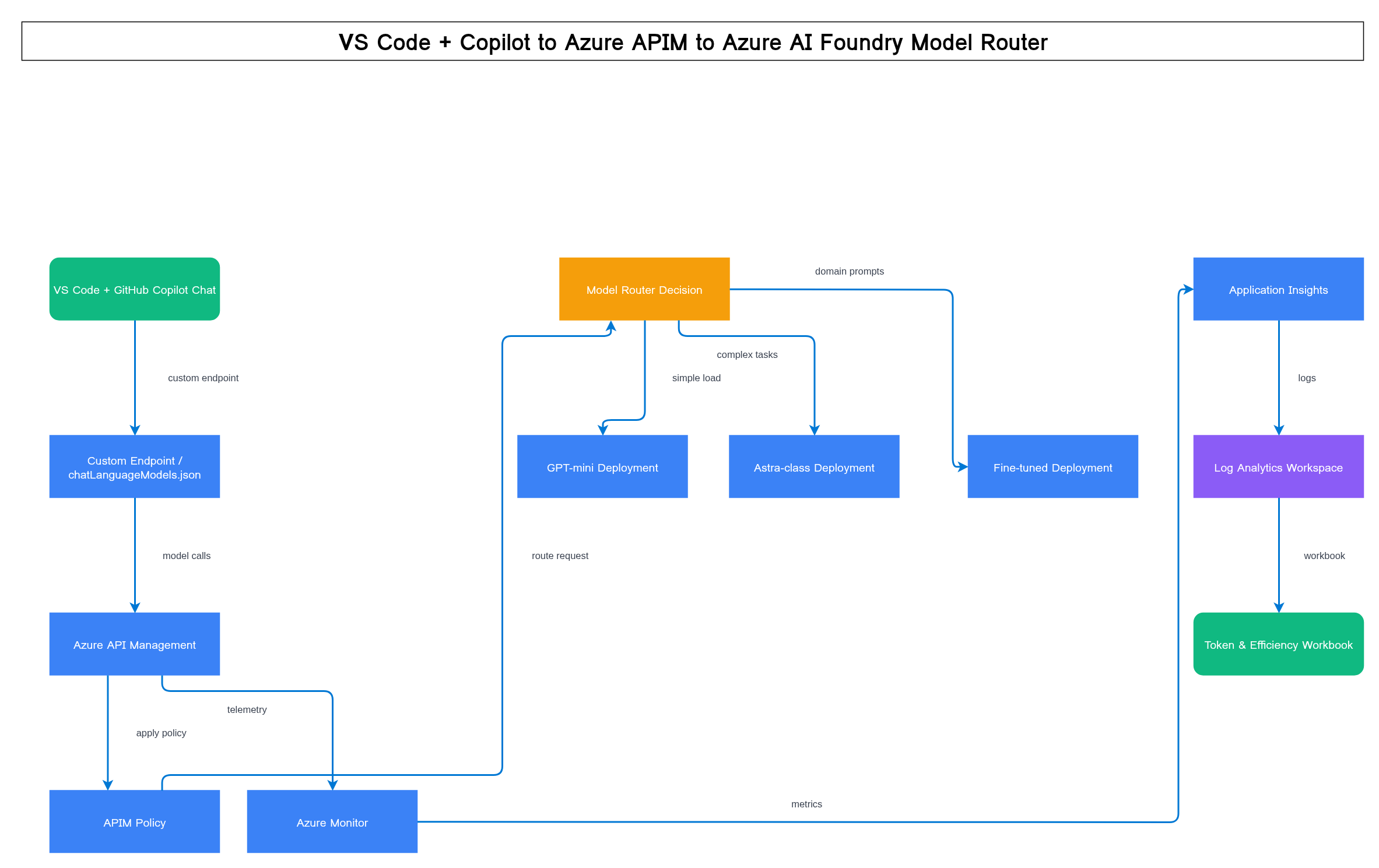
The point of putting APIM in the middle rather than pointing VS Code straight at an Azure AI Foundry endpoint is that APIM becomes your single control plane: one place for auth, quota, routing policy, and telemetry, regardless of how many models or deployments sit behind it.
Step 1: Configure VS Code for a Custom Model Provider
VS Code's Copilot Chat extension supports registering a custom, OpenAI-compatible chat model provider outside of GitHub's own hosted models. In current VS Code (Insiders and Stable), this is done through the Chat view's model picker: Manage Models → select "Custom" provider → Add Model. This walks you through a short prompt sequence rather than requiring you to hand-author a JSON file from scratch:
- Provider base URL — this should point at your APIM gateway (e.g.
https://your-apim-instance.azure-api.net/openai), not directly at the Azure AI Foundry deployment endpoint. - API key — your APIM subscription key, entered when prompted; VS Code stores it in OS-native secret storage (Keychain/Credential Manager/libsecret), not in plaintext settings. APIM re-authenticates to Foundry on your behalf via its own named-value/policy credential.
- Model ID — the model name to request (this can be an alias you define in APIM rather than the raw Foundry deployment name), which populates the Copilot Chat model picker.
- Capabilities — VS Code will ask (or infer from a probe request) whether the endpoint supports streaming, tool calling/agent mode, and vision, since this determines what UI affordances are shown for that model.
Once added, the resulting configuration is stored under the github.copilot.chat.customOAIModels settings key in your user or workspace settings.json as an OpenAI-compatible provider entry (base URL + model list) — this is the current, actively supported mechanism, not a deprecated one. Because it's a normal settings key, it can be checked into a shared .vscode/settings.json (with the API key itself left out and supplied per-developer via the secret-storage prompt or an environment reference).
Step 2: Why APIM as the Broker (Not Direct-to-Foundry)
You could point VS Code directly at an Azure AI Foundry endpoint. Most teams outgrow that quickly. APIM as the broker gets you:
- Centralized key management — developers get one APIM subscription key, never the underlying Foundry resource keys.
- Routing policy in one place — swap, add, or retire backend model deployments without touching every developer's VS Code settings.
- Quota and rate limiting per team/user — enforce token or request budgets at the gateway, not per-developer honor system.
- Unified logging — every request, regardless of which model it hit, lands in the same Log Analytics workspace for the reporting workbook in the last section of this post.
- Blue/green and canary model rollout — shift traffic percentages to a new model version behind the same alias.
Step 3: Model Routing for Token and Context Efficiency
Not every Copilot request needs your most expensive model. A router should classify requests and dispatch accordingly. A simplified decision tree:
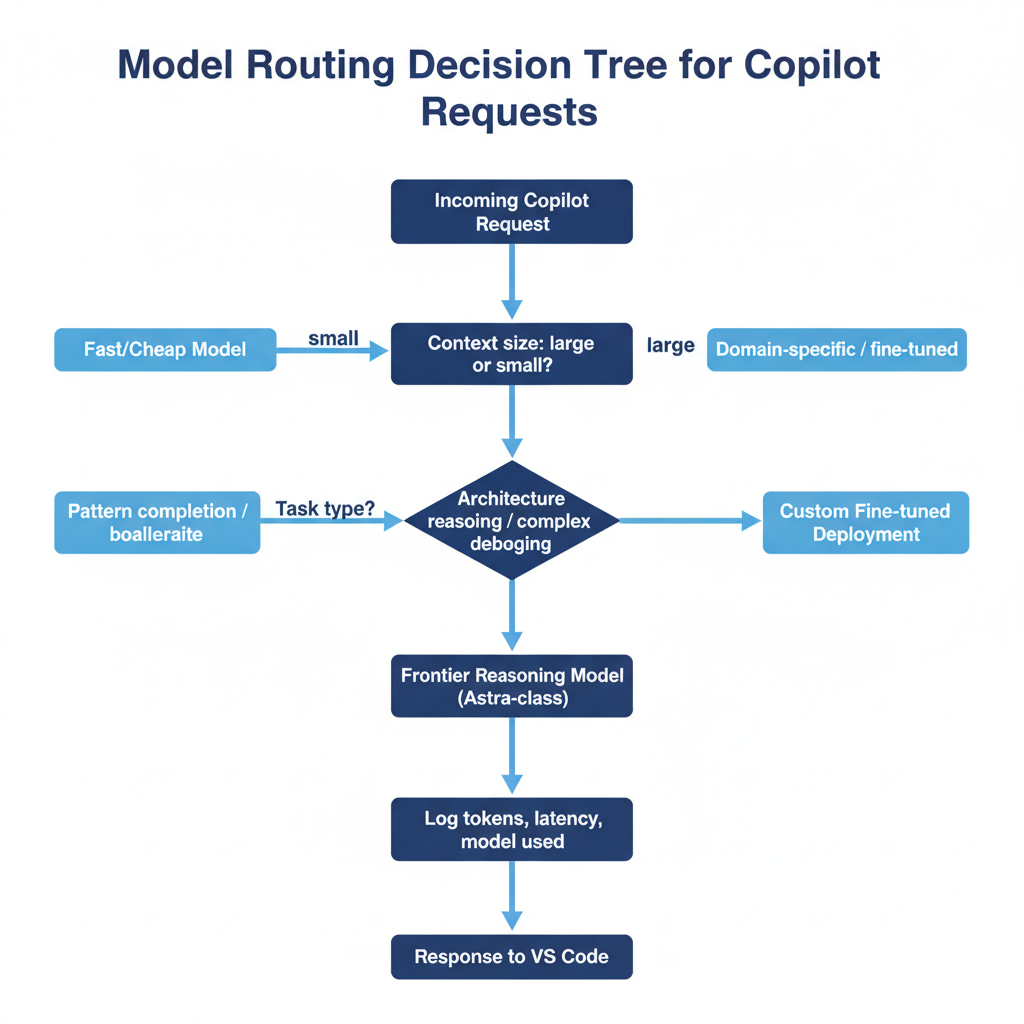
Practical heuristics worth codifying in your routing policy:
- Token-cheap, high-volume tasks (inline completions, simple chat Q&A, docstring generation) → smaller/faster models. These are the majority of Copilot's request volume by count.
- Token-expensive, low-volume tasks (large-context refactors, architecture discussions, multi-step agent workflows) → your frontier/reasoning-tier model. Fewer requests, but each one carries far more context tokens — this is where cost concentrates even though request count is low.
- Context trimming before routing — regardless of which model is picked, truncate or summarize context (open files, workspace symbols) to only what's relevant to the current request. A router only saves money if the payload it forwards is also lean.
- Sticky routing for multi-turn chat — once a conversation has escalated to the reasoning-tier model, keep it there for the remainder of that thread rather than bouncing between models turn to turn.
Azure AI Foundry's Model Router vs. a Custom APIM Routing Policy
Azure AI Foundry offers a native Model Router deployment — a single deployable "model" that itself dispatches each request to an appropriate underlying OpenAI model based on the router's own judgment of task complexity and cost. It's genuinely useful when your routing needs are generic: you want automatic quality/cost balancing across a set of OpenAI models and don't need organization-specific logic layered on top.
For the architecture in this post, APIM policy-based routing is the recommended default, because it's the layer that also does everything else this post relies on: per-team quota enforcement, unified logging across every backend (not just OpenAI-family models), cost-center attribution, and the ability to mix Foundry deployments with other providers behind the same alias. Foundry's Model Router is worth adopting underneath an APIM alias when your backend pool is exclusively OpenAI-family models and you want its automatic routing intelligence rather than authoring your own complexity heuristics in policy — the two are complementary, not mutually exclusive: APIM can front a Foundry Model Router deployment the same way it fronts any single model deployment.
Step 4: Deploying the Configuration Across a Team
For a single developer, editing settings.json by hand is fine. For a team, standardize on:
- Workspace or profile settings distributed via a settings sync profile or a checked-in
.vscode/settings.jsonso the custom endpoint configuration ships with the repo rather than living only on one machine. - APIM subscription keys issued per developer or per team, not one shared key, so usage and quota can be attributed and revoked individually.
- A CI/CD-managed APIM policy (APIM policies as code, version-controlled) so routing and rate-limit changes go through review rather than being edited ad hoc in the portal.
Step 5: Measuring Token and Model Efficiency
Configuring routing is only half the job — you need to know whether it's actually working. Two complementary telemetry sources:
- Gateway-side (APIM → Log Analytics / App Insights): every request/response through the gateway, which model it was routed to, response time, and (if you emit it in policy) token counts reported back from the model response payload.
- Client-side (VS Code OpenTelemetry export): VS Code documents an OpenTelemetry export path for chat/agent activity — model calls, input/output token counts, tool invocation counts, time-to-first-token, and full agent round-trip time. This is the layer that tells you what's actually happening inside a developer's coding session, not just at the gateway.
Building the Efficiency Report
Both telemetry sources land as structured logs, so the practical way to build this is a KQL-based Azure Monitor Workbook combining:
// Example shape only — validate table/field names
// against your actual Log Analytics schema before running.
CopilotGatewayLogs
| where TimeGenerated > ago(7d)
| summarize
    TotalRequests = count(),
    AvgLatencyMs = avg(DurationMs),
    TotalInputTokens = sum(InputTokens),
    TotalOutputTokens = sum(OutputTokens)
  by ModelAlias, bin(TimeGenerated, 1h)
| order by TimeGenerated desc
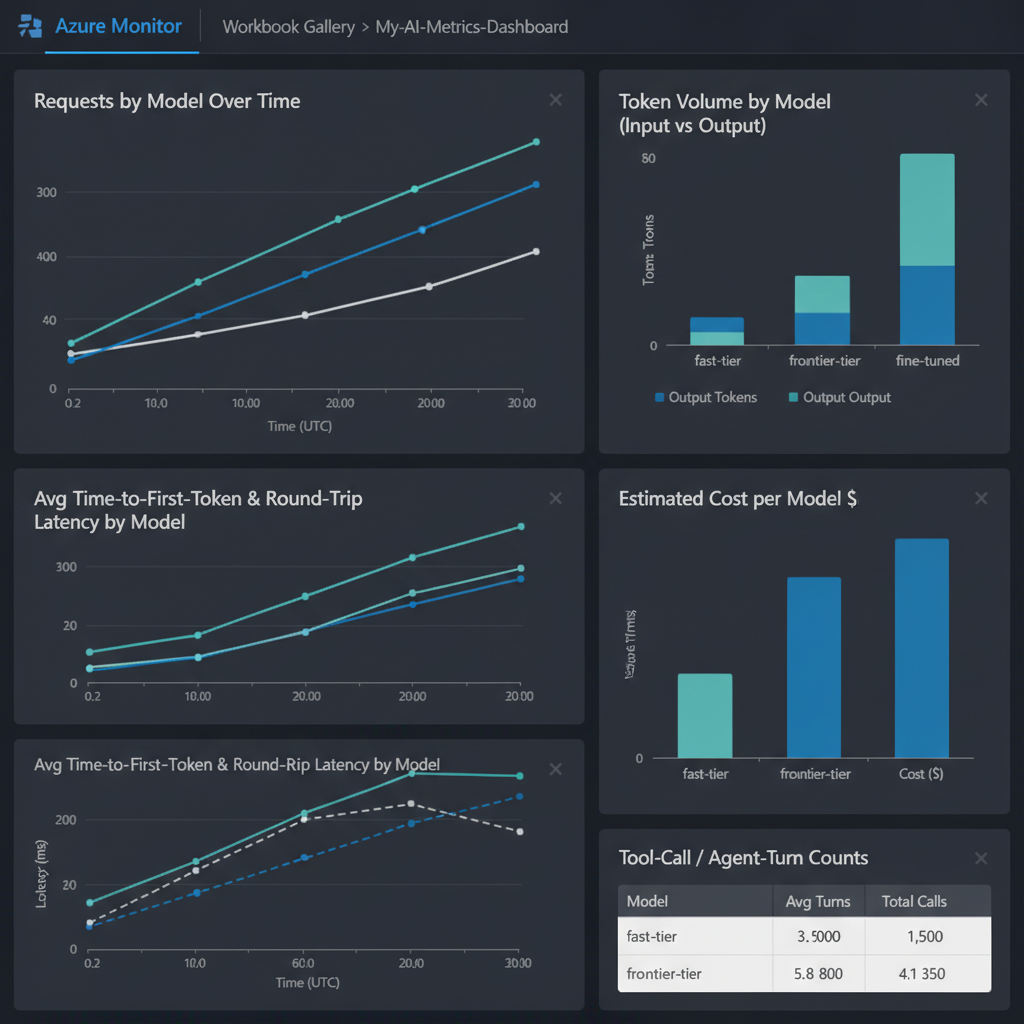
Recommended panels for the workbook:
- Requests by model over time — validates your router is actually distributing traffic as designed, not defaulting everything to the expensive tier.
- Token volume by model (input vs. output, stacked) — the actual cost driver; request count and token count often tell very different stories.
- Average time-to-first-token and full round-trip latency by model — the user-perceived efficiency metric, separate from token cost.
- Cost-per-model estimate — token volume multiplied by each model's published rate, to translate the above into a dollar figure leadership will actually ask about.
- Tool-call / agent-turn counts — for agent-mode Copilot sessions, how many round trips a task took, which is often a bigger efficiency lever than model choice alone.
Recap
- Configure VS Code's custom chat model provider (
github.copilot.chat.customOAIModels, added via the Manage Models UI) to point at your APIM gateway, not directly at Foundry. - Use APIM as the single broker for auth, quota, routing, and logging across every model deployment.
- Route by task complexity and context size — cheap/fast models for high-volume simple tasks, reasoning-tier models for complex/large-context work, with sticky routing per conversation thread. Use Foundry's native Model Router underneath an APIM alias for OpenAI-only backend pools; use APIM policy routing when you need cross-provider or organization-specific logic.
- Distribute the configuration and per-developer subscription keys through version-controlled settings rather than manual setup.
- Instrument both the gateway and VS Code's own OpenTelemetry export, and build a workbook that reports token volume, latency, and estimated cost by model — not just raw request counts.
This post reflects VS Code/Copilot BYOK and Azure AI Foundry/APIM capabilities as documented at the time of writing. Configuration surfaces in this space evolve quickly — validate field names and product capabilities against current Microsoft documentation before deploying to a team.



