What CDOs should require before deploying autonomous AI agents in Microsoft environments
What CDOs should require before deploying autonomous AI agents in Microsoft environments


Your agents will get enterprise permissions before your governance is ready. That is the part too many leadership teams are still underestimating.
In Microsoft environments, autonomous agents can now do far more than answer questions. They can retrieve data, call tools, trigger workflows, and even interact with desktops. So the executive question is no longer “Can we deploy them?” It is “What must be true before we let them act?”
My view is simple: CDOs should require a formal pre-deployment control baseline before any autonomous AI agent is allowed into production Microsoft environments.
The main risk is not the model in isolation. It is the combination of identity, configuration, tool access, data reach, and weak human oversight.
And this is where many enterprises are getting it wrong. They are treating autonomous agents like a lightweight productivity pilot when they should be treating them like a new class of software actor with delegated authority.
Why the usual pilot-first logic breaks here
The standard advice is familiar: start with a pilot, learn fast, add governance later.
For autonomous agents, that is backwards.
A drafting assistant is one thing. An agent that can query device data, trigger workflows, use connectors, or operate a Windows UI is something else entirely. Microsoft documents agent workflows across Azure AI Foundry, Microsoft 365 Copilot, Intune, Fabric, and Copilot Studio computer use. The platform surface is broad, and the friction to build is dropping fast.
That is useful. It is also dangerous when governance is still informal.
A recent example made this real for one team I advised: a small operations group built two internal agents in a non-production Power Platform environment. On paper, low risk. In practice, one inherited connector path still reached live customer case data because nobody had reviewed the underlying permissions model. The “pilot” was non-production. The access path was not.
That is exactly how low-risk experiments become high-risk incidents.
At board level, the real question is whether the organization can prove:
- who approved the agent
- what identity it uses
- what data it can read
- what systems it can act on
- how it is monitored
- how it is stopped
If those answers are vague, the agent is not ready.
The risk surface is now identity, configuration, and tool access
The loudest AI risk discussions still focus on hallucinations. That is not where most Microsoft agent failures will come from.
The bigger failures will come from misconfiguration, over-privileged access, connector sprawl, and weak approval design.
Why? Because an agent can sit at the intersection of:
- Entra identities and app registrations
- delegated and application permissions
- Microsoft Graph and line-of-business connectors
- Power Platform environments and DLP policies
- Fabric data estates
- Intune device and operational data
- desktop automation and computer use
Every tool an agent can call is a control boundary. It should be reviewed like an integration, not waved through like a harmless plugin.
This is also why I think some CDOs are tolerating the wrong rollout pattern. If the organization cannot govern identities, environments, approvals, and monitoring, then it is not ready for autonomous agents. “We’ll tighten controls after the pilot” is not agility. It is avoidable negligence.

The failure modes CDOs should assume in advance
Do not start from the optimistic case. Start from the failures most likely to happen.
1) Misconfiguration
Agents get launched in the wrong environment, with weak DLP posture, broad connectors, or poor separation between dev, test, and production.
2) Over-privileged access
Teams reuse existing service principals, broad Graph permissions, or connectors originally approved for humans, not autonomous execution.
3) Data leakage
Sensitive content moves across Microsoft 365, Fabric, Power Platform, or external systems through retrieval, prompts, logs, outputs, or workflow steps.
4) Weak human-in-the-loop design
Agents are allowed to execute meaningful actions without approval gates, exception handling, or a credible stop mechanism.
Those four risks are tightly connected. Most incidents will not be one dramatic model failure. They will be a chain: broad identity, weak connector review, unclear environment controls, and no fast rollback.
What I would require before any production approval
Here is the baseline I would insist on before an autonomous agent goes live.
1) A documented identity model for every agent
For each agent, name:
- the service identity or app registration
- whether it uses delegated or application access
- connector identities
- the owning team in Entra
- the break-glass disable path
If nobody can explain the identity model in one page, the agent is not ready.
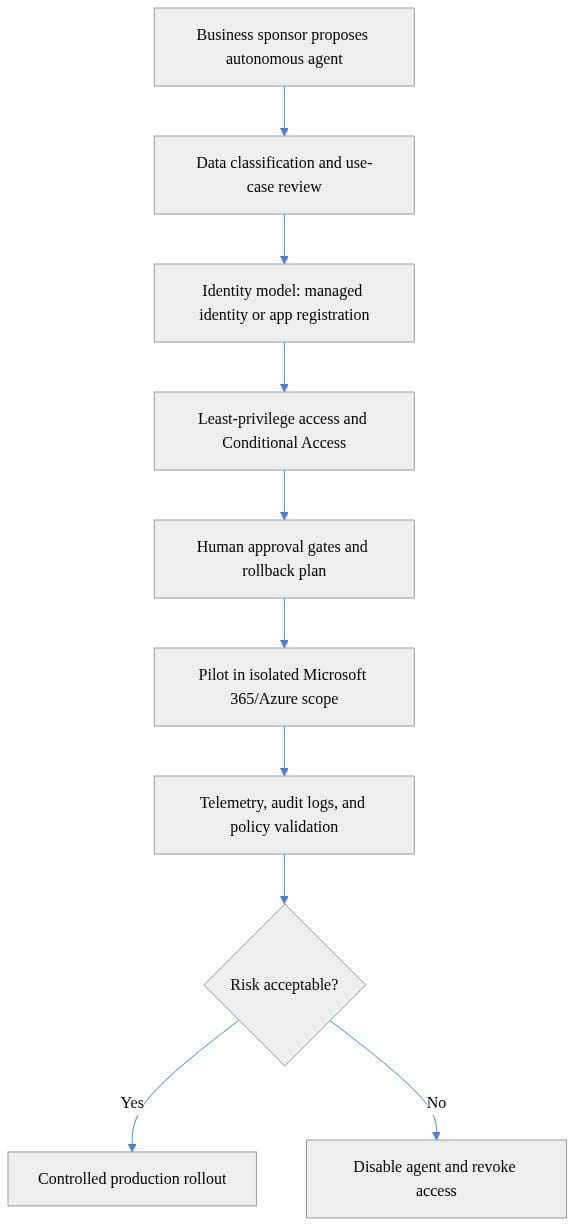
2) Least-privilege review for every tool and data source
Do not approve “Fabric access” or “Microsoft 365 access” as broad categories. Approve specific workspaces, sites, connectors, APIs, and actions tied to a named business purpose.
These examples are illustrative governance patterns, not production-ready deployment scripts.
# Example governance gate: block production rollout when required evidence is missing
$evidence = @{
    DataClassification = $true
    IdentityReview     = $true
    AccessReview       = $true
    AuditLogging       = $true
    RollbackRunbook    = $false
}

$missing = $evidence.GetEnumerator() | Where-Object { -not $_.Value } | Select-Object -ExpandProperty Key

if ($missing.Count -gt 0) {
    Write-Error ("Deployment blocked. Missing controls: " + ($missing -join ", "))
} else {
    Write-Host "Governance gate passed for controlled pilot deployment."
}
The point is not automation for its own sake. The point is that production approval becomes evidence-based, not enthusiasm-based.
3) Environment governance in Copilot Studio and Power Platform
Require separation of dev, test, and production. Align DLP policy to the sensitivity involved. Validate residency requirements before deployment, not after someone asks where agent data is processed.
4) Stronger controls for high-risk capabilities
If the agent uses computer use, desktop automation, or write-back actions into systems of record, require stronger controls than for read-only retrieval.
This is where many organizations are still too casual. A UI-operating agent should not be approved with the same governance posture as a read-only knowledge assistant.
5) Logging, alerting, and auditability
Security must be able to reconstruct what the agent accessed, recommended, and executed. Monitoring is part of launch criteria, not a phase-two enhancement.

What application owners must prove
Central AI teams should not carry this alone. If an agent can act in an application, the application owner remains accountable for the operational consequences.
That means application owners should provide:
- a clear inventory of every action the agent can take
- a business impact rating for each action path
- human approval checkpoints for consequential actions
- exception handling when context is incomplete
- a test plan for failure handling and unauthorized access attempts
For runtime governance, I would expect a checklist like this:
- Is the action within approved scope?
- Is it high impact?
- Does it require human approval?
- Is it executed with the right managed identity or app identity?
- Is the action logged in a durable audit trail?
- Is there an alert and rollback trigger for anomalies?
If your platform cannot enforce that logic, you are not ready for broad autonomy.
A practical pre-deployment checklist
This is the checklist I would put in front of every business sponsor before production:
- Who owns this agent end to end, and who can approve changes?
- What identities does it use, and are they least privilege?
- What data can it read, specifically?
- What systems can it act on, specifically?
- Which connectors, tools, and desktop automation capabilities are enabled?
- What DLP, residency, and environment policies apply?
- Which actions require human approval, and who provides it?
- What logs, alerts, and audit trails exist?
- How is the agent disabled, rolled back, or quarantined?
- What evidence must be reviewed before production approval?
# Minimal access review checklist for a Microsoft-hosted autonomous agent
$AgentName = "FinanceOps-Agent"
$RequiredControls = @(
    "Named owner and executive sponsor",
    "Managed identity or approved app registration",
    "Least-privilege Graph/Azure permissions",
    "Conditional Access and network restrictions",
    "Audit logging to Log Analytics/Sentinel",
    "Documented rollback and credential revocation plan"
)

[pscustomobject]@{
    Agent    = $AgentName
    Controls = $RequiredControls -join "; "
    Status   = "Do not deploy until every control is evidenced"
} | Format-List
That last line is the right standard: do not deploy until every control is evidenced.
Not “we’ll tighten it later.”

Rollback is not optional
If you need to stop an agent fast, rollback cannot be theoretical. It needs a runbook and ideally automation.
This example is illustrative and assumes the organization is using the relevant Microsoft Graph and Az PowerShell modules with the required permissions and role model already in place.
# Illustrative rollback automation: disable service principal and remove role assignments
param(
    [Parameter(Mandatory = $true)]
    [string]$ServicePrincipalObjectId
)

Write-Host "Starting emergency rollback for agent identity $ServicePrincipalObjectId"

Update-MgServicePrincipal -ServicePrincipalId $ServicePrincipalObjectId -AccountEnabled:$false

Get-AzRoleAssignment -ObjectId $ServicePrincipalObjectId -ErrorAction SilentlyContinue |
    ForEach-Object {
        Remove-AzRoleAssignment -ObjectId $_.ObjectId -RoleDefinitionName $_.RoleDefinitionName -Scope $_.Scope
    }

Write-Host "Rollback complete: identity disabled and Azure RBAC assignments removed"
If you cannot disable the identity and revoke access quickly, you do not have operational control. CDOs should stop accepting “manual rollback exists somewhere” as good enough.
“Microsoft-native” is not the same as “governed”
One argument I still hear is that because these agents are built with Microsoft tooling, the baseline governance is already handled.
That is the wrong conclusion.
Microsoft gives you powerful building blocks: agent creation in Azure AI Foundry, business-led agent building in Microsoft 365 Copilot, governance controls in Copilot Studio and Power Platform, operational workflows in Intune, and broad data access patterns across Fabric.
But Microsoft providing the primitives is not the same as your company configuring them well.
Your enterprise still decides:
- how identities are created
- which permissions are granted
- where environments are separated
- how connectors are approved
- when human review is mandatory
- how telemetry is retained and reviewed
- who can shut the system down
A secure platform does not rescue weak operating discipline.

The executive standard should be proof of control before proof of value
This is the strongest position I would take into any steering committee:
Autonomous agents should enter production Microsoft environments only after the organization can prove who owns them, what they can touch, how they are monitored, and how they are stopped.
That is not bureaucracy. It is basic enterprise discipline applied to a new class of actor.
The fastest path to safe scale is not broad experimentation first. It is a hard baseline for identity, access, environment governance, monitoring, and human oversight. Once that baseline exists, experimentation gets safer and faster.
CDOs: before your next pilot, which control is most often missing in your environment: identity clarity, least privilege, environment separation, monitoring, or rollback? And which one should be mandatory before any agent is allowed to act?
#AzureAI #EntraID #EnterpriseAI
Sources & References
- Use Microsoft Copilot in Intune
- Microsoft Fabric security overview
- Cloud Adoption Framework for Azure
- Azure AI Foundry agent quickstart
- Agent Builder in Microsoft 365 Copilot
- Automate web and desktop apps with computer use - Microsoft Copilot Studio
- Choose between Agent Builder in Microsoft 365 Copilot and Copilot Studio to build your agent
- Security and governance - Microsoft Copilot Studio
- Study guide for Exam AI-103: Developing AI Apps and Agents on Azure
Try it yourself
Run this tutorial as a Jupyter notebook: Download runbook.ipynb (23 cells, 20 KB).



