Why Most Enterprise AI Projects Stop at the Demo
Why Most Enterprise AI Projects Stop at the Demo


Why Most Enterprise AI Projects Stop at the Demo
Most enterprise AI projects do not fail because the model is weak. They stall because the demo was the easy part, and production exposes the hard parts: governance, data readiness, cost control, and compliance.
That is the uncomfortable truth.
The industry still over-credits model breakthroughs and underfunds the engineering needed to make AI survivable inside a real enterprise. Leaders keep asking teams to “add AI” before they have funded identity, data access, observability, API controls, and review paths. Then they act surprised when the pilot looks great and the rollout slows to a crawl.
In Azure terms, the teams that get past the demo treat AI as a governed, costed, API-managed, data-backed system, not a clever prompt wrapped in a slide deck.
My opinion, stated plainly
Most enterprise AI programs stop at the demo because organizations are buying intelligence but underfunding engineering.
Model access is getting easier. Operationalizing that access is not.
Microsoft’s own platform direction reflects this reality:
- Azure API Management is increasingly positioned as a control point for APIs and AI endpoints, which is exactly how production AI should be treated: as a governed interface, not an ad hoc endpoint.
- Azure’s data modernization push reinforces a basic truth: if the data estate is not ready, AI outcomes will be fragile.
- Microsoft’s cost optimization guidance is clear that AI-era spend must be actively planned and managed.
- Sovereign and controlled deployment models matter because many AI workloads cannot simply run in the most convenient region.
That is not marketing trivia. It is the architecture lesson.
The demo trap
A demo succeeds because it avoids the hardest questions:
- Who owns the system?
- What data is it allowed to touch?
- How is identity enforced?
- What happens when the model times out?
- How do you cap usage?
- How do you trace a bad answer back to a request?
- Which region is legally allowed to process the data?
- What is the cost per workflow?
- What is the fallback path when the AI is wrong or unavailable?
A demo chatbot usually has one happy-path prompt, curated data, no real quota strategy, no formal audit trail, and no production SLOs.
That is why it looks easy.
A concrete example
I have seen this pattern repeatedly in procurement and operations use cases.
The demo works: upload a few supplier documents, ask the bot to summarize terms, and everyone is impressed.
Then production requirements arrive:
- buyers should only see suppliers for their region,
- ERP data is stale or inconsistent,
- contract metadata is incomplete,
- legal wants traceability,
- finance wants usage caps,
- security wants private networking and approved identities.
The model did not suddenly get worse. The system finally met reality.
Step 1: Put a governed gateway in front of model access
If you only change one thing, change this.
Do not let every app call a model provider directly. Put a control plane in front of model access. In Azure, that often means Azure API Management as the front door for AI traffic.
The pattern is simple:
- the app calls an internal AI API,
- the gateway handles authentication, quotas, routing, and policy,
- telemetry is captured centrally,
- backend model changes do not break every client.
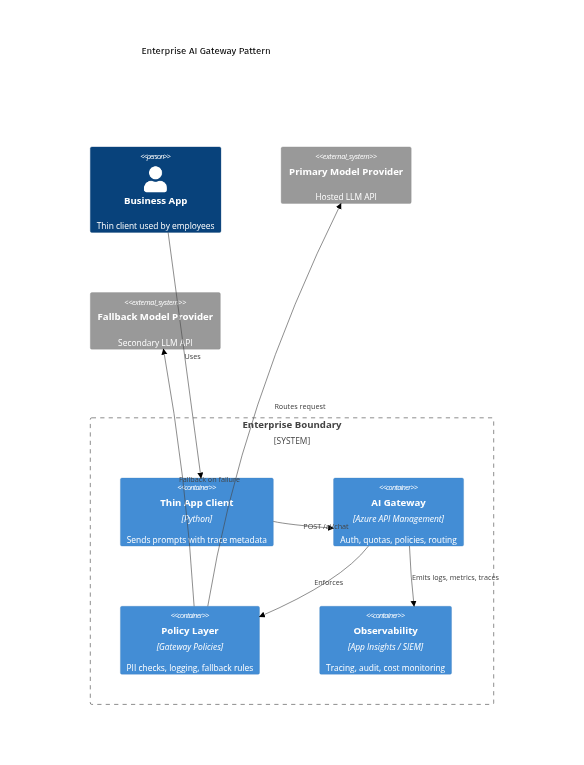
Even if a diagram does not render in every context, the architectural point stands: the gateway becomes the stable contract, and policy plus telemetry become first-class parts of the system.
Step 2: Make the client call your internal AI API
Once you adopt the gateway pattern, application code gets simpler and safer. The app sends business context and trace metadata to an internal endpoint. The gateway decides how to authenticate, route, enforce policy, and log.
# Purpose: Call an internal AI gateway with trace metadata instead of calling a model provider directly
import json
import uuid
import urllib.request

gateway_url = "https://api.contoso.com/ai/chat"
payload = {
    "messages": [{"role": "user", "content": "Summarize this contract in 3 bullets."}],
    "model_profile": "legal-summary",
    "fallback_allowed": True,
}
headers = {
    "Content-Type": "application/json",
    "Authorization": "Bearer INTERNAL_APP_TOKEN",
    "x-correlation-id": str(uuid.uuid4()),
    "x-business-unit": "legal",
    "x-data-classification": "confidential",
}

req = urllib.request.Request(gateway_url, data=json.dumps(payload).encode(), headers=headers, method="POST")
with urllib.request.urlopen(req, timeout=20) as resp:
    result = json.loads(resp.read().decode())
    print(result["answer"])
What matters here:
- the client targets a controlled enterprise endpoint,
- trace metadata is attached up front,
- the payload asks for a model profile, not a hardcoded backend dependency.
That is the difference between model access and production readiness.
Step 3: Design the request path for policy, tracing, and fallback early
A lot of pilots fail because teams wire the happy path first and postpone the control path.
Senior engineers should design the AI request flow early with:
- authentication,
- rate limits,
- content and safety checks,
- correlation IDs,
- provider routing,
- fallback behavior,
- latency and cost telemetry.
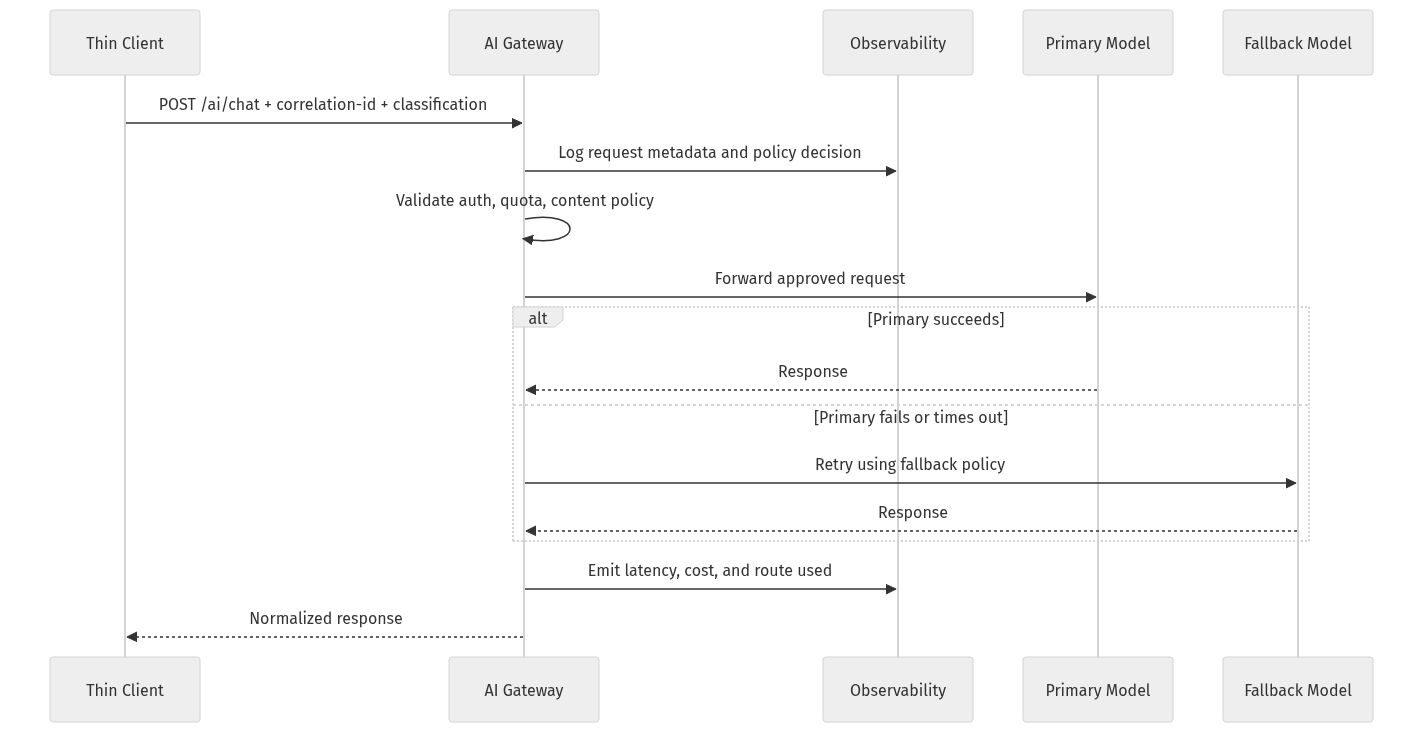
If you bolt governance on later, it feels like bureaucracy. If you design for it early, it becomes part of the contract.
Step 4: Normalize responses so provider changes do not break apps
Another demo-only anti-pattern is leaking provider-specific response formats into the application layer.
Your apps should consume a stable result shape from the gateway.
# Purpose: Normalize gateway responses so apps stay stable even when providers change underneath
from dataclasses import dataclass

@dataclass
class AiResult:
    answer: str
    provider: str
    model: str
    correlation_id: str
    fallback_used: bool

gateway_response = {
    "answer": "Three key obligations are payment, confidentiality, and termination notice.",
    "provider": "azure-openai",
    "model": "gpt-4o-mini",
    "correlation_id": "9d2f4d8c",
    "fallback_used": False,
}

result = AiResult(**gateway_response)
print(result.answer)
print(f"{result.provider}/{result.model} trace={result.correlation_id}")
This is not glamorous work. It is the work that keeps applications stable when providers, versions, or routing rules change.
Step 5: Govern usage before it explodes

If your AI endpoint matters, govern it like any other critical API.
Common anti-patterns I still see:
- direct model calls from apps,
- no quota strategy,
- no policy layer,
- no abstraction between application and provider,
- no audit trail,
- no route-level telemetry.
A practical first move in Azure API Management is to externalize backend configuration through named values instead of hardcoding endpoints.
# Purpose: Create an APIM named value for the backend AI endpoint used by gateway policies
$resourceGroup = "rg-enterprise-ai"
$apimName = "apim-contoso-ai"
$ctx = New-AzApiManagementContext -ResourceGroupName $resourceGroup -ServiceName $apimName
$namedValueId = "primary-llm-endpoint"
$endpoint = "https://primary-llm.openai.azure.com"

New-AzApiManagementNamedValue `
  -Context $ctx `
  -NamedValueId $namedValueId `
  -Name $namedValueId `
  -Value $endpoint `
  -Secret $false
Then apply a simple policy for header validation, rate limiting, correlation ID propagation, and backend routing. Exact policy syntax varies by implementation, but the pattern is what matters.
# Purpose: Apply a simple APIM policy for auth, quota, backend routing, and correlation-id propagation
$policyXml = @"
<policies>
<inbound>
<base />
<check-header name="Authorization"
failed-check-httpcode="401"
failed-check-error-message="Missing token" />
<rate-limit-by-key calls="60"
renewal-period="60"
counter-key="@(context.Request.Headers.GetValueOrDefault("Authorization","anon"))" />
<set-header name="x-correlation-id" exists-action="override">
<value>@(context.Request.Headers.GetValueOrDefault("x-correlation-id", Guid.NewGuid().ToString()))</value>
</set-header>
<set-backend-service base-url="{{primary-llm-endpoint}}" />
</inbound>
<backend>
<base />
</backend>
<outbound>
<base />
</outbound>
</policies>
"@
Set-AzApiManagementPolicy `
-Context (New-AzApiManagementContext -ResourceGroupName "rg-enterprise-ai" -ServiceName "apim-contoso-ai") `
-ApiId "enterprise-ai" `
-Policy $policyXml
Finally, govern usage at the product level so access is subscription-based and not casually exposed beyond the demo phase.
# Purpose: Configure a product-level subscription and quota so AI usage is governed beyond the demo
$ctx = New-AzApiManagementContext -ResourceGroupName "rg-enterprise-ai" -ServiceName "apim-contoso-ai"

New-AzApiManagementProduct `
  -Context $ctx `
  -ProductId "internal-ai" `
  -Title "Internal AI Gateway" `
  -Description "Governed access to enterprise AI endpoints" `
  -SubscriptionRequired $true `
  -State "published"

Add-AzApiManagementApiToProduct `
  -Context $ctx `
  -ProductId "internal-ai" `
  -ApiId "enterprise-ai"
Step 6: Treat data readiness as a prerequisite
This is where many impressive demos quietly die.
A demo uses curated sample data. Production uses messy joins, stale records, conflicting schemas, permissions boundaries, inconsistent metadata, and unclear lineage.
Before you build the assistant, review:
- Source quality
- Access patterns
- Freshness
- Authorization boundaries
- Lineage
If your retrieval layer depends on fragmented or poorly governed data, trust will collapse fast.
Step 7: Build cost discipline into the design
One of the clearest signals that a team is still in demo mode is this: they cannot explain unit economics per workflow.
Hidden production costs usually include:
- prompt and completion tokens,
- embeddings and vector storage,
- orchestration services,
- observability pipelines,
- retries and fallbacks,
- human review loops,
- storage and retention,
- network and data movement.
My rule is simple:
If a team cannot estimate the cost per summary, per search session, or per agent-run workflow, it is not ready to scale.
A basic worksheet should include:
- expected request volume,
- average tokens per request,
- retrieval payload size,
- fallback frequency,
- retention period for logs and artifacts,
- human escalation rate,
- cost per successful business outcome.
Step 8: Design for compliance and deployment constraints early
A surprising number of AI projects are not blocked by technical feasibility. They are blocked by where the system is legally and operationally allowed to run.
That changes architecture when you have:
- data residency requirements,
- sector-specific compliance obligations,
- disconnected or isolated environments,
- restrictions on cross-border data movement,
- local control requirements for sensitive workloads.
This is why architecture reviews often kill momentum. Not because the use case is bad, but because the original design ignored deployment reality.
Step 9: Be more careful with agents than with chatbots
Agents widen the gap between demo and production.
Yes, agentic patterns are becoming operationally relevant. But the enterprise lesson is not “let agents do everything.” It is “serious agents need serious scaffolding.”
Successful enterprise AI is usually:
- bounded,
- workflow-specific,
- attached to systems of record,
- measurable,
- easy to review.
Unsuccessful enterprise AI is usually:
- vague,
- over-permissioned,
- open-ended,
- weakly observable,
- hard to audit.
Agents multiply failure modes: tool misuse, runaway loops, permission sprawl, hidden retries, and accidental side effects in downstream systems.
So start with bounded agents. Give them explicit tools, narrow objectives, and clear approval boundaries.
Step 10: Add production-safe client behavior
Even with a governed gateway, the user experience still matters. Production-safe systems handle latency and failure gracefully.
# Purpose: Add a simple client-side timeout and graceful fallback message for production-safe UX
import json
import urllib.error
import urllib.request

req = urllib.request.Request(
    "https://api.contoso.com/ai/chat",
    data=b'{"messages":[{"role":"user","content":"Draft a release note."}]}',
    headers={"Content-Type": "application/json", "Authorization": "Bearer INTERNAL_APP_TOKEN"},
    method="POST",
)

try:
    with urllib.request.urlopen(req, timeout=5) as resp:
        print(json.loads(resp.read().decode())["answer"])
except urllib.error.HTTPError as e:
    print(f"Gateway rejected request: {e.code}")
except Exception:
    print("AI service is temporarily unavailable. Showing cached guidance instead.")
Production AI is not judged only by answer quality. It is judged by reliability under imperfect conditions.
What senior engineers should do differently
If I were setting a standard for enterprise AI delivery, it would be this:
- Put API Management in front of model access.
- Treat prompts as code plus configuration.
- Do a data readiness review before agent design.
- Require unit economics per scenario.
- Design for constrained environments early.
- Normalize interfaces and plan for fallback.
- Instrument everything.
A better definition of enterprise AI success
The wrong definition of success is:
“The model answered correctly in a demo.”
The better definition is:
“The system is governable, affordable, compliant, observable, and useful under real load.”
That is the bar.
And until more organizations fund the platform work required to reach that bar, many AI projects will continue to stop exactly where they look most impressive: at the demo.
Final takeaway
I am not arguing for fewer AI projects.
I am arguing for more honest architecture.
The winners will not be the teams with the flashiest prompt. They will be the teams that build AI as a real enterprise system: governed through APIs, backed by modern data, disciplined on cost, and designed for compliance from the start.
A sharper question for leaders:
When your last AI pilot slowed down, what killed momentum first: access control, bad data, cost surprise, compliance review, or integration debt?
And why was that risk underestimated at the start?
Sources & References
- Azure API Management documentation
- Azure API Management policy reference
- Introducing Azure Accelerate for Databases: Modernize your data for AI with experts and investments
- Cloud Cost Optimization: Principles that still matter
- Cloud Cost Optimization: How to maximize ROI from AI, manage costs, and unlock real business value
- Optimize object storage costs automatically with smart tier now generally available
- Microsoft named a Leader in The Forrester Wave for Sovereign Cloud Platforms
- Azure Local documentation
- How Drasi used GitHub Copilot to find documentation bugs
Try it yourself
Run this tutorial as a Jupyter notebook: Download runbook.ipynb (31 cells, 33 KB).



