AI in the Classroom and Enterprise Training Strategy
How AI Is Changing the Classroom and What That Means for Enterprise Training

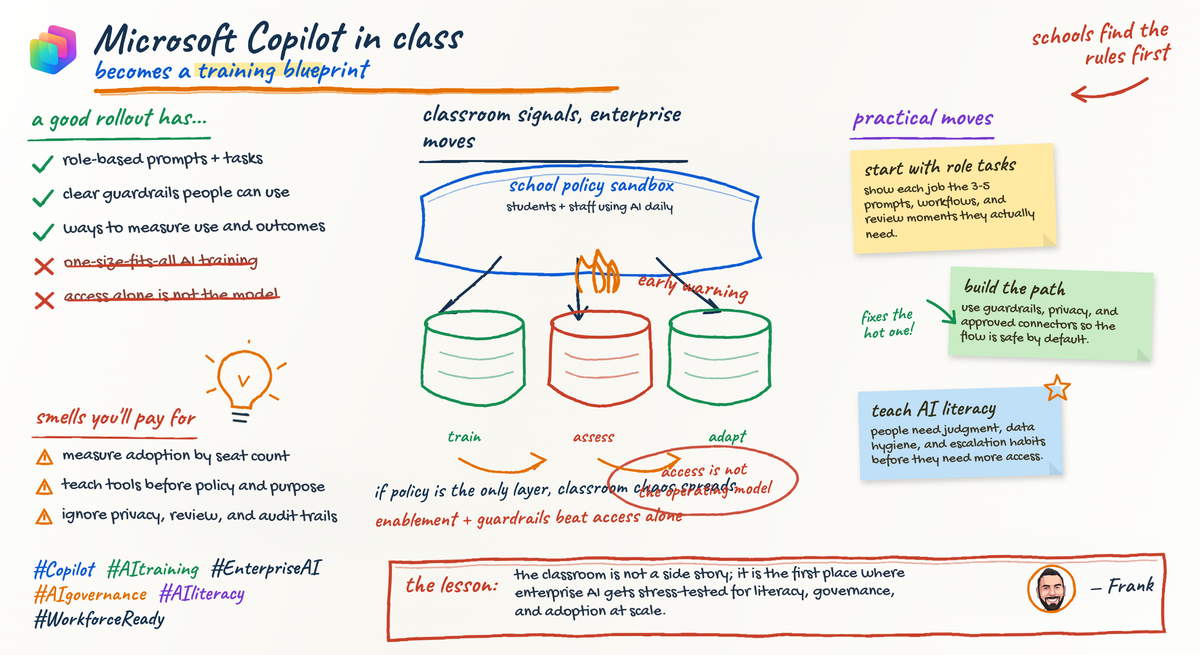
AI in schools is exposing the enterprise adoption mess early.
The classroom is often where AI failures become impossible to ignore, and enterprise training leaders should pay attention before they hand out licenses and call it transformation.
The classroom is not a side story
A lot of executives still treat education as a separate conversation. I think that is the wrong read.
Schools are surfacing problems enterprises are only beginning to formalize:
- weak prompts that look productive but produce poor output
- overreliance on generated content
- confusion about what is allowed and what is risky
- uneven adoption across users
- assessment methods that no longer measure what they claim to measure
That is the signal.
In learning environments, the cracks show up fast. If a student uses AI badly, the quality drop is visible. If a teacher has no operating model, inconsistency shows up immediately. If policy is vague, people fill in the blanks with bad habits.
The same pattern is showing up in the enterprise, just with more expensive consequences.
For CLOs, HR leaders, CIOs, and anyone running enablement, the strategic question has shifted. It is not just “Do our people have AI access?” It is whether you have a repeatable model for teaching people to use AI well, safely, and in ways that improve work.
What Microsoft’s documentation suggests
My read of Microsoft’s documentation is that AI deployment is being framed as more than a feature rollout.
The Microsoft 365 Copilot documentation emphasizes privacy, Responsible AI, architecture, and governance alongside product guidance, which suggests deployment is as much a control and operating-model challenge as a user adoption challenge per the Microsoft 365 Copilot docs.
A similar pattern appears across the broader stack. The Power Platform and Microsoft 365 developer documentation describe building apps, workflows, and agents on an integrated platform, which points to AI becoming part of business systems and day-to-day work infrastructure, not just a standalone assistant per Microsoft Learn Power Platform and the Microsoft 365 developer docs.
That matters for training.
Once AI is embedded in workflows, documents, approvals, and line-of-business processes, training stops being optional awareness content. It becomes part of production readiness.
That is the bridge to the classroom analogy: when the tool changes how work gets done, the learning model has to change too.
The real shift is from AI access to AI operating models
Here’s the blunt version: licenses do not create capability.
An AI operating model, in practical terms, includes:
- baseline literacy for safe use
- role-based training tied to real workflows
- policy guardrails people can understand
- assessment methods that test judgment, not just attendance
- manager coaching
- escalation paths for edge cases
- feedback loops between learning teams, IT, security, and business owners
Without that, broad access can scale confusion faster.
This is where the classroom analogy becomes useful. Giving students AI without redesigning assignments is similar to giving employees Copilot without redesigning workflows and expectations. If the old task assumed all work was manually produced, and the new environment includes AI assistance, then the task, the review method, and the definition of good work all have to change.
That is why some “successful” rollouts feel hollow. Usage goes up. Confidence goes up. Actual capability is still uneven.
What educator concerns reveal about enterprise risk
Let’s make this practical.
1) Prompt quality is a literacy problem
Bad prompts produce bad outputs in a classroom and in a finance team. The difference is that a bad student answer might earn a lower grade; a bad enterprise answer might end up in a client deck, a policy draft, or an executive summary.
Prompting is not magic. It is task framing, context setting, constraint management, and verification discipline.
If your training treats prompting like a bag of clever tricks, you are building theater, not workforce capability.
2) Overreliance weakens judgment
Students can outsource thinking. Employees can outsource judgment. Same pattern, bigger blast radius.
The failure mode is not AI use itself. The failure mode is when people stop interrogating output quality, source quality, and task fit.
That means training should cover:
- when AI is appropriate
- when human review is mandatory
- what “verify before use” looks like
- how to document or escalate uncertain output
3) Safety and data handling have to be taught explicitly
Schools worry about safety and appropriate use. Enterprises worry about confidential information, regulated data, and careless prompting.
The pattern is similar: if users do not know what they can paste, summarize, upload, or transform, they will improvise.
Microsoft’s education documentation broadly emphasizes secure, supported learning environments, which reinforces the idea that safety is not an add-on even in learning settings per Microsoft 365 Education.
4) Adoption will be uneven by role and by manager
Some users run toward new tools. Some avoid them. That is true for teachers, and it is true for managers, analysts, sellers, recruiters, support teams, and operations leads.
So blanket rollout plans are weak by design. You need segmentation by workflow risk and task type, not just by org chart.
5) Old assessment models break quickly
If AI changes how work gets done, old measures become less reliable.
In schools, a standard essay may no longer measure learning the way it used to. In the enterprise, raw activity counts and generic usage dashboards may not measure capability very well. Someone can use AI every day and still be unsafe, ineffective, or overly dependent.
That leads directly to the training redesign question.
Why enterprise training programs need redesign now
Microsoft’s adoption content is fairly clear on this point. The Microsoft 365 Copilot adoption learning path includes user enablement, envisioning successful adoption, and onboarding, which suggests structured change management is part of deployment, not cleanup after deployment per the Copilot adoption learning path.
That should push enterprise learning teams to redesign around three things.
Replace generic awareness with role-based scenarios
A seller using AI for account research has different needs than an HR business partner drafting internal communications. A support lead summarizing incidents has different risks than a finance analyst exploring variance commentary.
Train the workflow, not just the tool name.
Stop doing one-and-done launch training
The old pattern was:
- announce tool
- run webinar
- upload FAQ
- declare success
That model was weak before AI. With AI, it is worse.
People need repeated practice loops, examples of good and bad use, policy refreshes, and manager reinforcement.
Design for multiple learning modes
Self-paced works for baseline concepts. Instructor-led works for sensitive or high-variance workflows. Certification-aligned paths work for deeper specialist capability. Microsoft’s Power Platform training ecosystem reflects that mix of self-paced, instructor-led, and certification routes per Power Platform training.
A practical operating model for workforce AI literacy
Here is the model I’d put in place.
Layer 1: baseline literacy for everyone
Every employee should know:
- approved tools and boundaries
- prompt fundamentals
- verification habits
- data handling basics
- escalation routes for questionable output or risky use
A simple way to explain the flow from classroom habits to enterprise redesign is this:
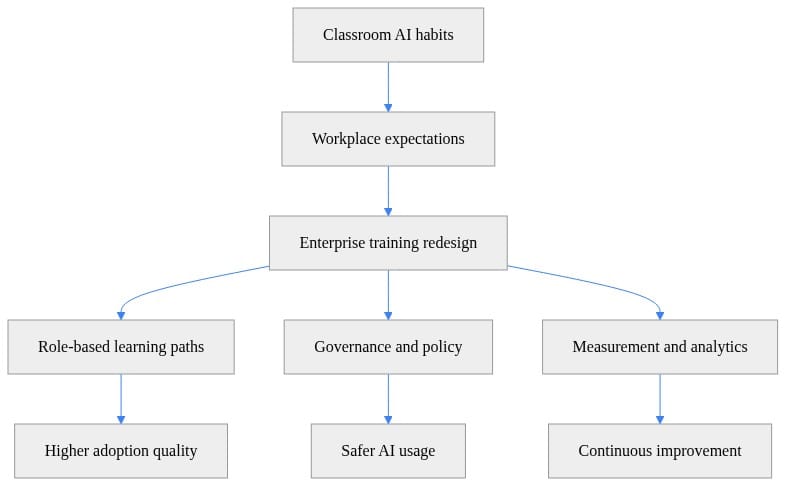
What to notice: the center of gravity is not the model alone. It is the training redesign, governance, and measurement wrapped around use.
Layer 2: role-specific workflow training
Build scenarios for actual jobs:
- sales: account prep, follow-up drafting, meeting recap validation
- HR: policy drafting, internal comms, recruiting summaries
- operations: SOP updates, incident summaries, exception handling
- analysts: first-draft narratives, query assistance, interpretation checks
If AI changes the workflow, train the workflow.
Layer 3: manager enablement
This is where many rollouts stall.
Managers need to know how to:
- coach good use without becoming AI police
- spot overreliance
- reinforce verification standards
- distinguish experimentation from recklessness
Layer 4: governance feedback loops
Learning teams should not operate separately from IT and security. If governance changes, training should change. If training surfaces recurring misuse, governance should respond.
That sequencing matters: readiness first, scale second.
What leaders should change in the next 90 days
1) Audit your current AI training
Look for:
- vague policy language
- no role-specific content
- no manager guidance
- no assessment beyond completion
2) Segment by risk and workflow
Do not segment only by job title. Segment by:
- data sensitivity
- decision impact
- frequency of AI-assisted tasks
- level of required human judgment
3) Define a minimum viable AI literacy standard
Before you expand access, define the baseline:
- safe use
- acceptable data handling
- verification habits
- escalation expectations
4) Measure adoption quality, not just usage volume
A team can have high completion and still perform badly in real work.
# Flag teams that need intervention when completion is high but quality is low
teams = [
    {"team": "Sales", "completion_rate": 0.92, "quality_score": 78},
    {"team": "HR", "completion_rate": 0.88, "quality_score": 91},
    {"team": "Finance", "completion_rate": 0.95, "quality_score": 74},
]

for t in teams:
    needs_intervention = t["completion_rate"] >= 0.85 and t["quality_score"] < 80
    if needs_intervention:
        print(f"Intervene: {t['team']} has strong completion but weak applied adoption quality.")
What to notice: “everyone finished the training” is not a success metric if applied quality is weak.
5) Build a live outreach list for enablement
If you’re running Microsoft 365 at scale, at least know who has assigned licenses so training can target actual users instead of broadcasting to everyone.
# Find users with Copilot-related licenses for training outreach
Connect-MgGraph -Scopes "User.Read.All","Directory.Read.All"

$users = Get-MgUser -All -Property "DisplayName,UserPrincipalName,AssignedLicenses"
$licensed = foreach ($u in $users) {
    if ($u.AssignedLicenses.Count -gt 0) {
        [PSCustomObject]@{
            DisplayName       = $u.DisplayName
            UserPrincipalName = $u.UserPrincipalName
            LicenseCount      = $u.AssignedLicenses.Count
        }
    }
}

$licensed | Sort-Object LicenseCount -Descending | Select-Object -First 10 | Format-Table -AutoSize
What to notice: this example identifies users with assigned licenses generally. Even that level of visibility is basic operational hygiene, and many organizations still skip it.
The strategic takeaway
The classroom is showing enterprises a compressed version of what AI adoption looks like under pressure.
That is the lesson.
The important shift is not whether an employee can open a Copilot prompt box. The shift is that AI adoption increasingly lives or dies on operating discipline: enablement, guardrails, assessment, manager reinforcement, and role-specific workflow design.
Organizations that move first on access may get headlines. Organizations that move fastest on operating model are more likely to get durable value.
AI literacy is becoming a managed enterprise capability. Treating it like an informal digital skill is how you end up with broad usage, weak judgment, and governance debt hiding behind adoption dashboards.
Rate your organization’s current AI operating model from 1 to 5. Are you still distributing access, or have you built the guardrails, role-based training, and manager coaching to scale it safely? Comment with your maturity level and the biggest blocker you’re facing right now.
#EnterpriseAI #Workforcelearning #Microsoft365
Sources & References
- Official Microsoft Power Apps documentation - Power Apps
- Official Microsoft Power Platform documentation - Power Platform
- Microsoft 365 Copilot hub
- Microsoft 365 Education Documentation - Windows Education
- Microsoft 365 developer documentation - Microsoft 365 Developer
- Course AB-730T00-A: Transform business workflows with generative AI - Training
- Microsoft Learn resources
- Training for Power Platform
- MS-4007: Discover how to drive enablement of Microsoft 365 Copilot in your organization - Training
- Study guide for Exam AB-100: Agentic AI Business Solutions Architect
Try it yourself
Run this tutorial as a Jupyter notebook: Download runbook.ipynb (21 cells, 19 KB).