Durable Azure AI Agents with Governed Storage State
My practical pattern for durable agents on Azure: state belongs in storage, not in the prompt

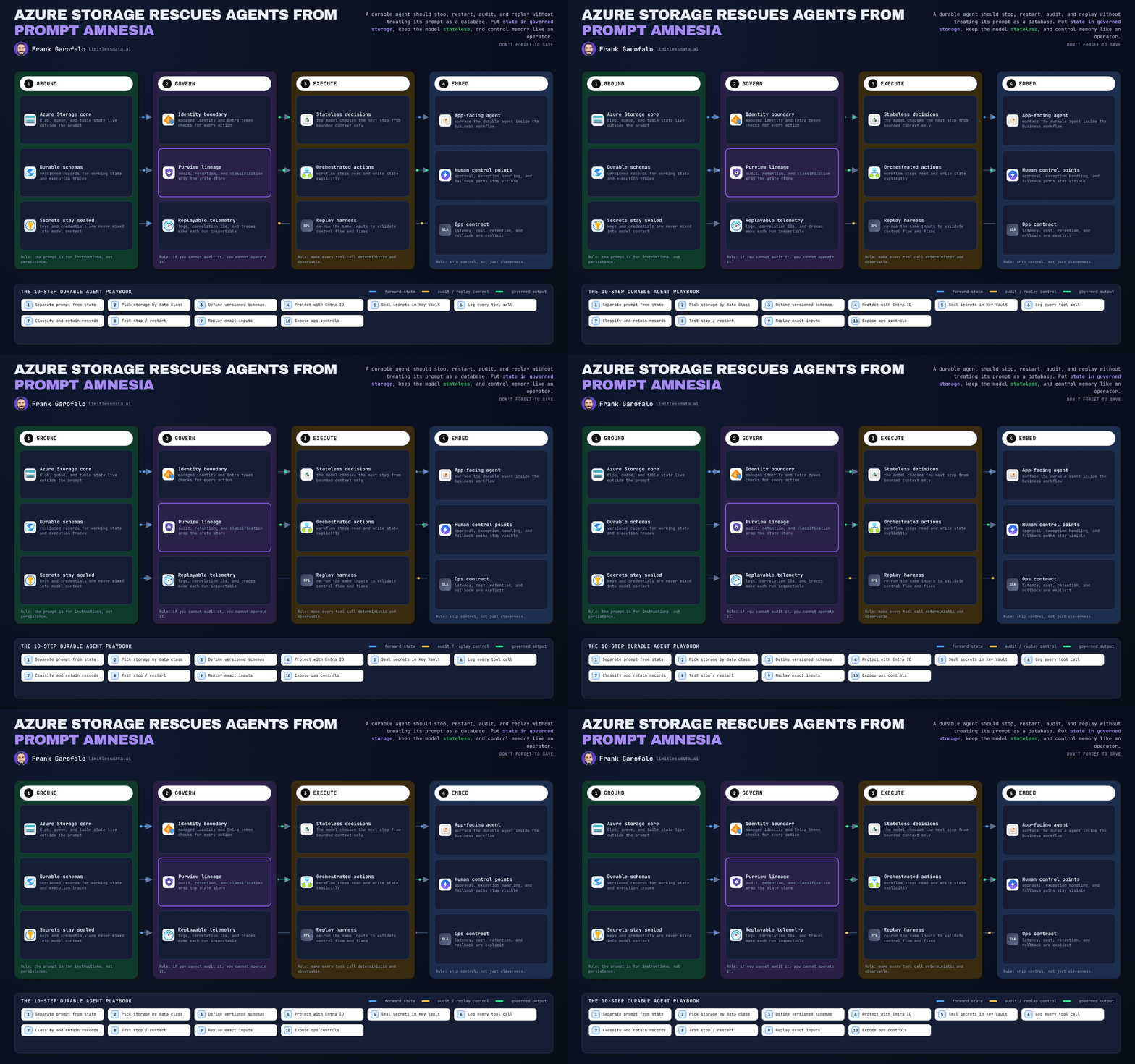
Prompts make lousy databases. If your agent can’t restart, audit, and replay from storage, you didn’t build a durable system — you built a demo.
On this page
- Step 1: Define the rule before you write a single prompt
- Step 2: Draw the reference architecture around a stateless model call
- Step 3: Choose storage by state shape, not by agent framework
- Step 4: Provision governed Azure storage boundaries
- Step 5: Persist immutable artifacts first
- Step 6: Execute each turn as a durable transaction boundary
- Step 7: Wrap non-idempotent actions with durable intent records
- Step 8: Reconcile workflow state after tool execution
- Step 9: Make replay a first-class feature, not a hero move
- Step 10: Contain the failure modes this pattern is designed for
- Step 11: The operator checklist I require before production
- The practical bottom line
- Code Reference
- Sources & References
I’m going to push against a pattern I keep getting handed in architecture reviews: teams stuffing business state, tool history, approvals, retry markers, and half the audit trail into an ever-growing prompt buffer and calling it “memory.”
That falls apart the first time the process crashes, the model changes, the token bill shows up, or an operator asks a simple question: “Why did this agent send that action at 2:14 PM?”
For enterprise Azure agents, the model should act like a stateless decision component. Durable business state belongs in governed storage with schema, versioning, access control, retention, and replay. Azure AI Foundry Agent Service gives you a managed platform to build and scale agents, and the hosted-agent model is specifically about taking runtime burden off your plate, including persisted state restoration and on-demand compute per the hosted agents docs. Great. Use that runtime help. But do not confuse runtime convenience with your system of record.
Last quarter I was in a war room with a 14-person claims automation team after a retry loop replayed a “send settlement email” action three times because the only durable trace of prior execution lived inside a reconstructed conversation window.
Here’s the pattern I use now: prompts carry the current instruction and bounded working context; storage carries operational truth.
Step 1: Define the rule before you write a single prompt
Separate the three things teams keep mixing together
You need three distinct layers:
- Bounded model context
- The minimum current instruction - The current task inputs - A short working set of retrieved facts or state references
- Durable workflow state
- Run status - Ownership - Approval state - Idempotency keys - State version - Checkpoint position - Artifact references
- Immutable execution evidence
- Original input snapshot - Tool request and response payloads - Retrieved document references - Prompt-template version - Model deployment identifier - Output artifacts
If an operator must inspect it, correct it, retain it, replay it, or delete it, persist it outside the prompt. That’s the rule.
This is also where people overcomplicate “agent memory.” Microsoft’s broader agent stack talks about conversations, memory, workflows, checkpoints, background agents, and human-in-the-loop controls in the Agent Framework docs. Good. Those are workflow concepts. Treat them like workflow concepts. Don’t flatten them into one giant text blob.
The production test
A durable agent should survive four ugly realities:
- process restart
- partial failure
- operator intervention
- replay under governance
If your design depends on “the model remembering what happened,” it will eventually bite you.
Step 2: Draw the reference architecture around a stateless model call
Put the orchestration boundary in the right place
I treat every model invocation as a versioned execution step, not the system of record.
The flow looks like this:
- client request arrives
- create a run envelope
- store immutable input artifact
- load current workflow state
- assemble bounded context from references
- call the model or tool
- persist outputs and evidence
- transition workflow state using concurrency control
- reconcile completion
This is the shape I want teams to reason about before they start debating prompt engineering.
The diagram below shows the transaction boundary I’m after.
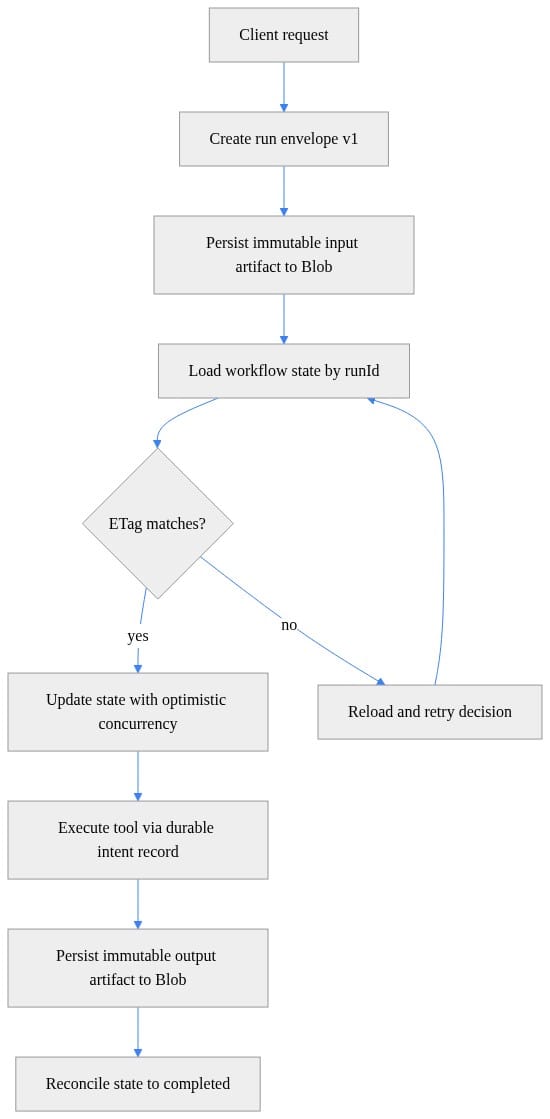
What to observe: the state update and the external action are separated by an explicit control point. That’s the difference between “retryable system” and “hope it works.”
What goes in the run envelope
At minimum, I want a durable envelope with:
- tenant or workload boundary
- correlation ID / run ID
- workflow version
- prompt-template version
- model deployment identifier
- input artifact references
- state schema version
- current status
Here’s a small Python example that defines a versioned run envelope with immutable artifact references.
# Python: define a versioned agent-run envelope and immutable artifact references
from dataclasses import dataclass, asdict
from datetime import datetime, timezone
from typing import Any
import json, uuid

@dataclass(frozen=True)
class ArtifactRef:
    uri: str
    sha256: str
    content_type: str

@dataclass(frozen=True)
class AgentRunEnvelopeV1:
    schema_version: str
    run_id: str
    agent_id: str
    created_utc: str
    input_artifact: ArtifactRef

envelope = AgentRunEnvelopeV1(
    schema_version="agent-run-envelope/v1",
    run_id=str(uuid.uuid4()),
    agent_id="claims-agent",
    created_utc=datetime.now(timezone.utc).isoformat(),
    input_artifact=ArtifactRef("https://acct.blob.core.windows.net/transient/in/1.json", "abc123", "application/json"),
)
print(json.dumps(asdict(envelope), indent=2))
What to observe: the envelope is tiny on purpose. It points to durable artifacts instead of trying to carry the world inside itself.
Azure AI Foundry is positioned as an AI app and agent factory for building and governing agents at scale per the Foundry overview. That governance story only gets real when your run metadata is explicit and queryable.
Step 3: Choose storage by state shape, not by agent framework
This is where I get blunt: stop defaulting to a vector store for everything because the workload has the word “agent” in it.
Use Blob Storage for large, immutable artifacts
Blob Storage is where I put:
- input snapshots
- model outputs
- tool payloads
- transcripts
- replay evidence
- retained documents
That’s the right fit because Azure Storage is built for durable, secure, highly available storage across different object types per the Azure Storage docs.
Use a database-backed operational store for workflow truth
Your workflow state wants:
- indexed lookups
- status queries
- optimistic concurrency
- idempotency checks
- operator filters
- small updates
That is not a prompt problem. That is not a blob problem. That is an operational record problem.
For lightweight patterns on Azure, Table Storage can absolutely do the job for a run ledger and intent records. For richer relational needs, I’ll often push teams toward Azure SQL. I wrote about that tradeoff in Azure SQL for Enterprise Coding Agents.
Use vector storage only when semantic retrieval is actually required
If you need retrieval over policy docs, knowledge articles, case notes, or product manuals, fine. Use a vector index.
But don’t store every turn there just because you can embed it. Semantic retrieval is a retrieval feature, not your default operational persistence layer.
Make lifecycle visible on day one
Define data classes up front:
- transient working artifacts
- replay evidence
- retained business records
That lets you apply different retention and cleanup policies before your diagnostics bucket turns into an accidental forever-memory archive.
Step 4: Provision governed Azure storage boundaries
The storage layout should reflect policy, not developer convenience.
Create separate containers and paths by retention class
I usually carve the object layer into something like:
transient/for short-lived working artifactsreplay/for execution evidenceretained/for records that follow business retention
This PowerShell example provisions the containers and prints a retention-oriented layout.
# PowerShell: provision storage containers and a retention-oriented blob layout
param(
  [string]$ResourceGroup = "rg-agents",
  [string]$StorageAccount = "stagentstate001"
)

$ctx = (Get-AzStorageAccount -ResourceGroupName $ResourceGroup -Name $StorageAccount).Context
"transient","replay","retained" | ForEach-Object {
  New-AzStorageContainer -Name $_ -Context $ctx -Permission Off -ErrorAction SilentlyContinue | Out-Null
}

$paths = @(
  "transient/runs/","transient/tool-cache/",
  "replay/evidence/","replay/tool-results/",
  "retained/records/","retained/audit/"
)
$paths | ForEach-Object { Write-Host "Layout:" $_ }
What to observe: the names are boring on purpose. Boring names age well in audits.
Put tags and access checks in front of production traffic
I also want validation for:
- required storage tags
- workload identity access
- container existence
Here’s a simple validation example.
# PowerShell: validate required state metadata, retention tags, and workload access assignments
param(
  [string]$ResourceGroup = "rg-agents",
  [string]$StorageAccount = "stagentstate001",
  [string]$PrincipalObjectId = "00000000-0000-0000-0000-000000000000"
)

$sa = Get-AzStorageAccount -ResourceGroupName $ResourceGroup -Name $StorageAccount
$ctx = $sa.Context
$containers = "transient","replay","retained"
$missing = $containers | Where-Object { -not (Get-AzStorageContainer -Context $ctx -Name $_ -ErrorAction SilentlyContinue) }
if ($missing) { throw "Missing containers: $($missing -join ', ')" }

$tags = $sa.Tags
if (-not $tags["data-classification"] -or -not $tags["retention-policy"]) { throw "Required storage tags are missing." }

$assignments = Get-AzRoleAssignment -ObjectId $PrincipalObjectId -Scope $sa.Id
if (-not ($assignments | Where-Object RoleDefinitionName -in "Storage Blob Data Contributor","Storage Table Data Contributor")) {
  throw "Principal lacks required data-plane roles."
}
Write-Host "Validation passed."
What to observe: governance checks should fail early. If the data classification tag or required role assignment is missing, that’s not a “we’ll fix it later” issue.
On larger programs, I tie these decisions back to Cloud Adoption Framework landing zone and governance patterns so the agent team isn’t inventing policy in a sprint review using the Cloud Adoption Framework guidance.
If you’re running hosted agents, network and identity boundaries matter just as much as storage boundaries. I covered that in my Azure AI Foundry Hosted Agent Network Governance Guide.
Step 5: Persist immutable artifacts first
Write inputs and outputs as durable objects with hashes
When I need replay, I don’t want “roughly the same prompt.” I want the actual input snapshot and the actual output artifact.
This sample writes immutable JSON artifacts to Blob Storage and computes a SHA-256 hash.
# Python: persist immutable input/output artifacts to Blob Storage with content hashes
from azure.storage.blob import BlobServiceClient, ContentSettings
import hashlib, json, os

conn = os.environ["AZURE_STORAGE_CONNECTION_STRING"]
svc = BlobServiceClient.from_connection_string(conn)
container = svc.get_container_client("transient")

def put_json_immutable(name: str, doc: dict) -> dict:
    payload = json.dumps(doc, separators=(",", ":"), sort_keys=True).encode()
    sha = hashlib.sha256(payload).hexdigest()
    blob = container.get_blob_client(name)
    blob.upload_blob(payload, overwrite=False, content_settings=ContentSettings(content_type="application/json"))
    return {"uri": blob.url, "sha256": sha, "content_type": "application/json"}

input_ref = put_json_immutable("runs/123/input.json", {"prompt": "summarize claim", "claimId": "C-42"})
output_ref = put_json_immutable("runs/123/output.json", {"summary": "Approved with deductible."})
print(input_ref["uri"], output_ref["uri"])
What to observe: the content hash matters. It gives you a cheap integrity check and a stable evidence reference for replay and audit.
A practical rule from the field: if the payload is large, append-friendly, or useful for later forensic review, make it a blob and store the URI in state.
Keep secrets out of artifacts and prompts
Do not persist raw credentials, tokens, or secret-bearing connection strings in the run envelope or prompt payloads. Resolve credentials at execution time through your approved secret-management path and keep the persisted record clean.
This sounds obvious right up until somebody dumps a full tool request body into a trace table with an API key embedded in it.
Step 6: Execute each turn as a durable transaction boundary
This is the heart of the pattern.
Read state by version, then update with optimistic concurrency
When a turn starts:
- load current state
- assemble bounded context from references
- invoke the model or decide on a tool action
- persist the proposed transition with version checks
For a lightweight implementation, Table Storage ETags are enough to prevent stale writers from trampling current state.
# Python: update workflow state with optimistic concurrency using Table Storage ETags
from azure.data.tables import TableClient, UpdateMode
from azure.core.exceptions import ResourceModifiedError
import os

table = TableClient.from_connection_string(
    conn_str=os.environ["AZURE_STORAGE_CONNECTION_STRING"],
    table_name="workflowstate"
)

entity = table.get_entity(partition_key="claims-agent", row_key="run-123")
entity["status"] = "tool_pending"
entity["step"] = "adjudicate"

try:
    table.update_entity(mode=UpdateMode.REPLACE, entity=entity, etag=entity.metadata["etag"], match_condition="IfNotModified")
    print("state updated")
except ResourceModifiedError:
    print("etag conflict: reload state and re-evaluate transition")
What to observe: if the ETag changed, reload and re-evaluate. Do not blindly retry the same prompt with stale assumptions.
That one detail contains a nasty failure mode: prompt-state mismatch after concurrent changes.
Use references in prompts, not massive histories
I want prompts to say things like:
- “Current run status: awaiting approval”
- “Use artifact X for claim details”
- “Use policy extract Y for deductible rules”
- “Draft the next action only”
I do not want a 200-turn transcript plus every prior tool result pasted back into the model call. That is expensive, hard to inspect, and unreliable as an operational record.
If you need long-term semantic recall, do retrieval. If you need workflow truth, read current committed state.
Step 7: Wrap non-idempotent actions with durable intent records
External actions are where “clever agent” designs become expensive incidents.
Anything that can charge money, send a message, create a ticket, or update a record gets an idempotency key and a durable intent record before execution.
The outbox-style pattern
Before invoking a non-idempotent tool:
- create an intent row with action key and pending status
- check whether it already completed
- execute once
- persist immutable result artifact
- mark intent completed
- reconcile workflow state
Here’s the sequence.
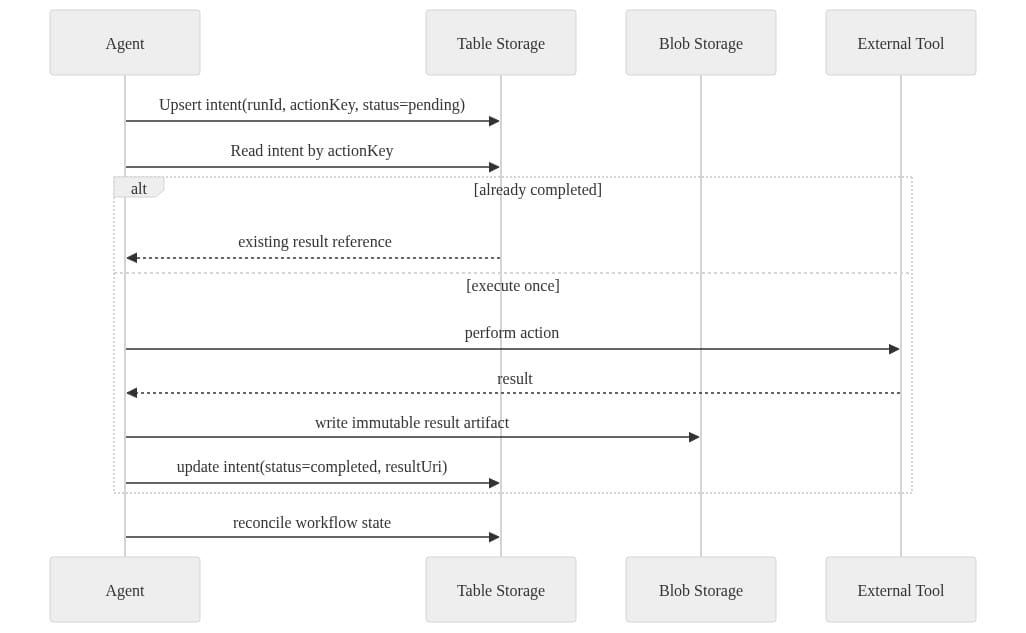
What to observe: the action key is the guardrail. A retry should resolve to the existing intent, not repeat the side effect.
And here’s a small Python example of the wrapper.
# Python: idempotent tool-action wrapper with durable intent record and retry-safe execution
from azure.data.tables import TableClient, UpdateMode
from azure.core.exceptions import ResourceExistsError
import os, json, hashlib

table = TableClient.from_connection_string(os.environ["AZURE_STORAGE_CONNECTION_STRING"], "toolintents")
action = {"tool": "charge_card", "amount": 1250, "currency": "USD"}
action_key = hashlib.sha256(json.dumps(action, sort_keys=True).encode()).hexdigest()
intent = {"PartitionKey": "run-123", "RowKey": action_key, "status": "pending"}

try:
    table.create_entity(intent)
except ResourceExistsError:
    existing = table.get_entity("run-123", action_key)
    print(existing.get("resultUri", "already pending")); raise SystemExit(0)

result = {"providerRef": "pay_987", "approved": True}
intent = table.get_entity("run-123", action_key)
intent["status"] = "completed"
intent["resultUri"] = "https://acct.blob.core.windows.net/replay/tool/run-123.json"
table.update_entity(intent, mode=UpdateMode.REPLACE)
print(result)
What to observe: this is the minimum viable pattern for retry-safe tool execution. In production, you’ll add stronger error handling, richer status values, and probably a queue around it.
I used the same general discipline in Azure MCP Tools with Functions and azd: Production Guide because tool calls are where governance and durability stop being theoretical.
Step 8: Reconcile workflow state after tool execution
A durable system needs to recover from the ugly middle:
- tool succeeded, state write failed
- state write succeeded, client timed out
- process crashed after external action
- retry arrives before prior completion is visible
That’s why I reconcile intent status back into workflow state instead of pretending every step is one perfect transaction.
Here’s a simple reconciliation example.
# Python: reconcile intent status to workflow state for durable recovery
from azure.data.tables import TableClient
import os

conn = os.environ["AZURE_STORAGE_CONNECTION_STRING"]
intents = TableClient.from_connection_string(conn, "toolintents")
state = TableClient.from_connection_string(conn, "workflowstate")

intent = intents.get_entity("run-123", "abc-action-key")
run = state.get_entity("claims-agent", "run-123")

if intent["status"] == "completed":
    run["status"] = "completed"
    run["lastResultUri"] = intent["resultUri"]
elif intent["status"] == "pending":
    run["status"] = "awaiting_replay_or_retry"
else:
    run["status"] = "manual_review"

state.upsert_entity(run)
print(run["status"])
What to observe: recovery logic should be explicit. “Pending,” “completed,” and “manual_review” are operational states, not afterthoughts.
Mark completion only after required writes succeed
A run is not complete because the model said “done.” A run is complete when:
- required artifacts are persisted
- required state transitions are committed
- required intent records are reconciled
That definition saves a lot of pain later.
Step 9: Make replay a first-class feature, not a hero move
If replay requires your best engineer and three cups of coffee, you do not have replay.
Replay from immutable inputs plus explicit versions
For a replayable run, preserve:
- original input artifact
- workflow version
- prompt-template version
- model deployment identifier
- retrieved context references
- tool contract version
- original output artifact
Then replay from those references.
Do not rebuild from “whatever the conversation probably looked like.”
Separate deterministic workflow replay from model comparison
Workflow replay can be deterministic. Model output replay usually is not.
That means you preserve the original output and compare the replay output against it. You don’t overwrite history and pretend variability didn’t happen.
Put approvals around dangerous replays
If replay can:
- send an email
- post a Teams message
- modify a customer record
- call a payment processor
then require explicit approval before re-executing the side effect.
I wrote more about failure testing and recovery discipline in Azure Agent Resilience Testing for Production Readiness. If you skip replay drills, production will run them for you.
Step 10: Contain the failure modes this pattern is designed for
Let’s name the messes directly.
Partial writes
A tool succeeds but the state persistence fails.
Contain it with:
- durable intent records
- idempotency keys
- reconciliation jobs
- immutable result artifacts
Replay drift
A changed prompt template, model deployment, retrieval corpus, or tool contract produces a different result.
Contain it with:
- explicit version capture
- immutable evidence references
- preserved original outputs
- controlled comparison workflows
Prompt-state mismatch
A retry uses stale context after state changed elsewhere.
Contain it with:
- optimistic concurrency
- state versions
- rebuilding context from committed state
- refusing stale writes
Runaway storage growth
Verbose traces and artifacts accumulate forever.
Contain it with:
- classification
- retention tiers
- lifecycle rules
- quotas
- cost monitoring
Sensitive-data leakage
PII or secrets leak into prompts, traces, or indexes.
Contain it with:
- minimization
- redaction
- access boundaries
- retention enforcement
- policy-driven routing
Step 11: The operator checklist I require before production
Before I sign off on a production agent, I want these answers in writing:
Required declarations
- state schema version
- storage classes used
- data owner
- retention policy
- replay procedure
- approval points for side effects
- deletion handling
- tenant boundary
Required telemetry
- correlation IDs on every run
- immutable execution evidence
- state transition metrics
- alerting on retry storms
- alerting on reconciliation failures
- prompt growth tracked separately from artifact growth
- retrieval index growth tracked separately from database transaction growth
Required design discipline
- prompts hold current instruction and bounded context only
- workflow truth is externalized
- side effects are idempotent or guarded
- replay is documented and tested
- operators can inspect and resume from checkpoints
This is where managed platforms help. Azure AI Foundry Agent Service exists to reduce the undifferentiated runtime work of building, deploying, and scaling agents per the Agent Service overview. Use that. But still own your data contract. Still own your retention model. Still own your audit trail.
The practical bottom line
A durable Azure agent should be able to stop, restart, audit, and replay without treating its prompt as a database.
That means:
- prompts for current reasoning
- storage for durable truth
- explicit schemas for state
- immutable artifacts for evidence
- idempotent wrappers for side effects
- replay as an operational capability
That pattern is less flashy than “autonomous memory.” It is also the one that survives contact with legal, security, finance, and a 3 AM incident bridge.
Where does this break in your environment: Blob for artifacts, table/sql for workflow truth, or the replay discipline itself?
#AzureAI #EnterpriseAI #DataArchitecture
Code Reference
Additional code samples that complement the tutorial above.
Sample 1 (bicep)
// Bicep: minimal storage account for durable agent state and immutable artifacts
param location string = resourceGroup().location
param storageAccountName string

resource stg 'Microsoft.Storage/storageAccounts@2023-05-01' = {
  name: storageAccountName
  location: location
  sku: { name: 'Standard_LRS' }
  kind: 'StorageV2'
  tags: {
    'data-classification': 'agent-state'
    'retention-policy': 'transient-7d,replay-30d,retained-365d'
  }
  properties: {
    allowBlobPublicAccess: false
    minimumTlsVersion: 'TLS1_2'
    supportsHttpsTrafficOnly: true
  }
}
Sample 2 (bicep)
// Bicep: create blob containers and a table for workflow state
param storageAccountName string

resource stg 'Microsoft.Storage/storageAccounts@2023-05-01' existing = {
  name: storageAccountName
}

resource blobSvc 'Microsoft.Storage/storageAccounts/blobServices@2023-05-01' = {
  name: '${stg.name}/default'
}

resource transient 'Microsoft.Storage/storageAccounts/blobServices/containers@2023-05-01' = {
  name: '${stg.name}/default/transient'
}
resource replay 'Microsoft.Storage/storageAccounts/blobServices/containers@2023-05-01' = {
  name: '${stg.name}/default/replay'
}
resource retained 'Microsoft.Storage/storageAccounts/blobServices/containers@2023-05-01' = {
  name: '${stg.name}/default/retained'
}
Sources & References
- Azure Table Storage documentation
- Hosted agents in Foundry Agent Service - Microsoft Foundry
- Microsoft Foundry documentation
- Agent Framework documentation
- What is Microsoft Foundry Agent Service? - Microsoft Foundry
- Azure Storage Documentation Hub
- Cloud Adoption Framework for Microsoft - Cloud Adoption Framework
- Azure Blob Storage documentation
- Bicep documentation
- Azure SDK for Python - Storage libraries
Try it yourself
Run this tutorial as a Jupyter notebook: Download runbook.ipynb (29 cells, 31 KB).