Azure SQL Hyperscale Vector Search Evaluation Guide
Azure SQL Hyperscale Vector Search at Billion-Row Scale: When It’s Good Enough for AI Retrieval

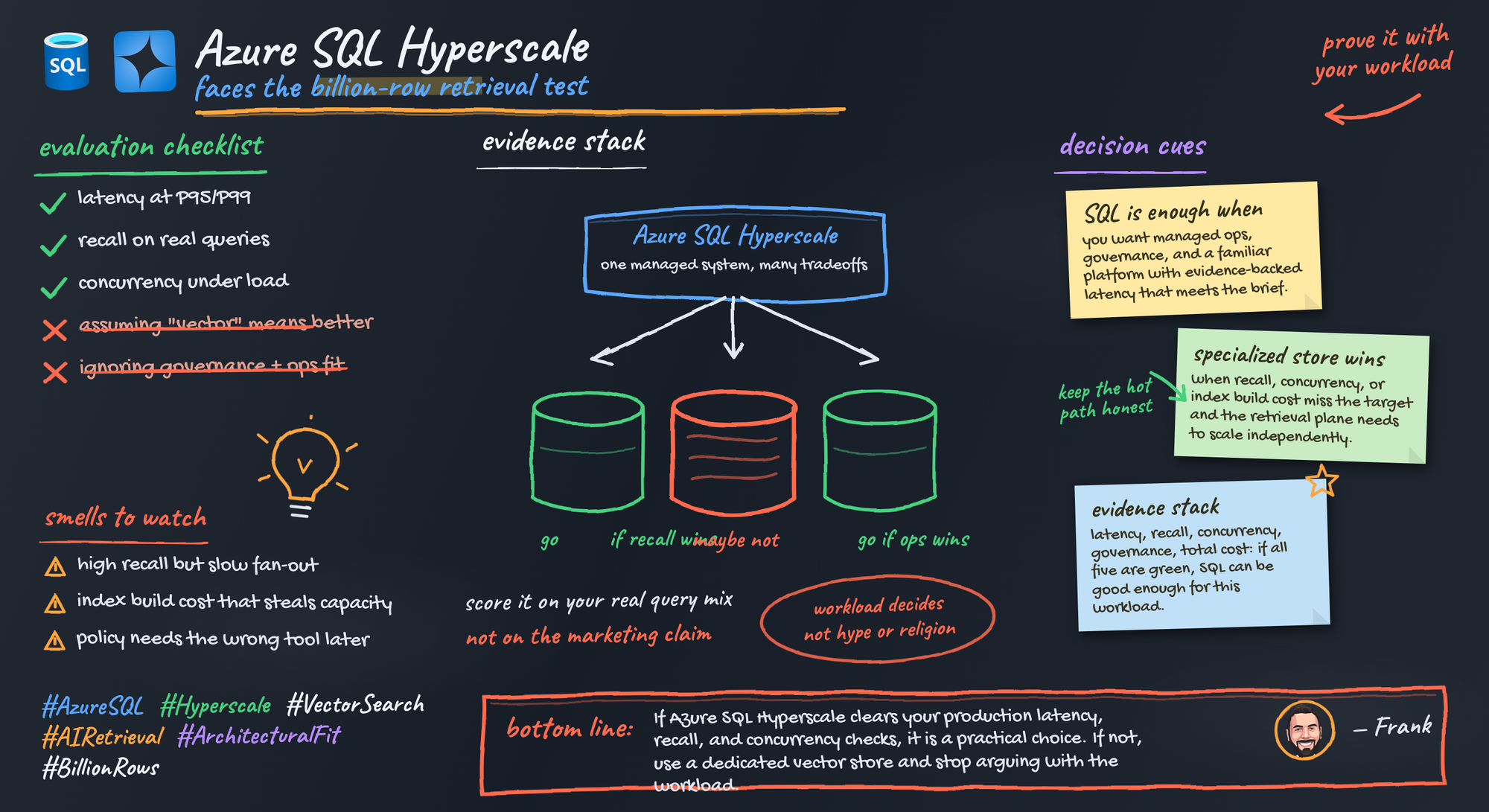
Billion-row vector search is a useful benchmark number, not a permission slip to redesign your retrieval stack. Azure SQL Hyperscale has to earn the job with measured latency, recall, concurrency, governance, and cost on your workload.
On this page
- The billion-row headline is a starting point, not a decision
- Start with a retrieval scorecard before you compare anything
- Where Azure SQL Hyperscale is genuinely compelling
- Where a dedicated vector engine still has to prove its value
- Build a benchmark that survives contact with production
- The failure modes that make a fast demo worthless
- Put retrieval in the broader Azure architecture without confusing the layers
- My recommendation framework
- Sources & References
I like the direction here. I also think a lot of teams are about to overread the headline.
The right question is brutally simple: can Azure SQL Hyperscale meet this application’s retrieval SLOs while keeping recall acceptable and operations sane? If yes, use it. If no, stop trying to force a managed relational database into a role your workload won’t tolerate.
That’s the whole post.
But let’s make it practical.
The billion-row headline is a starting point, not a decision
A billion rows tells me one thing: the platform can participate in a serious conversation.
It does not tell me:
- whether your embeddings are 768, 1536, or larger
- whether your filters are selective or ugly
- whether your tenants are evenly distributed or one customer owns 40% of the traffic
- whether you need p95 under 150 ms or you can live with 800 ms
- whether updates are hourly, continuous, or effectively never
- whether your authorization model is row-level, post-filtered, or document-parent aware
That’s why I push teams to treat a benchmark as an evaluation anchor, not an architecture verdict.
Back in Q1, I sat with a 14-person product team that had a beautiful semantic search demo on 220 million chunks and then watched it crater the minute they applied customer ACL filters and 60 concurrent users from a load script. The demo had “won.” The system had not.
Your decision memo should ask one question only:
Can Azure SQL Hyperscale serve retrieval for this application at the required latency and recall, under expected concurrency, with a governance and cost model the team can actually run?
If you can’t answer that with evidence, you don’t have a platform choice. You have a preference.
Start with a retrieval scorecard before you compare anything
Before you benchmark Azure SQL, Azure Cosmos DB, or anything else, define the scorecard.
Mine usually has six lines:
- Latency targets: p50, p95, p99 end-to-end retrieval latency
- Quality targets: recall@k or judged relevance on a fixed query set
- Concurrency targets: steady-state and burst
- Freshness targets: ingest-to-query visibility
- Governance targets: auth, deletion propagation, auditability
- Cost targets: ingest, storage, query, operations, and incident overhead
If embedding generation is in the request path, include it. If embeddings are precomputed, don’t hide behind blended numbers.
The biggest mistake I see is teams judging retrieval with screenshots. Five “good looking” answers prove nothing. Build a labeled query set with expected documents and score it consistently.
Here’s the simplest mental model for the harness. Load judged queries, replay them at controlled concurrency, capture top-k IDs, then compute recall and latency percentiles.
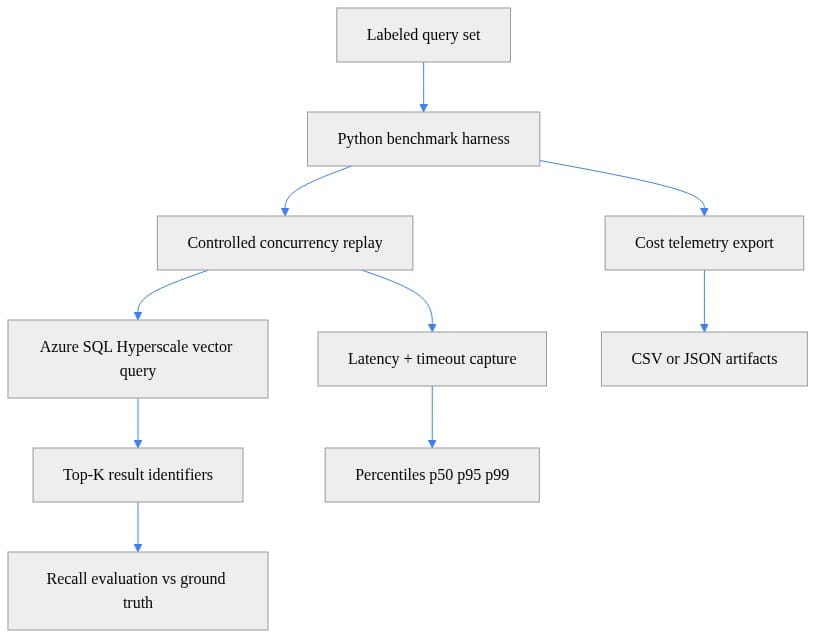
That flow is boring on purpose. Good benchmarks are boring. They are reproducible, inspectable, and hard to game.
Where Azure SQL Hyperscale is genuinely compelling
Azure SQL Database is a fully managed PaaS engine, and Microsoft handles upgrades, patching, backups, and monitoring per the Azure SQL Database overview. For a lot of enterprise teams, that matters more than people admit on architecture slides.
When I’m working with an application team that already stores core records, permissions, and metadata in SQL, keeping retrieval-serving data close to that system can be a huge win:
- fewer moving parts
- fewer synchronization paths
- one operational ownership model
- easier change control
- less “who owns the other datastore?” drama at 2:00 AM
And yes, delivery speed counts. If your developers and DBAs already know SQL well, that shortens the path from experiment to production. If you need generated APIs on top, Data API builder can expose REST and GraphQL endpoints for Azure SQL and other databases, and it also includes an MCP server for AI integration per the Data API builder docs. That’s useful when the access pattern actually fits. It is not magic. It is plumbing, and good plumbing saves projects.
I’ve written before about Azure SQL for Enterprise Coding Agents because the same pattern shows up there: consolidation can be a feature when governance and transactional proximity matter more than having the trendiest retrieval subsystem.
The trap is assuming consolidation is automatically cheaper. It isn’t. Price the whole path:
- embedding generation
- ingest
- index build and rebuild
- query load
- monitoring
- backup and DR
- incident response
- deletion and retention workflows
A single service can still be the wrong economics if it misses your latency target and forces overprovisioning.
Where a dedicated vector engine still has to prove its value
I’m not interested in generic “SQL versus vector DB” arguments. Those are usually marketing disguised as architecture.
A specialized vector engine should win because it demonstrates a material advantage on your workload:
- better latency at required recall
- stronger behavior under filtering
- cleaner ANN tuning
- better scale efficiency under concurrency
- lower operational pain for index lifecycle management
If it can’t prove one of those, then “it’s a vector database” is not a reason. It’s a label.
Azure gives you more than one retrieval-oriented path anyway. Azure Cosmos DB explicitly includes vector search and AI integration in its product documentation navigation, which is exactly why I tell teams to evaluate the actual service behavior instead of arguing by category name per the Azure Cosmos DB docs.
The hidden cost of the specialized route is almost always the same:
- another data copy
- another sync mechanism
- another auth path
- another observability surface
- another failure domain
I’ve seen teams spend three months shaving 40 ms off retrieval and then give back all the reliability gains because the dual-write path drifted during retries. Congratulations, you built a faster inconsistency.
If you’re considering Cosmos DB for retrieval-heavy AI workloads, the operational side of indexing policy and access patterns matters a lot more than the logo. That’s why I’d pair this evaluation with the lessons in my post on Azure Cosmos DB Indexing Policies for AI Performance.
Build a benchmark that survives contact with production
Here’s the benchmark design I trust:
- representative document lengths
- real embedding dimensionality
- realistic tenant skew
- duplicate and near-duplicate content
- metadata sparsity
- ACL constraints
- broad semantic queries
- narrow filtered queries
- adversarial queries
- post-retrieval authorization checks
- steady-state and burst concurrency
- update, delete, and index maintenance scenarios
Start by loading a judged query set. This is the minimum bar for recall work.
# Load a labeled query set with vectors and ground-truth ids
from dataclasses import dataclass
import json

@dataclass
class QueryCase:
    qid: str
    text: str
    vector: list[float]
    expected_ids: list[str]

def load_queries(path: str) -> list[QueryCase]:
    with open(path, "r", encoding="utf-8") as f:
        rows = json.load(f)
    return [
        QueryCase(
            qid=r["qid"],
            text=r["text"],
            vector=r["vector"],
            expected_ids=r["expected_ids"],
        )
        for r in rows
    ]
Next, execute a single search against Azure SQL and return identifiers only. Don’t score giant payloads first. Measure retrieval cleanly before you mix in hydration cost.
# Execute a single Azure SQL vector search and return result identifiers
import json
import pyodbc

def search_once(conn_str: str, vector: list[float], top_k: int = 10) -> list[str]:
    sql = """
    DECLARE @q NVARCHAR(MAX) = ?;
    SELECT TOP (?) CAST(doc_id AS NVARCHAR(64)) AS doc_id
    FROM dbo.Documents
    ORDER BY VECTOR_DISTANCE('cosine', embedding, CAST(@q AS VECTOR(1536)));
    """
    payload = json.dumps(vector)
    with pyodbc.connect(conn_str) as conn:
        cur = conn.cursor()
        cur.execute(sql, payload, top_k)
        return [row.doc_id for row in cur.fetchall()]
What to observe: keep the query shape stable, keep top-k fixed, and make sure your benchmark stores result IDs so you can compare runs without hand-waving.
Then replay with controlled concurrency. This is where the truth usually shows up.
# Replay queries at controlled concurrency and capture latency plus result ids
import asyncio
import time
from statistics import quantiles

async def run_benchmark(conn_str: str, queries: list, concurrency: int = 8) -> dict:
    sem = asyncio.Semaphore(concurrency)
    results = []

    async def worker(q):
        async with sem:
            t0 = time.perf_counter()
            ids = await asyncio.to_thread(search_once, conn_str, q.vector, 10)
            dt_ms = (time.perf_counter() - t0) * 1000
            results.append({"qid": q.qid, "latency_ms": dt_ms, "ids": ids, "expected": q.expected_ids})

    await asyncio.gather(*(worker(q) for q in queries))
    p50, p95, p99 = quantiles([r["latency_ms"] for r in results], n=100)[49], quantiles([r["latency_ms"] for r in results], n=100)[94], quantiles([r["latency_ms"] for r in results], n=100)[98]
    return {"results": results, "p50_ms": p50, "p95_ms": p95, "p99_ms": p99}
What to observe next: p50 is nice for slideware; p95 and p99 decide whether your app feels reliable. If your tail latency blows up under modest concurrency, the architecture discussion is over.
Finally, compute recall@k and export artifacts. If you can’t reproduce the run six weeks later, you learned almost nothing.
# Compute recall@k from captured result identifiers and expected ids
def recall_at_k(run: dict, k: int = 10) -> dict:
    recalls = []
    for row in run["results"]:
        got = set(row["ids"][:k])
        expected = set(row["expected"])
        score = len(got & expected) / max(1, len(expected))
        recalls.append(score)
    return {
        "recall_at_k": sum(recalls) / max(1, len(recalls)),
        "queries": len(recalls),
        "p50_ms": run["p50_ms"],
        "p95_ms": run["p95_ms"],
        "p99_ms": run["p99_ms"],
    }
# Export benchmark summary and cost-relevant telemetry artifacts
import csv
import json
from datetime import datetime, timezone

def export_artifacts(run: dict, summary: dict, path_prefix: str, db_name: str, sku: str) -> None:
    stamp = datetime.now(timezone.utc).isoformat()
    with open(f"{path_prefix}_summary.json", "w", encoding="utf-8") as f:
        json.dump({"timestamp_utc": stamp, "database": db_name, "sku": sku, **summary}, f, indent=2)
    with open(f"{path_prefix}_results.csv", "w", newline="", encoding="utf-8") as f:
        w = csv.DictWriter(f, fieldnames=["qid", "latency_ms", "ids", "expected"])
        w.writeheader()
        for row in run["results"]:
            w.writerow({**row, "ids": "|".join(row["ids"]), "expected": "|".join(row["expected"])})
What to observe after export: every run should produce a summary you can compare across SKUs, corpus sizes, filter patterns, and concurrency levels. If your benchmark output can’t survive a design review, rerun it.
The failure modes that make a fast demo worthless
This is the section people skip. It’s also the section that decides whether your retrieval system survives production.
1) Chunking breaks more systems than databases do
Chunk size, overlap, heading preservation, table handling, and parent-document reconstruction all affect relevance more than teams want to admit.
I’ve watched teams switch stores twice when the real issue was that they had shredded procedures and contracts into semantically useless fragments.
Treat chunking as an experiment matrix, not a preprocessing footnote.
2) Metadata filtering changes everything
Unfiltered vector search is the easiest case. Real apps filter by tenant, geography, document type, sensitivity, lifecycle state, or entitlements.
Weakly selective filters can wreck latency. Inconsistent metadata can wreck trust. Applying auth after retrieval can wreck correctness.
If your benchmark doesn’t include the real filter patterns, it is not a benchmark. It is a demo.
3) Single-client tests lie
One laptop, one script, one user is not evidence of production fitness.
Model:
- concurrent reads
- mixed read/write windows
- burst traffic
- noisy-neighbor behavior
- retries and timeouts
A system that looks great at concurrency 1 can become a support ticket factory at concurrency 40.
4) Reindex cost shows up later and hurts more
Embedding models change. Content churn happens. Retention rules change. Backfills happen after mergers, migrations, and policy updates.
If your business case excludes rebuild and reindex cost, your business case is fiction.
5) Deletions and authorization are correctness requirements
I don’t care how fast retrieval is if deleted content still appears for 20 minutes or if stale ACLs leak documents across tenants.
That is not a performance issue. That is a production failure.
Put retrieval in the broader Azure architecture without confusing the layers
This is where teams get sloppy.
Microsoft positions Foundry as a platform for building, optimizing, and governing AI apps and agents at scale in the Foundry documentation and also in the Azure Architecture Center. Good. Use that as application platform context.
But don’t let “AI platform” language blur the boundaries. You still need distinct decisions for:
- data preparation
- embedding generation
- retrieval serving
- application authorization
- agent orchestration
Azure Databricks is a unified platform for data, analytics, and AI at scale per the Azure Databricks introduction. Also good. Use it when the pipeline needs it. Don’t pretend pipeline tooling proves the serving store is correct.
Same story with Data API builder, Foundry, agents, and MCP. They may help your delivery model. None of them rescue a retrieval store that misses p95, recall, or auth requirements.
I made a similar point in my post on Azure AI Foundry Hosted Agent Network Governance Guide: platform convenience is real, but governance and boundary decisions still decide whether the system is enterprise-ready.
My recommendation framework
Here’s my blunt take.
Favor Azure SQL Hyperscale when:
- your measured workload hits latency and recall targets
- your filters and auth model behave correctly
- your concurrency profile stays inside acceptable tail latency
- consolidation with application data reduces ownership and integration pain
- managed operations matter to your team
Favor a specialized vector option when:
- it proves a necessary advantage in retrieval behavior
- it handles your filter patterns materially better
- it gives you scale economics SQL can’t match for this workload
- you actually need the tuning and lifecycle controls
Choose hybrid only when:
- each component has one clear responsibility
- synchronization is explicit
- security boundaries are funded
- ops ownership is named
- failure modes are rehearsed
And if you want a decision memo template, keep it to six headings:
- workload facts
- SLOs
- recall evidence
- operational model
- cost model
- unresolved risks plus re-evaluation date
That last line matters. Retrieval architecture is not a forever decision. It’s a workload-fit decision.
My opinion is simple: Azure SQL Hyperscale is absolutely credible as a retrieval candidate, especially when managed operations, SQL skills, and transactional proximity matter. It is not an automatic replacement for a dedicated vector engine, and teams that treat it that way are going to confuse consolidation with fitness.
Run the benchmark. Publish the numbers. Then choose the platform that earned the role.
Which tradeoff would you reverse in your environment: taking on another datastore for better retrieval behavior, or accepting “good enough” retrieval to keep governance and operations tighter?
#Azuresql #Vectorsearch #DataArchitecture
Sources & References
- Microsoft SQL Documentation - SQL Server
- Microsoft Foundry documentation
- Azure Cosmos DB documentation - Azure Cosmos DB
- What is a vector data type? - SQL Server
- VECTOR_DISTANCE (Transact-SQL) - SQL Server
- What is Azure Databricks? - Azure Databricks
- Hyperscale service tier - Azure SQL Database
- Data API builder documentation - Data API builder
- Get Started with AI Architecture Design - Azure Architecture Center
- What is the Azure SQL Database service? - Azure SQL Database
Try it yourself
Run this tutorial as a Jupyter notebook: Download runbook.ipynb (24 cells, 24 KB).