Azure PostgreSQL Major Upgrade Planning for Platform Teams
Azure Database for PostgreSQL Elastic Clusters: What Major Version Upgrades in Preview Mean for Platform Teams

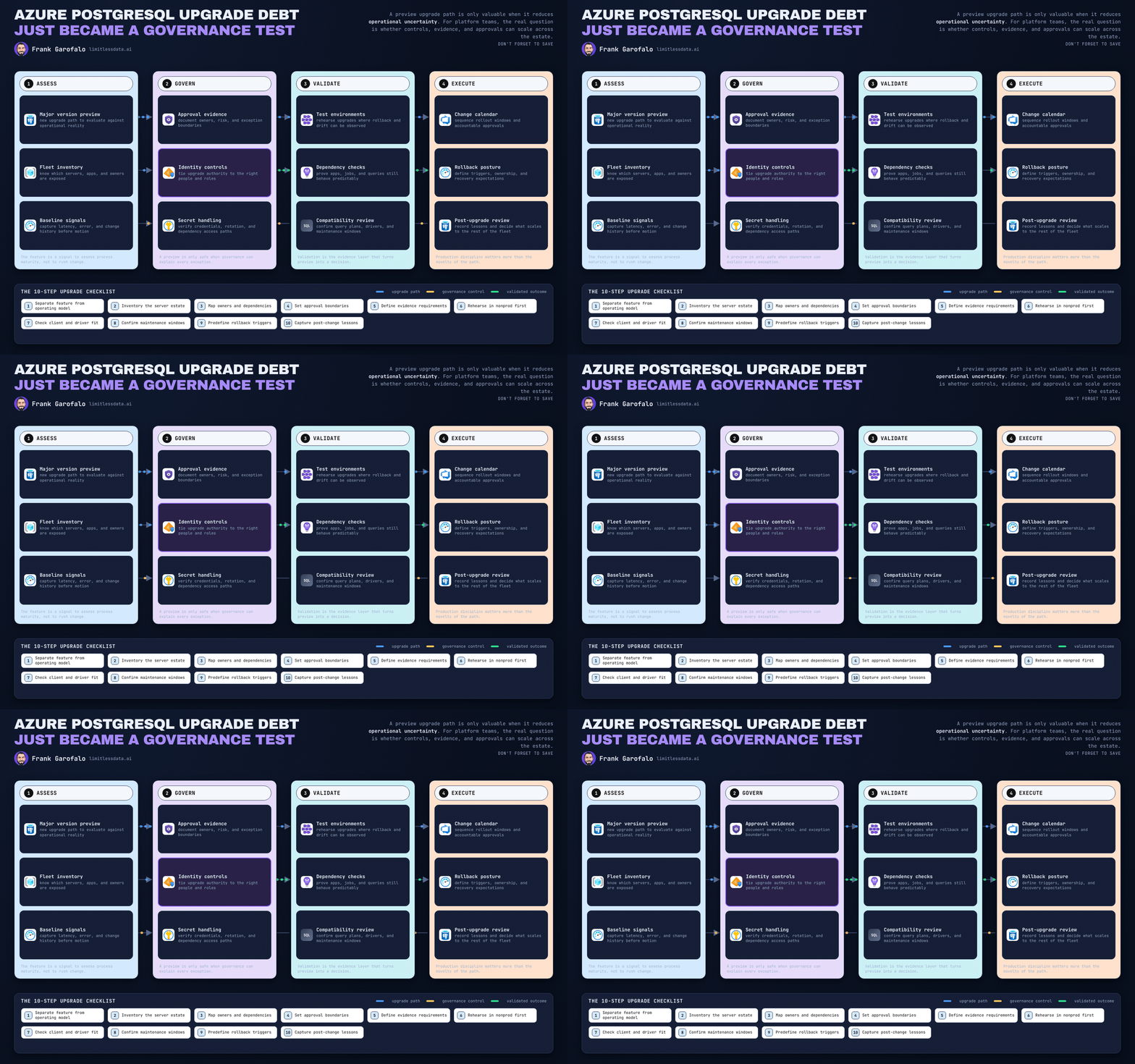
A major-version upgrade path only matters if it reduces operational uncertainty for the whole PostgreSQL estate, not if it just gives one engineer a faster button to click.
On this page
- The upgrade feature is not the operating model
- Why upgrade debt is a platform problem
- Maintenance windows need an estate policy
- Validation and recovery have to be explicit
- Compatibility testing is the real upgrade gate
- The pragmatic adoption sequence
- The leadership decision
- Sources & References
Microsoft’s published overview for Azure Database for PostgreSQL flexible server describes the service as fully managed while still giving teams meaningful control over configuration, maintenance, and operations. That’s exactly why platform teams need to think beyond the upgrade action itself: the real question is not just “can I upgrade?” but “can I prove, repeat, approve, observe, and recover this change at scale?” Source: Azure Database for PostgreSQL overview
That’s my take on any major-version-upgrade preview discussion around Azure Database for PostgreSQL Elastic Clusters: treat it as a governance capability to validate, not as an automatic green light for production acceleration.
One important boundary up front: based on the source material I have here, I can verify the Azure Database for PostgreSQL flexible server service overview, but not the exact preview mechanics for major version upgrades on Elastic Clusters. So before any team publishes internal guidance, they should confirm the current official documentation for the exact product name, preview scope, supported versions, downtime expectations, rollback options, extension constraints, and regional availability.
The upgrade feature is not the operating model
A cleaner technical path is useful. It does not solve the hard part.
The hard part is estate-wide lifecycle management: who owns each cluster, which apps depend on it, which extensions are installed, what maintenance window is allowed, what evidence is required, and who signs off when something breaks at 2:13 AM.
In practice, upgrade risk often comes less from the engine change itself and more from the forgotten dependencies around it: drivers, reporting jobs, automation, alerting, and escalation paths.
That’s why I’d evaluate any preview through a platform lens:
- Does it fit an approval workflow?
- Does it support repeatable validation?
- Can you define rollout cohorts?
- Can you document recovery expectations before the change?
- Can operations run it without tribal knowledge?
That’s not bureaucracy. That’s adult supervision.
Why upgrade debt is a platform problem
Version debt gets expensive when every database becomes a custom migration project.
That pattern creates the same bad loop every time:
- bespoke planning
- inconsistent test coverage
- fragmented ownership
- one-off change approvals
- emergency escalation paths invented during the incident
A fleet should not be managed like a pile of snowflakes.
What platform teams need is a standard lane: same eligibility criteria, same evidence pack, same communications template, same maintenance policy, same stop conditions, same post-change observation model.
A preview upgrade path can help reduce upgrade debt, but only if you use it to build a repeatable operating model.
Maintenance windows need an estate policy
Here’s where teams get sloppy: they treat the change window as the entire change.
Wrong.
You need two windows:
- The execution window: when the upgrade operation runs.
- The validation window: when you confirm the application, dependencies, jobs, backups, and telemetry all behave the way the business expects.
A completed operation is not the same thing as an accepted production change.
My recommendation is simple. Every cluster entering a major-version upgrade lane should carry this minimum metadata:
- service owner
- business approver
- application owner
- on-call contact
- environment classification
- business criticality
- permitted change period
- planned observation period after execution
Then classify workloads into cohorts. Start with non-production. Move to low-risk production only after you have evidence the runbook works.
This is the rollout shape I want teams to visualize before they touch production:
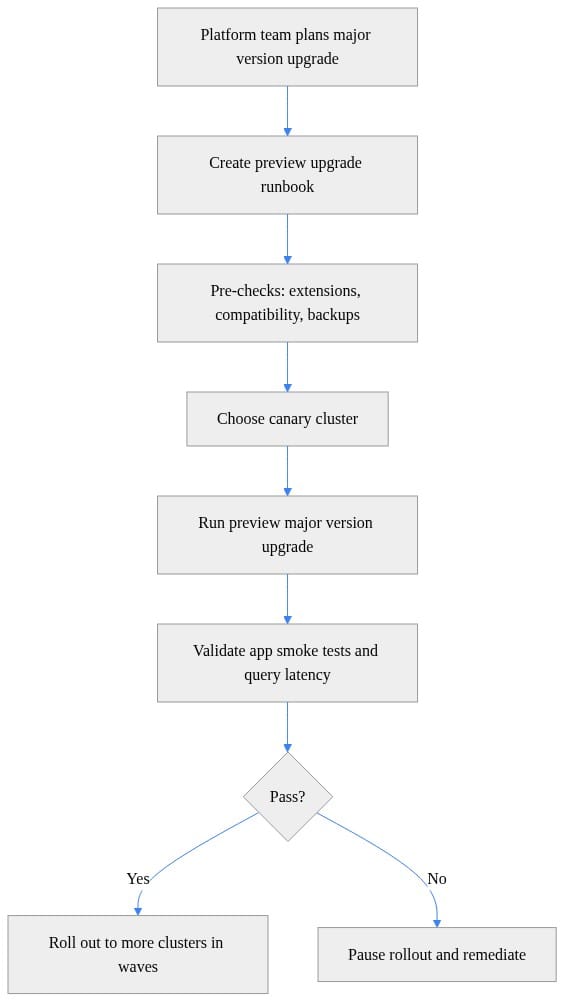
What to look for: pre-checks, a canary, validation, and an explicit pass/fail branch. If your process diagram has no pause point, you do not have a rollout plan.
If you need a second view for leadership and CAB discussions, show the rollout in waves because it makes the estate policy obvious:
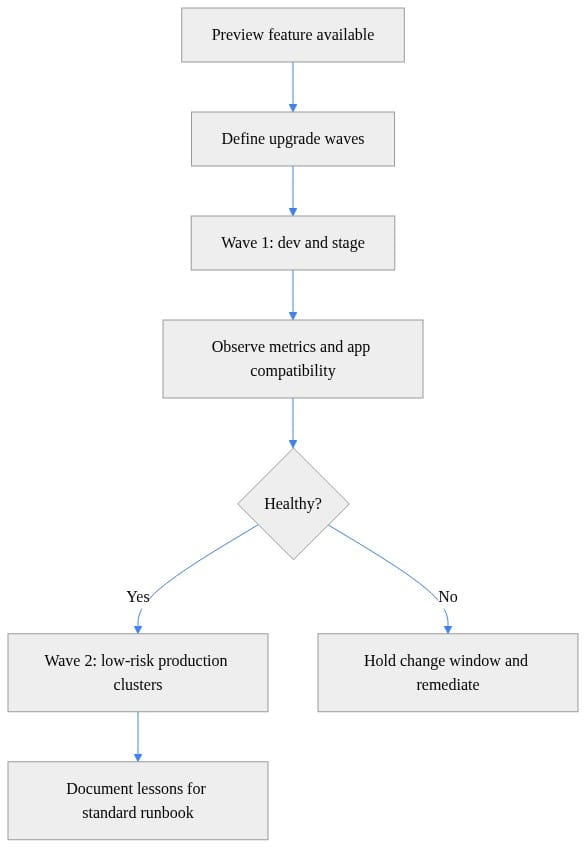
What to do next: define what qualifies a cluster for Wave 1, what evidence advances it to Wave 2, and who has the authority to hold the rollout.
Validation and recovery have to be explicit
Every preview evaluation should include one blunt question to Microsoft docs and support channels: what recovery options exist at each stage, and when are they unavailable?
I want that answered before the first pilot, not during a sev-2 bridge.
Too many teams write runbooks that assume recovery. Serious teams write runbooks around decision points:
- what stops the rollout
- who declares failure
- what restore or recovery path is approved
- what customer communication gets triggered
- what success criteria close the incident
- who owns the final go/no-go call
For a preview like this, I would require a non-production recovery rehearsal for representative workloads before broad adoption. Not a tabletop. An actual rehearsal.
And I would make recovery ownership visible in the change record. Operations teams should never be left to invent the response model while the clock is running.
Compatibility testing is the real upgrade gate
The database engine version is only one part of the blast radius.
Real compatibility testing has to cover:
- application drivers
- ORM behavior
- SQL semantics
- schema migration tooling
- batch jobs
- reporting workloads
- operational scripts
- backup and restore expectations
- observability dashboards and alerts
The minimum validation pack I push for looks like this:
- functional smoke tests
- representative performance checks
- backup and recovery checks
- observability checks
- application owner signoff
Here’s a lightweight example of how I’d identify non-production candidates first. It’s deliberately simple because the point is the selection logic, not the tooling brand.
# Discover elastic clusters and flag candidates for a preview major version upgrade
from dataclasses import dataclass

@dataclass
class Cluster:
    name: str
    resource_group: str
    current_version: int
    target_version: int
    environment: str

clusters = [
    Cluster("pg-elastic-dev", "rg-data-dev", 15, 16, "dev"),
    Cluster("pg-elastic-stage", "rg-data-stage", 15, 16, "stage"),
    Cluster("pg-elastic-prod", "rg-data-prod", 15, 16, "prod"),
]

candidates = [
    c for c in clusters
    if c.current_version < c.target_version and c.environment != "prod"
]

for c in candidates:
    print(f"{c.name} in {c.resource_group}: {c.current_version} -> {c.target_version}")
What to observe: the filter excludes production on purpose. That’s the right default for a preview. Your first pass should build evidence, not bravado.
Before the upgrade, I also want dependency checks called out explicitly. Extensions are where “the database upgrade succeeded” turns into “the application still failed.”
# Run lightweight pre-checks before a major version upgrade preview
required_extensions = {"pg_stat_statements", "pgcrypto"}
installed_extensions = {"pg_stat_statements", "pgcrypto", "uuid-ossp"}
blocked_extensions = {"timescaledb"}

missing = required_extensions - installed_extensions
blocked = installed_extensions & blocked_extensions

if missing:
    print(f"Missing required extensions: {sorted(missing)}")
if blocked:
    print(f"Blocked for preview upgrade: {sorted(blocked)}")

if not missing and not blocked:
    print("Cluster passed extension pre-checks for preview upgrade.")
What to do next: replace the toy sets with your real inventory source and use the output to block ineligible clusters automatically. Manual review does not scale once you have more than a handful of databases.
And after the operation, don’t wave it through because the control plane says “Succeeded.” Run a rollout gate tied to actual workload health.
# Validate post-upgrade readiness with a simple rollout gate
param(
    [double]$P95LatencyMs = 18.4,
    [int]$ErrorCount = 0,
    [double]$MaxAllowedLatencyMs = 25.0
)

$healthy = ($P95LatencyMs -le $MaxAllowedLatencyMs) -and ($ErrorCount -eq 0)

if ($healthy) {
    "Canary cluster passed validation. Continue rollout."
}
else {
    throw "Validation failed. Pause rollout and investigate."
}
What to observe: the gate uses latency and errors, not vibes. Pick your own thresholds, but make them explicit before the change window starts.
The pragmatic adoption sequence
Here’s the sequence I’d run with my own team before I ever recommended broader production use.
First, verify the current preview scope and constraints from official documentation and support guidance. Preview behavior changes. Support terms change. Assumptions age badly.
Second, select representative non-production workloads that expose the ugly stuff:
- extension usage
- app driver diversity
- reporting queries
- scheduled jobs
- automation hooks
Third, build and test the runbook. Start with access and subscription targeting so operator context is explicit.
# Authenticate to Azure and select the subscription used by the platform team
param(
    [string]$SubscriptionId = "00000000-0000-0000-0000-000000000000"
)

Connect-AzAccount | Out-Null
Set-AzContext -SubscriptionId $SubscriptionId | Out-Null

$context = Get-AzContext
"Tenant: $($context.Tenant.Id)"
"Subscription: $($context.Subscription.Id)"
"Account: $($context.Account.Id)"
What to observe: confirm you are in the right tenant and subscription before you do anything else.
Fourth, submit the upgrade in a controlled pilot. Because I cannot verify a specific Azure CLI command for Elastic Clusters from the provided sources, I’d document the workflow as pseudocode until the exact official command or API is confirmed.
# Illustrative workflow only: replace with the exact documented command or API for your service
param(
    [string]$ResourceGroup = "rg-data-stage",
    [string]$ClusterName = "pg-elastic-stage",
    [string]$TargetVersion = "16"
)

"Validate documented upgrade path for $ClusterName"
"Submit upgrade request for resource group $ResourceGroup"
"Record operation identifier in the change record"
"Track status until a terminal state is reached"
"Begin post-upgrade validation before advancing rollout"
What to do next: treat the request as the beginning of the process, not the end. Capture the operation ID, track progress, and route status into the change record.
Then poll until you hit a terminal state and branch accordingly.
# Poll an upgrade operation and stop on terminal states
import time

operation_statuses = ["InProgress", "InProgress", "Succeeded"]

for attempt, status in enumerate(operation_statuses, start=1):
    print(f"poll={attempt} status={status}")
    if status in {"Succeeded", "Failed", "Canceled"}:
        break
    time.sleep(1)

if status != "Succeeded":
    raise SystemExit(f"Upgrade did not complete successfully: {status}")

print("Upgrade completed successfully; proceed to validation.")
What to observe: success only means you move to validation. Failure means you execute the recovery path you already rehearsed.
Finally, industrialize what worked. Don’t celebrate one successful cluster and call it strategy. Turn the pilot into cohort-based lifecycle management.
The leadership decision
The strategic opportunity here is not a faster version change. It’s the chance to make PostgreSQL modernization routine instead of episodic.
That only happens if leaders fund the surrounding operating model:
- inventories
- test automation
- runbooks
- ownership data
- governance workflows
- recovery rehearsal
If you skip that work, a preview gives you a new button and the same old chaos.
If you do the work, it can reduce upgrade debt in a way that actually scales.
For teams evaluating any major-version-upgrade preview, my practical question is simple:
What evidence gates do you require before approving the first production rollout, and have you already rehearsed the recovery path?
#PostgreSQL #AzureData #PlatformEngineering
Sources & References
Try it yourself
Run this tutorial as a Jupyter notebook: Download runbook.ipynb (33 cells, 21 KB).