Azure Copilot Agent Access Architecture and Governance
Azure Copilot just got direct agent access — now the real architecture decisions start

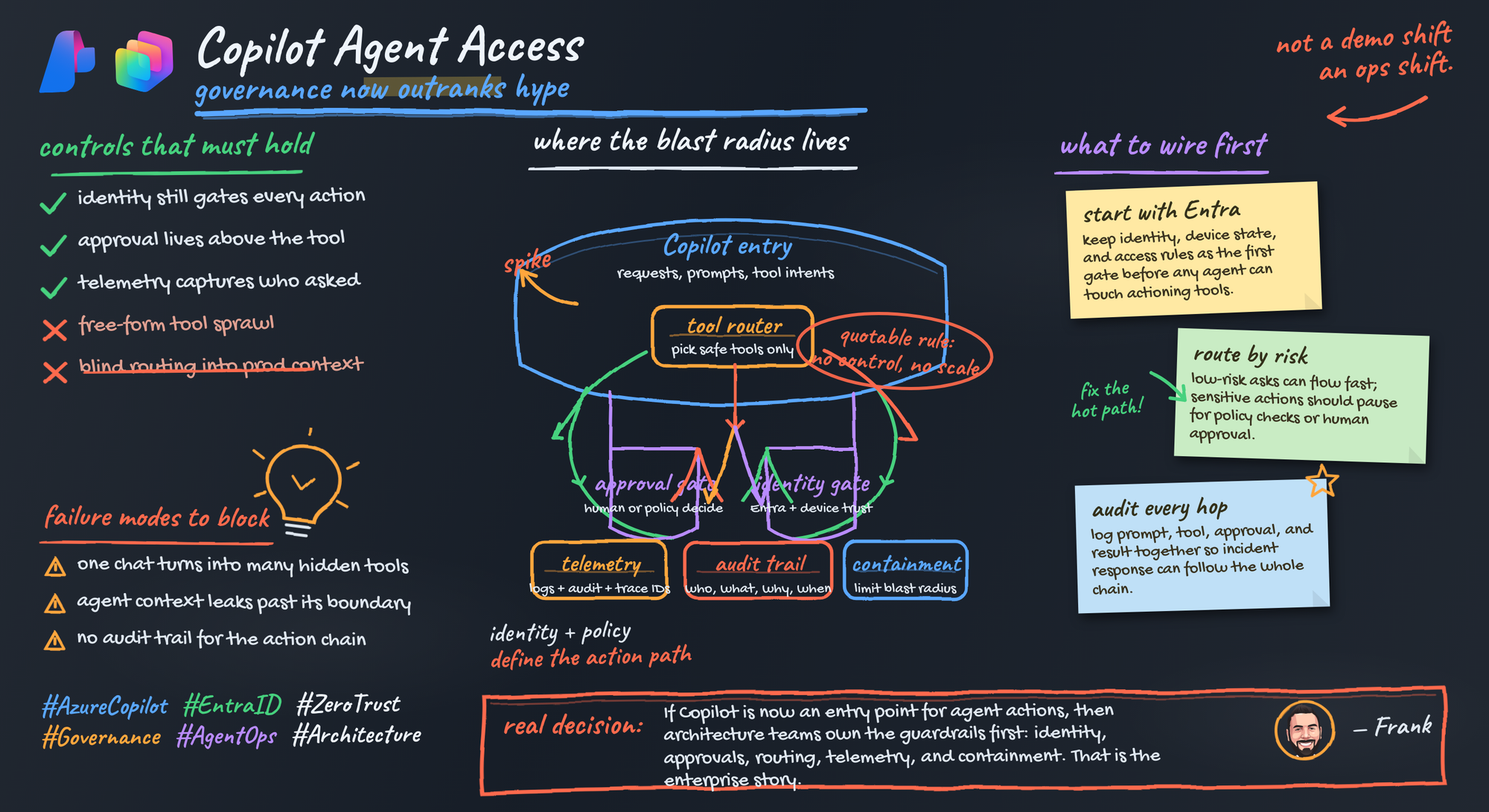
“Who approved the agent to do that?”
On this page
- The launch changes the entry point, not your control obligations
- Identity boundaries are the first real design decision
- Tool routing is the production control plane
- Approval gates should map to consequence, not confidence
- Telemetry is the difference between governance and theater
- Blast radius is the metric I’d put in front of the CIO
- Sources & References
That’s the question I want every exec, architect, and security lead asking right now. Direct agent access in Copilot changes the entry point. It puts a familiar surface in front of tools, actions, and sensitive context. If your answer is still “the prompt looked reasonable,” you do not have an architecture. You have a demo.
The launch changes the entry point, not your control obligations
Copilot used to feel like an assistance surface. With direct agent access, it starts acting like an operational front door.
That means the production test gets tougher fast: can you explain who initiated the request, which identity executed it, what downstream tool was called, what data got exposed, and how you would stop the next attempt? Microsoft already gives you the planning and governance domains across Copilot, identity, devices, and administration, but teams still have to stitch them into one operating model through the Copilot hub, Entra, Intune, and platform controls.
In March, I sat in a review with a 40-person platform team that had three working agents and zero agreement on who owned approval for a production restart path. The demo was clean. The accountability model was nonexistent.
Identity boundaries are the first real design decision
Here’s where teams get sloppy: they collapse the human, the Copilot experience, the agent, and the downstream workload into one fuzzy “AI did it” story.
Don’t.
Identity has to stay separable. The human requests. The Copilot surface brokers. The agent reasons and selects a route. A workload identity executes against the target system. Microsoft Entra is the control plane for identities and access to apps, data, and resources, and Conditional Access is the Zero Trust policy engine that evaluates user and device context, not just network location, per the Entra docs and Conditional Access overview.
That separation is what makes least privilege enforceable instead of aspirational.
If I’m designing this with a customer, I want four decisions on paper before anything scales:
- who can initiate
- who can approve
- which identity executes
- who can observe the audit trail
If your answer to any of those is “shared service account,” stop.
Tool routing is the production control plane
Every connector, API, data source, and runbook exposed to an agent is a route. Treat it that way.
Read-only retrieval is one class. Actions that mutate data, infrastructure, configs, or business records are another. I like four route labels because they force discipline:
- permitted
- approval-required
- restricted
- unavailable
That’s the backbone of the control plane I described in my Azure Functions just redefined the agent control plane post. Same principle here: route first, capability second.
A useful contrast is grounded, read-only retrieval from trusted enterprise sources. Microsoft Graph connectors, for example, help Copilot bring specific organizational data into context so responses are based on approved systems of record rather than open-ended retrieval. Useful. Low drama. But grounded retrieval is still not the same thing as authority to restart a workload, update a record, or trigger a workflow.
Approval gates should map to consequence, not confidence
A polished response is not a risk control.
I don’t care how fluent the prompt chain looks. If the action is irreversible, externally visible, policy-sensitive, or high blast radius, put a checkpoint in front of it. Show the approver the action, target scope, identity context, affected resources, and rollback path. Anything less is fake governance.
This is the kind of tiny pattern I like teams to prototype early. Not production-ready code. Just enough to force the conversation about consequence-based approval.
# PowerShell: just-in-time approval pattern before high-risk operations
param(
  [string]$AgentId,
  [string]$Action,
  [string]$Environment = "prod"
)

if ($Environment -eq "prod" -and $Action -in @("restart","delete")) {
  Write-Host "Approval required for $AgentId -> $Action in $Environment"
  exit 1
}

Write-Host "Approved: $AgentId can perform $Action in $Environment"
What to look for: the gate is driven by environment and action class, not by whether the agent “sounds confident.” That’s the right instinct.
This is also where Enterprise Microsoft 365 Copilot Agent Governance Playbook becomes practical, not theoretical. Approval design is where governance either survives contact with operations or collapses into exception tickets.
Telemetry is the difference between governance and theater
If your only record is a chat transcript, you’re already behind.
You need an evidence chain across:
- user request
- agent decision
- selected route
- auth result
- approval event
- execution outcome
- exception path
That event trail has to work for security, platform engineering, app owners, and audit. Same event, different lens. This is one reason I keep pushing lifecycle discipline around agent-enabled systems. Power Platform has explicit administration and ALM guidance because these capabilities still need ownership, promotion controls, and operational hygiene through the Power Platform documentation.
And yes, your data architecture matters here too. If your analytics backbone lives in Fabric, treat agent telemetry as first-class operational data. Fabric is built as a unified analytics platform spanning ingestion, storage, transformation, analysis, and sharing per the Fabric docs. That makes it a solid landing zone for cross-agent evidence.
Blast radius is the metric I’d put in front of the CIO
The executive question is simple: when something fails, how much can this agent touch before we contain it?
That’s the architecture metric that matters. Not prompt quality. Not number of connected tools. Blast radius.
So I’d write an explicit decision record now:
- identity separation model
- route classes
- approval thresholds
- telemetry owner
- maximum scope per agent
- pause and revoke authority
Use the Azure Architecture Center as the place to anchor the broader workload design patterns and decision guides for Azure workloads through the Architecture Center. Then connect that to your endpoint posture with Intune, your identity posture with Entra, and your operational boundaries with app and platform teams.
The winners here won’t be the companies that expose the most tools to Copilot first. They’ll be the ones that can prove controlled authority when agents act.
Where does your design break first today: identity separation, approval gates, or telemetry reconstruction?
#EnterpriseAI #EntraID #DataArchitecture
Sources & References
- Official Microsoft Power Platform documentation - Power Platform
- Microsoft Copilot hub
- Azure Architecture Center - Azure Architecture Center
- Microsoft Fabric documentation - Microsoft Fabric
- Microsoft Entra documentation
- What is Microsoft Intune? - Microsoft Intune
- Microsoft Entra Conditional Access: Zero Trust Policy Engine - Microsoft Entra ID
- What's new in Copilot Studio - Microsoft Copilot Studio
- Microsoft Graph connectors overview
Try it yourself
Run this tutorial as a Jupyter notebook: Download runbook.ipynb (16 cells, 14 KB).



