Enterprise Microsoft 365 Copilot Agent Governance Playbook
My Playbook for Building Microsoft 365 Copilot Agents That Survive Contact With the Enterprise

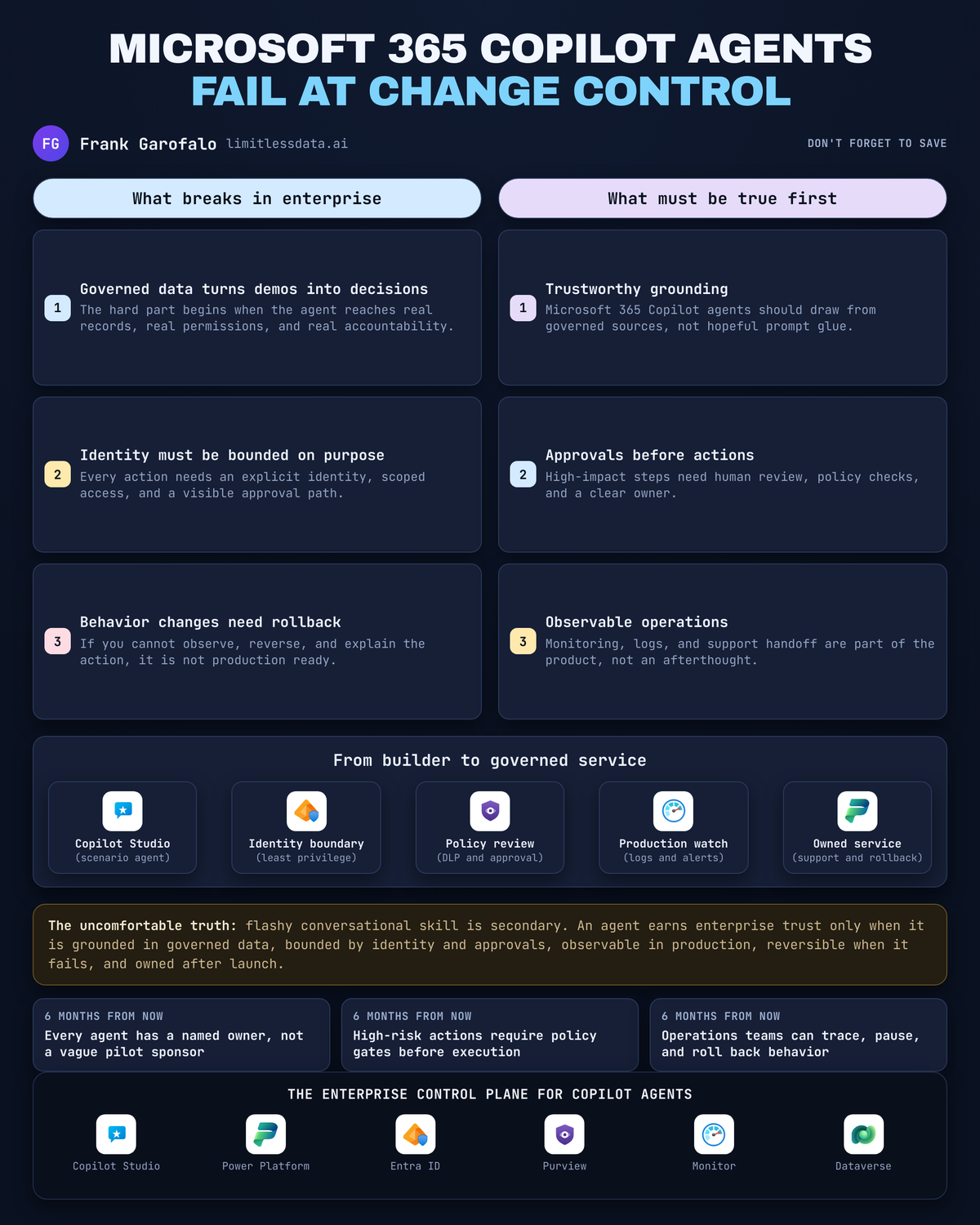
Enterprise agent success is an operations problem, not a demo problem. The minute a Microsoft 365 Copilot agent touches governed data, triggers a workflow, or changes a record, you are running a service that needs controls, evidence, and an owner.
On this page
- The demo is no longer the story
- Start with a service contract, not a prompt
- Grounding is a data quality decision
- Identity boundaries must survive the happy path
- Approval is the enterprise pattern for meaningful action
- Choose the build surface for control, not convenience
- Telemetry, rollback, and support ownership are release requirements
- My production gate for Microsoft 365 Copilot agents
- Sources & References
I’m glad the Microsoft 365 Copilot conversation is getting more practical, because too many teams still mistake a polished interaction for production readiness. Microsoft gives you multiple surfaces to build these experiences across Power Platform and Microsoft 365 extensibility, including Copilot Studio, Agent Builder, connectors, plugins, APIs, and developer tooling in the Microsoft docs and here. That’s useful. It’s also where teams get into trouble, because build surface gets discussed before operating model.
My test for every proposed agent is simple:
- What data grounds it?
- What can it read?
- What can it suggest?
- What can it actually do?
- Under which identity?
- Who approves meaningful actions?
- How do we observe it?
- How do we stop it?
- Who gets paged when it goes sideways?
If you can’t answer those questions in writing, you do not have an enterprise-ready agent. You have a demo.
The demo is no longer the story
Launch cycles and livestreams are useful forcing functions. They get architects, platform owners, and business teams back in the room. Good. Use that moment to review what you are actually shipping, not to recap announcements.
A Microsoft 365 Copilot agent can absolutely extend the way people work across Microsoft 365 and enterprise systems, which is exactly how Microsoft frames the model in its extensibility guidance. The problem is that enterprise acceptance criteria have almost nothing to do with whether the conversation felt smart in a meeting.
Demos optimize for capability.
Production has to optimize for control, evidence, and recoverability.
In Q4, I sat in a review with a 14-person operations team that had a beautiful onboarding agent in a test tenant. The meeting died the second someone asked who owned stale SharePoint policy content after HR updated benefits and Legal didn’t.
That’s the real enterprise test. Not “can it answer?” but “can we trust the answer path, the action path, and the support path?”
Start with a service contract, not a prompt
Every serious agent needs a service contract before it needs better instructions.
I want these fields filled out before anybody argues about prompt wording:
- Business outcome
- Named business owner
- Named technical owner
- Support route
- Approved user population
- Data boundary
- Action inventory
- Retirement decision
The action inventory matters more than most teams admit. Informational responses, suggested actions, and system-changing actions are not the same risk class. Treating them as equivalent is how you end up with an agent that starts life as “helpful assistant” and quietly turns into “unsupervised operator.”
Here’s the architecture I use to explain this to stakeholders. The policy decision sits before grounding and before generation, not after.
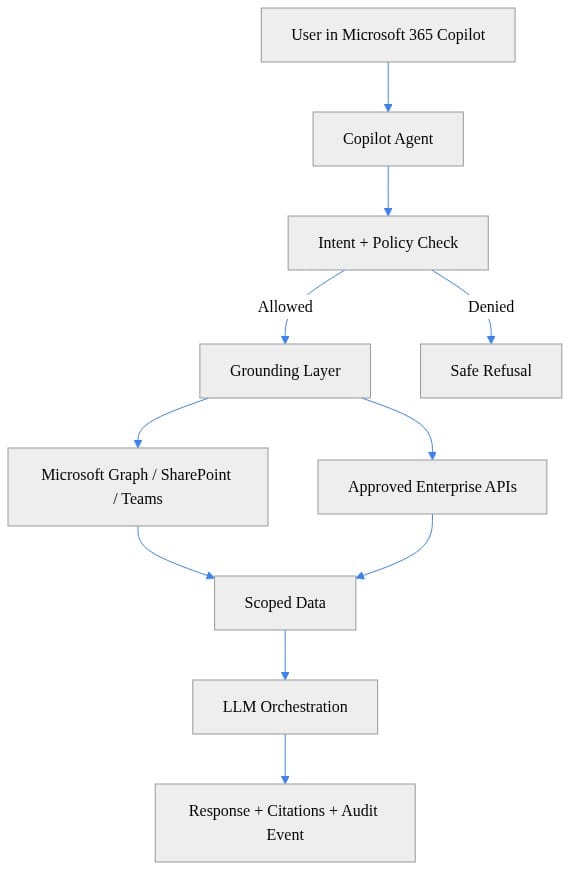
What to notice: the useful control points are explicit. Intent and policy check. Scoped grounding. Approved APIs. Audit event on the way out. If your design sketch jumps straight from user prompt to answer generation, you skipped the enterprise part.
This is also where scenario scope earns its keep. Microsoft positions Agent Builder for scenario-specific agents like writing coaching, presentation help, and onboarding use cases in the product guidance. That narrowness is a strength. A smaller business boundary is easier to govern, support, and retire.
If you want the longer version of why prompt design without operating discipline causes pain, I wrote about that in Microsoft 365 Copilot Organizational Prompt Governance.
Grounding is a data quality decision
“Just attach knowledge sources” is lazy architecture.
Grounding is a decision about which enterprise information is fit to influence a user decision. That means every source needs four things:
- A content owner
- A review cadence
- A source-of-truth status
- An escalation path when sources conflict
Broad discovery is fine for low-consequence scenarios. “Help me find the QBR deck” is one thing. “Tell me the current leave policy for a cross-border employee transfer” is a different class of problem.
I separate those on purpose:
- Discovery agents can search broadly but should stay informational.
- Guidance agents need tighter source control and narrower scope.
- Action agents need both of those plus approvals.
If a benefits agent is grounded on three SharePoint libraries, two Teams channels, and an abandoned PDF from 2022, the model is not your problem. Your content estate is.
A minimal request pipeline should make policy and grounding visible, even in a toy example. Here’s a stripped-down Python sketch that blocks higher-sensitivity requests, attaches approved content, and emits an audit payload.
# Python: Minimal agent request pipeline with policy gate, grounding, and audit event
from dataclasses import dataclass

@dataclass
class Request:
    user_id: str
    prompt: str
    sensitivity: str

def handle_request(req: Request) -> dict:
    if req.sensitivity not in {"public", "internal"}:
        return {"status": "denied", "message": "Request blocked by policy."}
    grounding = {"sources": ["sharepoint://hr/benefits.pdf"], "citations": True}
    response = f"Answer for {req.user_id}: grounded on approved content."
    audit = {"user": req.user_id, "action": "copilot.invoke", "sensitivity": req.sensitivity}
    return {"status": "ok", "grounding": grounding, "response": response, "audit": audit}

result = handle_request(Request("u123", "Summarize benefits changes", "internal"))
print(result)
What to notice: this is intentionally boring. Good. Enterprise agent plumbing should be boring. You want predictable policy handling, explicit sources, and a record of what happened. Fancy orchestration with no audit trail is how teams create support nightmares.
For teams thinking about memory and persistence, the same rule applies: if you cannot explain why a piece of retained context should influence a future answer, don’t keep it. I covered that in more depth in Enterprise Agent Memory Governance for Microsoft AI.
Identity boundaries must survive the happy path
The most dangerous sentence in agent design is: “It will just use the user’s context.”
No. Map the identities.
For every interaction, I want to know:
- Requesting user identity
- Agent runtime identity
- Connected service identity
- Downstream system identity or delegated context
- Logging and audit destination identity
That sounds obvious until somebody wires a line-of-business action behind a conversational front end and assumes the UX somehow simplified authorization. It didn’t. It hid it.
Microsoft’s documentation is clear that you can build secure, scalable agents across Microsoft 365 and line-of-business systems with both Agent Builder and Copilot Studio here. Fine. But “can connect” is not the same thing as “should connect without a hard boundary review.”
I use tool allow-lists early, even in prototypes, because they force the conversation. Which capabilities are approved? Which are blocked? Which need a second control?
# Python: Enforce tool allow-list so the agent only calls approved enterprise capabilities
ALLOWED_TOOLS = {
    "graph.search",
    "sharepoint.read",
    "servicenow.create_ticket",
}

def invoke_tool(tool_name: str, payload: dict) -> dict:
    if tool_name not in ALLOWED_TOOLS:
        raise PermissionError(f"Tool '{tool_name}' is not approved.")
    return {"tool": tool_name, "status": "executed", "payload": payload}

print(invoke_tool("graph.search", {"query": "Q3 OKRs"}))
What to notice: the allow-list is the point, not the Python. If a team can’t enumerate approved tools, they have no business shipping the agent. “We’ll let it call what it needs” is not architecture. It’s drift.
The same goes for secrets and sensitive content. Before prompts, logs, or downstream calls leave your control boundary, redact obvious junk you never needed to send in the first place.
# Python: Redact obvious secrets before sending prompts or logs to downstream systems
import re

PATTERNS = [
    re.compile(r"\b\d{3}-\d{2}-\d{4}\b"),          # SSN-like
    re.compile(r"\b[A-Z0-9._%+-]+@[A-Z0-9.-]+\.[A-Z]{2,}\b", re.I),
    re.compile(r"\b(?:\d[ -]*?){13,16}\b"),       # card-like
]

def redact(text: str) -> str:
    for pattern in PATTERNS:
        text = pattern.sub("[REDACTED]", text)
    return text

sample = "Email jane@contoso.com and reference SSN 123-45-6789."
print(redact(sample))
What to notice: data minimization wins twice. It reduces exposure and improves your odds of surviving an audit review without a week of cleanup.
Approval is the enterprise pattern for meaningful action
If an agent creates commitments, changes records, initiates outreach, or affects a business process, approval should be the default pattern.
I’m blunt on this because I’ve watched teams try to skip it. They want the wow moment where a natural language request goes straight to action. That’s a conference demo reflex. In an enterprise, meaningful action needs a visible decision point, a responsible human, a reviewable payload, and an auditable outcome.
Classify actions like this:
- Low consequence: retrieve, summarize, draft
- Medium consequence: recommend, prefill, prepare
- High consequence: submit, send, update, create, delete, approve
High-consequence actions should not leap from plausible intent to irreversible execution.
This is where a policy flow matters more than model quality. Here’s the sequence I want teams to internalize.
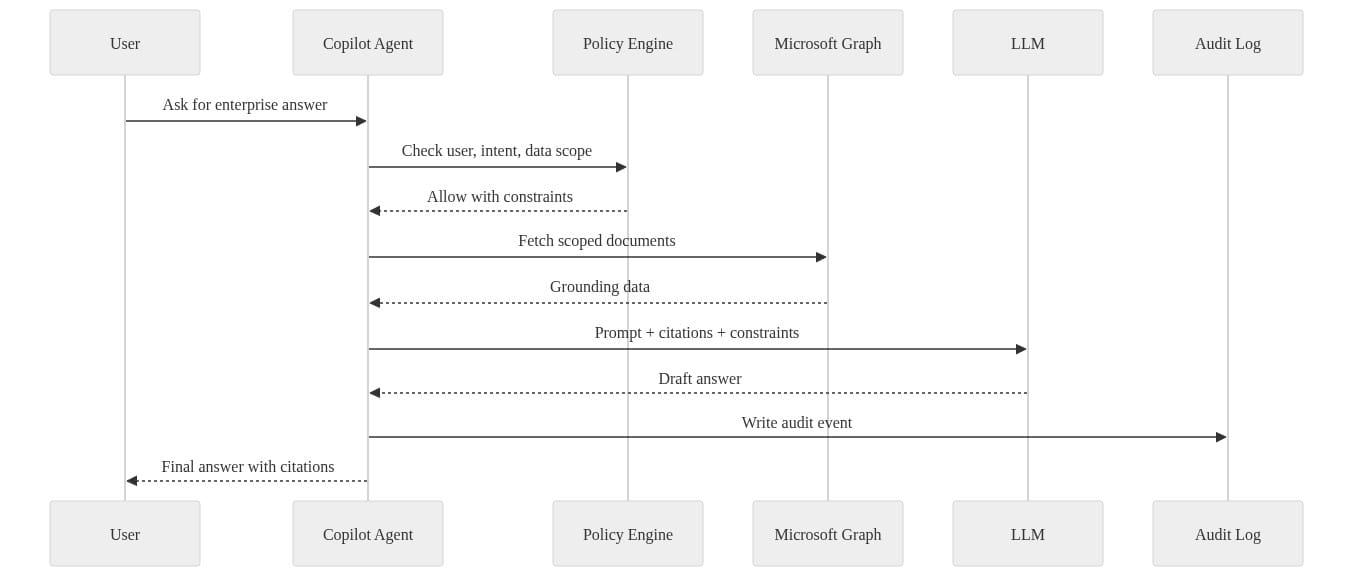
What to notice: policy check happens before data fetch and generation. Audit logging is part of the transaction, not an afterthought. If approval is required, insert it before the final action, not after the system has already changed state.
And define exception handling up front:
- What happens on ambiguous intent?
- What happens when the dependency is down?
- What happens when approval is denied?
- What happens when the target record changed between draft and submit?
If you don’t define those branches, production will define them for you, usually at 4:45 PM on a Friday.
Choose the build surface for control, not convenience
This is where people get tribal. They want a winner: Agent Builder or Copilot Studio or custom dev. That’s the wrong question.
The right question is: which surface matches the control, integration, and lifecycle requirements of the scenario?
Microsoft’s stack is broad on purpose. Power Platform brings together Copilot Studio, Power Apps, Power Automate, Power BI, and Power Pages for AI-driven apps, workflows, analytics, and sites across the platform. Microsoft 365 developer tooling and Copilot extensibility add another path for enterprise-grade agents and apps. Good. Use that breadth intelligently.
My rule set is simple:
- Use narrower, scenario-specific authoring when the use case is bounded and the operating model is simple.
- Use Copilot Studio when orchestration, integration, and managed lifecycle need to be more explicit.
- Escalate to developer extensibility and APIs when the requirement is really an integration contract with enterprise controls, not a one-off conversational experience.
The build surface should follow the service contract, not the other way around.
I made a similar point from the engineering side in How Visual Studio Agent Skills can turn Copilot into a governed engineering assistant for enterprise teams. The common thread is control. If the scenario needs governed tools, traceable behavior, and repeatable deployment, convenience stops being the deciding factor.
Telemetry, rollback, and support ownership are release requirements
An agent without telemetry is a rumor.
Before rollout, define the evidence you need to operate it:
- Request volume
- Policy allow/deny outcomes
- Latency
- Citation or grounding usage
- Tool invocation success/failure
- Approval outcomes
- User feedback
- Change history
A tiny structured event stream goes a long way. You need enough signal to answer basic questions fast: what changed, who was affected, did policy fail open or fail closed, and did grounding degrade?
# Python: Emit structured telemetry for prompt, latency, policy outcome, and citations
import json
import time

def log_event(name: str, **fields) -> None:
    event = {"event": name, **fields}
    print(json.dumps(event, separators=(",", ":")))

start = time.time()
policy_outcome = "allow"
citations = 2
time.sleep(0.01)
latency_ms = int((time.time() - start) * 1000)

log_event("copilot_request", user="u123", policy=policy_outcome, latency_ms=latency_ms, citations=citations)
What to notice: again, boring is good. Event name, user, policy outcome, latency, citations. Start there. Expand carefully. Don’t build a logging swamp you can’t interpret.
Then give yourself a rollback posture. You need to be able to reverse:
- Instructions
- Knowledge boundaries
- Tool availability
- Integration endpoints
- Audience scope
- Availability itself
I’m a big believer in fail-closed configuration checks for this exact reason. If the deployed configuration drifts from the approved baseline, stop the rollout.
# PowerShell: Fail closed when a deployment drifts from the approved enterprise configuration
$approved = @{
    AuthMode = "ManagedIdentity"
    DataBoundary = "EU"
    PublicNetworkAccess = "Disabled"
    AuditLogging = "Enabled"
}

$current = @{
    AuthMode = "ManagedIdentity"
    DataBoundary = "EU"
    PublicNetworkAccess = "Enabled"
    AuditLogging = "Enabled"
}

$drift = foreach ($key in $approved.Keys) {
    if ($approved[$key] -ne $current[$key]) { "$key: expected=$($approved[$key]) actual=$($current[$key])" }
}

if ($drift) {
    Write-Error ("Deployment drift detected: " + ($drift -join "; "))
    exit 2
}

Write-Host "Configuration matches approved baseline."
What to notice: drift detection is not glamorous, but it saves real incidents. Public network access flipped on by accident, wrong data boundary, audit logging disabled — these are not theoretical problems.
Finally, support ownership. This is where adoption usually jams up, because now Security, Compliance, platform admins, content owners, and business process owners all realize the agent is not a toy.
Readiness means you can answer these questions on an ordinary bad day:
- Who handles incorrect guidance?
- Who handles access issues?
- Who handles automation failures?
- Who handles suspected policy violations?
- Who can disable the agent?
- Who signs off on relaunch?
If nobody owns those answers, broad rollout is reckless.
My production gate for Microsoft 365 Copilot agents
Here’s my position:
Do not broadly roll out a Microsoft 365 Copilot agent until data grounding, identity boundaries, approval paths, telemetry, rollback, and support ownership each have a named accountable owner.
That’s the gate.
Not “the business is excited.” Not “the demo worked.” Not “the copilots team can iterate later.”
Microsoft gives us real building blocks here, from scenario-specific agents to broader extensibility, secure access patterns, and APIs that align with Microsoft 365 capabilities and compliance expectations in the platform docs. The technical path exists. The failure mode is operational laziness.
Demo agents showcase answers.
Enterprise agents demonstrate controlled behavior over time.
If you have agents in flight right now, use this week to force an operating-model review. Print the questions. Put names next to them. Anything without an owner goes back to the lab.
Rate your team from 1 to 5 on this standard: could you disable a misbehaving Microsoft 365 Copilot agent, explain its last action, and name the owner in under 15 minutes?
#Microsoft365copilot #EnterpriseAI #DataArchitecture
Sources & References
- Official Microsoft Power Platform documentation - Power Platform
- Microsoft 365 Copilot hub
- Agent Builder in Microsoft 365 Copilot
- Set Up Your Development Environment to Extend Microsoft 365 Copilot
- Choose between Agent Builder in Microsoft 365 Copilot and Copilot Studio to build your agent
- Microsoft 365 developer documentation - Microsoft 365 Developer
- Agents for Microsoft 365 Copilot
- Build agents in Copilot Chat - Online workshop - Training
- Transform Your Everyday Business Processes with Agents MS-4019 - Training
- Microsoft 365 Copilot APIs Overview
Try it yourself
Run this tutorial as a Jupyter notebook: Download runbook.ipynb (46 cells, 37 KB).



