Azure Cosmos DB Indexing Policies for AI Performance
Why Azure Cosmos DB Indexing Policies Still Decide AI App Performance

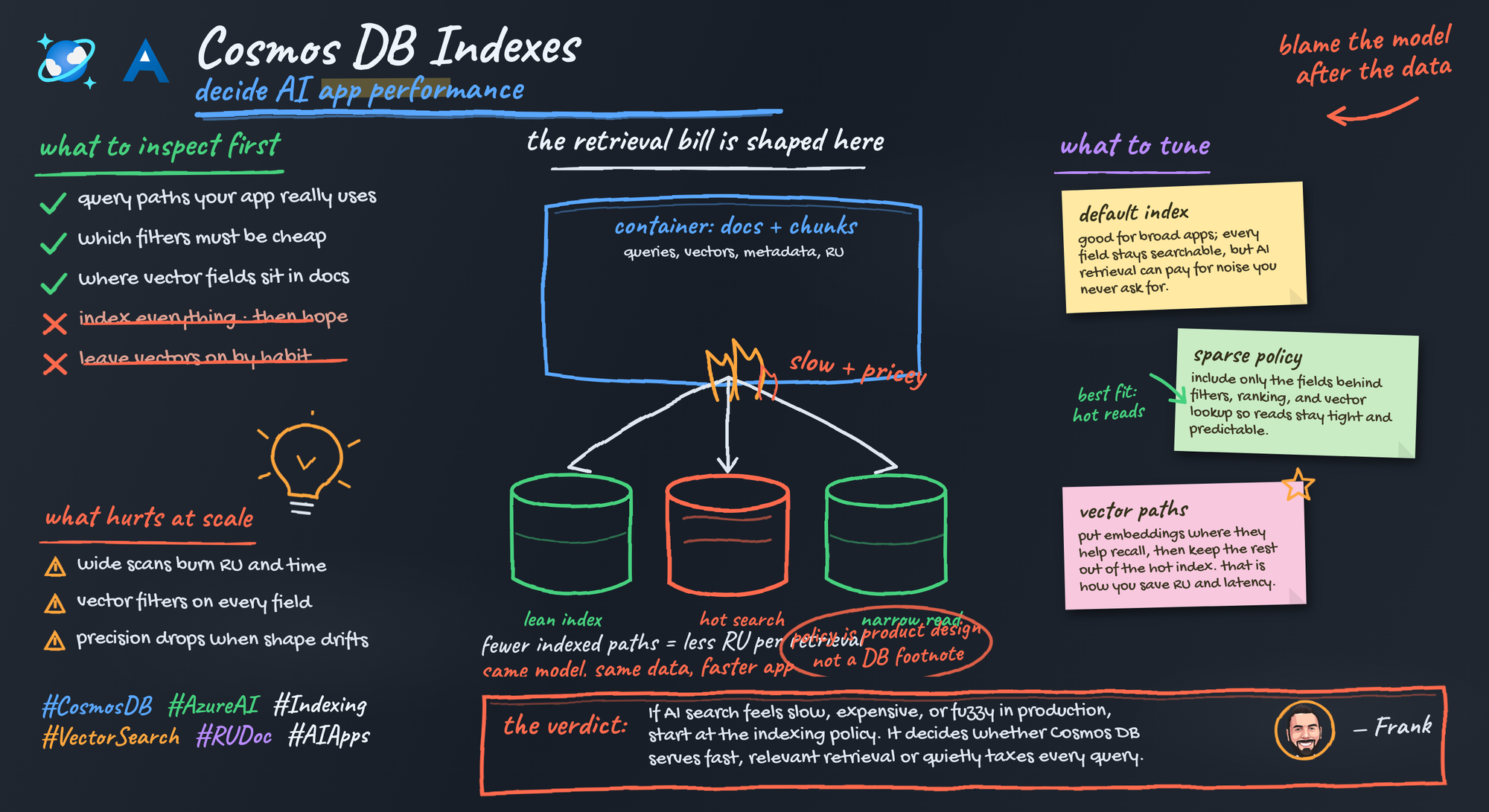
Blaming the model for a slow AI app is usually lazy architecture. The retrieval path is where production systems either get disciplined or get expensive.
On this page
- The model is not always your bottleneck
- Indexing policy is application behavior in disguise
- The default-indexing trap
- Query mismatch is where retrieval quality becomes a data problem
- RU, write amplification, and latency are one negotiation
- Vector search did not retire indexing discipline
- What intentional policy design looks like in an AI architecture review
- Make data-layer observability part of AI observability
- My blunt take
- Sources & References
When an AI app slows down or the retrieval bill jumps, teams love to stare at prompts, embeddings, and model deployments. Meanwhile the Cosmos DB indexing policy sits there untouched, inherited from a prototype, quietly deciding latency, RU burn, and whether your filters actually match how the product behaves.
That is the real point: for AI apps on Azure Cosmos DB, indexing policy is not a database afterthought. It is product behavior in disguise.
Azure Cosmos DB is positioned by Microsoft as a fully managed distributed database spanning NoSQL, relational, and vector workloads for modern app development, with explicit support for vector search and AI-driven features in the platform docs Azure Cosmos DB docs. So if you are building RAG, agent memory, or retrieval-heavy copilots on Cosmos DB, you are already making indexing decisions whether you admit it or not.
The model is not always your bottleneck
Here’s the production path people forget:
User asks a question. App builds or fetches an embedding. Database does vector retrieval. Metadata filters narrow the candidate set. The app projects fields into grounding context. Then the model gets called.
If that retrieval path is sloppy, the model never gets a fair shot.
I had this bite a team in Q1 on a knowledge assistant with roughly 40 million chunks across regulated content. They spent two weeks comparing embedding variants and prompt templates before anyone looked at the container policy and realized they were indexing ingestion junk they never queried while under-modeling the live filter path for tenant, region, status, and recency.
That is not an exotic mistake. That is normal enterprise behavior.
A clean way to visualize the request path is this:
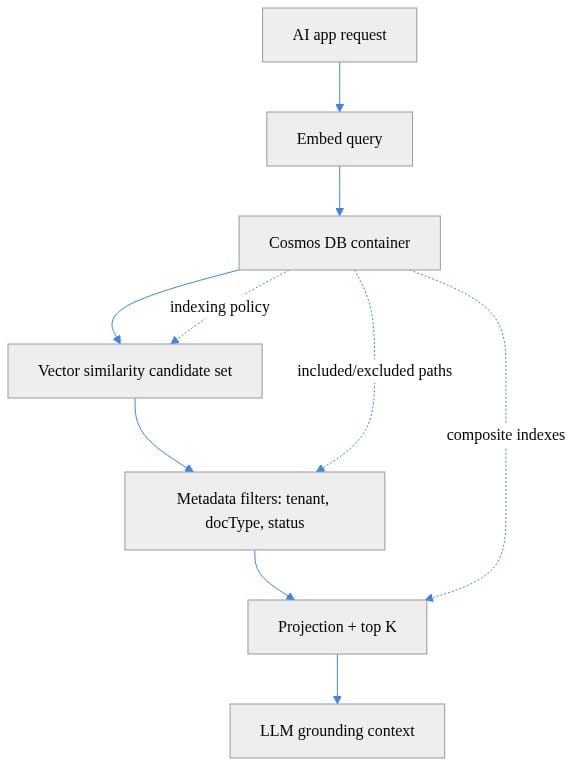
What to notice: the indexing policy influences candidate generation, metadata filtering, and projection before the LLM ever sees a token. If your app feels slow, start there.
Indexing policy is application behavior in disguise
Cosmos DB documentation puts request units, indexing policies, autoscale throughput, vector search, and Gen AI concepts in the same engine conversation for a reason Cosmos DB docs. These are not isolated knobs. They are one operating model.
The lazy default is broad indexing because “we might query it later.” That sounds prudent right up until ingestion volume climbs and every write drags around index maintenance for properties nobody uses in the retrieval path.
A schema-light database does not remove modeling discipline. It relocates it into three places:
- partition key choice
- document shape
- indexing policy
I wrote about the first two in Azure Cosmos DB Data Modeling for AI Applications and Azure Cosmos DB Partition Keys Decide Your Future Bill. Indexing is the third leg of the stool, and teams still treat it like a checkbox.
For AI workloads, the right question is simple:
Which document properties are actually on the latency-critical retrieval path?
If the answer is tenant, entitlement, document type, status, recency, and maybe title/source projection, then index for that. If chunk text, raw extraction artifacts, OCR diagnostics, pipeline traces, or giant metadata blobs are not queried, stop pretending they deserve first-class indexing treatment.
The default-indexing trap
Here’s the trap in plain English: your ingestion document carries everything because it is convenient, and the default indexing posture treats nearly everything as queryable.
That means a single chunk document can include:
- tenant and authorization metadata
- document lifecycle state
- source system identifiers
- extraction artifacts
- chunk text
- raw text
- processing diagnostics
- embedding vectors
- titles and URLs for citation rendering
But the live query path may only use a tiny subset of that.
A practical indexing example makes the point better than another paragraph. This one is intentionally opinionated: keep the filter fields queryable, keep the projection fields available, and stop indexing the baggage.
# Indexing policy tuned for AI retrieval: filter paths matter as much as vectors
indexing_policy = {
    "indexingMode": "consistent",
    "automatic": True,
    "includedPaths": [
        {"path": "/tenantId/?"},
        {"path": "/docType/?"},
        {"path": "/status/?"},
        {"path": "/title/?"},
        {"path": "/sourceUrl/?"},
    ],
    "excludedPaths": [
        {"path": "/chunk/*"},
        {"path": "/rawText/*"},
        {"path": "/embedding/*"},
        {"path": "/*"}
    ],
    "vectorIndexes": [
        {"path": "/embedding", "type": "diskANN"}
    ]
}

print(indexing_policy["includedPaths"])
What to notice: the retrieval contract is explicit. Tenant, type, and status are treated as first-class filter paths. Chunk payload, raw text, and embedding payload are not indexed as ordinary scalar paths. That is the difference between “we stored documents” and “we designed retrieval.”
Before anyone nitpicks the exact path list: good. You should nitpick it. That is the work. The exact policy depends on your query mix, write profile, and vector strategy. The point is that broad default indexing is not neutral. It is a cost and latency decision.
Query mismatch is where retrieval quality becomes a data problem
A lot of AI teams still talk about retrieval quality as if it starts and ends with embedding quality. That is prototype thinking.
In production, users expect relevance boundaries:
- only my tenant
- only my region
- only content I’m entitled to see
- only published or approved documents
- often only recent or active material
Vector similarity alone does not satisfy that contract.
Here is a production-style query shape that combines vector search with metadata constraints:
# Production-style retrieval request: vector search plus metadata constraints
from azure.cosmos import CosmosClient

endpoint = "https://example.documents.azure.com:443/"
key = "fake-key"
client = CosmosClient(endpoint, credential=key)
container = client.get_database_client("ai").get_container_client("knowledge")

query_embedding = [0.12, -0.44, 0.91, 0.03]
tenant_id = "contoso"
doc_type = "policy"

query = """
SELECT TOP 5 c.id, c.title, c.chunk, c.sourceUrl,
       VectorDistance(c.embedding, @embedding) AS score
FROM c
WHERE c.tenantId = @tenantId
  AND c.docType = @docType
  AND c.status = "published"
ORDER BY VectorDistance(c.embedding, @embedding)
"""

params = [
    {"name": "@embedding", "value": query_embedding},
    {"name": "@tenantId", "value": tenant_id},
    {"name": "@docType", "value": doc_type},
]

for item in container.query_items(query=query, parameters=params, enable_cross_partition_query=True):
    print(item["id"], item["title"], round(item["score"], 4))
What to notice: this is not “search the whole corpus and hope.” It is vector retrieval inside business boundaries. If your indexing policy does not reflect those boundaries, you get one of two bad outcomes:
- retrieval is slow or expensive
- retrieval is fast but semantically wrong because the filter contract was weak
Both are product failures.
I see this especially in enterprise knowledge assistants. Teams index all sorts of source metadata that never appears in a WHERE clause, then overlook the exact properties that define relevance boundaries for the app. The result is a system that demos well on generic questions and falls apart as soon as real users ask scoped ones.
RU, write amplification, and latency are one negotiation
Request units are where ingestion behavior and query behavior meet. You do not get to optimize one side in a vacuum.
If you index broadly, writes do more work. If you index poorly for the live query path, reads do more work. If you guess wrong on both, finance notices before engineering does.
This is why there is no universally “best” indexing policy.
A document-ingestion pipeline that absorbs continuous updates all day has a different sweet spot than an agentic application serving interactive retrieval under user-facing latency targets. One is write-sensitive. The other is read-sensitive. Plenty of real systems are both.
That is also why I hate architecture reviews that ask, “What’s the default?” The right question is, “What workload are we buying for?”
If you want to make this concrete in your own environment, inspect throughput and autoscale posture at the container level instead of debating in Slack:
# Inspect Cosmos DB throughput settings for the AI retrieval container
$resourceGroup = "rg-ai-prod"
$accountName = "cosmos-ai-prod"
$databaseName = "ai"
$containerName = "knowledge"

$throughput = Get-AzCosmosDBSqlContainerThroughput `
  -ResourceGroupName $resourceGroup `
  -AccountName $accountName `
  -DatabaseName $databaseName `
  -Name $containerName

[pscustomobject]@{
  Container = $containerName
  Throughput = $throughput.Resource.Throughput
  AutoscaleMax = $throughput.Resource.AutoscaleSettings.MaxThroughput
}
What to notice: tie your indexing discussion to actual throughput settings and workload shape. RU is not abstract. It is your shared budget.
And if you want a dead-simple way to make query shape visible to the team, compare a broad vector query against one constrained by the fields your app actually cares about:
# Compare a broad query and a constrained query to make the access pattern explicit
from azure.cosmos import CosmosClient

client = CosmosClient("https://example.documents.azure.com:443/", credential="fake-key")
container = client.get_database_client("ai").get_container_client("knowledge")
embedding = [0.12, -0.44, 0.91, 0.03]

broad = """
SELECT TOP 5 c.id FROM c
ORDER BY VectorDistance(c.embedding, @embedding)
"""

constrained = """
SELECT TOP 5 c.id FROM c
WHERE c.tenantId = @tenantId AND c.status = "published"
ORDER BY VectorDistance(c.embedding, @embedding)
"""

params = [{"name": "@embedding", "value": embedding}, {"name": "@tenantId", "value": "contoso"}]
print("Broad query shape:", broad.strip().splitlines()[0])
print("Constrained query shape:", constrained.strip().splitlines()[1].strip())
print("Parameters:", params)
What to notice: retrieval patterns should be named explicitly. “Broad” and “constrained” are different products, not just different SQL text.
Vector search did not retire indexing discipline
Cosmos DB absolutely supports vector search and AI integration, and that is one reason it is showing up in more RAG and agent architectures Azure Cosmos DB docs. But adding vectors did not magically remove the need to model metadata filters.
If anything, vector search makes indexing discipline more important.
Why? Because teams get seduced by the prototype effect. They load embeddings, run similarity search, get a few impressive answers, and conclude the hard part is done. Then production arrives with tenancy boundaries, entitlement rules, stale content risks, and a corpus large enough to punish every sloppy assumption.
The retrieval stack got richer. It did not get simpler.
And if you are building on Microsoft Foundry to build and govern AI applications and agents at scale, that makes the architecture review bar even higher, not lower Microsoft Foundry docs. A governed AI app still needs a retrieval layer that is economical and predictable.
What intentional policy design looks like in an AI architecture review
These are the questions I ask now, every time:
- Which properties are used in authorization and tenancy boundaries?
- Which properties are used in lifecycle filtering like draft, published, expired, or archived?
- Which properties are used for freshness or recency?
- Which fields are only ingestion baggage?
- What is the write cadence?
- What is the query mix?
- What happens when retrieval is stale, slow, or too expensive?
Then I want to see a document sample that reflects reality, not a toy JSON object from a notebook.
A minimal ingestion example is useful here because it forces the team to separate retrieval essentials from “nice to have” payload:
# Minimal ingestion example: write only fields that support retrieval and filtering
from azure.cosmos import CosmosClient

client = CosmosClient("https://example.documents.azure.com:443/", credential="fake-key")
container = client.get_database_client("ai").get_container_client("knowledge")

doc = {
    "id": "doc-001#chunk-01",
    "tenantId": "contoso",
    "docType": "policy",
    "status": "published",
    "title": "Travel Policy",
    "sourceUrl": "https://contoso.example/policies/travel",
    "chunk": "Employees must submit receipts within 30 days.",
    "embedding": [0.12, -0.44, 0.91, 0.03],
}

result = container.upsert_item(doc)
print(result["id"])
What to notice: if your live retrieval path only needs eight fields, stop stuffing thirty into the same hot path without a reason. You can still persist richer artifacts elsewhere or in adjacent structures, but don’t pretend every field belongs in the same indexing conversation.
Make data-layer observability part of AI observability
If your AI observability stops at model-call duration, you are measuring the wrong half of the system.
Azure Monitor Application Insights is Microsoft’s application performance monitoring feature in Azure Monitor, and it supports OpenTelemetry for supported scenarios Application Insights docs. Use that mindset for AI apps: trace the whole request path.
That means watching together:
- retrieval latency
- normalized RU consumption
- server-side database latency
- ingestion pressure
- query shapes by endpoint or scenario
- answer quality complaints from users
You do not need a giant observability program to start. You need enough instrumentation to correlate “the app got worse” with “the retrieval path changed” or “ingestion pressure spiked.”
Here is a simple operational example for pulling Cosmos metrics from Azure Monitor:
# Correlate AI workload pressure with Cosmos operational signals from Azure Monitor
$resourceGroup = "rg-ai-prod"
$accountName = "cosmos-ai-prod"
$end = Get-Date
$start = $end.AddHours(-1)
$resource = Get-AzResource -ResourceGroupName $resourceGroup -Name $accountName -ResourceType "Microsoft.DocumentDB/databaseAccounts"

$metrics = Get-AzMetric -ResourceId $resource.ResourceId `
  -TimeGrain 00:05:00 -StartTime $start -EndTime $end `
  -MetricName "TotalRequests","NormalizedRUConsumption","ServerSideLatency"

$metrics | ForEach-Object {
  $_.Data | Select-Object @{n="Metric";e={$_.MetricName.Value}}, TimeStamp, Average, Maximum
}
What to notice: metrics like total requests, normalized RU consumption, and server-side latency are the bridge between app complaints and database reality. If your team cannot correlate those, it is flying blind.
My blunt take
For AI apps backed by Cosmos DB, indexing policy is a first-order architecture decision. It decides which retrieval patterns are affordable, which are responsive, and which are precise enough to survive production scale.
That does not mean the model is unimportant. It means the database can ruin the product before the model has a chance to help.
So the next time an AI app slows down, do not start with prompt surgery. Start by asking whether the retrieval path was actually designed.
Which tradeoff would you reverse in your environment: broader indexing for future flexibility, or tighter indexing for today’s RU and latency budget?
#CosmosDB #Vectorsearch #DataArchitecture
Sources & References
- Microsoft Foundry documentation
- Azure Cosmos DB documentation - Azure Cosmos DB
- AI strategy - Guidance to set your organization's AI strategy - Cloud Adoption Framework
- Cosmos DB (in Azure and Fabric) Documentation
- Application Insights OpenTelemetry observability overview - Azure Monitor
Try it yourself
Run this tutorial as a Jupyter notebook: Download runbook.ipynb (29 cells, 24 KB).



