Azure MCP Server Cost Tools for FinOps Governance
Azure Resource Manager MCP Server: Why Cost Management and Pricing Toolsets Matter for FinOps

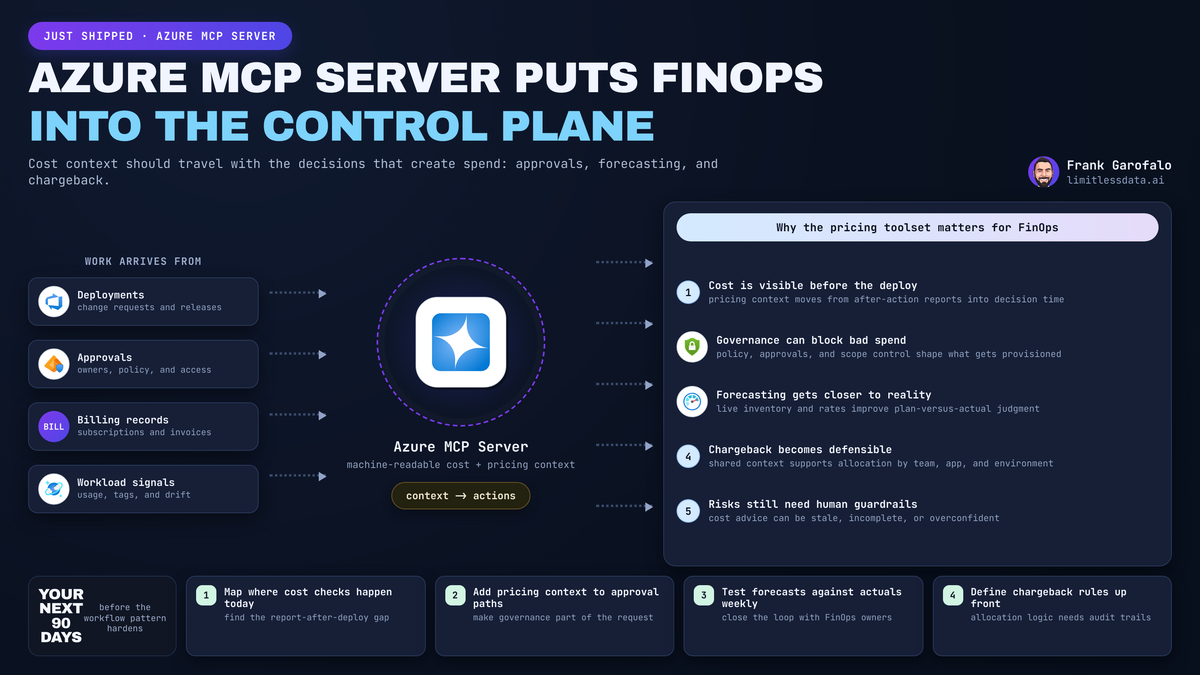
Cost reviewed after deployment is already a control failure.
On this page
- The real shift: cost moves into the control plane
- What I would implement first
- Priority workflows and guardrails
- My takeaway
- Sources & References
That is why the Azure MCP Server announcement matters for FinOps. Not because an agent will magically optimize cloud spend, but because Azure MCP Server gives AI clients and agents an MCP-based way to interact with Azure through natural language, so cost and pricing context can show up inside the same workflow that creates spend in the first place, per the Azure MCP Server overview.
The real shift: cost moves into the control plane
FinOps works when finance, cloud engineering, and operations act on the same evidence. Microsoft defines FinOps as combining financial management principles with cloud engineering and operations to improve understanding of cloud spending, per the FinOps guidance.
That is the opportunity here: machine-readable cost context at decision time, not after deployment.
What I would implement first
Start with read-only cost and pricing checks before any deployment path.
Microsoft Cost Management already covers cost analysis, monitoring, optimization, billing, and subscription management, per the Cost Management documentation. The workflow should be simple:
- proposal enters the workflow
- approved tool retrieves pricing context
- budget or policy check evaluates it
- human approval happens where required
- deployment proceeds only with evidence attached
# Python: read-only pre-deployment cost review using an approved pricing tool

proposal = {
    "subscription": "sub-prod-001",
    "resourceGroup": "rg-app-prod",
    "sku": "Standard_D4s_v5",
    "hoursPerMonth": 730,
    "region": "eastus"
}

def approved_pricing_tool(payload):
    return {"monthlyEstimate": 412.75, "currency": "USD", "source": "ApprovedPricingAPI"}

pricing = approved_pricing_tool(proposal)
budget_limit = 400.00
status = "NeedsApproval" if pricing["monthlyEstimate"] > budget_limit else "WithinBudget"
The key decision is not “deploy” or “don’t deploy.” It is “within budget” versus “needs approval.” That is FinOps: governed decision support, not a chatbot shortcut.
Priority workflows and guardrails
The first workflows I would prioritize are:
- pre-deployment pricing checks for VM, AKS, and storage changes
- budget-aware routing when requests cross thresholds
- showback and chargeback evidence tied to deployment intent
If your reporting needs go beyond the portal, FinOps hubs provide a scalable platform for advanced reporting and analytics, per the FinOps hubs overview. But the principle stays the same: agents need approved evidence sources, not ad hoc spreadsheets and random APIs.
Leaders should insist on:
- required ownership and allocation metadata
- least-privilege access for every MCP client and tool connection
- separation between read-only pricing tools and write-capable deployment actions
- human approval for spend-impacting actions until controls are proven
- full audit logs for prompts, tool calls, approvals, and resulting Azure changes
MCP is useful because it is an open standard that connects AI agents to external systems and context, per the Microsoft MCP description. Useful does not mean safe by default, which is why Microsoft’s MCP security guidance matters, per the Power BI MCP server security guidance.
My takeaway
The strategic shift is simple: cost context is moving closer to the moment infrastructure decisions are proposed, reviewed, and executed.
That is why Azure MCP Server cost and pricing toolsets matter for FinOps. Not autonomous optimization. Governed approvals. Better audit trails. Fewer surprises after deployment.
If you run platform engineering, FinOps, or cloud architecture, now is the time to design the ownership model, policy model, and evidence model before “helpful” agents reach production.
Where does this break first in your environment: pricing accuracy, approval latency, or ownership metadata?
#FinOps #Azuregovernance #Aioperations
Sources & References
- Cost Management + Billing - Microsoft Cost Management
- FinOps documentation - Cloud Computing
- What Is the Azure MCP Server? - Azure MCP Server
- What are the Power BI MCP servers? - Power BI
- FinOps hubs overview - Cloud Computing
- Use Model Context Protocol for finance and operations apps - Finance & Operations | Dynamics 365
Try it yourself
Run this tutorial as a Jupyter notebook: Download runbook.ipynb (17 cells, 17 KB).