Azure SQL Free Tier for Enterprise Modernization
Why Azure SQL Free Tier Is More Strategic Than It Looks for Enterprise Modernization

32 GB and 100,000 vCore seconds is not a pricing story. It is a modernization filter hiding in plain sight.
On this page
- The Free Tier Is Not the Story
- Why This Matters Right Now
- A Landing Zone for Application Discovery
- What the Team Actually Learns
- The Better Alternative to Three Bad Defaults
- Design It Like a Governed Experiment
- A Practical Modernization Sequence
- The Caveat Leaders Should Not Ignore
- Treat Free as a Modernization Option, Not a Price Point
- Sources & References
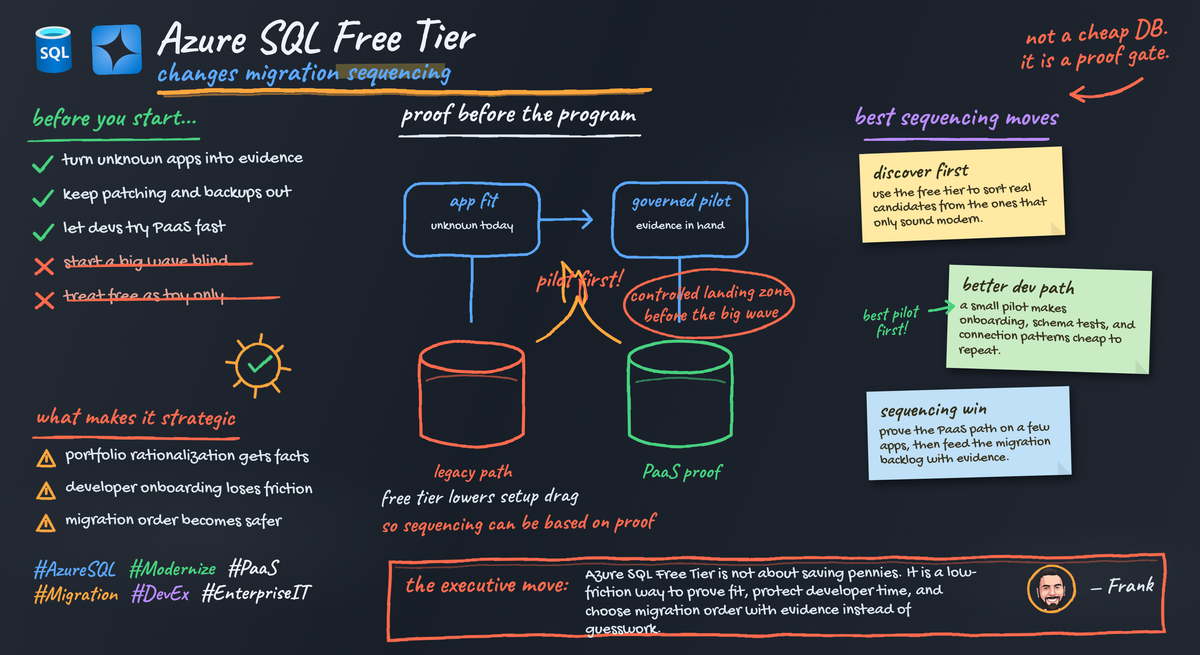
If you treat Azure SQL Free Tier like a cheap database, you miss the strategic move. The real value is that it gives enterprise teams a controlled place to turn “maybe this app can move” into evidence before a migration factory burns budget, governance cycles, and political capital. Per the Azure SQL free offer, each database gets 100,000 vCore seconds, 32 GB of data, and 32 GB of backup storage free per month for the lifetime of an Azure subscription.
That matters because modernization programs do not fail on slideware. They fail on unknowns: dependencies, operational assumptions, developer readiness, and security friction. The free tier is useful because it shrinks those unknowns cheaply and fast.
The Free Tier Is Not the Story
A lot of people ask the wrong question: “Can I run this database for free?”
That is a hobbyist question.
The enterprise question is: “Can this application prove a credible managed-database path with limited commitment?”
In a real portfolio, you usually have three ugly buckets:
- apps everyone is scared to touch
- apps nobody owns cleanly
- apps that look simple until you map the dependencies
The free tier is a landing zone for the third bucket first. Not the crown jewels. Not the monster ERP integration with 17 linked systems and a retired contractor who still knows where the jobs run. Start with bounded applications where uncertainty is the blocker, not raw complexity.
Back in Q3, I worked with a 40-person app team sitting on a pile of internal SQL Server workloads, and one “simple” reporting app turned out to have four undocumented file-share dependencies and a nightly credentialed export nobody had mentioned in the intake sheet. We found it in days instead of halfway through a funded migration wave.
That is the win.
Why This Matters Right Now
Microsoft has been clear about the direction of travel: Azure SQL Database is a fully managed PaaS engine that takes over upgrading, patching, backups, and monitoring as part of the service model, per the Azure SQL Database PaaS overview. That changes the operating model, not just the hosting location.
Enterprises need a proving ground before they ask every application team to enter a heavyweight migration pipeline with architecture review boards, security signoff, landing zone dependencies, and six meetings before anybody provisions anything.
A Landing Zone for Application Discovery
Here is how I’d run this in an enterprise: make Azure SQL Free Tier a formal discovery stage in your modernization funnel.
The candidate pattern is simple:
- bounded app
- low to moderate data volume
- named owner
- limited blast radius
- real uncertainty about PaaS fit
The free-tier limits are a feature, not a problem. Constraints force discipline.
Your output is not “database created.” Your output is a modernization dossier:
- dependency observations
- schema portability findings
- connectivity and auth results
- operational ownership gaps
- performance notes on representative queries
- recommendation: stop, remediate, or advance
That is why I like this as a landing zone. It generates evidence.
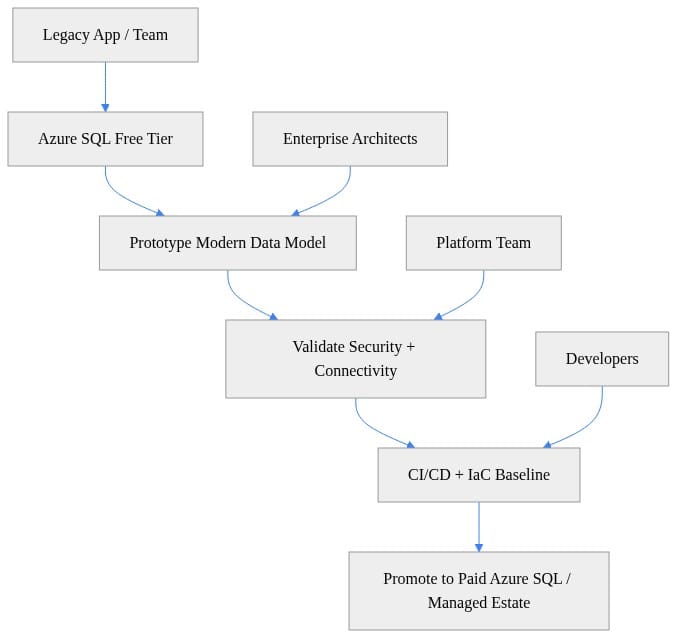
If your modernization path cannot be drawn in six boxes and owned by named teams, you do not have a path yet.
What the Team Actually Learns
People undersell this offer. They think they are testing database compatibility. They are really testing four things at once.
1) Operational learning
Azure SQL Database changes who owns what. You stop treating patching, backups, and engine maintenance as local chores and start validating service assumptions, observability, access patterns, and escalation boundaries.
2) Developer learning
Can the team actually build and deploy against Azure SQL cleanly? Can they connect, test, package schema changes, and work inside a repeatable delivery path without tribal knowledge?
Start by provisioning something small and explicit.
# Create a strategic low-friction Azure SQL Free Tier environment
$resourceGroup = "rg-sql-free-demo"
$location = "eastus"
$server = "sqlfree$(Get-Random)"
$database = "appdb"

az group create `
  --name $resourceGroup `
  --location $location

az sql server create `
  --resource-group $resourceGroup `
  --name $server `
  --location $location `
  --admin-user "sqladminuser" `
  --admin-password "P@ssw0rd1234!"

az sql db create `
  --resource-group $resourceGroup `
  --server $server `
  --name $database `
  --edition GeneralPurpose `
  --compute-model Serverless
Then validate connectivity immediately.
# Validate connectivity early so teams can de-risk migration assumptions
import os
import pyodbc

server = os.getenv("AZURE_SQL_SERVER", "myserver.database.windows.net")
database = os.getenv("AZURE_SQL_DB", "appdb")
username = os.getenv("AZURE_SQL_USER", "sqladminuser")
password = os.getenv("AZURE_SQL_PASSWORD", "P@ssw0rd1234!")

conn_str = (
    "Driver={ODBC Driver 18 for SQL Server};"
    f"Server=tcp:{server},1433;"
    f"Database={database};Uid={username};Pwd={password};"
    "Encrypt=yes;TrustServerCertificate=no;Connection Timeout=30;"
)

with pyodbc.connect(conn_str) as conn:
    cursor = conn.cursor()
    cursor.execute("SELECT @@VERSION")
    print(cursor.fetchone()[0])
If this fails, good. You just found friction while the blast radius is tiny.
3) Platform learning
Your platform team should learn what policies are missing: identity, firewall defaults, naming, logging, support ownership, review cadence, and upgrade path.
4) Portfolio learning
Some workloads belong on Azure SQL Database. Some need remediation. Some need a different Azure SQL deployment option. Some should stay put. The free tier helps you sort them before you spend real money and real program capacity pretending every app is migration-ready.
The Better Alternative to Three Bad Defaults
Most enterprises drift into one of three bad behaviors: do nothing, leave the workload on SQL Server Express forever, or force every candidate into the big migration machine too early. None of those creates useful evidence. SQL Server Express has a valid role for small applications, as Microsoft notes in the SQL Server editions documentation, but it is not a modernization strategy for an enterprise portfolio. Azure SQL Free Tier is the middle path: realistic enough to test Azure SQL Database, constrained enough to prevent sprawl, and cheap enough to increase learning volume.
Design It Like a Governed Experiment
If you want this to work, do not release it as a developer free-for-all. Build a tiny operating model around it.
Every free-tier database should have:
- an explicit owner
- a business purpose
- an expected decision date
- entry criteria
- exit criteria
My entry criteria would look like this:
- bounded data size
- noncritical initial use
- named application owner
- basic test plan
- agreement that “no-go” is an acceptable outcome
My exit criteria would look like this:
- sustained resource use beyond free allocation
- production SLA requirements
- growth beyond the size envelope
- validated business value
- clean security and support ownership
Also: apply security controls on day one.
# Add a firewall rule to prove secure access paths before production rollout
$resourceGroup = "rg-sql-free-demo"
$server = "sqlfree12345"
$ruleName = "AllowCorpIp"
$startIp = "203.0.113.10"
$endIp = "203.0.113.10"

az sql server firewall-rule create `
  --resource-group $resourceGroup `
  --server $server `
  --name $ruleName `
  --start-ip-address $startIp `
  --end-ip-address $endIp
And once the app is connected, benchmark something representative.
# Benchmark a representative query to estimate whether the workload is migration-ready
import os
import time
import pyodbc

conn = pyodbc.connect(os.environ["AZURE_SQL_CONN_STR"])
cur = conn.cursor()

cur.execute("SELECT TOP 1000 object_id, name FROM sys.objects ORDER BY name")
start = time.perf_counter()
rows = cur.fetchall()
elapsed_ms = (time.perf_counter() - start) * 1000

print(f"Rows: {len(rows)}")
print(f"Elapsed: {elapsed_ms:.2f} ms")
conn.close()
You are not trying to win a benchmark contest. You are checking for obvious pain and bad assumptions.
A Practical Modernization Sequence
Here is the sequence I’d put in front of an enterprise architecture board:
Stage 1: Pick the right cohort
Choose 5 to 10 applications where uncertainty is the blocker.
Stage 2: Provision the landing zone
Create the free-tier environment with standard naming, ownership tags, access controls, and a review date.
Stage 3: Validate the basics
Test connectivity, schema deployment, representative queries, and operational assumptions.
# Use the free tier to test modernization patterns like JSON + relational side by side
import os
import pyodbc

conn = pyodbc.connect(os.environ["AZURE_SQL_CONN_STR"])
cur = conn.cursor()

cur.execute("IF OBJECT_ID('dbo.CustomerProfile') IS NOT NULL DROP TABLE dbo.CustomerProfile")
cur.execute("""
CREATE TABLE dbo.CustomerProfile (
    CustomerId INT PRIMARY KEY,
    Name NVARCHAR(100) NOT NULL,
    Preferences NVARCHAR(MAX) NULL
)
""")
cur.execute(
    "INSERT INTO dbo.CustomerProfile (CustomerId, Name, Preferences) VALUES (?, ?, ?)",
    1, "Adele Vance", '{"channels":["email","sms"],"region":"EMEA"}'
)
cur.execute("SELECT Name, JSON_VALUE(Preferences, '$.region') FROM dbo.CustomerProfile")
print(cur.fetchone())
conn.commit()
conn.close()
Stage 4: Capture the scorecard
Do not let pilots end in vibes.
# Capture a simple modernization scorecard from the pilot database
import json

scorecard = {
    "connectivity_validated": True,
    "security_baseline_tested": True,
    "schema_portability_confirmed": True,
    "query_pattern_benchmarked": True,
    "ci_cd_ready": True,
    "next_step": "Promote to governed paid Azure SQL environment"
}

print(json.dumps(scorecard, indent=2))
Stage 5: Standardize the path
The first successful pattern should become a reusable onboarding motion.
The Caveat Leaders Should Not Ignore
A free tier is not proof that every workload belongs on Azure SQL Database.
The allocation is finite. The operating model still matters. Managed operations remove a set of database-management tasks, but they do not remove architecture decisions, workload accountability, data classification, or governance.
The failure mode is obvious: unmanaged proliferation of “free” databases that nobody reviews, nobody upgrades, and nobody retires.
The opportunity is better: a governed intake path that turns uncertainty into portfolio decisions.
Treat Free as a Modernization Option, Not a Price Point
My take is simple: Azure SQL Free Tier should be a formal front door for evidence-based modernization.
Do not measure success by how many free databases got created.
Measure:
- how many unclear candidates got clarified
- how many teams proved a managed-database path
- how many workloads were stopped early for the right reasons
- how many reusable platform patterns were created
If you are leading modernization, fund the operating model around the offer: intake, review dates, security guardrails, upgrade paths, and architecture decisions. Provisioning the database is the easy part. Running the funnel is the real work.
Which part of this would break first in your environment: intake discipline, security guardrails, or the handoff from free-tier proof to governed paid deployment?
#Azuresql #EnterpriseArchitecture #Cloudmodernization
Sources & References
- Try Azure SQL Database for Free - Azure SQL Database
- What is the Azure SQL Database service? - Azure SQL Database
- Editions and Supported Features of SQL Server 2025 - SQL Server
Try it yourself
Run this tutorial as a Jupyter notebook: Download runbook.ipynb (26 cells, 19 KB).