MCP Exposes Your Power Apps Governance Debt
Turning Power App data into governed Copilot experiences with MCP

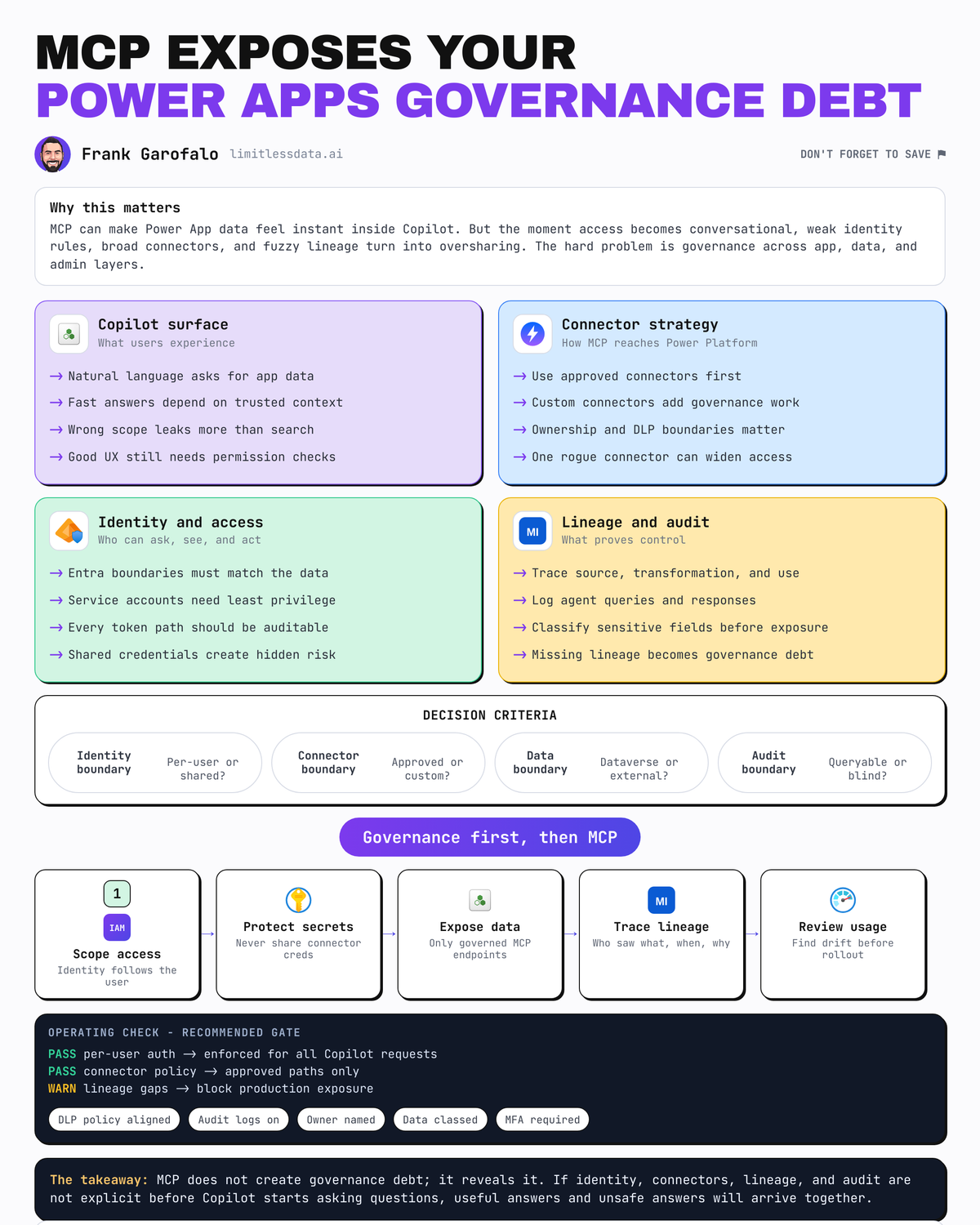
MCP does not solve Power App governance. It exposes whether you ever had it.
MCP can make Power App data feel instantly available inside Copilot experiences, and that is exactly why it can become a fast route to oversharing if you treat it like a simple integration project.
The popular framing is wrong: “connect Power Apps to Copilot with MCP.” Useful, but incomplete. The real work is designing a control plane: who can expose data, under which identity, through what connector boundary, with what discoverability rules, and with what audit trail.
That is the difference between a governed enterprise pattern and a demo that passes review only because nobody looked closely enough.
Microsoft’s platform guidance points in this direction. Power Platform documentation treats Dataverse, connectors, administration, ALM, and copilots as related platform concerns, not things you govern later. Microsoft 365 Copilot guidance emphasizes architecture, privacy, responsible AI, and secure governance as deployment requirements. And Copilot Studio can connect agents to existing MCP servers through an onboarding wizard or through a custom connector built via Power Apps, which is the key tell: MCP exposure still depends on Power Platform connector and admin patterns rather than bypassing them.
Why MCP is surfacing a governance problem, not solving one
MCP is valuable because it standardizes how tools and context can be exposed to agents. It does not standardize your security model, ownership model, or data quality.
That matters in Power Apps because many estates still mix:
- mature platform engineering
- departmental maker apps
- connector sprawl
- multiple environments with inconsistent policies
- business-critical records hidden behind low-code abstractions
Power Apps documentation now spans multiple app patterns and AI copilot capabilities, which increases the odds that enterprise data will be surfaced through varied maker-built experiences unless standards are set centrally. That is a productivity feature and a governance risk.
A specific example: in Q1, a 600-person operations group I advised discovered that a case-management app used a departed maker’s personal connection reference in a production flow. The issue only surfaced when a Copilot proof of concept started returning incomplete records after that account was disabled.
That is why my opinion is blunt: turning Power App data into Copilot experiences is not primarily an integration problem. It is a trust-boundary problem.
Here is the architecture pattern I want teams to think about first:
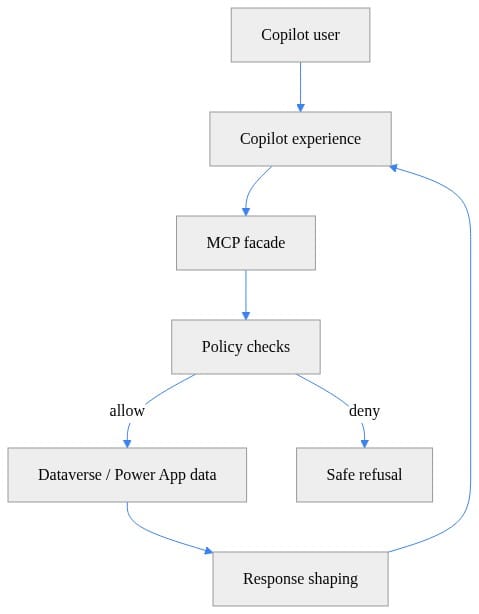
Notice what this diagram makes explicit: the MCP facade is not the trust anchor. Policy checks are. The response is shaped before it goes back to Copilot.
The real architecture question is where trust boundaries sit
The stack has several layers, and teams get in trouble when they blur them:
- Power Apps and Dataverse hold the operational data plane
- connectors and custom connectors define access paths into and out of Power Platform
- Copilot Studio provides an agent layer
- MCP provides a protocol boundary for tools and context
- Microsoft 365 Copilot and related extensibility layers handle grounding, invocation, and user experience
Recent Microsoft documentation can be read as evidence of broader governed patterns for enterprise tool and data access, including Microsoft MCP Server for Enterprise and Work IQ. But those docs do not remove the need to design your own control plane. They suggest a direction toward shared, permission-aware access models; they do not make MCP itself the policy boundary.
Here is the key distinction: MCP is a protocol boundary, not a policy boundary.
Policy still comes from:
- Entra ID identities and app registrations
- Power Platform environment strategy
- DLP policies
- connector configuration
- downstream API permissions
- Dataverse security roles and table permissions
- Microsoft 365 admin and Copilot governance controls
If you expose read access through MCP, that is one risk profile. If you expose action execution, that is another. If you mix retrieval and transactions in the same endpoint, you have created a third profile that usually deserves tighter controls.
A healthy rule: every MCP endpoint should have a named owner, an approved identity pattern, a data classification, and a logging path before anyone makes it discoverable to Copilot.
A compact decision guide
Think of the options this way:
| Pattern | Best for | Control focus | Typical risk |
|---|---|---|---|
| Copilot connectors | Governed retrieval, search grounding, Microsoft 365 reasoning | Source permissions, indexing/federation, connector governance | Broad discoverability without enough curation |
| MCP | Tool invocation and real-time actions | Identity, authorization, safe refusal, response shaping, logging | Overexposed actions or mixed trust profiles |
| Governed API / semantic layer | Normalization when source maturity is weak or inconsistent | Contract design, schema control, policy centralization | Added delivery overhead, but often lower long-term risk |
That distinction matters. These are complementary patterns, not interchangeable ones.
Governed pattern one: use enterprise identities, not maker-owned credentials
The most common anti-pattern is also the most avoidable: a maker’s personal connection silently becomes the runtime identity for Copilot-accessible actions.
In production, that should usually be treated as a blocking exception unless it is formally risk-accepted with compensating controls.
When supported, use service principals, managed identities, or centrally governed connection patterns with explicit ownership and rotation processes. If a connector or target system constrains your identity options, document that limitation and design around it. Do not assume a personal credential is harmless once an agent can invoke it.
Why this matters:
- personal credentials create silent privilege drift
- offboarding breaks production paths
- ownership becomes ambiguous
- incident response gets slower because nobody knows which identity actually executed the action
Before you expose anything through Copilot, inventory your Power Platform environments. This is basic, but teams skip it because it feels administrative instead of architectural.
# Inventory Power Platform environments for governance review
$environments = @(
    [pscustomobject]@{ Name = "Prod"; Region = "unitedstates"; Type = "Production" },
    [pscustomobject]@{ Name = "UAT"; Region = "europe"; Type = "Sandbox" }
)

$environments |
    Select-Object Name, Region, Type |
    Format-Table -AutoSize
Treat that as an illustrative governance pattern, not a direct Power Platform admin cmdlet example. In practice, use the Power Platform admin center, CoE toolkit, or actual admin modules/cmdlets to pull environment inventory.
The point is that environment strategy is part of the runtime trust model. If your MCP or Copilot path can touch unapproved environments, your governance model is already porous.
Next, inventory connectors and connection references that are likely to matter for Copilot or MCP exposure:
# Inventory connectors related to Copilot or MCP exposure
$connectors = @(
    [pscustomobject]@{ Name = "shared_commondataserviceforapps"; DisplayName = "Dataverse"; Tier = "Standard" },
    [pscustomobject]@{ Name = "shared_openai"; DisplayName = "Azure OpenAI"; Tier = "Custom" },
    [pscustomobject]@{ Name = "shared_sql"; DisplayName = "SQL Server"; Tier = "Standard" }
)

$connectors |
    Where-Object { $_.DisplayName -match 'Dataverse|OpenAI|Copilot|MCP' } |
    Sort-Object DisplayName |
    Format-Table Name, DisplayName, Tier -AutoSize
Again, this is illustrative rather than a literal out-of-box inventory result. The labels show the kind of review you want to perform, not the exact connector names or tiers you should expect in every tenant.
What to observe: you are looking for broad access paths, not just obvious “AI” components. Dataverse, SQL Server, and custom connectors often matter more than the model endpoint because they define what business data can actually be reached.
Governed pattern two: keep connector boundaries narrow and intentional
Broad generic connectors are seductive. They make demos easy. They also make blast radius large.
If the business need is “summarize account status” or “list open cases,” exposing a whole API surface to Copilot is usually the wrong move. Copilot Studio’s support for connecting to existing MCP servers or using custom connectors through Power Apps reinforces the point: the exposure path still inherits Power Platform connector patterns.
Microsoft 365 Copilot connectors are a useful comparison. They support external line-of-business data through synced and federated models, which is well suited to governed retrieval into Microsoft 365 search and reasoning. MCP is a better fit when you need tool invocation or real-time actions. Different jobs, different controls.
I recommend designing MCP capabilities around business verbs:
- get_account_summary
- list_open_cases
- create_service_request
Not:
- query_any_table
- call_crm_api
- execute_custom_operation
This tiny authorization example shows the right mindset for an MCP facade: validate intent and restrict allowed operations before anything touches data.
# Thin MCP facade: validate intent and restrict allowed operations
from typing import Dict, Any

ALLOWED = {
    "get_account_summary": {"read"},
    "list_open_cases": {"read"},
}

def authorize(request: Dict[str, Any]) -> Dict[str, Any]:
    tool = request.get("tool", "")
    intent = request.get("intent", "read")
    if tool not in ALLOWED:
        return {"allowed": False, "reason": "unknown_tool"}
    if intent not in ALLOWED[tool]:
        return {"allowed": False, "reason": "operation_not_permitted"}
    return {"allowed": True, "tool": tool, "intent": intent}

if __name__ == "__main__":
    req = {"tool": "get_account_summary", "intent": "read"}
    print(authorize(req))
The code is illustrative, not production-ready, but the lesson is production-grade: constrain the surface area.
Then add response shaping so Copilot never receives fields it does not need.
# Thin MCP facade: shape Dataverse records before returning to Copilot
from typing import Dict, Any, List

SENSITIVE_FIELDS = {"emailaddress1", "telephone1", "creditlimit"}

def shape_account(record: Dict[str, Any]) -> Dict[str, Any]:
    return {k: v for k, v in record.items() if k not in SENSITIVE_FIELDS}

def shape_response(rows: List[Dict[str, Any]]) -> Dict[str, Any]:
    safe_rows = [shape_account(r) for r in rows]
    return {"count": len(safe_rows), "items": safe_rows}

if __name__ == "__main__":
    sample = [{"name": "Contoso", "emailaddress1": "a@b.com", "accountnumber": "A-100"}]
    print(shape_response(sample))
Sensitive columns are removed before the response is returned. That is not just formatting. It is a control.
Governed pattern three: metadata is a security dependency
Teams still treat metadata as documentation hygiene. In agent systems, metadata is a security dependency.
Power BI’s MCP server guidance is a useful analogy. It emphasizes schema-aware querying and governed semantic access patterns. That only works when the schema is curated and permissioned correctly. The same principle applies to Power Platform assets.
Poor metadata causes real failures:
- agents choose the wrong tool
- users get misleading summaries because columns are ambiguously named
- lineage is unclear, so nobody knows whether a table is authoritative
- stale schemas increase the chance of accidental oversharing or bad joins
A minimum metadata contract for MCP-exposed Power Platform assets should include:
- owner
- source system
- sensitivity classification
- refresh expectations
- approved use cases
- deprecation status
If you cannot answer those six fields for a Dataverse table, custom connector, or action, it is probably not ready for Copilot discovery.
A minimal manifest helps force clarity about what is actually being exposed:
# Minimal MCP tool manifest for governed Copilot exposure
import json

manifest = {
    "server": "power-platform-governed-mcp",
    "tools": [
        {"name": "get_account_summary", "intent": "read", "environment": "Prod"},
        {"name": "list_open_cases", "intent": "read", "environment": "Prod"},
    ],
}

print(json.dumps(manifest, indent=2))
Even this tiny manifest makes environment and intent explicit. That matters because discoverability should be earned, not automatic.
Discoverability needs a publication model
Not every Power App, table, connector, or action should become discoverable to every agent or every Copilot surface.
This is as much product management as security. Work IQ documentation describes MCP servers as part of a shared context and tooling layer for Microsoft 365 Copilot and agents, with permission-aware access. That supports a governed model, but it does not replace governance prerequisites. You still need a publication model.
My recommendation is to tier MCP-exposed capabilities into:
- private team tools
- domain tools
- enterprise tools
Each tier should have different approval paths, support expectations, and discoverability scopes.
Because “available” is not the same as “appropriate.” A finance-specific action can be perfectly secure and still be the wrong thing to surface broadly.
Auditability is the difference between a demo and an operating model
After launch, leadership will ask questions your architecture needs to answer quickly:
- who invoked what tool
- under which identity
- against which data source
- with what result
- was the action policy-compliant
If you cannot answer those five questions, you do not have much of an operating model yet. You have a prototype.
The audit chain spans multiple systems:
- Power Platform admin and environment controls
- connection references and connector configuration
- Copilot Studio agent behavior
- Microsoft 365 governance controls
- downstream APIs or Dataverse logs
That is why unmanaged maker assets become such a liability. They create blind spots in ownership and change history.
Start by auditing connection references that may expose Copilot-facing paths:
# Audit connection references that may expose Copilot-facing data paths
$connectionReferences = @(
    [pscustomobject]@{ Environment = "Prod"; Flow = "CopilotCaseSummary"; Connector = "Dataverse"; Owner = "admin@contoso.com" },
    [pscustomobject]@{ Environment = "Prod"; Flow = "McpFacadeSync"; Connector = "Azure OpenAI"; Owner = "platform@contoso.com" },
    [pscustomobject]@{ Environment = "UAT"; Flow = "TestFlow"; Connector = "SQL Server"; Owner = "maker@contoso.com" }
)

$connectionReferences |
    Where-Object { $_.Flow -match 'Copilot|Mcp' -or $_.Connector -match 'OpenAI|Dataverse' } |
    Export-Csv -Path ".\copilot-mcp-audit.csv" -NoTypeInformation

Get-Item ".\copilot-mcp-audit.csv" | Select-Object FullName, Length
As above, treat this as a mock governance pattern rather than a literal admin export script. In practice, use tenant-appropriate admin tooling to review connection references, owners, environments, and connector usage.
Then think about runtime handling. A safe refusal is part of governance, not a UX edge case.
# Thin MCP facade: end-to-end request handler with safe refusal
from typing import Dict, Any

def handle_request(request: Dict[str, Any]) -> Dict[str, Any]:
    allowed_tools = {"list_open_cases"}
    if request.get("tool") not in allowed_tools:
        return {"status": "denied", "message": "This action is not available in Copilot."}
    if request.get("environment") not in {"Prod", "UAT"}:
        return {"status": "denied", "message": "Environment is not approved."}
    raw = [{"caseid": "C-101", "title": "Login issue", "internalnotes": "VIP user"}]
    shaped = [{"caseid": r["caseid"], "title": r["title"]} for r in raw]
    return {"status": "ok", "data": shaped}

if __name__ == "__main__":
    print(handle_request({"tool": "list_open_cases", "environment": "Prod"}))
Denied actions and unapproved environments are handled explicitly. A governed agent should fail safely and predictably.
A practical decision framework for Power App data in Copilot
Use Copilot connectors when:
- the need is governed retrieval
- data should participate in Microsoft 365 search and reasoning
- synchronized or federated access patterns fit the source system
- transactional actions are not required
Use MCP when:
- the need includes tool invocation
- real-time actions matter
- you can define narrow business verbs
- identity, logging, and output shaping are in place
Use a governed API or semantic layer first when:
- ownership is unclear
- metadata is weak
- source schemas are inconsistent
- you need normalization before safe exposure
Add these filters before approving any request:
- data sensitivity
- action criticality
- latency needs
- schema stability
- ownership maturity
- audit requirements
Sometimes the right answer is to normalize Dataverse-backed scenarios into a governed API or semantic layer before exposing them to agents. That extra step is not bureaucracy. It is often the cleanest way to centralize control when source maturity is uneven.
What good looks like over the next 12 months
The enterprises that succeed here will not have the most MCP endpoints. They will have the smallest number of approved patterns.
Expect the winning model to converge on:
- centrally owned connectors
- explicit identity standards
- environment-level controls
- curated metadata
- narrow MCP capabilities
- observable runtime behavior
That fits the broader direction suggested across Power Platform administration, Microsoft 365 Copilot governance, enterprise extensibility, and permission-aware intelligence layers.
My opinion is simple: the best Copilot architecture is boring.
Explicit identities. Narrow scopes. Good metadata. Strong audit trails.
Use connectors for governed retrieval. Use MCP for narrow actions. Add an API or semantic layer when the source is not ready.
Which claim would you push back on most: that MCP is a protocol boundary rather than a policy boundary, or that maker-owned connections should usually be treated as a production-blocking exception for Copilot exposure unless risk-accepted?
#Microsoft365copilot #PowerPlatform #Datagovernance
Sources & References
- Official Microsoft Power Apps documentation - Power Apps
- Official Microsoft Power Platform documentation - Power Platform
- Microsoft 365 Copilot hub
- Connect your agent to an existing Model Context Protocol (MCP) server - Microsoft Copilot Studio
- Microsoft 365 developer documentation - Microsoft 365 Developer
- Microsoft Graph documentation
- Work IQ overview
- Microsoft 365 Copilot connectors overview
- Work IQ MCP overview (preview)
- What are the Power BI MCP servers? - Power BI
Try it yourself
Run this tutorial as a Jupyter notebook: Download runbook.ipynb (28 cells, 21 KB).