Azure MCP Tools with Functions and azd: Production Guide
My Fastest Path to Production-Grade Agent Tooling on Azure: MCP + Functions + azd

2 endpoints changed one architecture decision for my teams: submit and status.
On this page
- Step 1: Set the target architecture before you write code
- Step 2: Choose the security boundary and keep the handler narrow
- Step 3: Build the first Azure Functions MCP handler
- Step 4: Make long-running work explicit in the tool contract
- Step 5: Package infrastructure and deployment with azd
- Step 6: Validate the endpoint like an operator, not a demo author
- Step 7: Connect the deployed tool to the agent runtime and govern reuse
- Step 8: Operate for cost, latency, and failure containment
- Step 9: The baseline I’d ship first
- Sources & References
That sounds small until you’ve watched a “working” local MCP demo hit a real enterprise boundary and fold on the first timeout, duplicate submission, or missing identity context.
Here’s the shortest credible path I’ve found to production-grade agent tooling on Azure:
- put the MCP execution boundary in Azure Functions, which Microsoft positions as managed event-driven compute for cloud workloads Azure Functions
- provision and promote the whole thing with azd, because repeatability beats portal archaeology every single time Functions get started
- make identity, operation state, retry ownership, and timeout behavior explicit on day one
And yes, Microsoft Foundry (part of the Azure AI agent framework) agents can connect to remote MCP server endpoints through the MCP tool integration, which is exactly why this pattern matters once you leave localhost MCP tool in Foundry.
I’m going to walk this as a hands-on tutorial, the way I’d set the baseline for a delivery team that needs to ship something real this quarter, not a conference demo.
A specific field note before we start: in Q1 I helped a 14-person platform team unwind an agent tool that looked fine in dev until three parallel retries hit the same order-adjustment API and created duplicate downstream work because nobody had defined idempotency ownership.
Step 1: Set the target architecture before you write code
What we are actually building
The target is not “an MCP tool.” The target is a remotely reachable, governable, deployable platform workload that an agent can invoke safely.
The reference path looks like this:
- agent or MCP-capable client
- remote MCP endpoint
- Azure Functions tool handler
- approved backend service or data system
- optional async worker and operation-state store
That separation matters. Your MCP contract is the agent-facing surface. Your business APIs and data systems stay behind it. That gives you a clean place to enforce validation, identity, authorization, retries, and telemetry.
Microsoft’s guidance for building your own MCP server on Azure lines up with this pattern: remote MCP server on Azure Functions, optional registration through Azure API Center, then connection into Foundry Agent Service build your own MCP server.
The operational questions you answer up front
Before the first handler exists, decide these:
- Who is the caller?
- What identity does the handler use downstream?
- Is the tool read-only, mutating, or privileged?
- Who owns retries: client, handler, downstream system, or some split?
- What is the timeout contract?
- Do you return a final result or an operation reference?
- Where is operation state stored?
- How do you suppress duplicates?
- How do you correlate logs across the call chain?
- How does this get promoted from dev to test to prod?
If you skip those, you’re not building a platform capability. You’re building future incident tickets.
Visualize the baseline flow
I like to get the team aligned on the flow before anybody bikesheds framework details. This diagram is the whole story in one screen: azd provisions, Functions hosts the endpoint, the tool validates, creates an operation, and the client polls for status.
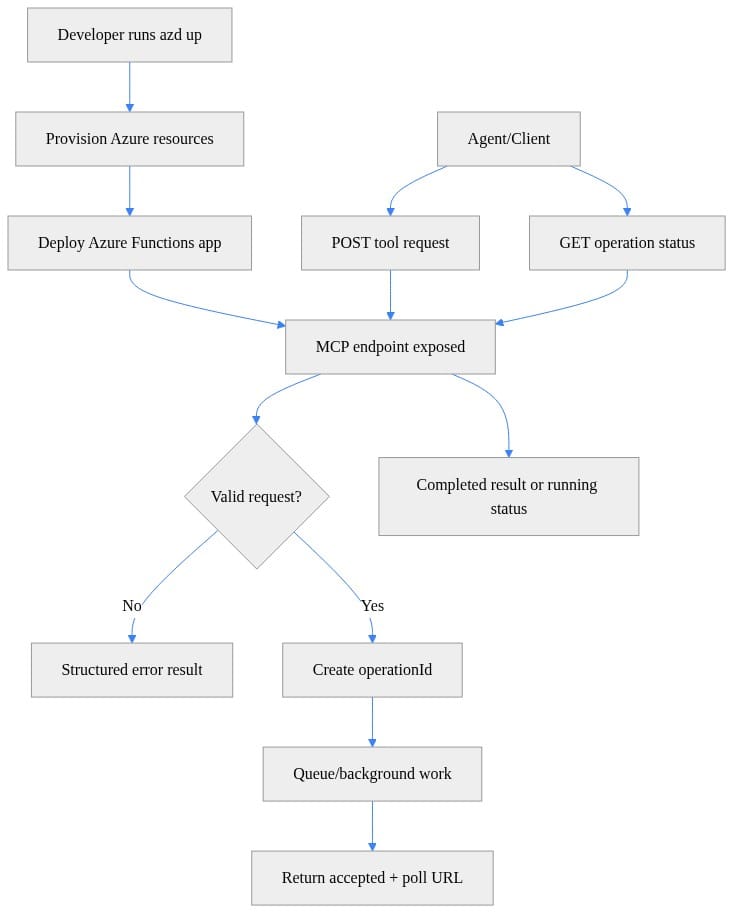
What you should notice: the contract already assumes async submission and status retrieval. That one design choice removes a lot of fake certainty from long-running tool calls.
Step 2: Choose the security boundary and keep the handler narrow
What belongs in the Function handler
A good MCP tool handler does four things well:
- validates the input
- establishes caller and workload context
- invokes an approved backend
- returns a contractually defined result
That’s it.
Do not turn the handler into a mini integration platform with ad hoc branching, hidden credentials, and five undocumented downstream calls. The narrower the handler, the easier it is to reason about blast radius.
Treat identity as deployment configuration, not developer convenience
I’m blunt on this one: if your local config file contains environment credentials or your tool arguments include secrets, you’re already off the rails.
Least-privilege access should be assigned per environment. Dev gets dev access. Test gets test access. Prod gets prod access. Different identities, different scopes, same deployment definition.
If your organization needs governed distribution, use the private catalog pattern. Microsoft documents registering the Azure Functions MCP server in Azure API Center before connecting it to Foundry. That’s the right move when multiple teams need a controlled discovery point.
Classify the tool by blast radius
I use three buckets:
- read-only: fetch status, summarize approved content, inspect metadata
- externally mutating: create, update, submit, approve
- privileged: actions that affect money, access, or irreversible business state
As you move right, requirements tighten:
- stronger validation
- tighter authorization
- audit fields
- idempotency keys
- explicit approval and rollback paths
If a tool can mutate anything important, assume retries will happen and design for them.
Step 3: Build the first Azure Functions MCP handler
Start with one small tool
Don’t start with the monster tool everybody wants. Start with a narrow tool that has:
- one clear input
- one clear outcome
- a backend response you can validate
- obvious telemetry
For this tutorial, I’m using a simple summarize-style tool because the shape is easy to understand. The point is the contract, not the business domain.
Implement validation and correlation first
This illustrative handler does two production-grade things immediately:
- validates
input.textbefore touching anything downstream - emits a correlation ID and returns it in both headers and payload
It also returns 202 Accepted with an operationId and pollUrl, which is exactly the right contract for work that may outlive the request window.
# Minimal Azure Functions MCP tool handler with validation, correlation IDs, and async submission contract
import json, uuid
import azure.functions as func

app = func.FunctionApp(http_auth_level=func.AuthLevel.FUNCTION)

@app.route(route="mcp/tools/summarize", methods=["POST"])
def summarize(req: func.HttpRequest) -> func.HttpResponse:
    correlation_id = req.headers.get("x-correlation-id", str(uuid.uuid4()))
    try:
        body = req.get_json()
        text = body["input"]["text"]
        if not isinstance(text, str) or not text.strip():
            raise ValueError("input.text must be a non-empty string")
        operation_id = str(uuid.uuid4())
        result = {"ok": True, "status": "accepted", "operationId": operation_id,
                  "pollUrl": f"/api/operations/{operation_id}", "correlationId": correlation_id}
        return func.HttpResponse(json.dumps(result), status_code=202, mimetype="application/json",
                                 headers={"x-correlation-id": correlation_id})
    except Exception as ex:
        error = {"ok": False, "error": {"code": "InvalidRequest", "message": str(ex)},
                 "correlationId": correlation_id}
        return func.HttpResponse(json.dumps(error), status_code=400, mimetype="application/json",
                                 headers={"x-correlation-id": correlation_id})
What you should notice: the handler does not pretend the work is complete. It validates fast, creates an operation reference, and returns a structured response the client can reason about.
Standardize responses early
Teams get sloppy here. One handler returns raw strings, another returns arbitrary JSON, a third leaks stack traces. Then six weeks later they wonder why clients are brittle.
A tiny shared helper for correlation-aware success and error payloads pays off fast. I use patterns like this so every tool returns a predictable shape.
# Shared helper for structured MCP-style error payloads and correlation-aware responses
import json
import uuid
import azure.functions as func

def response(payload: dict, status_code: int = 200, correlation_id: str | None = None) -> func.HttpResponse:
    cid = correlation_id or str(uuid.uuid4())
    return func.HttpResponse(
        json.dumps({**payload, "correlationId": cid}),
        status_code=status_code,
        mimetype="application/json",
        headers={"x-correlation-id": cid},
    )

def error(code: str, message: str, status_code: int = 400, correlation_id: str | None = None) -> func.HttpResponse:
    return response({"ok": False, "error": {"code": code, "message": message}}, status_code, correlation_id)
What you should notice: the response helper bakes in correlation consistently. The error helper keeps failure payloads structured instead of improvising them per function.
Why I prefer remote MCP over local stdio for the real thing
A local stdio server is fine for rapid prototyping. It is not the production execution boundary.
Remote hosting gives you:
- deployable isolation
- environment-specific identity
- observable HTTP behavior
- policy and registration options
- promotion through a repeatable pipeline
That is why Azure Functions is the right landing zone for this pattern, and it’s also why I wrote more about this control-plane shift in Azure Functions Just Redefined the Agent Control Plane.
Step 4: Make long-running work explicit in the tool contract
Pick one of three operation models
Every tool should be classified before implementation:
- synchronous completion
- asynchronous submission
- status retrieval
If work can’t reliably finish inside the invocation window, stop pretending it can. Return an operation reference.
This is where a lot of agent tooling goes sideways. The model is fast, the demo is smooth, and then the backend takes 18 seconds, retries twice, and the whole thing becomes ambiguous.
Add a status endpoint
Once you return an operationId, you need a stable polling contract. This illustrative status endpoint shows the shape.
# Operation status endpoint with idempotent polling semantics for asynchronous MCP tool execution
import json
import azure.functions as func

app = func.FunctionApp(http_auth_level=func.AuthLevel.FUNCTION)

@app.route(route="operations/{operationId}", methods=["GET"])
def get_operation(req: func.HttpRequest) -> func.HttpResponse:
    operation_id = req.route_params["operationId"]
    state = {"status": "succeeded", "result": {"summary": "Production-ready agent tooling on Azure."}}
    payload = {"ok": True, "operationId": operation_id, **state}
    return func.HttpResponse(json.dumps(payload), status_code=200, mimetype="application/json")
What you should notice: polling is idempotent. The client can ask again without creating duplicate work. That is exactly the behavior you want under retry pressure.
Define retry ownership
This is one of the least glamorous and most important decisions in the whole stack.
Document:
- which client-visible failures may be retried by the caller
- which downstream failures may be retried by the handler
- where duplicate suppression happens
- whether mutating requests require an idempotency key
For mutating tools, I require:
- an idempotency key on submission
- persisted operation state outside process memory
- terminal states like
succeeded,failed,cancelled,expired - authorization checks on status retrieval tied to the original workload context
And yes, you should explicitly test:
- duplicate delivery
- timeout before backend completion
- partial downstream completion
- process restart before status read
- malformed input
- expired authorization
If you want a deeper playbook for that part, Azure Agent Resilience Testing for Production Readiness covers the failure drills I actually run.
Sequence the lifecycle
This sequence diagram is the contract I want engineers, security, and platform ops to all agree on before rollout.
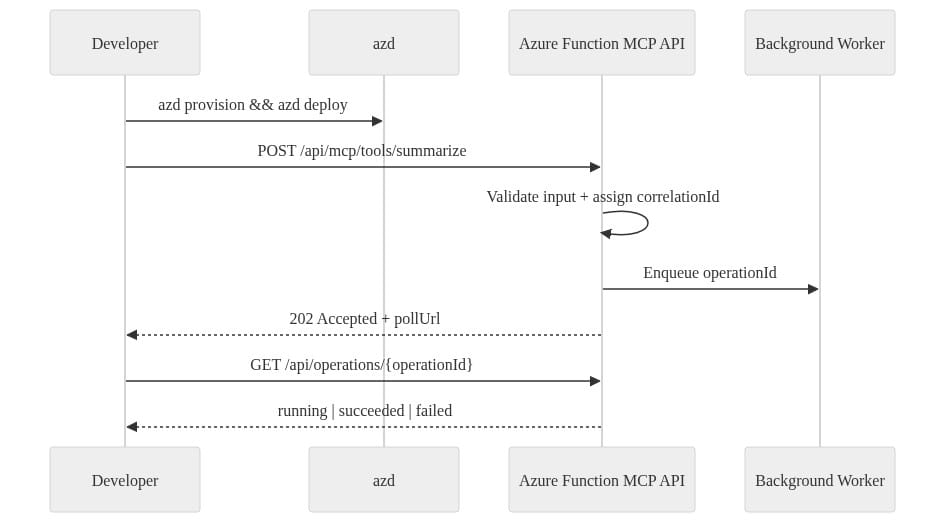
What you should notice: the Function API does fast validation and handoff, while background work owns completion. That separation is what keeps latency pressure from corrupting your contract.
Step 5: Package infrastructure and deployment with azd
Put infra and app lifecycle in one project
If your Function app, storage, settings, outputs, and deployment workflow live in five disconnected scripts, the system will drift.
I want one azd project that defines:
- the Function app
- dependent Azure resources
- environment naming
- configuration bindings
- deployment workflow
This is the minimum project wiring.
# azd project configuration wiring infra and app deployment together
name: mcp-functions-azd
metadata:
  template: mcp-functions-quickstart
services:
  api:
    project: .
    language: python
    host: function
infra:
  provider: bicep
What you should notice: azd knows there is an app service called api, it’s Python, it’s hosted as a Function, and infra is managed with Bicep. Clean and boring is the goal.
Provision the Azure resources
For a first baseline, you need the Function app and its supporting storage. This Bicep example shows the shape.
// Azure Functions resources for an MCP endpoint with storage and application settings
param location string = resourceGroup().location
param appName string
param storageName string

resource storage 'Microsoft.Storage/storageAccounts@2023-05-01' = {
  name: storageName
  location: location
  sku: { name: 'Standard_LRS' }
  kind: 'StorageV2'
}

resource plan 'Microsoft.Web/serverfarms@2023-12-01' = {
  name: '${appName}-plan'
  location: location
  sku: { name: 'Y1', tier: 'Dynamic' }
  kind: 'functionapp'
}

resource app 'Microsoft.Web/sites@2023-12-01' = {
  name: appName
  location: location
  kind: 'functionapp,linux'
  properties: {
    serverFarmId: plan.id
    siteConfig: {
      appSettings: [
        { name: 'AzureWebJobsStorage', value: 'DefaultEndpointsProtocol=https;AccountName=${storage.name};EndpointSuffix=${environment().suffixes.storage};AccountKey=${storage.listKeys().keys[0].value}' }
        { name: 'FUNCTIONS_WORKER_RUNTIME', value: 'python' }
      ]
    }
  }
}
What you should notice: this is enough to express the app plan, storage, and core app settings. In a real delivery, I’d extend this with identity, app settings from environment parameters, and role assignments per environment.
Emit outputs that make validation easy
I always output the function host and tool URL. If your deployment succeeds but nobody can discover the endpoint cleanly, the workflow still stinks.
// Outputs that make azd verification and endpoint discovery straightforward
param appName string

resource app 'Microsoft.Web/sites@2023-12-01' existing = {
  name: appName
}

output functionAppName string = app.name
output mcpBaseUrl string = 'https://${app.properties.defaultHostName}/api'
output summarizeToolUrl string = 'https://${app.properties.defaultHostName}/api/mcp/tools/summarize'
What you should notice: the outputs give you a predictable base URL and tool URL, which makes smoke testing and pipeline verification much easier.
Use the same definition across dev, test, and prod
Here’s the rule: same deployment definition, different environment values and approvals.
Do not rebuild prod manually in the portal because “it was faster.” It never is. It just delays the pain.
azd is the right workflow here because it gives you repeatable provisioning and deployment for Functions without inventing a custom wrapper script for everything.
Step 6: Validate the endpoint like an operator, not a demo author
Run a deployment and smoke test
After provisioning and deployment, hit the endpoint with a known payload and verify you get the async contract back.
This PowerShell example is exactly the kind of azd-oriented validation I like in a delivery repo: select environment, check required values, provision, deploy, call the tool, verify an operationId exists.
# azd-oriented validation and deployment workflow with endpoint verification
param(
  [string]$Environment = "dev",
  [string]$ToolPath = "/api/mcp/tools/summarize"
)

$ErrorActionPreference = "Stop"
azd env select $Environment | Out-Null
$envVars = azd env get-values | Out-String
if ($envVars -notmatch "AZURE_LOCATION" -or $envVars -notmatch "AZURE_SUBSCRIPTION_ID") { throw "Missing required azd environment values." }

azd provision
azd deploy

$baseUrl = (azd env get-value SERVICE_API_URI).Trim()
if (-not $baseUrl) { throw "SERVICE_API_URI is not set." }

$headers = @{ "x-correlation-id" = [guid]::NewGuid().ToString() }
$body = @{ input = @{ text = "Ship MCP tools safely on Azure." } } | ConvertTo-Json -Depth 5
$response = Invoke-RestMethod -Method Post -Uri "$baseUrl$ToolPath" -Headers $headers -ContentType "application/json" -Body $body
if (-not $response.operationId) { throw "MCP endpoint verification failed." }
$response | ConvertTo-Json -Depth 5
What you should notice: the script verifies the environment and the endpoint, not just the build. That’s the difference between CI theater and an actual deployment check.
What I verify before I call it “good”
My short list:
- endpoint resolves
- authentication path is correct for the environment
- payload validation works
- correlation ID is echoed back
202 Acceptedcomes back for async workoperationIdandpollUrlare present- status endpoint returns a stable state model
- logs can be correlated across the request path
If any of those are fuzzy, I don’t promote.
Step 7: Connect the deployed tool to the agent runtime and govern reuse
Register and connect the remote MCP endpoint
Once the endpoint is deployed and behaving, connect it to the consuming agent runtime through MCP. Microsoft Foundry supports remote MCP endpoints for agent tool access, which is the bridge from “service endpoint” to “agent-usable tool.”
That’s also the point where governance starts to matter more than code.
Use a toolbox or catalog approach when multiple agents need the same tool
This is one of the smarter patterns in the current guidance: treat tools as reusable governed assets instead of embedding credentials and tool logic independently into every agent.
Microsoft’s OpenAPI tool guidance describes a toolbox model that centralizes credential management, versioning, and policy enforcement through a managed MCP endpoint OpenAPI toolbox guidance.
That aligns with how I want enterprises to scale this:
- one governed tool surface
- multiple consuming agents
- centralized policy
- versioned contracts
- controlled promotion
If you’re also thinking about front-door governance and policy mediation, this is where Azure API Management AI Gateway for Enterprise Governance becomes relevant.
Promote versions deliberately
My promotion pattern is simple:
- deploy a compatible revision
- validate contract behavior in the next environment
- update registration under change control
- preserve rollback to the prior version
Never make tool registration an undocumented side effect of deployment. Version it. Track it. Roll it back cleanly.
Step 8: Operate for cost, latency, and failure containment
Instrument the invocation path
Every invocation should log at least:
- tool name
- contract version
- environment
- correlation ID
- outcome category
- downstream dependency
- elapsed time
- retry count
That’s the minimum set I need when something goes wrong at 2:13 AM.
Bound concurrency and time
Agent-driven traffic can create ugly downstream load patterns fast. Set concurrency and timeout policies based on backend capacity, not wishful thinking.
If the backend cannot tolerate burst fan-out, your Function handler should not amplify it.
This is one of the reasons I keep hammering on explicit async contracts. They let you shape work instead of forcing everything through one fragile synchronous path.
Run failure drills before production tells you the answer
I want deliberate tests for:
- unavailable dependency
- malformed input
- expired authorization
- duplicate submission
- status lookup after restart
- timeout during downstream execution
That’s where the real bugs live, not in the happy path.
My production-readiness checklist
Before I let a team call this “enterprise-ready,” I want named owners for:
- tool contract
- identity and authorization model
- deployment pipeline
- environment promotion
- observability and correlation
- incident response
- retirement and version deprecation
If nobody owns retirement, stale tools will outlive the systems they were built for. I’ve seen that movie too many times.
Step 9: The baseline I’d ship first
If you want the shortest path that I’d actually trust, it looks like this:
- Azure Functions hosts the remote MCP endpoint
- one narrow tool with strong validation
- correlation IDs on every request and response
- async submission contract for anything non-trivial
- persisted operation state
- status endpoint with idempotent polling
- azd project for infra plus app deployment
- isolated dev, test, prod environments
- governed registration and promotion path
- failure drills before broad rollout
That’s the difference between “look, the agent called a tool” and “we can support this in production without crossing our fingers.”
If you’ve shipped MCP tooling on Azure already, where does this pattern break in your environment: identity, long-running state, or promotion discipline?
#AzureFunctions #AIAgents #DataArchitecture
Sources & References
- Connect agents to MCP server endpoints - Microsoft Foundry
- Azure Functions documentation
- Azure MCP Server Tools - Azure MCP Server
- Azure for developers overview
- Build and register a Model Context Protocol (MCP) server - Microsoft Foundry
- Get Started with Azure Functions
- Serverless agents runtime in Azure Functions
- Foundry Hosted Agents
- Azure developer documentation: What's new
- Connect OpenAPI tools to Microsoft Foundry agents - Microsoft Foundry
Try it yourself
Run this tutorial as a Jupyter notebook: Download runbook.ipynb (26 cells, 25 KB).