Microsoft 365 Copilot Organizational Prompt Governance
Organizational Prompts in Microsoft 365 Copilot: The New Governance Layer for Prompt Reuse

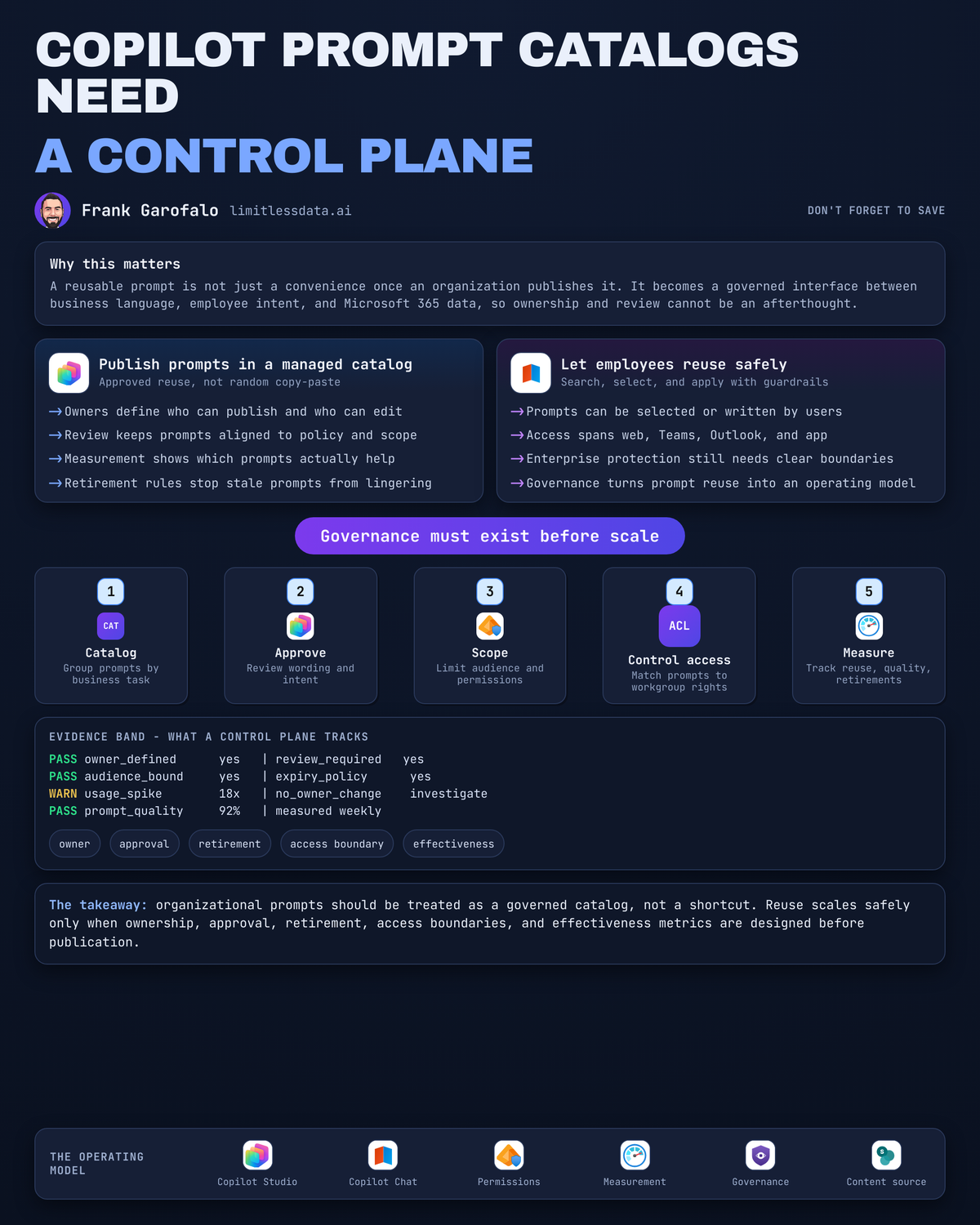
Organizational prompts are a governance layer, not a convenience feature.
The minute your company publishes a reusable prompt in Microsoft 365 Copilot, you have created an interface between business language, employee intent, and organizational data. Treat that like a tip sheet and you will get exactly what you deserve: inconsistent outputs at enterprise scale.
On this page
- Prompt reuse has crossed into operating-model territory
- Personal prompting versus a managed prompt catalog
- The four governance decisions every published prompt needs
- The risks hidden inside a shared prompt library
- Prompt governance belongs beside agent and data governance
- A practical starter pattern that won’t turn into chaos
- The calm mandate for Copilot governance leaders
- Sources & References
Prompt reuse has crossed into operating-model territory
A personal prompt is a working aid. I write one, I tweak it, I throw it away, nobody gets hurt.
An organizational prompt is different. Once it is published for other people to discover and reuse, the question stops being “does this work for me?” and becomes “who stands behind this prompt, for whom, and under what conditions?”
That shift matters because Microsoft has already framed Microsoft 365 Copilot for IT around delivery, architecture, security, governance, and management scenarios in its core documentation for administrators and architects, not as a loose collection of end-user productivity tricks per the Microsoft 365 Copilot docs for IT professionals. That is the tell. The platform conversation is already governance-first.
A reusable prompt sounds harmless because it is just text. That’s exactly why people underestimate it. Text is how business policy, process, and assumptions spread.
I learned this the hard way years before Copilot existed. In Q3 of 2021, a 14-country sales operations team I was helping standardized a “monthly account summary” template in SharePoint, and six weeks later we found three regions were reporting pipeline risk differently because one sentence in the shared instructions had drifted. Same form factor. Same label. Different meaning. Prompt catalogs can create the same mess faster.
So here’s my position: a prompt catalog without controls is a distribution channel for inconsistent instructions.
Personal prompting versus a managed prompt catalog
People should absolutely experiment on their own. That’s how good prompts are born.
Ad hoc personal prompting has real value:
- fast iteration
- private trial and error
- rough language that only needs to make sense to one person
- no publication overhead
But a managed prompt catalog is a different animal:
- discoverable reusable patterns
- named owners
- bounded audiences
- review expectations
- versioning
- retirement
That distinction is not theoretical. Microsoft says Copilot Chat supports both prewritten prompts selected by users and prompts users write themselves, and that experience is available across the web, the Microsoft 365 Copilot app, Teams, and Outlook per the Copilot privacy and protections documentation. If prewritten prompts are part of the interaction model, then reuse is already a service-design issue. It is not just a training issue.
The mistake I see is leaders saying, “We’ll let people share good prompts and see what sticks.” Fine for a brown-bag session. Bad for production knowledge work.
A catalog is not complete governance by itself. It is one control surface inside a broader Copilot operating model. But it is a very important one, because it is where business wording becomes standardized behavior.
If you want the bigger context for why governance keeps moving closer to the user interaction layer, I made a similar argument in GitHub Copilot Defaults Just Moved Your Governance Line. Same pattern, different surface.
The four governance decisions every published prompt needs
If you are going to publish prompts, decide these four things before you build a library.
1) Publisher authority
Who is allowed to:
- submit
- approve
- publish
- materially revise
- retire
Do not let “anyone who found a useful prompt” become your publication model. I want named roles. In smaller shops, that might be a Copilot governance lead plus one business approver. In larger enterprises, it usually turns into domain ownership: HR owns HR prompts, Finance owns Finance prompts, Legal reviews legal language, and central IT governs the publishing path.
Here is a simple way to think about the lifecycle from authoring to retirement:
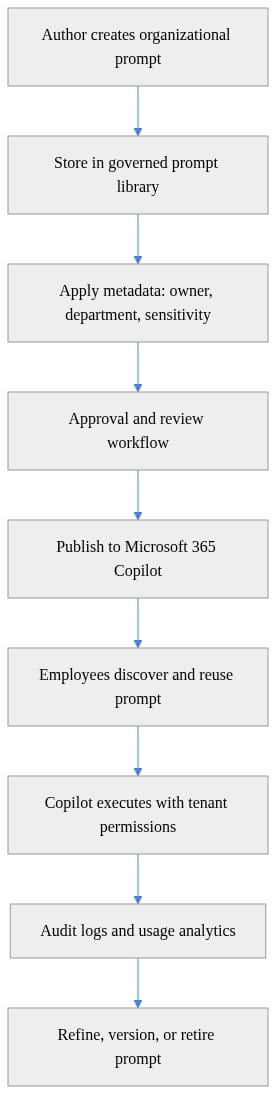
What to notice: the prompt is not the whole object. Metadata, approval, publishing, usage, and retirement are part of the object whether your tooling exposes them cleanly or not.
2) Review criteria
Every published prompt needs a minimum record:
- business purpose
- intended audience
- approved terminology
- expected output boundaries
- named accountable owner
If a prompt says “summarize customer issues,” I want to know:
- for which team
- using which business definitions
- in what format
- with what exclusions
- owned by whom when the process changes next quarter
This is the exact same discipline we apply to semantic models, data products, and API contracts. Prompts are just arriving through a friendlier door.
A lightweight validation pass catches a lot of sloppiness before publication:
# Validate prompt governance fields before publishing
$Prompt = @{
    Title       = "Sales Account Brief"
    Owner       = "copilot-governance@contoso.com"
    Department  = "Sales"
    Sensitivity = "Confidential"
    Version     = "1.2.0"
    Approved    = $true
}

$RequiredFields = "Title","Owner","Department","Sensitivity","Version","Approved"

foreach ($Field in $RequiredFields) {
    if (-not $Prompt.ContainsKey($Field) -or [string]::IsNullOrWhiteSpace("$($Prompt[$Field])")) {
        throw "Missing required governance field: $Field"
    }
}

"Prompt '$($Prompt.Title)' passed governance validation."
What to do next: use this as a mental model, not as production tooling. The point is that publication should fail when required governance fields are missing.
3) Lifecycle
Published prompts need review dates and retirement triggers.
Retire or revise a prompt when:
- policy changes
- process changes
- terminology changes
- the owner leaves
- usage collapses
- users repeatedly correct the output
This is where immature programs fall apart. They publish 40 prompts, celebrate adoption, and then never clean house. Six months later the library becomes a museum of obsolete workflows.
I run my home lab the same way I run enterprise systems: every reusable artifact gets an owner and a kill switch. If a Terraform module, a PowerShell runbook, or a prompt no longer reflects reality, I would rather delete it than let people trust stale automation.
4) Measurement
You need evidence that a prompt is useful and safe.
Track:
- adoption
- repeat use
- user feedback
- correction rates
- abandonment
- retirement reasons
A tiny usage model is enough to start:
# Track prompt usage metrics to support governance decisions
from collections import Counter

usage_events = [
    {"prompt": "QBR Summary", "user": "ana", "outcome": "success"},
    {"prompt": "QBR Summary", "user": "li", "outcome": "success"},
    {"prompt": "Account Brief", "user": "sam", "outcome": "edited"},
    {"prompt": "QBR Summary", "user": "maya", "outcome": "success"},
    {"prompt": "Postmortem Draft", "user": "raj", "outcome": "abandoned"},
]

prompt_counts = Counter(event["prompt"] for event in usage_events)
outcome_counts = Counter(event["outcome"] for event in usage_events)

print("Prompt usage:", dict(prompt_counts))
print("Outcome mix:", dict(outcome_counts))
What to observe: “used” is not the same as “valuable.” If a prompt gets frequent edits or gets abandoned, that is a governance signal, not just a UX footnote.
The risks hidden inside a shared prompt library
The dangerous part of a prompt library is not the first week. It is month four, when people assume the published thing must be correct.
Stale prompts preserve obsolete process. I have watched organizations carry dead terminology for years because it lived in a template nobody wanted to challenge. Prompts can do the same thing, except now the wording also shapes generated output.
Inconsistent business language creates fake alignment. Two departments can both publish “executive summary” prompts and still mean different risk thresholds, different customer segments, and different escalation rules. The outputs look polished, so the inconsistency hides better.
Over-permissioned access gets messy fast. A reusable prompt should never become a shortcut around audience and data validation. Microsoft’s Copilot architecture documentation lays out the prompt and grounding flow for Microsoft 365 Copilot and explicitly targets IT admin and security readers in that architecture view per the Microsoft 365 Copilot architecture documentation. Translation: prompt design and data access design are connected whether your governance team likes it or not.
Missing telemetry leaves owners blind. Without usage and outcome signals, you cannot tell the difference between:
- a high-value standard
- a forgotten artifact
- a prompt everyone quietly rewrites before sending anything
This is why I keep pushing teams to think in catalogs, not collections. Collections are piles. Catalogs have accountability.
Prompt governance belongs beside agent and data governance
Prompts are the lightest-weight reusable AI asset in the stack. That does not make them low-risk. It makes them the easiest thing to spread before controls exist.
And the stakes go up from here.
Microsoft says Agent Builder in Microsoft 365 Copilot and Copilot Studio can build agents that work across Microsoft 365 and line-of-business systems per the Agent Builder documentation. Microsoft also describes Work IQ as an intelligence layer that grounds Microsoft 365 Copilot and agents in real-time shared organizational context across Microsoft 365 and business systems in the Work IQ overview.
That means your prompt language is no longer just about phrasing. It is becoming part of how work is framed against enterprise context.
Then add action layers. Microsoft documents Copilot Cowork as able to send emails, schedule meetings, create documents, post in Teams, and handle multi-step tasks across Microsoft 365 in the Copilot Cowork FAQ. Once your reusable language starts feeding action-oriented experiences, sloppy prompt governance stops being a content problem and becomes an operational problem.
I covered that broader shift in Copilot Cowork GA Resets Microsoft 365 Automation and the same principle applies here: if the system can act, the instruction layer needs ownership.
A practical starter pattern that won’t turn into chaos
Do not wait for a 200-prompt catalog. Start governance at prompt number one.
Here is the pattern I would stand up first:
Step 1: Define the prompt record
Every organizational prompt gets:
- title
- description
- owner
- department
- sensitivity
- version
- publication state
- review date
A simple illustrative record looks like this:
# Define a governed organizational prompt as reusable metadata
from dataclasses import dataclass, asdict
from datetime import datetime
import json

@dataclass
class OrganizationalPrompt:
    title: str
    description: str
    owner: str
    department: str
    sensitivity: str
    version: str
    prompt_text: str
    approved: bool
    created_utc: str

prompt = OrganizationalPrompt(
    title="Quarterly Business Review Summary",
    description="Summarize QBR notes into executive bullets",
    owner="copilot-governance@contoso.com",
    department="Strategy",
    sensitivity="Internal",
    version="1.0.0",
    prompt_text="Summarize the uploaded QBR notes into 5 executive bullets and 3 risks.",
    approved=False,
    created_utc=datetime.utcnow().isoformat()
)

print(json.dumps(asdict(prompt), indent=2))
What to notice: the reusable prompt is packaged with metadata. That is the difference between a draft somebody likes and an organizational artifact somebody owns.
Step 2: Add policy checks before publication
You do not need a giant platform team to start. You need a gate.
# Enforce simple policy checks for organizational prompt publication
def can_publish(prompt: dict) -> tuple[bool, str]:
    allowed_sensitivity = {"Public", "Internal", "Confidential"}
    if prompt.get("approved") is not True:
        return False, "Prompt must be approved before publication."
    if prompt.get("sensitivity") not in allowed_sensitivity:
        return False, "Sensitivity label is invalid."
    if "password" in prompt.get("prompt_text", "").lower():
        return False, "Prompt text contains a blocked keyword."
    return True, "Prompt is eligible for publication."

candidate = {
    "title": "Incident Postmortem Draft",
    "approved": True,
    "sensitivity": "Internal",
    "prompt_text": "Create a postmortem summary from the attached incident timeline."
}

allowed, message = can_publish(candidate)
print({"publish": allowed, "message": message})
What to do next: decide your blocked terms, required labels, and approval rules. Keep it boring. Boring governance scales.
Step 3: Export and review the catalog regularly
If you cannot export your prompt inventory, you do not have a managed asset. You have a rumor.
# Export a prompt catalog for review and lifecycle tracking
$Catalog = @(
    [pscustomobject]@{ Title="QBR Summary"; Owner="strategy@contoso.com"; Version="1.0.0"; Status="Published" },
    [pscustomobject]@{ Title="Account Brief"; Owner="salesops@contoso.com"; Version="1.2.0"; Status="Published" },
    [pscustomobject]@{ Title="Postmortem Draft"; Owner="itops@contoso.com"; Version="0.9.0"; Status="Review" }
)

$Path = Join-Path $PWD "prompt-catalog.csv"
$Catalog | Export-Csv -Path $Path -NoTypeInformation

"Catalog exported to $Path"
Get-Content $Path
What to observe: once you can see title, owner, version, and state in one place, quarterly review becomes possible. Without that, retirement never happens.
Step 4: Version and retire like you mean it
Retirement is not failure. Retirement is proof that governance exists.
# Version and retire prompts based on governance lifecycle state
function Set-PromptLifecycle {
    param(
        [string]$Title,
        [string]$Version,
        [ValidateSet("Draft","Review","Published","Retired")]
        [string]$State
    )

    [pscustomobject]@{
        Title      = $Title
        Version    = $Version
        State      = $State
        UpdatedUtc = (Get-Date).ToUniversalTime().ToString("o")
    }
}

Set-PromptLifecycle -Title "QBR Summary" -Version "1.1.0" -State "Published"
Set-PromptLifecycle -Title "Legacy Sales Brief" -Version "0.8.4" -State "Retired"
What to do next: make “Retired” a first-class state, not a hidden deletion. People need to know a prompt was intentionally withdrawn.
If you are already thinking about agents, this same discipline carries over. I wrote about the adjacent controls in Microsoft Foundry Agent Governance Production Checklist, and I would absolutely align prompt ownership with your agent ownership model before the two collide in production.
The calm mandate for Copilot governance leaders
Do three things this quarter.
First, assign ownership before scale. A small publishing council is enough. One IT lead, one security voice, one business owner for each domain you publish into. That beats a free-for-all every time.
Second, start narrow. Pick 5 to 10 prompts where the business purpose is obvious and the audience is bounded. Good candidates:
- account brief
- meeting follow-up draft
- incident summary
- QBR summary
- policy comparison summary
Third, normalize retirement. A credible catalog removes obsolete prompts quickly. If nothing ever gets retired, your governance function is asleep.
My blunt take: the advantage is not having more prompts. The advantage is having reusable prompts your organization can explain, maintain, measure, and stop using when they no longer deserve trust.
Rate your team’s current prompt governance from 1 to 5: 1 means “shared prompts are wild west,” 5 means “every published prompt has an owner, review path, and retirement state.”
#Microsoft365copilot #Aigovernance #DataArchitecture
Sources & References
- Microsoft 365 Copilot hub
- Microsoft 365 Copilot Chat Privacy and Protections
- Choose between Agent Builder in Microsoft 365 Copilot and Copilot Studio to build your agent
- How does Microsoft 365 Copilot work?
- Copilot Cowork common questions
- Work IQ MCP overview (preview)
Try it yourself
Run this tutorial as a Jupyter notebook: Download runbook.ipynb (24 cells, 19 KB).



