Microsoft Foundry Agent Governance Production Checklist
From Pilot to Production: A Governance Checklist for Microsoft Foundry Agents


A good Foundry agent demo proves usefulness. It proves nothing about production.
If your Microsoft Foundry agent can wow a steering committee but you cannot explain its identity path, tool permissions, escalation route, and rollback plan, it is not ready. Production is a gated operating decision, not a victory lap for a successful pilot.
On this page
- The pilot-to-production trap
- Treat production as a gate, not a launch checklist
- Gate 1: Identity, access, and data boundaries
- Gate 2: Tool permissions and gateway enforcement
- Gate 3: Human escalation for consequential work
- Gate 4: Observability, evaluation, and audit evidence
- Gate 5: Incident response, rollback, and phased rollout
- The operating cadence leaders actually need
- My bottom line
- Sources & References
The problem is getting worse because the agent surface is getting bigger. You can build across Microsoft Foundry, Microsoft 365 Copilot and Copilot Studio, Fabric data agents, Power Platform patterns, and MCP-connected tools. Fabric data agents are already in public preview for conversational Q&A over enterprise data, which is great for adoption and terrible for anyone pretending governance can wait until later Fabric data agents GA. Microsoft’s own agent guidance is pointing in the same direction: secure adoption requires visibility, governance, identity controls, runtime safeguards, and data protection across the lifecycle agents hub guidance.
My opinion is simple: most pilots should fail the production gate.
That is not a criticism of the team. It is a sign the team did a pilot, not an operating model.
The pilot-to-production trap
Pilot teams optimize for usefulness because that is the only way to get budget. Fair enough. They prove the agent can answer questions, summarize work, call a tool, maybe even complete a task chain. Then the demo lands, leadership gets excited, and suddenly everyone wants rollout dates before anyone has named an incident owner.
I watched this happen in Q4 with a 14-person operations team that had three internal claims agents routing work out of a ticketing API; by week two, nobody could answer which service principal actually had write access in production after a connector change on a Friday night.
That is the trap.
Model quality is one signal. It is not the signal. An agent with strong grounded responses and weak controls is still an operational liability. If identity is fuzzy, if data boundaries are implicit, if tools can be invoked without clear policy, or if nobody owns the pager, you are scaling risk.
This is why I keep pushing teams toward a reusable gate. Not a pretty checklist in SharePoint. A stop-or-go mechanism that works across Foundry, Copilot Studio, Fabric, and whatever adjacent service your business unit discovered last week.
If you want the broader operating model behind that view, I laid out the platform angle in Microsoft Foundry agent platform for enterprise operations.
Treat production as a gate, not a launch checklist
A launch checklist is passive. A gate has teeth.
For every production agent, I want five names on paper:
- business owner
- technical owner
- data owner
- risk approver
- on-call incident owner
If one person holds two roles, fine. If nobody holds a role, block the launch.
I also want evidence, not promises:
- access review output
- tool inventory
- evaluation report
- telemetry dashboard
- escalation test result
- incident runbook
- rollback steps
- phased rollout approval
The cleanest way to explain this to engineering and security is with a simple promotion flow. The shape matters more than the diagramming tool.
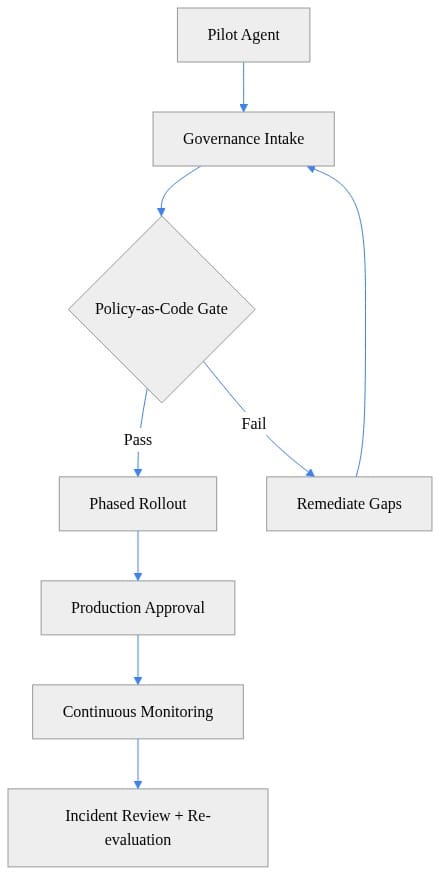
What to look for: the gate sits between pilot and rollout, and remediation loops back before production approval. That sounds obvious. In practice, most teams skip the loop because enthusiasm is louder than discipline.
I use only three outcomes:
- do not launch
- launch to a tightly bounded cohort
- expand after measured success
Nothing else. “Conditional enterprise rollout” is how you end up with unmanaged sprawl.
Gate 1: Identity, access, and data boundaries
Start here because every other control depends on it.
You need to answer four questions without hand-waving:
- Who can invoke the agent?
- Under what identity does it retrieve data?
- What data may it retrieve?
- What data is explicitly out of bounds?
This gets more important as agents are grounded in shared organizational context. Microsoft describes Work IQ as an intelligence layer grounding Microsoft 365 Copilot and agents in real-time shared organizational context, with Foundry among supported clients for Work IQ MCP tools Work IQ grounding. Useful? Absolutely. Harmless? Not unless your authorization boundaries are crystal clear.
My production-blocking rule is brutally simple: if the business owner and an auditor cannot understand the agent’s effective data access, the launch is blocked.
That means separate identities for dev, test, and prod. It means audience changes trigger a review. It means data source additions trigger a review. It means “the connector handles that” is not an acceptable answer.
I covered the practical control patterns in more detail in Designing a governance playbook for local and hosted AI agents in Microsoft Foundry.
Gate 2: Tool permissions and gateway enforcement
The second failure mode is tool sprawl.
Every agent team starts with “just search.” Then they add ticketing. Then email. Then a line-of-business API. Then an MCP server somebody stood up for convenience. Then everyone acts surprised when the agent can do more in production than anyone approved on paper.
Inventory every callable thing:
- APIs
- MCP servers
- connectors
- functions
- downstream systems
- external communications paths
Then classify them by impact:
- read-only retrieval
- external communication
- record creation or update
- financial or operational action
- privileged administration
Do not mix low-risk retrieval and high-consequence actions under the same vague approval. Split them. Least privilege is still the rule.
This is also where a managed gateway earns its keep. Azure API Management’s AI gateway capabilities are built specifically to help manage AI backends, and Microsoft frames AI adoption in phases that include defining requirements, evaluating models, and building solutions AI gateway capabilities. Translation: put policy enforcement, visibility, and consumption controls somewhere central before the estate gets messy.
A tiny policy-as-code example makes this concrete. This one blocks promotion if ownership, approved tools, evaluation evidence, runbook, or rollout limits are missing.
# Policy-as-code gate for promoting a Foundry agent to production
agent = {
    "name": "claims-triage-agent",
    "owner": "platform-ops@contoso.com",
    "approved_tools": ["search", "ticketing"],
    "requested_tools": ["search"],
    "evaluation": {"groundedness": 0.93, "safety": 0.98, "evidence_uri": "https://review/evals/42"},
    "incident_runbook": "https://wiki/runbooks/claims-triage",
    "rollout": {"strategy": "phased", "pilot_users": 25, "max_blast_radius_pct": 10},
}

errors = []
if not agent.get("owner"):
    errors.append("Missing accountable owner")
if not set(agent["requested_tools"]).issubset(set(agent["approved_tools"])):
    errors.append("Requested tools are not approved")
if agent["evaluation"]["groundedness"] < 0.90 or agent["evaluation"]["safety"] < 0.95:
    errors.append("Evaluation thresholds not met")
if not agent["evaluation"].get("evidence_uri"):
    errors.append("Missing evaluation evidence")
if not agent.get("incident_runbook"):
    errors.append("Missing incident runbook")
if agent["rollout"]["strategy"] != "phased" or agent["rollout"]["max_blast_radius_pct"] > 10:
    errors.append("Rollout criteria not compliant")

print({"agent": agent["name"], "decision": "PROMOTE" if not errors else "BLOCK", "errors": errors})
What to look for: the code is boring on purpose. Governance should be boring. If your production decision depends on tribal memory and a Teams chat, you do not have governance.
Also test abuse paths:
- prompt attempts to trigger unauthorized tools
- requests that exceed intended task boundaries
- retries that create excessive downstream calls
- malformed inputs that should fall back safely
If you are building more autonomous patterns, the agent abstraction matters too. Microsoft Agent Framework supports multiple agent types from a common base, which is useful for consistency, but it also means platform teams need common controls across different agent shapes Agent Framework agents.
Gate 3: Human escalation for consequential work
Autonomy without escalation is how you create a postmortem.
I separate agent behavior into three buckets:
- actions it may take autonomously
- actions it may prepare
- actions that require human approval
That middle bucket is where mature teams live. Let the agent gather context, propose the change, draft the response, or assemble the case. Then require a human to approve execution when the action is consequential.
The reviewer should see:
- proposed action
- supporting source context
- destination system or tool target
- expected consequence
- confidence or ambiguity flags
And yes, timeout behavior matters. An expired approval cannot silently turn into autonomous execution. It must fail closed.
This is where a lot of “agent productivity” claims fall apart in the real world. If escalation volume is high after launch, that does not automatically mean you need more automation. It often means the use case is badly bounded.
I wrote about the operational side of this in What CDOs should require before deploying autonomous AI agents in Microsoft environments.
Gate 4: Observability, evaluation, and audit evidence
If you cannot reconstruct what happened, you are not operating an agent. You are hosting a mystery.
Instrument the full path:
- user request
- identity context
- retrieved context
- model interaction
- tool selection
- tool result
- human approval event
- latency
- consumption
Then define pre-launch evaluation cases that actually resemble production:
- normal user requests
- edge cases
- ambiguous instructions
- authorization boundary tests
- unsafe tool requests
- failed dependencies
- stale or conflicting source data
Set thresholds tied to the use case. A high-volume internal FAQ agent and a claims triage agent should not share the same acceptance bar.
Here is a compact review artifact pattern I like for sign-off workflows. It is not fancy. It is enough to prove the agent has an owner, an environment, signoffs, and evidence locations.
# Create a compact review artifact for audit and sign-off workflows
import json
from datetime import datetime, timezone

artifact = {
    "agent": "claims-triage-agent",
    "environment": "prod",
    "owner": "platform-ops@contoso.com",
    "signoffs": ["security", "operations", "product"],
    "evidence": {
        "eval_report": "https://review/evals/42",
        "runbook": "https://wiki/runbooks/claims-triage",
        "endpoint_inventory": "artifact://endpoint-inventory.json",
    },
    "generated_at_utc": datetime.now(timezone.utc).isoformat(),
}

print(json.dumps(artifact, indent=2))
What to do next: generate something like this automatically during release review and store it with your change record. Auditors and operators both need the same truth.
Cost belongs in this section too. I have seen agents that were functionally correct and financially absurd because they called retrieval and downstream tools far more often than anyone expected. Correctness without cost discipline is still failure.
Gate 5: Incident response, rollback, and phased rollout
Every production agent needs a runbook before the first user is invited. Not after the first incident.
Your runbook should cover:
- data exposure concern
- unsafe output
- unauthorized tool action
- service dependency failure
- prompt or tool abuse
- unexpected cost growth
Containment actions should already be decided:
- disable the agent
- revoke a connector
- remove a tool permission
- restrict the audience
- rotate credentials
- route work to a human fallback
Then do the thing teams always postpone: test rollback.
This rollout validation example is exactly the kind of release guardrail I want in front of production traffic. Small blast radius, measurable success, rollback ready, named approver.
# Validate phased rollout settings before enabling production traffic
rollout = {
    "stage": "canary",
    "traffic_percent": 5,
    "success_rate": 0.992,
    "rollback_ready": True,
    "approver": "release-manager@contoso.com",
}

allowed = (
    rollout["stage"] in {"canary", "ring1", "ring2"} and
    rollout["traffic_percent"] <= 10 and
    rollout["success_rate"] >= 0.99 and
    rollout["rollback_ready"] and
    bool(rollout["approver"])
)

print({"rollout_ok": allowed, "rollout": rollout})
What to look for: canary first, traffic capped, success threshold explicit, rollback mandatory. That is the right shape for agents because behavior changes are often nonlinear once real users hit them.
And yes, re-run the gate after material changes:
- model swap
- prompt changes
- new data source
- new tool
- permission change
- orchestration change
- audience expansion
If your agent platform supports broad creation experiences, lifecycle visibility matters even more. Microsoft positions Agent Builder in Microsoft 365 Copilot and Copilot Studio as a way to build secure, scalable agents across Microsoft 365 and line-of-business systems, and agent management capabilities are enabled by default in Microsoft 365 Copilot licensed tenants Agent Builder and admin management. That convenience is exactly why portfolio-level inventory and control-plane discipline matter.
The operating cadence leaders actually need
Do not solve this with a giant approval board that meets once a month and slows everything down. That model dies under volume.
What works is a lightweight cadence:
Weekly readiness review for agents approaching production
Owners bring:
- permissions snapshot
- tool inventory
- evaluation evidence
- telemetry view
- cost estimate
- runbook
- rollout request
Periodic portfolio review for agents already in service
Leaders review:
- active agent inventory
- ownership gaps
- incidents
- scope changes
- cost drift
- control exceptions
- retirement candidates
The review should be evidence-led, not opinion-led. If a team cannot produce the packet, they are not ready.
One more practical example. I like to fail releases automatically when the evidence package is incomplete. That removes politics from the decision.
# Fail a release when required governance evidence is missing
$release = @{
    Owner              = "platform-ops@contoso.com"
    ApprovedTools      = @("search", "ticketing")
    RequestedTools     = @("search")
    EvaluationEvidence = "https://review/evals/42"
    IncidentRunbook    = "https://wiki/runbooks/claims-triage"
    RolloutStrategy    = "phased"
}

$errors = @()
if (-not $release.Owner) { $errors += "Missing owner" }
if (@($release.RequestedTools | Where-Object { $_ -notin $release.ApprovedTools }).Count -gt 0) { $errors += "Unapproved tools requested" }
if (-not $release.EvaluationEvidence) { $errors += "Missing evaluation evidence" }
if (-not $release.IncidentRunbook) { $errors += "Missing incident runbook" }
if ($release.RolloutStrategy -ne "phased") { $errors += "Rollout must be phased" }

if ($errors.Count -gt 0) { throw ("Governance gate failed: " + ($errors -join "; ")) }
"Governance gate passed"
What to do next: wire a simple check like this into your CI/CD or release workflow. It will save you from the classic Friday-afternoon “we’ll finish the runbook next sprint” mistake.
My bottom line
A successful pilot answers one question: can this agent be useful?
Production asks a different question: can we control it, observe it, afford it, and recover from it when it misbehaves?
Those are not the same test. They should never share the same approval standard.
If you are scaling Microsoft Foundry agents, stop rewarding demos and start rewarding operating evidence. The teams that can pass a real gate are the teams that should get to scale.
Rate your team’s current Foundry agent production gate from 1 to 5: 1 means demo-driven chaos, 5 means every agent has enforceable identity, bounded tools, tested rollback, and named incident ownership.
#Microsoftfoundry #EnterpriseAI #Datagovernance
Sources & References
- AI gateway capabilities in Azure API Management
- Fabric data agent creation - Microsoft Fabric
- Choose between Agent Builder in Microsoft 365 Copilot and Copilot Studio to build your agent
- Study guide for Exam AB-100: Agentic AI Business Solutions Architect
- What's new in Copilot Studio - Microsoft Copilot Studio
- Work IQ MCP overview (preview)
- Microsoft Agent Framework Agent Types - Microsoft Foundry
- Microsoft 365 developer documentation - Microsoft 365 Developer
- Agents hub - Start here for agentic computing at Microsoft
- Manage agents in the Microsoft 365 admin center - Microsoft 365 admin
Try it yourself
Run this tutorial as a Jupyter notebook: Download runbook.ipynb (22 cells, 21 KB).



