Secure AKS Private Cluster Access with Azure Bastion
Secure Native Access to AKS Private Clusters with Azure Bastion


“Your AKS cluster is private, right?” “Then why does your admin path still look like 2017?”
That’s the conversation I keep having with platform teams that did the hard part — private AKS, no public API endpoint, tighter network boundaries — and then wrecked the design with a jump box nobody patches, a temporary public exception that never gets removed, or a VPN that gives half the ops team way too much network reach.
The fix is straightforward: use Azure Bastion native client tunneling to reach the private AKS control plane and, when you actually need it, the nodes too. Microsoft explicitly documents Bastion as a supported option for connecting to AKS private clusters, and private AKS keeps the API server on internal IP addresses rather than exposing it to the public internet, per the AKS private cluster connectivity guidance and the Azure Bastion AKS article (note: this native client feature is currently in Public Preview).
It’s important to distinguish between two patterns. The Microsoft documentation details a newer, preview feature for native kubectl tunneling through Bastion, which can eliminate the jump VM. This tutorial, however, focuses on the production-ready and battle-tested pattern of using a jump VM behind Bastion. This approach provides a persistent, tool-rich environment for operators and remains the most common enterprise model today.
But let’s be clear about what Bastion does and does not solve.
Bastion gives you a managed, Azure-native access path. It does not rescue bad DNS, sloppy RBAC, or broken routing. If your private FQDN does not resolve from the path your operators use, kubectl will fail. If your Azure RBAC or Kubernetes authorization is wrong, the network can be perfect and you still get denied. That’s where day-2 operations usually fall apart.
In Q1, I worked with a 40-person platform team that had a clean private AKS rollout on paper and still lost two days because the private DNS zone link was missing from the VNet their admin VM used; everyone blamed kubectl first, which was the wrong suspect.
This tutorial walks through the pattern I recommend:
- operator workstation
- Azure Bastion
- a tightly scoped jump VM in the AKS network path
- private DNS resolution
- kubectl and Azure CLI from inside that private path
- optional node access for real maintenance and troubleshooting
Step 1: Understand the access pattern before you build anything
What Azure Bastion solves for private AKS
Private AKS means the Kubernetes API server uses internal addressing and is not published on the public internet, per the AKS private cluster docs. That’s the right starting point. The problem is operators still need a safe way in.
Azure Bastion gives you a managed PaaS entry point into the VNet path. For AKS private cluster access, the practical model this tutorial focuses on is usually:
- connect to a VM through Bastion
- run Azure CLI and kubectl from that VM
- resolve the private AKS API FQDN through private DNS
- operate the cluster without opening public endpoints
The Azure Architecture Center lists Bastion as one option for AKS API server access, which is exactly how I’d frame it: access path, not whole security strategy, per the architecture guidance.
To make the path concrete, here’s the reference flow.
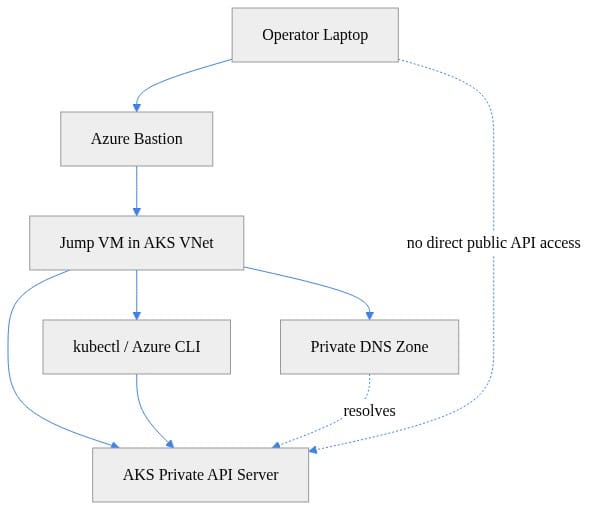
What you should notice: the operator laptop never talks directly to the AKS private API over the public internet. Bastion gets you to a controlled endpoint inside the network path, and private DNS plus local tooling do the rest.
Why this beats the old jump-box playbook
A self-managed jump server turns into pet infrastructure fast:
- patching drift
- stale local tools
- broad inbound rules
- long-lived credentials
- “temporary” admin access that becomes permanent
Bastion trims the blast radius because the ingress point is managed by Azure. You still may use a jump VM behind it for tooling and private resolution, but you stop exposing that VM like a classic bastion host.
That distinction matters. AKS networking best practices still talk about securely connecting to nodes through a bastion host, and the node access guidance is explicit that direct node access is sometimes needed for troubleshooting or maintenance, per the AKS node access docs. I use that sparingly, not as the default operating model.
Step 2: Lay down the reference architecture
The network path I actually recommend
For most enterprise teams, the clean pattern looks like this:
- AKS private cluster deployed into your VNet
- Azure Bastion deployed in that VNet or a peered path that can reach it
- a dedicated admin or jump subnet
- one hardened Linux or Windows jump VM with no public IP
- private DNS zone linked correctly for the AKS private API FQDN
- operators authenticate to Azure, enter through Bastion, and run kubectl from the jump VM
Here’s the sequence from operator to API server.
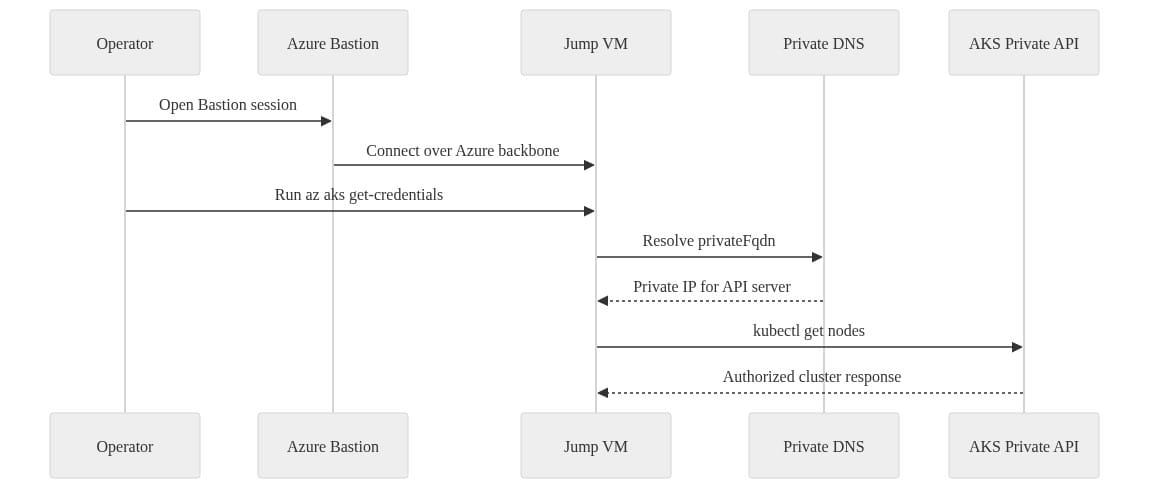
What you should notice: DNS resolution happens from the jump VM side, not from your laptop. That’s where a lot of troubleshooting goes sideways. People test from the wrong machine and conclude the cluster is broken.
Illustrative infrastructure deployment
This Bicep example shows the bones of the network side: a VNet, the required AzureBastionSubnet, a jumpbox subnet, a Standard public IP for Bastion, and the Bastion resource itself. It’s intentionally simple for LinkedIn, not production-hardened.
// Bicep: Create a Bastion host and jump VM subnet in the same VNet used by a private AKS cluster
param location string = resourceGroup().location
param vnetName string = 'aks-secure-vnet'
param bastionPipName string = 'bastion-pip'
param bastionName string = 'aks-bastion'

resource vnet 'Microsoft.Network/virtualNetworks@2023-09-01' = {
  name: vnetName
  location: location
  properties: {
    addressSpace: { addressPrefixes: ['10.20.0.0/16'] }
    subnets: [
      { name: 'AzureBastionSubnet'; properties: { addressPrefix: '10.20.0.0/26' } }
      { name: 'jumpbox-subnet'; properties: { addressPrefix: '10.20.1.0/24' } }
    ]
  }
}

resource pip 'Microsoft.Network/publicIPAddresses@2023-09-01' = {
  name: bastionPipName
  location: location
  sku: { name: 'Standard' }
  properties: { publicIPAllocationMethod: 'Static' }
}

resource bastion 'Microsoft.Network/bastionHosts@2023-09-01' = {
  name: bastionName
  location: location
  properties: {
    ipConfigurations: [{
      name: 'bastion-ipcfg'
      properties: {
        subnet: { id: '${vnet.id}/subnets/AzureBastionSubnet' }
        publicIPAddress: { id: pip.id }
      }
    }]
  }
}
What you should notice: Bastion lives in the required AzureBastionSubnet, and your jump VM belongs in a separate subnet. Keep those roles clean.
If you’re also standing up a private AKS cluster for testing the pattern, this Bicep sample shows the AKS side with private cluster enabled and Azure RBAC for Kubernetes authorization turned on.
// Bicep: Deploy a private AKS cluster into the VNet and enable Azure RBAC for Kubernetes authorization
param location string = resourceGroup().location
param aksName string = 'aks-private-demo'
param dnsPrefix string = 'aksprivdemo'
param subnetId string
param kubernetesVersion string = '1.29.4'

resource aks 'Microsoft.ContainerService/managedClusters@2024-02-01' = {
  name: aksName
  location: location
  identity: { type: 'SystemAssigned' }
  properties: {
    dnsPrefix: dnsPrefix
    kubernetesVersion: kubernetesVersion
    apiServerAccessProfile: { enablePrivateCluster: true }
    aadProfile: { managed: true, enableAzureRBAC: true }
    agentPoolProfiles: [{
      name: 'system'
      mode: 'System'
      count: 1
      vmSize: 'Standard_DS2_v2'
      osType: 'Linux'
      type: 'VirtualMachineScaleSets'
      vnetSubnetID: subnetId
    }]
    networkProfile: { networkPlugin: 'azure', networkPolicy: 'azure' }
  }
}
What you should notice: enablePrivateCluster: true is the key flag, and the cluster is attached to a VNet subnet. That private API path has to be reachable and resolvable from where you run kubectl.
Step 3: Validate the prerequisites before you ever touch kubectl
Check the cluster is actually private
I’ve seen teams swear they built a private cluster and then discover they were testing against the wrong environment. Start with facts:
- cluster name
- resource group
- private cluster enabled status
- private FQDN
- node resource group
The Azure CLI snippet below validates those details and inspects the private DNS records tied to the API server name.
# Azure CLI: Validate that the AKS cluster is private and inspect the private FQDN before connecting through Bastion
RG="rg-aks-private"
AKS="aks-private-demo"

az aks show -g "$RG" -n "$AKS" \
  --query "{name:name,private:apiServerAccessProfile.enablePrivateCluster,privateFqdn:privateFqdn,nodeRG:nodeResourceGroup}" \
  -o yaml

API_FQDN=$(az aks show -g "$RG" -n "$AKS" --query privateFqdn -o tsv)
echo "Private API server FQDN: $API_FQDN"

az network private-dns record-set a list \
  -g "$RG" \
  -z "$(echo "$API_FQDN" | cut -d. -f2-)" \
  -o table
What you should notice: you want enablePrivateCluster to come back true, and you want a real privateFqdn. If the private DNS zone or record lookup is empty, stop there and fix DNS before blaming auth or tooling.
Design checks I always do up front
Before you open a Bastion session, verify these four things:
1. VNet placement
Your Bastion path has to land in a network that can actually reach the AKS private endpoint. Same VNet is easiest. Peering works if routing and DNS are correct. “We have peering” is not the same as “the path is usable.”
2. Private DNS
This is the big one. If the AKS private API FQDN does not resolve from the jump VM, kubectl is dead on arrival.
3. Identity and RBAC
You need Azure permission to pull credentials and, depending on your setup, Azure RBAC and/or Kubernetes RBAC permission to do anything useful after connecting.
4. Tooling location
Run Azure CLI and kubectl from the private side. Your laptop can stay clean and untrusted from a network perspective.
I made the same point in my post on OneLake shortcuts and skipped security models: the control plane path is only one layer. If the identity and authorization model is mushy, the architecture still leaks risk.
Step 4: Connect through Bastion and establish the private admin path
Bastion session flow
At this point, open your Bastion session to the jump VM. I’m not going to waste your time with portal screenshots line by line. The important part is operational:
- connect to the jump VM through Bastion
- confirm Azure CLI is installed
- confirm kubectl is installed
- sign in with the right Azure identity
- test DNS from that machine, not your laptop
What success and failure look like
A good session looks like this:
- you can sign in with Azure CLI
- the AKS private FQDN resolves to a private IP
az aks get-credentialscompleteskubectl cluster-inforeturns cluster endpointskubectl get nodesreturns data
A bad session usually fails in one of three ways:
- name resolution failure
- TCP path blocked by NSG or route
- authz failure after successful connectivity
That distinction matters because the fixes are completely different.
Step 5: Configure kubectl access without mixing up network and authorization
Pull credentials only after the path works
Once you are on the jump VM and confident the private path is there, retrieve credentials and test the cluster from inside that session.
This PowerShell example is a clean sequence:
- inspect AKS private settings
- get credentials
- select context
- test control plane reachability
- test node listing
- test authorization
# PowerShell: Validate AKS details, retrieve kubeconfig, and test kubectl after Bastion connectivity is established
$rg = "rg-aks-private"
$aks = "aks-private-demo"

$cluster = az aks show -g $rg -n $aks | ConvertFrom-Json
"Private cluster: $($cluster.apiServerAccessProfile.enablePrivateCluster)"
"Private FQDN:   $($cluster.privateFqdn)"

az aks get-credentials -g $rg -n $aks --overwrite-existing | Out-Null
kubectl config use-context $cluster.name | Out-Null

kubectl cluster-info
kubectl get nodes -o wide
kubectl auth can-i get pods --all-namespaces
What you should notice: kubectl cluster-info and kubectl get nodes tell you the API is reachable. kubectl auth can-i tells you whether your identity is actually authorized to do useful work.
Separate the three layers in your head
This is where teams burn time. There are three distinct gates:
Azure authentication
Can you sign in and call Azure APIs?
Azure-side cluster access
Can you retrieve kubeconfig or cluster credentials?
Kubernetes authorization
Once you hit the API server, are you allowed to perform the action?
If DNS resolves and the API is reachable but kubectl get ns returns Unauthorized or Forbidden, that is not a Bastion problem. That is RBAC. Treat it like RBAC.
If you want a quick sanity check that helps separate DNS from auth, this little Python diagnostic is useful from the jump VM.
# Python: Check kubeconfig context, resolve the API server hostname, and hint whether failures are DNS or authorization related
import socket, subprocess, sys

def sh(*args):
    return subprocess.run(args, capture_output=True, text=True)

ctx = sh("kubectl", "config", "current-context")
view = sh("kubectl", "config", "view", "--minify", "-o", "jsonpath={.clusters[0].cluster.server}")
server = view.stdout.strip().replace("https://", "").split(":")[0]

print(f"context={ctx.stdout.strip()}")
print(f"api_server={server}")

try:
    print(f"resolved_ip={socket.gethostbyname(server)}")
except socket.gaierror:
    print("diagnosis=DNS resolution failed; verify Bastion/jump VM VNet DNS and private zone linkage")
    sys.exit(2)

probe = sh("kubectl", "get", "ns")
if probe.returncode == 0:
    print("diagnosis=API reachable and authorized")
elif "Unauthorized" in probe.stderr or "Forbidden" in probe.stderr:
    print("diagnosis=API reachable; likely Azure RBAC/Kubernetes RBAC issue")
else:
    print("diagnosis=API name resolves, but connectivity or kubeconfig may be broken")
What you should notice: if hostname resolution fails, fix private DNS. If resolution works and kubectl still errors with Unauthorized or Forbidden, fix RBAC. Don’t blend those into one generic “AKS access issue.”
Step 6: Run a minimal workload test from the private path
Validate that the session is actually usable
Once I can hit the API, I like one tiny workload test. Nothing fancy. Just enough to prove the control plane path is stable and the cluster responds normally.
This YAML creates a namespace and a lightweight pod for connectivity checks.
# YAML: Minimal workload manifest to verify scheduling and private-cluster API access from the jump VM
apiVersion: v1
kind: Namespace
metadata:
  name: connectivity-check
---
apiVersion: v1
kind: Pod
metadata:
  name: dnsutils
  namespace: connectivity-check
spec:
  containers:
    - name: dnsutils
      image: registry.k8s.io/e2e-test-images/agnhost:2.39
      args: ["pause"]
  restartPolicy: Always
What you should notice: this is just a minimal validation artifact. You are proving the API path works and the scheduler is healthy enough to place a pod.
Now apply it and run a few checks.
# kubectl: Apply a test pod and validate DNS plus API-driven operations from the Bastion-connected session
kubectl apply -f connectivity-check.yaml
kubectl get pods -n connectivity-check
kubectl exec -n connectivity-check dnsutils -- nslookup kubernetes.default.svc.cluster.local
kubectl get svc kubernetes -n default -o wide
kubectl logs -n connectivity-check dnsutils
What you should notice: if the pod schedules and you can query services and exec into the pod, your Bastion-backed admin path is functioning. At that point, you’ve moved from “network maybe works” to “operators can actually operate.”
Step 7: Reach AKS nodes only when you truly need to
Node access is the exception, not the operating model
The AKS docs are clear: there are legitimate cases where you need direct node access for maintenance or troubleshooting, especially for Linux or Windows node scenarios, per the AKS node access guidance.
That does not mean every platform engineer should live on the nodes.
The pattern I use is:
- Bastion into the hardened jump VM
- from there, use the approved path to the target node
- perform the narrow task
- document it
- get out
Typical justified cases:
- CNI or host networking troubleshooting
- disk or file system inspection
- kubelet or container runtime investigation
- Windows node-specific diagnostics
- emergency break-glass work during an incident
Typical unjustified cases:
- “it’s faster if I SSH to the node”
- ad hoc package installs
- browsing around because kubectl output confused somebody
Least privilege wins here. Short-lived access, narrow scope, audited path.
Control plane access and node access are different jobs
This is another common mistake:
- Bastion to API server path solves cluster administration
- node access solves host-level troubleshooting
Don’t design one and assume you got the other for free.
I’ve written before about how reliability disciplines are getting tighter in Azure operations; the same mindset applies here in Azure reliability entering its AI control era. Tight access paths and explicit operating procedures beat broad convenience every time.
Step 8: Fix the failure modes that break this pattern
Failure mode 1: Private DNS is wrong
Symptoms:
az aks showreturns a private FQDN- the jump VM cannot resolve it
- kubectl hangs or throws name resolution errors
Fix:
- verify the private DNS zone exists
- verify the right VNet links exist
- test resolution from the jump VM, not your laptop
Failure mode 2: NSG or routing blocks the path
Symptoms:
- DNS works
- API hostname resolves
- connection times out or hangs
Fix:
- inspect NSGs on the jump subnet and AKS-related path
- inspect UDRs if you use custom routing
- validate peering and forwarded traffic assumptions if networks are split
Failure mode 3: Credentials or authorization are missing
Symptoms:
az aks get-credentialsfails, or- kubectl connects but returns Unauthorized or Forbidden
Fix:
- verify Azure role assignments
- verify Kubernetes or Azure RBAC bindings
- test with
kubectl auth can-i
Failure mode 4: Teams confuse workload exposure with admin access
Admin connectivity through Bastion does not solve secure application ingress. If you’re exposing workloads privately or selectively, that is a separate design conversation involving things like Private Link and front-door patterns. Keep those concerns separate. The architecture center makes that broader point in secure AKS workload exposure patterns such as the Azure Front Door with AKS guidance.
Step 9: Make the platform decision, not just the technical one
Bastion versus jump VMs and VPN-heavy access
Here’s my blunt take.
If your current answer for private AKS operations is “everyone gets VPN and we trust process,” you do not have a private admin model. You have a broad network exposure model with paperwork around it.
If your answer is “we keep one old jump host around and only a few people know the password,” that’s worse.
Bastion is better because:
- it’s managed
- it narrows ingress
- it reduces the amount of host-level exposure you maintain
- it fits Azure-native operations better than rolling your own edge box
But it still requires discipline:
- private DNS has to work
- RBAC has to be intentional
- network segmentation still matters
- node access still needs guardrails
Cost and operations trade-off
Yes, Bastion is another service to provision. Good. Secure operations cost money. So do incidents, stale jump hosts, and over-broad VPN access.
I’ll take a managed service and a hardened internal admin VM over babysitting a public jump server all day. The operational math usually works out in favor of managed access once you count patching, monitoring, drift, and audit pain.
Step 10: The operating model I recommend
If you run private AKS seriously, standardize this:
Baseline pattern
- private AKS by default
- Bastion as the native admin entry point where it fits
- no public API exceptions as “temporary” shortcuts
- no public IP on admin VMs
- private DNS validation as part of cluster readiness
Access model
- Azure identity first
- least-privilege Azure RBAC
- least-privilege Kubernetes authorization
- documented break-glass path
- node access only for justified maintenance and troubleshooting
Day-2 checklist
Before you hand a private cluster to operations, prove:
- private FQDN resolves from the admin path
az aks get-credentialsworks from the jump VMkubectl cluster-infoworkskubectl get nodesworks- authorized users can do their job
- unauthorized users are blocked
That’s the real finish line. Not “deployment succeeded.”
Private AKS is only private if your admin path is private too. Bastion gets you a Microsoft-native path into the environment without dragging the old jump-box mess into a modern platform. Just don’t fool yourself into thinking Bastion replaces DNS, identity, or RBAC design. It doesn’t. It gives those controls a safer path to operate through.
Where does this pattern break for your environment — private DNS, RBAC, or the last-mile node access problem?
#AKS #Azurebastion #Cloudsecurity
Sources & References
- Connect to AKS Private Cluster Using Azure Bastion (Preview) - Azure Bastion
- Access an Azure Kubernetes Service (AKS) API Server - Azure Architecture Center
- Establish network connectivity to a private Azure Kubernetes Service (AKS) cluster - Azure Kubernetes Service
- Use Azure Front Door to Secure AKS Workloads - Azure Architecture Center
- Enhance Network Access Security to Kubernetes - Azure Architecture Center
- What's new in Azure Bastion?
- Connect to Azure Kubernetes Service (AKS) cluster nodes - Azure Kubernetes Service
- Best practices for network resources in Azure Kubernetes Service (AKS) - Azure Kubernetes Service
- Solved -- AKS cluster with private network is not able to connect to VM on different private network - Microsoft Q&A
- How do I use AKS and ACR only on a private network without allowing access from the Internet? - Microsoft Q&A
Try it yourself
Run this tutorial as a Jupyter notebook: Download runbook.ipynb (30 cells, 23 KB).