Zero Trust Controls for Microsoft AI Agents
Zero Trust for AI Agents: The Controls Every Microsoft Shop Should Prioritize

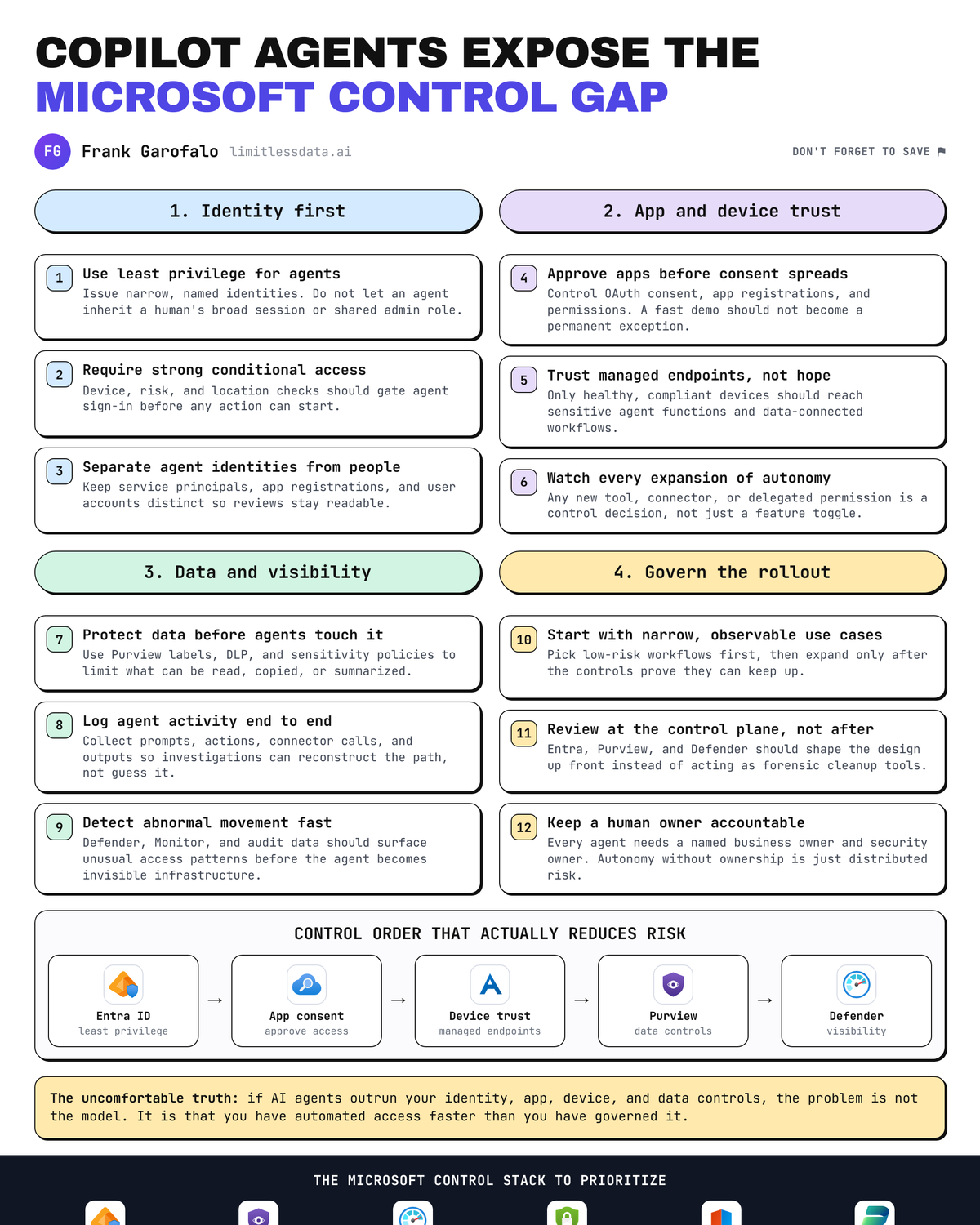
AI agents just created a new access plane in Microsoft shops. If your control plane still treats them like a nicer chatbot, you are already behind.
The mistake I keep seeing is technical teams obsessing over model quality while security teams are still arguing about whether agents belong under “productivity,” “apps,” or “identity.” That debate is over. Microsoft is explicitly building governance and control surfaces around agents: Entra Agent ID (currently in public preview) is aimed at securing agent access with enterprise-grade access management and governance, and Microsoft’s own admin guidance positions Microsoft Agent 365 as the place to deploy, govern, and manage agents across the environment Entra Agent ID Microsoft Agent 365 admin guidance.
My opinion is simple: do not start with autonomy. Start with access boundaries, consent governance, device trust, data protection, and telemetry. Then earn the right to automate more.
Why AI agents change the Zero Trust conversation
An agent is not just a UI on top of a model. In a Microsoft environment, it can touch Microsoft 365 data, call Graph, trigger workflows, connect to third-party apps, and execute actions on behalf of users or services. That means the real blast radius comes from identity, permissions, connectors, and data paths.
Microsoft has been clear for years that its security stack is built on Zero Trust principles, and the Zero Trust guidance center exists for a reason: verify explicitly, use least privilege, and assume breach Microsoft Security Zero Trust Guidance Center. Agents force you to apply those principles to a new actor class.
A CDO I worked with in Q4 had 14 Copilot extensions and internal agents live across HR, legal, and sales before anyone could answer one basic question: which ones had write access to SharePoint and Exchange.
That is the operational problem. Deployment speed is outrunning review speed.
If you want the short version, I laid out the executive checklist in What CDOs should require before deploying autonomous AI agents in Microsoft environments. Here I want to show the practical control order I would use.
Control priority 1: Identity first, because every agent is an access decision
The first control layer is Entra. Every agent, integrated app, service principal, delegated permission, and service-to-service call ends up as an identity and authorization problem.
Here is the mental model I use with teams. Map the path from user or agent to token issuance, app registration, service principal, API permissions, and governance review. If you cannot draw this, you cannot secure it.
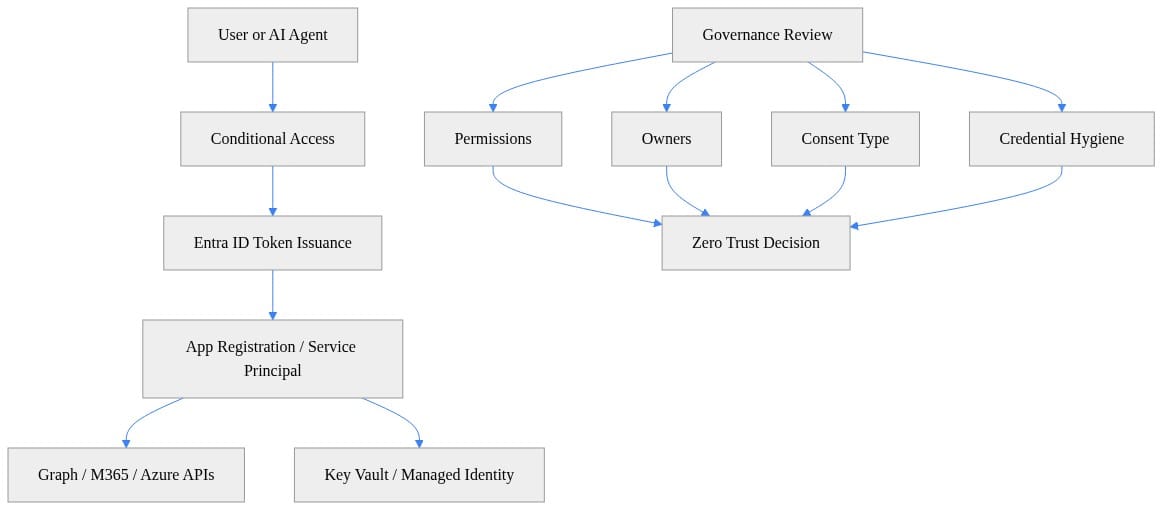
What you should notice in that diagram is that “agent security” is mostly boring identity plumbing done correctly. Owners, consent type, permissions, credential hygiene, and token issuance rules matter more than prompt engineering.
My baseline rules:
- Every agent-backed app registration needs a named owner.
- Every permission grant needs a business purpose.
- Application permissions get extra scrutiny because they bypass user context.
- Managed identity beats long-lived secrets wherever the architecture allows it.
- Admin paths for agent deployment and approval should sit behind strong Conditional Access and privileged workflows.
Over-permissioned agents are the fastest way to manufacture a breach. The classic failure mode is a helpful internal assistant that quietly gets Files.ReadWrite.All, Sites.ReadWrite.All, and broad mailbox access “just to make the demo work,” then nobody comes back to reduce scope.
If you want a concrete way to start, pull your app inventory and summarize Graph permissions plus owners. This Python example is intentionally simple, but it is enough to expose the ugly stuff fast.
# Inventory app registrations and summarize Graph permissions plus owners for governance review.
import requests

TOKEN = "YOUR_GRAPH_TOKEN"
headers = {"Authorization": f"Bearer {TOKEN}"}

apps = requests.get(
    "https://graph.microsoft.com/v1.0/applications?$select=id,appId,displayName,requiredResourceAccess",
    headers=headers,
    timeout=30,
).json().get("value", [])

for app in apps[:20]:
    owners_url = f"https://graph.microsoft.com/v1.0/applications/{app['id']}/owners?$select=id,displayName,userPrincipalName"
    owners = requests.get(owners_url, headers=headers, timeout=30).json().get("value", [])
    owner_names = [o.get("userPrincipalName") or o.get("displayName") for o in owners]
    graph_access = [r for r in app.get("requiredResourceAccess", []) if r.get("resourceAppId") == "00000003-0000-0000-c000-000000000000"]
    scopes = sum((r.get("resourceAccess", []) for r in graph_access), [])
    print({
        "app": app.get("displayName"),
        "appId": app.get("appId"),
        "graphPermissionCount": len(scopes),
        "owners": owner_names or ["NO_OWNER_ASSIGNED"],
    })
Run that against a sample or dev tenant first. You are looking for three things immediately: apps with lots of Graph permissions, apps with no owners, and apps nobody remembers approving. Those three categories deserve review before you greenlight more agents.
Control priority 2: App consent and plugin sprawl need hard guardrails
This is where a lot of Microsoft shops get sloppy. They call it “extensibility.” Security should call it what it is: consent governance.
Agents become dangerous when they can reach beyond the original boundary through connectors, plugins, integrated apps, or user-consented OAuth grants. Microsoft is also making it plain that organizations need to observe, govern, and secure the growing number of agents in the enterprise, not just deploy them, and Microsoft’s emerging strategy for Microsoft Agent 365 positions it as the place to deploy, govern, and manage those agents across the environment Microsoft Agent 365 overview.
My recommendation:
- Inventory every agent, integrated app, and extension point.
- Separate user-consented from admin-consented access.
- Block casual sprawl by requiring approval for new high-impact connectors.
- Review delegated grants regularly, because that is where shadow AI integrations hide.
- Tie every approval to an owner and expiration or review date.
This PowerShell example enumerates delegated OAuth consent grants. It is one of the fastest ways to find apps that slipped around central review.
# Enumerate delegated OAuth2 consent grants to spot user-consented apps that may bypass central review.
Connect-MgGraph -Scopes "Directory.Read.All","DelegatedPermissionGrant.Read.All","Application.Read.All"

$grants = Get-MgOauth2PermissionGrant -All
foreach ($g in $grants) {
  $clientSp = Get-MgServicePrincipal -ServicePrincipalId $g.ClientId
  [pscustomobject]@{
    AppDisplayName = $clientSp.DisplayName
    ConsentType    = $g.ConsentType
    PrincipalId    = $g.PrincipalId
    ResourceId     = $g.ResourceId
    Scope          = $g.Scope
  }
}
What to do next: sort by broad scopes, look for suspicious app names, and pay attention to consent types that indicate users granted access without a proper governance pass. In real tenants, this is where you find the “temporary” assistant app that has been reading files for nine months.
Then score AI-related apps for broad permissions or missing owners. Again, not production-grade tooling, but exactly the kind of quick triage that gets a governance backlog under control.
# Read exported app inventory CSV and flag risky AI-related apps with broad permissions or missing owners.
import csv

RISKY = {"Mail.ReadWrite", "Files.ReadWrite.All", "Sites.ReadWrite.All", "User.Read.All", "Directory.ReadWrite.All"}

with open("exported_app_inventory.csv", newline="", encoding="utf-8") as f:
    reader = csv.DictReader(f)
    for row in reader:
        name = row.get("AppName", "")
        scopes = {s.strip() for s in row.get("Permissions", "").split(";") if s.strip()}
        owners = [o.strip() for o in row.get("Owners", "").split(";") if o.strip()]
        is_ai = any(k in name.lower() for k in ["copilot", "agent", "openai", "assistant", "bot"])
        if is_ai and ((scopes & RISKY) or not owners):
            print({
                "app": name,
                "owners": owners or ["NO_OWNER"],
                "riskyScopes": sorted(scopes & RISKY),
                "reviewReason": "Broad access or missing owner",
            })
The pattern to watch is simple: names that sound harmless, permissions that are not, and no accountable owner. That combination should trigger immediate restriction.
I covered the broader operating model for this in How Microsoft Agent 365 changes enterprise AI governance. The short version: if you do not have a governance surface for agents, you will manage them badly through ad hoc exceptions.
Control priority 3: Device trust still matters in agent-driven workflows
A lot of teams assume that because the agent runs in a cloud service, endpoint posture matters less. Wrong.
The weak link is often the human invoking, approving, configuring, or administering the agent from an unmanaged laptop, a stale browser session, or a personal device that should never touch privileged workflows. Device trust still matters because high-impact actions still cross a human control point somewhere.
So I prioritize device-based access requirements for three groups first:
- Admins approving agent deployments or permissions
- Makers building or extending agents with access to enterprise systems
- Users invoking agents that can handle sensitive data or trigger consequential actions
This is where Zero Trust becomes practical instead of philosophical. Sensitive workflows should require compliant or hybrid-joined devices, especially for admin operations and data-heavy scenarios. If someone can approve an agent integration from an unmanaged endpoint at 11:40 PM from a hotel Wi-Fi network, your problem is not the model.
Control priority 4: Data protection must follow the agent
Once the agent has access, data can move fast. Faster than your old review processes. Faster than your awareness. Faster than your incident response if you have no instrumentation.
Microsoft Purview is the backbone here for Microsoft 365 Copilot and other generative AI app protections, and Microsoft’s own documentation ties those protections directly to Zero Trust-aligned governance for AI usage Microsoft Purview for generative AI apps. Use it.
The controls I push first:
- DLP policies for prompts, responses, uploads, and generated outputs where supported
- Sensitivity labels and information protection on the underlying content
- Retention and compliance boundaries that reflect how generated content is actually used
- Clear policy on whether agents can summarize or transform sensitive records
- Restricted connectors and export paths for regulated or high-value data sets
The ugly failure mode here is not always exfiltration in the classic sense. Sometimes it is transformation. An agent takes 40 sensitive documents, summarizes them into one neat answer, and pastes the result into a lower-control system or external workflow. Your old controls may have been written for files, emails, and records. Agents create a whole new category of “derived sensitive output.”
If you are building on the Microsoft 365 platform or extending Copilot-style experiences, go read the architecture and governance material for IT pros and developers before you let builders run wild Microsoft 365 Copilot docs.
Control priority 5: Visibility before autonomy
I am blunt on this one: if you cannot inventory it, constrain it. If you cannot monitor it, do not automate it.
That should be the executive decision rule.
Before broad autonomous workflows, you need a minimum viable telemetry model:
- What agents exist
- Who owns them
- What permissions they have
- What connectors they use
- How consent was granted
- What credentials they rely on
- What sensitive data paths they can touch
- What actions they can take without a human in the loop
This sequence is the review loop I use with teams. Discover, map owners, inspect permissions, check consent, validate credentials, then apply controls.
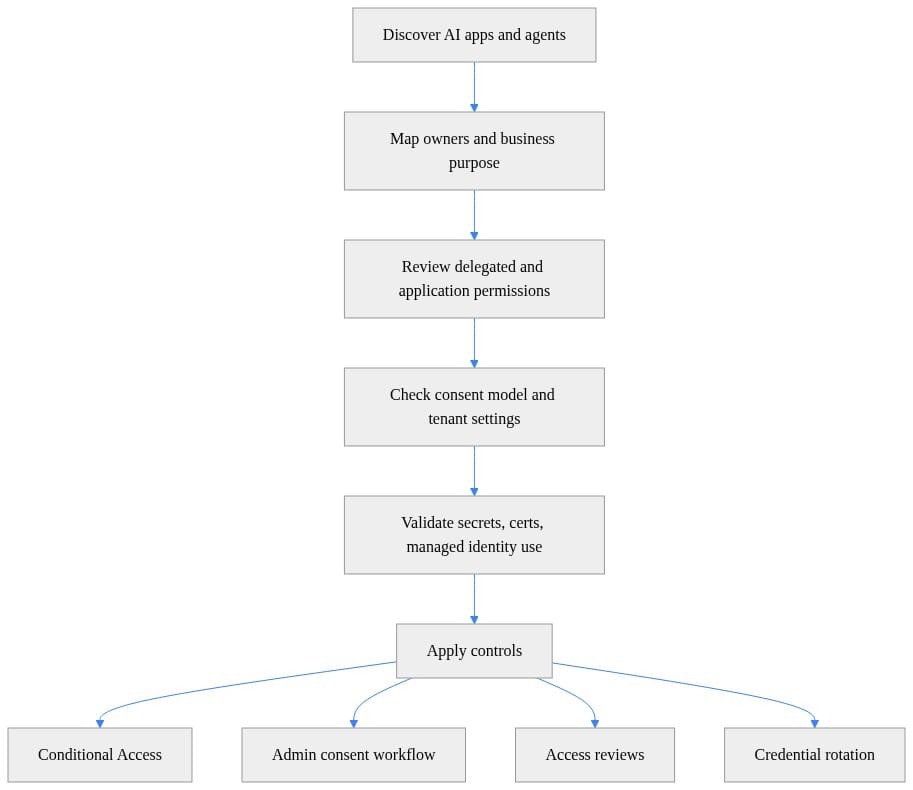
The operational win here is speed. You do not need a six-month architecture committee to improve your posture. You need a working inventory, a risk score, and a kill switch.
This PowerShell example helps find app registrations with no owners or aging credentials. That is not glamorous work. It is exactly the work that prevents ugly weekends.
# Find app registrations and service principals that have no owners or use potentially stale credentials.
Connect-MgGraph -Scopes "Application.Read.All","Directory.Read.All"

$applications = Get-MgApplication -All
foreach ($app in $applications) {
  $owners = Get-MgApplicationOwner -ApplicationId $app.Id
  $staleSecret = $app.PasswordCredentials | Where-Object { $_.EndDateTime -lt (Get-Date).AddDays(30) }
  $staleCert   = $app.KeyCredentials      | Where-Object { $_.EndDateTime -lt (Get-Date).AddDays(30) }

  if (($owners.Count -eq 0) -or $staleSecret -or $staleCert) {
    [pscustomobject]@{
      AppName          = $app.DisplayName
      AppId            = $app.AppId
      OwnerCount       = $owners.Count
      SecretExpiring   = [bool]$staleSecret
      CertificateAging = [bool]$staleCert
    }
  }
}
What to do with the output: assign owners, rotate or remove stale credentials, and flag anything tied to AI, Copilot, bot, assistant, or agent use cases for a tighter review. Missing owner plus expiring secret plus broad permissions is how incidents get born.
For teams building data-facing agent experiences, including Fabric scenarios, the same rule applies: governance has to be part of the product design, not a cleanup step. I made that case directly in Fabric Data Agent API Turns Governance Into Product Design.
Keep humans in the loop for high-impact workflows
There is a lot of “secure by design” language floating around AI right now. Fine. But I trust explicit approval checkpoints more than slogans.
Human review stays in place for:
- External sharing
- Sensitive data handling
- Privileged changes
- Financial approvals
- Customer-impacting actions
- Destructive operations
- Changes to access control or retention settings
That does not mean every agent interaction needs a person clicking Approve. It means high-impact workflows need defined boundaries, rollback paths, and evidence of who approved what. Human-in-the-loop is a compensating control until your inventory, telemetry, and policy enforcement are mature enough to support more autonomy safely.
And yes, this slows some teams down. Good. The wrong automation is more expensive than the right friction.
A rollout order that actually reduces risk
If I were walking into a Microsoft-heavy environment tomorrow, this is the order I would use:
Phase 1: Stop the obvious risk
- Inventory agents, app registrations, service principals, and integrated apps
- Identify owners
- Review Graph and Microsoft 365 permissions
- Lock down admin consent and delegated consent paths
- Require stronger controls for privileged agent administration
Phase 2: Tighten trust boundaries
- Enforce device trust for admins and sensitive workflows
- Reduce broad permissions
- Move away from stale secrets where possible
- Put approval gates around new connectors and plugins
Phase 3: Protect the data layer
- Apply Purview-aligned DLP and labeling controls
- Define sensitive workflow boundaries
- Restrict high-risk data movement and export patterns
- Monitor prompts, outputs, and connected content paths where your controls support it
Phase 4: Earn autonomy
- Add telemetry and review loops
- Measure agent activity and exceptions
- Expand autonomous actions only where monitoring, rollback, and ownership are already in place
That is the practical sequence. Identity first. Consent next. Device trust after that. Data protection on top. Visibility throughout. Autonomy last.
The shops that get this right will not be the ones with the flashiest demos. They will be the ones that treated agents as a new access plane early and built controls before the sprawl hit full speed.
Rate your team’s current agent governance from 1 to 5: are you still at app sprawl, or have you actually reached visibility-before-autonomy?
#MicrosoftAgent365 #EntraID #Compliance
Sources & References
- Microsoft Entra documentation
- Zero Trust Guidance Center
- Security hub - Security
- Microsoft 365 Copilot hub
- Microsoft Entra Agent ID documentation
- Manage agents in the Microsoft 365 admin center - Microsoft 365 admin
- Microsoft Agent 365 overview
- Microsoft Purview data security and compliance protections for Microsoft 365 Copilot and other generative AI apps
- Microsoft 365 developer documentation - Microsoft 365 Developer
- Fabric data agent creation - Microsoft Fabric
Try it yourself
Run this tutorial as a Jupyter notebook: Download runbook.ipynb (23 cells, 21 KB).



