AI agent cost optimization for Azure platform teams guide
Why AI agents cost so much and how platform teams should respond

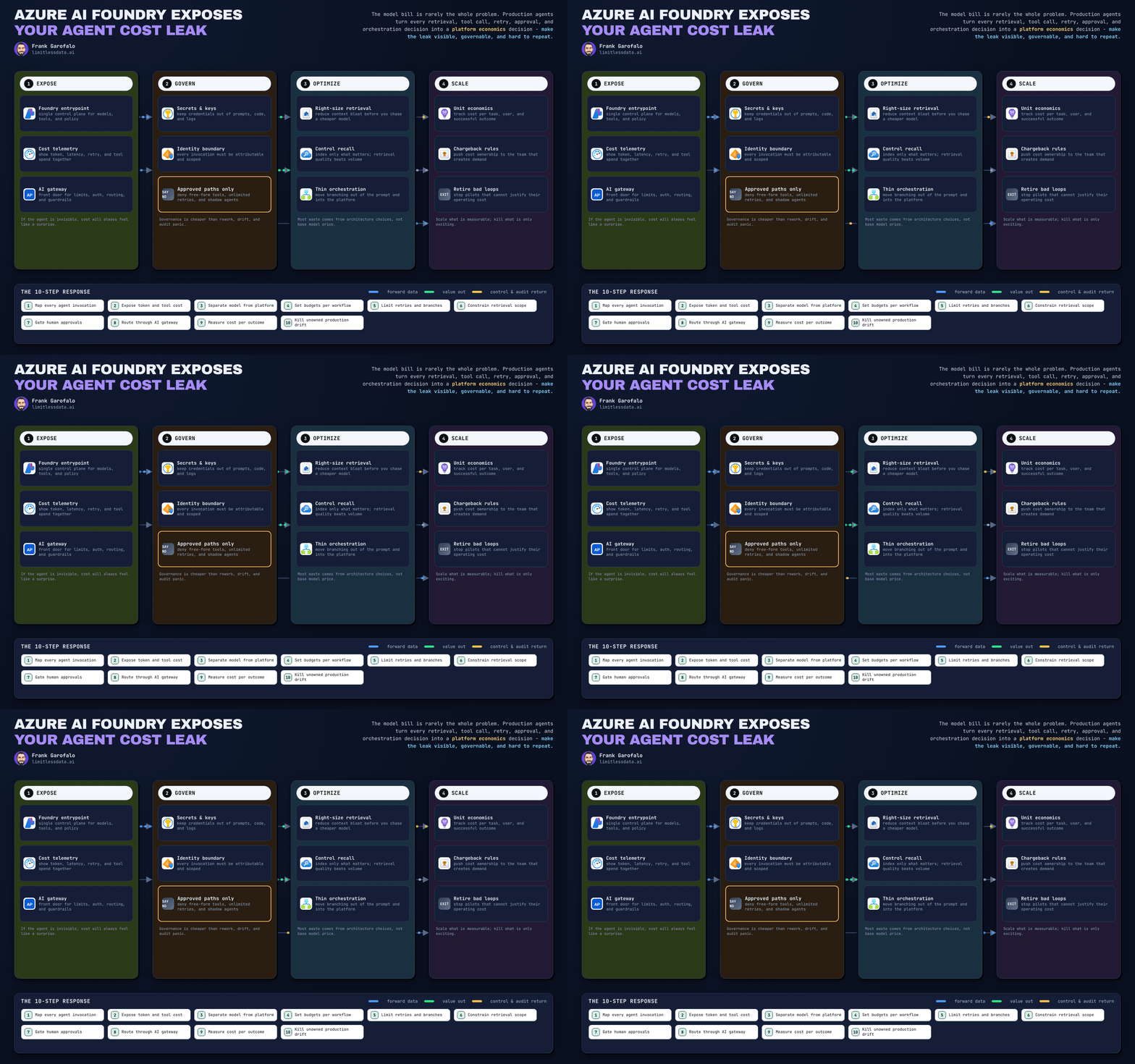
The token price sheet is the least interesting part of your agent bill. Production agents turn every retrieval, tool call, retry, approval, and orchestration decision into a platform economics decision.
On this page
- The uncomfortable reframing: agent cost is a platform problem
- Where costs compound across three agent patterns
- Draw the agent cost map before optimizing anything
- Build a governed Azure agent control plane
- Guardrails that reduce spend without pretending quality is free
- Security and governance are cost controls too
- The operating model: charge back, publish patterns, and say no
- My blunt take
- Sources & References
A lot of teams are still arguing about which model is “cheapest” while quietly building systems that multiply calls, expand context, fan out into tools, and escalate to humans with no cost boundary. That’s how a harmless pilot becomes a budget problem.
My position is simple: agent spend is primarily a platform design problem. Model pricing matters, but the scalable response is to make token use, invocation frequency, retrieval, tool orchestration, latency choices, and human review visible and governable before pilots turn into unowned production workloads.
The uncomfortable reframing: agent cost is a platform problem
Here’s the mistake: treating AI-agent cost like a single SKU decision.
That works for a toy chatbot. It fails the minute you move into production workflows where one user request can trigger retrieval, multiple model calls, tools, memory updates, policy checks, retries, and sometimes a human approval loop. Microsoft’s Foundry Agent Service exists precisely because teams building with raw frameworks end up owning containerization, web server setup, security, persistence, scaling, instrumentation, and rollback mechanics on top of the agent logic itself, while the managed service gives a common entry point for model inference and tools per the Foundry Agent Service overview and hosted agents guidance.
That is not a model problem. That is a platform problem.
A CDO I worked with in Q1 had 14 agent experiments across three business units, and by week 9 nobody could explain why a claims-triage assistant cost 6x more per resolved case in prod than in UAT because the retrieval path, tool retries, and human escalations weren’t attributed to the same run.
That’s the leadership test. If your team cannot attribute an agent’s spend to a business workflow, user population, model, tool, and environment, you do not have a managed platform. You have a demo with a procurement problem.
Where costs compound across three agent patterns
Let’s make this practical.
1) Simple chat
At the low end, economics are understandable:
- one user request
- one model invocation
- bounded context
- one response
You still need telemetry, but the cost path is short.
2) RAG assistant
Now add retrieval:
- query rewrite or intent classification
- one or more retrieval calls
- context assembly
- bigger prompt
- answer generation
- maybe a fallback if confidence is low
This is where teams start lying to themselves. They say, “the model is cheap,” while the actual bill grows because every answer drags along retrieval work and larger prompts. If your retriever returns too much, your model bill rises. If it returns too little, your retry rate rises. Either way, platform design decides the spend.
3) Multi-agent workflow
This is where the wheels come off:
- planner decides next step
- specialist agent handles subtask
- critic or verifier checks output
- tools execute actions
- memory gets updated
- retries fire on partial failures
- human escalation catches risky cases
There is no universal ratio here, and I’m not going to fake one. But the shape is obvious: complexity grows every time a request can trigger more decisions, more context, and more external work.
Some of that spend is legitimate. Better quality can justify more steps. Lower latency can justify a more capable model. What is never justified is accidental fan-out, duplicate retrieval, unbounded context windows, and retry storms that nobody notices until month-end.
Draw the agent cost map before optimizing anything
Before you tune prompts or negotiate model pricing, draw the request-level cost map.
Mine usually looks like this:
- ingress
- policy evaluation
- retrieval
- model call
- tool execution
- memory/state write
- human handoff
- response delivery
- telemetry and chargeback
That map matters because every edge is a metering point and every loop is a budget risk.
A simple way to explain it to teams is this flow:
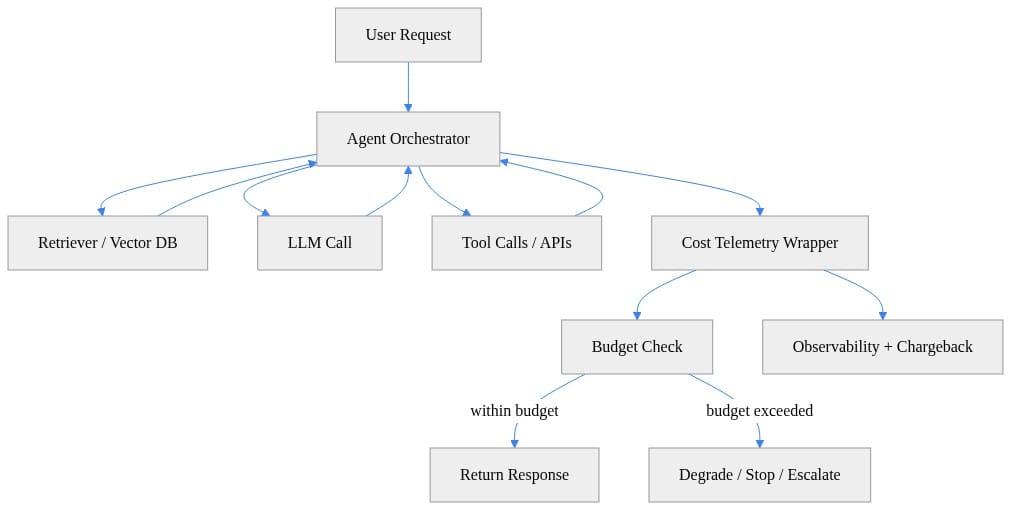
What to notice: the budget check sits inside the run, not after the invoice arrives. If your architecture can’t degrade, stop, or escalate mid-run, then “cost control” is just a dashboard for yesterday’s mistake.
I also push teams to separate:
- fixed platform costs: shared gateway, observability, hosting, support
- variable request costs: tokens, retrieval operations, tool/API usage, human review time
Then attribute variable cost by:
- application
- environment
- tenant or business unit
- workflow
- model deployment
- owner
If you want a concrete starting point, this is the same discipline I use in Azure azd Standard for Agent Delivery Platform Teams: standard paths, standard ownership, standard telemetry.
Build a governed Azure agent control plane
Platform teams should stop letting every product group invent its own agent stack.
You need a common path for:
- model access
- tool exposure
- identity
- logging
- routing
- budget enforcement
- ownership tags
On Azure, the clean reference point is straightforward.
Foundry Agent Service is a managed option for building, deploying, and scaling agents with a single entry point for model inference and tools, per the service overview. If a team insists on framework-based implementations, fine. But then the platform still owns the cross-cutting controls.
At the policy boundary, I want Azure API Management in front of AI backends. Microsoft is explicit that the AI gateway capabilities are for securing, scaling, monitoring, and governing AI models, agents, and tools, and those capabilities apply across API Management tiers per the AI gateway documentation.
That gives you one place to enforce:
- auth and identity standards
- rate limits
- backend routing
- policy inspection
- telemetry capture
- cost and abuse controls
Then tag everything. And I mean everything.
A tiny onboarding check catches a lot of future nonsense:
# PowerShell: validate required ownership and cost-allocation tags for Azure AI onboarding
param(
    [hashtable]$Tags = @{ Owner='team-ml'; CostCenter='CC-1042'; Environment='prod'; App='agent-assistant' }
)

$required = @('Owner', 'CostCenter', 'Environment', 'App')
$missing = $required | Where-Object { -not $Tags.ContainsKey($_) -or [string]::IsNullOrWhiteSpace($Tags[$_]) }

if ($missing.Count -gt 0) {
    throw "Missing required tags: $($missing -join ', ')"
}

"Tag validation passed for workload: $($Tags['App'])"
What to notice: this is boring on purpose. Boring is good. If a workload cannot declare owner, cost center, environment, and app name, it should not get production inference access.
Once tags are validated, normalize them and stamp chargeback conventions consistently:
# PowerShell: apply a consistent resource-tagging convention for an Azure AI workload
param(
    [string]$ResourceGroupName = 'rg-ai-prod',
    [string]$ResourceName = 'aoai-prod-01',
    [hashtable]$Tags = @{ Owner='team-ml'; CostCenter='CC-1042'; Environment='prod'; App='agent-assistant'; ManagedBy='platform-team' }
)

$normalized = @{}
foreach ($key in $Tags.Keys) {
    $normalized[$key.ToLower()] = $Tags[$key].ToString().Trim()
}

$normalized['workload'] = 'azure-ai'
$normalized['finops:chargeback'] = "$($normalized['costcenter'])/$($normalized['owner'])"

Set-AzResource -ResourceGroupName $ResourceGroupName -Name $ResourceName -Tag $normalized -Force | Out-Null
"Applied tags to $ResourceName in $ResourceGroupName"
What to notice: lowercase normalization and a chargeback tag save you from six months of dashboard cleanup later. I’ve had to unwind enough inconsistent tag sets in Azure estates to know this is cheaper than heroics.
If you want the deeper platform view, I laid that out in Microsoft Foundry agent platform for enterprise operations and the runtime angle in Durable agents in Foundry Agent Service explained.
Guardrails that reduce spend without pretending quality is free
This is the part teams usually skip because it feels restrictive. It isn’t restrictive. It’s adult supervision.
Set workflow-class budgets for:
- request count
- prompt tokens
- completion tokens
- retrieval count
- tool-call count
- elapsed time
- human-review rate
Then enforce explicit stop conditions for planners and retries. A capable agent without a bounded exit path is an operational liability.
Here’s a lightweight Python example of request-level telemetry with a budget check:
# Python: request-level telemetry wrapper for agent runs with budget enforcement
from dataclasses import dataclass, field
from time import perf_counter
from uuid import uuid4

@dataclass
class AgentRun:
    budget_usd: float
    run_id: str = field(default_factory=lambda: str(uuid4()))
    retrievals: int = 0
    tool_calls: int = 0
    cost_usd: float = 0.0
    started: float = field(default_factory=perf_counter)

    def record_model_call(self, model: str, usage: dict, price: dict) -> dict:
        pt = usage.get("prompt_tokens", 0)
        ct = usage.get("completion_tokens", 0)
        call_cost = (pt / 1000) * price["prompt_per_1k"] + (ct / 1000) * price["completion_per_1k"]
        self.cost_usd += call_cost
        return {"run_id": self.run_id, "model": model, "prompt_tokens": pt, "completion_tokens": ct, "call_cost_usd": round(call_cost, 6)}

    def check_budget(self) -> None:
        if self.cost_usd > self.budget_usd:
            raise RuntimeError(f"Budget exceeded for run {self.run_id}: ${self.cost_usd:.4f} > ${self.budget_usd:.4f}")
What to notice: the useful unit is the run, not the raw model call. You want one run ID that can collect retrievals, tool calls, token usage, and total cost so you can answer, “what happened on this expensive request?”
Once you have that, emit a structured summary every run:
# Python: emit a structured telemetry event including retrievals, tool calls, and elapsed time
import json
from time import perf_counter

def emit_run_summary(run, last_call: dict) -> str:
    event = {
        "event": "agent_run_summary",
        "run_id": run.run_id,
        "elapsed_ms": int((perf_counter() - run.started) * 1000),
        "retrieval_count": run.retrievals,
        "tool_call_count": run.tool_calls,
        "total_cost_usd": round(run.cost_usd, 6),
        "budget_usd": run.budget_usd,
        "last_model_call": last_call,
    }
    return json.dumps(event, separators=(",", ":"))

if __name__ == "__main__":
    class R: pass
    run = R(); run.run_id = "demo"; run.started = perf_counter(); run.retrievals = 2; run.tool_calls = 1; run.cost_usd = 0.0132; run.budget_usd = 0.05
    print(emit_run_summary(run, {"model": "gpt-4.1-mini", "prompt_tokens": 1200, "completion_tokens": 300}))
What to notice: elapsed time belongs in the same event as cost. I’ve seen teams reduce token spend and make the user experience worse because the new flow added extra steps, which increased abandonment and retried requests. Congratulations, you saved pennies and burned trust.
You also need a degrade path. Not every request deserves the full orchestra.
# Python: graceful degradation policy when an agent run approaches or exceeds budget
def choose_policy(total_cost_usd: float, budget_usd: float) -> str:
    ratio = total_cost_usd / budget_usd if budget_usd else 1.0
    if ratio >= 1.0:
        return "stop_and_escalate"
    if ratio >= 0.8:
        return "disable_tools_and_reduce_context"
    if ratio >= 0.5:
        return "switch_to_cheaper_model"
    return "full_capability"

if __name__ == "__main__":
    for cost in (0.01, 0.03, 0.045, 0.06):
        print(cost, "=>", choose_policy(cost, 0.05))
What to notice: the policy ladder matters more than the exact thresholds. Cheap requests can run full capability. As cost rises, reduce context, disable tools, switch models, or escalate. That is how you stop a “smart” agent from acting like an unlimited expense account.
Security and governance are cost controls too
Security teams already understand blast radius. Platform teams need to apply the same thinking to cost.
If an agent can send prompts, retrieved context, or tool payloads beyond the intended boundary, architecture review needs to catch that before go-live. If a tool is over-permissioned, the agent can trigger broader and more expensive work than the business ever intended.
Least privilege is not just a security principle. It is a spend control.
The same goes for quotas and limits. Teams love discovering them in production, usually at the worst possible time. Don’t do that. Copilot Studio documents quotas and limits for agents and agent flows powered by the standard harness in the requirements and quotas documentation. Use those constraints as product-design inputs, not late-stage operational surprises.
And if you’re building agents in the Microsoft 365 estate, remember what the data boundary implies. Microsoft 365 Copilot agents extend Copilot experiences using enterprise data from Microsoft Graph per the agents overview. That means governance, access patterns, and review paths are part of the economics conversation from day one.
Log:
- tool decisions
- policy denials
- retry reasons
- escalation reasons
- final disposition
Without that evidence, every expensive run turns into finger-pointing.
The operating model: charge back, publish patterns, and say no
This is where platform teams either lead or become a help desk.
You need:
- showback or chargeback tied to business ownership
- approved reference architectures for simple chat, RAG, and bounded tool workflows
- exception review for multi-agent designs
- promotion gates from pilot to production
My production gate is blunt:
- named owner
- business metric
- request forecast
- monthly budget
- security review
- observability
- rollback path
- unit-economics baseline
No owner, no production. No telemetry, no production. No budget, no production.
Chargeback does not need to be fancy on day one. Start with run-level records and aggregate by team:
# Python: simple chargeback aggregation by team using run-level telemetry records
records = [
    {"owner": "team-search", "run_id": "r1", "cost_usd": 0.021},
    {"owner": "team-search", "run_id": "r2", "cost_usd": 0.014},
    {"owner": "team-sales", "run_id": "r3", "cost_usd": 0.087},
]

totals = {}
for r in records:
    totals[r["owner"]] = round(totals.get(r["owner"], 0.0) + r["cost_usd"], 6)

for owner, total in sorted(totals.items()):
    print(f"{owner}: ${total:.3f}")
What to notice: this is enough to start the right conversation. Once business owners see their own usage profile, architecture quality improves fast.
And if you want a simple onboarding flow, make it explicit:
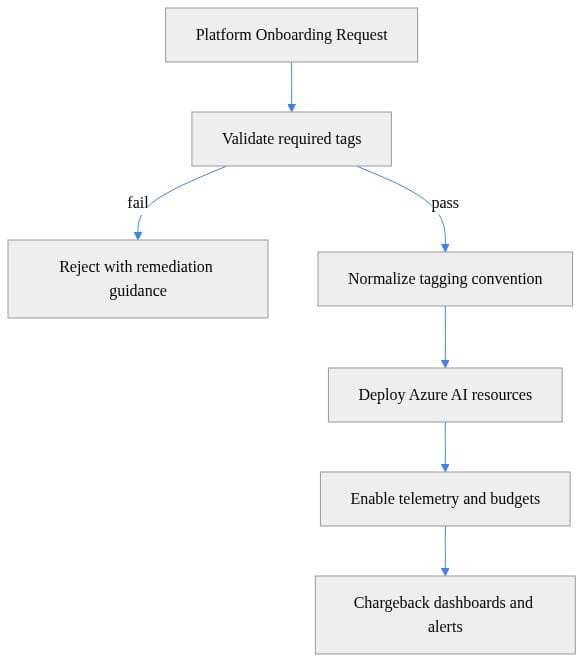
What to notice: rejection with remediation guidance is a feature, not bureaucracy. Platform teams earn trust when the path is clear and repeatable.
My blunt take
The winning platform team will not eliminate agent cost.
It will make cost intentional, attributable, bounded, and explainable.
That means:
- model choice becomes one lever, not the whole strategy
- orchestration is designed with budgets
- retrieval is measured, not assumed
- human review is treated as part of unit economics
- governance is built into the control plane, not stapled on later
- every production agent has an owner and a business reason to exist
The Cloud Adoption Framework has been saying for years that strategy starts with business justification and adoption outcomes; agent platforms are no exception, and teams should anchor these workloads in that same business strategy guidance. If you can’t tie the spend to an outcome, you’re funding curiosity with production-grade infrastructure.
That’s fine for a lab. I have a serious Proxmox and Azure lab at home, and I burn money there on purpose to learn. Enterprise production is different. Somebody owns the P&L.
So here’s the question: where does my claim break in your environment that agent spend is mostly a platform design problem rather than a model-pricing problem?
#AzureAI #AIAgents #DataArchitecture
Sources & References
- Official Microsoft Power Platform documentation - Power Platform
- Quotas and limits - Microsoft Copilot Studio
- What's new in Copilot Studio - Microsoft Copilot Studio
- What is Microsoft Foundry Agent Service? - Microsoft Foundry
- Cloud Adoption Framework for Microsoft - Cloud Adoption Framework
- Microsoft Clarity Documentation
- Hosted agents in Foundry Agent Service - Microsoft Foundry
- AI gateway capabilities in Azure API Management
- Microsoft 365 developer documentation - Microsoft 365 Developer
- Compare declarative and custom engine agents
Try it yourself
Run this tutorial as a Jupyter notebook: Download runbook.ipynb (36 cells, 29 KB).