Microsoft Foundry agent platform for enterprise operations
How Microsoft Foundry Is Turning Long-Running Agents Into an Enterprise Platform

A team showed me a “working agent” last month that looked great for exactly 90 seconds. Then it hit a real approval step in SAP, waited on a downstream process, lost the thread on who owned the state, and everybody in the room realized they had built a chat demo, not an enterprise workload.
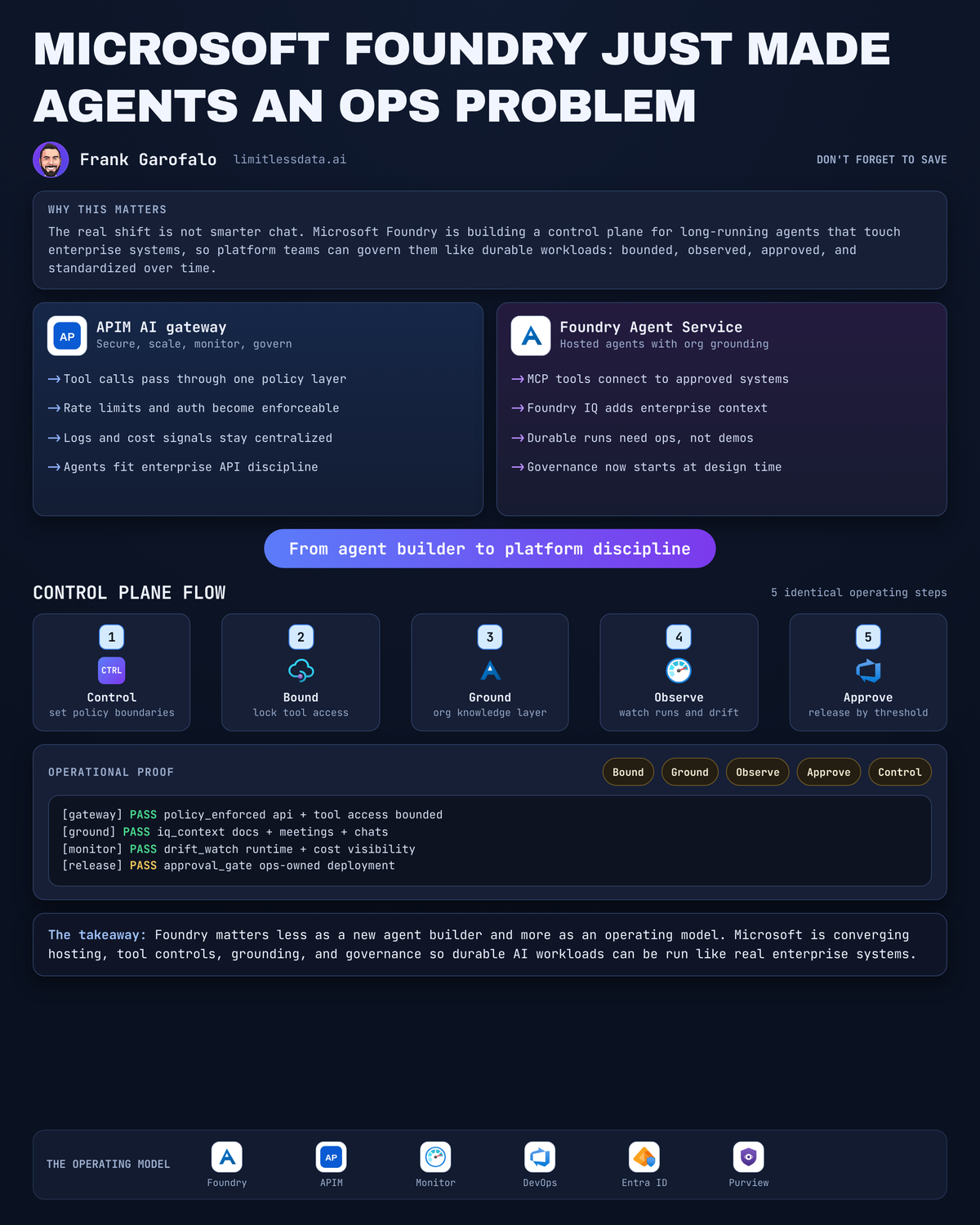
The real shift in Microsoft Foundry is not smarter chat. It is the arrival of a control plane for agents that run over time, touch enterprise systems, and now need the same operating discipline teams once applied to Functions, Kubernetes, and integration platforms.
Why this moment is different
A lot of the market is still arguing about prompts, models, and which chat surface wins. That is the wrong layer.
What matters now is whether an agent can start work, call tools, wait on a long-running operation, resume correctly, and finish under policy. Once that happens, you are no longer designing a conversation. You are operating a distributed system with identity, state, retries, approvals, and cost.
Microsoft Foundry is getting interesting because the pieces are lining up:
- SDK-based agent creation and conversation flows are there in the Foundry quickstart
- hosted agents give teams a deployment target with project-level permissions
- MCP tool connectivity gives agents a standard way to reach tools and enterprise systems
- Azure API Management’s AI gateway is explicitly positioned to secure, scale, monitor, and govern AI models, agents, and tools behind intelligent apps, per the APIM AI gateway docs
That combination is the story. Not “we built another agent builder.”
I wrote earlier about Foundry Hosted Agents as a deployment model for enterprise platform teams because this is where the center of gravity moves: away from one-off copilots and toward standard runtime patterns.
From chat surface to durable workload
Here is the architectural breakpoint: long-running operations.
The Foundry MCP tooling docs spell it out. Some MCP servers take longer than a normal synchronous timeout, so for long-running operations the server returns a task reference and the runtime keeps the response in the run object until the operation completes, per the MCP tools documentation.
That one design choice changes everything.
If a run can persist while a tool call is still in flight, now you need to answer questions most AI teams have been ducking:
- Where does run state live?
- How long does it persist?
- What resumes it?
- How do operators tell “slow” from “stuck”?
- Which actions require approval before resume?
- How do you correlate the original user request to the eventual tool completion?
This is why I keep pushing teams to think in workload terms, not assistant terms.
A simple mental model helps. The run is the unit of work. The tool call is a dependency. The state transitions are your operational contract.
This tiny example shows the shape. It is not production code. It is the right way to think about lifecycle.
# Minimal Foundry-style agent run that tracks a long-running MCP tool through run state.
import time
from dataclasses import dataclass

@dataclass
class Run:
    id: str
    state: str
    tool_call_id: str | None = None

run = Run(id="run_001", state="queued")
print(f"{run.id}: {run.state}")

for state in ["in_progress", "requires_action", "in_progress", "completed"]:
    time.sleep(0.2)
    run.state = state
    if state == "requires_action":
        run.tool_call_id = "mcp_call_42"
        print(f"{run.id}: waiting on MCP tool {run.tool_call_id}")
    else:
        print(f"{run.id}: {run.state}")
What to notice: the run moves through queued, in progress, requires action, back to in progress, then completed. That “requires_action” moment is where governance, observability, and human control enter the picture.
Foundry is becoming the agent control plane
This is the part people miss. Microsoft is assembling platform ingredients that look a lot like the standardization wave we already lived through with app runtimes and integration stacks.
You can see the layers:
- Hosted agents in Foundry for managed runtime patterns
- A common abstraction in Microsoft Agent Framework, where agent types derive from a shared
AIAgentbase with a consistent interface, per the Agent Framework docs - Organizational grounding through Foundry IQ and Work IQ
- API-path governance through APIM AI gateway
- Experience surfaces in Copilot-style apps and Power Platform
That is a control plane story.
Back in Q3 of 2021, I sat in a war room with a 14-person platform team after an Azure Functions estate had sprawled across six subscriptions, and the cleanup took longer than the original build because nobody had standardized identity, telemetry, or deployment boundaries. Agents are heading for the exact same ditch if platform teams let every business unit freestyle.
Foundry workflows being retired on December 1, 2024 is actually a healthy signal, not a red flag. Microsoft is still consolidating the right abstraction for orchestration, and the docs say those UI-based workflows in Foundry are being retired, per the workflow documentation. Good. UI abstractions come and go. Durable platform primitives are what survive.
If you want the big-picture architecture, this is the pattern I would show an enterprise architecture board.
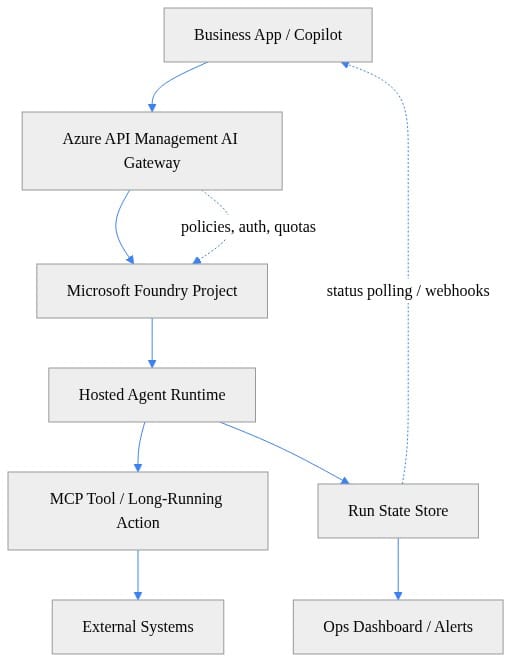
What to notice: APIM sits in front, hosted agents run in Foundry, MCP tools reach external systems, and run state plus telemetry become first-class operating concerns. That is the skeleton of an enterprise agent platform.
I went deeper on this exact runtime problem in Microsoft Foundry long-running agents for enterprises and the conclusion has not changed: the run lifecycle is the product.
What platform teams should standardize first
If you are responsible for enterprise architecture, stop debating whether agents are “real.” Standardize the boring parts now.
1. Identity and permissions
Hosted agent deployment already assumes Azure subscription access and specific Foundry project permissions such as Foundry Project Manager at project scope or Owner when creating a new project, per the hosted agent quickstart.
That is your starting point, not your finish line.
You still need:
- runtime identities for outbound tool access
- least-privilege access to data sources
- separation between build permissions and run permissions
- credential handling through managed identity and vault-backed secrets
This quick PowerShell object is the kind of preflight shape I like teams to define before anybody deploys a hosted agent.
# Create a Foundry project prerequisites object for governed agent deployment.
$projectConfig = [pscustomobject]@{
    SubscriptionId = "00000000-0000-0000-0000-000000000000"
    ResourceGroup  = "rg-foundry-prod"
    Location       = "eastus"
    FoundryProject = "fdry-enterprise-agents"
    KeyVault       = "kv-foundry-prod"
    ManagedIdentity = "mi-foundry-agents"
}

$projectConfig | ConvertTo-Json -Depth 3
What to notice: subscription, resource group, project, Key Vault, and managed identity are treated as platform prerequisites. If those are ad hoc, your security posture is ad hoc.
2. Tool access boundaries
Not every MCP server should be reachable by every agent. Period.
You need a tool onboarding process that answers:
- what system does this tool touch?
- is it read-only, write, or transaction-executing?
- does it support long-running operations?
- what is the timeout and retry policy?
- what audit event gets emitted on use?
This is where APIM earns its keep. Put a gateway in the path, enforce auth, add quotas, stamp correlation IDs, and centralize policy.
Here is a stripped-down policy scaffold to make that concrete.
# Script APIM AI gateway policy scaffolding for auth, quotas, and trace correlation.
$apiName = "agents-api"
$backendUrl = "https://foundry.contoso.internal"
$policyXml = @"
<policies>
  <inbound>
    <base />
    <set-header name="x-correlation-id" exists-action="override">
      <value>@(context.RequestId.ToString())</value>
    </set-header>
    <rate-limit calls="60" renewal-period="60" />
    <authentication-managed-identity resource="https://cognitiveservices.azure.com" />
    <set-backend-service base-url="$backendUrl" />
  </inbound>
  <backend><base /></backend>
  <outbound><base /></outbound>
</policies>
"@

$policyXml
What to notice: correlation IDs, rate limiting, managed identity auth, and backend indirection are all there. This is basic platform hygiene. Agents do not get a special exemption from API discipline.
3. State management and observability
If a run pauses on a tool call, your operators need to see the run ID, tool call ID, current state, elapsed time, and owning system. Otherwise incident response turns into archaeology.
This example is the minimum viable observability mindset.
# Correlate run IDs and tool call IDs into structured logs for enterprise observability.
import json
from datetime import datetime

def log_event(run_id: str, state: str, tool_call_id: str | None = None) -> None:
    record = {
        "ts": datetime.utcnow().isoformat() + "Z",
        "run_id": run_id,
        "state": state,
        "tool_call_id": tool_call_id,
        "service": "foundry-agent",
    }
    print(json.dumps(record))

log_event("run_001", "queued")
log_event("run_001", "requires_action", "mcp_call_42")
log_event("run_001", "completed", "mcp_call_42")
What to notice: structured logs with run IDs and tool call IDs. Without those two fields, troubleshooting long-running agents gets ugly fast.
4. Approval flows
The dividing line is simple: analysis can be broad, execution must be bounded.
If an agent is summarizing a contract, fine. If it is submitting an approval, creating a ticket, changing a record, or triggering a payment-related workflow, define the approval checkpoint before rollout. Not after the first incident.
5. Cost controls
Model calls are only part of the bill. Tool invocations, orchestration churn, retries, and idle-but-persisted run state all add up. Treat agent spend as a platform budget with showback, not as a hidden app-team line item.
Why grounding now matters more than model choice
This is where Foundry gets strategically smart.
Microsoft describes Foundry IQ as a managed knowledge layer that captures collaboration signals from documents, meetings, chats, and workflows to provide agents insight into how an organization operates, per the Foundry IQ docs. And the Work IQ MCP overview says Work IQ is the intelligence layer grounding Microsoft 365 Copilot and agents in real-time shared organizational context, with Microsoft Foundry listed as a supported client, per the Work IQ MCP overview.
That matters more than another round of model horse-race nonsense.
For enterprises, the durable advantage is not “we swapped model A for model B.” It is “our agents can access fresher, permission-aware, organization-specific context with provenance and control.”
That shifts the architecture conversation toward:
- context freshness
- source permissions
- grounding provenance
- shared semantic understanding across tools
- policy over who can use what organizational signal
In plain English: the best enterprise agent is usually the one with the cleanest governed access to your operating reality.
I made a similar point in Microsoft Foundry Turns Agent Memory Into an SRE Problem. Memory, grounding, and state are not prompt-engineering topics once you hit production. They are operating model topics.
Governance is moving into the runtime path
This is the strongest opinion I have on this whole space: enterprises need to stop treating agent governance as a Copilot side project.
Governance is becoming runtime infrastructure.
When APIM says its AI gateway capabilities secure, scale, monitor, and govern models, agents, and tools, that is not marketing fluff. That is the architecture direction. Policies, auth, quotas, observability, and routing are moving directly into the request path.
That changes the central platform team’s role. They are no longer just providing approved models and writing policy documents. They are owning:
- gateway policy baselines
- tool exposure standards
- run telemetry requirements
- approval integration patterns
- failure classification and escalation
- cost and quota enforcement
The practical implication is straightforward: if your agent stack bypasses your API governance stack, you are building shadow automation with a language model attached.
Here is the sequence I want teams to internalize.
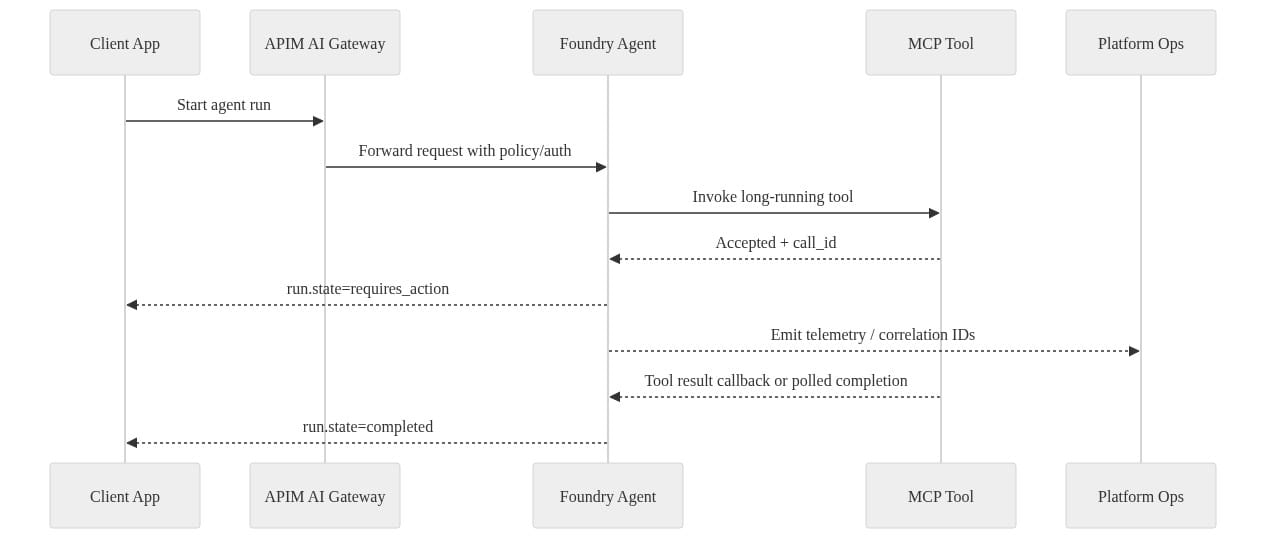
What to notice: the run starts through the gateway, the long-running tool returns an accepted state, telemetry goes to ops immediately, and completion happens later. That is enterprise runtime behavior. Design for it.
The operating model Microsoft is quietly assembling
Step back and the pattern is obvious.
Power Platform gives business-side app and automation surfaces. Foundry gives agent runtime and project scaffolding. Work IQ and Foundry IQ push organizational grounding into a managed layer. APIM and the rest of Azure governance services move control and observability closer to execution. Even the certification track is catching up: Microsoft’s AB-100 study guide explicitly includes assessing agents for task automation, analytics, and decision-making in AI-powered business solutions.
That adds up to a layered operating model:
- experience layer: business apps, copilots, custom front ends
- agent runtime layer: hosted agents and agent framework patterns
- tool layer: MCP-connected enterprise systems and actions
- knowledge layer: organizational grounding and managed context
- governance layer: identity, gateway policy, telemetry, approvals, budgets
The strategic question now is not which team can build an agent fastest.
It is which platform can run fifty of them safely, consistently, and with enough operational discipline that audit, security, and SRE teams do not revolt.
What enterprise architects should do next
Here is the playbook I would use.
Define a reference architecture first
Do this before business units scatter agents across random projects and subscriptions. Lock in identity, network path, logging, gateway placement, and tool onboarding.
Pilot one narrow long-running use case
Pick a domain where waiting and resuming are unavoidable:
- approval routing
- procurement exceptions
- service operations triage
- document-to-action workflows with human signoff
Do not start with a toy Q&A bot. Start where runtime discipline actually matters.
Standardize the run contract
Every run should have:
- a unique ID
- owner metadata
- state transitions
- correlation IDs
- tool call references
- timeout policy
- cancellation behavior
- retention policy
Avoid over-investing in UI abstractions
Foundry will keep evolving. Good. Bet on durable interfaces, telemetry hooks, identity boundaries, and gateway controls. Those survive product churn.
Treat agents as a platform estate
That means scorecards, review boards, cost reporting, incident response, and lifecycle ownership.
If you want the blunt version: Microsoft Foundry matters because it is turning agents from novelty software into governable workloads. The winning enterprises will not be the ones with the flashiest demo. They will be the ones that build the cleanest control plane.
Have you actually standardized run state, tool boundaries, and approval checkpoints for agents that can outlive a single request? Reply yes or no.
#AzureAI #EnterpriseAI #DataArchitecture
Sources & References
- Official Microsoft Power Platform documentation - Power Platform
- Work IQ MCP overview (preview)
- AI gateway capabilities in Azure API Management
- What is Foundry IQ? - Microsoft Foundry
- Microsoft Agent Framework Agent Types - Microsoft Foundry
- Study guide for Exam AB-100: Agentic AI Business Solutions Architect
- Build a workflow in Microsoft Foundry (Preview) - Microsoft Foundry
- Quickstart: Get started with Microsoft Foundry SDK - Microsoft Foundry
- Quickstart: Deploy your first hosted agent - Microsoft Foundry
- Connect to MCP Server Endpoints for agents - Microsoft Foundry
Try it yourself
Run this tutorial as a Jupyter notebook: Download runbook.ipynb (33 cells, 24 KB).



