Durable agents in Foundry Agent Service explained
Long-Running Agents in Foundry Agent Service: The Enterprise Case for Durable AI Workflows


This is a deep dive. If you're architecting enterprise-grade AI, here’s the full case for durable workflows.
On this page
- Why this matters now
- Separate chat UX from durable execution
- When a long-running agent is justified
- When standard assistants or conventional automation are better
- The platform requirements I’d insist on before production
- Foundry’s enterprise case is orchestration with managed guardrails
- A pragmatic adoption model
- My bottom line
- Sources & References
Durable agents are getting too much hype for the wrong reason. The real shift is not better chat — it’s Microsoft turning long-running agent workflows into managed enterprise infrastructure, and that changes the operating model far more than the user experience.
I’m bullish on this pattern, but only in the narrow slice where it actually earns its keep: work that has to persist across time, tools, failures, and approvals. If your “agent” finishes in one request and dies with the browser tab, you do not have a durable workflow. You have a chatbot with ambition.
Why this matters now
Microsoft is making that distinction clearer. Foundry Agent Service (part of the Azure AI platform) is positioned as a managed platform to build, deploy, and scale AI agents, supports frameworks and models from the Foundry catalog, and uses the Responses API as the entry point, per the Foundry Agent Service overview. That is a platform story, not a novelty demo.
Azure is also signaling where this belongs operationally. App Service guidance explicitly points to Foundry Agent Service as a managed option for production-ready agents with monitoring and scalability, per the Azure App Service agentic app guidance. That’s the part enterprise teams should pay attention to. Once Microsoft starts packaging these things as managed runtime components, the conversation moves from “can it answer?” to “who owns retries, identity, approval checkpoints, and incident review?”
A specific field note: in Q1, a 14-person platform team I worked with had an internal procurement assistant happily drafting vendor responses, right up until a network timeout dropped the run after it had created the ticket but before it logged the action, and suddenly nobody could prove whether the external system had been touched once or twice.
That is where durable execution stops being theory.
Separate chat UX from durable execution
A normal assistant answers in-session. Maybe it calls a tool. Maybe it summarizes a document and opens a ticket. Fine.
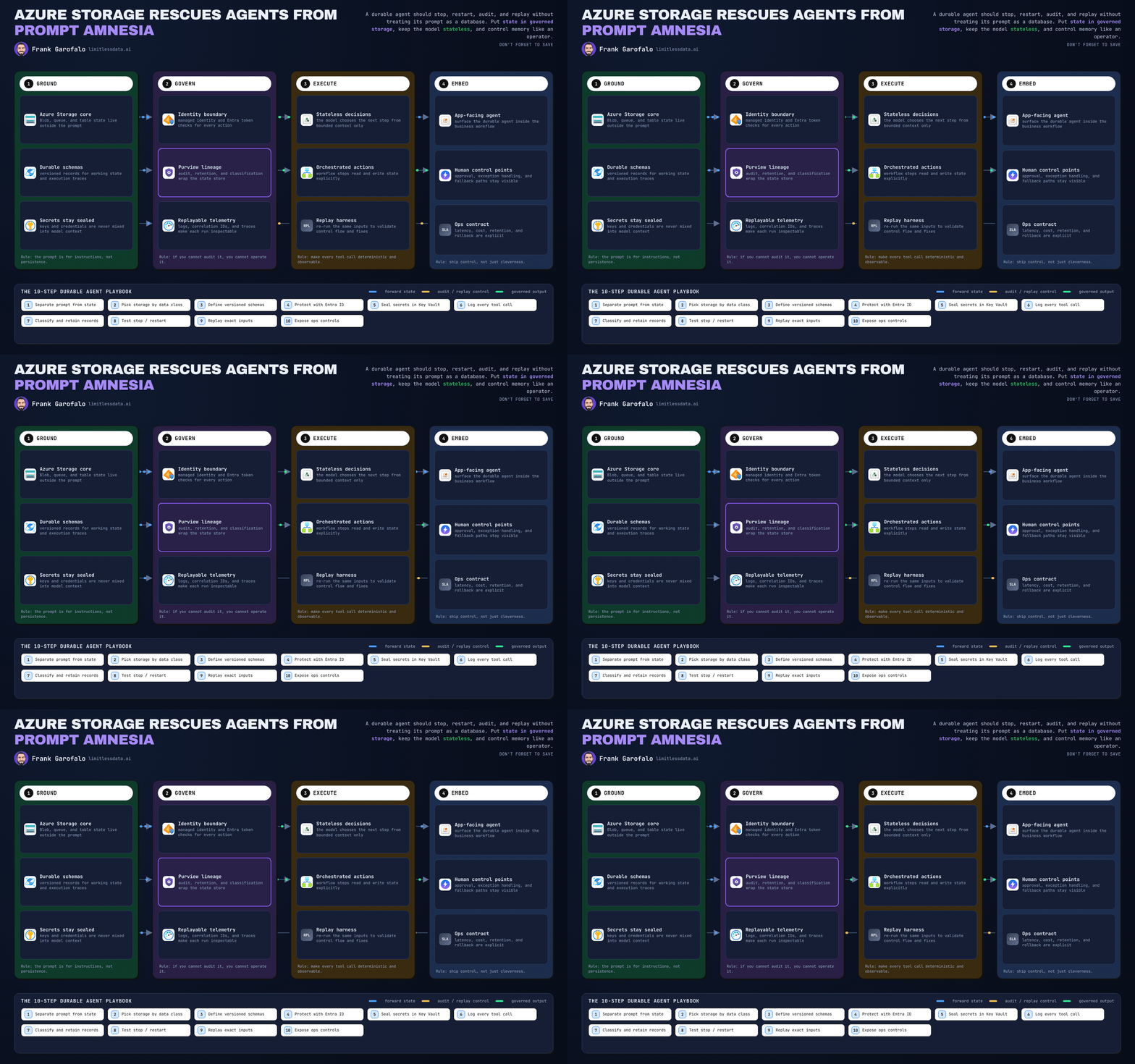
A durable agent workflow is different. It can run for hours, call external tools, wait for an event, survive an infrastructure failure, and then resume with state intact. Microsoft’s Durable Task guidance is explicit: if agents run for long periods, call external tools, and must survive failures, they need durable execution, per the Durable Task for AI agents docs.
That definition matters because a lot of teams are slapping the word “agent” on things that are really just tool-using assistants. There’s nothing wrong with that. I build plenty of those. But they are not the same operational problem.
The classic Foundry agent concept is already orchestration-oriented: models, instructions, tools, and knowledge sources working together to complete tasks, per the Agent Service concepts documentation. The hard part is not the prompt. The hard part is coordinating tools, state, and outcomes over time.
Here’s the mental model I use with architecture teams: if the business process can pause, wait on a human, resume tomorrow, and still needs a clean audit trail, you are in workflow territory.
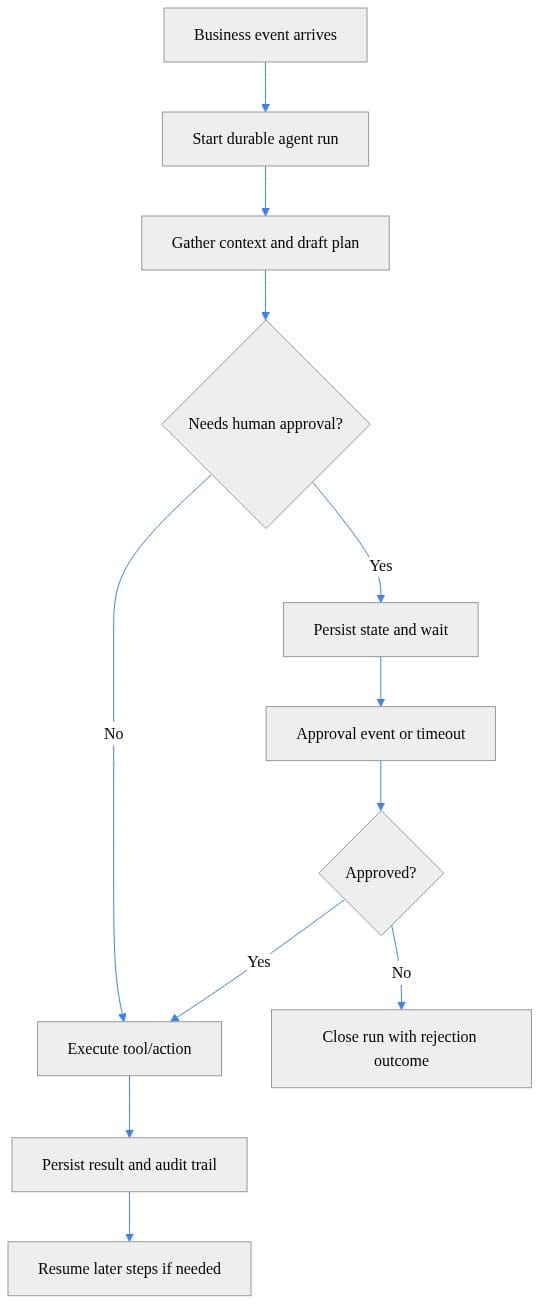
What matters most is not “use AI” — it’s “persist state and wait.” That’s the line between a session feature and actual workflow infrastructure.
When a long-running agent is justified
Microsoft’s own workflow guidance says teams should try simpler patterns first before reaching for workflows, per the Agent Framework workflows guidance. Good. That’s the right advice.
Use a durable agent when all four of these are true:
- The work spans time.
- The work spans systems.
- The outcome is uncertain enough to require reasoning or adaptive branching.
- The process must resume after waits, failures, or approvals.
Good fits:
- Exception handling across CRM, ERP, and ticketing
- Procurement or finance approvals with document review
- Incident triage that waits on vendor input
- Claims or case workflows that need human checkpoints
Bad fits:
- Q&A over a knowledge base
- Summarization
- Single-shot document extraction
- Deterministic automation you already know how to model in Logic Apps or Functions
The durable wait is the giveaway. Microsoft’s Durable Task extension for Agent Framework supports human approvals and timed waits that can last hours, days, or weeks without losing state. That is exactly where this architecture earns its complexity.
# Minimal durable agent workflow with an approval checkpoint
from dataclasses import dataclass, field
from datetime import datetime
import time

@dataclass
class DurableRun:
    run_id: str
    state: str = "draft"
    history: list[str] = field(default_factory=list)

run = DurableRun(run_id="run-1001")
run.history.append(f"{datetime.utcnow().isoformat()} created")
run.state = "waiting_for_approval"
run.history.append(f"{datetime.utcnow().isoformat()} paused for approval")

time.sleep(1)  # stand-in for a long wait handled by the platform

approval_received = True
run.state = "approved" if approval_received else "rejected"
run.history.append(f"{datetime.utcnow().isoformat()} {run.state}")
print(run)
The point is not the sleep call. In a real platform, the wait is externalized and stateful. The important thing is that the run has identity, state, and history across the pause.
When standard assistants or conventional automation are better
If you do not need persistence, do not buy the complexity.
A standard assistant is better for:
- Knowledge retrieval
- Summaries
- Draft generation
- Lightweight tool use inside a user session
Conventional automation is better for:
- Deterministic workflows
- High-volume repetitive processing
- Well-defined integrations
- Low-ambiguity business rules
And Microsoft’s own tooling reinforces that point. Built-in action tools in Agent Service include Azure Logic Apps and Azure Functions, per the Agent Service transparency note. That tells you exactly how to think about this stack: agents should sit on top of existing automation surfaces when reasoning is needed, not replace them wholesale.
I’ve written before about Foundry Hosted Agents as a deployment model for enterprise platform teams and the same rule applies here: keep the deterministic work deterministic. Let the agent decide when to invoke a controlled workflow, not improvise every step of the workflow itself.
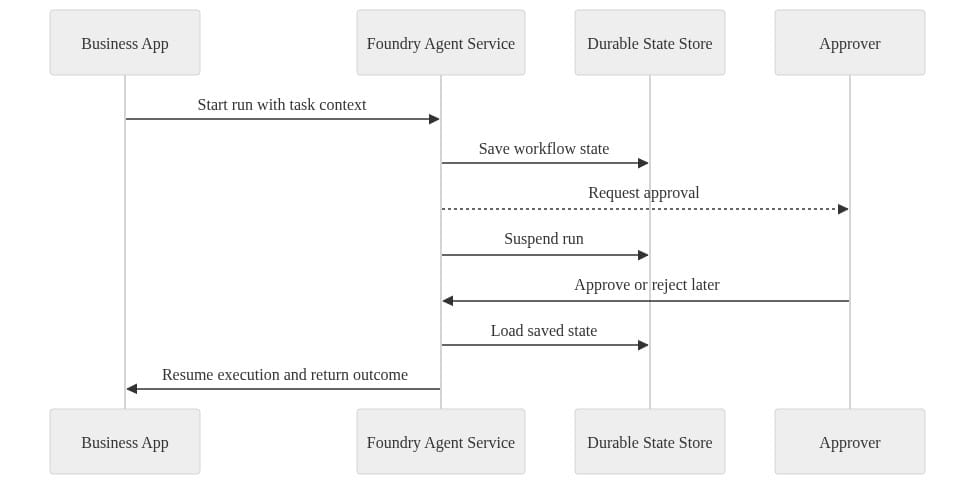
The durable state store is not a side detail. It is the backbone of resumability, auditability, and recovery.
The platform requirements I’d insist on before production
This is where most organizations are not ready.
1. Identity boundaries
Separate user identity, agent identity, and downstream system permissions. If the agent can submit, approve, and reconcile under one broad service principal, you built a compliance incident generator.
2. Approval checkpoints
High-impact actions need explicit pause points. Durable patterns are valuable because the pause is first-class, not hacked in with a database flag and a cron job.
# Timeout-aware wait pattern for enterprise escalation logic
from datetime import datetime, timedelta

started = datetime.utcnow()
deadline = started + timedelta(minutes=30)
approval_event_time = started + timedelta(minutes=45)

if approval_event_time <= deadline:
    outcome = "approved_in_time"
else:
    outcome = "timed_out_escalate"

result = {
    "started": started.isoformat(),
    "deadline": deadline.isoformat(),
    "approval_event_time": approval_event_time.isoformat(),
    "outcome": outcome,
}
print(result)
Timeout is a business outcome, not just a technical exception. Escalate, cancel, or route differently — but define it.
3. Observability
Long-running systems fail slowly and sideways. You need telemetry for:
- run starts and completions
- tool calls
- waits and resumes
- retries
- human approvals
- final actions
- correlation IDs across systems
# Check diagnostic settings to support auditability of long-running agent operations
param(
    [string]$ResourceId = "/subscriptions/00000000-0000-0000-0000-000000000000/resourceGroups/rg-foundry-prod/providers/Microsoft.CognitiveServices/accounts/foundry-prod"
)

$diag = Get-AzDiagnosticSetting -ResourceId $ResourceId

if ($diag) {
    $diag | Select-Object Name, WorkspaceId, EventHubAuthorizationRuleId, StorageAccountId | Format-List
} else {
    Write-Output "No diagnostic settings found for resource."
}
“No diagnostic settings found” should stop your rollout conversation cold.
4. Retry and idempotency
Durability without idempotency is how you get duplicate purchase orders, duplicate tickets, and duplicate customer notifications. Every action with side effects needs a repeat-safe design.
5. Audit trails
You need a durable event record for every meaningful transition. Because six weeks later, somebody will ask who approved what, when, and under which run context.
# Emit an auditable event record for each durable workflow transition
from datetime import datetime
import json

event = {
    "run_id": "run-3007",
    "agent": "procurement-review-agent",
    "transition": "waiting_for_approval -> approved",
    "actor": "manager@contoso.com",
    "timestamp_utc": datetime.utcnow().isoformat(),
    "correlation_id": "8f7f2d6a-1d7d-4d6f-a0d8-2d9b8f6f1a11"
}

print(json.dumps(event, indent=2))
Actor, transition, timestamp, and correlation ID are not optional if this touches a regulated or revenue-impacting process.
Foundry’s enterprise case is orchestration with managed guardrails
The strongest argument for Foundry Agent Service is not that it invents a new category. The strongest argument is that Microsoft is productizing the runtime burden that teams were otherwise going to hand-roll badly.
That matters. Platform teams do not need another science project. They need managed deployment, scaling, integration points, and operational consistency. Azure Architecture guidance frames Foundry as part of a unified PaaS approach for enterprise AI operations and application development.
The SAP angle is useful here too. The “systems of record to systems of intelligence” story is real, but only when execution is enterprise-grade. If the agent can reason beautifully and then falls apart on a two-day wait, it is not a system of intelligence. It is a demo.
I made a related argument in Microsoft Foundry agent platform for enterprise operations: the winning pattern is not autonomous magic. It is controlled orchestration with managed boundaries.
A pragmatic adoption model
Here’s how I’d roll this out if I owned the platform.
Start with one narrow durable workflow
Pick a process where persistence creates obvious business value:
- manager approval before external action
- cross-system exception handling
- case investigation with timed waits
- vendor or customer response loops
Do not start with a general-purpose “enterprise agent.”
Keep deterministic automation where it belongs
Logic Apps, Functions, and existing workflow engines should still handle the fixed steps. Use the agent at the decision points where interpretation, summarization, or adaptive routing adds value.
Define governance before scale
Before the second workflow goes live, lock down:
- approved tools
- maximum runtime
- retry limits
- escalation paths
- approval requirements
- logging standards
- incident ownership
Make ownership explicit
Architecture, platform engineering, security, and risk all have a piece of this. If nobody owns the run lifecycle end to end, the first production issue turns into a committee meeting.
# Persist and resume durable workflow state across long-running steps
import json
from pathlib import Path

state_file = Path("agent_run_state.json")
state = {
    "run_id": "run-2001",
    "step": "await_vendor_response",
    "status": "suspended",
    "context": {"ticket": "INC-4821", "owner": "ops-team"}
}

state_file.write_text(json.dumps(state, indent=2))
loaded = json.loads(state_file.read_text())
loaded["status"] = "resumed"
loaded["step"] = "finalize_recommendation"
print(json.dumps(loaded, indent=2))
Persistence is not glamorous, but it is the difference between “we can resume the case” and “we need the user to start over.”
My bottom line
Long-running agents deserve enterprise attention only when the work genuinely outlives a request and crosses business boundaries. That is why Foundry plus durable execution matters. It makes a hard pattern more practical.
But do not confuse practicality with universal fit.
If the job is short-lived, deterministic, and easy to automate, use simpler patterns. If the job needs to wait, retry, survive failures, and act after approvals, then durable agents are worth the architecture review. Treat this as an orchestration and governance decision first, and a UX upgrade second.
That’s the enterprise case.
Rate your team’s readiness for durable agent workflows from 1 to 5 — and be honest: are you ready for persisted state, retries, approvals, and audit trails, or are you still dressing up chat as automation?
#AzureAI #EnterpriseAI #DataArchitecture
Sources & References
- Workflows
- Durable Task for AI Agents - Azure
- Build agentic web applications in Azure App Service - Azure App Service
- Build a Multiple-Agent Workflow Automation Solution by using Microsoft Agent Framework - Azure Architecture Center
- What is Microsoft Foundry Agent Service? - Microsoft Foundry
- Threads, Runs, and Messages in the Foundry Agent Service (classic) - Microsoft Foundry (classic) portal
- Transparency Note for Foundry Agent Service - Microsoft Foundry
- Durable Task Extension for Microsoft Agent Framework
- Introduction to AI Agents
- SAP with Microsoft AI: Foundry & SAP Overview
Try it yourself
Run this tutorial as a Jupyter notebook: Download runbook.ipynb (28 cells, 18 KB).