Build a Proactive Azure Ops Copilot on Azure
Building a Proactive Azure Ops Copilot for Mission-Critical Environments


“Can we let the ops copilot auto-fix Sev1s in prod?”
That question is exactly how teams end up with a very expensive outage. In mission-critical Azure estates, the dangerous failure mode is not missing AI. It’s an eager copilot with weak grounding, broad permissions, and no approval path touching production operations.
I’m going to show you how I’d build this the way we build real operational systems: evidence first, recommendation second, action last. The target is not a cute chatbot. The target is a controlled Azure operations copilot for incident triage, context gathering, runbook suggestion, and tightly governed action initiation.
Azure already gives you the building blocks. Azure Copilot is positioned as an AI assistant for operations from cloud to edge, with documented guidance around prompting, access, and agent experiences in preview on the Azure Copilot docs. The architecture patterns are sitting in the Azure Architecture Center. Copilot Studio gives you the workflow and agent shaping layer for business scenarios on the Microsoft Learn module. That’s enough to assemble something useful and safe.
In Q3, I watched a 14-person platform team spend 47 minutes on a payments incident because the responder had alerts in one pane, Resource Graph in another, and the approved restart runbook buried in a SharePoint folder nobody trusted.
This tutorial is how I’d fix that.
Step 1: Define the operating model before you touch prompts
A proactive ops copilot has a different job than a helpdesk bot.
What this system should actually do
For mission-critical Azure environments, I want the copilot to do four things well:
- Detect or receive a high-signal incident trigger
- Build a grounded context package from telemetry and architecture metadata
- Summarize what is happening and suggest only approved next steps
- Initiate actions only through an approval gate and a controlled workflow
That sounds obvious, but teams skip straight to “let’s connect a model to Azure” and then act surprised when it starts improvising.
What it should never do by default
I do not want freeform autonomous remediation in production. Not restarts. Not failovers. Not secret rotation. Not scale actions. If the blast radius is real, the approval path must also be real.
Traditional Azure Monitor alerting already tells you something broke. The gap is the ugly middle: gathering evidence, correlating known context, mapping the issue to an approved runbook, and moving a human responder faster without handing a bot the keys to the building.
The architecture I recommend
Start with a simple event-driven pattern:
- Azure Monitor alert or incident fires
- Event Grid routes the event
- A context builder gathers evidence from logs, inventory, and approved metadata
- The copilot receives a grounded evidence package
- If action is needed, the request goes through approval
- Only then does automation execute
Here’s the shape.
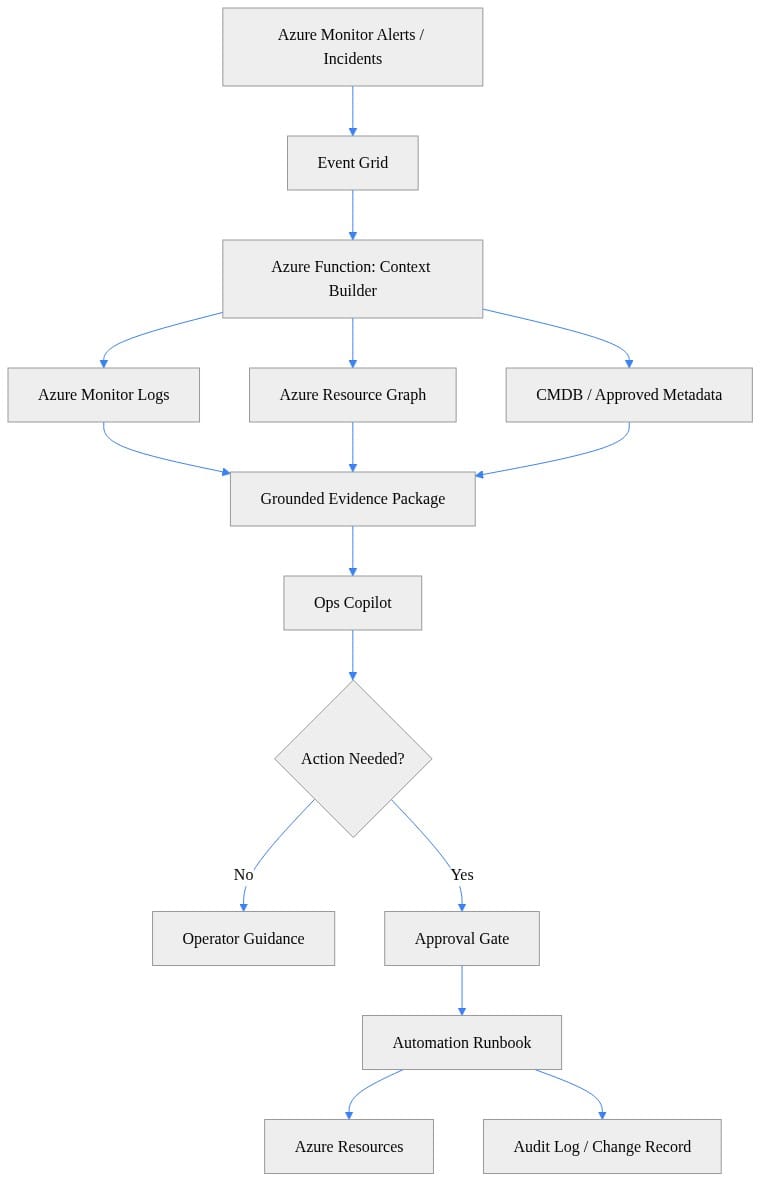
What to observe: the copilot sits after evidence assembly, not before it. That ordering matters. If you put the model in front of the context layer, you get confident nonsense faster.
Step 2: Choose the control plane before the model
The cleanest builds I’ve seen treat this as a reference architecture, not a prompt experiment.
Use architecture patterns, not vibes
The Azure Architecture Center is the right starting point because this problem spans monitoring, identity, automation, networking, and governance. You’re not deploying “an AI feature.” You’re standing up an operational control plane.
My stack for a first version looks like this:
- Azure Monitor for alerts and logs
- Event Grid for eventing
- Azure Functions for context building and orchestration
- Azure Resource Graph for live inventory context
- Key Vault for secrets if you absolutely need them
- Managed identities everywhere possible
- Copilot Studio for agent flow, boundaries, and handoffs
- Power Automate for approvals and notifications where it fits cleanly into the process
- Azure Automation or equivalent runbook tooling for guarded actions
If you want my blunt take, Azure Functions is the workhorse here. I wrote about that in Azure Functions Just Redefined the Agent Control Plane because this is exactly the kind of glue logic Functions handles well.
Why Azure Copilot and Copilot Studio have different jobs
Azure Copilot is the operations-facing assistant layer. Copilot Studio is where you shape behavior, define boundaries, and route actions through workflow. Power Platform as a whole is already positioned around agents, automation, connectors, and AI workflows on the Power Platform docs.
That separation is healthy:
- Azure Copilot side: operational interaction, cloud context, admin-facing experience
- Copilot Studio side: agent design, grounded prompts, flows, approvals, and controlled handoffs
Step 3: Build the context builder first
This is the heart of the whole design.
Grounding sources that actually matter
Your copilot should answer from three classes of evidence:
- Operational telemetry: logs, metrics, recent activity, incidents
- Architecture context: resource type, dependencies, tags, network placement, ownership
- Approved runbook context: known actions, environment policy, escalation rules
I do not want the model “figuring out” what to do from general internet knowledge. I want it constrained by my estate.
Here’s a simple Python example that pulls recent Azure activity, queries Resource Graph, and assembles an evidence package. It’s illustrative, not production-ready.
# Build a grounded evidence package from Azure Monitor, Resource Graph, and approved metadata.
import json
from azure.identity import DefaultAzureCredential
from azure.monitor.query import LogsQueryClient
from azure.mgmt.resourcegraph import ResourceGraphClient
from azure.mgmt.resourcegraph.models import QueryRequest

subscription_id = "00000000-0000-0000-0000-000000000000"
workspace_id = "11111111-1111-1111-1111-111111111111"
resource_id = "/subscriptions/000.../resourceGroups/prod-rg/providers/Microsoft.Compute/virtualMachines/app-01"

cred = DefaultAzureCredential()
logs = LogsQueryClient(cred)
arg = ResourceGraphClient(cred)

kql = f"AzureActivity | where ResourceId =~ '{resource_id}' | top 5 by TimeGenerated desc"
log_rows = logs.query_workspace(workspace_id, kql, timespan=None).tables[0].rows
arg_req = QueryRequest(subscriptions=[subscription_id], query=f"Resources | where id =~ '{resource_id}'")
resource_rows = list(arg.resources(arg_req).data)

evidence = {
    "resourceId": resource_id,
    "recentActivity": log_rows,
    "resourceMetadata": resource_rows,
    "approvedContext": {"serviceTier": "mission-critical", "owner": "ops@contoso.com"},
}
print(json.dumps(evidence, indent=2, default=str))
What to observe: the payload combines telemetry, inventory, and approved metadata into one object. That object is what you feed into the copilot or agent flow. Do not ask the model to fetch raw context ad hoc if you can hand it a structured package instead.
The retrieval pattern I use
For regulated or high-impact operations, I use a strict response order:
- Evidence
- Interpretation
- Recommendation
- Action request
That sounds small, but it changes operator behavior. The responder sees facts before suggestions. It also makes audit review much easier later.
Why grounded prompts and flows beat open conversation
Copilot Studio training material has been moving hard in the right direction on grounded prompts, Adaptive Cards, and agent flows in the Agent Academy sessions. That’s exactly what operations teams need.
In production operations, open-ended chat is a liability. Flows win because they force structure:
- Which incident type is this?
- Which evidence was retrieved?
- Which runbooks are approved?
- Is this production?
- Is approval required?
- Who approved it?
- What action was executed?
- Where is the audit record?
That’s an operational system. A chat transcript is not.
Step 4: Separate investigation from remediation
This is where most teams get reckless.
Read-only and write-capable paths should be different systems
I treat investigation and remediation as separate trust zones.
Read-only path:
- Query logs
- Query metrics
- Query Resource Graph
- Summarize incidents
- Suggest approved runbooks
- Draft escalation notes
Write-capable path:
- Restart a service
- Scale out a component
- Trigger failover
- Rotate a secret
- Update configuration
Those are not the same thing. They should not share the same permissions. They should not even share the same assumptions.
Add a policy decision before action
A tiny policy function goes a long way. Here’s a simple example that classifies severity and decides whether remediation is even eligible.
# Score incident severity and decide whether the copilot may recommend remediation.
def classify_incident(cpu_pct: float, error_rate: float, env: str, has_approval: bool) -> dict:
    severity = "sev3"
    if cpu_pct > 90 or error_rate > 0.05:
        severity = "sev2"
    if cpu_pct > 95 and error_rate > 0.10:
        severity = "sev1"

    can_remediate = env != "prod" or has_approval
    allowed_actions = ["diagnose", "summarize"]
    if can_remediate:
        allowed_actions.append("restart-service")

    return {
        "severity": severity,
        "environment": env,
        "approvalPresent": has_approval,
        "allowedActions": allowed_actions,
    }

print(classify_incident(cpu_pct=97, error_rate=0.12, env="prod", has_approval=False))
What to observe: production without approval gets diagnosis and summary only. That one rule prevents a lot of stupid behavior.
Enforce least privilege in Azure
Use managed identities. Full stop.
For the context builder, I usually start with read-only roles like Reader and Monitoring Reader scoped as tightly as possible. Here’s a Bicep example assigning those roles to a service principal or managed identity.
// Grant least-privilege read access so the copilot can query telemetry and inventory safely.
param principalId string
param subscriptionId string = subscription().subscriptionId

resource monitorReader 'Microsoft.Authorization/roleAssignments@2022-04-01' = {
  name: guid(subscriptionId, principalId, 'monitor-reader')
  scope: subscription()
  properties: {
    principalId: principalId
    roleDefinitionId: subscriptionResourceId('Microsoft.Authorization/roleDefinitions', '43d0d8ad-25c7-4714-9337-8ba259a9fe05')
    principalType: 'ServicePrincipal'
  }
}

resource reader 'Microsoft.Authorization/roleAssignments@2022-04-01' = {
  name: guid(subscriptionId, principalId, 'reader')
  scope: subscription()
  properties: {
    principalId: principalId
    roleDefinitionId: subscriptionResourceId('Microsoft.Authorization/roleDefinitions', 'acdd72a7-3385-48ef-bd42-f606fba81ae7')
    principalType: 'ServicePrincipal'
  }
}
What to observe: this is the directionally correct pattern for least-privilege read access. In a real environment, I’d usually scope lower than subscription unless I had a strong reason not to.
I covered the broader reliability and control argument in Azure Reliability Is Entering Its AI Control Era. Same principle here: if your AI layer can act, your control plane has to be better than your prompt.
Step 5: Stand up the orchestration layer
Now we wire the thing together.
Deploy a managed-identity Azure Function
I like Azure Functions for the context builder because it’s cheap, event-driven, easy to secure, and easy to slot into CI/CD. Here’s a basic Bicep definition for a system-assigned managed-identity Function App.
// Provision a managed-identity Function App for context building and safe automation orchestration.
param location string = resourceGroup().location
param functionAppName string
param environment string

resource plan 'Microsoft.Web/serverfarms@2023-12-01' = {
  name: 'asp-${functionAppName}'
  location: location
  sku: { name: 'Y1', tier: 'Dynamic' }
}

resource app 'Microsoft.Web/sites@2023-12-01' = {
  name: functionAppName
  location: location
  kind: 'functionapp'
  identity: { type: 'SystemAssigned' }
  properties: {
    serverFarmId: plan.id
    httpsOnly: true
    siteConfig: { appSettings: [{ name: 'ENVIRONMENT'; value: environment }] }
  }
}
What to observe: the important bit is the system-assigned identity and HTTPS-only configuration. The whole point is to avoid embedded credentials and keep the orchestration layer clean.
Add deployment automation
Even for a tutorial build, I want this deployed the same way I deploy anything else: source-controlled, repeatable, boring. Here’s a GitHub Actions example that pushes the infrastructure.
# Deploy an Azure Function workflow that builds context when a high-severity alert arrives.
name: deploy-ops-copilot
on:
  workflow_dispatch:
jobs:
  deploy:
    runs-on: ubuntu-latest
    steps:
      - uses: actions/checkout@v4
      - uses: azure/login@v2
        with:
          client-id: ${{ secrets.AZURE_CLIENT_ID }}
          tenant-id: ${{ secrets.AZURE_TENANT_ID }}
          subscription-id: ${{ secrets.AZURE_SUBSCRIPTION_ID }}
      - uses: azure/arm-deploy@v2
        with:
          resourceGroupName: rg-ops-copilot-prod
          template: infra/main.bicep
          parameters: environment=prod functionAppName=func-opscopilot-prod
What to observe: this is enough to make the deployment repeatable. For a real implementation, add environment protections, validation stages, and policy checks before prod.
Why this matters operationally
The first time you have to explain to an auditor or a reliability review board how the copilot got into production, “Bob clicked around in the portal” is not a serious answer.
Step 6: Build the first incident workflow in Copilot Studio
Start narrow. Very narrow.
Pick one scenario
The best first use case is usually one of these:
- Repeated service degradation on a known workload
- Noisy alert correlation for a single app tier
- Common restart decision with a clear runbook
- Dependency health summary for on-call handoff
Do not start with “all incidents across the subscription.” That’s how projects die.
My favorite first scenario is repeated App Service degradation with high CPU and rising 5xx rates. It’s common, it’s measurable, and the remediation path is usually straightforward if policy allows it.
Shape the agent around evidence and handoff
In Copilot Studio, define the flow so it does these things in order:
- Accept incident payload
- Call the context builder
- Present evidence summary
- Offer approved runbook suggestions
- If production action is requested, trigger approval workflow
- On approval, hand off to guarded automation
- Write audit status back to the incident record
This is where Copilot Studio Agent Node Just Moved Beyond Chat becomes relevant. The big leap is not “better chat.” It’s operational flow control.
Use approvals for production changes
Power Automate is perfectly reasonable here if your organization already uses it for approvals and notifications. Keep the approval payload tight:
- Incident ID
- Resource
- Evidence summary
- Proposed action
- Risk note
- Expiry time
- Ticket reference requirement
Step 7: Put a hard approval gate in front of remediation
If the environment is production, the path needs a brake pedal.
Define policy explicitly
I like having a machine-readable policy artifact that says what is allowed where. Here’s a simple example.
# Define a production approval check before any remediation workflow can execute.
environments:
  prod:
    approvalRequired: true
    allowedActions:
      - restart-service
      - scale-out
  nonprod:
    approvalRequired: false
    allowedActions:
      - restart-service
      - scale-out
      - recycle-worker
What to observe: production requires approval and only exposes a narrow action list. Non-prod can be looser. That split is exactly what you want.
Guard the automation entry point
Then the runbook itself should enforce the rule, not just trust the calling agent. Here’s a PowerShell example that refuses to run in production without an approval ticket.
# Invoke a guarded remediation runbook with managed identity and an approval gate.
param(
  [string]$AutomationAccount = "aa-ops-prod",
  [string]$ResourceGroup = "rg-ops-prod",
  [string]$RunbookName = "Restart-AppService",
  [string]$TargetResource = "/subscriptions/000.../resourceGroups/prod-rg/providers/Microsoft.Web/sites/app-prod",
  [string]$ApprovalTicket = ""
)

Connect-AzAccount -Identity | Out-Null
if ([string]::IsNullOrWhiteSpace($ApprovalTicket)) { throw "Approval ticket is required for production remediation." }

$params = @{
  TargetResource = $TargetResource
  ApprovalTicket = $ApprovalTicket
  RequestedBy    = "OpsCopilot"
}

Start-AzAutomationRunbook -AutomationAccountName $AutomationAccount `
  -ResourceGroupName $ResourceGroup -Name $RunbookName -Parameters $params
What to observe: the guard lives in the automation layer too. That’s intentional. Never rely on a single approval check in the conversational layer.
End-to-end flow
This is the sequence I want the team to internalize.
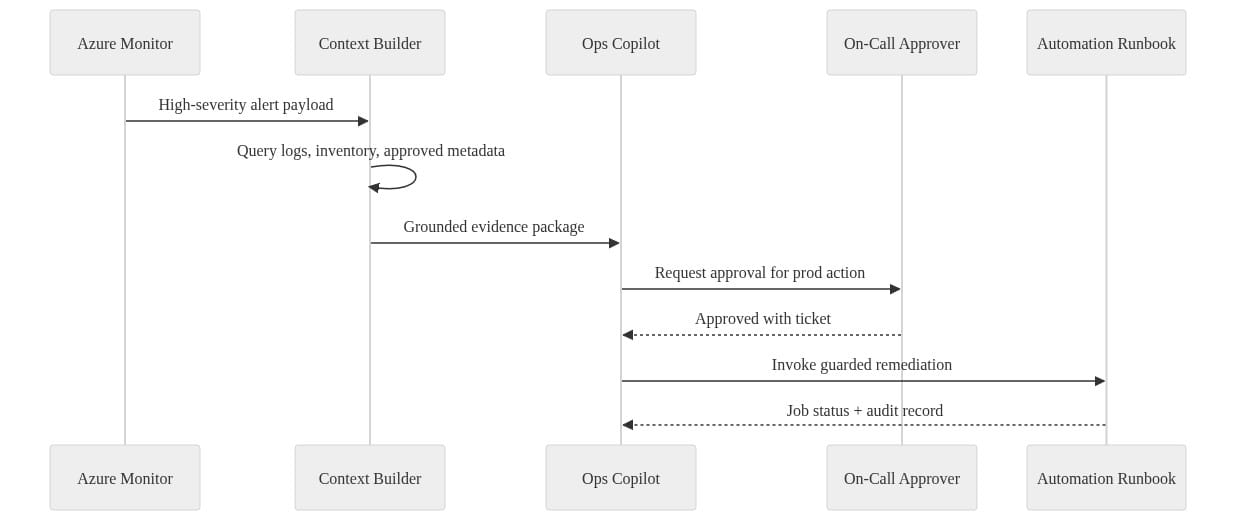
What to observe: the approver is a first-class actor in the system. That is the right design for mission-critical operations.
Step 8: Lock down access, secrets, and network boundaries
This part is not glamorous. It’s also where real systems survive contact with security review.
Identity
Use managed identities for Functions, runbooks, and any Azure-hosted integration point. Embedded secrets in agent configs are how teams accidentally create shadow admin tools.
Secrets
If a secret is unavoidable, store it in Key Vault and make access explicit. Rotate it like you mean it. Better yet, redesign the path so the secret disappears.
Networking
For sensitive operational integrations, prefer private networking and private endpoints where the service supports them. Keep the context builder and automation components off the public internet if your environment requires it.
Governance
The Microsoft 365 Copilot IT pro documentation includes governance, privacy, and security guidance on the Microsoft 365 Copilot docs. Different product family, same enterprise lesson: agent behavior without governance becomes a control failure very quickly.
Step 9: Plan the failure modes before rollout
A useful ops copilot can still fail badly if you don’t constrain it.
Failure mode 1: Alert fatigue with extra steps
If every warning becomes a copilot conversation, your responders will mute the whole thing.
Fix:
- Trigger only on high-confidence patterns
- Aggregate duplicate alerts
- Suppress low-value incident classes
- Start with one service boundary
Failure mode 2: Hallucinated remediation
The model invents a plausible fix because your grounding is weak.
Fix:
- Require evidence package attachment
- Limit recommendations to approved runbooks
- Present citations or source references inside the evidence payload
- Block freeform action generation
Failure mode 3: Over-broad permissions
The context builder gets Reader at subscription, then somebody adds Contributor “just to test,” and now your copilot can mutate production.
Fix:
- Separate read and write identities
- Scope roles to resource group or narrower where possible
- Put policy checks in the workflow and the runbook
- Review role assignments like you review firewall changes
Failure mode 4: Cost and token sprawl
Teams let every incident generate giant prompts with raw logs pasted into them.
Fix:
- Summarize upstream
- Pass compact evidence objects
- Keep prompts deterministic
- Trigger only on incidents that justify the cost
Step 10: Roll it out like an operations program, not a demo
Here’s the rollout motion I trust:
Phase 1: One service, one team, one incident class
Pick a single mission-critical service boundary and a small responder group. Measure:
- Time to triage
- Time to first accurate recommendation
- Escalation quality
- Approval turnaround time
- Number of actions blocked by policy
- Number of suggested actions accepted by humans
Phase 2: Expand read-only coverage
Once the evidence and recommendation quality are solid, expand the read-only side to more incident classes. This is the safest place to get value fast.
Phase 3: Add tightly scoped remediation
Only after the team trusts the evidence quality should you allow a tiny set of approved actions, with approvals and audit.
Upskill the team on purpose
If your ops and platform teams haven’t built agents before, don’t wing it. Microsoft’s hands-on learning paths are useful here, especially the Agent in a Day learning path for practical agent building patterns. I’d also use organizational learning plans if you need to standardize the rollout across multiple teams.
The build pattern I’d use tomorrow
If I had to stand this up quickly for a serious Azure estate, I’d do this:
- Azure Monitor and incident source already in place
- Event Grid trigger on high-severity incidents
- Azure Function builds grounded evidence package
- Resource Graph and logs queried with managed identity
- Copilot Studio flow presents evidence and approved options
- Power Automate routes production approvals
- Azure Automation executes only guarded runbooks
- Audit record written for every recommendation and action
- Start with one scenario, one service, one responder cohort
That is a proactive ops copilot I can defend in a design review.
A freeform bot with Contributor rights and a “go fix it” prompt? That’s a postmortem generator.
If you’re building one of these, keep the mental model simple: your copilot is an operational assistant sitting inside a governed control plane. The AI is the reasoning layer. It is not the trust layer.
Have you actually put approval-gated remediation in front of an Azure ops copilot in production? Reply yes or no.
#Copilotstudio #Azureoperations #EnterpriseAI
Sources & References
- Azure Architecture Center - Azure Architecture Center
- Official Microsoft Power Platform documentation - Power Platform
- Azure developer documentation
- Microsoft 365 Copilot hub
- Microsoft Learn for Organizations
- Agent in a day - Online Workshop - Training
- Microsoft 365 Copilot APIs Overview
- Azure Copilot
- Get started with Microsoft Copilot Studio - Training
- Copilot Studio Agent Academy
Try it yourself
Run this tutorial as a Jupyter notebook: Download runbook.ipynb (23 cells, 25 KB).