Fabric Dataflows Gen2 for Analytics Engineering
What Fabric Dataflows Gen2 Means for the Next Phase of Microsoft Analytics Engineering

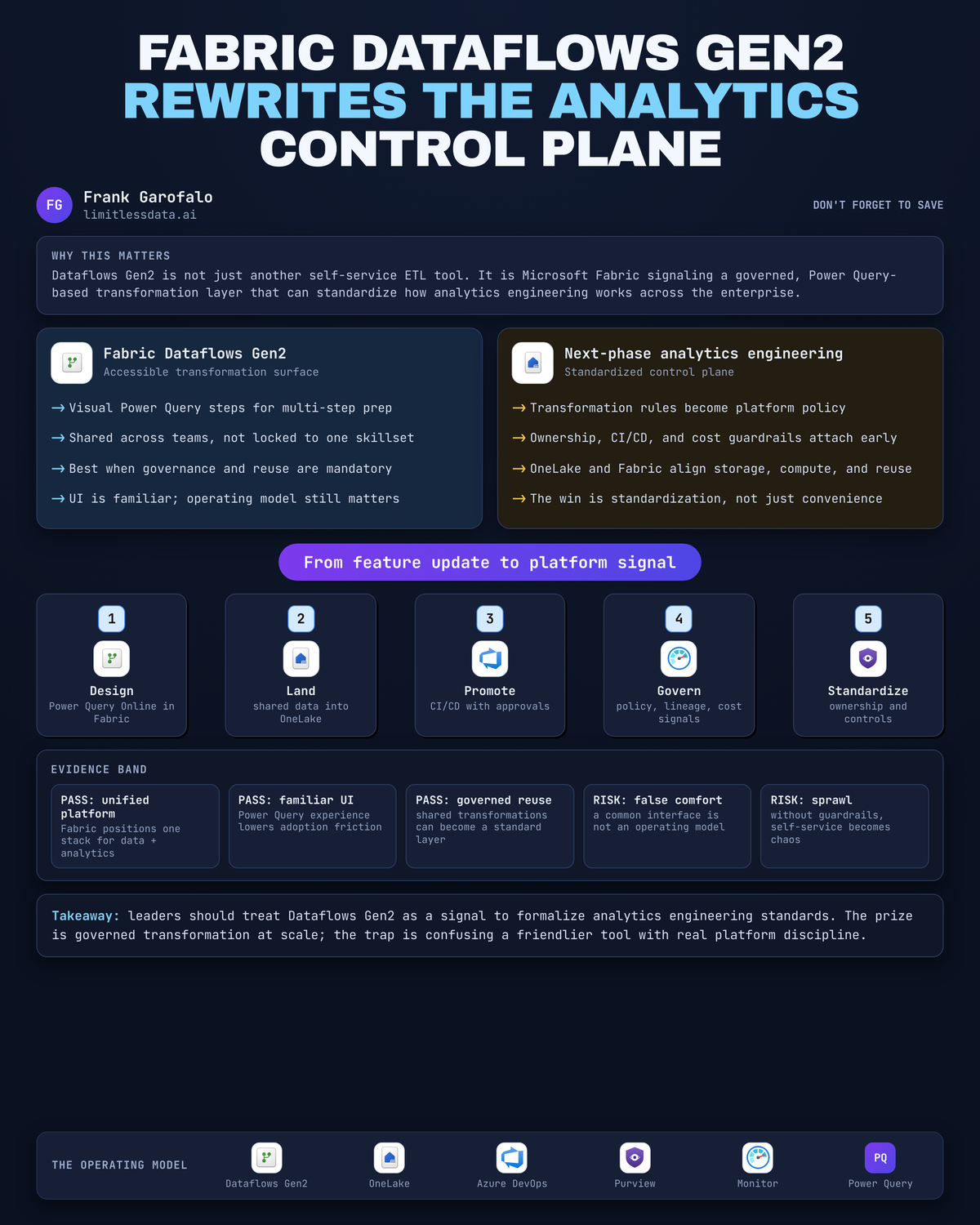
“Aren’t Dataflows Gen2 just faster self-service ETL with a nicer UI?”
On this page
- The feature story misses the platform signal
- Transformation is the most visible adoption wedge
- Fabric is consolidating the places transformation can land
- The real alternative is fragmented transformation
- Standardize the contract, not every implementation
- Common tooling does not eliminate operating discipline
- The next phase is governed transformation by design
- Sources & References
That’s the wrong read. The important story is that Microsoft is pushing governed, Power Query-based transformation into the middle of the enterprise analytics stack, and if you miss that platform signal, you’ll build Fabric like a pile of features instead of an operating model.
The feature story misses the platform signal
A lot of people looked at Dataflows Gen2 and saw another low-code ingestion surface. Sure, that’s part of it. Microsoft describes Fabric as a unified platform for an organization’s end-to-end data and analytics needs, and Dataflows Gen2 as the newer Dataflows experience built on the familiar Power Query model used across Microsoft products and services in the Fabric overview and the Dataflows Gen2 overview.
The strategic move is bigger than “more people can click together transformations.”
Transformation is where a data platform either becomes a shared operating layer or stays a junk drawer of pipelines, notebooks, exports, and tribal knowledge. Every enterprise says it wants reusable data products. Then I open the hood and find the same customer logic implemented four different ways: once in Power BI Desktop, once in a notebook, once in a pipeline expression, and once in somebody’s cursed CSV cleanup script living on a VM nobody wants to admit still exists.
Dataflows Gen2 matters because it gives Fabric a common transformation surface that a lot more teams can actually use. That is how standardization starts. Not with a memo. With a tool people will adopt.
Transformation is the most visible adoption wedge
Teams don’t start with abstract platform purity. They start where the pain is loudest.
That pain usually sits between source extraction and business consumption:
- raw files are messy
- APIs drift
- source tables are not analytics-ready
- semantic models need stable, named, curated inputs
- analysts want answers this quarter, not after a six-month platform committee
Microsoft’s Fabric training is explicit here: Dataflows Gen2 is for visually creating multi-step ingestion and transformation with Power Query Online in the training module. That accessibility matters. A lot of enterprises are never going to standardize 100% of transformation work on code-first engineering. They don’t have the staffing, the maturity, or frankly the patience.
Back in Q1, I sat in a war room with a 14-person BI team at a manufacturing client while a “simple” margin metric failed because three plants were classifying freight charges differently across two Excel extracts and one SAP feed. The fix was not another architecture slide. The fix was getting the transformation logic into one governed place with one owner and one refresh expectation.
That is the wedge.
But here’s the leadership mistake: accessibility by itself solves nothing. If the transformations people create are not visible, reusable, reviewable, and owned, all you did was industrialize inconsistency.
Fabric is consolidating the places transformation can land
This is where the Fabric story gets real.
OneLake is the storage unifier in the background, and Fabric asks you to think in terms of multiple analytics stores—lakehouse, warehouse, eventhouse—depending on the workload in the analytics stores learning path. Dataflows Gen2 is not floating off to the side. Microsoft keeps placing it alongside lakehouses, Spark, Delta tables, and orchestration as part of the broader Fabric data engineering and lakehouse pattern in the Fabric lakehouse learning path.
That’s the signal: transformation is being pulled into the same platform conversation as storage, orchestration, and consumption.
A simple way to explain the intended shape is this:
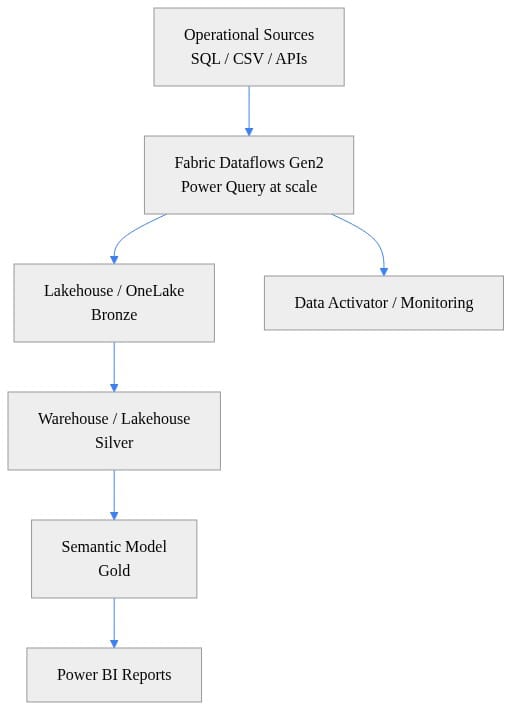
Look at the operating implication, not just the boxes. Fewer handoffs. Fewer “that team owns the ingest but not the cleanup” excuses. Fewer cases where business logic gets trapped in the reporting layer because nobody built a shared transformation tier.
And no, this does not mean there is one universal destination. Some workloads belong in a lakehouse. Some belong in a warehouse. Some event-driven patterns are a different animal entirely. I wrote about this same architectural discipline in OneLake Catalog for Governed Microsoft Fabric Adoption because the hard part is never naming the storage option. The hard part is making the landing zone legible and governed.
The real alternative is fragmented transformation
Let’s be blunt about the alternative, because I’ve run into it in enterprise shops and in my own lab when I get lazy.
Fragmented transformation looks like this:
- Power Query logic buried inside individual reports
- ad hoc notebooks with no owner after the original engineer leaves
- old package-based ETL nobody wants to touch
- SaaS ingestion tools running parallel schedules with duplicate outputs
- business rules recreated downstream because upstream data is unreliable
People call this “tool sprawl.” That undersells the problem.
The real cost is organizational:
- ownership is unclear
- lineage gets fuzzy
- refresh windows collide
- business logic forks
- semantic models stop trusting upstream inputs
- every incident becomes a detective story
I’ve made this point before in Power BI Just Became Fabric's Adoption Signal: the visible BI layer often exposes the maturity of the whole platform. If your semantic model team is constantly patching upstream inconsistencies, your transformation layer is not governed. It’s improvised.
So my position is simple: standardizing transformation matters more than declaring one interface the only acceptable interface.
That distinction matters because some teams hear “Dataflows Gen2” and immediately turn it into a religion. Bad move. The goal is a shared contract and a governed default, not a ban on engineering judgment.
Standardize the contract, not every implementation
Here’s the tutorial part. If you want Dataflows Gen2 to help your analytics engineering motion instead of adding another shiny object, define a transformation contract first.
My minimum contract has five parts:
- Named inputs and outputs
Every transformation should declare source systems, destination objects, and the business purpose.
- Declared owner
One team owns the logic, the refresh behavior, and the break/fix path.
- Refresh expectation
Hourly, daily, event-driven, or on-demand. Pick one and document it.
- Data quality expectations
Null tolerance, duplicate tolerance, basic conformance checks, and failure thresholds.
- Consumer alignment
Which semantic models, reports, or downstream tables depend on it?
When Dataflows Gen2 is handling broadly understandable, multi-step ingestion and cleanup, it should be the default. That is exactly the kind of work where Power Query-based standardization pays off.
For example, this tiny Python pattern mirrors the sort of source-to-destination normalization step I expect teams to define clearly, regardless of whether the implementation ends up visual in Dataflows Gen2 or coded elsewhere:
# Concept: Parameterized ingestion pattern that mirrors a Dataflows Gen2 source-to-destination step
import pandas as pd

def ingest_csv_to_parquet(source_path: str, destination_path: str) -> None:
    df = pd.read_csv(source_path)
    df.columns = [c.strip().lower().replace(" ", "_") for c in df.columns]
    df["ingested_utc"] = pd.Timestamp.utcnow()
    df.to_parquet(destination_path, index=False)

if __name__ == "__main__":
    ingest_csv_to_parquet(
        source_path="sales_orders.csv",
        destination_path="bronze_sales_orders.parquet",
    )
What to notice: the useful part is not the syntax. It’s the contract—normalize columns, stamp ingestion time, land a predictable output. That same discipline should exist in your Dataflows Gen2 design.
Then do the same thing for reusable transformation logic:
# Concept: Reusable transformation logic similar to Power Query steps in Dataflows Gen2
import pandas as pd

def transform_orders(df: pd.DataFrame) -> pd.DataFrame:
    clean = df.copy()
    clean["order_date"] = pd.to_datetime(clean["order_date"], errors="coerce")
    clean["amount"] = pd.to_numeric(clean["amount"], errors="coerce").fillna(0)
    clean["status"] = clean["status"].fillna("Unknown").str.title()
    clean = clean.dropna(subset=["customer_id", "order_date"])
    clean["order_year_month"] = clean["order_date"].dt.strftime("%Y-%m")
    return clean

sample = pd.DataFrame([
    {"customer_id": 101, "order_date": "2026-01-15", "amount": "120.50", "status": "shipped"}
])
print(transform_orders(sample))
The point here is that analytics engineering lives in repeatable cleanup steps: type coercion, null handling, conformance, and derived business fields. In Dataflows Gen2, those steps become accessible to more teams. Good. Now make them reviewable and reusable.
Where should you not force Dataflows Gen2 as the answer?
Reserve notebooks or specialized pipelines when you need:
- custom runtime dependencies
- advanced library support
- complex branching orchestration
- heavy code reuse across many assets
- engineering patterns that demand code review and test automation beyond the visual authoring model
That’s why I keep saying standardize the contract, not every implementation. Common UI is helpful. Common operating discipline is mandatory.
Common tooling does not eliminate operating discipline
This is where a lot of Fabric rollouts go sideways.
Leaders see a common authoring surface and assume they just solved governance. They didn’t. A shared tool does not create ownership, CI/CD, testing, review, or recovery procedures out of thin air.
My minimum guardrails for Dataflows Gen2 in a serious environment are boring on purpose:
- domain ownership by business capability
- dev/test/prod separation
- promotion paths between environments
- change review before production refresh changes
- refresh observability
- documented failure recovery
- downstream impact assessment for semantic models
A simple environment-driven promotion concept looks like this:
# Concept: Environment-driven configuration for promoting Dataflows Gen2 patterns across dev/test/prod
$environment = "prod"

$config = @{
    dev  = @{ Lakehouse = "lh_dev";  Workspace = "ws_dev"  }
    test = @{ Lakehouse = "lh_test"; Workspace = "ws_test" }
    prod = @{ Lakehouse = "lh_prod"; Workspace = "ws_prod" }
}

$selected = $config[$environment]

[pscustomobject]@{
    Environment = $environment
    Workspace   = $selected.Workspace
    Lakehouse   = $selected.Lakehouse
} | Format-List
Again, don’t get distracted by the sample. The lesson is that environment separation must exist before broad self-service adoption, not after the first outage.
And capacity planning belongs in the same conversation. Microsoft documents Dataflow Gen2 parallel task limits at 96 for F2 through F32 capacities and 384 for F64 through F512 in the Power Query Online limits documentation. That is not trivia. That is an executive planning input.
If you let every domain spin up refresh-heavy Dataflows Gen2 workloads without concurrency planning, you’ll create your own incident queue. I’ve done enough home lab tuning on Proxmox clusters and enough production capacity triage in Azure to know the pattern cold: teams call it “random slowness” right up until you graph the overlapping schedules and find the obvious bottleneck.
This is also where quality checks need to move from “nice to have” to “required”:
# Concept: Data quality checks that analytics engineers can place after Dataflows Gen2 landing
import pandas as pd

def validate_orders(df: pd.DataFrame) -> dict:
    return {
        "row_count": int(len(df)),
        "null_customer_id": int(df["customer_id"].isna().sum()),
        "negative_amounts": int((df["amount"] < 0).sum()),
        "duplicate_order_ids": int(df["order_id"].duplicated().sum()),
    }

orders = pd.DataFrame([
    {"order_id": 1, "customer_id": 101, "amount": 25.0},
    {"order_id": 2, "customer_id": None, "amount": -5.0},
])
print(validate_orders(orders))
What should you do next after a pattern like this? Put the checks right after the landing step, tie failures to owners, and stop pretending that refresh success means data is trustworthy. It just means the job finished.
The next phase is governed transformation by design
The next phase of Microsoft analytics engineering is not “everyone can build ETL faster.”
It’s governed transformation becoming a shared operating layer across the enterprise stack.
That’s why Dataflows Gen2 matters. It gives Fabric a broadly accessible transformation surface using a familiar Power Query experience, inside a platform that is explicitly trying to unify data and analytics. That combination is powerful. It lowers the barrier to participation while increasing the odds that transformation work lands inside a governed platform instead of in personal productivity shadows.
But don’t confuse a common authoring experience with an operating model. That mistake will cost you months.
If I were setting direction for a Fabric program right now, I’d do four things fast:
- Make Dataflows Gen2 the governed default for understandable, repeatable ingestion and transformation.
- Publish a transformation contract that every domain must follow.
- Keep notebook and specialized pipeline paths open for workloads that genuinely require them.
- Measure success with platform metrics, not feature adoption metrics:
- fewer duplicate transformations - clearer ownership - more stable semantic-model inputs - predictable capacity behavior - faster root-cause analysis when refreshes fail
That’s the practical read on Dataflows Gen2. Not a convenience feature. A platform move.
Where does this break in your environment: at ownership, at capacity, or at the point where teams insist every transformation must stay in code?
#MicrosoftFabric #Analyticsengineering #Datagovernance
Sources & References
- Microsoft Fabric documentation - Microsoft Fabric
- Azure Architecture Center - Azure Architecture Center
- Ingest Data with Microsoft Fabric - Training
- Power Query Online limits - Microsoft Learn
- Implement a Lakehouse with Microsoft Fabric - Training
- Ingest Data with Dataflows in Microsoft Fabric - Training
- Study guide for Exam DP-600: Implementing Analytics Solutions Using Microsoft Fabric
- Explore Analytics Data Stores in Microsoft Fabric - Training
- What is Fabric IQ? - Microsoft Fabric
- Differences between Dataflow Gen1 and Dataflow Gen2 - Microsoft Fabric
Try it yourself
Run this tutorial as a Jupyter notebook: Download runbook.ipynb (26 cells, 19 KB).



