GitHub Copilot Spend Governance for Engineering Leaders
Taming GitHub Copilot Spend Without Slowing Developers

Last month I watched a VP of Engineering approve Copilot for everyone on a Tuesday and freeze new access by Friday after the first ugly usage review. That whiplash is what happens when you treat AI tooling like a perk instead of a product with an operating model.
On this page
- Copilot spend becomes a governance problem before it becomes a finance problem
- Treat usage visibility as the first control plane
- Install a four-part Copilot spend operating model
- Design the controls around developer experience
- Avoid the failure modes that turn governance into a brake
- Make governance a scaling enabler
- Sources & References
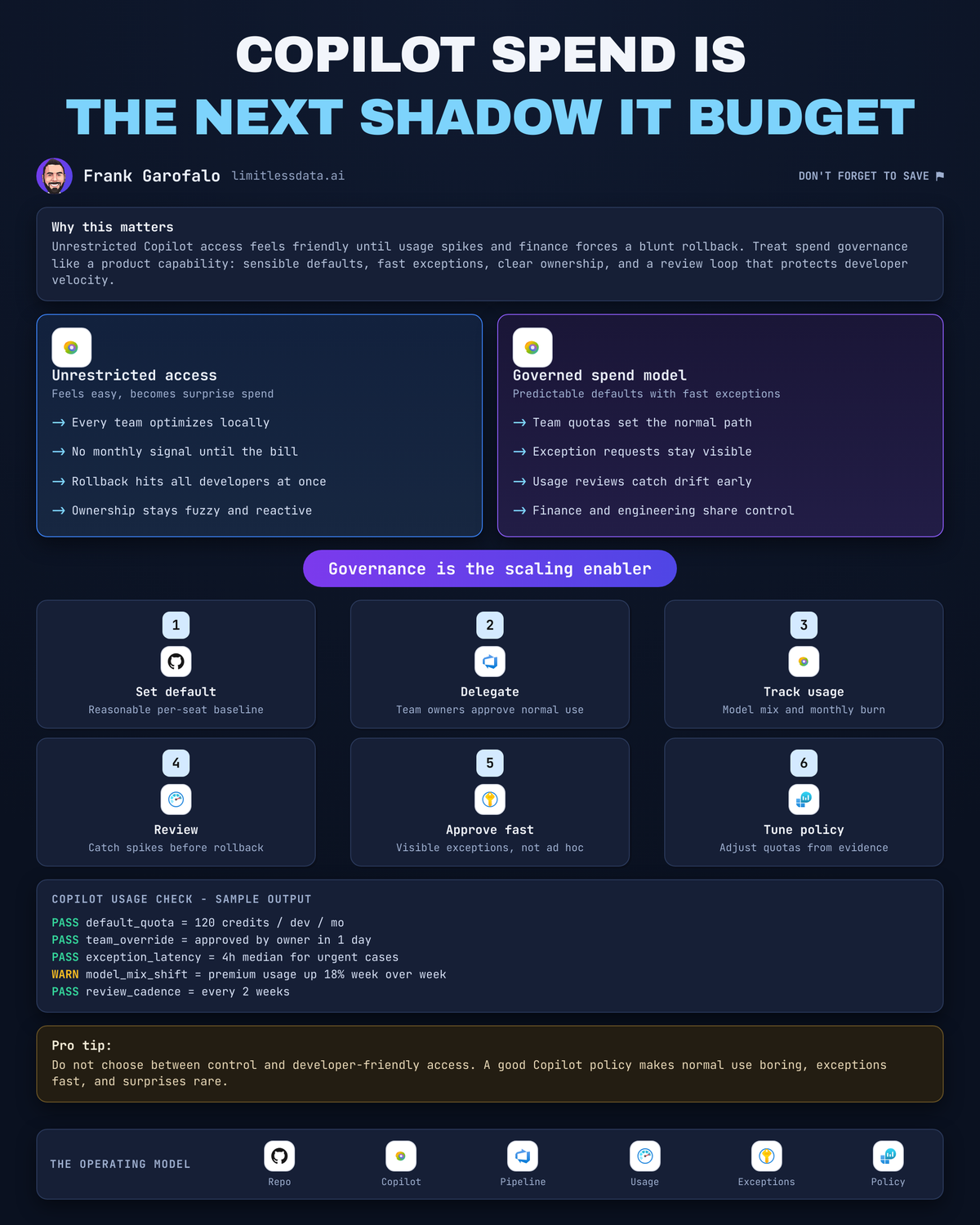
GitHub Copilot absolutely helps developers move faster, and Microsoft is explicit that it’s an AI coding assistant licensed through the developer’s work organization per Microsoft’s overview. The mistake is not buying it. The mistake is handing it out with no defaults, no ownership, no exception path, and then acting surprised when finance asks who authorized the bill.
I have a blunt opinion here: unrestricted access followed by a blunt rollback is the worst possible management pattern. You lose trust twice. First with finance because spend looks unmanaged. Then with developers because the answer becomes “no” right when teams start depending on the tool.
The fix is boring in the best way. Put a simple operating model around Copilot spend:
- sensible defaults
- delegated approvals
- fast exceptions
- regular reviews
- named owners
That’s how you keep developers moving without turning the monthly bill into a recurring executive meeting.
Copilot spend becomes a governance problem before it becomes a finance problem
The usual debate is framed badly. People act like the choice is between developer freedom and cost control. That framing is lazy.
The real choice is unmanaged consumption versus a developer-centered operating model.
Copilot usage is not one narrow interaction anymore. The surface area includes chat, extensions, model selection, and agent-style workflows. Microsoft’s Visual Studio guidance for version 17.10 and later calls out built-in capabilities to track usage, manage a plan, and understand how model selection affects monthly usage in the Visual Studio docs. And Microsoft’s agent mode training describes agents that can iterate across a codebase to fix errors, refactor code, and build functionality in the training module.
That matters because spend doesn’t only come from “someone asked chat a few questions.” It comes from how teams work:
- a platform team doing broad refactors
- a security team remediating findings under time pressure
- a migration team chewing through old services
- a product team using higher-cost model choices because they’re under a release deadline
In Q1, one 140-developer organization I worked with had three teams consuming Copilot in completely different ways, and the only thing leadership could see at first was a bigger invoice and a lot of finger-pointing.
That’s not a finance issue yet. That’s a governance failure.
If you want predictable spend without slowing delivery, your objective is simple: preserve useful access while making consumption, decision rights, and exceptions predictable.
Treat usage visibility as the first control plane
Don’t start with caps. Start with visibility.
A lot of companies wait for the invoice, then try to reverse-engineer who used what and why. That’s backward. Use the product’s own management and usage views first, then pair that with team ownership and cost center context.
The questions I ask are straightforward:
- Who has access today?
- Which teams are showing unusual usage patterns?
- Which workflows depend on more intensive Copilot use?
- Who owns follow-up for each outlier?
- Which seats look inactive enough to reclaim?
Notice what is not on that list: “Who do we blame?”
A usage spike is not proof of waste. Sometimes it’s the exact signal you want. If a team is in the middle of a codebase-wide upgrade, a security hardening sprint, or a nasty incident, I expect usage to move. The right response is context, not punishment.
Here’s the simplest possible flow I recommend for new Copilot access and monthly follow-up:
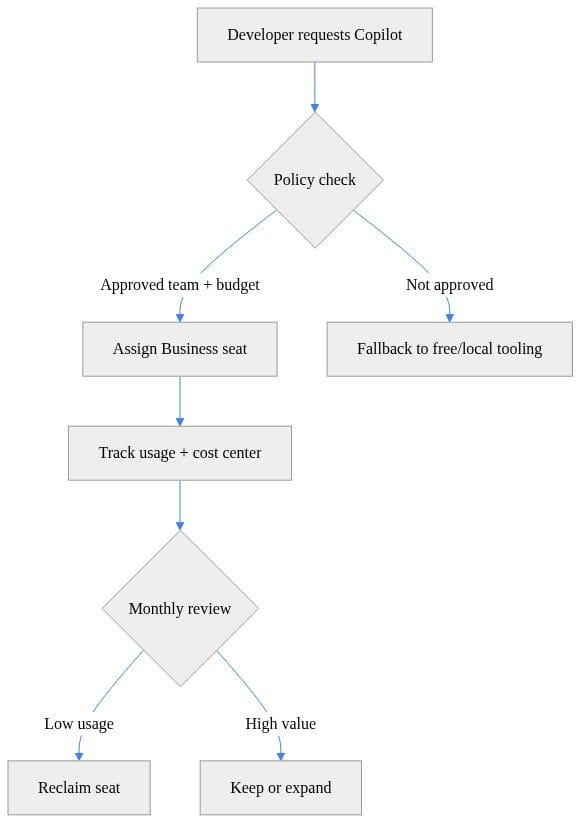
What to notice: the policy check happens before you create drift, and the monthly review includes both reclaim and expansion. That second branch matters. Governance that only knows how to say “remove” is not governance. It’s rationing.
I also want one shared dashboard or recurring report that engineering platform, finance, and engineering managers can all read without translation. If finance has one spreadsheet, platform has another export, and managers have a Slack thread, you do not have a control plane. You have folklore.
This is the same problem I wrote about in Copilot Spend Is the New Shadow IT Budget: once spend shows up outside a clear operating model, people start managing around the process instead of through it.
Install a four-part Copilot spend operating model
This is the part leaders skip because it sounds administrative. It’s also the part that prevents the rollback email.
1) Default quotas
Give most developers a standard path that works without an approval ritual.
That means defining a default service tier or consumption envelope for approved teams. The exact number will vary by org, but the principle does not: the default should be generous enough for normal work and constrained enough that you can forecast.
If every developer has to justify basic access, your process is already broken.
2) Team-level approvals
Push ordinary decisions down to the nearest accountable owner.
Engineering managers, platform leads, or designated budget owners should be able to approve routine increases for their teams. Do not centralize every seat request in procurement or a steering committee. That’s how you turn a useful tool into a ticket queue.
The approval path should look like this:
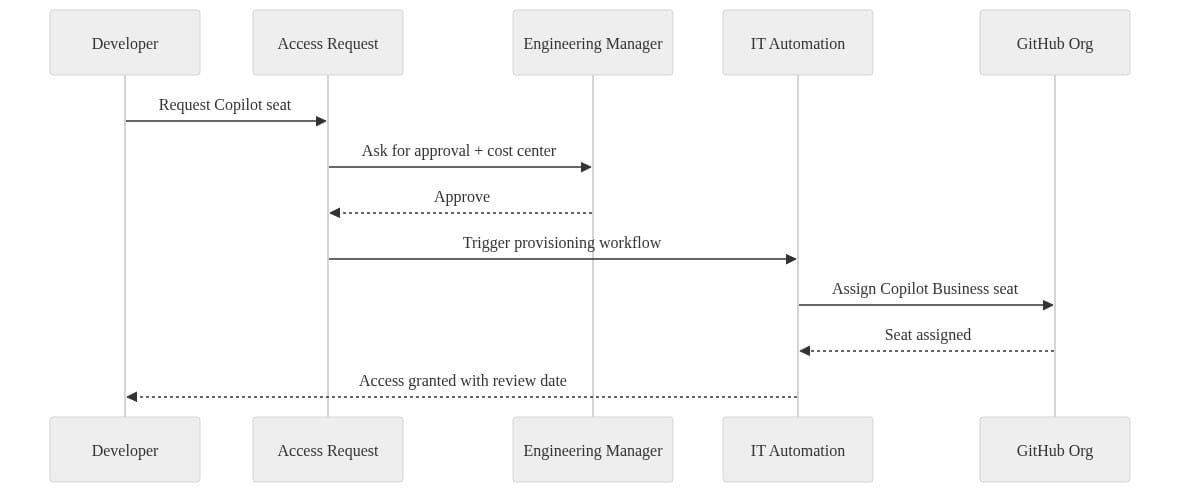
What to notice: the manager approves with a cost center, automation provisions the seat, and the developer gets a review date up front. That review date is where discipline starts.
3) Fast exception paths
This is where most governance models fail. They create a default and forget the pressure-release valve.
You need a lightweight, time-bound exception process for:
- large migrations
- release stabilization
- incident response
- broad refactoring
- temporary agent-assisted work across a codebase
If a team has a legitimate short-term need, they should not spend a week writing a business case. A short request with team, reason, expected duration, and owner is enough.
I’ve written before about how GitHub Copilot defaults moved the governance line. This is exactly what I meant. Defaults matter, but exceptions are where your real operating maturity shows up.
4) Review cadences
Every overage, exception, or unusual pattern needs:
- a named owner
- a reason
- a next review date
No owner means no decision. No review date means temporary access becomes permanent by accident.
I like a monthly review for usage and reclaim candidates, with a quarterly policy review to see whether the defaults still fit the actual work.
Design the controls around developer experience
If your governance model feels like procurement, developers will route around it.
That’s not a character flaw. That’s a systems design problem.
The default path should be simple enough that a developer can understand it in 30 seconds:
- what they get by default
- who can approve more
- what an exception requires
- how long approval takes
- when access gets reviewed
Keep the exception request short. Keep it visible. Keep it fast.
One practical pattern is to auto-expire trial or temporary seats unless the usage justifies keeping them. That gives teams room to move while forcing a review point.
Here’s a lightweight illustration:
# Auto-expire trial seats unless usage justifies keeping them
$today = Get-Date
$trials = @(
    [pscustomobject]@{ User = "ana"; Expires = $today.AddDays(-1); ActiveDays = 14 }
    [pscustomobject]@{ User = "ben"; Expires = $today.AddDays(-2); ActiveDays = 3 }
    [pscustomobject]@{ User = "chris"; Expires = $today.AddDays(7); ActiveDays = 1 }
)

foreach ($trial in $trials) {
    if ($trial.Expires -lt $today) {
        if ($trial.ActiveDays -ge 8) {
            "Keep seat for $($trial.User): strong usage"
        } else {
            "Remove seat for $($trial.User): expired and low usage"
        }
    }
}
What to notice: expiration is automatic, but strong usage gives you a reason to keep the seat. This is the right balance. You are not punishing usage; you are asking whether the usage justifies continuing the allocation.
Another practical move is to stop treating every role the same. A developer doing routine feature work has different needs than a team running a code modernization effort or handling a sev-1 remediation. Uniform rules feel fair on paper and fail in production.
Also, don’t confuse access problems with policy problems. Microsoft’s troubleshooting guidance points to network issues, service availability, and credentials as common reasons Copilot appears offline in the Visual Studio troubleshooting docs. I’ve seen teams misread “Copilot isn’t working” as “the policy blocked me,” when the real problem was auth or connectivity. If your support path is muddy, governance gets blamed for everything.
Avoid the failure modes that turn governance into a brake
I see the same four mistakes over and over.
Blanket restrictions
A broad cut may reduce immediate spend, but it hides where Copilot is actually creating value. You save money fast and learn nothing.
No exception process
This one is deadly. When legitimate edge cases have nowhere to go, teams start improvising with unapproved tools or personal accounts. Congratulations, you just recreated shadow IT with better autocomplete.
No owner for overages
Finance sees a variance. Engineering sees friction. Nobody owns the decision. That’s how small spend issues become executive escalations.
One-time caps with no review
Static limits are management theater. They can’t tell the difference between a temporary high-value project and recurring unexplained consumption.
Tooling helps, but tooling alone is not governance. A dashboard won’t assign accountability. A usage export won’t make a decision. A cap won’t explain an outlier.
If you want a dead-simple example of how to operationalize reclaim decisions, start with something as basic as flagging low-activity seats by team:
# Find reclaim candidates from a simple Copilot usage export
$pricePerSeat = 19
$threshold = 5

$seats = @(
    [pscustomobject]@{ User = "ana"; Team = "platform"; ActiveDays = 18 }
    [pscustomobject]@{ User = "ben"; Team = "platform"; ActiveDays = 2 }
    [pscustomobject]@{ User = "chris"; Team = "data"; ActiveDays = 11 }
)

$reclaim = $seats | Where-Object { $_.ActiveDays -lt $threshold }
$monthlyCost = $seats.Count * $pricePerSeat

$reclaim | Format-Table User, Team, ActiveDays -AutoSize
"Estimated monthly cost: $monthlyCost"
"Potential savings if reclaimed: $($reclaim.Count * $pricePerSeat)"
What to notice: this is not advanced FinOps. It doesn’t need to be. The point is to create a repeatable review loop that surfaces reclaim candidates and estimated savings before someone panics over the monthly total.
Make governance a scaling enabler
The success metric is not the lowest possible Copilot bill.
The success metric is predictable spend paired with timely access for justified engineering work.
That means:
- quotas are defaults, not punishments
- approvals are delegated decisions, not centralized gatekeeping
- exceptions are pressure valves, not loopholes
- reviews are learning loops, not audits
When you get this right, finance gets predictability, engineering managers get authority, platform teams get a process they can automate, and developers keep access to a tool that can genuinely improve throughput. Microsoft’s introductory GitHub Copilot training covers the broad product surface across chat, benefits, and extensions in the training content. That breadth is exactly why you need an operating model. The more useful the tool becomes, the less acceptable “we’ll figure out the bill later” becomes.
My own bias is simple: I would rather run a well-governed AI tool broadly than a poorly governed one selectively. Broad access with clear defaults and fast exceptions scales. Selective access with executive-by-exception approvals does not.
If you’re leading engineering, platform, or IT, do this next week:
- define the default Copilot access policy
- assign team-level budget owners
- publish a one-page exception path
- schedule a monthly usage review
- reclaim or renew seats based on actual usage and actual team context
That’s enough to stop the nonsense.
Where does this break in your environment: default quotas, manager approvals, or the speed of exceptions?
#GitHubCopilot #Engineeringleadership #FinOps
Sources & References
- Troubleshoot GitHub Copilot state - Visual Studio (Windows)
- Decide which Copilot is right for you
- Manage GitHub Copilot installation and state - Visual Studio (Windows)
- Building Applications with GitHub Copilot Agent Mode - Training
- GitHub Copilot usage and models - Visual Studio (Windows)
- Get Started with GitHub Copilot - Training
Try it yourself
Run this tutorial as a Jupyter notebook: Download runbook.ipynb (23 cells, 18 KB).