Trusted Launch Azure AI Landing Zone Architecture
If You’re Standardizing on Azure for AI, Trusted Launch by Default Should Change Your Baseline Architecture

“Why are we still debating VM security settings one workload at a time?”
On this page
- Trusted Launch by Default belongs in landing-zone governance
- AI scale makes existing VM inconsistency more dangerous
- Rewrite the landing-zone contract around one approved compute path
- Make golden images a product, not a file someone copied once
- Policy-as-code should prevent bad patterns, not just describe them
- Build an exception process designed to expire
- Govern the transition without pretending legacy disappears next quarter
- The standard to set before AI sprawl sets it for you
- Sources & References
That question should make every Azure platform owner uncomfortable. AI scale will amplify whatever provisioning habits already exist in your estate, and Trusted Launch by Default is the moment to reset the baseline before image drift and permanent exceptions become the real architecture.
Trusted Launch by Default belongs in landing-zone governance
If your enterprise is standardizing on Azure for AI, the mistake is treating Trusted Launch by Default like a new VM checkbox to evaluate later. That’s backwards. This is a landing-zone decision.
The real problem in large estates is not a missing feature. It’s discretionary infrastructure. One team deploys from a marketplace image, another from a copied image, a third from an old template somebody parked in a repo 18 months ago, and everyone swears they are “close enough” to standard. Then AI shows up and suddenly you need more dev boxes, more integration environments, more data prep workers, more training support systems, more jump workloads, more test subscriptions, more everything.
Azure already gives you the architecture discipline to frame this correctly. The Azure Well-Architected Framework is about decision points and technical foundations, not random per-project settings. That’s exactly where this belongs.
This post is about baseline architecture:
- approved compute paths
- golden images
- policy-as-code
- exception handling
- drift control
- landing-zone ownership
It is not a feature tour.
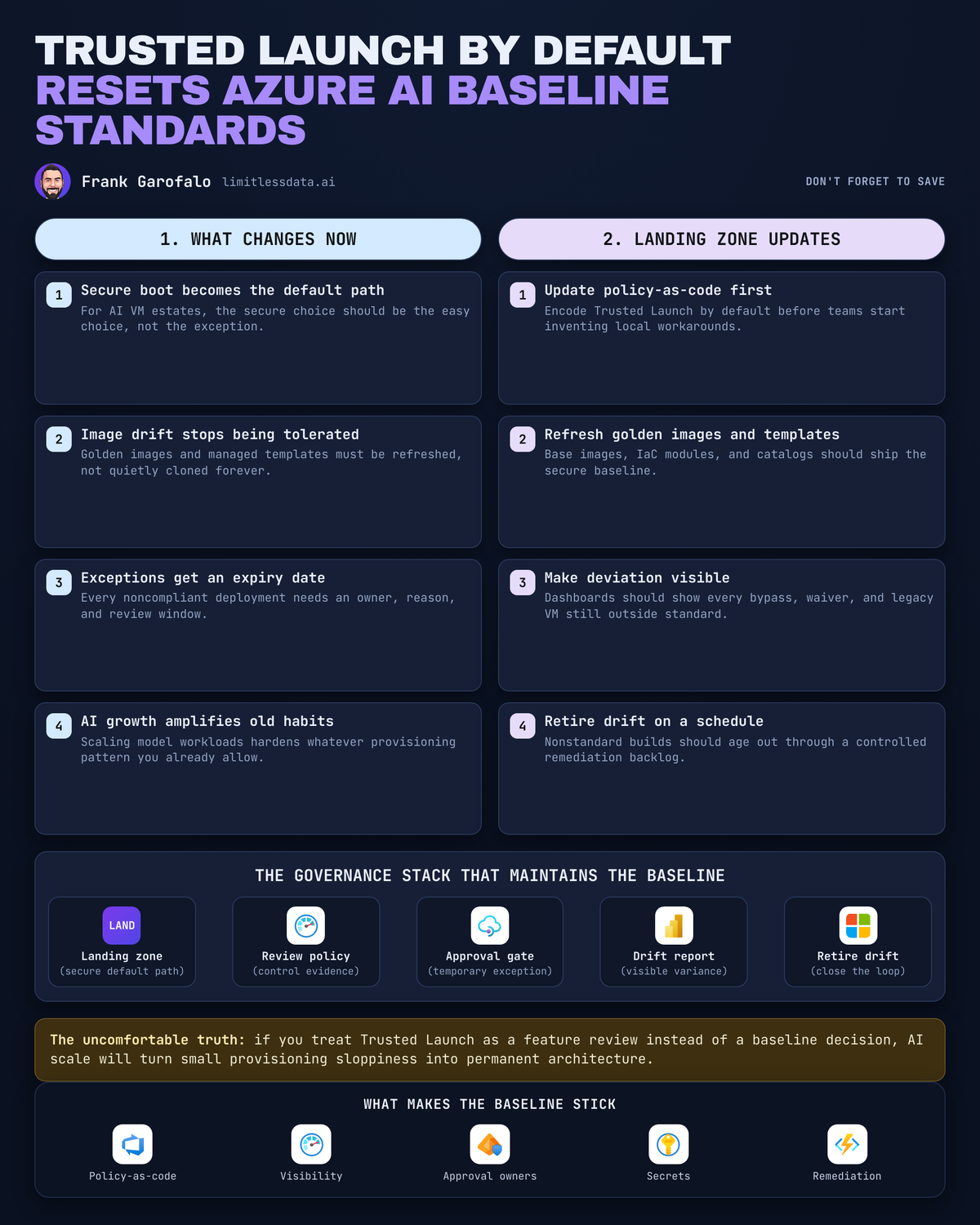
To make the baseline decision visible, I like to draw it as a control flow instead of a compute setting. The point is simple: the secure path should be the normal path.
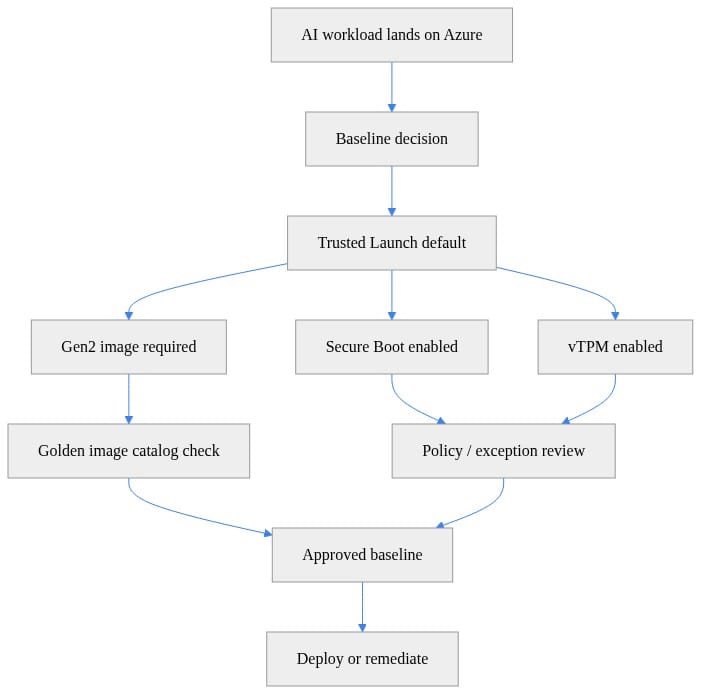
What to observe: the flow starts with the workload landing on Azure and immediately forces a baseline decision. That is the right mental model. If the first real decision happens after the VM exists, you’re already late.
AI scale makes existing VM inconsistency more dangerous
Here’s the operational failure mode nobody wants to admit: most estates already have inconsistent VM provisioning, but they get away with it because growth is slow enough to hide the mess.
AI changes that. Fast.
A data science team stands up experimentation boxes. An app team adds inference support services. An analytics team deploys integration workers. A security team wants isolated validation environments. A platform team provisions shared utility nodes. If there isn’t one approved path, every team creates its own “reasonable” version of one.
In Q1, I worked with a 14-subscription enterprise platform where a review of less than 400 VMs found four image lineages for what was supposed to be one standard Windows baseline, and two of those lineages came from copied templates no one could trace back to an owner.
That is how architecture debt hardens into policy debt.
The Azure Architecture Center matters here because AI architecture design, compute selection, network topology, and production baselines are architecture concerns. They are not independent project choices. If your AI program is scaling on top of inconsistent VM standards, your “AI architecture” is already compromised before the first model endpoint goes live.
My blunt take: the value of a secure default is not that it adds one more security control. The value is that it removes hundreds of repeated low-quality decisions from delivery teams.
Rewrite the landing-zone contract around one approved compute path
The platform team needs to publish a contract, not a suggestion.
A real landing-zone compute contract should define:
- approved image sources
- approved deployment patterns
- required security configuration
- ownership boundaries between platform and workload teams
- evidence required for exceptions
- review cadence for baseline changes
That sounds obvious. It rarely exists in a form teams can actually use.
I’d structure it as two explicit paths:
1. Default path
This is the path every new workload takes unless there is a documented reason not to.
- approved Gen2 images
- Trusted Launch baseline
- approved templates or modules
- standard policy assignments
- standard monitoring and inventory hooks
2. Exception path
This is not tribal knowledge and it is not “open a ticket and we’ll see.”
- named business reason
- technical blocker
- accountable owner
- compensating controls
- review date
- exit plan
That organizational framing is exactly what the Cloud Adoption Framework is for: aligning decision-makers on how Azure gets adopted, governed, and operated. And if you are serious about Zero Trust, treat secure compute baselines as a platform capability, which is consistent with Microsoft’s broader security guidance.
If you want the AI-specific extension of that conversation, I covered the control-plane side in my post on Azure AI landing zones for enterprise AI governance. Same principle here: standardize the safe path first, then let teams move fast inside it.
Make golden images a product, not a file someone copied once
A golden image without ownership is just future drift with better branding.
This is where a lot of enterprises fool themselves. They build an image, publish it once, and call the standard complete. Six months later:
- teams have copied it
- versions are unclear
- patch lineage is fuzzy
- exceptions are undocumented
- nobody knows what should be retired
A platform-owned image catalog needs:
- a product owner
- versioned image definitions
- release notes
- validation gates
- retirement criteria
- deprecation timelines
The workload team should choose from approved versions. They should not be inheriting unmanaged copies or quietly changing infrastructure lineage just because they need to ship an app release on Friday.
Inventory is the first practical control. Before you can govern drift, you need a clean export of what’s actually deployed. Here’s a lightweight PowerShell example that collects image reference and security metadata across subscriptions.
# Collect VM image-reference and security metadata across subscriptions for baseline classification.
param(
    [string[]]$SubscriptionIds = @("00000000-0000-0000-0000-000000000001")
)

$results = foreach ($sub in $SubscriptionIds) {
    Set-AzContext -SubscriptionId $sub | Out-Null
    foreach ($vm in Get-AzVM -Status) {
        [pscustomobject]@{
            SubscriptionId = $sub
            ResourceGroup  = $vm.ResourceGroupName
            Name           = $vm.Name
            Location       = $vm.Location
            Publisher      = $vm.StorageProfile.ImageReference.Publisher
            Offer          = $vm.StorageProfile.ImageReference.Offer
            Sku            = $vm.StorageProfile.ImageReference.Sku
            Version        = $vm.StorageProfile.ImageReference.Version
            SecurityType   = $vm.SecurityProfile.SecurityType
            SecureBoot     = $vm.SecurityProfile.UefiSettings.SecureBootEnabled
            VTpm           = $vm.SecurityProfile.UefiSettings.VTpmEnabled
            PowerState     = ($vm.Statuses | Where-Object Code -like "PowerState/*").DisplayStatus
        }
    }
}

$results | Export-Csv -Path ".\vm-baseline-inventory.csv" -NoTypeInformation
$results
What to do next: export this regularly and treat it like source data for your platform review, not a one-time audit artifact. If you can’t answer “what image lineage is running where” in under 10 minutes, you do not have a baseline.
Once you have inventory, compare it to an approved catalog. This is the simplest useful drift check: publisher, offer, SKU, and security type.
# Join collected VM inventory with an approved image catalog to identify drift and exceptions.
$catalog = @(
    [pscustomobject]@{ Publisher="Canonical"; Offer="0001-com-ubuntu-server-jammy"; Sku="22_04-lts-gen2"; SecurityType="TrustedLaunch" },
    [pscustomobject]@{ Publisher="MicrosoftWindowsServer"; Offer="WindowsServer"; Sku="2022-datacenter-azure-edition"; SecurityType="TrustedLaunch" }
)

$inventory = @(
    [pscustomobject]@{ Name="vm-a"; Publisher="Canonical"; Offer="0001-com-ubuntu-server-jammy"; Sku="22_04-lts-gen2"; SecurityType="TrustedLaunch"; ExceptionId="" },
    [pscustomobject]@{ Name="vm-b"; Publisher="MicrosoftWindowsServer"; Offer="WindowsServer"; Sku="2019-datacenter"; SecurityType="Standard"; ExceptionId="EX-104" },
    [pscustomobject]@{ Name="vm-c"; Publisher="MicrosoftWindowsServer"; Offer="WindowsServer"; Sku="2019-datacenter"; SecurityType="Standard"; ExceptionId="" }
)

$approvedKeys = $catalog | ForEach-Object { "$($_.Publisher)|$($_.Offer)|$($_.Sku)|$($_.SecurityType)" }

$inventory | ForEach-Object {
    $key = "$($_.Publisher)|$($_.Offer)|$($_.Sku)|$($_.SecurityType)"
    [pscustomobject]@{
        Name        = $_.Name
        Status      = if ($_.ExceptionId) { "ApprovedException" } elseif ($approvedKeys -contains $key) { "Compliant" } else { "Drift" }
        ExceptionId = $_.ExceptionId
    }
} | Format-Table -AutoSize
What to observe: this gives you three buckets that matter operationally — compliant, approved exception, and drift. That classification is enough to drive governance meetings without turning them into archaeology projects.
Policy-as-code should prevent bad patterns, not just describe them
Too many Azure policy programs are elaborate reporting systems. That’s not governance. That’s scorekeeping.
Policy-as-code should do three jobs:
- prevent unsupported new deployments where possible
- detect drift where prevention is not yet feasible
- collect evidence for review and remediation
And yes, all of it belongs in source control:
- policy definitions
- assignments
- exemptions
- template modules
- change approvals
- ownership metadata
The rollout model matters. If you slam enforcement into a messy estate, teams route around you. I use rings:
- observe first
- identify common breakpoints
- remediate known patterns
- enforce for new deployments
- tighten legacy scope over time
That sequence is straight platform engineering. It also lines up with the review discipline the Well-Architected Framework pushes: explicit tradeoffs, not magical compliance numbers.
One practical pattern I like is a simple drift report that compares exported inventory against the approved catalog and emits review-required rows. It’s not glamorous, but it works.
# Compare exported VM inventory to an approved golden-image catalog and emit a drift report.
import csv
from io import StringIO

inventory_csv = """subscription,resource_group,name,publisher,offer,sku,version,security_type
sub1,rg-ai,vm-a,Canonical,0001-com-ubuntu-server-jammy,22_04-lts-gen2,latest,TrustedLaunch
sub1,rg-ai,vm-b,MicrosoftWindowsServer,WindowsServer,2019-datacenter,latest,Standard
sub2,rg-ml,vm-c,Canonical,0001-com-ubuntu-server-jammy,22_04-lts-gen2,latest,TrustedLaunch
"""

catalog_csv = """publisher,offer,sku,security_type
Canonical,0001-com-ubuntu-server-jammy,22_04-lts-gen2,TrustedLaunch
MicrosoftWindowsServer,WindowsServer,2022-datacenter-azure-edition,TrustedLaunch
"""

approved = {(r["publisher"], r["offer"], r["sku"], r["security_type"])
            for r in csv.DictReader(StringIO(catalog_csv))}
rows = list(csv.DictReader(StringIO(inventory_csv)))

drift = [r for r in rows if (r["publisher"], r["offer"], r["sku"], r["security_type"]) not in approved]

writer = csv.DictWriter(
    StringIO(),
    fieldnames=["subscription", "resource_group", "name", "publisher", "offer", "sku", "security_type", "status"],
)
print("subscription,resource_group,name,publisher,offer,sku,security_type,status")
for r in drift:
    r["status"] = "REVIEW_REQUIRED"
    print(",".join(r[k] for k in ["subscription", "resource_group", "name", "publisher", "offer", "sku", "security_type", "status"]))
What to do next: feed the output into a weekly platform review and sort by subscription, image family, and security type. You’ll usually find a small number of repeated anti-patterns causing most of the noise.
If you’re already doing governance around AI ingress and service mediation, this is the same muscle. I wrote about that pattern in Azure API Management AI Gateway for Enterprise Governance. Different layer, same rule: make the approved path easy and visible, and make deviations explicit.
Build an exception process designed to expire
The worst exception process in the enterprise is the common one: ticket approved, problem forgotten, architecture permanently altered.
An exception is not a permission slip. It is a temporary risk decision.
Every exception record should include:
- business justification
- technical constraint
- owner
- compensating controls
- issue date
- review date
- expected exit trigger
Then classify them properly:
- legacy carve-out
- migration-in-progress
- new workload request
The bar should be much higher for new AI initiatives than for old line-of-business systems. I’ll be very direct here: if a net-new AI workload wants to bypass the standard compute path, the platform team should assume the design is wrong until proven otherwise.
Also track exception age and renewal count. Those are risk signals. A six-month exception renewed four times is not an exception anymore. It’s shadow architecture.
This is where platform reviews need numbers, not anecdotes. A lightweight summary script can turn a drift file into something leadership can act on.
# Build a concise platform-review summary from a drift report.
import csv
from collections import Counter
from io import StringIO

drift_csv = """subscription,name,security_type,sku,status
sub1,vm-b,Standard,2019-datacenter,REVIEW_REQUIRED
sub2,vm-c,TrustedLaunch,22_04-lts-gen2,REVIEW_REQUIRED
sub2,vm-d,Standard,2016-datacenter,REVIEW_REQUIRED
"""

rows = list(csv.DictReader(StringIO(drift_csv)))
by_security = Counter(r["security_type"] for r in rows)
by_sku = Counter(r["sku"] for r in rows)

print(f"Total drifted VMs: {len(rows)}")
print("By security type:", dict(by_security))
print("Top SKUs needing review:", by_sku.most_common(3))
What to observe: once you summarize by security type and SKU, the conversation gets concrete fast. You stop arguing over abstract standards and start seeing exactly which patterns are resisting the baseline.
Govern the transition without pretending legacy disappears next quarter
You do not need to rebuild the whole estate before you set a new standard. You do need visibility.
Start with an inventory and segment the estate into:
- enforce now
- migrate on change
- durable legacy carve-out
That classification lets you move without fantasy planning.
For each workload, capture:
- owner
- criticality
- image lineage if known
- current security type
- exception status
- next planned change event
Then establish a review cadence. Monthly is usually enough if the data is clean:
- new image releases
- drift findings
- expiring exemptions
- new exception requests
- baseline adoption metrics
This is where architecture and adoption guidance need to meet. The Azure Architecture Center gives you the technical patterns. The Cloud Adoption Framework gives you the operating model. Use both. Don’t let platform, security, and delivery teams run separate conversations about the same baseline.
The standard to set before AI sprawl sets it for you
Here’s the position plainly: if you’re standardizing on Azure for AI, Trusted Launch by Default should trigger a landing-zone baseline reset now.
Not next quarter. Not after one more pilot. Not after every legacy VM is perfectly understood.
Now.
Set the secure path as the normal path. Publish the golden-image contract. Codify the guardrails. Make exceptions visible. Make exceptions expire.
Performance constraints, cost constraints, and ugly legacy realities are all real. Fine. Put them on paper, assign an owner, set a date, and stop pretending undocumented variance is architecture.
Because once AI-driven growth starts multiplying VMs across sandboxes, integration tiers, support services, and production estates, your existing inconsistencies become the standard by sheer volume. At that point you are no longer governing the platform. You are documenting the drift.
Rate your current Azure VM baseline from 1 to 5: are you actually enforcing one approved compute path, or are you still running on “close enough”?
#AzureAI #EnterpriseAI #DataArchitecture
Sources & References
- Azure Architecture Center - Azure Architecture Center
- Cloud Adoption Framework for Microsoft - Cloud Adoption Framework
- Azure Well-Architected Framework - Microsoft Azure Well-Architected Framework
- Security hub - Security
Try it yourself
Run this tutorial as a Jupyter notebook: Download runbook.ipynb (20 cells, 18 KB).