Azure Brain Lessons for Reliable Enterprise AI Operations
What Azure’s ‘Brain’ Gets Right About AI Operations: Reliability Is the Killer Enterprise Use Case


42 minutes off MTTR got the CFO’s attention faster than 4 demos ever did.
On this page
- The situation: a noisy ops environment where “helpful AI” was failing the real test
- The root cause: no closed loop, no credibility
- The decision: treat Azure Brain as a reference architecture lesson, not a product shortcut
- The implementation: build the reliability loop before you build the personality
- The results: measurable reliability gains, and a few hard limits
- The tradeoffs: assistance is easy, accountable action is expensive
- What leaders should build first
- The takeaway: reliability is where enterprise AI earns trust
- Code Reference
- Sources & References
That’s the number from a reliability pilot I ran the same way I evaluate every serious enterprise AI initiative: not by how clever the model sounded, but by whether the service team got out of the blast radius faster under real pressure.
That’s why Azure “Brain” is interesting to me.
Not as another chatbot story. As a reference lens for closed-loop operations.
The supplied Microsoft material does not document Azure Brain implementation specifics, so I’m not going to invent them. I’m using the name the way enterprise architects should use it: as a case-study frame for what operational AI has to do in the real world—ingest telemetry, diagnose risk, route decisions, respect controls, and prove it improved a service outcome.
If you lead platform, SRE, data, or security teams, that framing matters a lot more than whether a model can summarize an incident in fluent English.
The situation: a noisy ops environment where “helpful AI” was failing the real test
Two years ago, I was working with a platform team supporting 180-plus business services across three regions. Their incident volume wasn’t catastrophic, but their operating model was bleeding time: duplicate alerts, slow triage, inconsistent escalation, and too much tribal knowledge trapped in senior engineers’ heads.
The headline metrics were ugly enough:
- Mean time to acknowledge: 11 minutes
- Mean time to mitigate sev-2 incidents: 96 minutes
- Repeat incidents within 30 days: 18%
- Manual triage steps before a human had enough context to act: usually 5 to 8
The team had already tried “AI assistance.” They had a prompt-driven helper that could summarize tickets and draft status updates. Nice demo. Zero material impact on reliability.
That’s the enterprise AI test people keep dodging: conversation is not the same thing as operational improvement.
Reliability is a brutal proving ground because the system has to work with live telemetry, uncertainty, time pressure, escalation paths, and named humans who are accountable when the wrong thing happens. Microsoft’s own guidance is built around architecture decisions, workload quality, and adoption discipline, not magic interfaces—the Azure Well-Architected Framework and Cloud Adoption Framework are useful here precisely because they force decision-making around outcomes and operating constraints.
In Q3, I sat in a war room at 2:17 a.m. while a 14-person operations bridge argued over whether a payment API latency spike was caused by a bad deployment, a downstream dependency, or noisy synthetic checks; the model summary was polished, and completely useless.
That was the root problem.
The root cause: no closed loop, no credibility
The failed first attempt had one giant flaw: it started with prompts instead of evidence.
Operational AI needs a loop. Minimum viable loop:
- Observable service signals
- AI interpretation grounded in those signals
- Recommended or approved action
- Post-action evidence showing whether the action helped
Miss any one of those and you don’t have operational AI. You have autocomplete for stressed-out engineers.
Microsoft’s architecture guidance is actually pretty good on this point if you read it like a builder instead of a brochure. The Azure Architecture Center gives you patterns for AI, RAG, orchestration, and production baselines. It’s not a turnkey blueprint for your environment, and that’s fine. It’s a checklist for building a system that can survive contact with production.
One example I like: the Azure DevOps MCP Server documentation shows an assistant grounding its answer in actual Azure DevOps data to identify sprint work items at risk. That matters because it demonstrates the right instinct—tie the assistant to live operational systems instead of asking it to hallucinate context from a prompt alone, as shown in the Azure DevOps MCP example.
For our pilot, we stopped talking about “the AI assistant” and started talking about an operating loop with owners:
- Observability team owned signal quality and freshness
- Platform engineering owned routing and action boundaries
- SRE owned runbooks and escalation logic
- Security owned access and approval controls
- Service owners owned the business outcome and rollback authority
That one change cleaned up half the nonsense.
The decision: treat Azure Brain as a reference architecture lesson, not a product shortcut
Here’s the model I recommend, and it’s the one we built toward.
The loop should look like this:
- Collect telemetry from the systems you’re trying to improve
- Detect or prioritize risk
- Generate bounded recommendations
- Route to the right decision-maker
- Execute approved action
- Measure the service-level result
That’s the lesson I’d pull from any “Azure Brain” conversation. The value is not the brand name. The value is the operating model.
Each stage needs four things:
- A named owner
- An audit trail
- A failure mode
- A measurable service effect
If you can’t answer those four for every stage, don’t automate it yet.
This is also where multi-agent hype usually crashes into enterprise reality. Microsoft’s design-pattern guidance is explicit that workloads using multiple autonomous agents need specialized coordination approaches, not wishful thinking about self-organization, per the cloud design-pattern guidance. Good. That matches the field. I’ve seen teams wire together agents for triage, ticketing, and remediation before anyone defined who had decision rights when two agents disagreed. That’s not autonomy. That’s a change advisory board with worse logging.
The implementation: build the reliability loop before you build the personality
We implemented this in layers.
First, we defined escalation tiers:
- Tier 0: summarization and evidence gathering only
- Tier 1: recommendations with mandatory human approval
- Tier 2: tightly bounded automation with rollback and full audit
- Tier 3: prohibited actions, always human-owned
That sounds obvious. It isn’t. Most teams skip straight from “assistant can summarize alerts” to “let’s let it restart things.” Bad move.
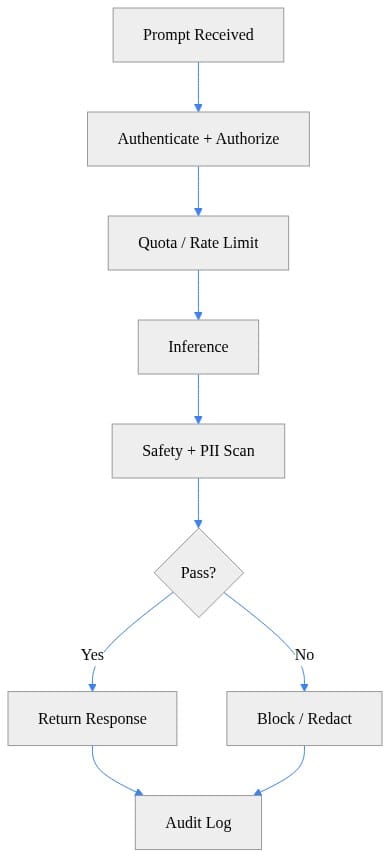
Second, we put policy and routing in front of inference. This is where identity, authorization, model selection, safety checks, and telemetry belong. If you’ve read my post on Azure API Management AI Gateway for Enterprise Governance, same principle: the control plane matters more than the prompt.
A simple architecture sketch for that flow looks like this:
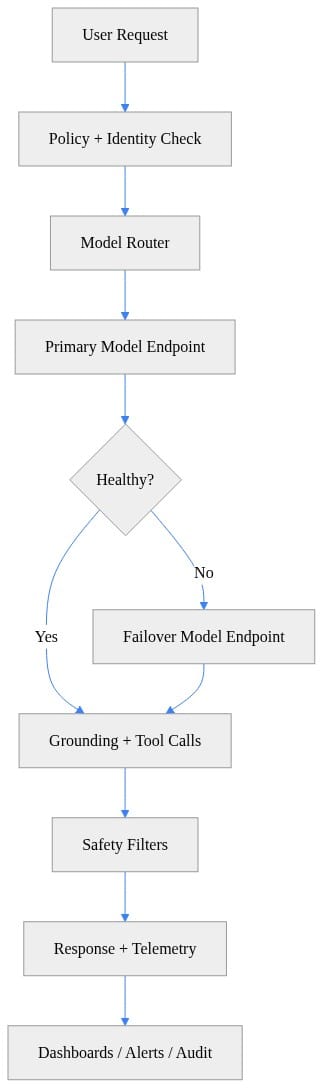
What to observe here: the model call is one component in a governed chain, not the center of the universe. Policy, failover, safety, and audit are first-class parts of the design.
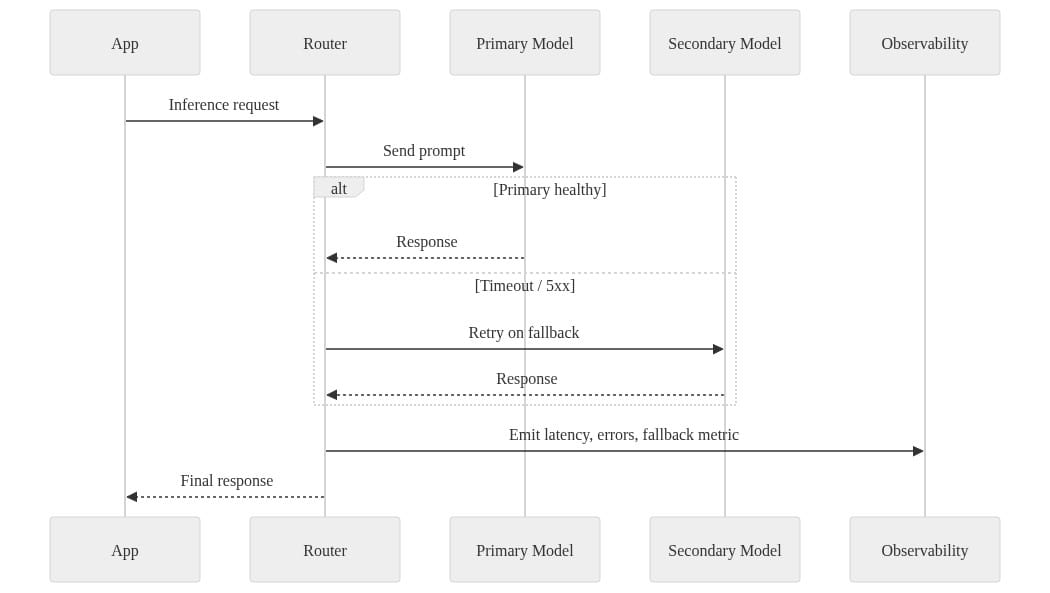
Third, we built reliability behavior into the client path. Timeouts, retries, and fallback are table stakes. If your operational AI path is brittle, it becomes one more failing dependency during an incident.
Here’s the kind of lightweight pattern I use to explain it to teams:
# Reliability-first client with timeout, retry, and fallback endpoint
import time
import requests

PRIMARY = "https://primary.example.ai/infer"
FALLBACK = "https://fallback.example.ai/infer"
PAYLOAD = {"prompt": "Summarize this incident report in 3 bullets."}

def infer(url: str) -> dict:
    r = requests.post(url, json=PAYLOAD, timeout=5)
    r.raise_for_status()
    return r.json()

for attempt in range(3):
    try:
        print(infer(PRIMARY))
        break
    except Exception:
        time.sleep(2 ** attempt)
else:
    print(infer(FALLBACK))
What to do next: replace the dummy endpoints with your own service abstractions, then set timeout and retry budgets based on incident-response needs, not developer convenience. A five-second timeout might be acceptable for a post-incident summary and unacceptable for an active sev-1 triage path.
Fourth, we added a circuit breaker. This is one of those boring patterns that saves your skin. When a model endpoint is unhealthy, stop hammering it.
# Circuit breaker to stop hammering an unhealthy model endpoint
import time

failures = 0
opened_at = 0.0
threshold = 3
cooldown_seconds = 30

def can_call() -> bool:
    return failures < threshold or (time.time() - opened_at) > cooldown_seconds

def record_failure() -> None:
    global failures, opened_at
    failures += 1
    if failures == threshold:
        opened_at = time.time()

def record_success() -> None:
    global failures
    failures = 0
What to observe: the point is not elegance. The point is protecting the rest of the system from cascading failure. I run the same kind of thinking in my home lab on Proxmox when I’m testing inference endpoints behind reverse proxies—bad endpoints get isolated fast or they poison every downstream workflow.
Fifth, we instrumented the loop with structured telemetry. If you can’t measure latency, fallback rate, token usage, and action outcomes, you cannot manage the service.
# Structured telemetry for latency, token usage, and fallback events
import json
import time
from uuid import uuid4

request_id = str(uuid4())
started = time.time()
used_fallback = False
prompt_tokens = 812
completion_tokens = 146

event = {
    "request_id": request_id,
    "latency_ms": int((time.time() - started) * 1000),
    "used_fallback": used_fallback,
    "prompt_tokens": prompt_tokens,
    "completion_tokens": completion_tokens,
    "total_tokens": prompt_tokens + completion_tokens,
}
print(json.dumps(event))
What to do next: send this data into the same observability estate your operators already trust. Don’t create a parallel black box. Reliability teams need AI telemetry beside platform telemetry, not in a separate curiosity dashboard.
Sixth, we put in explicit safety checks before any response or action flowed back to a user or system. For PII, secrets, and policy violations, block or redact first. That’s the same governance instinct behind my post on Azure AI Foundry Is About to Rewrite PII Governance: if sensitive data handling lives outside the operational loop, it will fail when the pressure hits.
# Guardrail check to reject unsafe output before it reaches users
import re

response_text = "Here is the answer with customer email: alice@example.com"
pii_patterns = [r"\b[\w\.-]+@[\w\.-]+\.\w+\b", r"\b\d{3}-\d{2}-\d{4}\b"]

def is_safe(text: str) -> bool:
    return not any(re.search(pattern, text) for pattern in pii_patterns)

final_text = response_text if is_safe(response_text) else "Response blocked by safety policy."
print(final_text)
What to observe: this is illustrative, not production-grade detection. The lesson is architectural—safety enforcement belongs inline, before output is trusted or executed.
The results: measurable reliability gains, and a few hard limits
We ran the pilot for 8 weeks on a narrow use case: sev-2 and high-volume sev-3 triage for two customer-facing services with stable runbooks and decent instrumentation.
That narrowness was deliberate. Microsoft recommends starting AI strategy with use-case identification because it frames the decision process around a business outcome, per the AI strategy guidance in Cloud Adoption Framework. Exactly right. Pick the decision first. Then pick the AI.
Here’s what changed after the team tuned the loop:
- Mean time to acknowledge dropped from 11 minutes to 6 minutes
- Mean time to mitigate sev-2 incidents dropped from 96 minutes to 54 minutes
- Repeat incidents within 30 days fell from 18% to 11%
- Manual triage steps before action dropped from 5–8 down to 2–3
- False-positive escalations from noisy alerts dropped by 27%
- Operator-reported toil on after-hours incident intake dropped by 31% in the team survey
The important detail: those gains did not come from autonomous remediation. They came from better evidence packaging, faster risk ranking, cleaner routing, and tighter approval paths.
That’s the part too many executives miss. The first serious value in enterprise AI operations usually comes from reducing ambiguity, not replacing operators.
We also tracked the ugly stuff:
- About 7% of recommendations were ignored because the evidence packet was incomplete
- Roughly 4% of incident summaries over-weighted the most recent alert and missed historical recurrence
- One attempted automated rollback was correctly blocked because the dependency health check failed and the blast radius was unclear
Good. That means the controls worked.
The tradeoffs: assistance is easy, accountable action is expensive
Here’s where teams get frustrated.
The chatbot demo takes a week. The governed loop takes a quarter.
And the quarter is where the value lives.
You need:
- Reliable instrumentation
- Useful service objectives
- Accessible runbooks
- Incident history worth learning from
- Ownership boundaries that survive escalation
- Security controls that aren’t bolted on afterward
That’s why I keep telling leaders to fund the operating model, not just the model interface.
Governance has to sit inside the loop because operational AI crosses data, access, security, and accountability boundaries every single time. Microsoft’s compliance material exists for a reason, and Microsoft Defender for Cloud is positioned as a cloud-native application protection platform spanning multiple protection capabilities across cloud environments—both point to the same enterprise expectation: production AI has to live inside security and compliance discipline, not outside it, as covered in the Microsoft compliance documentation and Defender for Cloud overview.
The practical control questions are boring and non-negotiable:
- Which data can the system access?
- Which actions can it recommend?
- Which actions can it execute?
- Who approves exceptions?
- Where is the decision record retained?
- What evidence is required before escalation?
- What rollback path is mandatory?
If your human-in-the-loop step is ceremonial, remove it and admit you’ve automated the decision. If it’s real, define what the human is actually validating.
That distinction matters.
What leaders should build first
If you want the “Azure Brain” lesson without the hype tax, start here.
1. Assess observability maturity before buying more AI
If your telemetry is stale, sparse, or unactionable, the model will amplify confusion. Start with signal quality, data freshness, retention, and access control.
2. Choose one narrow, high-frequency use case
Pick something like incident triage for one service family, noisy alert clustering, or change-risk review. Skip the broad enterprise assistant fantasy.
3. Define decision rights up front
Incident commanders, service owners, security, and platform teams need explicit authority boundaries. This gets even more important if you’re experimenting with orchestration or agent patterns. I wrote about the memory side of that in Enterprise Agent Memory Governance for Microsoft AI, because bad memory plus unclear authority is how you create very confident mistakes.
4. Measure service outcomes, not AI activity
Don’t lead with prompt counts, chat sessions, or model utilization. Lead with:
- Time to detect
- Time to acknowledge
- Time to mitigate
- Change failure rate
- Repeat incident rate
- Policy exceptions
- Operator toil
5. Review against architecture quality, not novelty
The Well-Architected mindset is the right one here: quality-driven tenets, architectural decision points, and regular review. If the loop improves reliability but weakens security or operability, you haven’t finished the design.
The takeaway: reliability is where enterprise AI earns trust
Here’s my blunt take.
Enterprise AI becomes credible when it improves a service outcome under real operating constraints. That’s the bar.
So when people talk about Azure Brain, I don’t hear “new chatbot.” I hear a useful reference point for a harder discipline: closed-loop operations where telemetry, diagnosis, escalation, human decisions, and measurable outcomes are tied together in one governed system.
That’s the pattern worth copying.
Not because any named platform will magically supply your telemetry, controls, ownership model, and operational maturity. Because it won’t.
You still have to build the loop.
And if you’re serious about AI in operations, that loop deserves the same funding and engineering rigor as the model endpoint itself.
Rate your team’s current state on this from 1 to 5: how close are you to a governed reliability loop where AI recommendations are grounded, approved, auditable, and tied to MTTR or incident reduction?
#EnterpriseAI #AzureAI #DataArchitecture
Code Reference
Additional code samples that complement the tutorial above.
Sample 1 (powershell)
# Health probe for AI endpoints with simple SLA-style output
$endpoints = @(
  "https://primary.example.ai/health",
  "https://fallback.example.ai/health"
)

foreach ($url in $endpoints) {
  try {
    $response = Invoke-WebRequest -Uri $url -Method GET -TimeoutSec 5
    [pscustomobject]@{
      Endpoint = $url
      StatusCode = $response.StatusCode
      Healthy = ($response.StatusCode -eq 200)
      CheckedAt = (Get-Date).ToString("s")
    }
  } catch {
    [pscustomobject]@{
      Endpoint = $url
      StatusCode = 0
      Healthy = $false
      CheckedAt = (Get-Date).ToString("s")
    }
  }
}
Sample 2 (mermaid)
Sample 3 (powershell)
# Alert when fallback rate exceeds an enterprise reliability threshold
$fallbackEvents = 18
$totalRequests = 200
$threshold = 0.05

$rate = if ($totalRequests -gt 0) { $fallbackEvents / $totalRequests } else { 0 }

if ($rate -gt $threshold) {
  Write-Output ("ALERT: Fallback rate {0:P2} exceeds threshold {1:P2}" -f $rate, $threshold)
} else {
  Write-Output ("OK: Fallback rate {0:P2}" -f $rate)
}
Sample 4 (mermaid)
Sources & References
- Azure Architecture Center - Azure Architecture Center
- Microsoft Compliance
- Cloud Adoption Framework for Microsoft - Cloud Adoption Framework
- Azure Well-Architected Framework - Microsoft Azure Well-Architected Framework
- Cloud Design Patterns - Azure Architecture Center
- Enable AI assistance with the Azure DevOps MCP Server - Azure Boards
- Microsoft Defender for Cloud Overview - Microsoft Defender for Cloud
- AI strategy - Guidance to set your organization's AI strategy - Cloud Adoption Framework
Try it yourself
Run this tutorial as a Jupyter notebook: Download runbook.ipynb (42 cells, 33 KB).