Local Inferencing Governance for Microsoft 365 Copilot
What Local Inferencing Means for Microsoft 365 Copilot Governance

Local inferencing moves your Copilot governance line to the endpoint.
If your Microsoft 365 team treats local inferencing as an automatic privacy win, you are governing the marketing label instead of the system.
On this page
- Local is not a governance exemption
- Why the policy boundary moves to the endpoint
- The controls local inference cannot retire
- Privacy and data residency need narrower questions
- Latency gains do not settle the risk decision
- Agents expose the fragmented-enforcement problem
- A practical decision framework before you enable local capabilities
- Why this matters now
- Sources & References
I’m bullish on anything that reduces unnecessary data movement. I’m not bullish on executives using “local” as a substitute for identity, device trust, DLP, retention, eDiscovery, and evidence. Those controls still decide whether Microsoft 365 Copilot is governed or just conveniently deployed.
Microsoft’s own Copilot guidance for IT pros centers the real operating model: architecture, privacy, Responsible AI, and how to secure and govern Copilot in the tenant, not magical immunity because a workload runs closer to the user on some path Microsoft 365 Copilot docs. That is exactly the right frame.
Local is not a governance exemption
Here’s the mistake I want Microsoft 365 leaders to stop making: confusing processing location with governance outcome.
Local inferencing can change where some computation happens. Fine. That matters for performance, resiliency, and potentially for reducing a subset of exposure paths. But the governance answer still comes from enforceable controls:
- who the user is
- whether the device is trusted
- what data the user and the agent can reach
- what can leave approved boundaries
- what gets logged, retained, discovered, and reviewed later
That’s the whole game.
A lot of teams want architecture labels to do compliance work for them. “Cloud” becomes scary. “Local” becomes safe. Real estates don’t work that way. In Q1, I sat with a 14-person governance team at a regulated customer that had three Copilot pilot groups already running, and the first hard question that stalled rollout was not model location — it was whether they could prove which unmanaged laptops had access to sensitive SharePoint content through approved sessions.
That is the right question.
If you want the broader control map, I covered the tenant side of it in my post on Microsoft 365 Copilot Enterprise AI Governance Controls. Local inference doesn’t erase any of that. It raises the bar on the endpoint.
Why the policy boundary moves to the endpoint
Once more AI work is associated with the device, the endpoint stops being a side concern and becomes part of the governance boundary.
That shift is easy to visualize:
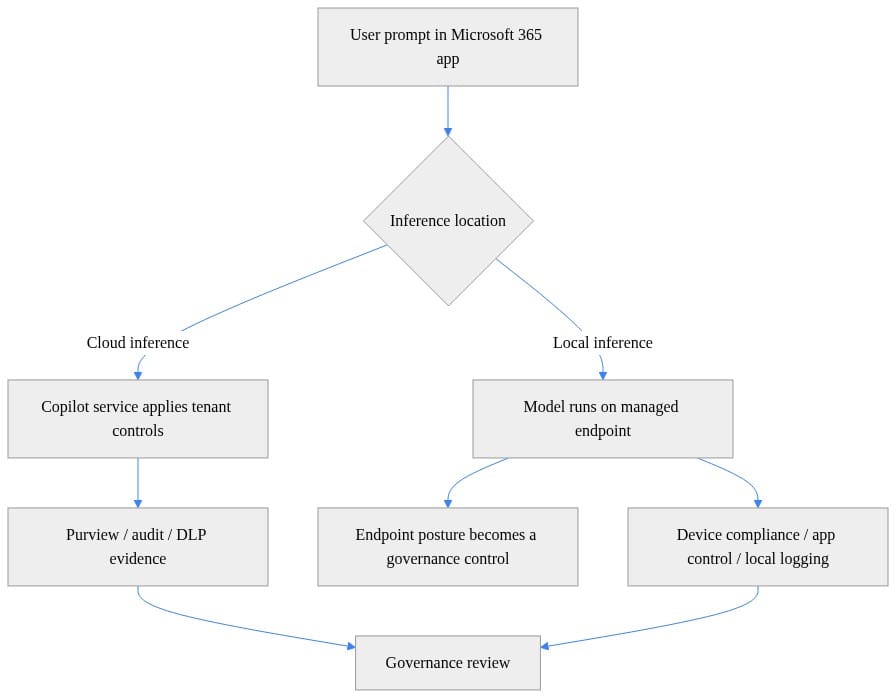
What to look for: the cloud path naturally concentrates more evidence and policy enforcement in centralized services, while the local path makes endpoint posture, runtime approval, and local telemetry collection materially more important.
This is where a lot of privacy talk gets sloppy. Reduced remote processing, where it applies, does not prove that:
- the user session is legitimate
- the device is compliant
- local data on disk is protected
- prompts and outputs are handled correctly
- connectors and tools are permissioned correctly
- evidence exists after the fact
If the device is unmanaged, shared, weakly monitored, or personally owned, your “local” story is governance theater.
In my home lab, I love pushing workloads down to capable hardware. I run Proxmox nodes, test policy edges, and break things on purpose because the endpoint and edge tiers always reveal what the architecture diagram politely hides. Enterprise is harsher. If you cannot attest device encryption, EDR health, application control posture, and approved runtime inventory, then local inferencing is not mature enough for broad business use on that class of endpoint.
The controls local inference cannot retire
Let’s get blunt about the controls that stay on the field.
Identity and authorization
Microsoft describes Work IQ as a permission-aware workplace intelligence layer that can access and reason over organizational data, context, and tools with built-in governance Work IQ docs. That means identity and authorization remain foundational. Permission-aware does not mean permission-optional.
If a user is over-permissioned in SharePoint, Teams, or connected tools, local inferencing does not save you from bad access design. It just gives the bad access a different execution path.
Device compliance and Conditional Access
You do not get to claim governance strength on a weak endpoint. Full stop.
Before I’d approve any local-capable scenario, I want at minimum:
- managed identity
- compliant device
- disk encryption
- healthy EDR
- approved app/runtime inventory
- session controls appropriate to the data class
Here’s a lightweight example of how I’d force a team to document endpoint assumptions before rollout:
# Evaluate whether endpoint posture is strong enough for local inferencing scenarios
$device = [pscustomobject]@{
    DeviceName = $env:COMPUTERNAME
    Encrypted = $true
    EdrHealthy = $true
    Compliant = $true
    AppControlEnforced = $false
    LocalAiRuntimeApproved = $true
}
$ready = $device.Encrypted -and $device.EdrHealthy -and $device.Compliant -and $device.LocalAiRuntimeApproved
[pscustomobject]@{
    DeviceName = $device.DeviceName
    LocalInferenceReady = $ready
    Gap = if ($device.AppControlEnforced) { "None" } else { "Enable application control before broad rollout" }
}
What to look for: this kind of check is intentionally simple, but it exposes the real issue fast. “Compliant” is not enough if application control is missing or the local AI runtime is not part of an approved software baseline.
DLP still matters
Copilot Studio’s data policy guidance is crystal clear that agents can connect to many data sources and services, and that organizational data is an asset admins are responsible for protecting DLP guidance. That is why DLP survives every architecture shift.
If an agent can touch multiple sources, the inferencing location is only one layer. The bigger question is whether data can move from approved systems to unapproved destinations through connectors, prompts, outputs, browser actions, or plugin/tool invocation.
Retention, eDiscovery, and audit evidence
This is the one executives underestimate.
Legal, compliance, and internal audit do not care that a response was fast or that some processing happened locally. They care whether the business record, interaction, and policy decision can be reconstructed when there is an investigation, dispute, regulator request, or insider risk review.
Your evidence chain has to cover:
- user identity
- device posture
- source data and permissions
- agent/tool action
- policy decision
- resulting output
That chain does not build itself.
Privacy and data residency need narrower questions
“Data stays local” is one of those phrases that sounds great in a steering committee and falls apart under two minutes of technical review.
Ask narrower questions:
- Which data elements stay on the device?
- Which prompts, outputs, or metadata are transmitted?
- Which services are still invoked?
- Which logs are stored centrally?
- Which policy signals are retained elsewhere?
- What support and telemetry paths exist?
- What happens across regions?
Microsoft documents geographic data residency and regional considerations in Copilot Studio governance, and it separately documents that Copilot Cowork follows the same data residency model as Microsoft 365 Copilot Copilot Studio governance and Copilot Cowork administration. Good. That’s the level of specificity leaders need.
But don’t confuse residency with endpoint locality. They are not the same control.
For regulated industries, I want capability-specific confirmation on:
- processing location
- storage location
- telemetry path
- audit availability
- support access model
- cross-region behavior
- connector/service dependencies
Anything less is hand-waving.
Latency gains do not settle the risk decision
Yes, local inferencing can be attractive for responsiveness and partial resiliency. I get the appeal. Users absolutely notice latency.
But latency is a performance property, not a governance verdict.
A fast answer can still be produced:
- in a weakly controlled session
- on a noncompliant endpoint
- using over-broad permissions
- through a connector nobody reviewed
- without evidence you can defend later
That tradeoff needs to be scored, not admired.
When I’m advising a rollout, I push teams to classify use cases instead of arguing in the abstract. Sensitive board summaries, HR workflows, M&A prep, legal review, frontline SOP lookup — those are not the same governance problem. Treating them as one policy bucket is lazy architecture.
This simple scoring example is the kind of worksheet I like because it forces the conversation into specifics:
# Score AI use cases by sensitivity, endpoint posture, connectors, residency, and audit evidence
weights = {
    "data_sensitivity": 5,
    "endpoint_posture": 4,
    "connector_exposure": 4,
    "residency_requirement": 3,
    "audit_evidence_need": 2,
}
use_case = {
    "name": "Draft board summary from SharePoint and Teams",
    "data_sensitivity": 5,
    "endpoint_posture": 2,
    "connector_exposure": 4,
    "residency_requirement": 3,
    "audit_evidence_need": 5,
}
score = sum(use_case[k] * weights[k] for k in weights)
tier = "High" if score >= 55 else "Moderate" if score >= 35 else "Low"
print({"use_case": use_case["name"], "risk_score": score, "tier": tier})
What to look for: the output should drive a deployment decision. If the sensitivity is high and endpoint posture is weak, local inferencing should not get a free pass just because it sounds privacy-friendly.
Agents expose the fragmented-enforcement problem
This is where things get messy in the real world.
Microsoft documents Agent Builder for declarative agents in Microsoft 365 Copilot, while more complex requirements use broader tools and features Agent Builder docs. Add in permission-aware organizational context, connectors, browser use, plugins, environment routing, and model administration, and you now have a stack where governance can be mature in one layer and weak in three others.
That is the fragmented-enforcement problem.
I’ve seen tenants where:
- Entra access policy was solid
- SharePoint permissions were mediocre
- endpoint compliance was inconsistent
- connector review was half done
- browser/tool use was barely governed
- audit review was manual and late
That tenant does not become safe because one inferencing path moves closer to the device.
Copilot Cowork administration is a good reminder of the actual surface area: plugins, models, browser use, security and compliance, and usage-based billing are all administrative concerns in the product guidance. That breadth is the point. Governance is a control inventory problem, not a single toggle problem.
If you’re building your operating model, my Enterprise Microsoft 365 Copilot Agent Governance Playbook is the companion read to this post. The inferencing location is one row in the spreadsheet, not the spreadsheet.
A practical decision framework before you enable local capabilities
Here’s the tutorial part. This is the review motion I’d run before approving local inferencing for Microsoft 365 Copilot scenarios.
1) Classify the use case
For each scenario, document:
- business purpose
- data sensitivity
- regulated-record obligations
- user population
- endpoint type
- connectors and tools involved
- evidence required after the fact
If the team cannot explain the path, they do not get the feature.
2) Set a minimum admission bar
My minimum bar is boring on purpose:
- managed identity
- compliant device
- least-privilege access
- approved data paths
- DLP coverage
- retention and eDiscovery alignment
- observable policy decisions
No exceptions for senior executives. No exceptions for “innovation” pilots.
3) Create an evidence package before rollout
Do not wait until audit season to figure out what you can prove.
Use a compact evidence record so every pilot has the same review artifact:
# Collect a compact governance evidence record for Microsoft 365 Copilot assumptions
$evidence = [ordered]@{
    CollectedAtUtc = (Get-Date).ToUniversalTime().ToString("s") + "Z"
    TenantId = "contoso.onmicrosoft.com"
    ReviewScope = "Microsoft 365 Copilot governance"
    Assumptions = @(
        "Local inferencing may shift control reliance to endpoint posture",
        "Connector exposure must be reviewed before broad enablement",
        "Audit evidence must exist for both cloud and endpoint paths"
    )
    Controls = [ordered]@{
        CopilotEnabled = $true
        PurviewAuditEnabled = $true
        DlpPoliciesReviewed = $true
        SensitivityLabelsRequired = $true
        ManagedDevicesRequired = $true
    }
}
$evidence | ConvertTo-Json -Depth 4
What to look for: this is not production automation. It is a forcing function. Every assumption should be explicit, timestamped, and reviewable by security, compliance, and the business owner.
Then export a simple control inventory so you can track what is partial, missing, or blocked:
# Inventory Copilot-related configuration and export a governance review artifact
$inventory = @(
    [pscustomobject]@{ Control="CopilotLicenseAssigned"; State="Partial"; Evidence="Group-based licensing" }
    [pscustomobject]@{ Control="PurviewAudit"; State="Enabled"; Evidence="Unified audit log retained" }
    [pscustomobject]@{ Control="SensitivityLabels"; State="Required"; Evidence="Default labels for SharePoint/Teams" }
    [pscustomobject]@{ Control="ConnectorReview"; State="InProgress"; Evidence="Top 10 connectors assessed" }
    [pscustomobject]@{ Control="ManagedEndpoint"; State="Required"; Evidence="Compliant + encrypted devices only" }
)
$path = Join-Path $PWD "copilot-governance-inventory.csv"
$inventory | Export-Csv -Path $path -NoTypeInformation
Get-Item $path | Select-Object FullName, Length, LastWriteTimeUtc
What to look for: if “ConnectorReview” or “ManagedEndpoint” is incomplete, that should stop broad enablement. Partial governance is still risk.
4) Define no-go cases
I would block local-capable scenarios outright when any of these are true:
- unmanaged endpoints
- shared or kiosk-style endpoints
- unclear connector/data paths
- unsupported evidence requirements
- materially fragmented policy enforcement
- high-sensitivity workflows with weak endpoint posture
This decision tree is simple, but it’s the right shape:
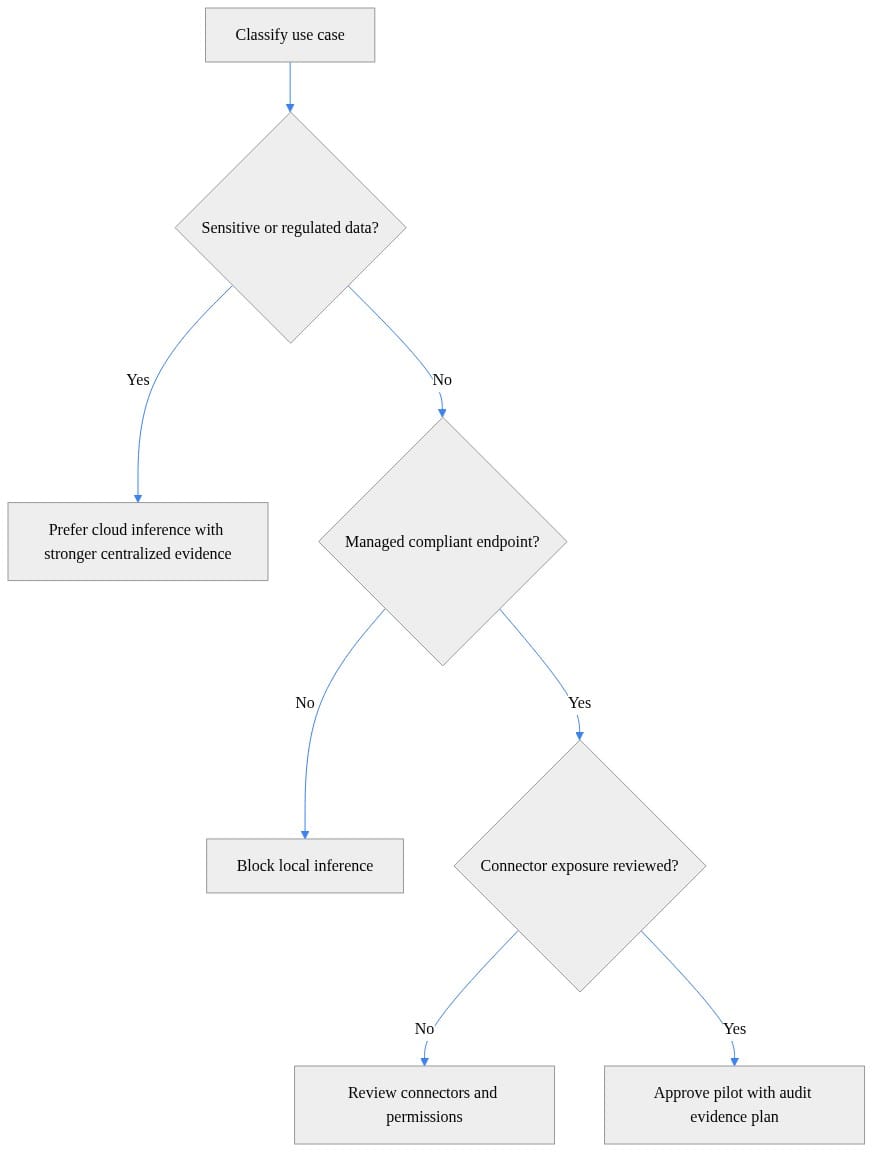
What to look for: the first branch should always be sensitivity and regulation, not convenience.
5) Pilot on hard workflows, not easy demos
Do not use generic productivity tasks as your governance proof. Pilot with representative high-risk workflows where evidence, permissions, and endpoint trust actually matter.
That means legal, HR, finance, executive staff, regulated operations. If the model survives there with clean controls, then you’ve learned something. If it only works for low-risk note summarization, you have learned that too.
Why this matters now
The real opportunity here is not “yay, some AI work may happen locally.” The opportunity is using this moment to mature your Microsoft 365 Copilot operating model.
Microsoft’s documentation keeps pointing leaders to the right places: architecture, secure governance, permission-aware organizational context, agent data policies, residency, browser and plugin administration, and security/compliance operations. Good. That’s the work.
The winning tenant will not be the one with the most local processing.
It will be the one that can consistently prove which policy governed each AI action, on which identity, from which device, against which data source, with which resulting evidence.
That’s the standard I’d hold. It’s the standard I’d build for. And it’s the standard that survives the first real audit, insider event, or regulator question.
Rate your Microsoft 365 Copilot environment from 1 to 5 on this specific question: can you prove the policy path for an AI action across identity, endpoint, connector, and output?
#Microsoft365copilot #EntraID #Compliance
Sources & References
- Official Microsoft Power Platform documentation - Power Platform
- Microsoft Copilot hub
- Security and governance - Microsoft Copilot Studio
- Agent Builder in Microsoft 365 Copilot
- Microsoft Copilot Chat Privacy and Protections
- Work IQ overview
- Configure data policies for agents - Microsoft Copilot Studio
- Study guide for Exam AB-900: Microsoft 365 Copilot and Agent Administration Fundamentals
- Data, privacy, and security for web search in Microsoft Copilot and Microsoft Copilot Chat
- Manage Copilot Cowork for your organization
Try it yourself
Run this tutorial as a Jupyter notebook: Download runbook.ipynb (24 cells, 19 KB).



