Microsoft 365 Copilot Enterprise AI Governance Controls
What Microsoft 365 Copilot for U.S. Government Reveals About Enterprise-Grade AI Controls

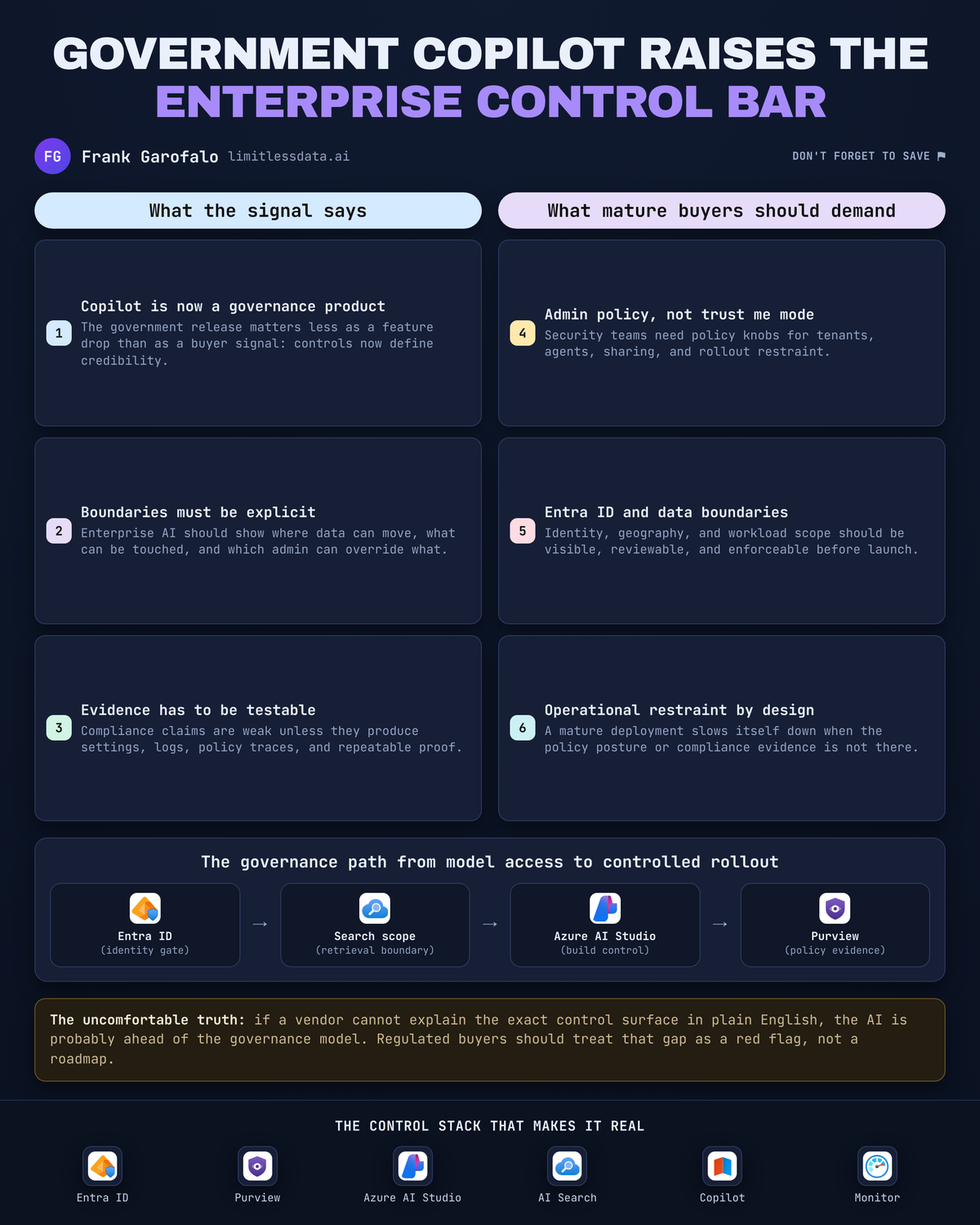
Three controls matter more than 300 features: boundary, gate, evidence.
On this page
- The Government SKU Is a Governance Signal
- Deployment Boundaries Must Be Visible
- Residency Is an Enforceable Setting, Not a Slide
- Feature Gating Is the Real Safety Mechanism
- Auditability Requires a Control Plane
- Custom Agents Expand the Compliance Perimeter
- What Regulated Buyers Should Demand Next
- Sources & References
That’s why a U.S. Government-flavored Copilot announcement matters to enterprise buyers. Not because everyone needs a government cloud deployment, but because it forces the right question: can your commercial AI rollout produce the same hard edges, admin controls, and audit trail?
I’ll make the blunt case.
The useful signal in government-positioned AI isn’t the marketing wrapper. It’s the expectation that deployment boundaries are explicit, geography is controllable, publishing is gated, and administrators can prove what was enabled, by whom, and under which policy. If your AI platform can’t do that, you do not have enterprise-grade AI. You have a demo with procurement support.
The Microsoft documentation around Microsoft 365 Copilot, Copilot Studio, and extensibility points in exactly that direction: architecture guidance, privacy and responsible AI material, security and governance settings, admin management, geographic controls, and compliance-aligned APIs are all part of the story in the Microsoft 365 Copilot documentation. That expanding control surface is the real headline.
The Government SKU Is a Governance Signal
Plenty of buyers still evaluate AI the wrong way. They ask whether the assistant can summarize meetings, draft emails, or connect to a line-of-business system. Useful questions, but second-order questions.
First-order question: what are the operational restraints?
The supplied Microsoft docs do not give us a full U.S. Government release matrix, certification table, or a side-by-side feature list for every environment. Fine. I don’t need a glossy matrix to see the more important pattern. Microsoft is documenting controls that serious buyers should demand everywhere, whether they run in a sovereign environment, a regulated commercial tenant, or a global enterprise with ugly data boundaries.
A CDO I worked with in Q4 had 14 internal agents live across HR, legal, and service operations before anyone could answer a basic audit question: which ones were allowed to publish responses grounded on employee files versus public knowledge only. That is exactly how AI programs drift into trouble—capability first, control-plane later.
Mature buyers should stop rewarding vague claims like “enterprise secure.” Ask for explicit controls you can test. Ask who can change them. Ask where they’re administered. Ask what evidence remains after an incident review.
Deployment Boundaries Must Be Visible
Microsoft 365 Copilot sits close to the heart of the Microsoft 365 estate. Microsoft’s admin guidance describes it as combining large language models with Microsoft 365 apps and data, and it positions the Microsoft 365 admin center as the control plane for Copilot agents and integrated apps in the Microsoft 365 admin docs.
That matters because AI governance is inseparable from identity, content permissions, app governance, and extension governance. You cannot govern Copilot as a chat box. You govern it as an access path into your collaboration system.
Here’s the mental model I use with clients and in my own lab: every AI deployment needs a boundary map.
That map should answer five things:
- Which tenant is in scope
- Which native Copilot experiences are enabled
- Which custom agents exist
- Which data sources and connectors they can touch
- Which external applications can invoke or extend those capabilities
If you can’t draw that map on one page, your rollout is already ahead of your controls.
A simple architecture view helps teams stop hand-waving and start naming the policy checkpoints.
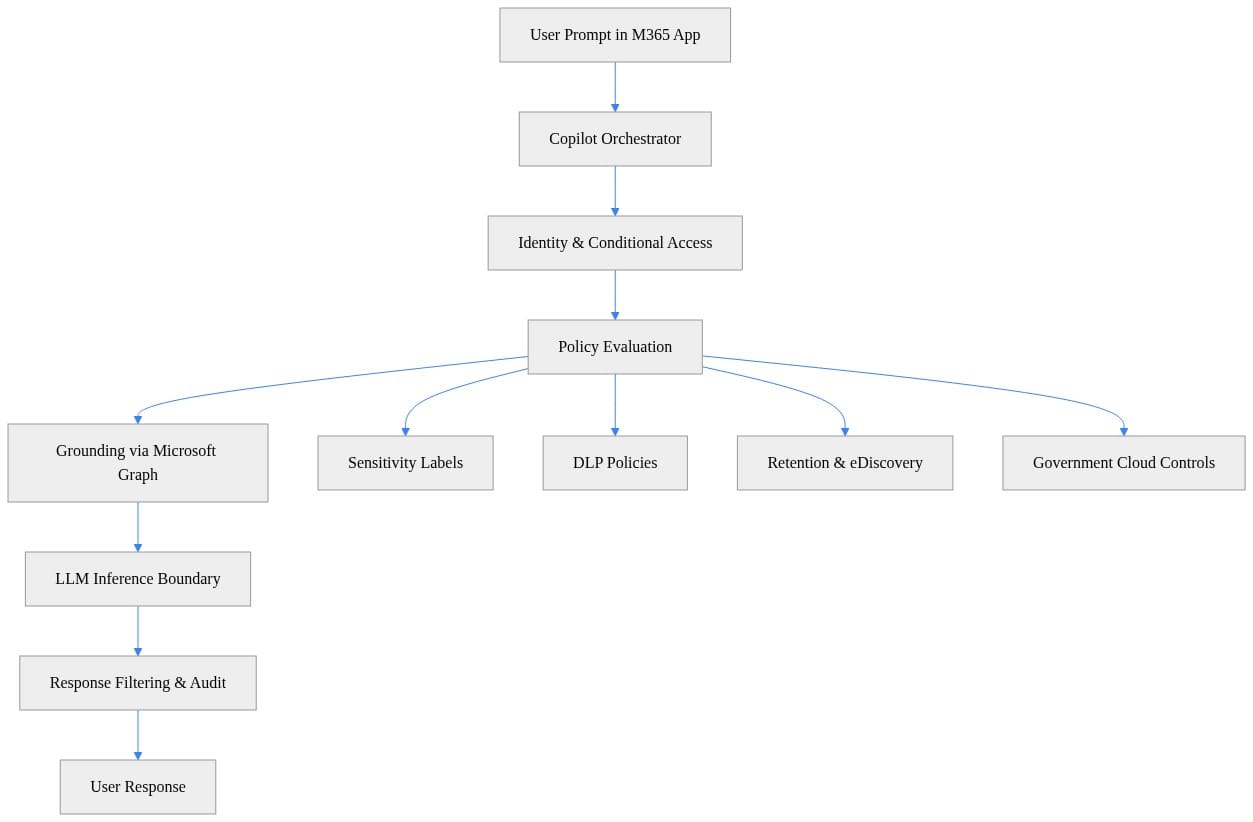
Look at the sequence in that diagram. Identity, policy evaluation, grounding, inference boundary, and response handling all sit in the path. That’s the right conversation. Not “does the model work,” but “where exactly do we enforce and record decisions?”
I wrote a deeper version of this operating model in my Enterprise Microsoft 365 Copilot Agent Governance Playbook, because this is where most commercial deployments get sloppy: they issue a policy statement, but operators still can’t enumerate every AI surface that was actually enabled.
Residency Is an Enforceable Setting, Not a Slide
This is one of the clearest tells in the Microsoft docs.
Copilot Studio governance includes an administrative option to disable data movement across geographic locations for generative AI in the Copilot Studio security and governance guidance. Good. That is the shape of a real control: configurable behavior, admin ownership, and a decision point that can be reviewed.
Too many enterprise AI programs treat residency as branding. They put a region on a PowerPoint deck and call it governed. That’s amateur hour.
The right questions are operational:
- Is cross-geo behavior configurable?
- Which admin role can change it?
- Is the setting tenant-wide, environment-specific, or agent-specific?
- Where is the setting recorded?
- How do I validate the runtime path for a given scenario?
If your compliance lead can’t answer those questions before go-live, then residency is still a promise, not a control.
Here’s a tiny illustrative pattern I use when explaining this to architecture teams. It models routing as a policy decision, not a networking afterthought.
# Tenant boundary check to model sovereign cloud routing decisions
def route_request(cloud: str, region: str) -> str:
    approved = {
        "USGov": {"us"},
        "Commercial": {"us", "eu", "apac"},
    }
    if region not in approved.get(cloud, set()):
        raise ValueError(f"Region {region} not permitted for {cloud}")
    return f"routed:{cloud}:{region}"

print(route_request("USGov", "us"))
What should you notice? The request is either routed within an approved boundary or it fails. That’s the mindset regulated buyers need. Make cross-geography behavior a release gate for every agent scenario, especially when line-of-business data enters the picture.
Feature Gating Is the Real Safety Mechanism
The most underrated control in the supplied material is not glamorous. It’s administrative gating.
Copilot Studio administrators can disable publishing of agents that use generative AI through the Power Platform admin center per the Copilot Studio governance docs. That single capability matters more than a dozen “AI principles” posters in the lobby.
Why? Because it creates a choke point.
Experimentation and production are not the same thing. Building an agent, connecting an agent, publishing an agent, and exposing it to business users are four separate decisions. They should have four separate approval paths.
That’s how grown-up platforms run:
- Sandbox creation is easy
- Connector access is reviewed
- Publishing is gated
- Production exposure is monitored
- Exceptions are documented
In uncontrolled self-service environments, those steps collapse into one click and a prayer.
If you want to show your team what a gate looks like in practice, start with a pre-execution policy check. This example is intentionally simple, but it teaches the right lesson: no compliant device, no acceptable label, no approved clearance, no AI execution.
# Policy-aware prompt gate before enterprise AI execution
from dataclasses import dataclass

@dataclass
class RequestContext:
    user_id: str
    clearance: str
    device_compliant: bool
    sensitivity_label: str

def allow_copilot(ctx: RequestContext) -> bool:
    if not ctx.device_compliant:
        return False
    if ctx.clearance not in {"Moderate", "High"}:
        return False
    return ctx.sensitivity_label in {"Public", "Internal"}

ctx = RequestContext("u123", "High", True, "Internal")
print({"allowed": allow_copilot(ctx)})
Don’t obsess over the syntax. Focus on the operating model behind it. A request should pass through policy before inference, not after a bad response reaches a user.
And define ownership clearly. Tenant admin, data owner, app owner, security, compliance—someone must own each gate. “Shared responsibility” is usually code for “nobody signed it.”
Auditability Requires a Control Plane
Executives love to talk about prompts. Auditors do not. They care about inventory, ownership, change history, and evidence.
That’s why the control-plane discussion matters so much. Microsoft’s admin framing around agents and integrated apps is a clue that the right unit of governance is not the individual prompt. It’s the centrally managed AI surface: agents, apps, connectors, policies, and their administrative state.
The executive test is simple:
- Can you inventory every agent?
- Can you identify the owner for each one?
- Can you state what data it can reach?
- Can you show which controls were active?
- Can you reconstruct what happened after an incident?
If the answer is “sort of,” you are not ready for regulated deployment.
Here’s a lightweight audit record pattern I use to explain what “evidence” should look like. Again, illustrative, not production-ready.
# Minimal audit record for prompt, policy decision, and response handling
$audit = [pscustomobject]@{
    Timestamp      = (Get-Date).ToString("o")
    User           = "analyst@agency.gov"
    App            = "Microsoft 365 Copilot"
    PromptHash     = "sha256:9f2c..."
    PolicyDecision = "Allowed"
    DataBoundary   = "USGov"
    ResponseAction = "DeliveredWithRedaction"
}

$audit | ConvertTo-Json -Depth 3
Notice the fields: timestamp, user, app, policy decision, boundary, response action. That’s the skeleton of a defensible review trail. You may need more, especially around retention, approvals, and connector activity, but you need at least this much to have an adult conversation with internal audit.
I covered the people side of this in Microsoft 365 Copilot Adoption, Burnout and Governance, because the ugly truth is that weak governance burns out operators too. They spend their time reconstructing decisions that should have been logged by design.
Custom Agents Expand the Compliance Perimeter
This is where many AI programs break.
Microsoft supports agent building across Microsoft 365 and line-of-business systems through Agent Builder and Copilot Studio, and the company also documents APIs that let developers securely access Copilot capabilities in their own applications and custom engine agents while aligning with Microsoft 365 compliance standards in the Copilot APIs overview. Microsoft also positions Power Platform broadly across agents, apps, automation, analytics, and websites in the Power Platform docs.
That means your compliance perimeter is larger than “the assistant.”
Every extension path creates its own obligations:
- Data access review
- Connector approval
- Environment strategy
- Monitoring and logging
- Lifecycle management
- Retirement and retention handling
This is why I push teams toward one architecture review pattern for native Copilot, Agent Builder, Copilot Studio, APIs, connectors, and line-of-business integrations. If you create a special process for each one, you’ll get policy drift in 90 days.
A practical place to start is retrieval filtering. If an agent grounds on enterprise content, authorization has to survive the retrieval step. Here’s a stripped-down example that shows the idea.
# Retrieval filtering that respects document labels and user entitlements
documents = [
    {"id": "doc-1", "label": "Public", "owners": {"u123", "u999"}},
    {"id": "doc-2", "label": "Secret", "owners": {"u999"}},
    {"id": "doc-3", "label": "Internal", "owners": {"u123"}},
]

def authorized_docs(user_id: str, max_label: str):
    rank = {"Public": 1, "Internal": 2, "Secret": 3}
    return [
        d["id"]
        for d in documents
        if user_id in d["owners"] and rank[d["label"]] <= rank[max_label]
    ]

print(authorized_docs("u123", "Internal"))
What should you observe? The retrieval layer respects both ownership and label level. That’s the standard. If your agent can retrieve beyond the user’s entitlement boundary, the rest of your governance story is theater.
This is also why prompt governance alone is not enough. I laid that out in Microsoft 365 Copilot Organizational Prompt Governance. Prompts matter, but connectors, retrieval, publishing, and admin state matter more.
What Regulated Buyers Should Demand Next
Here’s my buyer checklist. Short, sharp, and non-negotiable.
1) Demand written deployment boundaries
Get a document that names tenant scope, enabled AI surfaces, custom agents, connectors, integrated apps, and extension models. If it isn’t written down, it isn’t governable.
2) Demand admin-enforceable gates
You want proof that experimentation, publishing, connector access, and production release are distinct control points. If every maker can build and publish generative AI into business workflows unchecked, you have a governance problem, not an innovation strategy.
3) Demand geographic controls where the use case requires them
Not broad statements. Actual settings, assigned owners, and validation steps. Geography needs to be enforceable, recorded, and testable.
4) Demand a control-plane view
Inventory, ownership, change governance, and evidence should be available without a three-week war room. If your platform team can’t produce that quickly, your AI estate is already too opaque.
5) Demand restraint
This one gets ignored. Enterprise-grade AI is not just about what the system can do. It’s about what it is prevented from doing until the right approvals exist.
That’s the core lesson here. A government-positioned Copilot offering is valuable because it sharpens buyer expectations. It raises the bar from “show me the features” to “show me the boundaries, gates, and evidence.”
Commercial enterprise AI should be judged against that same bar. No exceptions.
Rate your organization’s current AI control plane from 1 to 5: can you inventory agents, prove publishing gates, and validate geography settings today?
#EnterpriseAI #Microsoft365copilot #Compliance
Sources & References
- Official Microsoft Power Platform documentation - Power Platform
- Microsoft 365 Copilot hub
- Security and governance - Microsoft Copilot Studio
- Decide which Copilot is right for you
- Microsoft 365 developer documentation - Microsoft 365 Developer
- Choose between Agent Builder in Microsoft 365 Copilot and Copilot Studio to build your agent
- Microsoft 365 Copilot APIs Overview
- Enhance your productivity with prebuilt Microsoft 365 Copilot agents - Training
- Agent Builder in Microsoft 365 Copilot
- Manage agents in the Microsoft 365 admin center - Microsoft 365 admin
Try it yourself
Run this tutorial as a Jupyter notebook: Download runbook.ipynb (24 cells, 19 KB).