Microsoft 365 Copilot Adoption, Burnout and Governance
Burnout, AI, and the Reality Gap: What Enterprise Leaders Need to Hear Before the Next Copilot Rollout


12 minutes to assign a Copilot license. 12 weeks to earn back trust after a bad rollout.
On this page
- The rollout risk nobody sees in the demo
- Why the licensing-event mindset fails
- Map the work before expanding the copilots
- Sequence adoption around human capacity
- Governance is an adoption enabler, not a brake
- Measure relief, not just activity
- The executive mandate before the next rollout
- Sources & References
A Copilot license can be provisioned in minutes. Earning back employee attention, trust, and capacity takes a far more deliberate operating model.
Leaders are right to want relief for employees. Inbox churn, meeting sprawl, status updates, document rewrites, approval ping-pong — that stuff is expensive, demoralizing, and completely reasonable to attack with AI.
But here’s the part too many executive teams skip: a slick prompt demo is not evidence of workflow improvement. Microsoft 365 Copilot is designed to enhance work across Copilot Chat, Outlook, Teams, and Word using enterprise data from Microsoft Graph, which means it shows up right in the middle of how people already work, not off to the side in some sandbox per Microsoft’s overview. That embedded reach makes rollout discipline more important, not less.
If you launch Copilot like a software entitlement exercise, you will increase cognitive load before you reduce it.
The rollout risk nobody sees in the demo
The demo environment is clean. The real enterprise is not.
In the demo, the calendar is tidy, the document is current, permissions are correct, and the user has a crisp ask. In the real world, the meeting invite has three versions of the deck attached, the decision owner changed last week, two teams are using different naming conventions, and the employee is already juggling seven open threads.
That’s the reality gap.
A few months ago, I was with a 4,800-person operations organization that had Copilot enthusiasm at the top and absolute calendar chaos in the middle; by week three, managers were praising faster draft creation while employees were quietly spending extra time validating summaries against the actual meeting decisions.
The damage from that pattern is predictable:
- people keep the old process and add AI on top
- review work expands
- nobody removes a step
- “productivity” gets measured as visible usage instead of lower friction
- fatigue goes up
This is the leadership test before the next rollout: don’t ask whether Copilot is available. Ask what work changes, what work stops, and how you’ll know daily work actually got better.
A simple way to explain the failure mode to your sponsors is this flow:
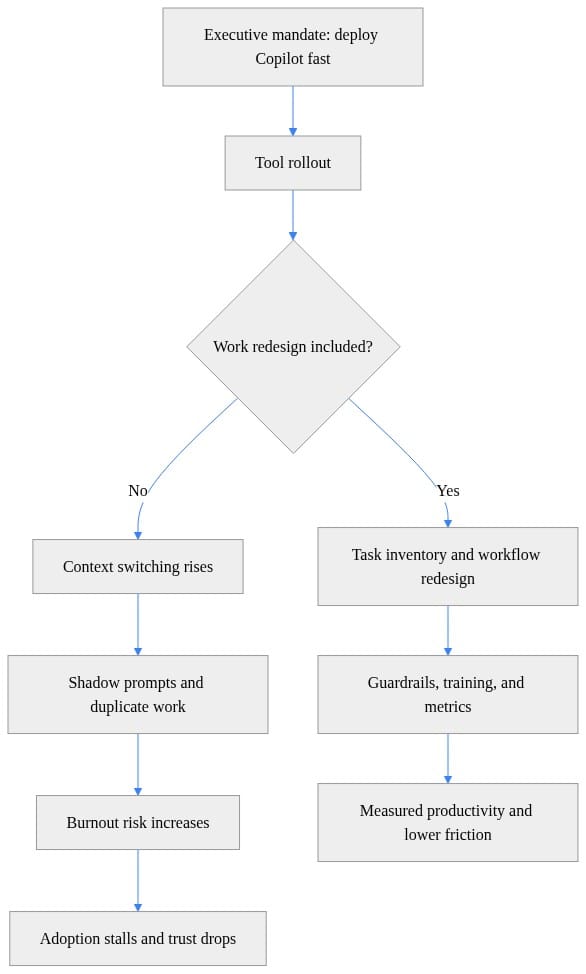
If your rollout path goes down the left side of that diagram, you did not deploy transformation. You deployed another layer of work.
Why the licensing-event mindset fails
Provisioning is easy. Adoption is management work.
That’s the uncomfortable truth. IT can enable access. Procurement can approve spend. Comms can announce the program. None of that tells you whether a seller writes better customer follow-ups, whether a PM spends less time stitching status notes together, or whether a manager now has to review twice as much AI-generated sludge.
The broad “everyone gets more productive” promise is where a lot of rollouts get stupid. Aggregate productivity targets create the wrong pressure. Employees start using AI visibly because they think they’re supposed to, even in tasks where review burden wipes out the gain.
I’ve written about this in a Microsoft 365 Copilot Change Management Case Study, and the pattern is consistent: the license is a deployment metric, not a value metric.
Here’s a tiny example I use with leadership teams. Don’t just measure time saved. Compare it to rework.
# Compare AI time saved against rework to expose the reality gap
tasks = [
    {"task": "draft_email", "minutes_saved": 12, "rework_minutes": 3},
    {"task": "status_summary", "minutes_saved": 20, "rework_minutes": 14},
    {"task": "meeting_notes", "minutes_saved": 15, "rework_minutes": 2},
]

for item in tasks:
    net = item["minutes_saved"] - item["rework_minutes"]
    verdict = "real gain" if net > 5 else "thin gain" if net >= 0 else "negative"
    print(f"{item['task']}: net={net} min -> {verdict}")
That’s the whole argument in 11 lines. If “minutes saved” gets eaten by review, correction, and follow-up clarification, you don’t have a workflow gain. You have a demo gain.
What matters is net effect on the employee’s day:
- fewer manual steps
- less duplicate summarization
- less coordination overhead
- lower rework
- clearer accountability
If those don’t move, the rollout is mostly theater.
Map the work before expanding the copilots
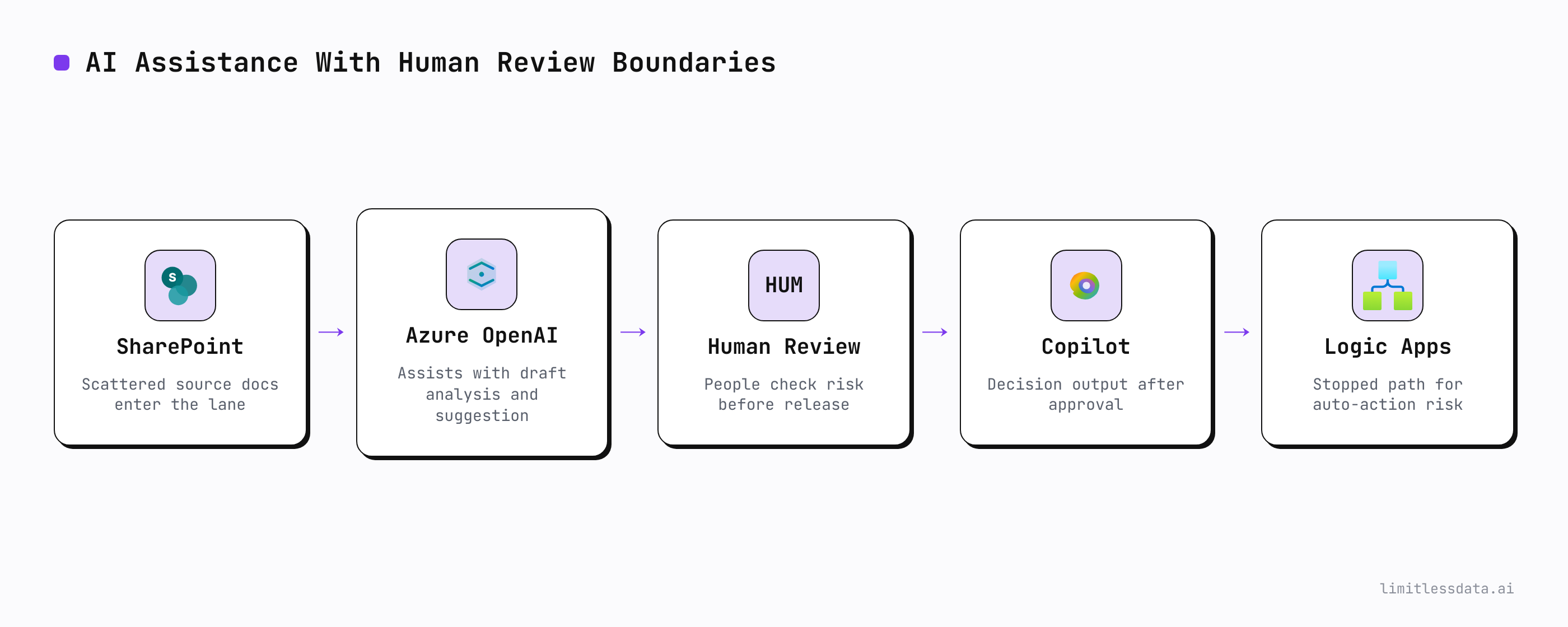
Start with a small number of recurring, high-friction workflows. Not job titles. Workflows.
Good starting points:
- weekly status synthesis
- meeting recap and action extraction
- first-draft customer follow-up emails
- document preparation before review meetings
- retrieval of scattered project context before a decision call
Bad starting points:
- “make everyone more productive”
- “let’s give all managers access and see what happens”
- “every team can build its own agent”
The right map is boring on purpose:
- Who is the user?
- What source information do they need?
- Who owns the decision?
- Where is the review step?
- What output is actually useful?
- What task gets removed if this works?
That workflow map exposes the hidden mess quickly:
- permissions gaps
- duplicate content
- stale files
- approval bottlenecks
- unclear ownership
- bad habits that AI will happily accelerate
And let’s talk about agents, because this is where executive excitement usually outruns operating maturity. Microsoft says Agent Builder is meant for immediate, interactive development of quick, straightforward declarative agents in the product guidance. Fine. That’s useful. It does not mean every expression of process pain deserves an agent.
Agent demand is usually a process signal before it is a build mandate.
If the workflow is unstable, undocumented, and politically ambiguous, wrapping it in an agent just gives you a faster path to confusion. I made a similar point in my post on enterprise agent memory governance: ownership beats novelty every time.
Sequence adoption around human capacity

This is the part leaders routinely underfund.
Don’t dump access broadly and hope usage creates value. Pick a pilot cohort with:
- a shared workflow
- one accountable business sponsor
- a manager willing to coach the team
- enough similarity in the work to compare outcomes
Then do something radical: give them time.
Protected time to learn. Protected time to test. Protected time to compare AI output with the old method. Protected time to report where the tool adds friction.
If experimentation has to happen after the day job, you are converting adoption into unpaid overtime.
Microsoft Learn plans are useful here because they let organizations create curated learning paths and track progress across teams as documented by Microsoft Learn. Good. Use that. But don’t confuse course completion with readiness. Readiness means a manager can answer three questions clearly:
- When should my team use AI help?
- When is human review mandatory?
- How do people raise concerns without being labeled resistant?
I also like to put a lightweight readiness check in front of any expansion decision. Nothing fancy. Just enough to expose whether the basics exist.
# Audit Copilot readiness by checking policy, training, and workflow ownership
$readiness = [pscustomobject]@{
    DataClassificationPolicy = $true
    PromptTrainingCompleted  = $false
    WorkflowOwnerAssigned    = $true
    SuccessMetricsDefined    = $false
}

$checks = $readiness.PSObject.Properties | ForEach-Object {
    [pscustomobject]@{
        Check  = $_.Name
        Status = if ($_.Value) { "Ready" } else { "Gap" }
    }
}

$checks | Format-Table -AutoSize
If training is incomplete and success metrics are undefined, expansion is a management failure, not an employee failure.
Governance is an adoption enabler, not a brake
Employees use AI more confidently when the rules are clear.
That means governance has to show up early as practical operating guidance:
- what information can be used
- what outputs require verification
- who owns the workflow
- who approves changes
- what happens when the output is wrong
- how an agent gets retired
Microsoft already provides Microsoft 365 Copilot documentation for privacy, responsible AI, architecture, and secure governance in its core guidance hub. Use that as your baseline. Stop treating governance like a late-stage legal review after the pilot is already making promises.
The same goes for custom extensions. Microsoft states that Microsoft 365 Copilot APIs can securely expose Copilot capabilities to your own applications and custom engine agents while aligning with Microsoft 365 compliance standards in the API overview. Great. That gives you a secure path. It does not remove your obligation to define:
- data access ownership
- change control
- test criteria
- incident response
- retirement process
Security and compliance alignment are table stakes. Operational ownership is the real maturity marker.
Measure relief, not just activity

The wrong KPI stack will lie to you fast.
I do not care how many licenses were assigned. I do not care how many prompts were sent. I do not care how many agents got published.
Those are activity signals. They are not proof that work improved.
For each prioritized workflow, build a balanced scorecard:
- cycle time
- rework minutes
- quality review burden
- escalation rate
- training time
- user confidence
- after-hours work change
- reported friction
And yes, include human outcome checks. If output volume rises while after-hours work rises too, you probably shifted effort instead of removing it.
Here’s a simple illustrative KPI pattern I use to make that visible:
# Build a simple KPI view that balances productivity with human cost
metrics = {
    "adoption_rate": 0.74,
    "minutes_saved_per_user": 18,
    "rework_rate": 0.31,
    "after_hours_change": 0.22,
}

healthy_rollout = (
    metrics["adoption_rate"] >= 0.7
    and metrics["minutes_saved_per_user"] >= 15
    and metrics["rework_rate"] <= 0.2
    and metrics["after_hours_change"] <= 0.05
)

print("healthy_rollout =", healthy_rollout)
print("focus:", "redesign work" if not healthy_rollout else "scale carefully")
Notice what that logic does: it refuses to call a rollout healthy if adoption looks good but rework or after-hours load is climbing. That’s exactly how you should think about this at the executive level.
If you want another practical check, measure overload before and after rollout in one or two pilot teams. Meeting count, tool hops, after-hours messaging — ugly but useful indicators. If those numbers worsen, pause expansion and redesign the workflow before you celebrate usage.
The executive mandate before the next rollout
Before any broader Copilot push, every sponsor should be able to answer this in one minute:
- What workflow are we changing?
- Which role is affected?
- What work gets removed or redesigned?
- Who owns the outcome?
- How will we measure whether the employee’s day improved?
That’s the mandate.
Then sequence the rollout like adults:
- prepare data and governance
- pilot a bounded workflow
- train users and managers
- measure net effect, including human cost
- expand only when the pattern is repeatable
One more blunt point: Microsoft also distinguishes between Copilot offerings and notes that Microsoft 365 includes Copilot Chat with enterprise data protection and pay-as-you-go agents in its product selection guidance. That flexibility is useful, but it also increases the chance that organizations mistake option breadth for rollout readiness. More surfaces, more agents, and more access paths mean you need tighter operating discipline.
I’m bullish on Copilot where the workflow is real, the owner is named, the review boundary is explicit, and the team has room to learn. I’m bearish on executive theater dressed up as transformation.
A license takes minutes. Adoption takes design. Trust takes evidence. Capacity only comes back when you remove work.
Rate your organization from 1 to 5 on this specific question: before your next Copilot expansion, can every sponsor name the workflow that will stop, not just the tool that will ship?
#Microsoft365copilot #EnterpriseAI #Changemanagement
Sources & References
- Microsoft 365 Copilot hub
- Microsoft Learn for Organizations
- Decide which Copilot is right for you
- Agents for Microsoft 365 Copilot
- Microsoft 365 Copilot APIs Overview
- Agent Builder in Microsoft 365 Copilot
Try it yourself
Run this tutorial as a Jupyter notebook: Download runbook.ipynb (22 cells, 19 KB).



