Microsoft 365 Copilot Change Management Case Study
There is no enterprise Copilot without change management — and the best proof is coming from the field


“A CIO asked me last week: why did Copilot usage go up while throughput stayed flat?”
On this page
- The situation: two industries, same executive problem
- The root cause: rollout metrics are hiding workflow failure
- The decision: treat Copilot as an operating-model change
- The implementation: map the workflow, then engineer the human loop
- The case-study standard: what the insurance and dairy stories must prove
- The results model: measure by role, blockers, and intervention
- Four failure modes that keep showing up
- A 90-day field plan that actually works
- The takeaway executives need to hear
- Sources & References
That’s the whole story in one sentence.
I’ve sat in enough executive reviews to know how this goes. Someone puts a big license number on a slide. Someone else shows monthly active users. Training attendance gets rounded up into “readiness.” Then the first serious operator in the room asks the only question that matters: which workflow got faster, cleaner, and more reliable?
If you’re deploying Microsoft 365 Copilot, you’re not rolling out a feature. You’re changing an operating model. Microsoft’s own guidance for IT pros spans architecture, privacy and responsible AI, security and governance, planning, deployment, and management because this is a service that has to be run, not a button that gets turned on Microsoft 365 Copilot docs.
That is why the best proof is coming from the field, not the procurement memo.

The situation: two industries, same executive problem
Over the last year, two stories kept showing up in boardroom conversations with me: insurance and dairy.
Different business. Same trap.
In insurance, the promise is obvious: claims summaries, policy servicing, broker communication, internal handoffs, exception routing. In dairy, people assume the use cases are thinner until they actually map the work: plant communications, quality documentation, shift handoffs, procurement coordination, maintenance summaries, and frontline reporting.
Different context, same executive problem.
When I ask these five questions, the room usually goes quiet:
- Which workflow was redesigned?
- Who owns the decision and the exceptions?
- What changed for frontline employees on Tuesday morning?
- Which KPI moved?
- What evidence proves the change held for more than two weeks?
If you don’t have those answers, you don’t have a Copilot case study. You have a rollout story.
In Q1, I was in a review with a 1,400-person operations group that had already assigned access broadly, and the ugliest number on the page was not adoption at all. It was that exception handling for a document-heavy approval process still lived in shared mailboxes and tribal knowledge.
That’s the pattern leaders need to fix.
The root cause: rollout metrics are hiding workflow failure
Here’s what gets over-reported:
- licenses assigned
- aggregate monthly active users
- prompt volume
- number of agents created
- training completions
None of those are useless. All of them are weak evidence of value.
The KPI reset has to happen at workflow level:
- elapsed cycle time from intake to completion
- quality rate or rework rate
- exception frequency
- time to exception resolution
- active use inside the target role
- override and escalation patterns
- business outcome tied to the process
That means before-and-after scorecards segmented by role, stage, complexity band, and exception type.
Here’s a lightweight baseline example I use when I want a team to stop admiring aggregate numbers and start measuring who is actually ready.
# Baseline adoption metrics before Copilot rollout
from dataclasses import dataclass

@dataclass
class AdoptionBaseline:
    eligible_users: int
    trained_users: int
    weekly_active_users: int

baseline = AdoptionBaseline(
    eligible_users=1200,
    trained_users=180,
    weekly_active_users=95,
)

training_rate = baseline.trained_users / baseline.eligible_users
wau_rate = baseline.weekly_active_users / baseline.eligible_users

print(f"Training coverage: {training_rate:.1%}")
print(f"Weekly active usage: {wau_rate:.1%}")
What to observe: training coverage and weekly active usage are starting signals, not proof of realized value.
The decision: treat Copilot as an operating-model change
The turning point in successful programs is always the same: somebody decides this work will have named owners.
That owner model needs to be explicit:
- business process owner owns outcomes
- platform owner owns configuration and service operations
- data and security leaders define controls
- frontline managers own adoption feedback and practice loops
- employees retain review, approval, and escalation duties
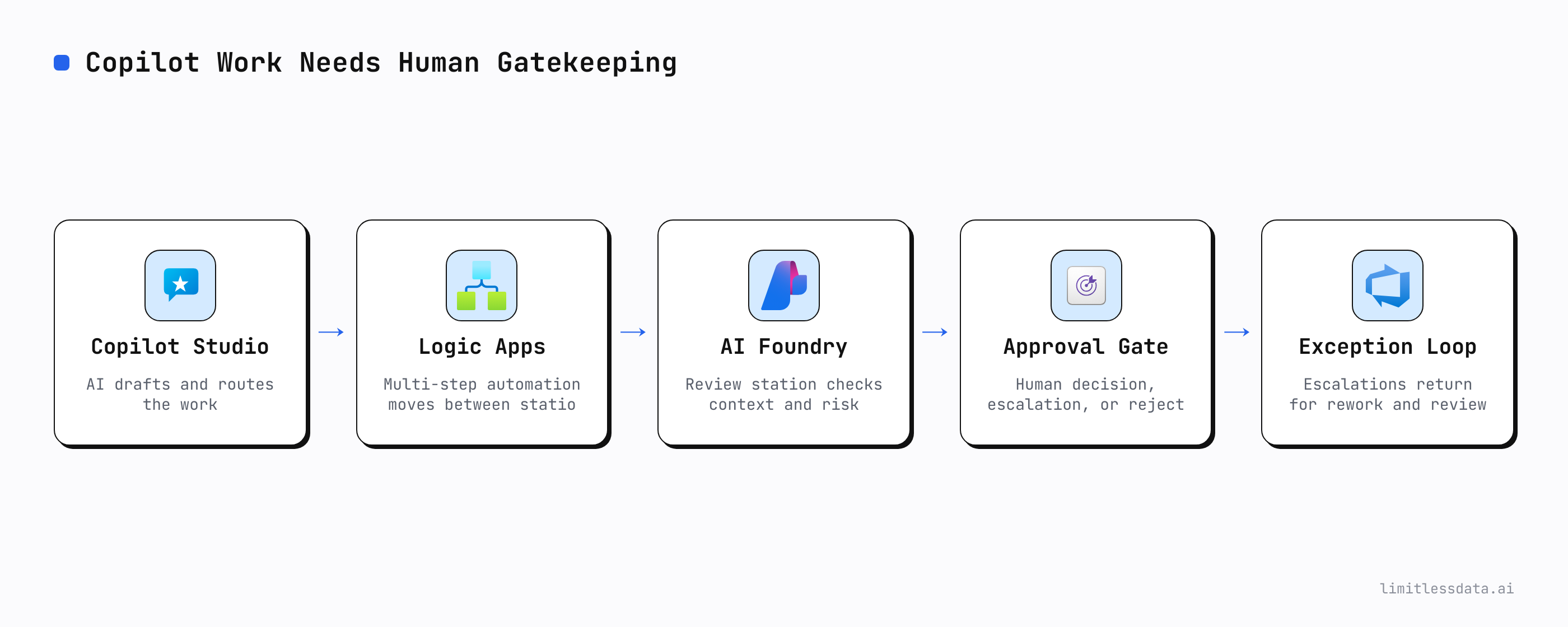
This is where Microsoft’s product direction matters. Agents can extend and customize Microsoft 365 Copilot for the way your organization works agents prerequisites. Microsoft also positions Agent Builder for quick declarative projects, while Copilot Studio is there for secure, scalable agents working across Microsoft 365 and line-of-business systems Copilot Studio experience.
That’s not a toy stack. That’s operational surface area.
And once you have operational surface area, you need operational discipline.
I wrote about one slice of that in Microsoft 365 Copilot Organizational Prompt Governance, but prompt guidance alone won’t save a weak process. If the workflow owner can’t define acceptable output, exception paths, and review points, Copilot just accelerates ambiguity.
The implementation: map the workflow, then engineer the human loop
This is the part people try to skip because it feels slower than license assignment.
Don’t skip it.
Start with trigger-to-completion mapping:
- what event starts the work
- what data sources are involved
- what Copilot drafts, summarizes, retrieves, routes, or executes
- where a human verifies
- where a human decides
- where a human approves
- what conditions create an exception
- who handles that exception
- what evidence gets logged
If you’re using Microsoft 365 Copilot capabilities that can span multi-step tasks across Microsoft 365, that design work becomes even more important. Microsoft describes Copilot Cowork as able to send emails, schedule meetings, create documents, post in Teams, and handle multi-step tasks across the environment Copilot Cowork FAQ.
That means the “human in the loop” can’t be a slogan. It has to be a named checkpoint.
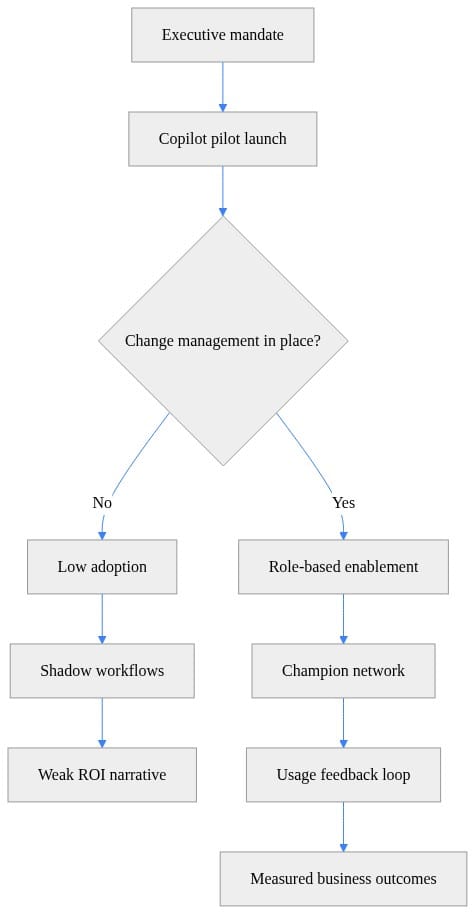
What to observe: if change management is absent, shadow workflows appear immediately.
Then I segment users into cohorts. Not everyone should be enabled the same way on day one.
# Segment users into change cohorts for targeted enablement
$users = @(
    [pscustomobject]@{ Name = "Ava"; Department = "Sales"; License = $true; ManagerApproved = $true },
    [pscustomobject]@{ Name = "Noah"; Department = "Finance"; License = $true; ManagerApproved = $false },
    [pscustomobject]@{ Name = "Mia"; Department = "HR"; License = $false; ManagerApproved = $true }
)

$users | ForEach-Object {
    $cohort = if (-not $_.License) {
        "NotReady"
    } elseif (-not $_.ManagerApproved) {
        "NeedsManagerAlignment"
    } else {
        "ReadyForEnablement"
    }

    [pscustomobject]@{
        Name       = $_.Name
        Department = $_.Department
        Cohort     = $cohort
    }
} | Format-Table -AutoSize
Your real deployment unit is not “all licensed users.” It’s the role cohort inside a workflow.

The case-study standard: what the insurance and dairy stories must prove
I’m not inventing customer names, percentages, quotes, or implementation details that aren’t in primary case material. If a field story doesn’t show the workflow evidence, that’s a reporting gap.
So here is the standard I’d use to judge both the insurance and dairy cases.
Insurance workflow evidence
For a valid insurance Copilot story, I want to see:
- named workflow: claims intake summary, policy servicing response, underwriting prep, broker communication
- baseline cycle time
- post-change cycle time over a defined window
- quality measure: rework, correction rate, QA findings, or escalation rate
- exception categories and handoff path
- active use among the target role
- accountable process owner
- frontline enablement plan
- business outcome tied to the workflow
Dairy workflow evidence
For a valid dairy Copilot story, I want to see:
- named workflow: maintenance summary, quality incident documentation, shift handoff package, procurement follow-up, plant meeting recap
- baseline completion time
- output quality or rework rate
- exception frequency by plant or shift
- escalation path when Copilot output is incomplete or unsafe for operational use
- target-role adoption rate
- owner for process and owner for platform
- operating outcome: reduced delay, fewer missed actions, cleaner audit trail, faster coordination
That’s the difference between a broad rollout narrative and a field-proof case.
If the story only says “employees use Copilot to save time,” I can’t underwrite that as an executive. Time saved where? In what step? Measured how? Sustained by whom?
The results model: measure by role, blockers, and intervention
Once the workflow is live, I want a weekly operating rhythm.
Not a showcase. An operating rhythm.
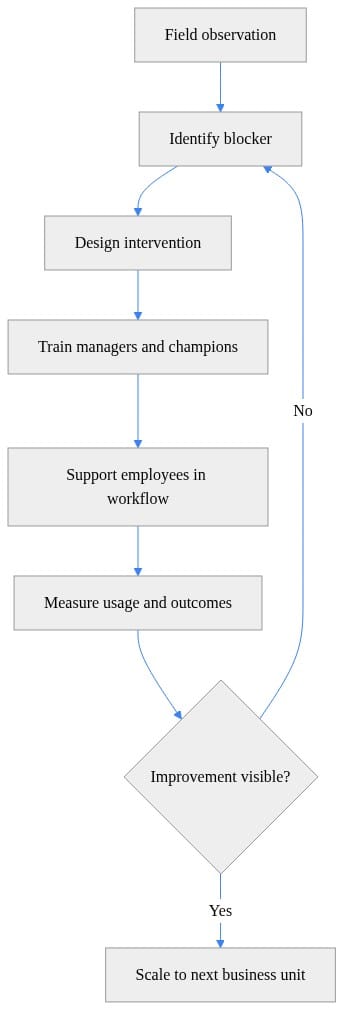
That means role-level adoption, blocker analysis, and intervention design.
# Track adoption by role to prove change management impact
usage = [
    {"role": "Sales", "users": 120, "active": 84},
    {"role": "HR", "users": 40, "active": 18},
    {"role": "Finance", "users": 60, "active": 21},
]

for row in usage:
    rate = row["active"] / row["users"]
    status = "healthy" if rate >= 0.60 else "needs enablement"
    print(f'{row["role"]}: {rate:.0%} active, status={status}')
A 70% active rate in one role and 35% in another is not “mixed adoption.” It is two different operational realities requiring two different actions.
Then I convert field feedback into a ranked backlog.
# Convert field feedback into prioritized change actions
feedback = [
    {"theme": "Prompting", "votes": 18},
    {"theme": "Data access confusion", "votes": 27},
    {"theme": "Manager skepticism", "votes": 22},
]

priority = sorted(feedback, key=lambda item: item["votes"], reverse=True)

for item in priority:
    action = {
        "Data access confusion": "publish governance FAQ",
        "Manager skepticism": "run leader briefing",
        "Prompting": "deliver role-based labs",
    }[item["theme"]]
    print(f'{item["theme"]}: {item["votes"]} votes -> {action}')
If people do not trust the data boundary or the escalation path, another prompt workshop won’t move the needle.
Four failure modes that keep showing up
1) Unclear ownership
No accountable process owner means nobody can define success, approve redesigns, or own exceptions.
2) No frontline enablement
Giving people access without role-based practice is lazy. Employees need examples from their actual workflow, manager reinforcement, escalation guidance, and time to build new habits.
3) Governance translated poorly into operations
Microsoft gives you control points around planning, governance, security, and management. Web search in Microsoft 365 Copilot is also an optional feature, which matters because many organizations need a deliberate policy on when external web content should be referenced manage public web access.
The mistake is treating these as admin settings only. They have to become operating procedures:
- when web grounding is allowed
- what output requires human review
- what data sources are approved
- how exceptions are logged
- who approves changes
That’s the same reason I push teams toward lifecycle discipline when Power Platform is involved Power Platform documentation. I’ve covered similar control patterns on the API side in Azure API Management AI Gateway for Enterprise Governance. Different layer, same lesson: governance has to survive contact with production.
4) Treating licenses as realized value
Provisioning is not realization. Usage is not realization. Attendance is not realization.
Realization is when a measurable workflow improves and stays improved with accountable human adoption.
A 90-day field plan that actually works
If I were walking into an insurance or dairy deployment next Monday, this is the plan I’d run.
Days 1–15: pick the workflows
Choose 2 to 4 high-volume, measurable workflows with:
- clear trigger
- repeatable volume
- visible handoffs
- measurable completion
- known exceptions
Days 16–30: write the one-page workflow charter
For each workflow, define:
- owner
- target role
- customer or operational outcome
- baseline metrics
- human review points
- exception path
- data sources
- controls
- KPI targets
- weekly review cadence
Days 31–45: run a controlled cohort
Use a limited frontline cohort with manager involvement. Observe the actual work. Don’t rely on surveys alone.
Days 46–60: redesign based on field evidence
Refine prompts, agent behavior, knowledge access, training materials, and exception routing.
If you’re building beyond simple declarative patterns, be honest about the build path. Quick projects belong in the simpler lane. Cross-system, governed, scalable workflows belong in the more robust lane.
Days 61–90: review evidence before scaling
Every week:
- workflow KPI review
- blocker review
- target-role adoption review
Every month:
- governance review
- exception review
- change approval review
Scale only when both are true:
- target-role adoption is healthy
- operational KPIs are moving in the right direction
The takeaway executives need to hear
The insurance and dairy stories matter because they represent the real test of enterprise Copilot.
Not whether Microsoft can demo it. Not whether IT can provision it. Not whether employees can ask it to summarize a meeting.
The test is whether accountable people changed a measurable workflow.
If you can show:
- the workflow
- the owner
- the baseline
- the redesigned human loop
- the exception path
- the target-role adoption
- the KPI movement
then you have value.
If you can’t, you have activity.
Rate your team’s current state on this from 1 to 5: can you prove one Copilot workflow improved cycle time, quality, and exception handling with a named owner?
#Microsoft365Copilot #EnterpriseAI #ChangeManagement
Sources & References
- Official Microsoft Power Platform documentation - Power Platform
- Microsoft 365 Copilot hub
- Decide which Copilot is right for you
- Set Up Your Development Environment to Extend Microsoft 365 Copilot
- Choose between Agent Builder in Microsoft 365 Copilot and Copilot Studio to build your agent
- Microsoft 365 Copilot APIs Overview
- Copilot Cowork common questions
- Data, privacy, and security for web search in Microsoft 365 Copilot and Microsoft 365 Copilot Chat
- Agent Builder in Microsoft 365 Copilot
Try it yourself
Run this tutorial as a Jupyter notebook: Download runbook.ipynb (47 cells, 30 KB).



