Microsoft Foundry long-running agents for enterprises
How Microsoft Foundry Is Turning Long-Running Agents Into an Enterprise Platform


A customer demo died in minute 14 because the agent had no idea what to do after the first tool call timed out. That is why Microsoft’s agent push matters: the interesting part is not smarter chat, it is the slow construction of an enterprise control plane for context, permissions, tools, approvals, and long-running execution.
Everybody wants to talk about model quality and agent UX. Fine. That gets clicks. But once an agent has to do real work across systems for 20 minutes, 2 hours, or overnight, the conversation changes fast. Now you are dealing with run state, task references, retries, approvals, policy, identity, audit, stale jobs, cost controls, and ownership. That is platform territory.
My take is simple: Microsoft Foundry matters less as a shiny new agent builder and more as a platform layer. Microsoft is assembling managed context, hosted execution, tool connectivity, and AI gateway governance into something enterprises can actually operate beyond isolated copilots.
The real shift: from copilots to operating systems for agents
The market keeps pretending the big question is, “Which assistant gives the best answer in chat?” That is the wrong frame.
The real question is, “What runs the work when the chat window closes?”
That is where Microsoft is getting more interesting than people admit. The Foundry SDK already frames agents as first-class developer objects with multi-turn interactions, not just prompt wrappers, per the Foundry SDK quickstart. And the Microsoft Agent Framework goes further by describing agents that execute using a structured runtime model, which is exactly the language you use when you are building operated systems instead of demo toys, per the Agent Framework docs.
I hit this wall with a 40-person enterprise data platform team in Q1 when an internal procurement agent could classify requests correctly but fell apart on the approval chain because nobody had designed task resumption, exception handling, or ownership after the third backend dependency stalled. The model was fine. The runtime was immature.
That is the point. Long-running work forces architecture discipline.
If you want the broader version of this argument, I made a similar case in Fabric Copilot Hype Masks the Real AI Platform Bet: the platform story always matters more than the assistant branding.
Why long-running agents force a platform conversation
Here is the concrete trigger. Microsoft’s MCP tooling model in Foundry explicitly documents long-running operations. Some MCP servers can exceed the normal synchronous timeout, return a task reference, and keep the response in the run object while the runtime continues polling until completion, per the Foundry MCP tools documentation.
That sounds like a small implementation detail. It is not.
The second your tool call returns “accepted, come back later,” you are no longer building a chatbot. You are building a distributed system with AI in the loop.
This is the architecture pattern I want teams to internalize:
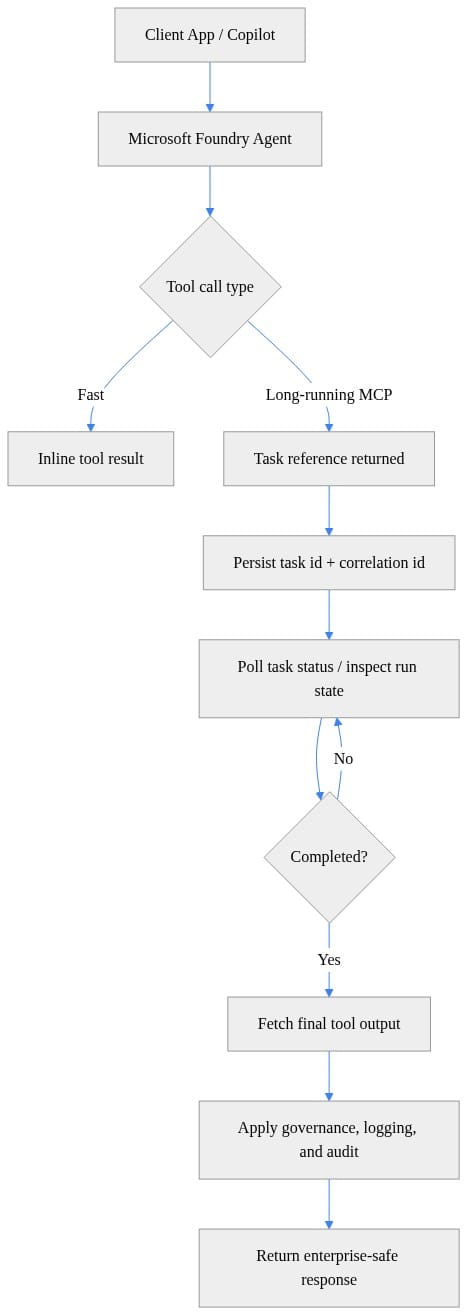
What to notice: the important artifacts are not just the prompt and the answer. They are the task reference, correlation ID, persisted run state, and the governance step before anything comes back to a user.
That is why point-solution agent stacks keep looking better in demos than in production. They optimize the first 30 seconds. Enterprises care about the next 3 hours.
Foundry’s control plane is emerging in four layers
When I look at Foundry, I see four layers coming together. Not perfectly. Not finished. But clearly enough that platform teams should pay attention.
1) Execution layer
Hosted agents are the first sign Microsoft understands enterprises do not want every team inventing its own runtime. The hosted agent quickstart also makes the operational reality obvious: you need an Azure subscription and the right project permissions, including Foundry Project Manager at project scope or Owner at resource scope to create a new project, per the hosted agent quickstart.
Good. That is what real platforms look like. Roles, scopes, and ownership show up on day one.
I wrote more on that deployment model in Foundry Hosted Agents as a deployment model for enterprise platform teams.
2) Context layer
This is where Microsoft has the strongest hand.
Foundry IQ is described as a managed knowledge layer that captures collaboration signals from documents, meetings, chats, and workflows so agents can understand how the organization actually operates, per the Foundry IQ docs. Work IQ extends that idea as the intelligence layer grounding Microsoft 365 Copilot and agents in real-time shared organizational context, and its MCP tools can be used from Microsoft 365 admin center, Copilot Studio, and Foundry, per the Work IQ MCP overview.
That is a lot more valuable than another generic retrieval plugin.
3) Tool layer
MCP is becoming the bridge between the model runtime and enterprise systems. That matters because tools are where the business value sits: SharePoint, ticketing, ERP, internal APIs, line-of-business apps, approvals, and data products.
The trick is not connecting one tool. The trick is handling the ugly part when that tool takes 12 minutes and returns partial state.
Here is a minimal example of what that feels like in practice: invoke a long-running tool, capture the run ID and task ID, and treat those as first-class workflow artifacts.
# Minimal long-running MCP tool invocation with task reference handling in Foundry-style SDK terms
import time

# Note: FoundryClient is a conceptual class for this example
class FoundryClient:
    def invoke_tool(self, agent_id, tool_name, arguments):
        return {"run_id": "run-123", "task": {"id": "task-789", "status": "queued"}}
    def get_task(self, run_id, task_id):
        return {"id": task_id, "status": "succeeded", "output": {"summary": "Indexed 42 files"}}

client = FoundryClient()
agent_id = "agent-enterprise-ops"

result = client.invoke_tool(
    agent_id=agent_id,
    tool_name="mcp.sharepoint.index_site",
    arguments={"siteUrl": "https://contoso.sharepoint.com/sites/legal"}
)

run_id = result["run_id"]
task_id = result["task"]["id"]
print(f"Run={run_id} Task={task_id}")
What to notice: the first response is not the business result. It is tracking metadata. If your architecture ignores that distinction, your agent platform will be fragile.
Then you need a polling and timeout strategy that your ops team can actually reason about:
# Poll task status and inspect run-state transitions until the long-running tool completes
import time

def poll_task(client, run_id, task_id, interval_seconds=2, timeout_seconds=30):
    deadline = time.time() + timeout_seconds
    while time.time() < deadline:
        task = client.get_task(run_id, task_id)
        state = task["status"]
        print(f"task={task_id} state={state}")
        if state in {"succeeded", "failed", "cancelled"}:
            return task
        time.sleep(interval_seconds)
    raise TimeoutError(f"Task {task_id} did not finish before timeout")

class FoundryClient:
    def get_task(self, run_id, task_id):
        return {"id": task_id, "status": "succeeded", "output": {"summary": "Done"}}

final_task = poll_task(FoundryClient(), "run-123", "task-789")
print(final_task["output"]["summary"])
What to notice here: terminal states matter. Succeeded, failed, cancelled. Everything else is “still in motion,” and your platform needs to expose that cleanly to users and operators.
4) Governance layer
This is the part too many teams bolt on at the end and regret later.
Azure API Management’s AI gateway is described as a set of capabilities to secure, scale, monitor, and govern AI models, agents, and tools backing intelligent applications, per the APIM AI gateway documentation.
That wording matters. Secure. Scale. Monitor. Govern. That is not chatbot language. That is control-plane language.
If I were standing up an enterprise agent platform today, I would put governed tool traffic through an API layer early, not after the first incident review. Even a basic pattern of named values, backend registration, auth injection, correlation IDs, and timeout controls gets you out of hobby mode fast.
# Create APIM named values and backend settings for a governed agent tool endpoint
param(
  [string]$ResourceGroup = "rg-foundry",
  [string]$ApimName = "apim-contoso",
  [string]$BackendUrl = "https://agent-backend.contoso.internal",
  [string]$ApiKey = "replace-me"
)

$ctx = New-AzApiManagementContext -ResourceGroupName $ResourceGroup -ServiceName $ApimName

New-AzApiManagementNamedValue -Context $ctx -NamedValueId "agent-backend-key" `
  -Name "agent-backend-key" -Value $ApiKey -Secret $true

New-AzApiManagementBackend -Context $ctx -BackendId "foundry-agent-backend" `
  -Url $BackendUrl -Protocol http `
  -Title "Foundry Agent Backend" `
  -Description "Governed backend for long-running MCP tools"
What to notice: this is the skeleton of platform control. Centralized backend definition and secret handling are boring, which is exactly why they matter.
Then add policy so every call carries correlation and a predictable timeout envelope:
# Deploy a simple APIM policy that adds auth, correlation, and timeout controls for agent traffic
param(
  [string]$ResourceGroup = "rg-foundry",
  [string]$ApimName = "apim-contoso",
  [string]$ApiId = "foundry-agent-api"
)

$ctx = New-AzApiManagementContext -ResourceGroupName $ResourceGroup -ServiceName $ApimName
$policy = @"
<policies>
  <inbound>
    <base />
    <set-header name="x-correlation-id" exists-action="override">
      <value>@(Guid.NewGuid().ToString())</value>
    </set-header>
    <set-header name="Authorization" exists-action="override">
      <value>{{agent-backend-key}}</value>
    </set-header>
    <forward-request timeout="120" />
  </inbound>
  <backend><base /></backend>
  <outbound><base /></outbound>
</policies>
"@

Set-AzApiManagementPolicy -Context $ctx -ApiId $ApiId -Policy $policy
What to notice next: once you can stamp policy onto agent traffic, observability and enforcement stop being aspirational.
Context is the moat, if Microsoft keeps permissions intact
The strongest differentiator here is not model access. Everybody has model access.
The moat is organizational context tied to existing identity and collaboration systems.
That is why I take Foundry IQ and Work IQ seriously. Microsoft is not just saying, “bring your own vector store and good luck.” It is trying to offer a managed context layer grounded in how work actually happens across documents, meetings, chats, and workflows. If that holds up operationally, that is a major enterprise advantage.
But I am not giving them a free pass. Context becomes enterprise value only if permission inheritance stays predictable, licensing boundaries are understandable, and identity behavior does not turn into a support nightmare. The Work IQ tooling story already comes with licensing and setup prerequisites, including a Microsoft 365 Copilot license and configuration steps. That is normal enterprise reality, but it is also where adoption friction shows up first.
I covered the governance side of that problem in Zero Trust Controls for Microsoft AI Agents. If the context plane gets sloppy, the whole promise collapses.
Governance is where enterprise agent platforms win or fail
Plenty of vendors can show an agent opening a ticket, summarizing a PDF, or calling an API. That bar is low now.
The harder question is whether your platform team can answer these five questions in 30 seconds:
- Which identity executed the action?
- Which tool was called?
- Which policy was applied?
- What state is the long-running task in right now?
- Who gets paged when it stalls?
If you cannot answer those, you do not have an enterprise agent platform. You have a clever demo environment.
This is why I keep coming back to governance primitives. AI gateway patterns, structured runtime state, hosted execution, managed context, and explicit project roles are all signs Microsoft is building toward a platform teams can standardize on. The flashy part is the agent. The durable value is the operating envelope around it.
A simple practice I recommend: normalize task states into operator-friendly categories and log every transition. Your security and SRE teams do not want model-native ambiguity. They want dashboards and alerts.
# Normalize run-state inspection into enterprise-friendly statuses for dashboards and alerts
def classify_run_state(task):
    state = task.get("status", "unknown")
    if state in {"queued", "running"}:
        return "InProgress"
    if state == "succeeded":
        return "Healthy"
    if state == "failed":
        return "ActionRequired"
    if state == "cancelled":
        return "Stopped"
    return "Unknown"

samples = [
    {"status": "queued"},
    {"status": "running"},
    {"status": "succeeded"},
    {"status": "failed"},
]

for task in samples:
    print(task["status"], "=>", classify_run_state(task))
What to notice: “queued” and “running” become one operational class, “failed” becomes action required, and “cancelled” is distinct from failure. That small mapping saves a lot of confusion in incident triage.
Then wrap the task lifecycle in structured audit events:
# Wrap polling with structured audit logging so platform teams can trace long-running agent work
import json
from datetime import datetime, timezone

def audit(event_type, payload):
    record = {
        "ts": datetime.now(timezone.utc).isoformat(),
        "event": event_type,
        "payload": payload,
    }
    print(json.dumps(record))

audit("tool.accepted", {"run_id": "run-123", "task_id": "task-789"})
audit("tool.polled", {"task_id": "task-789", "status": "running"})
audit("tool.completed", {"task_id": "task-789", "status": "succeeded", "duration_s": 18})
What to notice: accepted, polled, completed. That sequence is the minimum viable audit trail for long-running agent work.
The platform is moving, so design for change
One blunt reality check: this stack is still evolving. Microsoft Foundry workflows are documented as UI-based orchestration tools for multiple agents, and Microsoft has also stated they are retiring on December 1, 2024 in the workflow article.
That does not weaken my thesis. It strengthens it.
Enterprises should not marry every abstraction that appears in a fast-moving AI platform. They should anchor on the durable layers:
- identity
- context
- tool contracts
- runtime state
- policy enforcement
- observability
- approval boundaries
Everything else is implementation detail.
This is the same advice I give in my home lab when I am testing agent patterns across Proxmox VMs and Azure services: if a component disappears next quarter, your run-state model, audit trail, and API boundaries should survive it. Fancy orchestration UIs come and go. Good control planes stick.
What enterprise architecture teams should do now
If you are an enterprise architect, data platform lead, or security lead, here is the practical move:
Treat agents as governed workloads from day one
Pull in platform SRE, identity, API management, and data architecture early. Do not leave agent design to a single app team and hope governance catches up.
Build a target operating model
Use a central control plane for policy, observability, and execution standards. Let domain teams own their tools and data products. Make approval boundaries explicit.
Start with one long-running use case
Pick something ugly enough to force discipline:
- contract review with approval routing
- procurement intake with backend enrichment
- knowledge indexing across collaboration content
- incident triage with human checkpointing
If your stack can survive one of those, then you have learned something real.
Judge Microsoft on control-plane maturity, not demo fluency
The strategic advantage here is convergence: Microsoft 365 context, Azure runtime, business process surfaces like Power Platform, and governance controls are moving closer together. Power Platform already positions Copilot Studio, Power Apps, and Power Automate as ways to build AI-driven agents, custom apps, and automated workflows across business processes, per the Power Platform documentation. That convergence is what point vendors struggle to match.
Bottom line
Foundry’s significance is architectural, not theatrical.
The novelty is not another agent builder. The real story is Microsoft assembling the pieces of an enterprise control plane for long-running agents: managed context, hosted execution, tool connectivity, and governance surfaces that platform teams already know how to run.
That does not mean the job is finished. It means buyers should stop grading these platforms on how smoothly they chat and start grading them on whether they can survive long-running, cross-system, policy-bound work without turning into operational chaos.
Rate your team’s current agent platform maturity from 1 to 5 on this specific test: can one of your agents run for an hour across multiple systems with approvals, retries, audit, and clean ownership?
#EnterpriseAI #AzureAI #DataArchitecture
Sources & References
- Official Microsoft Power Platform documentation - Power Platform
- Work IQ MCP overview (preview)
- AI gateway capabilities in Azure API Management
- What is Foundry IQ? - Microsoft Foundry
- Study guide for Exam AB-100: Agentic AI Business Solutions Architect
- Microsoft Agent Framework Agent Types - Microsoft Foundry
- Build a workflow in Microsoft Foundry (Preview) - Microsoft Foundry
- Quickstart: Get started with Microsoft Foundry SDK - Microsoft Foundry
- Quickstart: Deploy your first hosted agent - Microsoft Foundry
- Connect to MCP Server Endpoints for agents - Microsoft Foundry
Try it yourself
Run this tutorial as a Jupyter notebook: Download runbook.ipynb (25 cells, 21 KB).



