ODBC to ADBC Migration Playbook for Microsoft Fabric
Moving Off ODBC in Fabric: A Migration Playbook for Analytics Teams

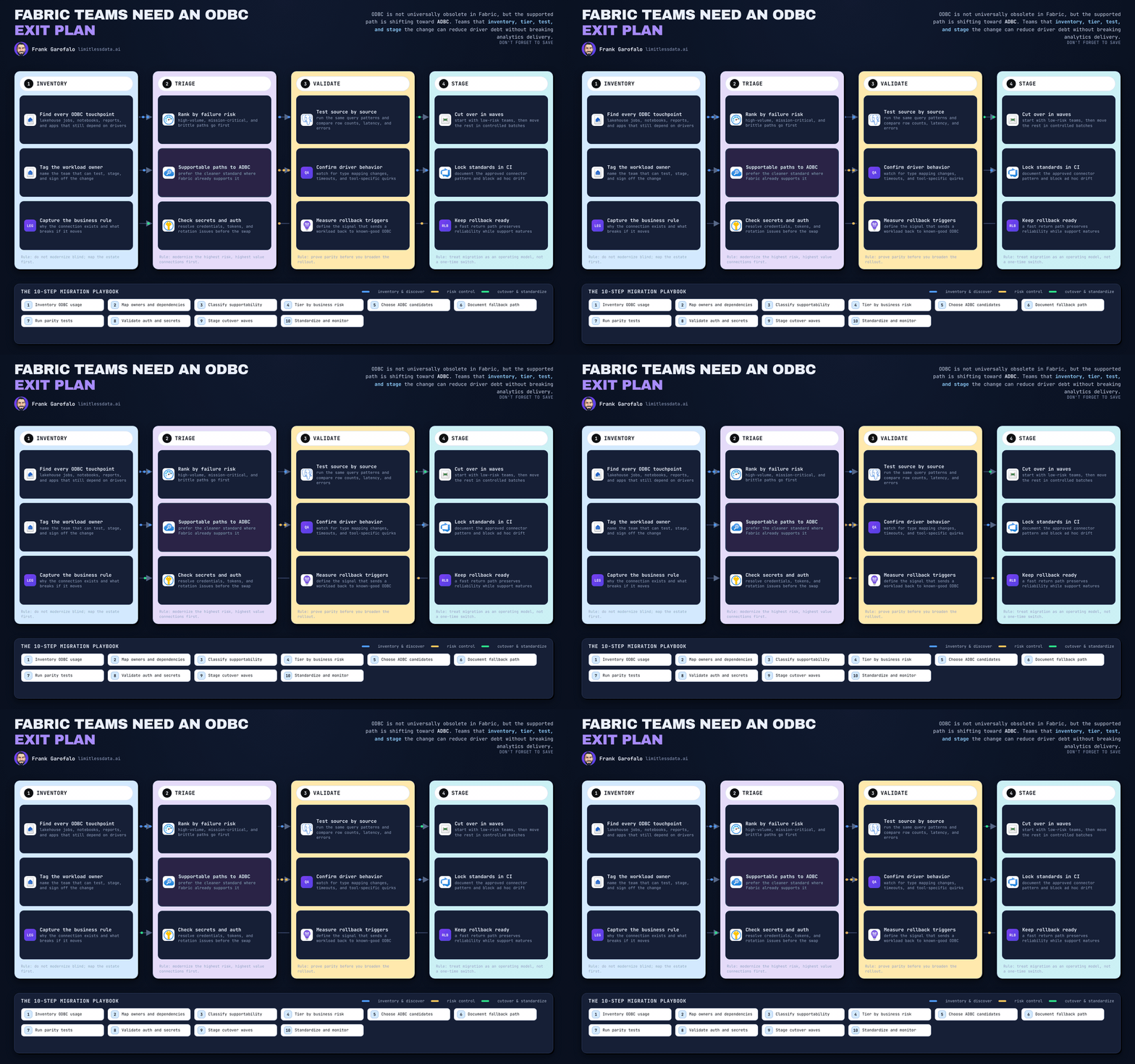
ODBC cleanup sounds boring right up until a Monday refresh dies.
On this page
- The situation: too many connection paths, no single truth
- The root cause: nobody inventories connectivity until it hurts
- The decision: treat ODBC-to-ADBC as a tiered modernization program
- Phase 1: inventory every ODBC dependency
- Phase 2: classify risk before you touch a connection
- Phase 3: build the target connectivity standard
- Phase 4: migrate in waves with proof and rollback
- Operationalize the new standard so the mess doesn’t come back
- Results, tradeoffs, and the part people skip
- The playbook I’d use again tomorrow
- Code Reference
- Sources & References
A few months ago I sat with an analytics team that had done what a lot of decent teams do under delivery pressure: they kept shipping. Power BI models, Fabric workspaces, a couple of lakehouse consumers hitting Spark SQL, ingestion jobs stitched together from whatever worked fastest, and a handful of SQL scripts nobody wanted to touch because “that one always runs.” By the time they asked for help, they had 47 distinct connection definitions spread across desktop files, repos, gateways, notebooks, and scheduled jobs. Eleven of them were ODBC in some form. Three had no named owner. Two were effectively tribal knowledge.
That is the real problem. Not “ODBC bad.” Not “replace every driver.” The problem is unmanaged connectivity decisions quietly turning into platform debt.
And now there’s a forcing function. Microsoft has documented that supported Power BI and Fabric data-source connections are transitioning from legacy embedded ODBC drivers to Apache Arrow Database Connectivity, or ADBC, drivers in Power Query per the transition guidance. At the same time, Fabric still has valid ODBC-compatible paths in the stack. In the lakehouse end-to-end scenario, Spark SQL workloads can be reached by ODBC-compatible clients using the Microsoft ODBC Driver per the Fabric lakehouse tutorial.
So the move here is targeted modernization. Keep supported ODBC usage where it actually fits. Standardize the rest before the estate standardizes itself into a mess.
TL;DR
- Inventory every connection before you migrate anything.
- Separate legacy embedded ODBC from valid Spark SQL ODBC-compatible access.
- Move supported Power BI/Fabric paths toward ADBC, but keep justified exceptions governed.
- Migrate in waves with owners, validation, and rollback already defined.
- The real win is not “driver replacement.” It’s reducing platform debt and incident time.
The situation: too many connection paths, no single truth
Here’s the representative scenario I used with the team.
They were running a Fabric-era analytics estate with:
- Power BI semantic models and Power Query connections
- Fabric data movement and transformation workloads
- Lakehouse consumers using Spark SQL
- A few SQL-driven operational checks and release scripts
- Desktop-built reports promoted into shared workspaces with inconsistent documentation
Fabric itself spans the full analytics path from data movement through data science in one platform per the Fabric overview in the lakehouse tutorial. That all-in-one promise is great. The side effect is that teams accumulate connection patterns faster than they realize.
The operating question was simple:
- Which ODBC dependencies were legacy embedded connections that should move toward the supported ADBC direction?
- Which were intentional exceptions, especially Spark SQL client scenarios?
- Which ones needed vendor or tool validation before anybody touched them?
Success was not “swap a driver.” Success was:
- one governed inventory
- one owner per connection
- migration waves with evidence
- explicit exceptions with review dates
- rollback plans written before cutover, not during the outage bridge
The root cause: nobody inventories connectivity until it hurts
What caused the sprawl wasn’t incompetence. It was local optimization.
One analyst solved a desktop problem with a DSN. A data engineer copied a stable connection string into a deployment script. Somebody else pinned a gateway config because changing it felt risky. Then a project ended, a contractor left, and the connection stayed.
In Q3 last year I was in a war room with a 14-person analytics team staring at a failed 6:00 AM executive refresh because one report still depended on a desktop-authored ODBC path nobody had documented after the original owner moved to another business unit.
That sentence is why I push hard on connectivity hygiene.
The other root cause is category confusion. Teams lump all ODBC usage together as if it’s one migration problem. It isn’t.
- Legacy embedded ODBC usage inside supported Power BI/Fabric connection paths is one conversation.
- ODBC-compatible client access to Spark SQL is a different conversation.
- Scripted SQL operations are another one again.
If you blur those together, you either over-migrate and break working consumers, or under-migrate and keep dragging around legacy patterns that should have been cleaned up six months ago.
The decision: treat ODBC-to-ADBC as a tiered modernization program
We made one decision early that saved a lot of time: no blanket replacement campaign.
The target standard was “ADBC where the supported transition and workload validation justify it; managed ODBC exceptions where the workload still fits better there.”
Instead of debating ideology, the team evaluated workload fit against actual Fabric store patterns. Fabric learning guidance pushes teams to assess lakehouses, warehouses, and eventhouses as distinct data-store choices, not interchangeable buckets in OneLake per the Fabric data stores learning path. Good. That same discipline belongs in connectivity.
A warehouse SQL endpoint is not the same operational shape as a lakehouse Spark SQL consumer. Don’t pretend otherwise.
We also split the estate into four outcomes:
- migrate in wave 1
- migrate after remediation
- retain as approved exception
- retire entirely
That last category matters more than people think. Two of the 11 ODBC-related items were dead paths still sitting in deployment assets. Killing them reduced work immediately.
Phase 1: inventory every ODBC dependency
First job: stop guessing.
I had the team build one inventory row per connection with these fields:
- system or artifact name
- consuming tool
- owner
- environment
- data source
- auth method
- connector or driver
- schedule or execution path
- business criticality
- rollback contact
- notes on gateway, automation, and monitoring dependencies
Then we scanned repos and deployment folders for obvious markers. For a LinkedIn audience, here’s the kind of lightweight PowerShell I like to start with for discovery:
# Recursively scan repository paths for ODBC markers and export a reviewable CSV
$paths = @(".\repo", ".\deploy")
$patterns = @("Driver=", "DSN=", "odbc:", "System.Data.Odbc", "pyodbc", "OdbcConnection")
$results = foreach ($path in $paths) {
    Get-ChildItem -Path $path -Recurse -File -ErrorAction SilentlyContinue |
        Select-String -Pattern $patterns -SimpleMatch |
        ForEach-Object {
            [PSCustomObject]@{
                FilePath   = $_.Path
                LineNumber = $_.LineNumber
                Match      = $_.Matches.Value -join ";"
                LineText   = $_.Line.Trim()
            }
        }
}
$results | Export-Csv -Path ".\odbc-discovery.csv" -NoTypeInformation
$results | Format-Table -AutoSize
What to look for next: not just Driver= and DSN=, but library references like pyodbc, System.Data.Odbc, and any hard-coded connection construction in scripts.
After the file scan, normalize findings into an inventory table instead of leaving them in CSV purgatory. If you want a dead-simple SQL structure to start tracking discovered dependencies, this gets the job done:
-- Create a migration inventory table for discovered ODBC dependencies
CREATE TABLE dbo.odbc_migration_inventory (
    inventory_id BIGINT IDENTITY(1,1) PRIMARY KEY,
    system_name NVARCHAR(200) NOT NULL,
    source_file NVARCHAR(500) NOT NULL,
    owner_name NVARCHAR(200) NULL,
    environment_name NVARCHAR(50) NULL,
    risk_classification NVARCHAR(50) NULL,
    connection_string NVARCHAR(2000) NOT NULL,
    discovered_at DATETIME2 NOT NULL DEFAULT SYSUTCDATETIME(),
    status NVARCHAR(50) NOT NULL DEFAULT 'discovered'
);
The next move is operational, not technical: assign a named decision owner to every row. No owner means no migration. No exceptions.
For teams with exported metadata or config JSON, I also like a quick parse-and-normalize pass to catch connection strings buried in structured files:
# Parse exported metadata files and normalize ODBC references into an inventory DataFrame
import json
import pandas as pd
from pathlib import Path

root = Path("exports")
rows = []
for path in root.rglob("*.json"):
    doc = json.loads(path.read_text(encoding="utf-8"))
    conn = str(doc.get("connectionString", ""))
    if "odbc" in conn.lower() or "driver=" in conn.lower():
        rows.append({
            "source_file": str(path),
            "system": doc.get("name", path.stem),
            "owner": doc.get("owner"),
            "environment": doc.get("environment"),
            "risk": doc.get("risk"),
            "connection_string": conn
        })

inventory = pd.DataFrame(rows)
print(inventory.head())
What to observe here: you are not trying to build a perfect parser on day one. You are trying to turn hidden dependencies into a reviewable list fast enough that the team can make decisions this week, not next quarter.
One more thing: separate embedded ODBC usage from ODBC-compatible Spark SQL access immediately. If a lakehouse consumer is intentionally using an ODBC-compatible client path to Spark SQL, that belongs in the exception lane until validated against the actual workload and support posture. Don’t shove it into the same queue as a Power Query transition item.
Phase 2: classify risk before you touch a connection
Once the inventory existed, the team wanted to start migrating. I slowed them down.
Migration without risk classification is how you turn a cleanup project into an incident.
We tiered each connection on five dimensions:
- business impact
- refresh or execution frequency
- data sensitivity
- consumer count
- ease of rollback
That gave us a practical matrix:
- High risk: executive reporting, finance, daily production jobs, ugly rollback
- Medium risk: shared team analytics, known owner, moderate downstream impact
- Low risk: ad hoc models, dev-only paths, easy revert
Then we flagged metadata gaps. Missing owner, environment, or risk score is itself a risk signal. Here’s the kind of triage logic I use to force the issue:
# Flag missing owner, environment, or risk classification for migration triage
import pandas as pd

inventory = pd.DataFrame([
    {"system": "sales-etl", "owner": "data-eng", "environment": "prod", "risk": "high"},
    {"system": "finance-report", "owner": None, "environment": "prod", "risk": None},
    {"system": "ad-hoc-model", "owner": "analyst", "environment": None, "risk": "low"},
])

required = ["owner", "environment", "risk"]
inventory["missing_fields"] = inventory[required].isna().apply(
    lambda row: [col for col, missing in row.items() if missing], axis=1
)
inventory["needs_review"] = inventory["missing_fields"].str.len() > 0
print(inventory[["system", "missing_fields", "needs_review"]])
What to do after this runs: block promotion of anything with missing ownership or environment data. If the team can’t answer “who owns this in prod,” they are not ready to migrate it.
We also documented friction up front:
- legacy BI tools that might not align cleanly
- custom query behavior needing comparison
- credential and auth flow differences
- gateway dependencies
- lack of test data
- downstream consumers nobody had listed
That exercise changed the wave plan. Out of 11 ODBC-related items:
- 4 became early-wave migration candidates
- 3 needed remediation first
- 2 were approved exceptions
- 2 were retired
That’s a good outcome. Smaller scope, cleaner execution.
Phase 3: build the target connectivity standard
Now you define the standard you actually want to run, not the one buried in old tickets.
For this team, the standard included:
- ADBC-preferred connections for supported Power BI and Fabric paths aligned to the documented transition
- consistent connection naming across dev, test, and prod
- ownership tags in the inventory and deployment assets
- credential handling rules
- promotion rules across environments
- observability expectations for refreshes, scripts, and jobs
- an exception pattern for retained ODBC scenarios
Fabric’s ingestion options are broad — Dataflows Gen2, pipelines, Apache Spark, and KQL databases all show up in Microsoft’s learning guidance on ingestion with Fabric per the training path. That means your connectivity standard has to be architecture-aware. If your ingestion pattern changes by store type or workload, your connection standard should reflect that instead of flattening everything into “one connector policy.”
I’ve written before about why Fabric Migration Exposes Every Weak ADF Assumption. Same story here. Connectivity standards fail when they ignore the actual execution path.
This is the mental model I had the team use:
- preferred lane: supportable ADBC-aligned connections where validation says yes
- exception lane: explicit ODBC-compatible access where the workload still warrants it
- no-man’s-land: undocumented one-offs nobody can defend
For teams that need a quick mapping exercise from old patterns to likely Fabric targets, even a simple recommendation script helps focus the review:
# Map legacy ODBC patterns to Fabric-friendly connection targets
import pandas as pd

inventory = pd.DataFrame([
    {"system": "sales-etl", "connection_string": "Driver={ODBC Driver 18};Server=sql01;Database=sales;"},
    {"system": "lake-report", "connection_string": "DSN=legacy_lakehouse;UID=user;PWD=secret;"},
])

def recommend_target(conn: str) -> str:
    text = conn.lower()
    if "database=sales" in text:
        return "Fabric Warehouse SQL endpoint"
    if "lakehouse" in text or "dsn=legacy_lakehouse" in text:
        return "Fabric Lakehouse SQL analytics endpoint"
    return "Review manually"

inventory["recommended_target"] = inventory["connection_string"].apply(recommend_target)
print(inventory[["system", "recommended_target"]])
What to observe: this is not automated migration. It is a sorting tool. You want humans reviewing whether a workload belongs on a warehouse SQL endpoint, a lakehouse SQL analytics endpoint, or in the manual-review bucket.
Phase 4: migrate in waves with proof and rollback
This is where teams usually get impatient. Don’t.
We started with low-risk, well-owned workloads that had representative test data and somebody available to validate outputs the same day. Fast feedback beats heroic planning.
The sequence looked like this:
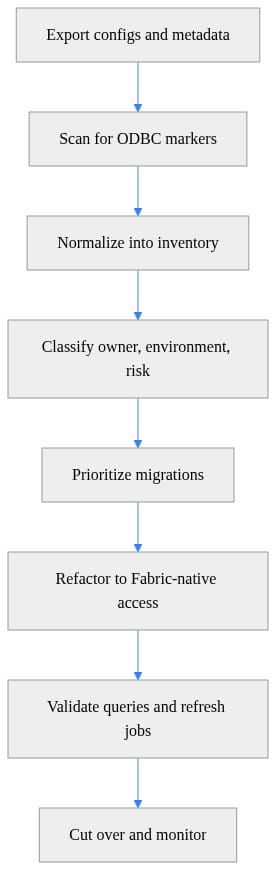
After each wave, we compared:
- successful connection establishment
- refresh or execution completion
- output parity on key queries
- duration against the old path
- failure behavior
- downstream consumer impact
Then we held a short observation window before declaring victory.
I also insist on rollback being prepared before cutover. That means:
- preserve prior configuration
- assign rollback authority
- define objective rollback conditions
- prewrite the communication to affected users
If you want a cleaner way to explain that sequence to your team, this is the picture:
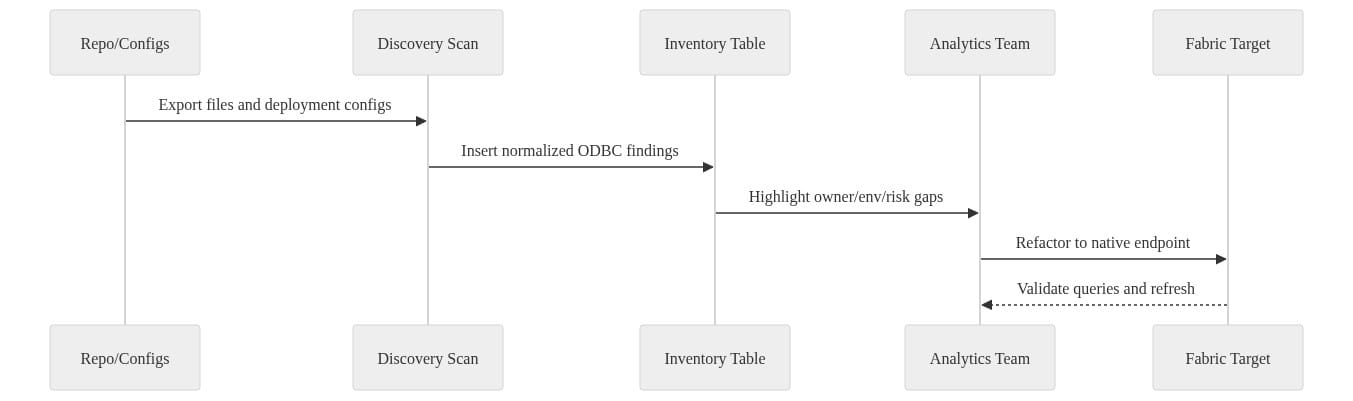
What to do next: make sure your “parallel validation” is real. Don’t compare one happy-path query and call it done. Use representative datasets and the exact refresh or execution pattern the business depends on.
For this team, the first migration wave covered 4 workloads over 10 business days. Results:
- 4 of 4 completed cutover without rollback
- refresh success moved from 91% to 98% across those workloads during the first 30 days after cutover
- median incident triage time dropped from about 95 minutes to 28 minutes because ownership and connection paths were finally documented
- one workload showed a 12% longer execution duration in test and was held back for remediation instead of being forced into production
That last bullet is a win, not a miss. Good migration programs create evidence that says “not yet.”
Operationalize the new standard so the mess doesn’t come back
A migration wave is a project. Connectivity hygiene is an operating model.
So we put three controls in place.
First, every new ODBC usage needed an explicit review. Not a committee circus. Just a documented owner, rationale, review date, and retirement trigger if it was an exception.
Second, we created a lightweight connector register with:
- connection type
- supported pattern
- owner
- environments used
- exception status
- last review date
Third, we added scripted validation for SQL-based checks where it made sense. Microsoft documents sqlcmd for running Transact-SQL statements, procedures, and script files, and its applicability includes SQL database in Microsoft Fabric per the sqlcmd documentation. That gave the team a simple way to automate some cutover validation and smoke tests.
This is also where training matters. If the platform team doesn’t understand store choices and approved access patterns, they’ll keep approving one-off workarounds. If analysts don’t know the preferred path, they’ll keep inventing their own.
That’s one reason I keep pushing governed patterns in posts like Fabric Dataflows Gen2 for Analytics Engineering and Fabric Spark Demos Hide the Jobs That Actually Fail. The glamorous part of the platform isn’t where most teams bleed time. The operational seams are.
Results, tradeoffs, and the part people skip
By the end of the work, the team had moved from 47 loosely understood connection definitions to a governed set with owners on every active path.
The numbers that mattered:
- 47 total connection definitions inventoried
- 11 flagged as ODBC-related or ODBC-adjacent
- 2 dead connections retired immediately
- 4 migrated in the first wave
- 3 queued behind remediation
- 2 retained as approved exceptions
- 100% of active connections assigned an owner
- incident triage time down roughly 70%
- zero emergency rollback events during the first migration wave
Tradeoffs? There were a few.
You do spend time on inventory that feels unglamorous. Good. That’s cheaper than debugging undocumented dependencies in production.
You also have to tolerate exceptions. Some leaders hate that because they want a clean slide saying “we eliminated ODBC.” That’s theater. If a Spark SQL client path remains supportable and operationally justified, keep it — just keep it governed.
And yes, phased migration is slower than a brute-force replacement campaign. It is also much less likely to break the quarter-end reporting pack.
The playbook I’d use again tomorrow
If you’re moving off legacy embedded ODBC patterns in Fabric, here’s the blunt version:
- Inventory every connection path.
- Separate embedded ODBC transition candidates from valid ODBC-compatible client scenarios.
- Classify risk before choosing a target.
- Build a real connectivity standard, including exceptions.
- Migrate in waves with proof, not optimism.
- Write rollback before cutover.
- Operationalize reviews so the sprawl doesn’t regenerate.
That’s the whole playbook.
Don’t declare ODBC dead. Don’t keep it everywhere because change is annoying either. Standardize what should be standardized, validate what needs validation, and isolate exceptions so they stay exceptions.
Rate your team’s current state on connectivity hygiene from 1 to 5: are you running a governed standard, or are you one undocumented DSN away from a bad Monday?
#MicrosoftFabric #DataArchitecture #PowerBI
Code Reference
Additional code samples that complement the tutorial above.
Sample 1 (sql)
-- Prioritize migration work by missing metadata and risk level
SELECT
    system_name,
    owner_name,
    environment_name,
    risk_classification,
    CASE
        WHEN owner_name IS NULL OR environment_name IS NULL OR risk_classification IS NULL THEN 'metadata-gap'
        WHEN risk_classification = 'high' THEN 'migrate-first'
        ELSE 'standard'
    END AS migration_priority
FROM dbo.odbc_migration_inventory
ORDER BY
    CASE
        WHEN owner_name IS NULL OR environment_name IS NULL OR risk_classification IS NULL THEN 0
        WHEN risk_classification = 'high' THEN 1
        ELSE 2
    END,
    system_name;
Sample 2 (powershell)
# Make discovery repeatable with a timestamped output and stable scan roots
param(
    [string[]]$ScanRoots = @(".\repo", ".\deploy"),
    [string]$OutputDir = ".\reports"
)

New-Item -ItemType Directory -Path $OutputDir -Force | Out-Null
$stamp = Get-Date -Format "yyyyMMdd-HHmmss"
$csv = Join-Path $OutputDir "odbc-discovery-$stamp.csv"
$markers = @("Driver=", "DSN=", "pyodbc", "OdbcConnection")

$findings = foreach ($root in $ScanRoots) {
    Get-ChildItem -Path $root -Recurse -File |
        Select-String -Pattern $markers -SimpleMatch |
        Select-Object Path, LineNumber, Line
}
$findings | Export-Csv -Path $csv -NoTypeInformation
Write-Host "Discovery report written to $csv"
Sources & References
- Microsoft Fabric documentation - Microsoft Fabric
- Introduction to end-to-end analytics using Microsoft Fabric - Training
- Course DP-600T00-A: Implement analytics solutions using Microsoft Fabric - Training
- Download and Install the sqlcmd Utility - SQL Server
- Get started with Microsoft Fabric - Training
- Transition from ODBC to ADBC drivers in Power BI and Microsoft Fabric - Power Query
- Explore Analytics Data Stores in Microsoft Fabric - Training
- Lakehouse end-to-end scenario: overview and architecture - Microsoft Fabric
- Ingest Data with Microsoft Fabric - Training
- Explore the Analytics Process That Turns Data into Insights - Training
Try it yourself
Run this tutorial as a Jupyter notebook: Download runbook.ipynb (27 cells, 31 KB).



