Azure AI Agent Security Playbook for Enterprise Tools
My playbook for giving Azure AI agents real tools without turning them into security incidents

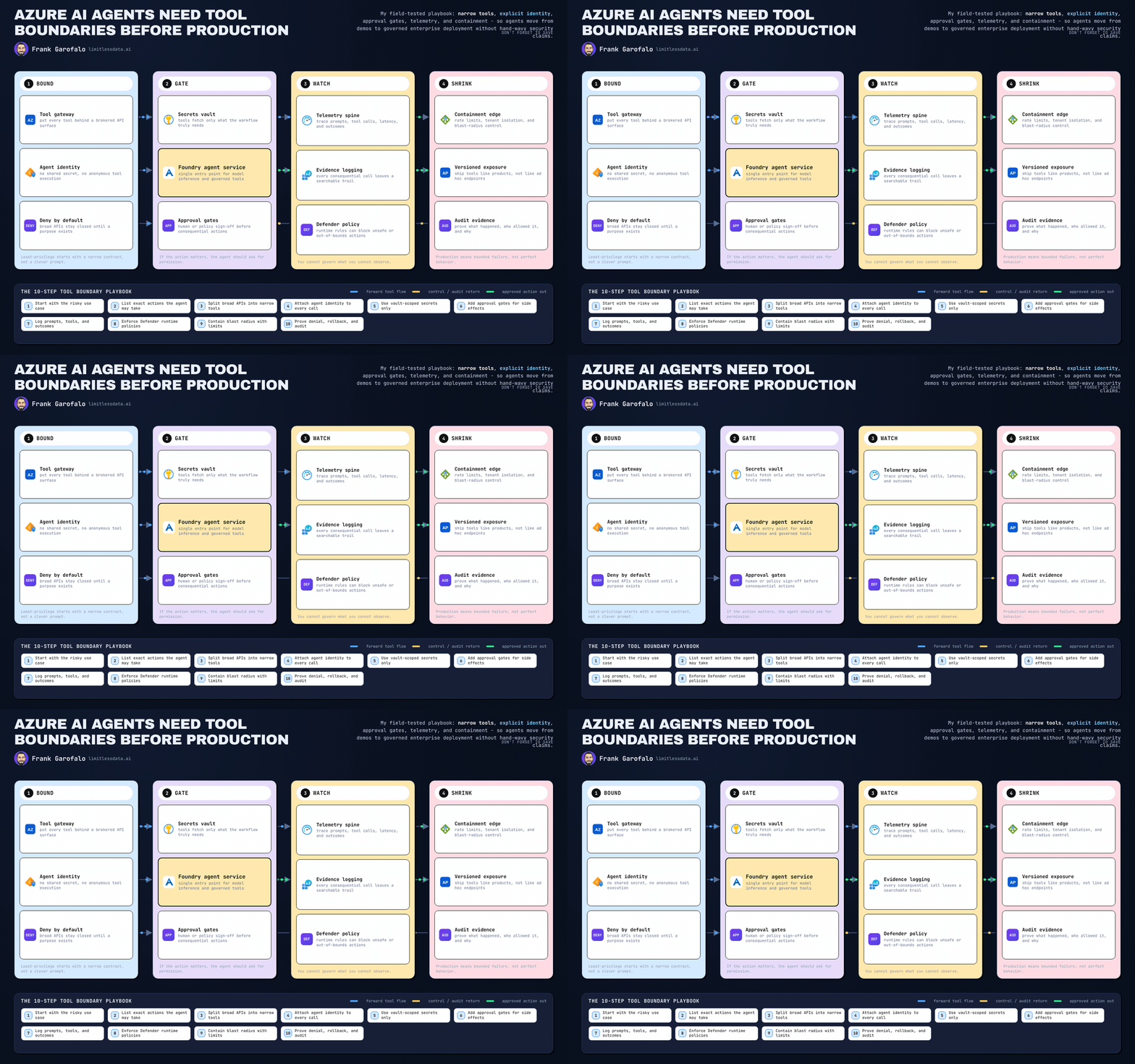
90% of agent failures I see in production start at the tool boundary, not the model.
On this page
- Step 1: Inventory agent actions before selecting models or frameworks
- Step 2: Replace broad API exposure with specialized Azure tool contracts
- Step 3: Put identity boundaries around every tool invocation
- Step 4: Route tools through a governed gateway
- Step 5: Make approvals first-class workflow states
- Step 6: Build telemetry that can reconstruct every decision
- Step 7: Engineer failure isolation and safe degradation
- Step 8: Run a pre-production validation gate
- The operating model: autonomy is earned per tool
- The rule I use in every design review
- Code Reference
- Sources & References
The fastest way to turn an agent demo into an incident is to give it a broad API and call it autonomy. Production agents need constrained tools, explicit identity boundaries, approval gates, and evidence for every consequential action.
I’m going to show you the playbook I use to give Azure AI agents real tools without giving them a path to become a security event.
The operating principle is simple:
- reasoning can be probabilistic
- authorization cannot
- side effects definitely cannot
If an agent can open tickets, restart workloads, send external messages, change access, or touch regulated data, every tool call has to be treated like a privileged production operation.
That means the security boundary is not “the chat.” It’s the full chain:
- user intent
- agent identity
- tool selection
- policy decision
- approval state
- downstream execution
- result sanitization
- audit trail
Microsoft gives you solid building blocks for this. Azure API Management’s AI gateway is built to secure, scale, monitor, and govern models, agents, and tools per the Azure API Management documentation. Microsoft Foundry Agent Service gives you a managed entry point for model inference and tools per the Foundry Agent Service overview. Those are useful. They are not a substitute for a disciplined tool contract.
One distinction matters early: skills and tools are not the same thing. Skills are portable, self-contained packages of instructions and resources. Tools connect the agent to external services and real side effects, which is exactly why they deserve tighter controls per the Copilot Studio skills overview.
In Q1, I reviewed an internal pilot with 14 agents and one “temporary” operations connector that had write access across three non-prod subscriptions and one prod resource group; a prompt-injected restart request bounced into the wrong environment because nobody had pinned the scope in the tool contract.
That’s the production gap.
Here’s how I close it.
Step 1: Inventory agent actions before selecting models or frameworks
Don’t start with the model. Start with the action inventory.
Build the action table first
For each proposed agent action, capture:
- operation
- target system
- data classification
- business impact
- reversibility
- actor identity
- required approver
- allowed environment
- audit requirement
I usually sort actions into four buckets:
- Read-only retrieval
Example: get ticket status, retrieve a named report, fetch a runbook summary.
- Low-risk writes
Example: add a comment to a ticket, create a draft work item, tag a non-prod resource.
- High-impact changes
Example: restart an approved workload, request access review, disable an integration.
- Irreversible or regulated actions
Example: delete data, export sensitive records, commit spend, change production policy.
Decide the disposition for every action
Every action gets one of four outcomes:
- deny
- allow through a narrow tool
- require approval
- require a human outside the agent
There are some actions I won’t hand to an agent unchecked. Period.
- privileged role assignment
- secret or credential handling
- unrestricted data export
- destructive operations
- financial commitment
- production deployment
- policy changes
If your action inventory doesn’t make those decisions explicit, your “agent architecture” is still a demo.
Step 2: Replace broad API exposure with specialized Azure tool contracts
The biggest design mistake is wrapping a broad enterprise API and calling it a tool.
A broad API says, “Here’s the resource manager, good luck.” A production tool says, “You may restart this approved workload in this environment with these parameters after approval.”
That difference is the whole game.
Design tools around business verbs, not raw system capability
Good tool examples:
request_access_reviewretrieve_named_reportopen_service_ticketrestart_approved_workloaddraft_change_request
Bad tool examples:
execute_sqlcall_graph_apimanage_azure_resourcesrun_powershellinvoke_any_endpoint
The tool contract should have:
- allowlisted actions
- typed inputs
- fixed resource scopes
- enumerated environments
- pagination limits
- server-side validation
- minimal structured outputs
Here’s a small FastAPI example that shows the shape I want: typed request model, strict action allowlist, and correlation header required on every invocation.
# FastAPI tool endpoint with allowlisted action validation and typed request model
from fastapi import FastAPI, Header, HTTPException
from pydantic import BaseModel, Field
from typing import Literal

app = FastAPI()
ALLOWED_ACTIONS = {"ticket.read", "ticket.comment"}

class ToolRequest(BaseModel):
    action: Literal["ticket.read", "ticket.comment"]
    ticket_id: str = Field(min_length=3, max_length=32)
    comment: str | None = Field(default=None, max_length=500)

@app.post("/tool")
async def tool(req: ToolRequest, x_correlation_id: str = Header(...)):
    if req.action not in ALLOWED_ACTIONS:
        raise HTTPException(status_code=403, detail="action_not_allowed")
    return {"accepted": True, "correlationId": x_correlation_id, "action": req.action}
What to observe: the model never gets to invent a new action. The service enforces the contract, not the prompt.
Keep authorization inside the tool service
This is where teams get lazy.
They put rules in the system prompt: “Only use this tool for safe actions.” That is not a control. That is a suggestion.
Enforcement belongs in the tool service and the gateway policy. The model can propose. The service decides.
Also return the minimum useful result. If the agent needs to know that a ticket is open, return state and ID. Don’t dump the full incident payload, analyst notes, and customer PII back into the model context.
If you want a deeper implementation pattern, I covered the service design in my post on Azure MCP Tools with Functions and azd: Production Guide.
Step 3: Put identity boundaries around every tool invocation
One shared all-powerful identity is how you end up writing the incident report on Friday night.
Use distinct identities for:
- the agent runtime
- each tool service
- the downstream service access path
- the approval workflow
- the audit sink
Record identity provenance every time
For every side-effecting request, I want to know:
- who requested it
- which agent proposed it
- which tool executed it
- which downstream principal was used
- what scope that principal had
That kills identity confusion fast.
The practical rule: apply least privilege at the narrowest scope you can manage operationally.
That usually means narrowing by:
- resource
- environment
- operation
- dataset
And keep secrets out of prompts, tool arguments, and model-visible responses. Secrets are infrastructure concerns. Put them in managed identity flows or secret stores, not chat context.
Here’s a simple Bicep example that shows the shape: strict app settings, fixed allowed actions, and a Key Vault reference for downstream credentials instead of leaking secrets into the app or prompt path.
// Key Vault secret reference for downstream credentials and app settings for strict tool execution
param location string = resourceGroup().location
param appName string = 'func-agent-tools'
param keyVaultName string = 'kv-agent-tools'

resource app 'Microsoft.Web/sites@2023-12-01' existing = {
  name: appName
}

resource kv 'Microsoft.KeyVault/vaults@2023-07-01' existing = {
  name: keyVaultName
}

resource appSettings 'Microsoft.Web/sites/config@2023-12-01' = {
  name: '${app.name}/appsettings'
  properties: {
    'TOOL_ALLOWED_ACTIONS': 'ticket.read,ticket.comment'
    'DOWNSTREAM_API_BASE': 'https://tickets.contoso.com'
    'DOWNSTREAM_API_KEY': '@Microsoft.KeyVault(SecretUri=${kv.properties.vaultUri}secrets/downstream-api-key/)'
    'AUDIT_MODE': 'required'
  }
}
What to observe: the app configuration constrains behavior before the model ever talks to the endpoint.
Decide when to use delegation, app identity, or human approval
I use a blunt decision tree:
- User-specific read of user-scoped data → delegated identity
- Back-end workflow with narrow operational scope → application identity
- High-impact change → approval workflow plus revalidation at execution time
Write down the rationale. If you can’t explain why an action runs under a given identity, it’s probably too broad.
Step 4: Route tools through a governed gateway
A governed API layer is where platform discipline shows up.
Put something between the agent and your enterprise systems that can consistently apply:
- authentication
- authorization
- validation
- throttling
- observability
- policy
- routing by environment
Azure API Management’s AI gateway is useful here because it’s designed to secure and govern models, agents, and tools in one control plane, per the APIM AI gateway docs.
Treat each tool route like a product
Every route should have:
- an owner
- a version
- a data classification
- a rate limit
- explicit error behavior
- a deprecation plan
- separate dev, test, and prod policy
Here’s a minimal Bicep front door example for APIM in front of a tool app.
// APIM policy-backed front door with rate limiting and managed identity to the tool app
param location string = resourceGroup().location
param apimName string = 'apim-agent-tools'
param appName string = 'func-agent-tools'

resource apim 'Microsoft.ApiManagement/service@2023-05-01-preview' = {
  name: apimName
  location: location
  sku: { name: 'Consumption'; capacity: 0 }
  properties: {
    publisherEmail: 'ops@contoso.com'
    publisherName: 'Contoso'
  }
}

resource app 'Microsoft.Web/sites@2023-12-01' existing = {
  name: appName
}
What to observe: this is the front door pattern, not the whole house. The point is to force all tool traffic through a governable choke point.
Separate environments hard
Do not let test prompts or experimental tools drift into production routes.
I want separate routes, separate policies, and usually separate identities by environment. If your dev agent can “accidentally” hit prod because someone reused a backend definition, that’s not bad luck. That’s bad architecture.
Step 5: Make approvals first-class workflow states
Confidence scores are not approvals.
Approval gates should be based on impact:
- production changes
- access changes
- external communications
- financial actions
- sensitive-data disclosure
Make the agent produce an action proposal
Before a side-effecting call, have the agent assemble a bounded proposal:
- target
- parameters
- rationale
- expected effect
- rollback plan
- expiry time
Then require approval before execution.
And when the approved action executes, revalidate everything:
- approval token still valid
- scope still matches
- target still allowed
- identity still authorized
- state has not materially changed
This tiny approval verifier shows the mechanics: decode token, check expiry, check scope, reject hard when it doesn’t line up.
# Approval token verification with scope and expiry checks
from fastapi import HTTPException
from datetime import datetime, timezone
import base64, json

def verify_approval_token(token: str, required_scope: str) -> dict:
    try:
        payload = json.loads(base64.urlsafe_b64decode(token + "==").decode())
    except Exception as exc:
        raise HTTPException(status_code=401, detail="invalid_approval_token") from exc

    exp = datetime.fromtimestamp(payload["exp"], tz=timezone.utc)
    if exp <= datetime.now(timezone.utc):
        raise HTTPException(status_code=401, detail="approval_expired")
    if required_scope not in payload.get("scopes", []):
        raise HTTPException(status_code=403, detail="scope_denied")
    return payload
What to observe: approval is scoped and time-bound. An approval token is not a blank check.
Build for the ugly cases
Real systems fail in ugly ways:
- approval expires
- approval is duplicated
- target state changes after approval
- the approver is unavailable
- the request is replayed
That means your workflow has to handle rejection, expiry, duplicate submissions, and changed state as normal operating conditions.
For high-risk operations, I often stop at “agent prepares evidence and a change request; human performs final action.” That still saves time without handing the last mile to a stochastic system.
Step 6: Build telemetry that can reconstruct every decision
If you can’t reconstruct the full decision path, you don’t control the agent. You’re just watching it.
I want a correlated event trail across:
- conversation
- agent run
- tool selection
- policy evaluation
- approval decision
- downstream request
- downstream response
- user-facing outcome
Correlate, hash, and sanitize
Capture at least:
- tool name and version
- input classification
- authorization result
- policy result
- identity used
- target scope
- latency
- status
- error category
- correlation ID
- idempotency key
Redact or tokenize sensitive content before retention. Auditability does not justify storing unrestricted prompts, secrets, or regulated payloads forever.
Here’s a lightweight example of idempotency plus correlated audit emission before the downstream call.
# Idempotency guard and correlated audit event emission before downstream call
import hashlib, json
from datetime import datetime, timezone

IDEMPOTENCY_STORE: dict[str, dict] = {}
AUDIT_LOG: list[dict] = []

def process_once(idempotency_key: str, correlation_id: str, body: dict) -> dict:
    if idempotency_key in IDEMPOTENCY_STORE:
        return {"replayed": True, "result": IDEMPOTENCY_STORE[idempotency_key]}

    event = {
        "ts": datetime.now(timezone.utc).isoformat(),
        "correlationId": correlation_id,
        "bodyHash": hashlib.sha256(json.dumps(body, sort_keys=True).encode()).hexdigest(),
        "decision": "approved",
    }
    AUDIT_LOG.append(event)
    result = {"status": "queued", "reference": body["ticket_id"]}
    IDEMPOTENCY_STORE[idempotency_key] = result
    return {"replayed": False, "result": result}
What to observe: the system can detect replay and preserve an audit trail tied to the exact request body hash and correlation ID.
Send security signals where defenders live
Security signals should land in the SIEM, not in somebody’s forgotten app log table.
Microsoft Sentinel is the cloud-native SIEM I expect teams to wire into for detections and response across environments, per the Sentinel overview. I want detections for:
- denied high-risk calls
- unusual tool volume
- approval bypass attempts
- unexpected target scopes
- repeated failures
- replay patterns
And yes, runtime protection matters too. Microsoft’s security stack includes runtime protections and policy controls intended to prevent unsafe agent actions, per the Microsoft Security documentation. Use that layer. Just don’t confuse it with your application audit trail. You need both.
If you’re building durable workflows around these traces, my write-up on Durable Azure AI Agents with Governed Storage State goes deeper on state and audit discipline.
Step 7: Engineer failure isolation and safe degradation
Production agents need failure boundaries as much as they need permissions.
Per tool, set:
- hard timeouts
- concurrency limits
- retry budgets
- circuit breakers
- idempotency requirements
Never let failure trigger a more privileged fallback
This one burns teams.
A narrow tool fails, so the orchestration falls back to a broader API path “to be helpful.” Congratulations, you just built an escalation path.
Tool failure should produce one of three outcomes:
- retry within budget
- return a safe failure
- require human review
Here’s a minimal downstream wrapper with timeout and sanitized response mapping.
# Minimal downstream call wrapper with timeout and sanitized response mapping
import asyncio

async def call_downstream(action: str, ticket_id: str, comment: str | None = None) -> dict:
    await asyncio.sleep(0.05)
    if action == "ticket.read":
        return {"ticketId": ticket_id, "state": "open"}
    if action == "ticket.comment":
        return {"ticketId": ticket_id, "commentAccepted": bool(comment)}
    raise ValueError("unsupported_action")

async def safe_tool_execution(req: dict) -> dict:
    result = await asyncio.wait_for(
        call_downstream(req["action"], req["ticket_id"], req.get("comment")),
        timeout=1.0,
    )
    return {"ok": True, "data": result}
What to observe: the wrapper bounds execution time and returns a controlled shape back to the agent instead of raw downstream chaos.
Use dry-run for consequential operations
For anything meaningful, support a simulation mode that returns:
- proposed diff
- impact summary
- target confirmation
- rollback notes
I want the agent to show me what it intends to change before it changes it.
And if a partial failure leaves the system in an uncertain state, force human review. Don’t let the agent improvise recovery on production resources.
Step 8: Run a pre-production validation gate
Before go-live, I want a negative-test pass focused on the exact ways agents break boundaries.
Test prompt injection attempts that try to alter:
- tool selection
- parameter values
- identity use
- approval requirements
- data disclosure
Test authorization negatives:
- wrong user
- wrong tenant
- wrong environment
- out-of-scope resource
- expired approval
- malformed input
- replayed request
Test operational negatives:
- timeout
- partial success
- throttling
- duplicate execution
- unavailable approver
- unavailable audit sink
This sequence is the target behavior I want the team to validate end to end.
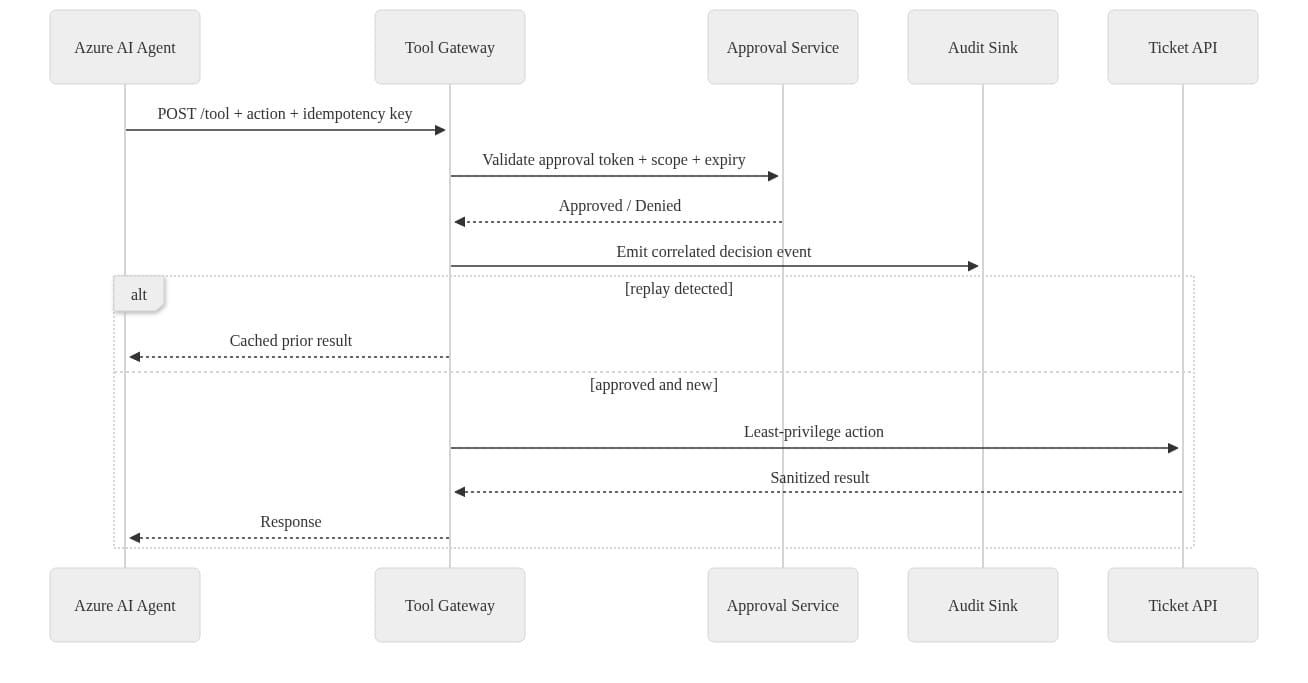
What to observe: approval, replay handling, least-privilege execution, and audit emission are part of one transaction path.
Now run the ugly tests against pre-prod. This PowerShell example is exactly the kind of thing I ask teams to automate before launch: denied access, expired approval, invalid scope, replay, timeout, and throttling.
# Pre-production validation script for denied access, expired approval, invalid scope, replay, timeout, and throttling
$baseUrl = "https://agent-tools-preprod.contoso.com/tool"
$cases = @(
  @{ Name="DeniedAccess"; Headers=@{ "x-correlation-id"="c1"; "x-approval-token"="bad" }; Body=@{ action="admin.delete"; ticket_id="T-100" } },
  @{ Name="ExpiredApproval"; Headers=@{ "x-correlation-id"="c2"; "x-approval-token"="ZXhwaXJlZA" }; Body=@{ action="ticket.read"; ticket_id="T-101" } },
  @{ Name="InvalidScope"; Headers=@{ "x-correlation-id"="c3"; "x-approval-token"="aW52YWxpZHNjb3Bl" }; Body=@{ action="ticket.comment"; ticket_id="T-102"; comment="hi" } },
  @{ Name="Replay"; Headers=@{ "x-correlation-id"="c4"; "x-approval-token"="dmFsaWQ"; "Idempotency-Key"="same-key" }; Body=@{ action="ticket.read"; ticket_id="T-103" } },
  @{ Name="Timeout"; Headers=@{ "x-correlation-id"="c5"; "x-approval-token"="dmFsaWQ" }; Body=@{ action="ticket.read"; ticket_id="slow" } },
  @{ Name="Throttling"; Headers=@{ "x-correlation-id"="c6"; "x-approval-token"="dmFsaWQ" }; Body=@{ action="ticket.read"; ticket_id="burst" } }
)
foreach ($case in $cases) {
  try {
    $json = $case.Body | ConvertTo-Json -Depth 3
    $resp = Invoke-RestMethod -Method Post -Uri $baseUrl -Headers $case.Headers -Body $json -ContentType "application/json" -TimeoutSec 2
    [pscustomobject]@{ Case=$case.Name; Outcome="Success"; Response=($resp | ConvertTo-Json -Compress) }
  } catch {
    [pscustomobject]@{ Case=$case.Name; Outcome="Error"; Status=$_.Exception.Response.StatusCode.value__; Message=$_.Exception.Message }
  }
}
What to observe: success here means the bad cases fail in the right layer, with the right status, and with evidence preserved.
If you want to go deeper on the validation side, I broke out the resilience side of this in Azure Agent Resilience Testing for Production Readiness.
The operating model: autonomy is earned per tool
This is the maturity ladder I use:
- Observe-only
- Read-only assistance
- Human-approved writes
- Narrowly autonomous low-risk actions
- Continuously reviewed production automation
A tool moves up that ladder only after it proves four things:
- scope is explicit
- identity is constrained
- approval path is enforceable
- audit trail is reconstructable
And every change reopens the review:
- tool contract changes
- downstream API changes
- prompt changes
- model changes
- workflow changes
- environment changes
Ownership matters too:
- platform engineering owns the paved road
- security owns policy standards and detections
- service owners own business authorization
- SRE owns reliability guardrails
That operating model is how you keep useful agents from becoming expensive chaos.
The rule I use in every design review
If a tool cannot explain its scope, identity, approval path, and audit trail, it is not ready to be callable by an enterprise agent.
That’s the bar.
Not “the demo worked.” Not “the model seems careful.” Not “we’ll tighten it later.”
Treat every tool call like a privileged production operation and your agents can do real work without turning into a security incident.
Rate your team’s current agent tool governance from 1 to 5 — and be honest: are you still exposing broad APIs anywhere?
#AzureAI #EnterpriseAI #DataArchitecture
Code Reference
Additional code samples that complement the tutorial above.
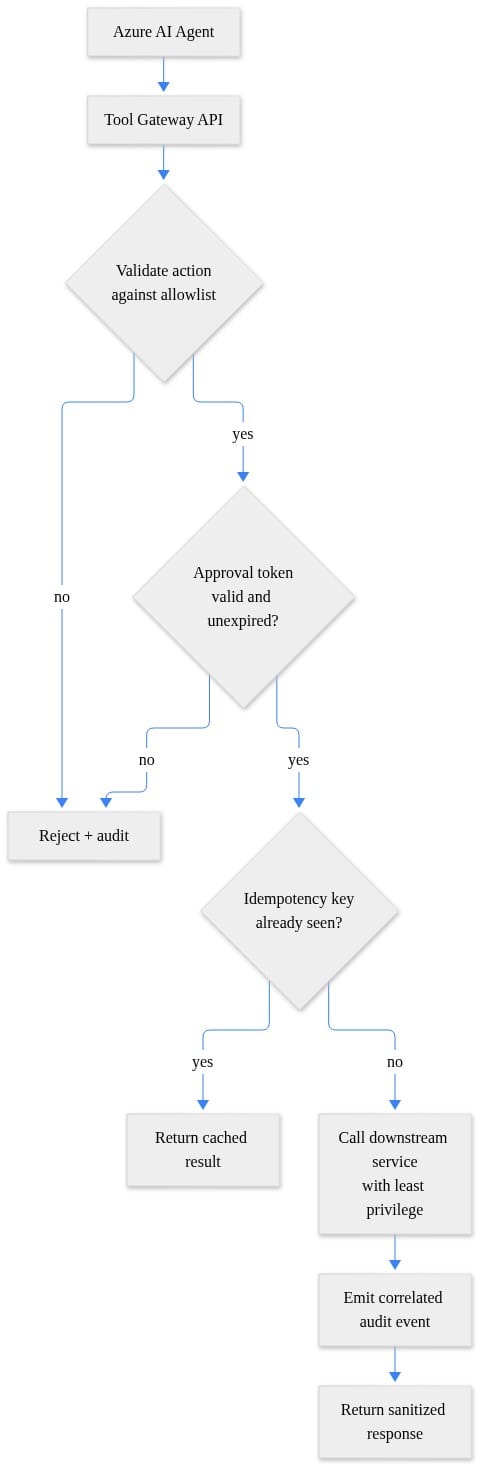
Sample 1 (mermaid)
Sources & References
- Official Microsoft Power Platform documentation - Power Platform
- Azure developer documentation
- Security hub - Security
- Security and governance - Microsoft Copilot Studio
- Skills overview for agents (GitHub Copilot) - Microsoft Copilot Studio
- AI gateway capabilities in Azure API Management
- What is Microsoft Foundry Agent Service? - Microsoft Foundry
- Study guide for Exam SC-500: Implementing End-to-End Security Controls for Cloud and AI Workloads
- What is Microsoft Sentinel SIEM?
Try it yourself
Run this tutorial as a Jupyter notebook: Download runbook.ipynb (23 cells, 30 KB).