Azure AI Landing Zones for Enterprise AI Governance
How Azure AI Landing Zones Turn Enterprise AI from Experiments into an Operating Model

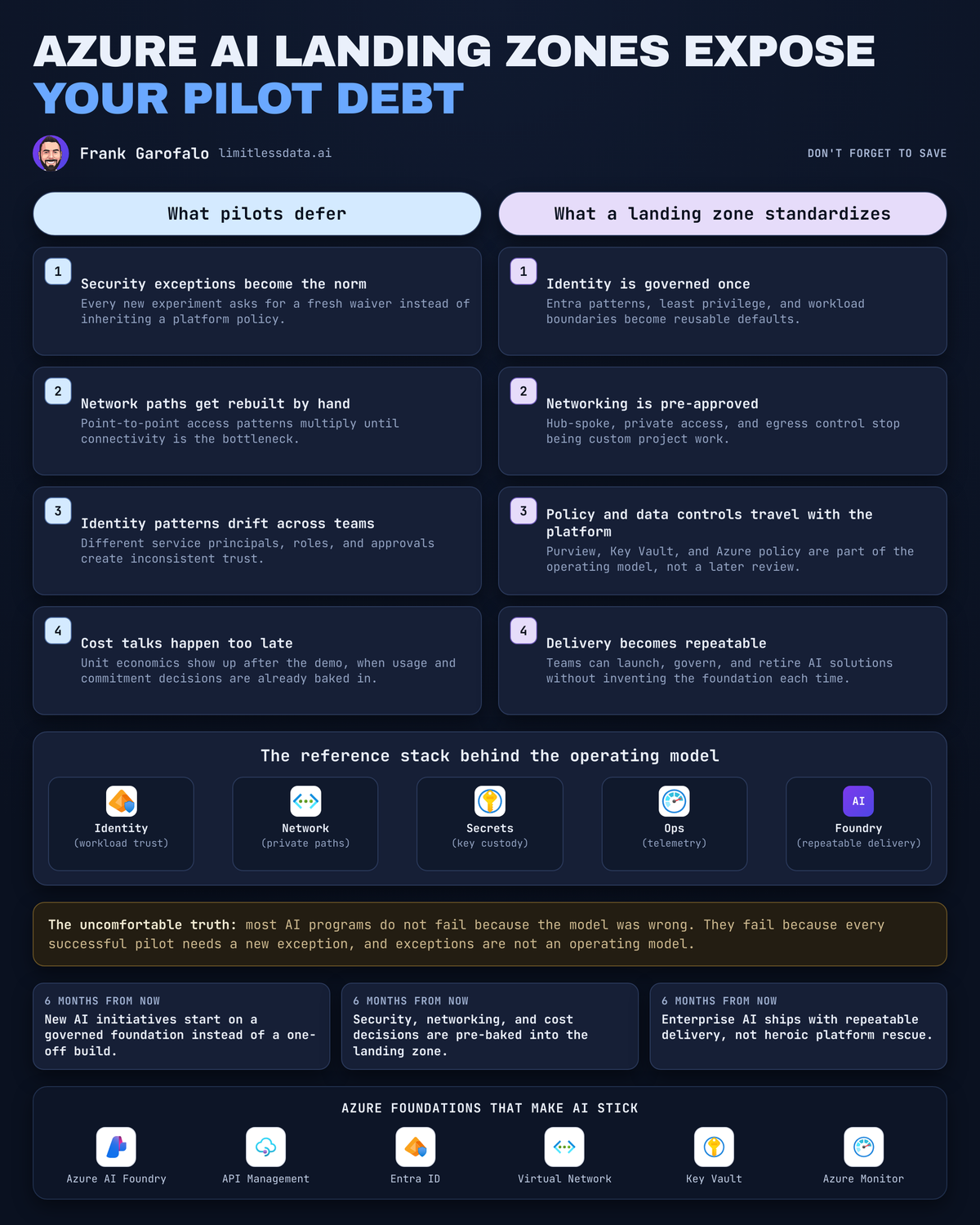
That pilot didn’t die because the model was weak. It died in the meeting where security, networking, identity, and finance all realized the team had invented a one-off operating model.
On this page
- The model is not the bottleneck
- Why AI pilots fail at the enterprise boundary
- Landing zones are an operating model
- The architecture choices that separate scale from sandboxing
- The AI control plane needs a gateway mindset
- From chat pilots to an agent-ready estate
- Ad hoc sandbox versus landing-zone operating model
- What leaders should demand now
- Sources & References
I watched this happen with a 40-person data and app team in Q1: they had a slick internal claims copilot working in nine days, then lost five weeks getting answers on private access, managed identity, logging, and who owned the Azure bill after go-live. That story is more common than anyone wants to admit.
Here’s the blunt take: your AI program is unlikely to stall because it picked the wrong model. It will stall when every promising pilot needs a new security exception, network path, identity pattern, and cost conversation.
That’s why I treat Azure AI landing zones as an operating model, not a reference-architecture artifact. If you want governed, repeatable delivery, the landing zone is the thing that turns AI from “interesting demo” into “we can ship this again next month.”
The model is not the bottleneck
Enterprises can usually get access to capable models. That part is solvable.
What they cannot do repeatedly is approve and operate the surrounding platform at speed.
A small team gets a sandbox working. Great. They wire up a model endpoint, maybe a retrieval layer, maybe a quick chat UI. Everyone is happy until somebody says “production.” Then the real questions show up:
- Which identities are users and services running under?
- Is access public or private?
- What data classes are allowed into prompts, retrieval, or tool calls?
- Where do logs go, and who can see them?
- Which region is approved?
- Who owns support at 2:00 AM?
- Which cost center pays for token usage, gateways, search, storage, and observability?
Model selection is a reversible decision. Weak platform discipline is a compounding tax.
You can swap a model. You can tune prompts. You can move from one retrieval pattern to another. But once ten teams have each invented their own secrets pattern, network exception flow, and cost tagging scheme, you’ve built organizational drag into every future app, copilot, RAG workflow, and agent.
The Microsoft Cloud Adoption Framework gets this right: AI adoption belongs inside strategy, governance, and platform preparation, not off to the side as a lab exercise.
Why AI pilots fail at the enterprise boundary
A local proof of concept lives in a clean room. Enterprise deployment does not.
The minute the workload crosses into regulated data, shared enterprise networks, corporate identities, procurement controls, and audit expectations, the easy prototype becomes a platform problem. That’s the boundary most AI programs underestimate.
Separate sandboxes feel fast because they defer hard decisions. They also create four ugly outcomes:
- Inconsistent security boundaries
One team uses public endpoints with IP restrictions. Another insists on private connectivity. A third stores secrets in app settings because “it’s temporary.” Now you have three control surfaces for the same class of workload.
- Duplicated integrations
Every team builds its own path to search, storage, monitoring, and approval workflows. You pay for the same plumbing over and over.
- Unclear accountability
When latency spikes, who owns the issue? App team? Platform? Network? Security? Nobody knows because the architecture was negotiated ad hoc.
- Fragmented spend visibility
AI costs don’t live in one line item. They spread across inference, retrieval, storage, API mediation, monitoring, and network egress. If you don’t standardize ownership early, finance gets surprised late.
Data residency and policy enforcement are not paperwork. They are architecture decisions. Make them before deployment velocity turns into organizational risk.
Landing zones are an operating model
This is the part too many architecture decks miss.
A landing zone is not just a diagram with a hub, some spokes, and a few policy boxes. A landing zone is the durable set of guardrails, shared services, and decision rights that product teams inherit instead of reinventing.
That means the platform team owns the paved road:
- identity patterns
- network connectivity patterns
- policy enforcement
- observability defaults
- cost allocation and tagging
- environment promotion rules
- support boundaries
And the product teams still own the application:
- business logic
- prompt and retrieval design
- user experience
- testing against real use cases
- workload-specific safety and evaluation
That split matters. The platform should remove repeated decisions, not remove engineering judgment.
The Azure Architecture Center has enough material now to make this practical, not theoretical: Microsoft Foundry chat baseline guidance, RAG patterns, agent orchestration patterns, hub-spoke networking, and AKS production baseline material all point in the same direction—standardize the substrate so teams can build faster on top of it Azure Architecture Center.
If you need a simple way to explain the landing zone to executives and engineers in the same room, start with this picture.
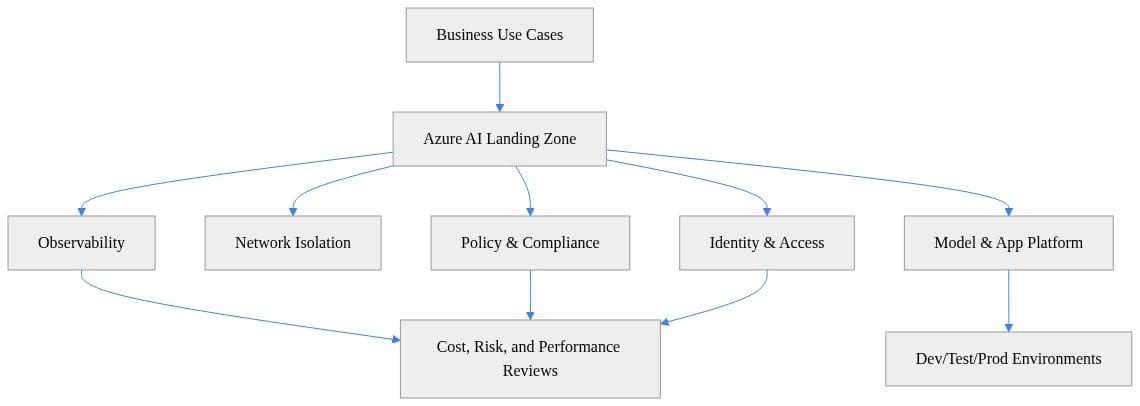
What I want people to notice in that diagram is the review loop. Identity, policy, observability, and cost are not afterthoughts. They are part of the delivery path.
The architecture choices that separate scale from sandboxing
Let’s get practical. If you’re building an Azure AI landing zone, there are five decisions that separate a real operating model from another demo environment.
1) Identity: stop shipping AI with app secrets everywhere
Set a consistent enterprise access model for people, workloads, service-to-service calls, and privileged operations.
That means:
- Entra-backed user access
- managed identities for workloads where possible
- least-privilege RBAC
- separate privileged admin paths from runtime access
- group-based assignment instead of one-off user grants
Here’s a simple example of granting scoped access to an engineering group at the resource-group level. This is illustrative, not production-complete, but it shows the shape of the pattern.
# Grant least-privilege access to an AI engineering group at resource-group scope
param(
  [string]$SubscriptionId = "00000000-0000-0000-0000-000000000000",
  [string]$ResourceGroup = "rg-ai-lz-prod",
  [string]$PrincipalObjectId = "11111111-1111-1111-1111-111111111111"
)

Connect-AzAccount | Out-Null
$scope = "/subscriptions/$SubscriptionId/resourceGroups/$ResourceGroup"

New-AzRoleAssignment `
  -ObjectId $PrincipalObjectId `
  -RoleDefinitionName "Cognitive Services OpenAI User" `
  -Scope $scope
The point is not the exact role assignment. The point is that access should be standardized, reviewable, and repeatable.
2) Networking: decide private access once, not 20 times
Private connectivity, segmentation, egress expectations, and shared connectivity patterns should be explicit. Don’t negotiate them workload by workload.
If your organization requires private endpoints and controlled egress for data-bearing AI workloads, bake that into the landing zone. Don’t let every app team rediscover the same answer under deadline pressure.
Hub-spoke remains a strong default pattern for shared enterprise services, and Microsoft keeps documenting it for a reason: it gives you central control without forcing every workload into the same blast radius.
3) Data and residency: classify before you connect
You need a policy for which data classes can reach which AI services, where they may be processed, and how approved knowledge sources connect.
This is where a lot of “we’ll figure it out later” pilots hit the wall. Retrieval is not just a search problem. It is a data movement and authorization problem. If your RAG design ignores source-system permissions and residency constraints, you built a demo, not a platform.
I’ve written before about why Azure SQL as an AI-ready data platform matters here: the retrieval layer is part of the enterprise data estate, not a sidecar toy.
4) Policy: turn requirements into defaults
Review boards are slow because they rely on people remembering every rule.
Policy-based enforcement is faster because the platform remembers for them.
A basic example is location control. If you know your approved region set, assign policy early and make the deployment fail fast when somebody drifts.
# Enforce baseline governance with an Azure Policy assignment
param(
  [string]$SubscriptionId = "00000000-0000-0000-0000-000000000000",
  [string]$Location = "eastus"
)

Connect-AzAccount | Out-Null
Set-AzContext -SubscriptionId $SubscriptionId | Out-Null

$policy = Get-AzPolicyDefinition | Where-Object {
  $_.Properties.DisplayName -eq "Allowed locations"
}

$allowed = @{ listOfAllowedLocations = @{ value = @($Location) } } | ConvertTo-Json -Depth 5
New-AzPolicyAssignment -Name "pa-allowed-locations-ai" `
  -DisplayName "AI Landing Zone Allowed Locations" `
  -Scope "/subscriptions/$SubscriptionId" `
  -PolicyDefinition $policy `
  -PolicyParameterObject $allowed
What to observe here is the operating model shift: the platform enforces the rule once, and every workload inherits it.
5) Cost: make AI spend visible from day one
Cost ownership belongs in the platform contract. If nobody knows who pays, nobody really owns production.
At minimum:
- standard tags
- resource hierarchy aligned to ownership
- environment separation
- usage reporting by team or product
- regular review of cost, latency, and error trends together
This is why I always start a landing zone with boring things like resource groups and tags before anybody talks about prompt libraries.
# Create a resource group and core tags for an AI landing zone
param(
  [string]$SubscriptionId = "00000000-0000-0000-0000-000000000000",
  [string]$Location = "eastus",
  [string]$ResourceGroup = "rg-ai-lz-prod"
)

Connect-AzAccount | Out-Null
Set-AzContext -SubscriptionId $SubscriptionId | Out-Null

$tags = @{
  "Platform"    = "AzureAI"
  "Environment" = "Prod"
  "Owner"       = "AIPlatformTeam"
  "CostCenter"  = "FIN-1001"
}

New-AzResourceGroup -Name $ResourceGroup -Location $Location -Tag $tags
Nothing glamorous here. Good. Platform work should feel boring in the right places. That’s how you get repeatability.
The AI control plane needs a gateway mindset
One of the worst patterns I see is direct model integration everywhere.
Ten apps. Ten secrets. Ten slightly different retry policies. Ten inconsistent logging patterns. Ten teams all convinced they are the exception.
That’s not architecture. That’s entropy.
Azure API Management now explicitly documents AI gateway capabilities and points to unified AI gateway and reference architecture patterns API Management AI gateway capabilities. That matters because it confirms what platform teams already know: AI endpoint access is becoming a shared control-plane concern.
A gateway mindset gives you a repeatable enforcement point for:
- access control
- routing choices
- rate shaping
- usage visibility
- shared operational policy
No, a gateway does not replace product ownership. No, it does not solve safety by itself. What it does is stop your model endpoints from becoming an unmanaged sprawl of direct integrations.
If you’re thinking about agents, this gets even more important. I covered the deployment angle in Foundry Hosted Agents as a deployment model for enterprise platform teams. The minute the platform starts brokering tools, actions, and model access for many teams, you need mediation, not improvisation.
From chat pilots to an agent-ready estate
Agentic systems increase the governance surface area fast.
More tools. More identities. More data paths. More actions. More things that can go wrong automatically.
That is exactly why landing zones matter more now than they did for first-wave chat pilots.
Microsoft’s architecture material now spans baseline chat, RAG, and agent orchestration patterns in one place, and that’s the tell. The conversation has moved from “can we build a chatbot?” to “can we run an estate of AI systems safely and repeatedly?” Azure Architecture Center
Agent readiness is not achieved by enabling an agent feature. Agent readiness happens when the surrounding platform can constrain and observe action at scale.
That means:
- approved tool connectivity
- workload identity boundaries
- auditable execution paths
- centralized logs and traces
- measurable cost and performance per workflow
- promotion paths from dev to test to prod
Here’s a simple pre-deployment validation example I like because it makes the point clearly: the workload should prove it meets baseline expectations before it gets to production.
# Validate required landing zone settings before deploying an AI workload
required = {
    "private_network": True,
    "managed_identity": True,
    "diagnostics_enabled": True,
    "approved_region": "eastus",
}

workload = {
    "name": "claims-copilot",
    "private_network": True,
    "managed_identity": True,
    "diagnostics_enabled": False,
    "approved_region": "eastus",
}

missing = [k for k, v in required.items() if workload.get(k) != v]
if missing:
    print(f"Block deployment for {workload['name']}: {missing}")
else:
    print(f"Deployment approved for {workload['name']}")
The right next step after a check like this is obvious: wire it into CI/CD and fail noncompliant deployments early instead of arguing about them late.
And if you want a mental model for how sandboxing differs from an operating model, this flow keeps it honest.
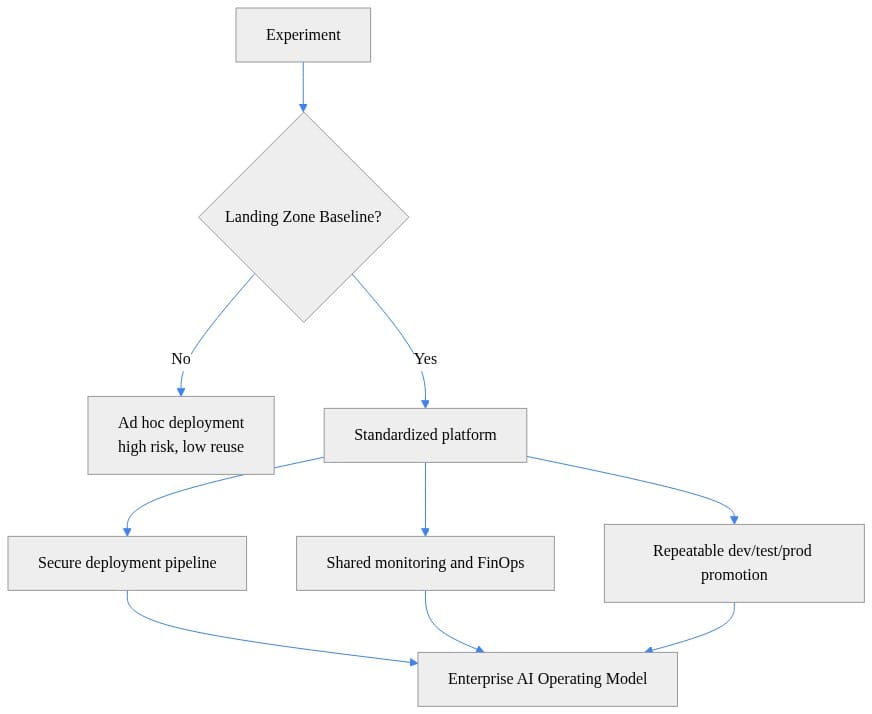
That last box is the whole game. Enterprise AI operating model. Not “another successful pilot.”
Ad hoc sandbox versus landing-zone operating model
Sandboxes are useful. I use them. I have a serious home lab for exactly this reason, and half the value is learning what breaks before it breaks somewhere expensive.
But a sandbox is for discovery, not default production.
Here’s the difference:
Ad hoc sandbox
- team-by-team exceptions
- local decisions on identity and networking
- inconsistent logging
- unclear support ownership
- unallocated experimentation spend
- hidden assumptions about data handling
Landing-zone operating model
- platform-owned standards
- product-team autonomy inside clear boundaries
- shared observability and support expectations
- accountable consumption
- deliberate security and residency decisions
- repeatable dev/test/prod promotion
This is the same pattern platform teams already learned with data estates, Kubernetes, and integration platforms. AI is not exempt from operational discipline. It just exposes weak discipline faster.
That’s also why I keep linking AI platform work back to broader Azure platform strategy. The same standardization pressure shows up in data and app layers too, which is why posts like Databricks to OneLake Just Rewrote Azure Platform Strategy resonate with platform leaders. The underlying question is always the same: what do we standardize centrally so teams can move faster locally?
What leaders should demand now
If you’re a CIO, CDO, chief architect, or platform leader, fund AI landing zones as product infrastructure.
Not a side project. Not a slide deck. Not a one-time architecture review.
A product.
That means:
- named service ownership
- a roadmap
- onboarding patterns
- support expectations
- measurable adoption
- clear platform boundaries
- regular cost/risk/performance reviews
And stop measuring AI progress by the number of demos. Measure it by the number of teams shipping on governed patterns.
That is the difference between experimentation and capability.
My opinion is simple: do not wait for a flagship AI incident to discover that every pilot invented its own operating model. Build the landing zone first, or at least build it in parallel with the first serious workloads. That’s how Azure AI becomes an enterprise system instead of a collection of expensive exceptions.
Rate your organization’s AI landing zone maturity from 1 to 5: are you still approving one-off pilots, or do teams actually inherit identity, network, policy, and cost controls by default?
#AzureAI #EnterpriseAI #DataArchitecture
Sources & References
- Azure Architecture Center - Azure Architecture Center
- Cloud Adoption Framework for Microsoft - Cloud Adoption Framework
- Official Microsoft Power Platform documentation - Power Platform
- Azure developer documentation
- AI gateway capabilities in Azure API Management
- Plan and Prepare to Develop AI Solutions on Azure - Training
- Transform your business with AI - Training
- Azure Arc
- Study guide for Exam AB-100: Agentic AI Business Solutions Architect
- Preparing for AI-102 - Plan and manage an Azure AI solution (Part 1 of 6)
Try it yourself
Run this tutorial as a Jupyter notebook: Download runbook.ipynb (22 cells, 19 KB).



