Azure Front Door Architecture for AI API Edge Design
Azure Front Door just got more interesting for AI platforms — here’s the edge pattern I’d standardize on

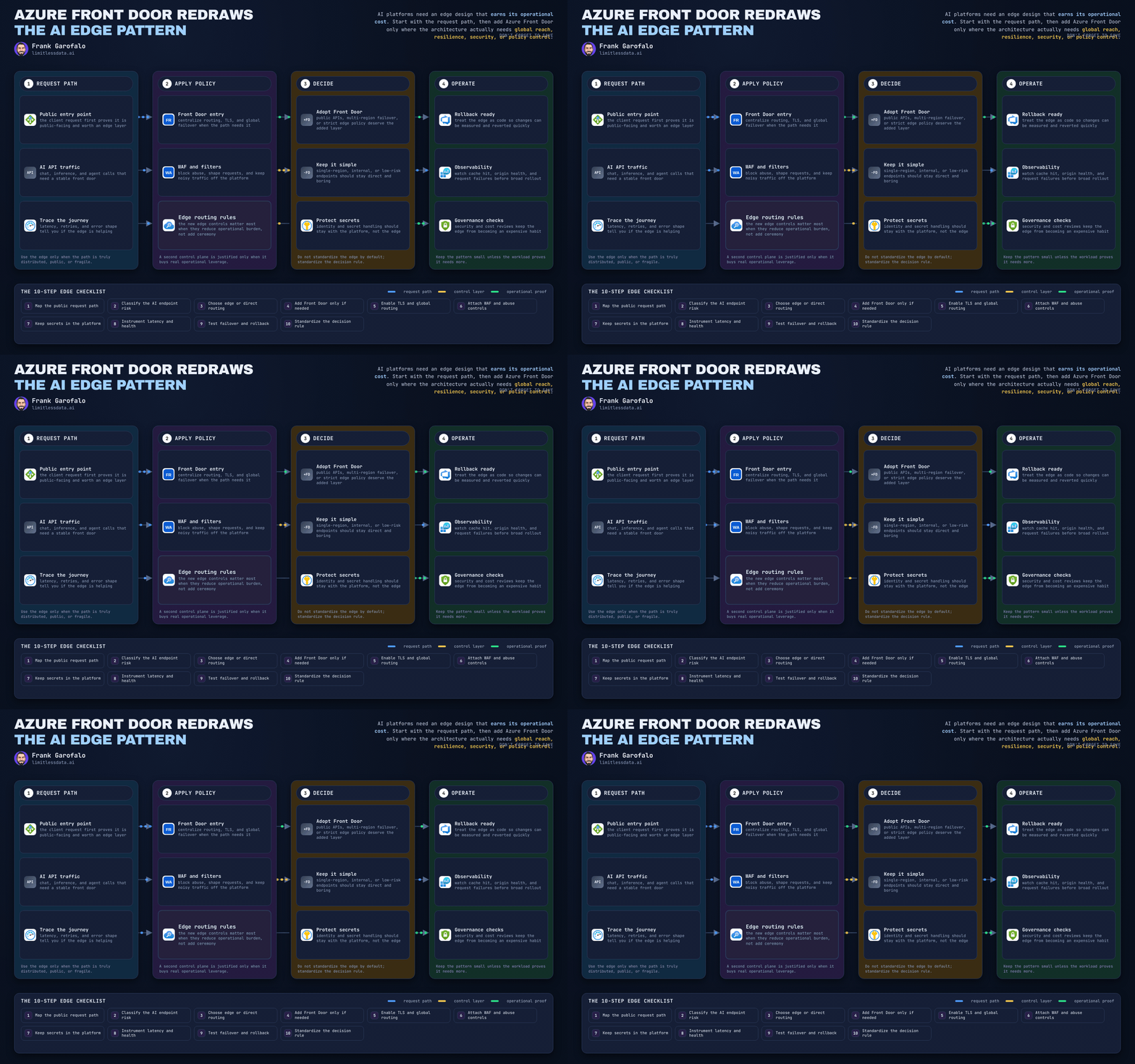
Azure Front Door just became an architecture decision for AI.
If your AI platform has public inference, app APIs, or agent-facing APIs, the edge is no longer a cosmetic networking layer. It is part of the request path, the abuse path, the failover path, and eventually the incident bridge.
On this page
- Step 1: Start with the request path, not the product menu
- Step 2: Separate the global edge from the AI control plane
- Step 3: Build the minimum viable Front Door footprint
- Step 4: Decide what belongs at Front Door versus API Management versus regional ingress
- Step 5: Test the newer Front Door capabilities like architecture decisions
- Step 6: Make abuse protection and resilience testable
- Step 7: Treat gRPC and post-quantum TLS as adoption gates
- Step 8: Automate the minimum, not the fantasy architecture
- Step 9: Know when the simpler pattern wins
- Step 10: Turn the pattern into enterprise governance
- Final take
- Code Reference
- Sources & References
Azure Front Door is explicitly positioned for content, files, global applications, and APIs, with the usual goals: better availability, lower latency, more scale, and stronger security per the Azure Front Door overview. Good. That still does not mean every inference endpoint deserves Front Door.
That’s the whole tutorial.
I’m going to show the edge pattern I’d standardize on for AI platforms, where I’d place Front Door versus API Management versus a regional ingress, and how I’d test whether the newer edge capabilities belong in production instead of in a slide deck.
One blunt rule before we start: add an edge control only when it changes a real requirement around latency, resilience, abuse protection, protocol handling, or governance. If it doesn’t move one of those, it’s just another thing your on-call team gets paged for.
A specific field note so this doesn’t sound theoretical: in Q1, a 40-person platform team I worked with put a single global entry point in front of every AI route, including internal tool APIs, and bought themselves three extra weeks of rollback work when one streaming path behaved differently under load than their synchronous inference path.
Step 1: Start with the request path, not the product menu
The first mistake teams make is evaluating Front Door as a feature bundle. Wrong starting point. Start with the routes.
Classify the AI routes before you deploy anything
For a real AI platform, I want these route classes documented first:
/inference/*for synchronous model calls/stream/*for streaming or protocol-sensitive paths/agents/*for agent-facing APIs that may trigger tools, orchestration, or downstream services
Those three paths look similar on a diagram and behave very differently in production. Inference traffic is usually bursty and latency-sensitive. Streaming paths are more fragile because clients, intermediaries, and timeout behavior all matter. Agent APIs are governance magnets because they often touch secrets, tools, and downstream systems.
Inventory what is actually exposed
Before you standardize an edge, figure out what is public, what is regional, and what should stay private. I use a fast inventory pass like this to list the obvious components in the request path.
# PowerShell: Inventory Azure resources and endpoint metadata in an AI request path
param(
  [string]$SubscriptionId,
  [string]$ResourceGroupName
)

az account set --subscription $SubscriptionId | Out-Null
$resources = az resource list --resource-group $ResourceGroupName | ConvertFrom-Json
$types = @('Microsoft.Cdn/profiles/afdendpoints','Microsoft.ApiManagement/service','Microsoft.App/containerApps','Microsoft.CognitiveServices/accounts')

$resources |
  Where-Object { $types -contains $_.type.ToLower() } |
  Select-Object name, type, location, id |
  Sort-Object type, name |
  Format-Table -AutoSize
What to observe: you’re not trying to build a CMDB here. You want a quick map of Front Door endpoints, API gateways, app runtimes, and AI services so you can stop arguing from memory.
Then I run a second pass to flag what is externally reachable versus regional or private.
# PowerShell: Flag which discovered endpoints are externally reachable versus regional/private
param(
  [string]$ResourceGroupName
)

$items = az resource list --resource-group $ResourceGroupName | ConvertFrom-Json
$report = foreach ($r in $items) {
  $externallyReachable = $false
  if ($r.type -match 'Microsoft.Cdn/profiles/afdEndpoints') { $externallyReachable = $true }
  if ($r.type -match 'Microsoft.ApiManagement/service' -and $r.properties.publicIpAddresses) { $externallyReachable = $true }
  [pscustomobject]@{
    Name = $r.name
    Type = $r.type
    Location = $r.location
    Reachability = if ($externallyReachable) { 'External' } else { 'RegionalOrPrivate' }
  }
}

$report | Sort-Object Reachability, Type, Name | Format-Table -AutoSize
What to observe: if half your “AI edge strategy” is actually private or single-region traffic, that’s your first clue not to force a global edge onto everything.
Use architecture guidance the right way
Microsoft’s Azure Architecture Center is useful because it’s a catalog of architecture styles, patterns, and AI guidance, not because it gives you a magic answer for your exact platform per the Azure Architecture Center. I use it as a review starting point, then I make the placement call based on the request path I actually own.
And I treat landing zones and ops processes as design constraints from day one. The Cloud Adoption Framework is explicit that adoption scenarios plug into landing zones and operational processes, which is exactly how enterprise edge standards either survive or die per the Cloud Adoption Framework.
Step 2: Separate the global edge from the AI control plane
This is the pattern I’d standardize first: one deliberate global edge for the routes that genuinely need it, with route separation early and the AI control plane staying regional.
The reference path
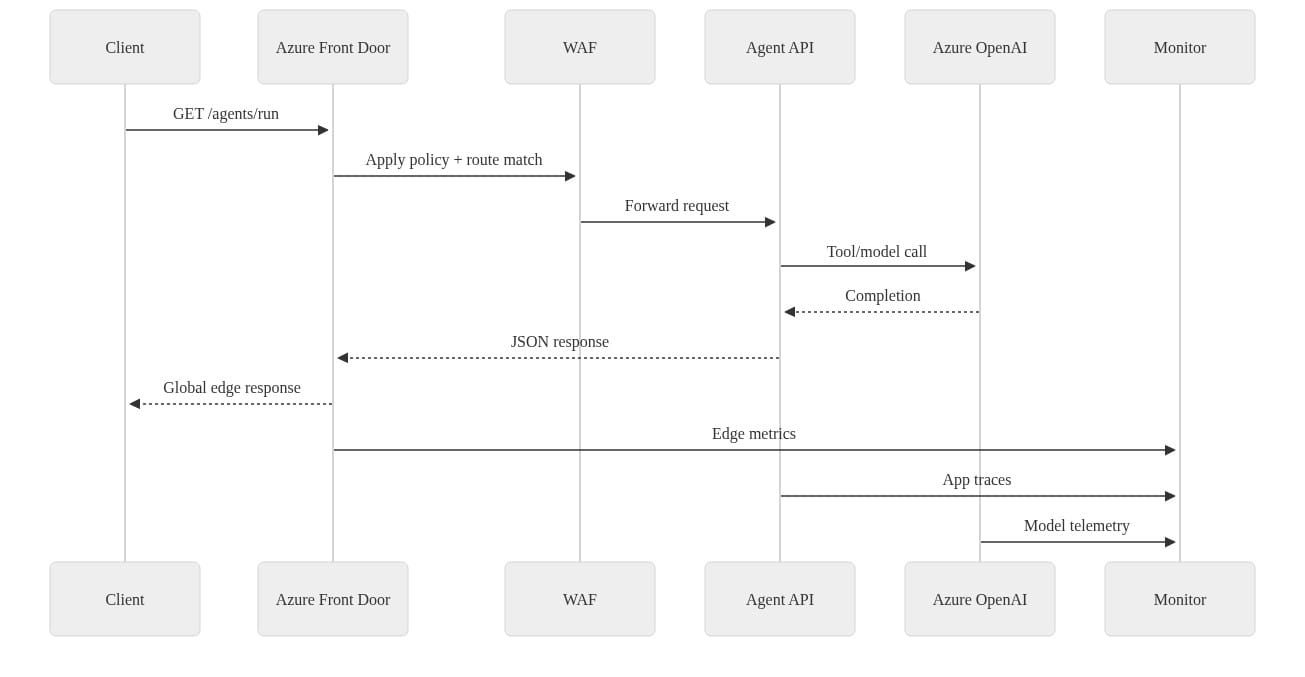
External client → Azure Front Door → WAF / route match → regional API or AI-serving layer → observability everywhere
That sounds simple because it is simple. Keep it that way.
Here’s the basic shape.
flowchart TD
    U[Client / SDK / Browser] --> AFD[Azure Front Door Premium]
    AFD --> WAF[WAF Policy]
    WAF --> R1[/inference/*]
    WAF --> R2[/stream/*]
    WAF --> R3[/agents/*]

    R1 --> AOAI[Azure OpenAI / Model Gateway]
    R2 --> APIM[API Management]
    R3 --> ACA[Agent API on Container Apps]

    APIM --> AOAI
    ACA --> KV[Key Vault]
    ACA --> SB[Service Bus]
    ACA --> AOAI

    AOAI --> MON[Azure Monitor / App Insights]
    ACA --> MON
    APIM --> MON
    AFD --> MON
What to observe: route separation happens at the edge, but policy and service ownership still live where they belong. /inference/, /stream/, and /agents/* do not have to terminate into the same backend pattern.
Why I keep the control plane regional
Your AI control plane has region-specific concerns whether you admit it or not:
- model or service placement
- private connectivity
- secrets and managed identity boundaries
- local app dependencies
- capacity behavior and failover realities
Front Door should help with the global request entry. It should not become the place where your team hides unresolved regional design problems.
If you’re building the broader landing zone around this, I’d line it up with the same principles I laid out in Trusted Launch Azure AI Landing Zone Architecture: ownership, boundaries, and operational assumptions first, templates second.
Step 3: Build the minimum viable Front Door footprint
I’m a big believer in proving the smallest useful pattern before standardizing it. For AI platforms, that means one profile, one endpoint, one origin group, and a small set of route patterns.
Create the Front Door profile and endpoint
This is the bare minimum shape for a standardized AI edge entry point.
// Bicep: Front Door profile and endpoint for a standardized AI edge entry point
param profileName string = 'afd-ai-edge'
param endpointName string = 'ai-global'
param location string = 'global'
param skuName string = 'Premium_AzureFrontDoor'

resource profile 'Microsoft.Cdn/profiles@2024-02-01' = {
  name: profileName
  location: location
  sku: {
    name: skuName
  }
}

resource endpoint 'Microsoft.Cdn/profiles/afdEndpoints@2024-02-01' = {
  name: '${profile.name}/${endpointName}'
  location: location
  properties: {
    enabledState: 'Enabled'
  }
}
What to observe: this is intentionally small. The skeleton is clear: global profile, endpoint, premium SKU, nothing fancy yet.
Define the origin group like an operator
Health probing and load balancing are where teams start pretending defaults are architecture. They’re not. Pick settings that match the behavior of your APIs.
// Bicep: Origin group with health probe settings tuned for AI APIs
param profileName string = 'afd-ai-edge'
param originGroupName string = 'og-ai-platform'

resource originGroup 'Microsoft.Cdn/profiles/originGroups@2024-02-01' = {
  name: '${profileName}/${originGroupName}'
  properties: {
    sessionAffinityState: 'Disabled'
    healthProbeSettings: {
      probePath: '/health'
      probeProtocol: 'Https'
      probeRequestType: 'GET'
      probeIntervalInSeconds: 30
    }
    loadBalancingSettings: {
      sampleSize: 4
      successfulSamplesRequired: 3
      additionalLatencyInMilliseconds: 0
    }
  }
}
What to observe: the /health probe, 30-second interval, and sample settings are there to force a conversation about what “healthy” means for your AI-serving path. If your health endpoint lies, your failover story lies too.
Separate routes at the edge
Don’t dump all AI traffic into one catch-all route and call it a platform. Route classes should exist before policy complexity shows up.
// Bicep: Route patterns that separate inference, streaming, and agent APIs at the edge
param profileName string = 'afd-ai-edge'
param endpointName string = 'ai-global'
param originGroupName string = 'og-ai-platform'
param customDomainId string = '/subscriptions/00000000-0000-0000-0000-000000000000/resourceGroups/rg/providers/Microsoft.Cdn/profiles/afd-ai-edge/customDomains/api-contoso-com'

resource inferenceRoute 'Microsoft.Cdn/profiles/afdEndpoints/routes@2024-02-01' = {
  name: '${profileName}/${endpointName}/rt-inference'
  properties: {
    originGroup: { id: '/subscriptions/00000000-0000-0000-0000-000000000000/resourceGroups/rg/providers/Microsoft.Cdn/profiles/${profileName}/originGroups/${originGroupName}' }
    customDomains: [{ id: customDomainId }]
    supportedProtocols: ['Https']
    patternsToMatch: ['/inference/*']
    forwardingProtocol: 'HttpsOnly'
    httpsRedirect: 'Enabled'
    linkToDefaultDomain: 'Disabled'
  }
}
What to observe: route-level separation is the whole point. It gives you room to test and evolve inference, streaming, and agent APIs independently instead of turning every change into a shared blast radius event.
Step 4: Decide what belongs at Front Door versus API Management versus regional ingress
This is where teams get sloppy. These products are adjacent. They are not interchangeable.
My placement rule of thumb
Use Front Door when the problem is global internet-facing entry for apps or APIs.
Use API Management when the problem is API mediation, policy ownership, productization, consumer governance, or API lifecycle controls.
Use a regional ingress pattern when the problem is nearest-to-workload application delivery inside a region.
Use direct regional exposure only when the workload is internal-only, low-scale, or the extra edge layer does not earn its keep.
A practical decision table
| Decision factor | Front Door | API Management | Regional ingress | Direct regional |
|---|---|---|---|---|
| Public internet entry | Strong fit | Sometimes behind/alongside | Usually no | Limited |
| Global distribution | Strong fit | Not the primary reason | No | No |
| API policy mediation | Basic at edge | Strong fit | Limited | None |
| Protocol sensitivity | Validate carefully | Validate carefully | Often better for local control | Depends |
| Regional affinity | Indirect | Indirect | Strong fit | Strong fit |
| Operational burden | Moderate | Moderate to high | Moderate | Lowest |
That’s why I don’t tell teams “put Front Door in front of everything.” I tell them to prove it belongs on the routes that are public and distributed.
If your platform team is also wrestling with who owns agent access and API governance, this pairs directly with Azure Copilot Agent Access Architecture and Governance. Edge placement and agent governance collide faster than people think.
Step 5: Test the newer Front Door capabilities like architecture decisions
Feature announcements are not platform patterns. A capability becomes a standard only after it survives threat modeling, load testing, rollback planning, and observability review.
The capability review matrix I use
For each candidate capability, I want five answers:
- Is it currently available for the service path we run?
- What protocol or client constraints matter?
- Which route classes benefit?
- Who owns rollout and rollback?
- How do we observe success and failure?
The four buckets I’d review right now are:
- native gRPC support
- edge actions
- rate-limit grouping
- post-quantum TLS
I’m not telling you to turn all four on. I’m telling you to force each one through the same decision gate.
Evaluate by route class, not by marketing label
For /inference/*:
- focus on latency, fairness, and failover behavior
For /stream/*:
- focus on protocol behavior, first-byte time, timeout handling, intermediaries, and diagnostics
For /agents/*:
- focus on abuse patterns, downstream dependency protection, and ownership boundaries
Agent APIs can look low-volume in a dashboard and still trigger ugly downstream fan-out. One request becomes ten tool calls, two model calls, and a queue write. Your edge policy has to reflect that reality.
Step 6: Make abuse protection and resilience testable
Abuse protection is where people love slogans and hate measurements. I want measurements.
Define abuse scenarios first
Before you configure anything, write down what you’re defending against:
- one tenant consuming disproportionate capacity
- repeated agent tool calls from a bad loop
- malformed requests
- concentrated bursts from a single client population
- retries amplifying a partial outage
Rate-limit grouping only makes sense after you define what “fair consumer boundary” means. Is it API key, tenant ID, token claim, client IP, route, or something else? If you can’t answer that, you’re not ready to standardize the control.
Run a repeatable route test matrix
I like a tiny route probe first. Nothing glamorous. Just enough to compare behavior across route classes.
# Python: Generate a repeatable request-test matrix for inference, streaming, and agent-facing routes
import time, json, urllib.request, urllib.error

tests = [
    {"name": "inference", "url": "https://api.contoso.com/inference/ping"},
    {"name": "stream", "url": "https://api.contoso.com/stream/ping"},
    {"name": "agents", "url": "https://api.contoso.com/agents/ping"},
]

results = []
for test in tests:
    started = time.perf_counter()
    try:
        with urllib.request.urlopen(test["url"], timeout=15) as resp:
            body = resp.read(256).decode("utf-8", errors="ignore")
            status = resp.status
    except urllib.error.HTTPError as e:
        status, body = e.code, str(e)
    except Exception as e:
        status, body = 0, str(e)
    latency_ms = round((time.perf_counter() - started) * 1000, 1)
    results.append({"route": test["name"], "status": status, "latency_ms": latency_ms, "sample": body[:80]})

print(json.dumps(results, indent=2))
What to observe: compare status and latency across /inference, /stream, and /agents. If one route class is materially different, stop pretending a single edge policy is automatically correct for all three.
Measure streaming separately
Streaming paths deserve their own test because total duration and first-byte behavior matter.
# Python: Minimal SSE-style streaming probe that measures first-byte and total completion time
import time, urllib.request

url = "https://api.contoso.com/stream/events"
req = urllib.request.Request(url, headers={"Accept": "text/event-stream"})

start = time.perf_counter()
with urllib.request.urlopen(req, timeout=30) as resp:
    first_line = resp.readline().decode("utf-8", errors="ignore").strip()
    first_byte_ms = round((time.perf_counter() - start) * 1000, 1)
    lines = [first_line]
    for _ in range(2):
        lines.append(resp.readline().decode("utf-8", errors="ignore").strip())

total_ms = round((time.perf_counter() - start) * 1000, 1)
print({"status": resp.status, "first_byte_ms": first_byte_ms, "total_ms": total_ms, "preview": lines})
What to observe: first-byte time is often the signal that tells you whether the edge and intermediaries are helping or hurting. Don’t bury streaming inside an ordinary HTTP success metric.
What I want to see in the results
For each route class, capture:
- p50, p95, and p99 latency
- error rate by status family
- first-byte latency for streaming
- failover behavior during origin impairment
- operator response effort during the test
That last one is not fluff. If the new edge pattern cuts 20 milliseconds and adds 40 minutes of incident confusion, you did not improve the platform.
Step 7: Treat gRPC and post-quantum TLS as adoption gates
This is where platform teams get seduced by “new capability” energy. Slow down.
For gRPC
Native gRPC support is interesting only if your actual AI clients, intermediaries, observability stack, and failure handling all behave correctly. I would test it on a limited route class before I let it anywhere near a shared enterprise standard.
That means validating:
- client SDK behavior
- streaming semantics
- timeout and retry behavior
- header propagation
- error mapping
- trace visibility
If one of those breaks, the capability is not ready for your platform standard even if the checkbox exists.
For post-quantum TLS
Same discipline. Review:
- client support
- partner support
- security policy alignment
- handshake implications
- rollback mechanics
- certificate and operational handling
I’d absolutely evaluate it. I would not broad-roll it on a shared edge without explicit acceptance criteria signed off by security, network, application, and platform owners.
This is the same pattern I use in cost and platform standardization work: constrain the blast radius, prove the behavior, then scale. I wrote about the same operating style in AI agent cost optimization for Azure platform teams guide because edge sprawl and agent sprawl usually show up together.
Step 8: Automate the minimum, not the fantasy architecture
Once the pattern is small and proven, automate it.
Put deployment behind a simple pipeline
You do not need a giant platform engineering opera to get started. A basic validation-and-deploy workflow is enough for the first version.
# YAML: GitHub Actions workflow to validate and deploy Bicep for the AI edge pattern
name: deploy-ai-edge
on:
  workflow_dispatch:
jobs:
  deploy:
    runs-on: ubuntu-latest
    steps:
      - uses: actions/checkout@v4
      - uses: azure/login@v2
        with:
          creds: ${{ secrets.AZURE_CREDENTIALS }}
      - run: az bicep build --file infra/main.bicep
      - run: >
          az deployment group create
          --resource-group rg-ai-edge
          --template-file infra/main.bicep
          --parameters profileName=afd-ai-edge endpointName=ai-global
What to observe: the point is repeatability, not ceremony. Build, validate, deploy the minimum edge resources the same way every time.
Publish the operating contract
For the standard pattern, document:
- which route classes must use Front Door
- which route classes may bypass it
- who owns WAF and route policy
- what health endpoint contract origins must expose
- what telemetry is mandatory
- what rollback path exists
That document matters more than your diagram. If ownership is fuzzy, the platform standard will drift in a quarter.
Step 9: Know when the simpler pattern wins
This is the part too many architecture posts skip because it doesn’t sound exciting.
Do not put Front Door in front of:
- internal-only AI services with no public entry point
- single-region low-scale workloads with stable demand
- prototypes that are still changing route shape weekly
- private service-to-service paths that gain nothing from a global edge
Azure Front Door has a clear place for global applications and APIs per the service overview. That’s exactly why I like it. Clear fit. Clear scope. Clear value when the request path justifies it.
The wrong move is turning that into “therefore every inference endpoint gets Front Door.” No. Standardize it where the architecture needs an explicit edge layer.
Step 10: Turn the pattern into enterprise governance
The last step is where architecture becomes durable.
Tie the edge decision into:
- landing zone standards
- architecture review checklists
- operational readiness reviews
- exception handling for simpler regional patterns
- security and abuse testing evidence
The rubric I’d use to approve Front Door for an AI route
A route gets Front Door when most of these are true:
- public exposure
- distributed users or clients
- resilience requirement across regions or origins
- meaningful abuse risk
- edge-level routing or security value
- operational team ready to own it
A route stays simpler when most of these are true:
- internal-only
- single region
- low traffic
- low abuse risk
- protocol behavior is sensitive and unproven at the edge
- no measurable benefit from another layer
That’s the standard I’d put in front of an architecture review board and defend.
Final take
My default AI edge pattern is narrow on purpose:
- classify routes first
- put Front Door only on the public or distributed paths that earn it
- separate inference, streaming, and agent APIs early
- keep the AI control plane regional
- test resilience and abuse behavior before standardizing new edge capabilities
- preserve a simpler path for internal and low-scale workloads
That’s how you keep the edge from becoming expensive theater.
Which part of this would you reverse in your environment: putting Front Door only on selected public routes, or keeping streaming and agent APIs out of the same default edge policy?
#AzureFrontDoor #EnterpriseAI #DataArchitecture
Code Reference
Additional code samples that complement the tutorial above.
Sample 1 (mermaid)
Sources & References
- Azure Front Door overview
- Azure Front Door WAF
- Azure Front Door rate limiting
- Azure Front Door origin groups and health probes
- Azure Front Door gRPC support
- Azure Front Door rule sets
- Azure API Management gateway and policy overview
- Azure Architecture Center
- Cloud Adoption Framework
- Trusted Launch Azure AI Landing Zone Architecture
- Azure Copilot Agent Access Architecture and Governance
- AI agent cost optimization for Azure platform teams guide
Try it yourself
Run this tutorial as a Jupyter notebook: Download runbook.ipynb (45 cells, 37 KB).