Azure SQL for Enterprise Coding Agents
Why Azure SQL Is Becoming the Default Database for Coding Agents

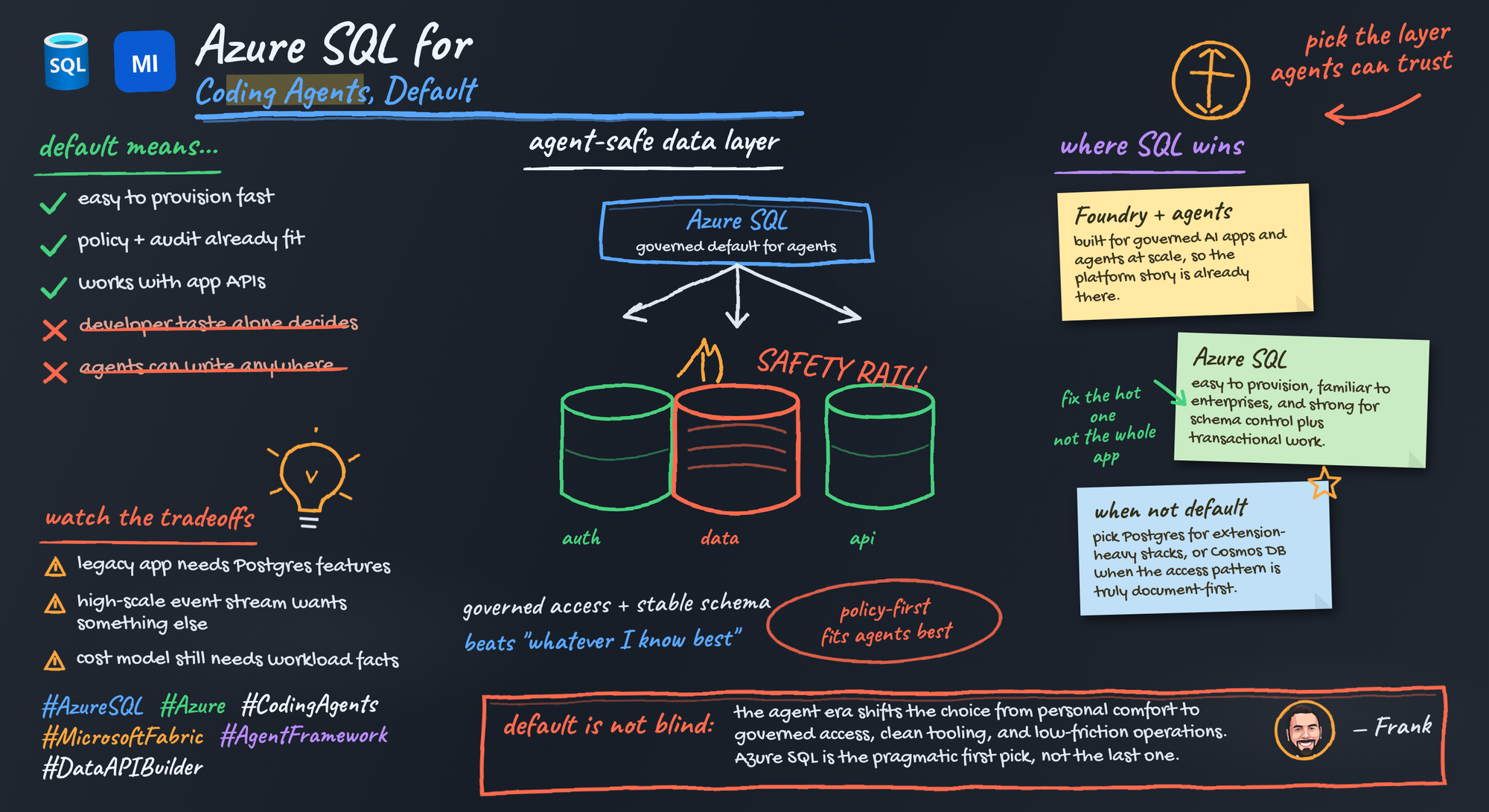
Your favorite developer database may be the wrong default for coding agents.
On this page
- The database decision changed when agents entered production
- Why now: agent tooling is becoming a platform surface
- The Azure SQL advantage is the controlled access path
- Governance beats developer preference
- Schema discipline is an agent multiplier
- Choose the service shape, not a fake binary
- The honest trade-offs and when not to default to Azure SQL
- A practical checklist for the next agent project
- Sources & References
Once agents touch production workflows, the database stops being a personal preference and becomes a platform control point.
My view: Azure SQL is a strong default candidate for coding agents in Microsoft-centric enterprises. Not because every workload wants relational storage, but because the winning database for agents is often the one you can provision through approved workflows, secure with existing identity controls, govern clearly, and expose through narrow interfaces instead of broad credentials.
That’s the shift people are still underestimating.
A coding agent does more than autocomplete code. It can call tools, read operational data, participate in CI/CD decisions, and trigger downstream actions. The second that happens, your database choice gets pulled into identity, policy, audit, networking, and blast-radius conversations.
The database decision changed when agents entered production
For years, the usual database selection process was simple: pick what the team knows, what the ORM likes, and what can be deployed without drama.
That logic weakens the minute an automated actor starts interacting with production data paths.
Agents need repeatable access patterns. Reviewable permissions. Clear boundaries between “can answer a question” and “can update a record.” They need tool contracts, not mystery privileges. They need observability when something goes sideways at 2:13 AM and the on-call engineer is staring at logs trying to understand why an agent fanned out hundreds of calls against the wrong table.
So the default criteria change:
- Can platform engineering provision it through an approved workflow?
- Can identity be handled cleanly without embedding secrets in app code?
- Can I put a narrow API or tool contract in front of the data?
- Can security and governance teams understand the access model?
- Can application teams use it without creating a one-off operating model?
If your organization is already standardizing on Microsoft’s data and agent stack, Azure SQL often checks those boxes well.
Why now: agent tooling is becoming a platform surface
The reason this matters now is straightforward: agent development is moving out of skunkworks mode.
Microsoft’s Azure AI Foundry documentation describes a platform for building AI applications and agents, which is a strong signal that this work is moving into formal platform engineering and operating models, not staying as laptop-only experimentation. The Microsoft Agent Framework documentation similarly supports agent-building concepts such as tools and workflows.
That combination matters.
Once you have tools, workflow orchestration, and longer-running agent behavior, you also have more machine-initiated paths into data. More paths means more governance pressure. More governance pressure means the database has to fit the platform, not just the developer.
This is also why I keep telling teams to separate agent harness decisions from data access decisions. I wrote about that in The Three Layers of Agentic Coding: the workflow layer and the data layer are where production risk shows up first.
The Azure SQL advantage is the controlled access path
Here’s the real reason Azure SQL keeps coming up in these conversations: it gives you a clean path to controlled access.
I do not want agents talking to operational databases with broad raw SQL privileges. I want them calling approved tools that map to approved operations. That means views, stored procedures, API layers, managed identity, and explicit contracts.
The architecture is simple and boring, which is exactly why it works.
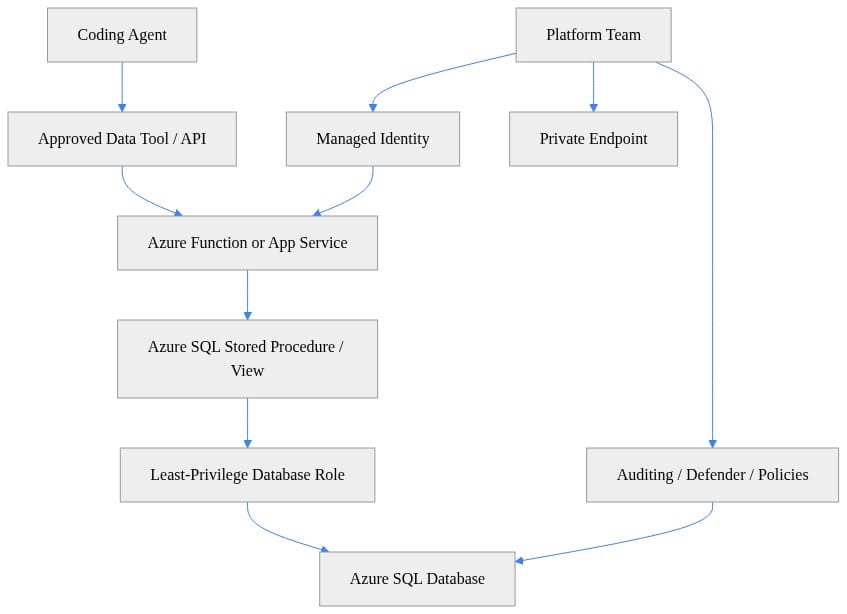
Look at the shape of that flow. The agent never gets to freeload as a database admin. The platform team owns identity, private access, and guardrails. The application exposes a bounded interface. The database role is least privilege.
That’s how you keep an agent useful without making it dangerous.
Microsoft’s Data API builder is part of why this is getting easier. It can generate REST and GraphQL endpoints for supported databases, including Azure SQL. Separately, the SQL MCP Server documentation covers an MCP-based path for SQL access, including authentication, semantic descriptions, data tools, deployment targets, and local development options. Taken together, those docs point to a practical pattern for agent-facing data access.
That’s the pattern I want teams adopting:
- stable APIs
- explicit tool names
- validated arguments
- least-privilege execution
- no direct free-form database reach for agents
Here’s a tiny example of the tool pattern. The point is not the Python. The point is the contract.
# Agent calls a narrowly scoped tool instead of issuing raw SQL.
from typing import Any, Dict, List

def get_recent_customer_orders(customer_id: int, limit: int = 5) -> List[Dict[str, Any]]:
    approved_tool_payload = {
        "tool": "orders.get_recent_by_customer",
        "arguments": {"customer_id": customer_id, "limit": min(limit, 20)},
    }
    print("Calling approved tool:", approved_tool_payload)
    return [{"order_id": 101, "status": "Shipped"}, {"order_id": 102, "status": "Processing"}]

if __name__ == "__main__":
    orders = get_recent_customer_orders(customer_id=42, limit=5)
    for order in orders:
        print(order)
An agent should ask for orders.get_recent_by_customer, not improvise a SELECT * against whatever table name it guessed from context.
Then the API layer validates the request and maps it to an approved stored procedure.
# Minimal API layer validates intent and maps requests to a safe stored procedure contract.
from typing import Dict, Any

ALLOWED_TOOLS = {
    "orders.get_recent_by_customer": {"required": {"customer_id", "limit"}}
}

def handle_tool_call(request: Dict[str, Any]) -> Dict[str, Any]:
    tool = request["tool"]
    args = request["arguments"]
    if tool not in ALLOWED_TOOLS or set(args) != ALLOWED_TOOLS[tool]["required"]:
        raise ValueError("Tool or arguments not approved")
    sql_command = "EXEC api.GetRecentOrdersByCustomer @CustomerId=?, @Limit=?"
    sql_params = (int(args["customer_id"]), min(int(args["limit"]), 20))
    return {"sql_command": sql_command, "sql_params": sql_params}

if __name__ == "__main__":
    result = handle_tool_call({"tool": "orders.get_recent_by_customer", "arguments": {"customer_id": 42, "limit": 5}})
    print(result)
Validate intent before you ever touch the database. Narrow the operation. Cap the arguments. Return a business response, not the entire relational universe.
Governance beats developer preference
Senior leaders do not care which database your team finds aesthetically pleasing. They care whether organizational data is protected while agents connect to multiple systems and services.
Copilot Studio’s admin guidance says the quiet part out loud: organizational data is the most important asset administrators are responsible for safeguarding, and agents can connect to many data sources and services.
That is the actual decision frame.
The operating model I want looks like this:
- approved provisioning pattern
- approved identity pattern
- approved network pattern
- approved audit pattern
- approved tool exposure pattern
- approved exception process when a team needs something else
Azure SQL fits that model well in Microsoft-heavy environments because it aligns with familiar identity, policy, and operational controls. That does not make governance automatic. Teams still have to design roles carefully, manage migrations, and avoid turning service principals into confetti.
If you’re doing this well, you’re also aligning it with your broader landing zone and API governance patterns. I’ve written about both in Azure AI Landing Zones for Enterprise AI Governance and Azure API Management AI Gateway for Enterprise Governance. Same principle: standardize the control plane before the use cases multiply.
Schema discipline is an agent multiplier
This is where I get a little opinionated.
Relational structure is a feature for coding agents.
Agents do better when business entities are explicit, constraints are visible, naming is consistent, and transactional boundaries are real. Reviewers do better too. A schema with actual discipline gives architects, DBAs, and security reviewers something concrete to validate before an agent-generated change lands in production.
Weak schema habits get amplified by agents. Fast.
So treat the following as part of the agent contract:
- migrations under source control
- semantic descriptions for exposed data operations
- approved stored procedures and views
- explicit data classifications
- role-based permissions tied to tool scopes
Here’s the database-side shape I like for agent access.
# Database-side contract uses a view and stored procedure to constrain what agents can access.
schema_sql = """
CREATE VIEW api.vRecentOrders AS
SELECT TOP (1000) OrderId, CustomerId, Status, OrderDate
FROM dbo.Orders
WHERE IsDeleted = 0;

CREATE OR ALTER PROCEDURE api.GetRecentOrdersByCustomer
    @CustomerId INT,
    @Limit INT = 5
AS
BEGIN
    SET NOCOUNT ON;
    SELECT TOP (@Limit) OrderId, Status, OrderDate
    FROM api.vRecentOrders
    WHERE CustomerId = @CustomerId
    ORDER BY OrderDate DESC;
END;
"""
print(schema_sql)
Notice what’s happening there: the exposed surface is smaller than the underlying schema. That’s intentional. Views and procedures are not old-school baggage in this model. They are the safety rail.
And when the app connects, use Microsoft Entra token auth so the agent path is not carrying SQL usernames and passwords around in environment variables like it’s 2014.
# Azure SQL connection with Microsoft Entra token auth keeps secrets out of agent code.
import struct
import pyodbc
from azure.identity import DefaultAzureCredential

server = "myserver.database.windows.net"
database = "appdb"
scope = "https://database.windows.net/.default"

token = DefaultAzureCredential().get_token(scope).token.encode("utf-16-le")
token_struct = struct.pack(f"<I{len(token)}s", len(token), token)

conn_str = (
    "Driver={ODBC Driver 18 for SQL Server};"
    f"Server=tcp:{server},1433;Database={database};"
    "Encrypt=yes;TrustServerCertificate=no;"
)

with pyodbc.connect(conn_str, attrs_before={1256: token_struct}) as conn:
    rows = conn.cursor().execute("EXEC api.GetRecentOrdersByCustomer ?, ?", 42, 5).fetchall()
    print([tuple(r) for r in rows])
Again, illustrative, not production-complete. What matters is the pattern: token-based auth, approved procedure call, no broad credential leakage.
Choose the service shape, not a fake binary
One mistake I see all the time is teams treating this as a false binary: either “Azure SQL” or “not Azure SQL.”
That’s not how you should think about it.
Start with the least operationally burdensome option that satisfies compatibility, scale, residency, and governance requirements. For many greenfield agent-backed applications, that’s Azure SQL Database. If you need a different compatibility or deployment shape, evaluate the broader SQL options available in Microsoft’s documentation without throwing away the surrounding operating model.
The standard should be:
- start managed
- keep identity and policy consistent
- expose controlled interfaces
- force exception cases to justify themselves
Provisioning should also be boring and repeatable. Here’s a simple example of creating an Azure SQL-backed environment with Entra-only authentication turned on from day one.
# Repeatable Azure SQL-backed agent environment provisioning with org-approved placeholders.
param(
  [string]$ResourceGroup = "rg-agent-data-dev",
  [string]$Location = "eastus",
  [string]$SqlServer = "sql-agent-demo-001",
  [string]$Database = "appdb"
)

az group create --name $ResourceGroup --location $Location
az sql server create --resource-group $ResourceGroup --name $SqlServer `
  --location $Location --enable-ad-only-auth true `
  --external-admin-principal-type User `
  --external-admin-name "<ORG_APPROVED_ENTRA_ADMIN_NAME>" `
  --external-admin-sid "<ORG_APPROVED_ENTRA_OBJECT_ID>"

az sql db create --resource-group $ResourceGroup --server $SqlServer `
  --name $Database --service-objective S0
After that, layer in the guardrails.
# Add platform guardrails: firewall lockdown, auditing, Defender, and placeholder policy hooks.
param(
  [string]$ResourceGroup = "rg-agent-data-dev",
  [string]$SqlServer = "sql-agent-demo-001",
  [string]$Database = "appdb",
  [string]$LogAnalyticsWorkspaceId = "<ORG_APPROVED_WORKSPACE_RESOURCE_ID>"
)

az sql server firewall-rule create --resource-group $ResourceGroup --server $SqlServer `
  --name "AllowAzureServicesTemporarily" --start-ip-address 0.0.0.0 --end-ip-address 0.0.0.0

az sql db audit-policy update --resource-group $ResourceGroup --server $SqlServer `
  --name $Database --state Enabled --log-analytics-target-state Enabled `
  --workspace-resource-id $LogAnalyticsWorkspaceId

az security atp sql update --resource-group $ResourceGroup --server $SqlServer --state Enabled
Write-Host "Apply org policy assignments for private endpoints, CMK, and tagging."
Then assign the application identity and grant only what the tool contract requires.
# Provision an agent app identity and grant least-privilege database access through Entra.
param(
  [string]$ResourceGroup = "rg-agent-data-dev",
  [string]$AppName = "app-agent-api-demo",
  [string]$SqlServer = "sql-agent-demo-001",
  [string]$Database = "appdb"
)

az webapp identity assign --resource-group $ResourceGroup --name $AppName | Out-Null
$principalId = az webapp identity show --resource-group $ResourceGroup --name $AppName --query principalId -o tsv

Write-Host "Run the following T-SQL through your approved deployment pipeline or query tool:"
$query = @"
CREATE ROLE agent_executor;
GRANT EXECUTE ON OBJECT::api.GetRecentOrdersByCustomer TO agent_executor;

/*
Use an org-approved Entra display name for the application identity.
Exact CREATE USER syntax depends on how the external principal is represented in your tenant.
Example:
CREATE USER [app-agent-api-demo] FROM EXTERNAL PROVIDER;
ALTER ROLE agent_executor ADD MEMBER [app-agent-api-demo];
*/
"@

Write-Output $query
What I want you to notice is the sequence: provision, lock down, assign identity, grant execute on specific operations, then observe.
Not “spin up a database and let the agent figure it out.”
The honest trade-offs and when not to default to Azure SQL
Azure SQL is a default candidate. It is not the universal answer.
Cost is real. Managed convenience is worth money, and if you spray environments everywhere with no lifecycle discipline, your bill will remind you. Relational discipline is real too. Azure SQL won’t rescue a team that refuses to model data properly, maintain indexes, or manage migrations well.
There are also clear scenarios where another database class is the better fit:
- document-heavy workloads where the primary access pattern is nonrelational by design
- ultra-low-latency or locality-sensitive architectures where the existing data platform is already optimized for that path
- specialized engines chosen for workload-specific capabilities that are central, not incidental
- hard compatibility constraints where another platform is materially cleaner
That’s why I prefer a decision framework over a slogan.
The question is not which database wins a synthetic benchmark war on the internet. The question is which choice gives your specific agent workload the safest, lowest-friction production path.
For many Microsoft-centered enterprises, Azure SQL deserves to be the first option considered.
A practical checklist for the next agent project
If you’re evaluating the database for a coding agent, run this checklist before the team bikesheds syntax preferences.
- Can the database and access path be provisioned through an approved workflow?
- Can the agent use narrow tools or APIs instead of unrestricted credentials?
- Are schemas, migrations, permissions, and classifications reviewable?
- Can platform engineering support it without creating a custom snowflake?
- Can security explain the blast radius of a compromised agent identity in one whiteboard diagram?
- Can you rotate, audit, and observe the whole path without heroics?
For future versions of this framework, I’d visualize three things:
- an architecture diagram for the controlled-access path
- a comparison table for “default candidate vs exception case”
- a checklist graphic for production readiness
If the answer to those questions points cleanly toward Azure SQL, stop overcomplicating it and make it the default candidate.
My view is simple: as coding agents move into production, database selection belongs to platform architecture, not individual taste. Azure SQL keeps showing up because it aligns well with governed access, operational simplicity, policy expectations, and the surrounding Microsoft platform surface.
Use it as the default candidate. Make teams earn the exception.
Which factor most often breaks the Azure SQL default in your environment: governance, cost, latency, or data model?
#Azuresql #AIAgents #DataArchitecture
Sources & References
- Azure AI Foundry documentation
- Microsoft Agent Framework documentation
- Data API builder documentation
- SQL MCP Server overview
- Configure data policies for agents - Microsoft Copilot Studio
- Microsoft SQL documentation
Try it yourself
Run this tutorial as a Jupyter notebook: Download runbook.ipynb (29 cells, 23 KB).



